ESP32-C6AliExpress price boards are the best-value ESP32AliExpress price choice when you need 2.4 GHz Wi-Fi 6, Bluetooth LE and an IEEE 802.15.4 radio for Thread or Zigbee. For most people, the official ESP32-C6-DevKitC-1AliExpress price is the safest first board. Choose the smaller DevKitM-1 or Seeed Studio XIAO ESP32C6 when space matters.
The confusing part is that ESP32-C6 can describe the chip, a WROOM or MINI module, or a complete development board. This guide separates those layers, compares the popular boards and explains ESP32-C6 versus C61, C3 and S3. It was checked against current manufacturer documentation in September 2026.
Quick answer: which ESP32-C6 board should you buy?
| Use case | Best starting point | Why |
|---|---|---|
| General prototyping | ESP32-C6-DevKitC-1 | Official board, 8 MB flash, broad pin access and two USB-C ports |
| Smaller breadboard projects | ESP32-C6-DevKitM-1 | Compact MINI module with an official reference design |
| Battery or space-limited build | Seeed Studio XIAO ESP32C6 | 21 × 17.8 mm board with battery charging and an external-antenna option |
| Built-in display | LILYGO T-QT C6 | Useful for compact status screens and portable controls |
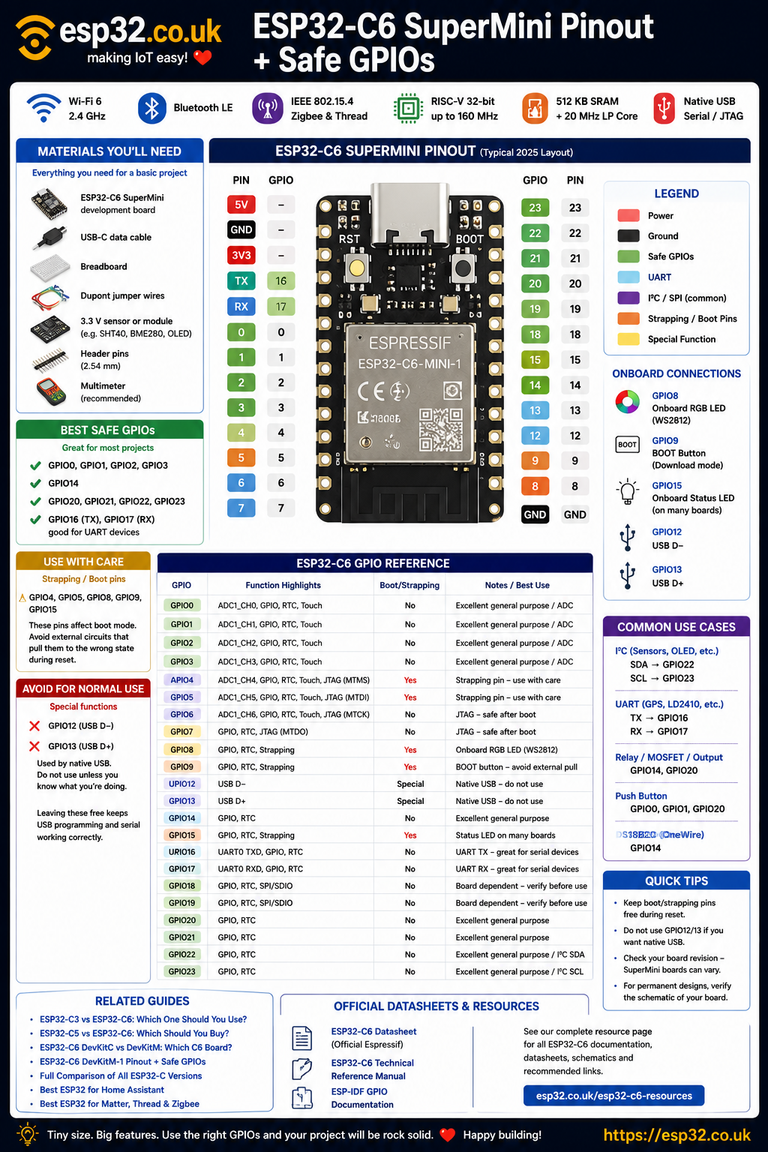
| Lowest-cost experiment | ESP32-C6 SuperMini | Very small and inexpensive, but seller designs and pin labels vary |
Our default recommendation: buy a DevKitC-1 unless you already know why you need a smaller board. Its size is less convenient in a finished product, but its accessible pins, reliable documentation and separate native USB and USB-to-UART connections make development easier.
What the ESP32-C6 gives you
- A 32-bit RISC-V application processor running at up to 160 MHz
- A low-power RISC-V core for power-management tasks
- 512 KB high-performance SRAM plus 16 KB low-power SRAM
- 2.4 GHz Wi-Fi 6 with backwards compatibility for 802.11b/g/n networks
- Bluetooth 5.3 Low Energy
- IEEE 802.15.4 for Thread 1.3 and Zigbee 3.0
- USB Serial/JTAG, SPI, I2C, UART, I2S, PWM, ADC and other common peripherals
Wi-Fi 6 here still means the 2.4 GHz band. ESP32-C6 does not add 5 GHz or 6 GHz Wi-Fi. The practical benefits are IoT-focused features such as target wake time, OFDMA and better operation in busy wireless environments, not a faster desktop-style Wi-Fi connection.
ESP32-C6 chip, module and board names explained
The chip
ESP32-C6 is the bare system-on-chip. You will normally encounter it inside a shielded module rather than solder the chip directly. A chip suffix can describe its package and built-in flash, but it does not turn it into a different wireless family.
The module
ESP32-C6-WROOM-1, WROOM-1U, MINI-1 and MINI-1U are modules containing the C6, flash, crystal and RF components. WROOM modules are larger and expose more GPIO. MINI modules save PCB space. The U suffix indicates an external-antenna connector instead of the standard on-module antenna.
The development board
A development board adds USB, power regulation, buttons, headers and sometimes a display or battery circuit around a C6 module. DevKitC-1, DevKitM-1, XIAO ESP32C6 and SuperMini are board designs, not separate ESP32-C6 processors.
What N4, N8 and N16 mean
On module names such as ESP32-C6-WROOM-1-N4, the number normally identifies flash capacity: N4 is 4 MB, N8 is 8 MB and N16 is 16 MB. Check the exact part marking and seller specification before buying because board names are often reused across memory variants. More flash helps with larger firmware, web assets and over-the-air update partitions, but it does not make the processor faster.
ESP32-C6 WROOM vs MINI modules
| Feature | WROOM-1 / 1U | MINI-1 / 1U |
|---|---|---|
| Module size | Larger | Smaller |
| GPIO at module | Up to 23 | Fewer pins exposed by the module |
| Flash variants | Commonly 4 MB, 8 MB or 16 MB | 4 MB or 8 MB variants |
| Standard antenna | WROOM-1 has PCB antenna | MINI-1 has PCB antenna |
| External antenna | WROOM-1U | MINI-1U |
| Best fit | Prototypes and designs needing more I/O | Smaller finished hardware |
For a first prototype, module size matters less than the board built around it. The DevKitC-1 is easier to probe and wire; the DevKitM-1 is easier to fit on a crowded bench. For a custom PCB, use the exact Espressif land pattern and antenna keep-out guidance for the module you choose.
ESP32-C6 board comparison
| Board | Module / flash | Main advantage | Watch for |
|---|---|---|---|
| Espressif DevKitC-1 v1.2 | WROOM-1(U), 8 MB | Maximum convenience and official documentation | Full-size board occupies more breadboard space |
| Espressif DevKitM-1 | MINI-1(U), commonly 4 MB | Compact official board | Fewer convenient header pins than DevKitC |
| Seeed XIAO ESP32C6 | ESP32-C6, 4 MB | Tiny board, battery charging, external antenna interface | Only 11 main castellated GPIO positions |
| LILYGO T-QT C6 | ESP32-C6 board | Integrated display | Display consumes pins and increases software complexity |
| Generic SuperMini | Varies | Low price and small size | Regulator, antenna layout, pinout and documentation vary by seller |
ESP32-C6-DevKitC-1: best all-round choice
The current official DevKitC-1 v1.2 uses an ESP32-C6-WROOM-1 or WROOM-1U module and 8 MB SPI flash. Most module pins are available on the headers. It also has two USB-C connections: one for the C6 native USB interface and another through a USB-to-UART bridge. That is useful when debugging USB firmware or when a project needs a dependable serial recovery path.
The standard WROOM-1 version has a PCB antenna. The WROOM-1U version uses an external antenna connector. The board also includes boot and reset buttons, an addressable RGB LED on GPIO8 and a current-measurement jumper.
Before wiring sensors, use our ESP32-C6-DevKitC-1 pinout and safe GPIO guide. Espressif’s official DevKitC-1 documentation is the reference for schematics and board revisions.
ESP32-C6-DevKitM-1: smaller official board
The ESP32-C6-DevKitM-1 uses the smaller MINI module. The common board is built around an ESP32-C6FH4 with 4 MB flash. Like DevKitC-1, it provides native USB and USB-to-UART connections, an RGB LED and a current-measurement jumper.
Choose it when you want an official Espressif board but the DevKitC footprint is excessive. Check our ESP32-C6-DevKitM-1 pinout guide, and use the official DevKitM-1 guide for board-specific documentation.
Seeed Studio XIAO ESP32C6: best compact option
The XIAO ESP32C6 measures 21 × 17.8 mm, includes 4 MB flash and exposes 11 main GPIOs in its small castellated footprint. It adds lithium-battery charge management and can switch between its built-in ceramic antenna and an external antenna interface. That combination makes it more suitable than a full-size DevKit for battery sensors, wearables and compact enclosures.
The trade-off is simple: you get less connector space and fewer immediately accessible pins. Headers may also need to be soldered. Seeed’s XIAO ESP32C6 documentation lists the pin map, battery precautions and antenna-switch control.
D1 Mini vs Seeed Studio XIAO ESP32C6
A classic D1 Mini normally means an ESP8266 development board. It is inexpensive and well supported for simple Wi-Fi sensors, but it has 2.4 GHz Wi-Fi only: no Bluetooth LE and no 802.15.4 radio for Thread or Zigbee. The XIAO ESP32C6 is smaller and adds Wi-Fi 6, Bluetooth LE, Thread/Zigbee-capable radio hardware and battery charging.
| Feature | ESP8266 D1 Mini | Seeed XIAO ESP32C6 |
|---|---|---|
| Wi-Fi | 2.4 GHz 802.11b/g/n | 2.4 GHz Wi-Fi 6 plus b/g/n compatibility |
| Bluetooth LE | No | Yes |
| Thread / Zigbee radio | No | Yes, via IEEE 802.15.4 |
| USB connector | Varies by revision, often Micro-USB | USB-C |
| Battery charging | Not normally built in | Built in |
| Best reason to choose | Legacy projects and D1 Mini shields | Modern compact wireless projects |
If a shop advertises an “ESP32-C6 D1 Mini”, treat D1 Mini as a board-shape description, not another ESP32-C6 chip version. Confirm its schematic and pin mapping before using D1 Mini shields. For the classic board, see our Wemos D1 Mini pinout guide.
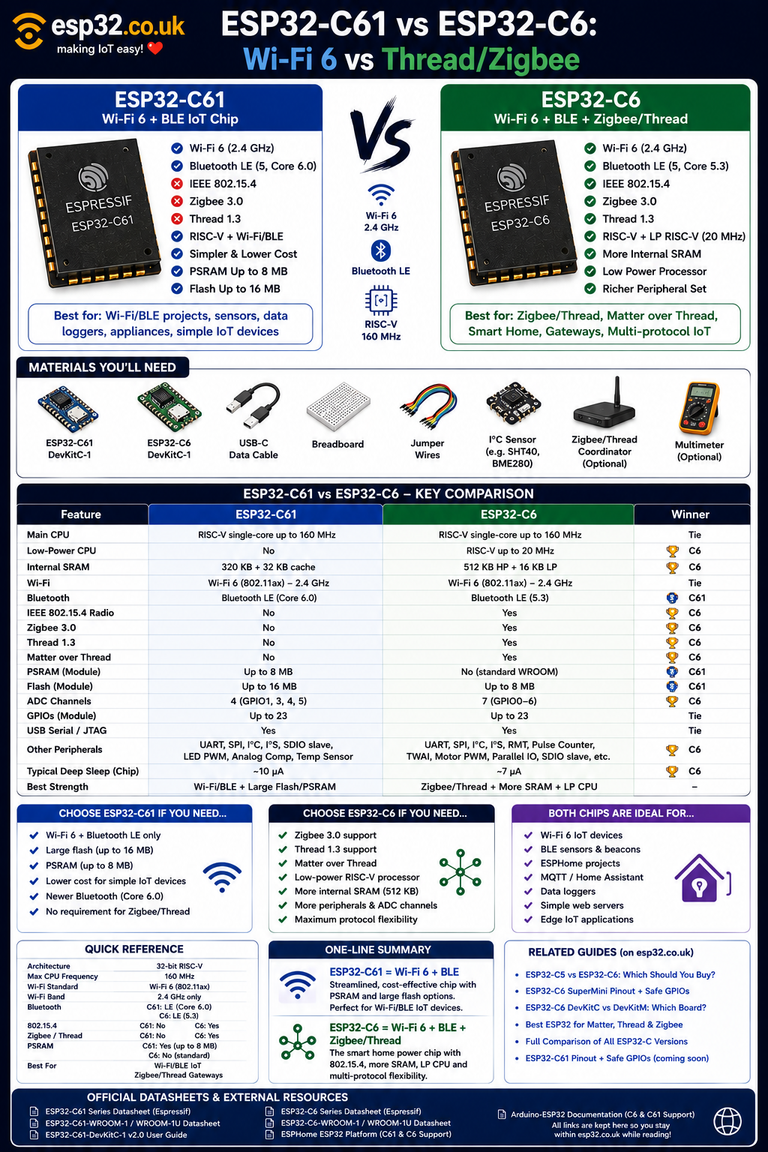
ESP32-C6 vs ESP32-C61
Despite the similar name, ESP32-C61 is not simply a later C6 board revision. It is a different chip aimed at affordable Wi-Fi 6 and Bluetooth LE products. The key buying difference is that ESP32-C61 does not include the C6’s IEEE 802.15.4 radio, so it is not the direct choice for Thread or Zigbee.
| Feature | ESP32-C6 | ESP32-C61 |
|---|---|---|
| Application CPU | RISC-V up to 160 MHz plus low-power core | Single RISC-V core up to 160 MHz |
| SRAM | 512 KB HP plus 16 KB LP SRAM | 320 KB |
| 2.4 GHz Wi-Fi 6 | Yes | Yes |
| Bluetooth LE | Yes | Yes |
| IEEE 802.15.4 | Yes | No |
| Thread / Zigbee | Radio and official stack support | No 802.15.4 radio |
| Best fit | Multiprotocol smart-home and IoT nodes | Wi-Fi/BLE products needing newer memory options |
Matter can operate over Wi-Fi as well as Thread, so a C61 can still be used in some Matter products. If your specific project needs Matter-over-Thread, a Thread border router or Zigbee, choose C6 instead.
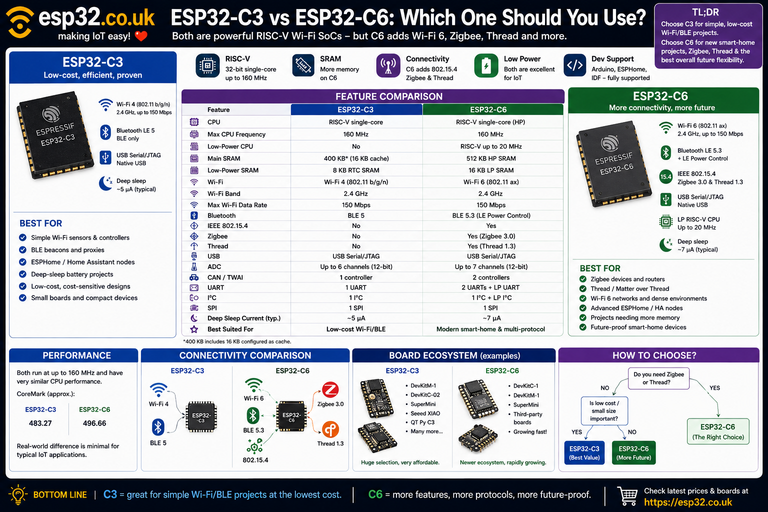
ESP32-C6 vs C3 vs S3
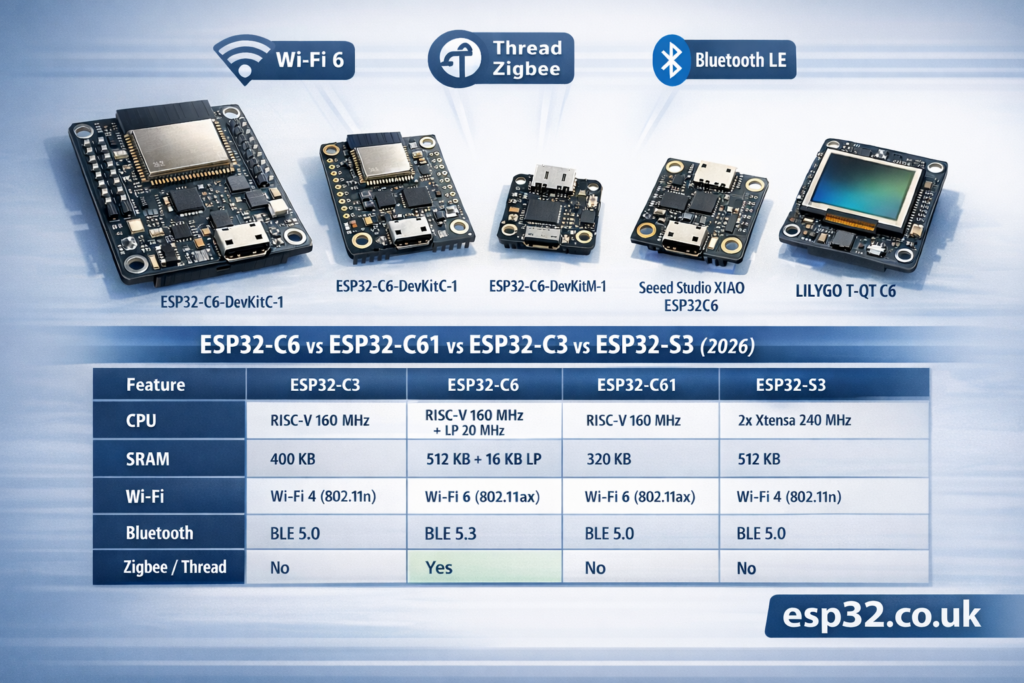
Here is the family comparison that matters when selecting a board:
| Feature | ESP32-C3 | ESP32-C6 | ESP32-C61 | ESP32-S3 |
|---|---|---|---|---|
| CPU | Single RISC-V, up to 160 MHz | RISC-V up to 160 MHz plus LP core | Single RISC-V, up to 160 MHz | Dual Xtensa LX7, up to 240 MHz |
| Wi-Fi | 2.4 GHz Wi-Fi 4 | 2.4 GHz Wi-Fi 6 | 2.4 GHz Wi-Fi 6 | 2.4 GHz Wi-Fi 4 |
| Bluetooth | BLE | BLE | BLE | BLE |
| Thread / Zigbee radio | No | Yes | No | No |
| Typical reason to buy | Low-cost Wi-Fi/BLE node | Modern multiprotocol IoT | Wi-Fi 6/BLE without 802.15.4 | More compute, USB OTG, cameras or displays |
Choose C3 for a basic low-cost Wi-Fi/BLE device, C6 for Thread or Zigbee radio hardware, and S3 for workloads that benefit from two faster cores, vector instructions, USB OTG or external PSRAM options. Our ESP32-C family comparison covers the wider C-series in more detail.
Matter, Thread and Zigbee: an important distinction
The C6 radio hardware makes these projects possible, but the terms are not interchangeable:
- IEEE 802.15.4 is the low-level 2.4 GHz radio standard used by Thread and Zigbee.
- Thread is an IPv6 mesh networking protocol. A Thread device usually needs a border router to reach the rest of an IP network.
- Zigbee is a separate mesh stack and ecosystem that also uses 802.15.4.
- Matter is an application-layer smart-home standard. It can run over Thread, Wi-Fi or Ethernet depending on the device.
Buying a C6 does not automatically make a finished device a Matter, Thread or Zigbee product. Your framework, firmware, network role and commissioning flow must support the protocol. Radio coexistence also does not mean every stack can use Wi-Fi, Bluetooth and 802.15.4 simultaneously without design constraints.
Software support
ESP-IDF provides the broadest access to Espressif features and protocol stacks. Arduino-ESP32 is usually the quickest route for sensors, displays and conventional Wi-Fi/BLE projects. ESPHome supports many ESP32-C6 boards for normal components, but check the current component and board documentation before assuming that an ESPHome build exposes the C6’s Thread or Zigbee capabilities.
Always select the exact board or module flash size in your build settings. A firmware image compiled for the wrong partition layout can upload successfully and then fail during updates or filesystem use.
Common ESP32-C6 buying mistakes
- Assuming Wi-Fi 6 means 5 GHz: C6 is a 2.4 GHz device.
- Confusing C6 with C61: C61 omits the 802.15.4 radio used for Thread and Zigbee.
- Ignoring the antenna suffix: WROOM-1 and MINI-1 use on-module antennas; 1U versions are for an external antenna.
- Buying too little flash: 4 MB is enough for many projects, while larger firmware and OTA layouts may benefit from 8 MB or 16 MB.
- Trusting a generic board name: SuperMini and D1 Mini-style layouts can differ between manufacturers. Verify the schematic, regulator, USB circuit and GPIO labels.
- Expecting protocols from hardware alone: confirm framework and stack support for the exact Matter, Thread or Zigbee role you need.
ESP32-C6 FAQ
Is ESP32-C6 better than ESP32-C3?
For a new smart-home project, usually yes: C6 adds 2.4 GHz Wi-Fi 6, an 802.15.4 radio and a low-power core. C3 remains a good inexpensive choice when you only need conventional Wi-Fi and Bluetooth LE.
Does ESP32-C6 support Zigbee and Thread?
Yes. The chip includes an IEEE 802.15.4 radio and Espressif documents Thread 1.3 and Zigbee 3.0 support. Your firmware and chosen framework must implement the required stack and device role.
Does ESP32-C6 support 5 GHz Wi-Fi?
No. ESP32-C6 supports Wi-Fi 6 features in the 2.4 GHz band and remains compatible with older 2.4 GHz Wi-Fi standards.
What is the difference between ESP32-C6-WROOM-1 and 1U?
WROOM-1 has an on-module PCB antenna. WROOM-1U uses a small connector for an external antenna. The same distinction applies to MINI-1 and MINI-1U.
Is ESP32-C61 the replacement for ESP32-C6?
No. It is a related Wi-Fi 6 and Bluetooth LE chip with a different memory and peripheral design, but it lacks the C6’s 802.15.4 radio. Pick based on protocol requirements, not the larger model number.
Which ESP32-C6 board is best for ESPHome?
DevKitC-1 is the easiest general starting point because it is well documented and exposes plenty of pins. XIAO ESP32C6 is attractive for small or battery-powered nodes. Confirm the exact ESPHome board definition and component support before committing hardware.
Final recommendation
Start with ESP32-C6-DevKitC-1 for learning and prototypes. Move to DevKitM-1 when you want a smaller official layout, or XIAO ESP32C6 when compact size and battery charging matter. Choose a display board only when the integrated screen saves more work than it adds, and treat generic SuperMini boards as seller-specific hardware.
Most importantly, choose ESP32-C6 because you need its combination of Wi-Fi 6, Bluetooth LE and 802.15.4. If your project only needs Wi-Fi/BLE, C3 may be cheaper; if it needs heavier processing, a display or camera, S3 may be the better platform.