Comparing ESP32 C2AliExpress price vs C3 vs C5 vs C6 vs C61? Choose C3 for general Wi-Fi and BLE, C6 for Matter, Thread or Zigbee, C5 for 5 GHz Wi-Fi, C61 for Wi-Fi 6 without 802.15.4, and C2 for the lowest-cost connected devices.
Quick answer:
- ESP32-C3AliExpress price → best general-purpose low-cost Wi-Fi + BLE choice
- ESP32-C6AliExpress price → best for Matter, Thread and Zigbee projects
- ESP32-C5 → choose it when you need 5 GHz Wi-Fi
- ESP32-C61 → Wi-Fi 6 + BLE without Thread/Zigbee
- ESP32-C2AliExpress price / ESP8684AliExpress price → cheapest option for simple connected devices
The most important difference is connectivity.
C2 and C3 use 2.4 GHz Wi-Fi 4. C6 and C61 move to 2.4 GHz Wi-Fi 6. C5 adds dual-band 2.4 + 5 GHz Wi-Fi 6. C5 and C6 also include an IEEE 802.15.4 radio for Thread and Zigbee.
So for most projects the real decision is:
C3 for simple IoT, C6 for smart home, C5 for 5 GHz.
That is the short version. The rest of this guide explains exactly what you gain and lose with each ESP32-C version.
ESP32-C Series Comparison
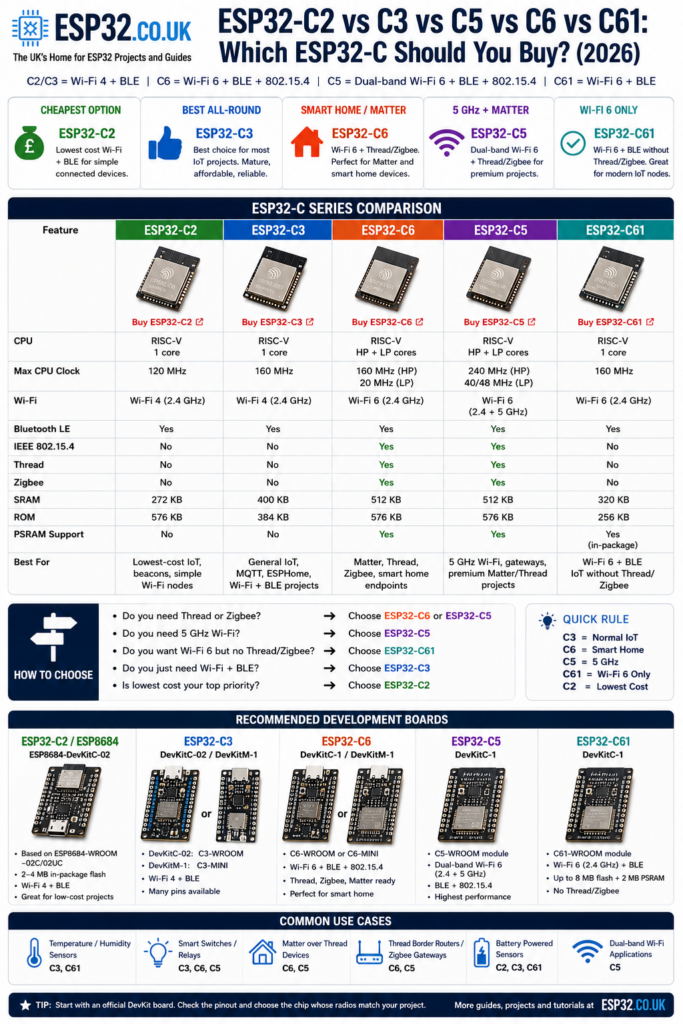
If you’re deciding which ESP32-C chip to buy, start with this table.
| Feature | ESP32-C2 | ESP32-C3 | ESP32-C6 | ESP32-C5 | ESP32-C61 |
|---|---|---|---|---|---|
| CPU | Single-core RISC-V | Single-core RISC-V | RISC-V HP + LP | RISC-V HP + LP | Single-core RISC-V |
| Max CPU clock | 120 MHz | 160 MHz | 160 MHz | 240 MHz | 160 MHz |
| Wi-Fi | Wi-Fi 4 | Wi-Fi 4 | Wi-Fi 6 | Wi-Fi 6 | Wi-Fi 6 |
| Wi-Fi band | 2.4 GHz | 2.4 GHz | 2.4 GHz | 2.4 + 5 GHz | 2.4 GHz |
| Bluetooth LE | Yes | Yes | Yes | Yes | Yes |
| IEEE 802.15.4 | No | No | Yes | Yes | No |
| Thread | No | No | Yes | Yes | No |
| Zigbee | No | No | Yes | Yes | No |
| Best for | Lowest-cost IoT | General IoT | Matter / smart home | 5 GHz + smart home | Wi-Fi 6 IoT |
Espressif specifies the C2/ESP8684 at up to 120 MHz, the C3 and C61 at up to 160 MHz, the C6 HP core at up to 160 MHz, and the C5 at up to 240 MHz. The C6 combines Wi-Fi 6, BLE and IEEE 802.15.4, while the C5 adds dual-band 2.4/5 GHz Wi-Fi 6.
Which ESP32-C Is Best?
For most people, ESP32-C3 is still the easiest default choice if all you need is Wi-Fi, BLE and normal microcontroller peripherals.
Choose ESP32-C6 instead when Thread or Zigbee matters.
Choose ESP32-C5 when 5 GHz Wi-Fi is part of the requirement.
Choose ESP32-C61 when you want Wi-Fi 6 but specifically don’t need the 802.15.4 radio found in C5/C6.
Choose ESP32-C2 when keeping cost and hardware complexity as low as possible matters more than performance.
| Your project | Best choice |
|---|---|
| General Wi-Fi sensor | ESP32-C3 |
| MQTT / ESPHome node | ESP32-C3 |
| Very low-cost connected product | ESP32-C2 |
| Wi-Fi 6 sensor | ESP32-C61 |
| Matter over Thread | ESP32-C6 |
| Zigbee device | ESP32-C6 |
| Thread device | ESP32-C6 |
| Need 5 GHz Wi-Fi | ESP32-C5 |
| 5 GHz + Thread/Zigbee | ESP32-C5 |
| First C-series board | ESP32-C3 or C6 DevKit |
ESP32-C3 vs ESP32-C6: Which Should You Choose?
Choose ESP32-C3 for ordinary Wi-Fi and Bluetooth LE projects. Choose ESP32-C6 when you need Thread, Zigbee, Matter over Thread or 2.4 GHz Wi-Fi 6. Both use a main RISC-V CPU running at up to 160 MHz, so C6 is not simply a faster C3; its real advantage is the newer radio system.
| Feature | ESP32-C3 | ESP32-C6 |
|---|---|---|
| Wi-Fi | 2.4 GHz Wi-Fi 4 | 2.4 GHz Wi-Fi 6 |
| Bluetooth LE | Yes | Yes |
| Thread and Zigbee | No | Yes, via IEEE 802.15.4 |
| Main CPU | Single-core RISC-V, up to 160 MHz | RISC-V HP core up to 160 MHz plus LP core |
| Best choice | ESPHome, MQTT, sensors, relays and general IoT | Matter, Thread, Zigbee and multi-protocol smart-home projects |
For a normal sensor, relay or MQTT node, C3 remains the simpler and usually cheaper choice. For a new smart-home project where 802.15.4 support may matter later, C6 gives you considerably more flexibility.
ESP32-C2: The Cheapest ESP32-C
The ESP32-C2, commonly encountered through the ESP8684 family, is the stripped-down member of the C-series.
It uses a single-core 32-bit RISC-V processor running at up to 120 MHz, with 272 KB SRAM and 576 KB ROM.
Connectivity is intentionally simple:
- 2.4 GHz Wi-Fi 4
- Bluetooth LE
- no Thread
- no Zigbee
- no 802.15.4
Espressif’s ESP32-C2 documentation currently groups the C2 family under ESP8684, which is why development boards and modules are often labelled ESP8684 rather than ESP32-C2.
When should you choose ESP32-C2?
Choose C2 when you need:
- simple Wi-Fi connectivity
- Bluetooth LE
- basic sensors or switches
- minimum hardware cost
- an ESP8266-class application on a newer RISC-V platform
For a hobby project where the small cost difference isn’t critical, I would normally move up to ESP32-C3.
It gives you a much larger ecosystem and more performance without changing the basic Wi-Fi + BLE concept.
For a deeper look at the available boards, see our ESP32-C2 versions and development boards guide.
ESP32-C3: The Best General-Purpose C-Series Chip
The ESP32-C3 is the established workhorse of the C family.
It uses a:
- single-core 32-bit RISC-V CPU
- maximum clock of 160 MHz
- 400 KB SRAM
- 2.4 GHz Wi-Fi 4
- Bluetooth LE
It does not include an IEEE 802.15.4 radio, so there is no native Thread or Zigbee support.
Espressif specifies a 160 MHz RISC-V CPU, 400 KB SRAM and 2.4 GHz 802.11b/g/n Wi-Fi for the C3.
What is ESP32-C3 best for?
C3 makes sense for:
- Wi-Fi sensors
- MQTT nodes
- ESPHome devices
- relays
- BLE devices
- small web servers
- data loggers
- battery-powered sensors
- replacements for ESP8266 projects
For most normal IoT devices, C3 is enough.
You don’t gain anything useful by buying a C6 simply because the model number is higher if your device will never use Thread, Zigbee or other C6-specific features.
ESP32-C3 vs C2
For most makers, choose C3.
Choose C2 only when reducing cost or PCB complexity is genuinely important.
| ESP32-C2 | ESP32-C3 | |
|---|---|---|
| CPU | 120 MHz | 160 MHz |
| SRAM | 272 KB | 400 KB |
| Wi-Fi | Wi-Fi 4 | Wi-Fi 4 |
| BLE | Yes | Yes |
| Ecosystem | Smaller | Very mature |
| Best choice for makers | ✓ |
For board-specific differences, see our ESP32-C3 versions and development boards comparison.
ESP32-C6: The Best ESP32-C for Matter, Thread and Zigbee
The ESP32-C6 is where the C-series becomes significantly more interesting for smart-home development.
It combines:
- 2.4 GHz Wi-Fi 6
- Bluetooth LE
- IEEE 802.15.4
- Thread
- Zigbee
- 160 MHz high-performance RISC-V core
- 20 MHz low-power RISC-V core
Espressif describes the C6 as a Wi-Fi 6, Bluetooth LE and IEEE 802.15.4 SoC with a 160 MHz HP RISC-V core and 20 MHz LP RISC-V core.
The important addition isn’t simply Wi-Fi 6.
It’s 802.15.4.
That radio allows C6 hardware to participate directly in Thread and Zigbee networks.
ESP32-C6 for Matter
Matter can operate over Wi-Fi or Thread.
A C3 can therefore be used for some Matter-over-Wi-Fi applications, but the C6 adds the ability to build Matter-over-Thread endpoints because it includes the required 802.15.4 radio.
That makes C6 a much more flexible platform for new smart-home hardware.
What is ESP32-C6 best for?
Choose C6 for:
- Matter devices
- Matter-over-Thread
- Thread sensors
- Zigbee devices
- modern smart-home products
- multi-protocol experimentation
- Wi-Fi 6 IoT projects
If you’re buying an ESP32 specifically to experiment with Matter, Thread or Zigbee, the C6 is the obvious place to start.
For the board differences, see our ESP32-C6 versions and development boards comparison.
ESP32-C5: The ESP32-C with 5 GHz Wi-Fi
The ESP32-C5 solves a limitation found on almost every earlier ESP32:
it supports 5 GHz Wi-Fi.
C5 supports:
- 2.4 GHz Wi-Fi 6
- 5 GHz Wi-Fi 6
- Bluetooth LE
- IEEE 802.15.4
- Thread
- Zigbee
- RISC-V CPU up to 240 MHz
- external PSRAM support
Espressif describes the C5 as a 32-bit single-core RISC-V MCU with dual-band 2.4/5 GHz Wi-Fi 6, Bluetooth LE and IEEE 802.15.4 support.
This makes it the most capable wireless device in this group when 5 GHz connectivity actually matters.
ESP32-C5 vs ESP32-C6
For many buyers this is the most useful C-series comparison.
| ESP32-C6 | ESP32-C5 | |
|---|---|---|
| Wi-Fi 6 | Yes | Yes |
| 2.4 GHz | Yes | Yes |
| 5 GHz | No | Yes |
| BLE | Yes | Yes |
| 802.15.4 | Yes | Yes |
| Thread | Yes | Yes |
| Zigbee | Yes | Yes |
| Main CPU | 160 MHz | 240 MHz |
| Best for | Matter / Thread | Dual-band IoT |
Choose C6 if:
you need Thread, Zigbee or Matter and 2.4 GHz Wi-Fi is perfectly adequate.
Choose C5 if:
you specifically want 5 GHz Wi-Fi or the additional CPU performance.
5 GHz can also help move Wi-Fi traffic away from crowded 2.4 GHz networks, although it generally has less range and poorer wall penetration than 2.4 GHz.
For many simple sensors, C5 is overkill.
For gateways, more demanding connected devices and projects where dual-band Wi-Fi matters, it is much more compelling.
ESP32-C61: Wi-Fi 6 Without Thread or Zigbee
The ESP32-C61 fills an interesting gap between C3 and C6.
It gives you:
- 2.4 GHz Wi-Fi 6
- Bluetooth LE
- single-core RISC-V CPU up to 160 MHz
- 320 KB SRAM
- 256 KB ROM
- support for in-package PSRAM
But it does not contain the IEEE 802.15.4 radio used by Thread and Zigbee.
Espressif positions the C61 as an affordable Wi-Fi 6 + Bluetooth LE device and specifies a 160 MHz single-core RISC-V CPU, 320 KB SRAM and support for in-package PSRAM.
ESP32-C61 vs C6
Think of the difference like this:
ESP32-C61
Wi-Fi 6 + BLE
ESP32-C6
Wi-Fi 6 + BLE + Thread/Zigbee
That’s the important distinction.
| ESP32-C61 | ESP32-C6 | |
|---|---|---|
| Wi-Fi 6 | Yes | Yes |
| Wi-Fi band | 2.4 GHz | 2.4 GHz |
| BLE | Yes | Yes |
| 802.15.4 | No | Yes |
| Thread | No | Yes |
| Zigbee | No | Yes |
| CPU | 160 MHz | 160 MHz HP |
| Best for | Wi-Fi 6 IoT | Smart home / Matter |
If you have no interest in Thread or Zigbee, C61 gives you a cleaner route to Wi-Fi 6.
Wi-Fi 4 vs Wi-Fi 6 on ESP32
One easy mistake is assuming Wi-Fi 6 automatically means 5 GHz.
It doesn’t.
ESP32-C6
Wi-Fi 6, but 2.4 GHz only
ESP32-C61
Wi-Fi 6, but 2.4 GHz only
ESP32-C5
Wi-Fi 6 on 2.4 GHz and 5 GHz
The main benefit of Wi-Fi 6 for many ESP32 applications isn’t huge download speeds.
IoT devices normally transmit very little data.
More useful benefits can include improved efficiency, better behaviour in dense wireless environments and newer power-saving mechanisms. Espressif specifically highlights transmission efficiency and lower power consumption among the Wi-Fi 6 benefits of the C6.
So don’t buy a C6 expecting it to suddenly connect to a 5 GHz-only network.
For that you need C5.
ESP32-C Development Boards
Choosing the chip is only half the decision.
For development, Espressif’s official DevKit boards are usually the easiest starting point because the schematics, pinouts and hardware documentation are available.
ESP32-C2 / ESP8684
ESP8684-DevKitC-02
This is the official C2-family development board based on the ESP8684-WROOM-02C/02UC module, with 2 MB or 4 MB in-package flash.
Good choice for experimenting with the lowest-cost C-series platform.
ESP32-C3
ESP32-C3-DevKitC-02
A conventional DevKitC-style board based on the C3-WROOM module.
This is probably the easiest official C3 board for general experimentation.
ESP32-C3-DevKitM-1
Uses the smaller MINI module and produces a more compact development board.
Choose it if board size matters.
ESP32-C6
ESP32-C6-DevKitC-1
The straightforward C6 development board.
It exposes the C6’s:
- Wi-Fi 6
- BLE
- Zigbee
- Thread
and uses the ESP32-C6-WROOM-1/1U module.
ESP32-C6-DevKitM-1
The smaller MINI-based C6 alternative.
For general Matter and Thread experimentation, either C6 DevKit is an excellent starting point.
ESP32-C5
ESP32-C5-DevKitC-1
This is the board to choose if the reason you’re interested in C5 is dual-band Wi-Fi 6.
The official board uses an ESP32-C5-WROOM-1(U) module supporting 2.4 and 5 GHz Wi-Fi 6, BLE and IEEE 802.15.4.
ESP32-C61
ESP32-C61-DevKitC-1
The official C61 development board is based on ESP32-C61-WROOM-1 and current variants support configurations up to 8 MB flash and 2 MB PSRAM.
This is the logical board for experimenting with Wi-Fi 6 without moving into Thread/Zigbee.
What About ESP32-C3 SuperMini Boards?
Tiny ESP32-C3 SuperMini boards are extremely popular because they combine:
- C3
- USB
- tiny PCB
- low price
- enough GPIO for many sensor projects
They’re excellent when physical size matters.
The trade-off is simple: you don’t get as many conveniently broken-out pins as you do on a full DevKit board.
That can become frustrating once you add:
- SPI displays
- multiple sensors
- relays
- buttons
- UART devices
For one or two sensors, the tiny format is excellent.
For development and experimenting, I still prefer a full DevKit.
XIAO ESP32-C3 and ESP32-C6
Seeed Studio’s XIAO boards are another good option when space matters.
They package the ESP32-C3 or C6 into a very small board and are designed for compact embedded projects.
The trade-off is the same as with most mini boards:
small PCB = fewer pins physically available.
Choose them when the final project needs to be small.
Choose a DevKit when you’re still experimenting on a breadboard.
Which ESP32-C Should a Beginner Buy?
For general ESP32 projects:
ESP32-C3
It’s inexpensive, mature and has everything needed for normal Wi-Fi + BLE projects.
For smart-home experimentation:
ESP32-C6
It gives you Wi-Fi, BLE, Thread and Zigbee on one platform.
If you’re interested in Home Assistant, Matter or Thread development, the extra capability is useful rather than theoretical.
If you specifically need 5 GHz:
ESP32-C5
Don’t buy C5 simply because it has the highest number.
Buy it because you need dual-band Wi-Fi, higher performance, or another specific C5 feature.
Common ESP32-C Buying Mistakes
Assuming C6 is simply a faster C3
It isn’t.
Both run their main application CPU at up to 160 MHz.
The major C6 upgrade is the radio subsystem: Wi-Fi 6 and IEEE 802.15.4.
Assuming Wi-Fi 6 means 5 GHz
It doesn’t.
C6 and C61 are still 2.4 GHz-only Wi-Fi devices.
C5 is the model in this group with 2.4 + 5 GHz Wi-Fi 6.
Buying Thread/Zigbee hardware when you only need Wi-Fi
If you’re building an MQTT temperature sensor, relay or simple ESPHome node, a C3 may do everything you need.
More radios don’t automatically make the project better.
Assuming Matter always requires Thread
It doesn’t.
Matter can run over Wi-Fi or Thread.
The reason C6 and C5 are particularly attractive is that their 802.15.4 radios allow them to support Thread-based Matter devices in addition to Wi-Fi applications.
Confusing C2 with ESP8684
ESP8684 belongs to the ESP32-C2 group.
So an ESP8684 development board isn’t an unrelated chip family—it is the name you’re likely to encounter on actual C2 modules and official development boards.
ESP32-C2 vs C3 vs C6 vs C5 vs C61: Final Recommendation
You don’t need to pick the most advanced ESP32-C.
You need the one whose radios match the project.
ESP32-C2
Choose it for minimum-cost Wi-Fi + BLE applications.
ESP32-C3
Choose it for normal Wi-Fi + BLE IoT.
For most basic sensors, relays and MQTT projects, this is still my default C-series recommendation.
ESP32-C6
Choose it for Matter, Thread, Zigbee or 2.4 GHz Wi-Fi 6.
For modern smart-home experimentation, this is the best overall choice.
ESP32-C5
Choose it when 5 GHz Wi-Fi matters.
It combines dual-band Wi-Fi 6 with BLE and 802.15.4 and is the most capable wireless option of these five.
ESP32-C61
Choose it when you want Wi-Fi 6 + BLE but don’t need Thread or Zigbee.
The simplest decision rule is:
C3 = normal IoT
C6 = smart home
C5 = 5 GHz
C61 = Wi-Fi 6 without Thread
C2 = lowest cost
For most buyers choosing between the models they actually see on development boards, C3 vs C6 vs C5 is the comparison that matters most.