ESP32AliExpress price versions now range from low-cost Wi-Fi sensors to Thread and Zigbee chips, dual-band Wi-Fi 6 devices and high-performance display processors.
For most new projects, choose an ESP32-S3AliExpress price development board with PSRAM. It offers the best balance of performance, USB, GPIO, mature software support and price.
For more specialised projects:
- ESP32-S3AliExpress price → best all-round choice for most makers
- ESP32-C3AliExpress price → cheap Wi-Fi + Bluetooth LE sensors
- ESP32-C6 → Matter, Thread and Zigbee
- ESP32-C5 → dual-band 2.4 + 5 GHz Wi-Fi 6
- ESP32-C61 → inexpensive Wi-Fi 6 + BLE without Thread/Zigbee
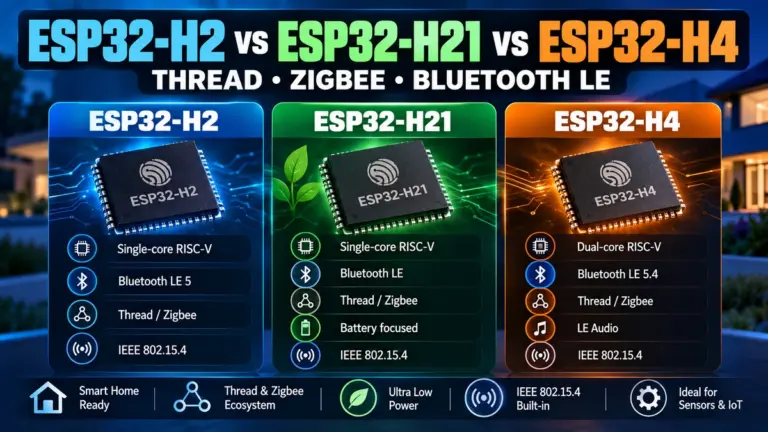
- ESP32-H2 / H21 / H4 → low-power Thread, Zigbee and BLE devices without Wi-Fi
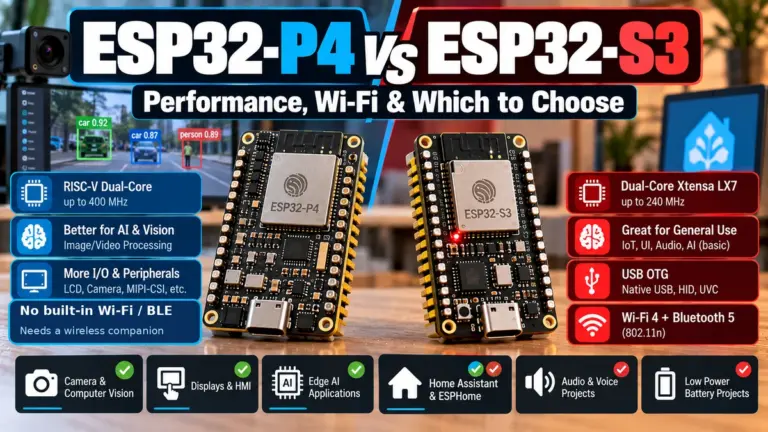
- ESP32-P4 → displays, cameras, HMI and heavy processing; no built-in wireless
- ESP32-S31 → next-generation high-performance ESP32AliExpress price with Wi-Fi 6, Bluetooth Classic, BLE and 802.15.4
- Original ESP32 → still excellent when you need mature library support or Bluetooth Classic
Espressif’s current product range now includes the original ESP32 plus the S, C, H, P and E families, including newer chips such as the ESP32-S31, ESP32-C61, ESP32-H21, ESP32-H4 and ESP32-E22. You can see the current official lineup on the Espressif SoC product page.
This guide explains the differences between the ESP32 chips, modules and development boards and, more importantly, which ESP32 you should actually buy.
Which ESP32 Should I Buy?
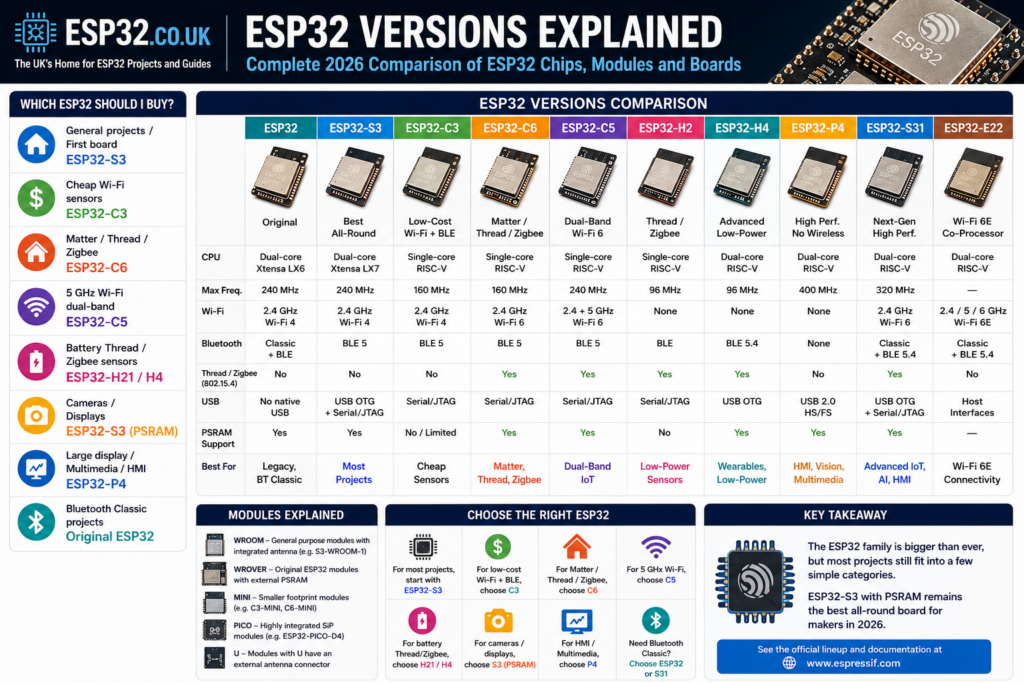
If you don’t want to compare specifications, use this table.
| What are you building? | Best ESP32 |
|---|---|
| General Arduino / ESPHome / IoT projects | ESP32-S3 |
| First ESP32 board | ESP32-S3 DevKitC |
| Cheap Wi-Fi sensor | ESP32-C3 |
| Wi-Fi 6 device | ESP32-C6 / C61 |
| 5 GHz Wi-Fi device | ESP32-C5 |
| Matter / Thread / Zigbee device | ESP32-C6 |
| Battery Thread/Zigbee sensor | ESP32-H21 / H2 |
| Advanced low-power BLE + Thread device | ESP32-H4 |
| Bluetooth Classic project | Original ESP32 |
| Camera / display / audio project | ESP32-S3 with PSRAM |
| Large display / HMI / multimedia | ESP32-P4 |
| Next-generation high-performance connected product | ESP32-S31 |
| Wi-Fi 6E connectivity co-processor | ESP32-E22 |
Our default recommendation: ESP32-S3
For a new hobby or general-purpose project, the ESP32-S3 remains the safest choice.
It combines:
- dual-core 240 MHz CPU
- 2.4 GHz Wi-Fi
- Bluetooth 5 Low Energy
- native USB
- plenty of GPIO
- optional integrated PSRAM
- very good Arduino and ESP-IDF support
- excellent support for displays, cameras and audio
The S3’s dual-core Xtensa LX7 processor also includes vector instructions useful for signal-processing and AI workloads.
Unless your project specifically requires Bluetooth Classic, 5 GHz Wi-Fi, Thread/Zigbee or substantially more processing power, the S3 is usually the ESP32 version to start with.
ESP32 Versions Comparison
Here is the useful high-level comparison.
| ESP32 | CPU | Wi-Fi | Bluetooth | Thread / Zigbee | USB | Best use |
|---|---|---|---|---|---|---|
| ESP32 | Dual-core Xtensa, 240 MHz | Wi-Fi 4, 2.4 GHz | Classic + BLE | No | No native USB | Legacy projects, BT Classic |
| ESP32-S2 | Single-core Xtensa, 240 MHz | Wi-Fi 4, 2.4 GHz | None | No | USB OTG | USB devices |
| ESP32-S3 | Dual-core Xtensa, 240 MHz | Wi-Fi 4, 2.4 GHz | BLE 5 | No | USB OTG + Serial/JTAG | Best general-purpose ESP32 |
| ESP32-S31 | Dual-core RISC-V, 320 MHz | Wi-Fi 6, 2.4 GHz | Classic + BLE 5.4 | Yes | USB OTG + Serial/JTAG | Advanced IoT, HMI, AI |
| ESP32-C2 | Single-core RISC-V, 120 MHz | Wi-Fi 4, 2.4 GHz | BLE | No | — | Very low-cost IoT |
| ESP32-C3 | Single-core RISC-V, 160 MHz | Wi-Fi 4, 2.4 GHz | BLE 5 | No | Serial/JTAG | Cheap sensors |
| ESP32-C61 | Single-core RISC-V, 160 MHz | Wi-Fi 6, 2.4 GHz | BLE 5 | No | Serial/JTAG | Low-cost Wi-Fi 6 |
| ESP32-C6 | Single-core RISC-V, 160 MHz | Wi-Fi 6, 2.4 GHz | BLE 5 | Yes | Serial/JTAG | Matter / Thread / Zigbee |
| ESP32-C5 | Single-core RISC-V, 240 MHz | Wi-Fi 6, 2.4 + 5 GHz | BLE 5 | Yes | Serial/JTAG | Dual-band IoT |
| ESP32-H2 | Single-core RISC-V, 96 MHz | None | BLE | Yes | Serial/JTAG | Thread/Zigbee sensors |
| ESP32-H21 | Single-core RISC-V, 96 MHz | None | BLE | Yes | — | Low-power Thread/Zigbee |
| ESP32-H4 | Dual-core RISC-V, 96 MHz | None | BLE 5.4 | Yes | USB OTG | Advanced battery IoT |
| ESP32-P4 | Dual-core RISC-V, 400 MHz | None | None | No | USB 2.0 HS/FS | HMI, vision, multimedia |
| ESP32-E22 | Dual-core RISC-V | Wi-Fi 6E, 2.4/5/6 GHz | Classic + BLE 5.4 | No | Host interfaces | Wireless co-processor |
A very important distinction is that USB support is not the same on every ESP32. The S2, S3, S31 and P4 provide general-purpose USB OTG capabilities, while chips such as the C3, C5 and C6 primarily provide an integrated USB Serial/JTAG interface for flashing, serial communication and debugging.
Original ESP32 — Still Useful in 2026
The original ESP32 is old, but it is far from obsolete.
Its biggest advantage remains Bluetooth Classic + Bluetooth Low Energy combined with an extremely mature software ecosystem.
Typical specifications include:
- dual-core Xtensa LX6 CPU up to 240 MHz
- 2.4 GHz 802.11b/g/n Wi-Fi
- Bluetooth Classic
- Bluetooth Low Energy
- large Arduino library ecosystem
- huge selection of cheap development boards
The original ESP32 does not have native USB, so most development boards use a USB-to-UART chip such as a CP2102 or CH340.
Choose the original ESP32 when:
- an existing project was designed around it
- you need maximum compatibility with older Arduino libraries
- you need Bluetooth Classic
- you have existing ESP32 hardware you want to reuse
For most completely new projects, however, the ESP32-S3 is usually a better starting point.
ESP32-S2 vs ESP32-S3 vs ESP32-S31
The S family targets more capable applications, particularly USB, HMI, audio, displays and increasingly edge processing.
ESP32-S2
The ESP32-S2 is unusual because it has:
- single-core Xtensa CPU up to 240 MHz
- Wi-Fi
- native USB OTG
- no Bluetooth
It still makes sense for USB devices where Bluetooth is unnecessary, but the S3 is normally more attractive for a new project.
ESP32-S3
The ESP32-S3 became the sweet spot of the ESP32 range.
It has:
- dual-core Xtensa LX7 CPU up to 240 MHz
- Wi-Fi
- Bluetooth 5 LE
- native USB OTG
- USB Serial/JTAG
- 45 programmable GPIOs
- vector instructions
- support for external flash and PSRAM
S3 variants are available with different amounts of integrated PSRAM depending on the exact chip and module.
This makes the S3 particularly good for:
- TFT displays
- LVGL interfaces
- cameras
- audio processing
- voice projects
- web interfaces
- Bluetooth sensors
- projects requiring large buffers
ESP32-S3 with PSRAM or without?
For basic sensors, relays and automation, you usually don’t need PSRAM.
For displays, cameras, audio or larger applications, buy the PSRAM version.
An S3 board with 8 MB PSRAM is an excellent general-purpose ESP32 board to keep on the workbench.
ESP32-S31 — the next-generation S-series
The ESP32-S31 is a much newer design and a substantial step beyond the S3.
It combines:
- dual-core 32-bit RISC-V CPU up to 320 MHz
- 2.4 GHz Wi-Fi 6
- Bluetooth 5.4 LE
- Bluetooth Classic
- IEEE 802.15.4 for Thread and Zigbee
- up to 60 GPIO
- USB OTG
- USB Serial/JTAG
- Gigabit Ethernet MAC
- display and camera interfaces
- SIMD/vector capabilities
Espressif positions it for advanced IoT, HMI, machine learning, computer vision and intelligent audio applications.
Interestingly, the S31 also brings Bluetooth Classic back to a mainstream ESP32 microcontroller, something missing from the S2 and S3.
There is an important software-readiness caveat for hobbyists. Espressif’s current ESP32-S31 product page says ESP-IDF and ESP-Matter support will be provided, which marks it as a newer platform rather than an established drop-in replacement for the S3.
Before buying an S31, confirm support in the exact Arduino core, ESPHome release or board package you plan to use. For a normal maker project today, the mature ESP32-S3 ecosystem remains the safer choice unless you specifically need the S31’s newer features.
ESP32-C Series — C2 vs C3 vs C61 vs C6 vs C5
The C-series moved ESP32 from Xtensa CPUs to RISC-V and now covers everything from very cheap Wi-Fi devices to dual-band Wi-Fi 6 and Matter.
ESP32-C2
The C2 is the stripped-down budget option.
It is a single-core 120 MHz RISC-V device aimed primarily at cost-sensitive connected products.
Use it when board cost and simplicity matter more than GPIO count, USB features or performance.
For hobby projects, the C3 normally offers a better balance.
ESP32-C3
The ESP32-C3 is one of the best inexpensive ESP32 versions.
It provides:
- single-core 32-bit RISC-V CPU up to 160 MHz
- 2.4 GHz Wi-Fi
- Bluetooth 5 LE
- integrated USB Serial/JTAG
- low cost
- mature Arduino/ESP-IDF support
The C3 is a cost-effective Wi-Fi + Bluetooth LE platform based on RISC-V.
Best for:
- temperature sensors
- switches
- relays
- small data loggers
- BLE gateways
- simple battery devices
- compact PCB designs
If an S3 is more processor than you need, the C3 is often the sensible cheaper option.
ESP32-C61
The ESP32-C61 is easy to confuse with the C6, but they target slightly different jobs.
The C61 provides:
- single-core RISC-V CPU up to 160 MHz
- 2.4 GHz Wi-Fi 6
- Bluetooth 5 LE
- USB Serial/JTAG
- flash/PSRAM variants
- no IEEE 802.15.4 radio
It is designed as a cost-effective Wi-Fi 6 + BLE device.
C61 vs C6
Choose C61 if you want:
- Wi-Fi 6
- BLE
- low cost
Choose C6 if you also need:
- Thread
- Zigbee
- Matter-over-Thread
ESP32-C6
The ESP32-C6 is currently one of the most interesting chips for smart-home projects.
It combines:
- 160 MHz RISC-V application processor
- 2.4 GHz Wi-Fi 6
- Bluetooth 5 LE
- IEEE 802.15.4
- Thread
- Zigbee
- USB Serial/JTAG
The combination of Wi-Fi 6, BLE and IEEE 802.15.4 makes it suitable for both Wi-Fi and Thread-based Matter devices.
Best for:
- Matter devices
- Thread endpoints
- Zigbee devices
- smart-home sensors
- modern connected appliances
If you are building a new smart-home project, C6 is the ESP32 I would look at first.
ESP32-C5 — The ESP32 with 5 GHz Wi-Fi
One of the most important newer ESP32 chips is the ESP32-C5.
Unlike most ESP32 devices, it supports both 2.4 GHz and 5 GHz Wi-Fi.
Specifications include:
- single-core 32-bit RISC-V CPU up to 240 MHz
- 2.4 GHz Wi-Fi 6
- 5 GHz Wi-Fi 6
- Bluetooth 5 LE
- IEEE 802.15.4
- Thread
- Zigbee
- external PSRAM support
- USB Serial/JTAG
The C5 supports 802.11ax while remaining backwards-compatible with older Wi-Fi standards.
C5 vs C6
| ESP32-C6 | ESP32-C5 | |
|---|---|---|
| 2.4 GHz Wi-Fi | Yes | Yes |
| 5 GHz Wi-Fi | No | Yes |
| Wi-Fi 6 | Yes | Yes |
| BLE | Yes | Yes |
| Thread | Yes | Yes |
| Zigbee | Yes | Yes |
| CPU | 160 MHz | 240 MHz |
| Best for | Smart home / Matter | Higher-performance dual-band IoT |
If you specifically need 5 GHz Wi-Fi, choose the ESP32-C5.
Otherwise, the C6 is already more than capable for most Matter and automation projects.
ESP32-H2, H21 and H4 — Thread/Zigbee Without Wi-Fi
The H-series takes a different approach.
These chips include:
- Bluetooth LE
- IEEE 802.15.4
- Thread
- Zigbee
but no Wi-Fi radio.
That can reduce complexity and power consumption in devices that only need mesh connectivity.
ESP32-H2
The H2 is a single-core 96 MHz RISC-V device intended for low-power BLE and IEEE 802.15.4 applications.
Good examples include:
- door sensors
- motion sensors
- temperature sensors
- smart switches
- Matter-over-Thread endpoints
- Zigbee devices
One important point is that an H2 does not automatically become a Thread Border Router simply because it supports Thread.
A border router also requires an IP-side connection such as Wi-Fi or Ethernet. The H2 can instead be used as the 802.15.4 radio alongside another host processor.
ESP32-H21
The H21 is an evolution of the H2 aimed at even more power-sensitive devices.
It adds an integrated DC-DC converter and supports up to 20 dBm transmit power, improving efficiency and link range for battery-powered Thread, Zigbee and BLE devices.
For a new simple battery-powered Thread/Zigbee product, the H21 is more interesting than the older H2 where availability and software support suit the project.
ESP32-H4
The H4 is considerably more capable.
It combines:
- dual-core 32-bit RISC-V CPU up to 96 MHz
- Bluetooth 5.4 LE
- IEEE 802.15.4
- Thread 1.4
- Zigbee 3.0
- LE Audio features
- external PSRAM support
- USB OTG
- integrated DC-DC converter
The H4 is aimed at wearables, wireless audio, healthcare devices and large low-power sensor networks.
Think of the H4 as the higher-end next-generation H-series device, while H2/H21 remain suitable for simpler sensor nodes.
ESP32-P4 — A Very Different ESP32
The ESP32-P4 is not really a replacement for an ESP32-S3 or C6.
It is a high-performance processor designed for applications that need significantly more local computing power.
It has:
- dual-core 32-bit RISC-V CPU up to 400 MHz
- large PSRAM options depending on variant
- USB 2.0
- MIPI camera/display interfaces
- hardware multimedia functions
- H.264 encoding support
- rich display peripherals
But:
The ESP32-P4 has no built-in Wi-Fi or Bluetooth.
The P4 is designed for high-performance HMI, edge computing and multimedia applications.
Development boards can therefore combine a P4 with another ESP32, such as a C6, to provide wireless connectivity.
Best for:
- large touchscreens
- LVGL interfaces
- camera processing
- video
- industrial HMI
- multimedia
- edge processing
If your project is basically a sensor connected to Wi-Fi, the P4 is unnecessary.
If you’re building something closer to a smart display or embedded computer, it becomes much more interesting.
ESP32-E22 — Wi-Fi 6E, but Not a Normal ESP32 Dev Board
The ESP32-E22 introduces something new to the ESP32 range: tri-band 2.4, 5 and 6 GHz Wi-Fi 6E. Espressif specifies 2×2 MU-MIMO, up to 2.4 Gbit/s throughput, PCIe 2.1 and SDIO 3.0.
It supports:
- 2.4 GHz Wi-Fi 6E
- 5 GHz Wi-Fi 6E
- 6 GHz Wi-Fi 6E
- Bluetooth Classic
- Bluetooth 5.4 LE
- PCIe
- SDIO
- very high wireless throughput
However, it is designed primarily as a Radio Co-Processor for another host processor rather than as the microcontroller at the centre of a normal Arduino-style project.
So if your question is:
Which ESP32 supports 6 GHz Wi-Fi?
the answer is ESP32-E22.
But if your question is:
Which ESP32 board should I use for my sensor project?
the E22 probably isn’t what you are looking for.
ESP32 Modules: WROOM vs WROVER vs MINI vs PICO
A lot of ESP32 confusion comes from mixing up chips, modules and development boards.
For example:
ESP32-S3 = chip family
ESP32-S3-WROOM-1 = module containing the chip, flash, antenna and supporting hardware
ESP32-S3-DevKitC-1 = development board containing the module, USB connection, regulator and header pins
They are not three different ESP32 versions.
WROOM
WROOM is Espressif’s common general-purpose module format.
Examples include:
WROVER
The WROVER name is mainly associated with original ESP32 modules that include external PSRAM.
These became popular for cameras, displays and other memory-heavy applications.
For newer S3 hardware, look at the actual flash/PSRAM configuration of the S3-WROOM module rather than assuming that you need something called an “S3-WROVER”.
MINI
MINI modules are designed to provide a smaller PCB footprint.
Examples include:
They are useful when physical board size matters.
PICO
PICO devices use a more highly integrated system-in-package approach.
The classic example is the ESP32-PICO-D4, while newer S3 PICO variants are also available.
What Does the “U” Mean?
You may see module names such as:
The U does not mean a different ESP32 family.
It identifies a module designed for an external antenna connection rather than the normal integrated PCB antenna.
There is therefore no “ESP32-U family.”
ESP32 Development Boards Explained
The chip determines what the ESP32 can do.
The development board determines how convenient it is to use.
For most users, these are the board types worth knowing.
| Development board | Chip | Recommended for |
|---|---|---|
| ESP32 DevKitC | ESP32 | Legacy/general ESP32 projects |
| ESP32-S3-DevKitC | S3 | Best general board |
| ESP32-C3-DevKitM | C3 | Cheap sensors |
| ESP32-C6-DevKitC / DevKitM | C6 | Matter / Thread / Zigbee |
| ESP32-C5 DevKit | C5 | Dual-band Wi-Fi |
| ESP32-H2 DevKit | H2 | Thread/Zigbee |
| ESP32-P4 Function EV Board | P4 | HMI/multimedia |
| ESP32-P4-EYE | P4 | Vision |
| ESP32-S31 development boards | S31 | Advanced/early development |
What About NodeMCU, ESP32-CAM, XIAO and M5Stack?
These are board families or products, not new ESP32 chip versions.
NodeMCU-32S
Usually contains an original ESP32-class module.
It is inexpensive and widely available, but doesn’t represent a separate ESP32 architecture.
ESP32-CAM
The common ESP32-CAM is a cheap camera development board based on the original ESP32 generation.
It remains popular because of its low price, but the S3 is usually a better platform for a new camera project.
M5Stack
M5Stack makes complete development products around several different ESP32 chips.
The exact ESP32 inside matters more than the M5Stack name.
The same applies to Seeed Studio XIAO, LILYGO and similar board families.
Best ESP32 for Different Projects
Best ESP32 for beginners
ESP32-S3
It gives you enough performance, USB, Wi-Fi, BLE and GPIO for almost anything you are likely to build while keeping excellent software support.
Best cheap ESP32
ESP32-C3
For simple sensors and automation where you only need Wi-Fi + BLE, the C3 is difficult to beat.
Best ESP32 for Matter
ESP32-C6
You get:
- Wi-Fi 6
- BLE
- Thread
- Zigbee
- IEEE 802.15.4
That combination makes it one of the most flexible ESP32 chips for modern smart-home development.
Best ESP32 for 5 GHz Wi-Fi
ESP32-C5
The C5 supports both 2.4 GHz and 5 GHz Wi-Fi 6 while also providing BLE and 802.15.4.
Best ESP32 for battery-powered Thread/Zigbee sensors
ESP32-H21
For simple low-power endpoints, H21 is particularly interesting because of its integrated DC-DC converter and 802.15.4/BLE radio.
For more demanding low-power applications, consider the H4.
Best ESP32 for cameras
ESP32-S3 with PSRAM
For inexpensive cameras and computer-vision experiments, an S3 with sufficient PSRAM remains one of the easiest platforms to work with.
For substantially more demanding vision applications, move up to the ESP32-P4.
Best ESP32 for displays
For small and medium displays:
ESP32-S3 with PSRAM
For large displays, rich HMI or multimedia:
ESP32-P4
Best ESP32 for Bluetooth Classic
For a mature, inexpensive project:
Original ESP32
The newer ESP32-S31 also supports Bluetooth Classic, but the original ESP32 currently has a much more mature hobbyist ecosystem.
Best ESP32 for ESP-NOW
ESP-NOW is not limited to the original ESP32.
ESP-NOW is supported across Wi-Fi-capable ESP32 families, including chips such as the C3 and C6.
For a new ESP-NOW project, choose the chip based on the rest of your requirements:
- ESP32 → maximum legacy compatibility
- S3 → high-performance general-purpose nodes
- C3 → cheap sensor nodes
- C6 → ESP-NOW plus Wi-Fi 6 / smart-home capability
- C5 → useful when dual-band Wi-Fi is also required
A good antenna and board design can matter as much as the processor choice for real-world ESP-NOW range.
ESP32-S3 vs C3 vs C6 vs C5
For most people choosing a new ESP32, this is the comparison that actually matters:
| ESP32-S3 | ESP32-C3 | ESP32-C6 | ESP32-C5 | |
|---|---|---|---|---|
| CPU | Dual-core 240 MHz | Single-core 160 MHz | Single-core 160 MHz | Single-core 240 MHz |
| Architecture | Xtensa | RISC-V | RISC-V | RISC-V |
| Wi-Fi | 2.4 GHz Wi-Fi 4 | 2.4 GHz Wi-Fi 4 | 2.4 GHz Wi-Fi 6 | 2.4 + 5 GHz Wi-Fi 6 |
| BLE | Yes | Yes | Yes | Yes |
| Thread/Zigbee | No | No | Yes | Yes |
| USB OTG | Yes | No | No | No |
| PSRAM | Widely available | No/limited | No typical | Supported |
| Best for | General use | Cheap IoT | Matter | Dual-band IoT |
Choose S3 if:
you don’t have a specific reason to choose something else.
Choose C3 if:
cost and simplicity matter.
Choose C6 if:
you need Matter, Thread or Zigbee.
Choose C5 if:
you need 5 GHz Wi-Fi.
That is the easiest way to choose between the four ESP32 versions most hobbyists are likely to encounter.
Frequently Asked Questions
Which is the best ESP32 version?
For most hobbyists and general embedded projects, the ESP32-S3 provides the best balance of processing power, USB, Wi-Fi, Bluetooth LE, GPIO and software support.
Is ESP32-S3 better than ESP32?
Technically, the S3 is better for many modern projects because it has a newer CPU architecture, native USB and better support for memory-intensive applications.
However, the original ESP32 still has one important advantage: Bluetooth Classic, plus extremely mature software compatibility.
Which ESP32 supports 5 GHz Wi-Fi?
The ESP32-C5 supports both 2.4 GHz and 5 GHz Wi-Fi 6.
Which ESP32 supports 6 GHz Wi-Fi?
The ESP32-E22 supports tri-band 2.4 GHz, 5 GHz and 6 GHz Wi-Fi 6E, but it is primarily intended as a connectivity co-processor rather than a normal standalone maker MCU.
Which ESP32 supports Zigbee?
ESP32 chips with an IEEE 802.15.4 radio include:
These can support Zigbee and/or Thread through the appropriate software stack.
Which ESP32 supports Matter?
Matter can run over Wi-Fi or Thread.
For a versatile Matter development board, the ESP32-C6 is particularly attractive because the same chip contains Wi-Fi, BLE and IEEE 802.15.4.
Which ESP32 has Bluetooth Classic?
The original ESP32 supports Bluetooth Classic and BLE.
The newer ESP32-S31 also includes Bluetooth Classic alongside Bluetooth 5.4 LE.
The ESP32-S3, C3, C5 and C6 support Bluetooth Low Energy but not Bluetooth Classic.
Final Recommendation
The ESP32 range is much larger than it used to be, but most projects still fall into a handful of categories.
If you want one ESP32 board that can handle almost anything: ESP32-S3 DevKit with PSRAM
It is still the best combination of capability, ecosystem maturity and price for a general-purpose development board.
If you want cheap Wi-Fi + BLE: ESP32-C3
If you’re building Matter, Thread or Zigbee devices: ESP32-C6
If you need 5 GHz Wi-Fi: ESP32-C5
If you need a low-power Thread/Zigbee sensor: ESP32-H21 or H4
If you need much more display, camera or multimedia performance: ESP32-P4
If you want Espressif’s next-generation high-performance connected MCU: ESP32-S31
For most makers starting a project today, the answer remains simple: ESP32-S3 with PSRAM