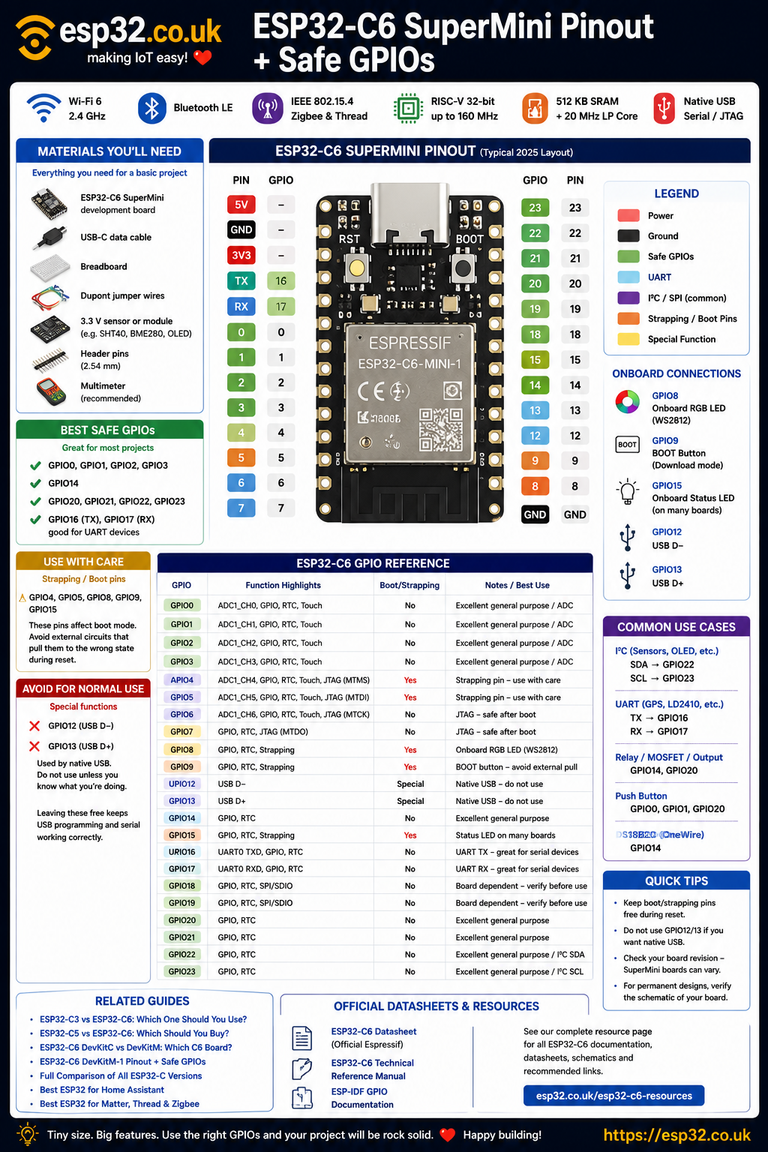
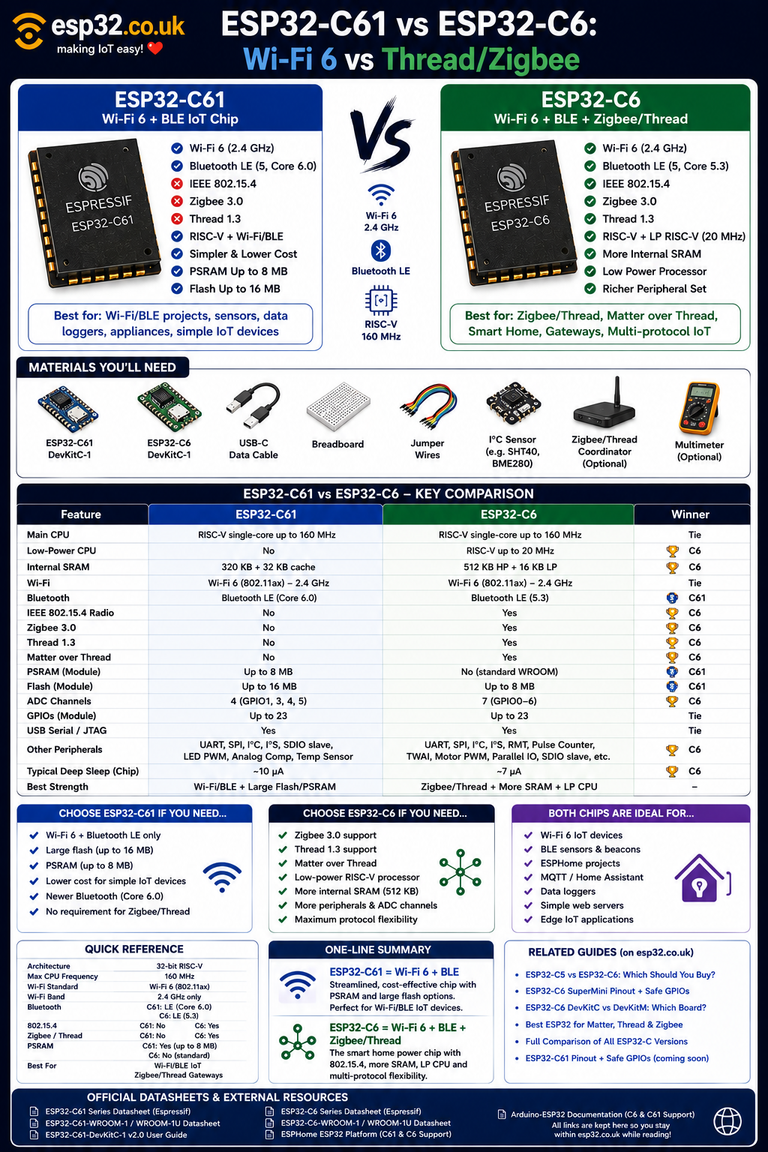
The ESP32-C6 DevKitC-1AliExpress price v1.2 exposes 23 GPIOs across its J1 and J3 headers, but they are not all equally convenient. For ordinary digital I/O, the lowest-conflict choices are GPIO0, GPIO1, GPIO2, GPIO3, GPIO10, GPIO11 and GPIO18–23. GPIO4, 5, 8, 9 and 15 are strapping pins; GPIO12/13 serve native USB; GPIO16/17 connect to the USB-to-UART bridge; and GPIO6/7 also carry JTAG and LP-I2C functions.
This guide gives the corrected v1.2 header order, safe-pin guidance and working mappings for ADC, I²C, SPI, UART and the onboard RGB LEDAliExpress price. The pin tables were checked against Espressif’s current DevKitC-1 guide and ESP32-C6AliExpress price datasheet in September 2026.
Quick ESP32-C6 DevKitC-1 pin summary
| Purpose | Recommended pins | Important caveat |
|---|---|---|
| General digital I/O | GPIO0–3, 10, 11, 18–23 | Lowest-conflict group for typical projects |
| I²C example | SDA GPIO6, SCL GPIO7 | Explicitly configure them; they also have JTAG/LP-I2C functions |
| SPI2 example | SCLK 6, MISO 2, MOSI 7, CS 10 | CS uses the GPIO matrix to avoid GPIO16, which is connected to UART0 TX |
| ADC | GPIO0–6 | Seven ADC1 channels; GPIO7 is not an ADC pin |
| UART0 | TX GPIO16, RX GPIO17 | Connected to the onboard USB-to-UART bridge |
| Native USB | D− GPIO12, D+ GPIO13 | Reserve both while using USB Serial/JTAG |
| Onboard RGB LED | GPIO8 | GPIO8 is also a strapping pin |
Identify the correct board first
The ESP32-C6-DevKitC-1AliExpress price is the larger official board built around an ESP32-C6AliExpress price-WROOM-1 or WROOM-1U module with 8 MB SPI flash. It has two USB-C connectors: one native ESP32-C6 port and one USB-to-UART port.
Do not use an ESP32-C6-DevKitM-1 diagram for this board. The smaller DevKitM-1 uses a different module and header layout. Check the name printed on the PCB and the connector arrangement before wiring anything.
Board overview
- Module: ESP32-C6-WROOM-1 with PCB antenna or WROOM-1U with external-antenna connector
- Wireless: 2.4 GHz Wi-Fi 6, Bluetooth LE and IEEE 802.15.4 for Zigbee or Thread
- Processor: single-core 32-bit RISC-V CPU up to 160 MHz plus a low-power RISC-V core
- Flash: 8 MB on the official v1.2 board
- USB: native USB Serial/JTAG port plus a separate USB-to-UART port
- RGB LED: addressable LED driven by GPIO8
- Power: USB-C, 5V/GND headers or 3V3/GND headers
- Current measurement: J5 disconnects the module supply for an ammeter
The ESP32-C6 GPIOs operate in the 3.3 V domain and are not 5 V tolerant. Use a divider or level shifter for 5 V signals.
Correct J1 and J3 header pinout
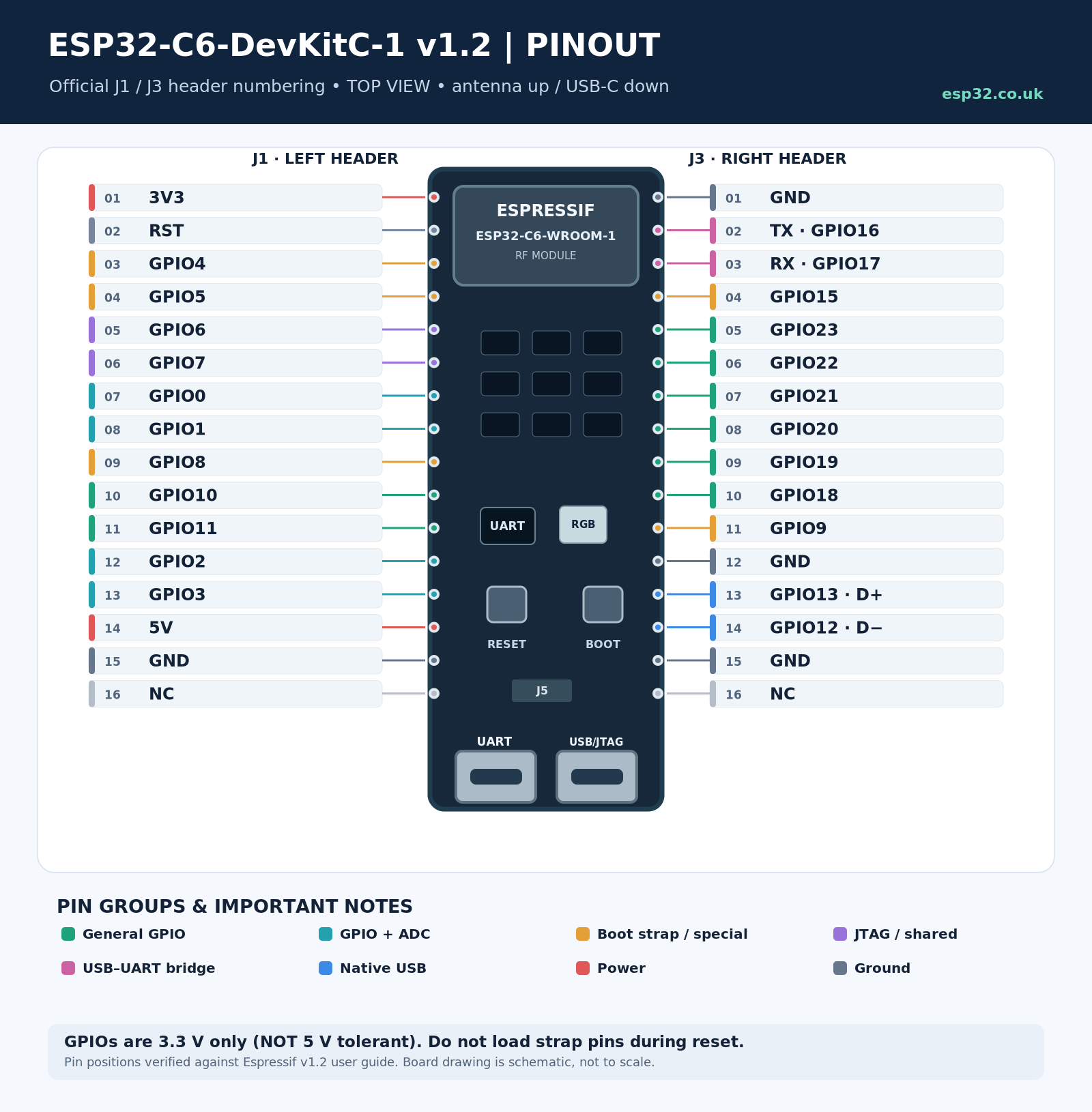
The following order is copied from the official DevKitC-1 v1.2 header tables. J1 and J3 each have 16 physical positions; there is no extra reserved J1 position between RST and GPIO4.
J1 header
| J1 position | Label | Main functions |
|---|---|---|
| 1 | 3V3 | 3.3 V supply |
| 2 | RST | High enables the chip; low resets/disables it |
| 3 | GPIO4 | MTMS, LP_GPIO4, LP_UART_RXD, ADC1_CH4, FSPIHD |
| 4 | GPIO5 | MTDI, LP_GPIO5, LP_UART_TXD, ADC1_CH5, FSPIWP |
| 5 | GPIO6 | MTCK, LP_GPIO6, LP_I2C_SDA, ADC1_CH6, FSPICLK |
| 6 | GPIO7 | MTDO, LP_GPIO7, LP_I2C_SCL, FSPID |
| 7 | GPIO0 | LP_GPIO0, ADC1_CH0, optional 32.768 kHz crystal input |
| 8 | GPIO1 | LP_GPIO1, ADC1_CH1, optional 32.768 kHz crystal input |
| 9 | GPIO8 | Strapping pin and onboard RGB LED |
| 10 | GPIO10 | General-purpose I/O |
| 11 | GPIO11 | General-purpose I/O |
| 12 | GPIO2 | LP_GPIO2, ADC1_CH2, FSPIQ |
| 13 | GPIO3 | LP_GPIO3, ADC1_CH3 |
| 14 | 5V | 5 V supply |
| 15 | GND | Ground |
| 16 | NC | Not connected |
J3 header
| J3 position | Label | Main functions |
|---|---|---|
| 1 | GND | Ground |
| 2 | GPIO16 / TX | U0TXD, FSPICS0 |
| 3 | GPIO17 / RX | U0RXD, FSPICS1 |
| 4 | GPIO15 | Strapping pin |
| 5 | GPIO23 | SDIO_DATA3 |
| 6 | GPIO22 | SDIO_DATA2 |
| 7 | GPIO21 | SDIO_DATA1, FSPICS5 |
| 8 | GPIO20 | SDIO_DATA0, FSPICS4 |
| 9 | GPIO19 | SDIO_CLK, FSPICS3 |
| 10 | GPIO18 | SDIO_CMD, FSPICS2 |
| 11 | GPIO9 | Strapping pin and BOOT button |
| 12 | GND | Ground |
| 13 | GPIO13 | USB D+ |
| 14 | GPIO12 | USB D− |
| 15 | GND | Ground |
| 16 | NC | Not connected |
Safe GPIOs and shared-function pins
“Safe” is contextual: the same pin can be ordinary GPIO after boot but still conflict with a debugger, USB connection or boot-time strap. For a basic ESP32-C6 sensor or relay project, use this priority order.
| Group | GPIOs | How to use them |
|---|---|---|
| Lowest conflict | 0, 1, 2, 3, 10, 11, 18, 19, 20, 21, 22, 23 | Best starting pool for ordinary digital I/O |
| Usually usable | 6, 7 | Convenient for I²C/SPI, but also JTAG and LP-I2C pins |
| UART bridge | 16, 17 | Keep for UART0 if you flash or monitor through the UART USB-C port |
| Native USB | 12, 13 | Keep free while using the native USB-C port |
| Strapping/special | 4, 5, 8, 9, 15 | Avoid external circuits that force their level during reset |
GPIO18–23 also carry SDIO-related functions, but they remain available as normal GPIO when SDIO is not used. GPIO0 and GPIO1 can connect to an optional low-frequency crystal; on the standard DevKitC-1 they are available at the header.
Strapping pins and boot problems
The ESP32-C6 strapping pins are GPIO4, GPIO5, GPIO8, GPIO9 and GPIO15. Their levels are sampled at reset, then the pins become normal I/O.
- GPIO8 and GPIO9: determine the boot mode. GPIO9 is normally pulled high; the BOOT button pulls it low for download mode.
- GPIO4 and GPIO5: MTMS and MTDI straps influence SDIO sampling and driving behaviour.
- GPIO8: also influences UART0 ROM-message output and drives the onboard RGB LED.
- GPIO15: participates in selecting the JTAG signal source.
You can use these pins after startup, but avoid strong pull-ups, pull-downs, large capacitors or peripherals that actively drive them while the board resets. If the board suddenly stops booting after you attach a sensor, disconnect the circuit from GPIO4, 5, 8, 9 and 15 first.
ADC pins and input voltage
The ESP32-C6 has one 12-bit SAR ADC with seven channels on GPIO0 through GPIO6:
| GPIO | ADC channel | Pin note |
|---|---|---|
| 0 | ADC1_CH0 | Low-conflict choice |
| 1 | ADC1_CH1 | Low-conflict choice |
| 2 | ADC1_CH2 | Low-conflict choice and SPI2 MISO IO_MUX |
| 3 | ADC1_CH3 | Low-conflict choice |
| 4 | ADC1_CH4 | Strapping/JTAG pin |
| 5 | ADC1_CH5 | Strapping/JTAG pin |
| 6 | ADC1_CH6 | JTAG, LP-I2C and SPI clock functions |
GPIO7 is not an ADC channel on ESP32-C6. Do not convert a raw ADC value with a simple raw × 3.3 / 4095 formula and assume it is accurate: attenuation, calibration and chip variation matter. On recent calibrated devices, the highest attenuation setting covers an effective range up to about 3.3 V, but the pin is still not 5 V tolerant.
const int ADC_PIN = 3;

void setup() {
  Serial.begin(115200);
}

void loop() {
  uint32_t millivolts = analogReadMilliVolts(ADC_PIN);
  Serial.printf("ADC = %lu mV\n", (unsigned long)millivolts);
  delay(500);
}
Onboard RGB LED on GPIO8
The DevKitC-1 uses GPIO8 to drive its addressable RGB LED. The board circuit is designed around the strap function, but avoid attaching another heavy load to GPIO8.
#include <Adafruit_NeoPixel.h>

Adafruit_NeoPixel rgb(1, 8, NEO_GRB + NEO_KHZ800);

void setup() {
  rgb.begin();
  rgb.setPixelColor(0, rgb.Color(0, 40, 0));
  rgb.show();
}
Native USB versus USB-to-UART
The ESP32-C6-DevKitC-1 has two USB-C ports that serve different hardware paths.
- USB-to-UART port: connects through the onboard bridge to UART0 on GPIO16 TX and GPIO17 RX. Use it for conventional flashing and serial monitoring.
- Native ESP32-C6 USB port: connects directly to GPIO12 D− and GPIO13 D+. It provides full-speed USB Serial/JTAG for flashing, console output and JTAG debugging.
The ESP32-C6 native peripheral is USB Serial/JTAG; it is not the general-purpose USB OTG peripheral found on chips such as ESP32-S2 or ESP32-S3. Do not promise HID or arbitrary USB-device support from this port. GPIO12 and GPIO13 can be reconfigured as GPIO, but doing so takes them away from USB Serial/JTAG.
I²C pin mapping
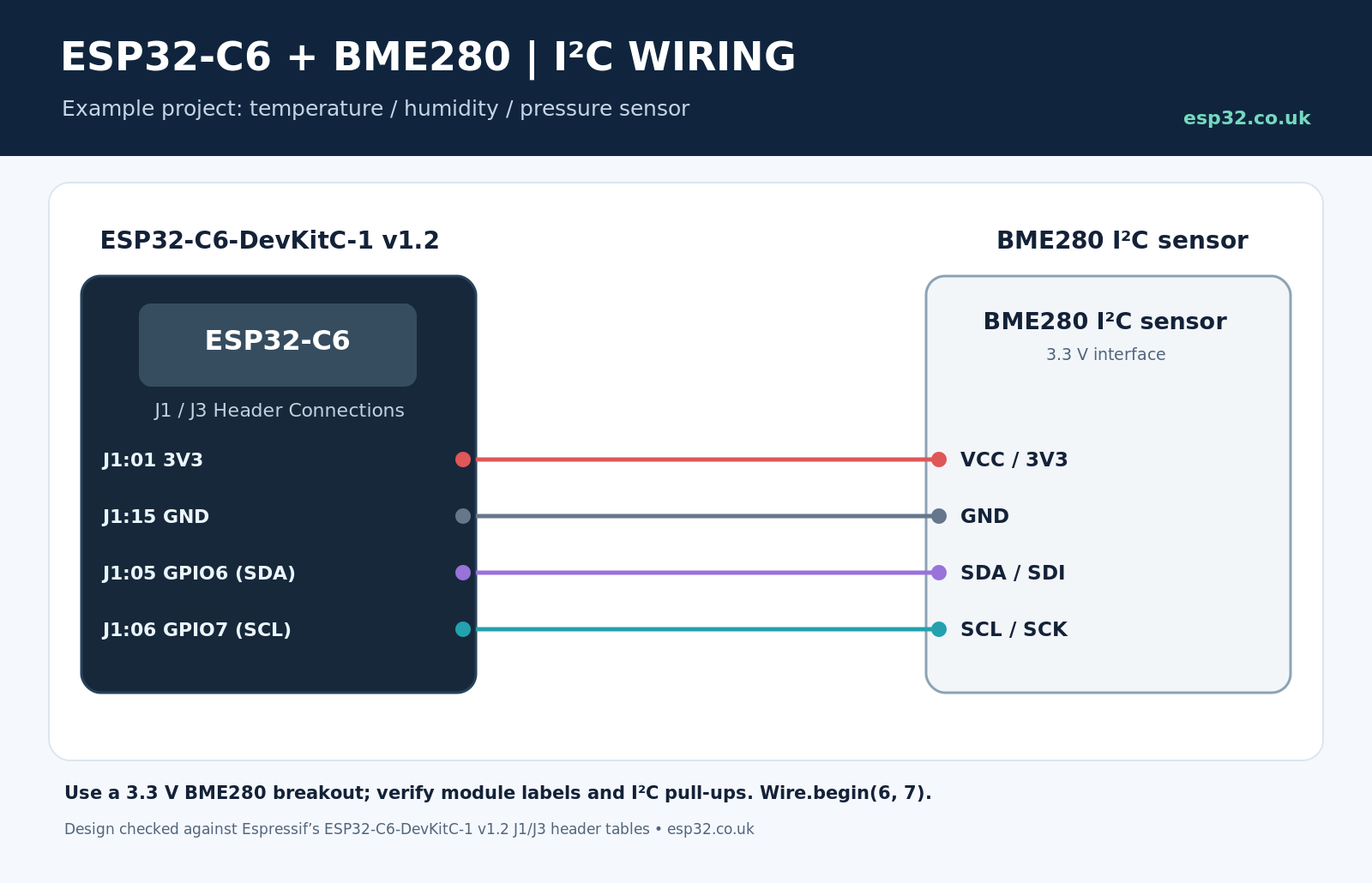
ESP32-C6 peripheral signals can be routed through the GPIO matrix, so there is no single compulsory I²C pair for every framework. GPIO6 and GPIO7 are a convenient explicit choice because the header also identifies their LP-I2C functions.
#include <Wire.h>

void setup() {
  Wire.begin(6, 7);  // SDA, SCL
  Serial.begin(115200);
}
If you need the JTAG pad functions on GPIO4–7, move I²C to another free pair such as GPIO0 and GPIO1 and configure it explicitly.
SPI pin mapping
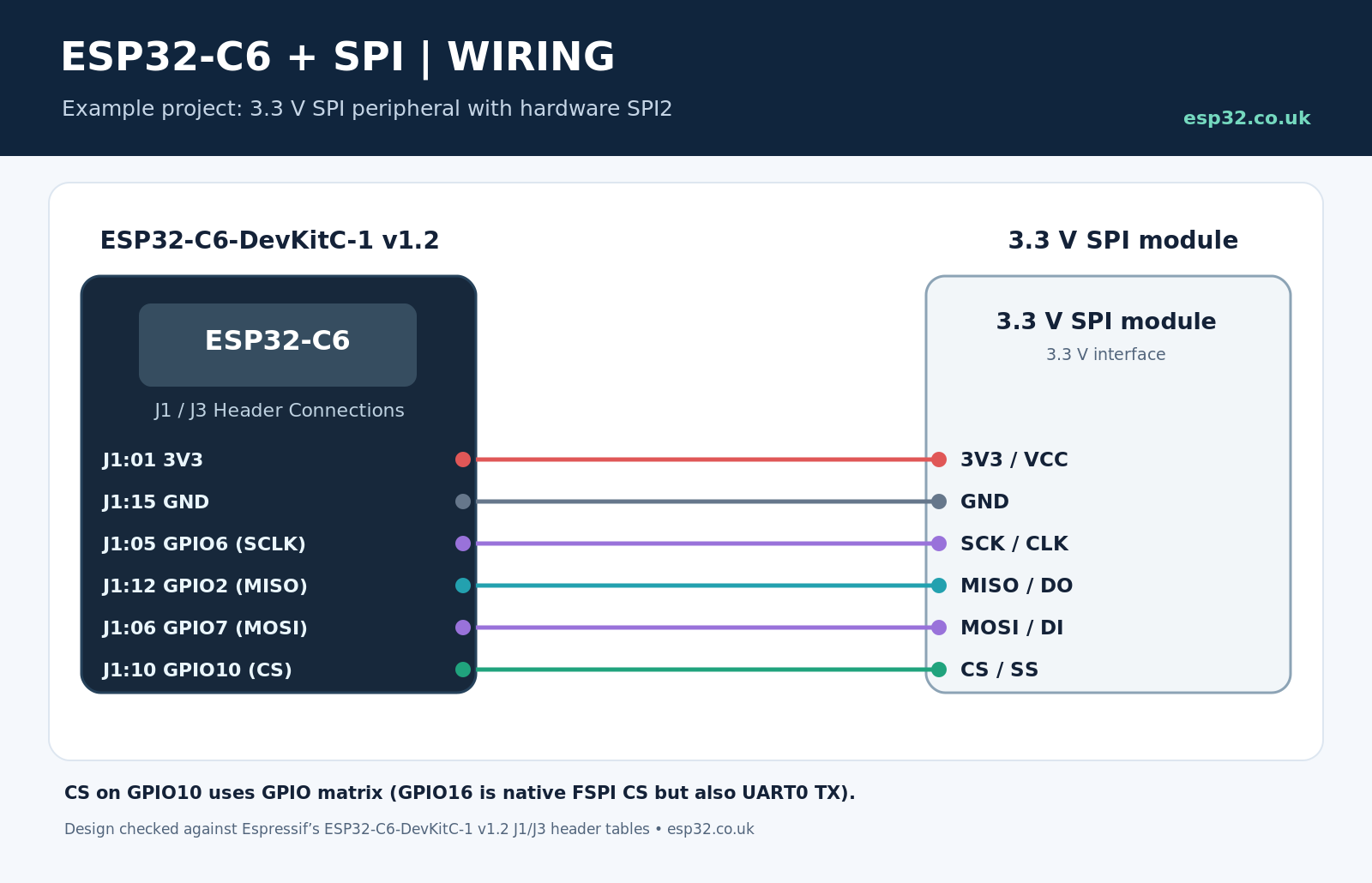
For SPI2, Espressif lists the direct IO_MUX pins as SCLK GPIO6, MISO GPIO2, MOSI GPIO7 and CS0 GPIO16. GPIO5 and GPIO4 provide optional QUADWP and QUADHD signals. Since GPIO16 is connected to the board’s USB-to-UART bridge, the practical example below uses GPIO10 as a remapped chip-select instead. GPIO10 is not the direct FSPICS0 pin.
#include <SPI.h>

void setup() {
  SPI.begin(6, 2, 7, 10);  // SCLK, MISO, MOSI, SS (remapped CS)
}
You may remap SPI signals through the GPIO matrix. Espressif states that at 40 MHz or below, a matrix-routed SPI bus behaves the same as an IO_MUX-routed bus for this purpose. Choose a separate free GPIO as chip select for each additional device.
UART pin mapping
UART0 appears on GPIO16 TX and GPIO17 RX and is connected to the onboard USB-to-UART bridge. Keep that pair available if you rely on the UART USB-C connector for logs. Other UART signals can be routed to free pins.
HardwareSerial Serial1(1);

void setup() {
  Serial.begin(115200);
  Serial1.begin(9600, SERIAL_8N1, 19, 18); // RX, TX
}
Powering the board and measuring current
- For normal development, power the board through either USB-C connector.
- Alternatively, use the 5V and GND header pins or a regulated 3.3 V supply on 3V3 and GND.
- Treat the header-supply methods as alternatives; do not feed unrelated supplies into 5V and 3V3 simultaneously.
- To measure module current, remove the J5 jumper and place an ammeter across J5.
When powering through the 3V3 header for current measurement, Espressif specifically instructs users to remove the J5 jumper. A bare module’s deep-sleep figure is not the same as complete development-board consumption because the regulator, bridge and LEDs add load.
Practical sensor-node pin plan
A simple ESP32-C6 Wi-Fi, Thread or Zigbee sensor can use the following mapping without occupying native USB:
| Function | GPIO | Reason |
|---|---|---|
| I²C SDA | 6 | Convenient explicit I²C mapping |
| I²C SCL | 7 | Convenient explicit I²C mapping |
| Analog sensor | 0 | ADC1_CH0 and no strap |
| Digital input | 2 | Low-conflict GPIO |
| Digital output | 10 | Low-conflict GPIO |
| Status LED | 8 | Uses the onboard RGB LED only |
| UART console | 16/17 | Retains the USB-to-UART bridge |
This leaves GPIO12/13 free for native USB and avoids adding external loads to the boot-sensitive pins.
Troubleshooting common pinout problems
The board will not boot
Disconnect external circuits from GPIO4, 5, 8, 9 and 15. Pay particular attention to GPIO9: holding it low at reset selects download mode.
The PC does not detect USB
Use a data-capable cable and confirm which USB-C port you connected. The UART port uses the bridge; the native port uses USB Serial/JTAG on GPIO12/13. A charging-only cable powers the board but carries no data.
The header numbers do not match the diagram
Check whether the PCB says DevKitC-1 or DevKitM-1. They are different boards. On DevKitC-1 v1.2, J1 position 3 is GPIO4 and J1 ends at position 16.
ADC readings are inaccurate
Use GPIO0–6 only, select suitable attenuation, keep the source impedance reasonable, add local filtering where needed and use the calibrated millivolt API. GPIO7 is not ADC-capable.
ESP32-C6 DevKitC-1 FAQ
Which GPIOs are safest?
Start with GPIO0, 1, 2, 3, 10, 11 and 18–23. GPIO6/7 are also practical when you do not need their JTAG functions. Reserve 12/13 for native USB and 16/17 for the UART bridge.
Which pins affect boot?
GPIO4, GPIO5, GPIO8, GPIO9 and GPIO15 are strapping pins. GPIO8 and GPIO9 directly control boot mode, with GPIO9 also connected to the BOOT button.
How many ADC pins are available?
Seven: GPIO0 through GPIO6, corresponding to ADC1_CH0 through ADC1_CH6.
Does ESP32-C6 support Zigbee and Thread?
Yes. The chip includes an IEEE 802.15.4 radio supporting Zigbee 3.0 and Thread 1.3. The application still needs the appropriate firmware stack; the radio alone does not make a finished coordinator or border router.
Are the GPIOs 5 V tolerant?
No. Use level shifting or a resistor divider where appropriate.
Final pin recommendation
For the ESP32-C6-DevKitC-1 v1.2, begin with GPIO0–3, 10, 11 and 18–23 for general I/O. Use GPIO6/7 deliberately for I²C or SPI, keep GPIO12/13 for native USB, retain GPIO16/17 for the UART bridge, and treat GPIO4, 5, 8, 9 and 15 as boot-sensitive. Most wiring failures disappear once those five groups are kept separate.