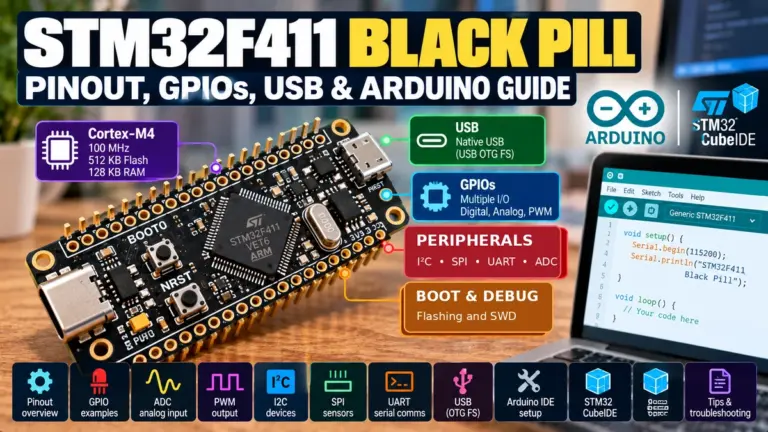
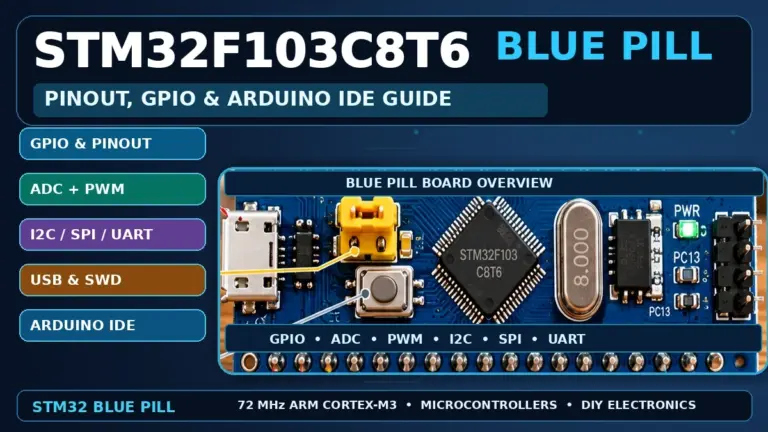
If you are choosing between an STM32 Blue PillAliExpress price and the classic Arduino NanoAliExpress price, the right answer depends less on the advertised clock speed and more on what you want to learn. The Nano starts quickly: connect its USB cable, select the board and serial port in Arduino IDE, and upload Blink. The Blue PillAliExpress price offers considerably more RAM, faster 32-bit processing, a higher-resolution ADC and sophisticated timers—but usually needs an external programmer for its first upload and requires more attention to its 3.3 V electrical limits.
Quick verdict: Buy a classic Arduino Nano (ATmega328P) if this is your first microcontroller, you want to follow beginner Arduino tutorials, or your existing peripherals expect 5 V logic. Choose a genuine STM32F103C8 Blue Pill if you are ready to learn SWD debugging, hardware timers, DMA, Cortex-M interrupts or classic CAN and you accept the extra toolchain work. Neither board includes Wi-Fi, and neither is a drop-in replacement for the other.
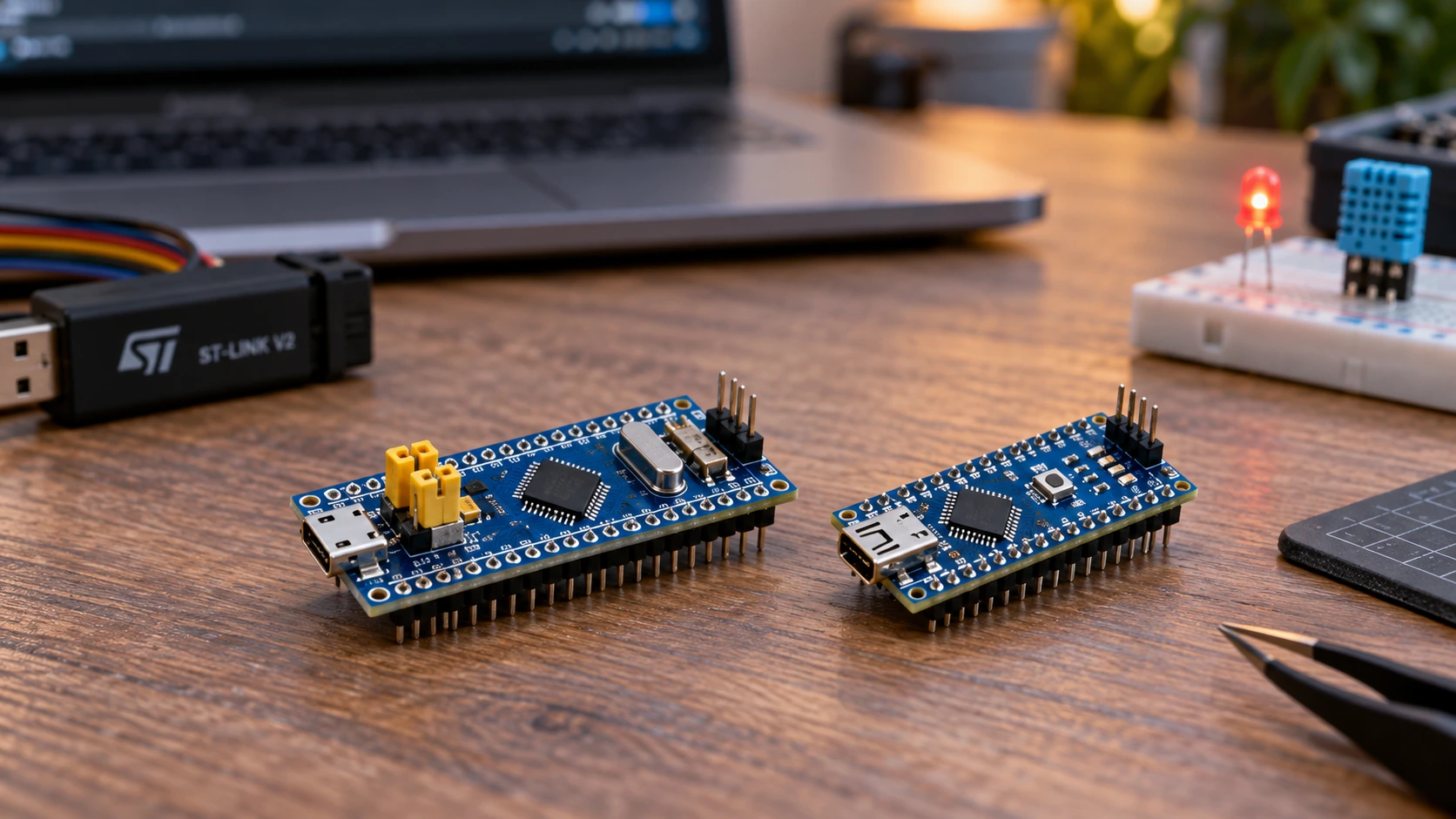
This comparison is specifically for a typical STM32F103C8T6 Blue Pill and the Arduino Nano 3.x with ATmega328P at 16 MHz. The modern Nano family also includes Nano Every, Nano R4 and other substantially different boards. Cheap third-party Nano and Blue Pill variants can have different USB interfaces, regulators, crystals and even microcontroller markings. Always inspect your actual board before following a pin diagram.
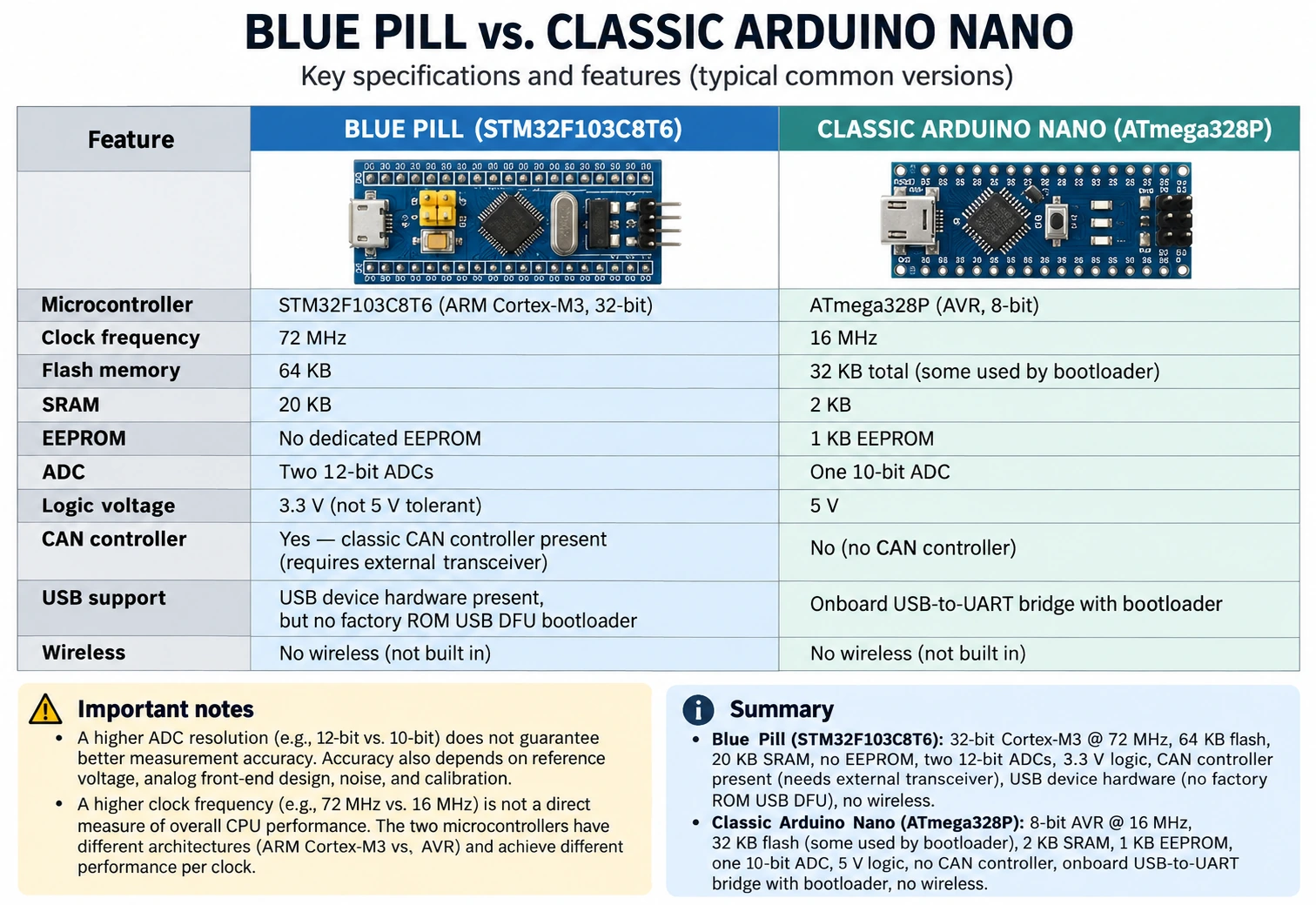
Blue Pill vs Arduino Nano: specifications at a glance
| Feature | STM32 Blue Pill (STM32F103C8T6) | Classic Arduino Nano (ATmega328P) |
|---|---|---|
| CPU | 32-bit Arm Cortex-M3 | 8-bit AVR |
| Nominal maximum CPU clock | 72 MHz | 16 MHz |
| Internal flash | 64 KB on genuine F103C8 | 32 KB total; bootloader occupies some |
| SRAM | 20 KB | 2 KB |
| EEPROM | No dedicated EEPROM array | 1 KB hardware EEPROM |
| ADC | Two 12-bit ADC units; pin channels depend on package | One 10-bit ADC, eight analog inputs on Nano package |
| DAC | No true DAC | No true DAC |
| PWM | Several hardware timers, including advanced-control timer | Six familiar PWM pins: D3, D5, D6, D9, D10, D11 |
| GPIO voltage | 3.3 V design; only marked FT digital inputs can be 5 V tolerant under conditions | Nominally 5 V logic at 5 V VCC |
| USB hardware | MCU has USB FS peripheral, but factory ROM does not offer USB DFU | USB-to-serial interface on board for bootloader uploading |
| First-time programming | Commonly external ST-LINK/SWD; UART factory bootloader alternative | Standard USB cable and Arduino IDE |
| Native CAN controller | Yes, classic CAN 2.0; external transceiver required | No; external CAN controller and transceiver needed |
| I²C and SPI | Hardware I²C and SPI, pins can be remapped on F103 | Hardware I²C and SPI with familiar Arduino naming |
| Wireless connectivity | None onboard | None onboard |
| Ideal learner | Comfortable troubleshooting hardware, wants deeper embedded control | First projects, sensors, educational kits, minimal setup |
Important: The Blue Pill is not 4.5 times faster at every task merely because 72 ÷ 16 = 4.5. Cortex-M3 and AVR run different instruction sets and have different memory, timer and interrupt architectures. Likewise, a 12-bit ADC has four times as many output codes as a 10-bit ADC, not automatically four times the real accuracy.
Why the Arduino Nano is easier on day one
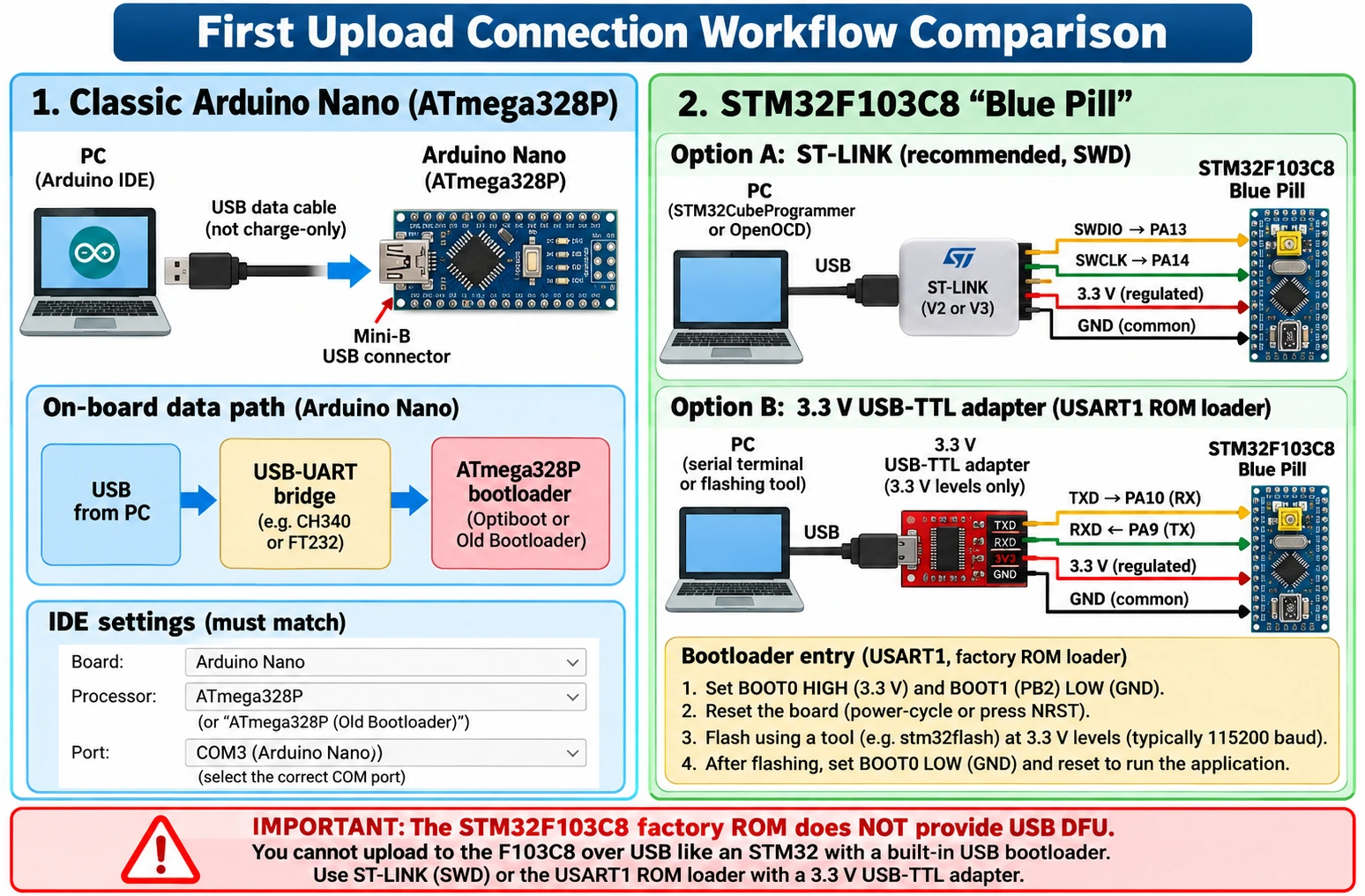
On a conventional Nano, the processor’s programming serial interface is already connected through a USB-to-UART chip. The board normally has an AVR bootloader, so a compatible data USB cable, Arduino IDE 2 and the correct board/port selection are enough to upload a first example. There is no separate debugger cable to map or BOOT0 jumper to change.
In the IDE, open Tools → Board → Arduino AVR Boards → Arduino Nano and choose the enumerated serial port. Under Tools → Processor, use ATmega328P for recent official Nano boards. If an older or third-party Nano fails at the upload handshake, try ATmega328P (Old Bootloader). Arduino documents this difference: boards sold before 2018 often use the older bootloader. Do not assume every low-cost Nano uses the same USB chip or bootloader.
A conventional Nano also matches hundreds of introductory tutorials, shields, breadboard diagrams and library examples. The Arduino API is deliberately simple: pinMode(), digitalRead(), analogRead(), Serial.begin() and delay() form a useful first toolkit. It is possible to use the same style of code on the Blue Pill, but setup is not identical and some board-specific libraries assume AVR registers or 5 V signals.
Nano first sketch: blink its built-in LED
On the classic Nano, the onboard user LED is connected to D13, typically active HIGH. This tiny program works without external wiring:
// Classic Arduino Nano / ATmega328P
void setup() {
  pinMode(LED_BUILTIN, OUTPUT);  // Nano LED is on D13
}

void loop() {
  digitalWrite(LED_BUILTIN, HIGH);
  delay(500);
  digitalWrite(LED_BUILTIN, LOW);
  delay(500);
}
Upload through the board’s USB serial port. If it says avrdude: stk500_recv(): programmer is not responding, do not immediately conclude the ATmega328P is defective. First check that you selected Nano, the correct port and the appropriate processor/bootloader option; close any serial terminal that has the port open; verify that the cable carries data rather than only power.
Why the Blue Pill is a powerful learning platform
The Blue Pill typically carries the STM32F103C8T6, a 32-bit Cortex-M3 with 64 KB flash, 20 KB SRAM and a maximum 72 MHz core clock. The processor has multiple timers, DMA channels, USB full-speed hardware, two 12-bit ADC units, hardware serial interfaces and a classic CAN controller. These are capabilities of the MCU; the inexpensive board does not automatically populate everything required by each interface.
That feature set provides a natural progression beyond blinking LEDs. You can learn hardware-triggered ADC sampling, capture a pulse width with a timer, configure an interrupt, stream sensor data via DMA or drive deterministic PWM without software delay loops. You can also inspect registers and memory through SWD and STM32CubeIDE instead of guessing what happened after a failed serial print.
The catch is the initial programming workflow. Most Blue Pill boards expose PA13/SWDIO, PA14/SWCLK, GND and 3.3 V for an external ST-LINK probe. The STM32F103C8 factory bootloader also supports programming over USART1 (PA9 TX and PA10 RX) when the BOOT0/BOOT1 selection enters system memory. Its built-in USB device peripheral does not mean a factory USB DFU uploader is available through the board’s Micro-USB socket.
If these terms are unfamiliar, use our STM32 for beginners guide, then follow Blue Pill programming with ST-LINK. Our STM32 BOOT0 guide explains the alternative UART factory-loader path.
Blue Pill first sketch: the LED works backwards
Many Blue Pill boards connect their user LED to PC13 in an active-LOW configuration. Writing LOW turns the LED on; writing HIGH turns it off. In Arduino IDE 2 with the official STM32duino board core and a correctly selected F103C8 target, a representative sketch is:
// STM32F103C8 Blue Pill, official STM32duino core
// Assumes the common active-LOW user LED on PC13.
void setup() {
  pinMode(PC13, OUTPUT);
  digitalWrite(PC13, HIGH);  // LED off on common boards
}

void loop() {
  digitalWrite(PC13, LOW);   // LED on
  delay(500);
  digitalWrite(PC13, HIGH);  // LED off
  delay(500);
}
This code is intentionally simple, but it still needs a valid Blue Pill upload method. A standard fresh F103C8 board will not accept a sketch merely because its Micro-USB cable is attached. Use ST-LINK (SWD) with STM32CubeProgrammer available to the STM32duino tooling, or configure a supported UART upload route. A custom USB bootloader is a separate software installation and should never be described as factory functionality.
Some clones label the LED differently or use a different polarity. A board test is not complete until its actual circuit agrees with the assumed LED pin and the programmer reports a successful flash and verify.
Arduino IDE on both boards: similar editor, different setup
If you want to remain in one editor, Arduino IDE 2 can target both platforms, but the board support packages are different. The Nano uses the official Arduino AVR Boards package, while the Blue Pill uses STM32 MCU based boards from the STM32duino project. Add the current STM32duino package URL to IDE Preferences → Additional Boards Manager URLs:
https://github.com/stm32duino/BoardManagerFiles/raw/main/package_stmicroelectronics_index.json
Install the STM32 core, identify the correct Generic STM32F1 series / F103C8 target option offered by the installed package and select the appropriate upload method. UI labels change with core versions, so check the currently installed STM32duino package’s board menu. The package is based on ST’s HAL/LL drivers and supports Arduino-style calls without making the underlying MCU equivalent to AVR.
| Step | Classic Nano | Blue Pill |
|---|---|---|
| Install IDE | Arduino IDE 2 | Arduino IDE 2 |
| Add board core | Arduino AVR Boards | STM32 MCU based boards (STM32duino) |
| Board selection | Arduino Nano, ATmega328P | Generic F103C8-compatible STM32F1 target |
| Connect first program | Data USB → onboard USB-UART → AVR bootloader | ST-LINK → SWD, or serial ROM bootloader with correct BOOT0 state |
| Common upload failure | Wrong old/new bootloader, wrong COM port, busy serial port | Missing ST-LINK/target supply, swapped SWD signals, wrong mode, clone MCU |
| More advanced debugging | Extra AVR programmer/debug tools | Full SWD with breakpoints/watchpoints through STM32 tooling |
The IDE’s familiar menu does not remove the electrical differences. A sketch written for a 5 V Nano motor shield may compile on an STM32 and still be unsafe to wire directly. That is a hardware migration, not simply a change of board selection.
GPIO pinout: do not translate Nano pin names directly
The Arduino Nano has a well-established community convention: D0/D1 are hardware UART RX/TX, A4 is SDA and A5 is SCL for I²C, and SPI commonly uses D10/D11/D12/D13 (SS/MOSI/MISO/SCK). A6 and A7 on the classic Nano are analog-input-only, not general digital GPIO, although they are exposed as additional analog inputs on the small package.
The STM32F103C8 names its physical MCU signals as PA0, PA1, PB6 and so on. PA9/PA10 are common USART1 TX/RX signals, PB6/PB7 are default I²C1 SCL/SDA signals, and PA5/PA6/PA7 are common SPI1 SCK/MISO/MOSI signals. F103 alternate-function remapping exists, but a remapped peripheral may conflict with debugging pins, other peripherals or board wiring.
| Function | Nano ATmega328P example | Blue Pill STM32F103C8 example | What to verify |
|---|---|---|---|
| LED | D13, usually active HIGH | PC13, commonly active LOW | Board revision and LED resistor |
| External analog input | A0 (0–5 V at 5 V reference) | PA0 / ADC1_IN0 (0–VDDA) | Actual reference and safe signal voltage |
| UART TX/RX | D1 TX / D0 RX | PA9 USART1_TX / PA10 USART1_RX | UART logic-level compatibility |
| I²C SCL/SDA | A5 SCL / A4 SDA | PB6 I²C1_SCL / PB7 I²C1_SDA | Pull-ups and power domains |
| SPI SCK/MISO/MOSI | D13 / D12 / D11 | PA5 / PA6 / PA7 | Chip-select and any remapping |
| SWD debugging | Not available as Arm SWD | PA13 SWDIO / PA14 SWCLK | External ST-LINK and shared ground |
| Classic CAN | Needs extra CAN controller and transceiver | Native bxCAN controller; still needs transceiver | CAN_TX/CAN_RX remap and bus termination |
These are MCU signal names, not a photo-based guarantee that a particular generic board exposes them at the same physical header positions. Use the exact board pinout and verify its silkscreen. For the Blue Pill, prioritize the real MCU marking and datasheet over unverified store images.
5 V Nano versus 3.3 V Blue Pill: the safety decision
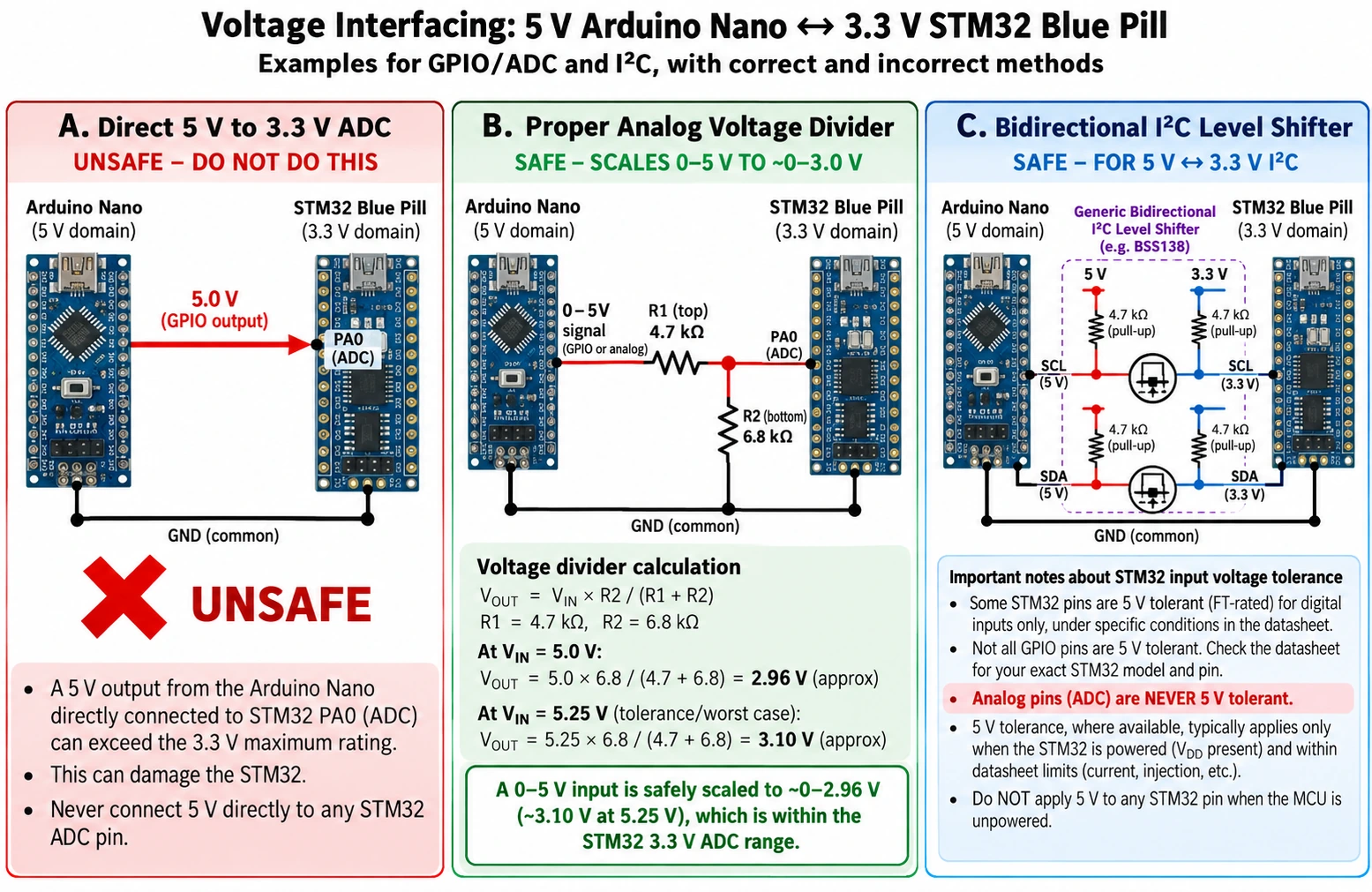
This is the single most important wiring distinction. The Nano’s ATmega328P normally operates from a 5 V supply and drives digital outputs close to 5 V. The STM32F103C8 is a 2.0–3.6 V-powered MCU whose normal GPIO logic and ADC reference are around 3.3 V on the Blue Pill. Never use the Nano’s 5 V signal as a blanket permission to drive every STM32 pin.
Some STM32F103C8 pads are marked FT, meaning 5 V tolerant when the datasheet conditions are met. Those conditions include MCU supply state, peripheral function and pin configuration. ADC pins are not 5 V tolerant. For a first mixed-voltage project, it is safer to translate digital lines or design the interface around 3.3 V-compatible sensors, and to use a divider or appropriate analog-conditioning circuit for analog signals.
A useful example is an external analog sensor with a 0–5 V output feeding Blue Pill PA0. A divider with 4.7 kΩ top and 6.8 kΩ bottom gives approximately 5.0 × 6.8 / (4.7 + 6.8) = 2.96 V at the ADC input. At 5.25 V sensor output, the same divider gives approximately 3.10 V. Sensor ground and Blue Pill ground must share a suitable reference. Verify maximum sensor output, resistor tolerances and ADC sampling time before selecting values for a real design; the voltage divider alone is not fault protection.
Do not directly tie a Nano’s 5 V output to a Blue Pill ADC pin. Do not power the STM32 through an arbitrary GPIO. Do not use unverified 5 V I²C pull-ups simply because both devices can speak the I²C protocol. And do not assume that an unpowered STM32 FT pin can tolerate an active 5 V peripheral.
Logic-level compatibility checklist
- Read the exact MCU pin’s FT/non-FT designation, not a generic forum list.
- Confirm both boards’ ground reference and which regulator supplies each device.
- Identify whether the signal is digital input, digital output, open-drain or analog.
- For I²C, inspect pull-up resistors already fitted on sensor breakout boards.
- Confirm the power-up sequence; a powered Nano can back-feed an unpowered STM32.
- Use a level translator, buffer, divider or isolated interface where the signal exceeds the receiving device’s rated limits.
ADC precision: 12-bit versus 10-bit is not the whole story
The Nano’s ATmega328P has a 10-bit ADC. With a stable 5.00 V reference, one ideal output step is about 5 / 1024 = 4.88 mV. The STM32F103C8’s ADC hardware is 12-bit, so with VDDA = 3.30 V the nominal step is about 3.3 / 4096 = 0.806 mV. That is a distinction in resolution, not proof of precision or low noise.
The real measurement depends on VDDA noise, board layout, sensor output impedance, ADC sample time, calibration, thermal drift and the selected input range. The cheap Blue Pill regulator and PCB should not be assumed to provide a metrology-grade analog reference; the Nano’s default AVCC reference is not a laboratory standard either.
STM32duino gotcha: The official STM32duino analogRead() API commonly defaults to a 10-bit return value for Arduino compatibility, even though the STM32F103 ADC hardware is 12-bit. To retrieve the 12-bit reading, request it explicitly before measuring:
// Blue Pill (STM32duino): PA0 is a 3.3 V-range ADC input.
void setup() {
  analogReadResolution(12);  // values 0..4095
  pinMode(PA0, INPUT_ANALOG);
}

void loop() {
  const uint16_t raw = analogRead(PA0);
  const float estimatedVolts = raw * (3.3f / 4095.0f);
  // Send estimatedVolts via a separately configured debug/serial path.
  delay(100);
}
The 3.3f constant assumes the actual analog reference is precisely 3.3 V. Measure VDDA or use a suitable calibration strategy if you need accurate volts rather than a rough estimate. This sketch deliberately avoids assuming that Serial is automatically exposed over the Blue Pill’s Micro-USB connector.
For comparison, the classic Nano can use analogRead(A0) directly, returning nominally 0–1023 by default. The STM32duino API’s analogReadResolution(12) is not part of the standard classic AVR Nano programming pattern, so do not paste that line into an AVR-targeted sketch without checking support.
PWM, interrupts and hardware timers
Both boards can fade LEDs or drive an external transistor using timer-generated pulse-width modulation. On a classic Nano, the familiar PWM outputs are D3, D5, D6, D9, D10 and D11; Arduino’s analogWrite(pin, value) convention supplies an 8-bit duty parameter. Different AVR timers produce different default PWM frequencies, which matters for audio, motors and LED flicker.
The STM32F103C8 provides multiple timer channels and additional facilities such as input capture, quadrature-encoder measurement, dead-time generation on the advanced timer and DMA support for data movement. An STM32duino analogWrite() call can be convenient, but on the Blue Pill you should choose a verified timer-capable pin and be sure that the selected timer channel is not reserved for a conflicting function.
For a genuine timer-driven motor project, do not base the design only on analogWrite() working once. Calculate timer clock, prescaler, auto-reload, compare value and output polarity. If using an H-bridge, verify dead time and emergency shutdown requirements. Neither Nano nor Blue Pill GPIO should power a motor directly; use a properly rated driver, flyback protection for inductive loads and an independent motor supply where appropriate.
The STM32’s advantage is not merely a larger number of PWM pins. It is the ability to coordinate ADC triggers, timers, DMA and interrupts on the same microcontroller. That makes it a particularly good second board after learning the Arduino basics.
CAN bus: Blue Pill has a controller, Nano needs more hardware
If your project involves a vehicle, industrial CAN network or a bench CAN simulator, the boards are not equivalent. The STM32F103C8 has a bxCAN classic CAN controller supporting CAN 2.0; however, its MCU pins do not produce the differential CAN_H/CAN_L physical bus signals. You still need an external CAN transceiver with compatible supply and logic levels, appropriate bus termination at the physical ends and sensible EMC protection.
The ATmega328P has no built-in CAN controller. A typical Arduino Nano implementation needs an external SPI CAN controller, such as MCP2515, plus a CAN transceiver. Some breakout modules contain both, so inspect the module’s schematic before counting chips or assuming voltages. A popular 5 V module may not be electrically suitable for direct connection to a 3.3 V Blue Pill.
Neither the classic Nano nor STM32F103C8 implements CAN FD natively. A CAN FD requirement implies a different microcontroller or external CAN FD controller and a compatible transceiver. For a first CAN project, consider a known-good two-node bus on a desk before touching live vehicle wiring. Keep CAN bus experiments off safety-critical vehicle networks.
USB: same connector shape does not mean the same workflow
USB is a recurring source of confusion because the visible cable reveals little about what is happening internally. The classic Nano’s Mini-B connector normally feeds a USB-to-serial converter that talks to an AVR bootloader. It does not mean the ATmega328P itself implements USB device firmware, CDC or HID. A Nano sketch uses the hardware UART routed via the bridge for a serial monitor.
The Blue Pill’s Micro-USB connector, by contrast, is typically routed to the STM32F103’s USB peripheral on PA11 (D−) and PA12 (D+). But a blank factory F103C8 does not automatically enumerate as a USB mass-storage programmer or ROM DFU target. To expose CDC serial, HID or another USB class, the firmware and clock configuration must provide it. The Blue Pill’s widely documented USB D+ pull-up resistor issue can additionally prevent reliable enumeration on some clones.
The USB cable may be useful for powering the board; it is not a substitute for verifying bootloader support. The Blue Pill is usually programmed first using an external ST-LINK. Follow our separate CubeProgrammer SWD, UART and USB guide and Blue Pill USB troubleshooting guide before assuming a broken connector.
Memory limits and large Arduino libraries
A Nano’s 2 KB SRAM is often its first real constraint. A few large arrays, long strings, nested library buffers and formatted text can use it quickly. For example, a 128 × 64 monochrome framebuffer needs 128 × 64 / 8 = 1024 bytes of storage—half the Nano’s RAM before stacks and communication buffers. A display library that reserves that buffer may leave little memory for the rest of the sketch.
The F103C8’s 20 KB SRAM gives roughly ten times the total RAM. The same 1024-byte framebuffer is about 5% of that capacity. But embedded memory still has to cover stacks, interrupt context, peripheral buffers and application state. The STM32’s 64 KB flash is double the Nano’s nominal 32 KB, yet a larger HAL/Arduino core and libraries may use more code space. Compiler output and actual free RAM should guide the choice, not just chip specifications.
The classic Nano has 1 KB of real EEPROM for configuration values or small state that must survive power loss. The F103C8 has no equivalent dedicated EEPROM array; flash-emulation schemes use erase/program cycles and require wear management. If persistent state is a major requirement, budget for a suitable external EEPROM or FRAM, or validate a flash-emulation design rather than writing to arbitrary flash addresses.
Power consumption and battery projects
Neither unmodified development board should be assumed to be a great ultra-low-power solution. The regulator, power LED, USB interface, crystal and other fitted components can dominate standby draw. The STM32F103 supports Sleep, Stop and Standby modes; the AVR ATmega328P also supports sleep modes and can make an efficient custom battery-powered design. But a particular Nano or Blue Pill clone can draw considerably more than the bare chip in a deep sleep state.
For a sensor node that wakes once a minute, collect real measurements of active current, time to boot, time spent sampling and serial traffic, and sleep current. The useful average is calculated from the duty cycle:
Iavg = (Iactive × tactive + Isleep × tsleep) / (tactive + tsleep)
As a purely illustrative example, a device that draws 25 mA for one second and 0.2 mA for 59 seconds averages (25×1 + 0.2×59)/60 ≈ 0.61 mA. These are not measurements of either board. For a battery product, the regulator’s quiescent current, battery chemistry, sensor leakage and wake-up circuitry may matter more than whether the processor is ARM or AVR.
Project-by-project recommendations
| First project or goal | Better starting choice | Reason and caveat |
|---|---|---|
| First LED, pushbutton and buzzer | Nano | Simple USB upload and abundant tutorials |
| Basic breadboard robot | Nano | Familiar 5 V ecosystem; motor driver still required |
| 5 V-compatible older Arduino modules | Nano | Less level shifting, but always check each module’s limits |
| 3.3 V sensor with larger buffers | Blue Pill | More RAM and 12-bit ADC hardware |
| Learning embedded debugging and registers | Blue Pill | SWD, watchpoints and STM32 HAL/CMSIS |
| Hardware-timed motor/encoder control | Blue Pill | Strong timer and DMA peripherals; still needs appropriate power driver |
| Classical CAN node | Blue Pill | On-chip CAN controller; transceiver needed |
| CAN FD node | Neither directly | Needs an MCU/controller designed for CAN FD |
| Reusing AVR-only libraries | Nano | AVR-specific register dependencies may not port |
| USB HID or USB CDC firmware experiment | Blue Pill after setup | USB FS hardware, but firmware/clock/host setup is necessary |
| Built-in Wi-Fi | Neither | Choose a wireless-capable MCU/module instead |
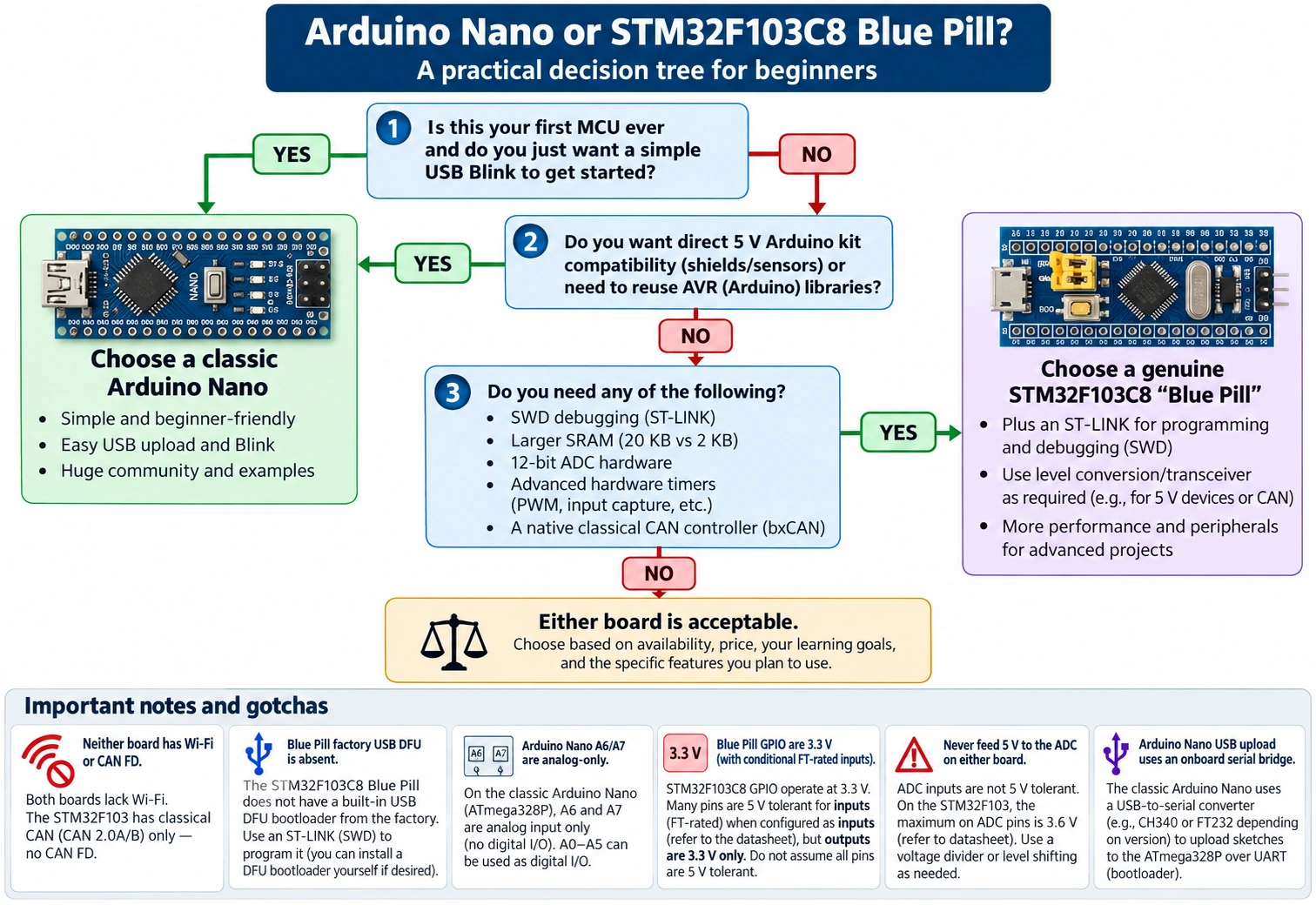
The Nano wins when the goal is getting started quickly. The Blue Pill wins when the goal is learning the mechanisms behind embedded systems, and its stronger peripherals directly help the project. Both are valuable and inexpensive platforms for learning; they simply make different trade-offs.
The true cost of your first setup
Comparing bare-board prices is misleading without checking the full starter kit. A Nano usually needs a suitable data USB cable, a breadboard, LED resistors and a few basic sensors. A Blue Pill commonly adds an ST-LINK-compatible SWD programmer, four or five carefully identified signal wires, and sometimes a USB-to-serial converter for ROM UART flashing. It is worth buying a known genuine MCU and reliable programmer rather than spending hours debugging an unreliable counterfeit or a misleading board pinout.
If you already own Arduino Nano accessories, the incremental cost of trying the Blue Pill can be low, particularly if your sensors operate at 3.3 V. But 5 V modules, Arduino pin-number assumptions and incompatible libraries introduce hidden conversion work. On the other hand, if the project truly needs hardware CAN, timer input capture or more RAM, building the same design around a Nano plus external controllers may cost more in parts and firmware complexity.
Avoid assuming one online listing always costs less. Price, shipping, import taxes, flash markings and the presence of headers or debug hardware vary. A genuine Nano also supports Arduino’s hardware ecosystem and documentation, while inexpensive unbranded Nano clones may differ in USB converter, regulator or bootloader. When selecting a Blue Pill, look for seller transparency about the exact STM32F103C8 part and crystal/regulator design.
Common mistakes and troubleshooting matrix
| Symptom | Likely issue | First reliable check |
|---|---|---|
| Nano powers up but will not upload | Wrong COM port or bootloader, USB cable, conflicting serial app | Try ATmega328P vs Old Bootloader; confirm data USB and port |
| Nano works with USB but not external supply | Supply range or regulator wiring issue | Measure at 5 V and GND; check VIN versus regulated 5 V supply rules |
| Blue Pill LED is always on | PC13 active-LOW logic or wrong LED mapping | Toggle PC13 HIGH/LOW deliberately and check schematic |
| Blue Pill not detected by ST-LINK | SWDIO/SWCLK swapped, missing common GND or target voltage | PA13=SWDIO, PA14=SWCLK, proper target reference and regulated power |
| Blue Pill’s USB socket does not upload | No factory USB DFU loader | Program by ST-LINK or USART1 ROM loader, not USB DFU by assumption |
| Sensor ADC value appears different | Resolution or reference mismatch | 10-bit Nano, 12-bit STM32 hardware, STM32duino output resolution setting |
| 5 V sensor damages/locks STM32 | Non-FT input, analog input, or power sequencing | Translate or scale signal; inspect datasheet and powered state |
| I²C scan finds nothing | Swapped signals, incorrect pull-ups, conflicting voltage domains | Nano A4/A5; Blue Pill PB7/PB6 by default; check pull-ups |
| CAN controller initializes but no frames pass | Missing/wrong transceiver, bus wiring, bit timing or termination | Verify actual CAN transceiver and 120 Ω ends; test on isolated bench |
| Sketch fits Nano flash but crashes | SRAM exhaustion/stack overlap | Measure RAM usage and avoid unbounded dynamic strings |
A safe beginner migration path
Start with Nano Blink, a pushbutton and one voltage-safe sensor. Learn how a pull-up resistor works and how to read a datasheet. Next, build the same sensor logger on the Blue Pill, keeping all inputs inside its 3.3 V range. Program it through ST-LINK, then use a debugger to inspect variables while the ADC conversion runs. Finally, add a hardware timer or DMA transfer to learn what the STM32 peripherals can do without blocking loops.
Do not connect 5 V Nano outputs directly to Blue Pill inputs as a shortcut. Do not blindly transplant a Nano pin diagram onto a Blue Pill or assume analogRead() has the same resolution on all cores. These mistakes can lead to hardware damage or hours of unproductive debugging.
Frequently asked questions
Is the STM32 Blue Pill better than an Arduino Nano?
It has substantially more SRAM and faster 32-bit hardware, but it is not necessarily the better first microcontroller. The Nano has the lower setup barrier, especially for classic Arduino tutorials and 5 V breadboard projects. Choose by your learning goal and peripheral needs, not simply the largest CPU clock number.
Can I program the Blue Pill from Arduino IDE?
Yes. Use Arduino IDE 2 with the official STM32duino core and configure the correct target and upload method. Most fresh F103C8 Blue Pill boards need ST-LINK/SWD or their USART1 factory bootloader for the first flash. A Micro-USB connector does not imply a factory USB DFU upload mechanism.
Are the Blue Pill pins 5 V tolerant?
Some individual FT-rated digital pins can accept 5 V under specific electrical and configuration conditions. The STM32F103C8 itself is a 3.3 V-class part, and ADC pins are not 5 V tolerant. When in doubt, add suitable level translation or analog scaling. The exact datasheet classification matters more than board color.
Does the Arduino Nano have more analog inputs?
The classic Nano exposes A0–A7 and uses a 10-bit ADC, while the F103C8 contains two 12-bit ADC units with more potential MCU ADC channels than the small Nano. Count the inputs actually exposed by your board and check shared-function restrictions. On the Nano, A6/A7 are analog-input-only.
Does the Blue Pill have built-in CAN, and can it connect directly to a car?
The genuine F103C8 contains a classic CAN controller. It still needs an external CAN transceiver to generate the differential bus voltages, correct termination and often protection/isolation for the application. Neither the chip nor the module is a ready-made automotive diagnostic interface, and critical vehicle networks are unsuitable for casual experiments.
Which one is better for MicroPython?
The classic ATmega328P Nano is not a practical mainstream MicroPython target, and the F103C8 Blue Pill’s flash and SRAM are also constrained for typical modern MicroPython builds. For a straightforward MicroPython beginner experience, a board designed and well-supported for it—such as Raspberry Pi Pico 2—is usually more appropriate. See our Blue Pill vs Pico 2 comparison.
Can I use the same sketch on both boards?
Basic Arduino calls can often be ported, but pin names, MCU peripheral availability, electrical voltage limits and library dependencies differ. If a sketch directly accesses AVR registers, depends on 5 V outputs or relies on Nano-specific EEPROM, porting requires real work. A successful compile is not an electrical compatibility test.
Final verdict
For an absolute beginner, a classic Nano makes the first few hours more enjoyable: consistent Arduino semantics, uncomplicated USB upload and a broad, approachable parts ecosystem. For an experimenter who has already built simple Arduino circuits, the Blue Pill is a rewarding step into 32-bit embedded development—with more memory, 12-bit ADC hardware, advanced timers, DMA, SWD and classic CAN.
Choose Nano for easiest entry, Blue Pill for a deeper embedded learning curve, and use a different board if the real requirement is wireless connectivity, CAN FD or convenient native USB flashing. The best board is the one whose toolchain, voltage limits and interfaces match the project.