
ST-LINKAliExpress price V2 and STLINK-V3 both program and debug STM32 microcontrollers over SWD, but they are not interchangeable pieces of hardware. Genuine ST-LINKAliExpress price/V2 is a straightforward USB full-speed probe with a legacy 20-pin connector and a maximum 4 MHz SWD rate. The modern STLINK-V3 family uses USB high-speed and, on the V3SET and V3MINIE models, supports up to 24 MHz SWD. Depending on the model, it also adds a virtual COM port, flexible connector cables, protocol bridging or even precision power measurements. The best purchase is determined by the actual probe model, the target voltage, the connection standard and whether you need anything beyond SWD.
Quick verdict: For an existing STM32F103 Blue Pill project, a genuine V2 already does the job. For a new STM32 bench, STLINK-V3MINIE is often the most practical compact debugger if you can use its STDC14 interface or a correctly wired adapter. Choose STLINK-V3SET for STM8 work, its included adapter board and USB-to-peripheral bridge functions. Choose STLINK-V3PWR when measuring and controlling target current is part of the assignment. Do not buy an anonymous dongle based only on its printed “ST-LINKAliExpress price V2” label, and do not assume that any V3 probe can supply 3.3 V power to your circuit.
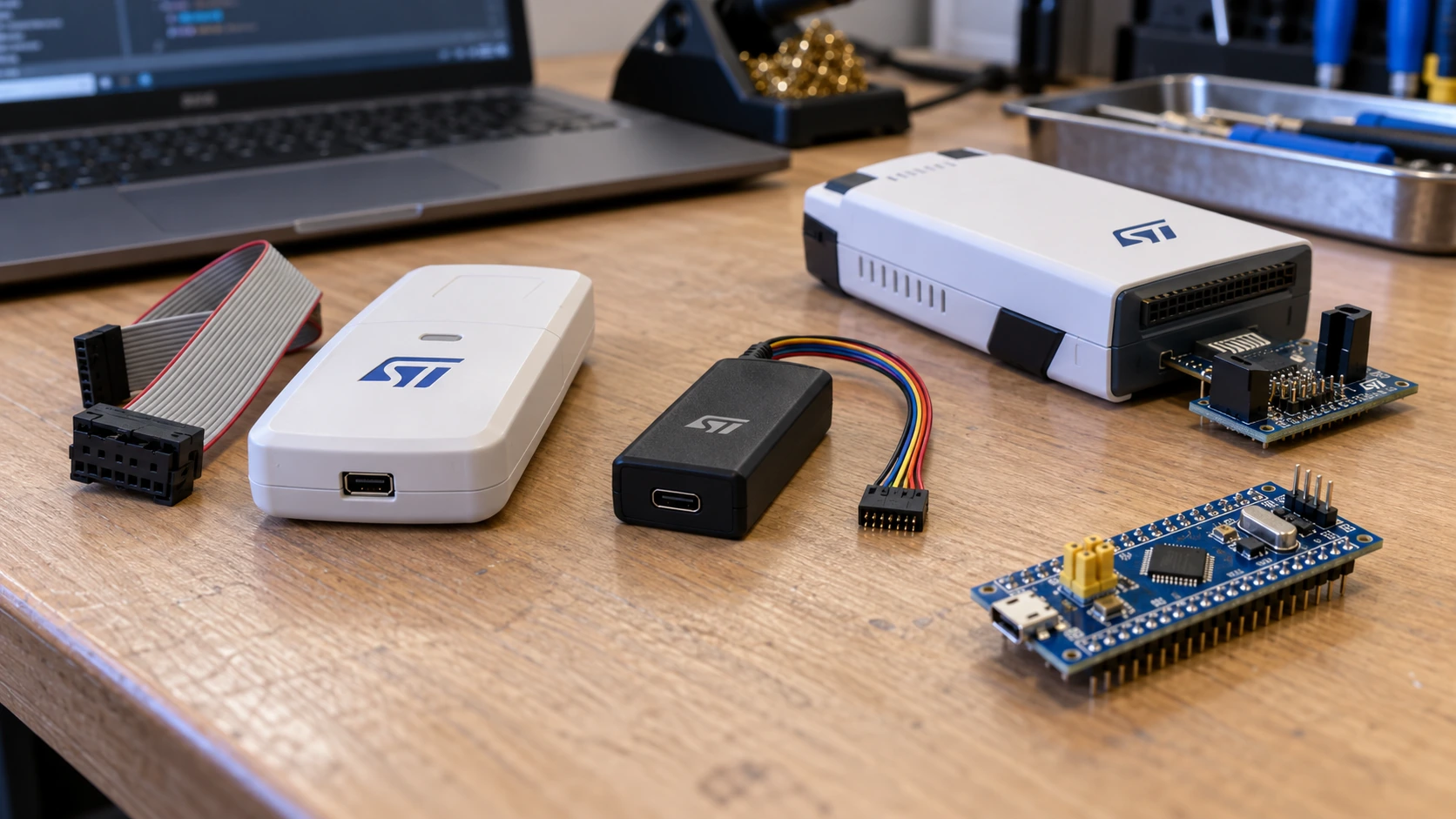
This guide concerns genuine standalone ST-LINK/V2, STLINK-V3MINIE, STLINK-V3SET and STLINK-V3PWR. The onboard ST-LINK/V2-1 and STLINK-V3E implementations found on some Nucleo boards are related, but their headers, virtual COM routing and capabilities depend on the board. Exact firmware revision and target silicon also matter. The speeds quoted are supported debug clock settings, not a promise that downloading a 1 MB image will be six times faster in every setup.
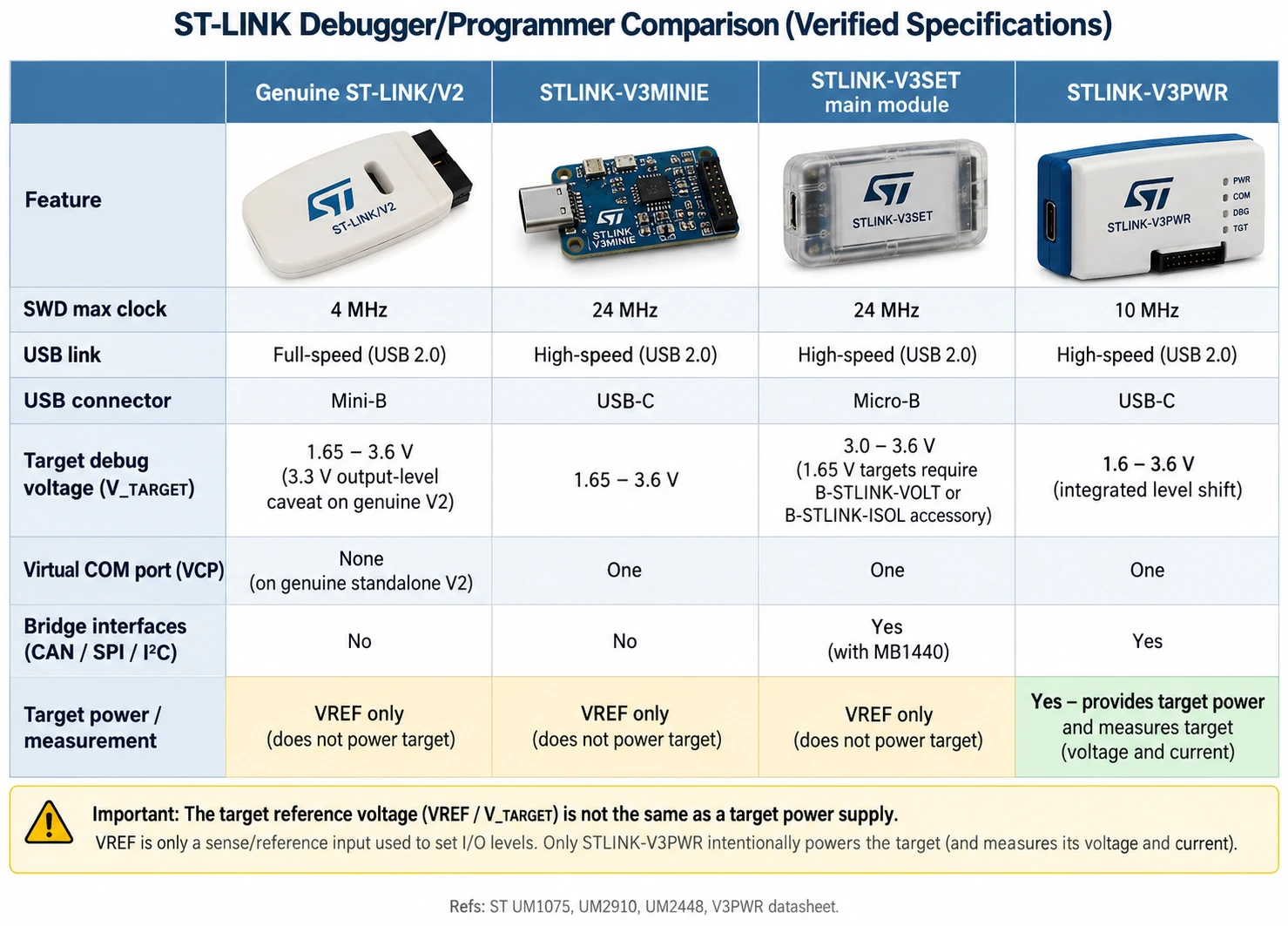
ST-LINK V2 vs V3: specification comparison
| Feature | Genuine ST-LINK/V2 | STLINK-V3MINIE | STLINK-V3SET (main module) | STLINK-V3PWR |
|---|---|---|---|---|
| Primary role | STM32/STM8 debug and flash | Compact STM32 debug and flash | Modular STM32/STM8 debugging and bridging | STM32 debug, programming and current measurement |
| Host USB link | USB 2.0 full-speed | USB 2.0 high-speed | USB 2.0 high-speed | USB 2.0 high-speed |
| Probe-side USB connector | Mini-B | USB-C | Micro-B | USB-C |
| Maximum SWD clock (model capability) | 4 MHz | 24 MHz | 24 MHz | 10 MHz |
| Maximum JTAG clock (model capability) | 9 MHz | About 21 MHz | About 21 MHz | 20 MHz |
| SWV / SWO | Yes, up to 2 MHz SWV per UM1075 | Yes | Yes | Yes |
| Standalone VCP (USB serial) | Not a standard V2 feature | One | One; optional second via bridge firmware | One |
| Protocol bridge SPI/I²C/CAN/GPIO | No | No general multipath bridge | Yes, via MB1440 adapter | Yes, model-specific bridge |
| Target SWD operating voltage | 1.65–3.6 V; see V2 output-level caveat | 1.65–3.6 V | 3.0–3.6 V without voltage adapter | 1.6–3.6 V integrated shifting |
| Target power output | No general target power supply | No | No | Yes, via controlled SMU/auxiliary output |
| Debug connector | Genuine 20-pin, 2.54 mm | STDC14, 1.27 mm | STDC14, adapters to MIPI10/MIPI20 | STDC14, adapters to MIPI10/MIPI20 |
| STM8 SWIM | Yes | No | Yes with MB1440 adapter | Check model scope; primarily STM32 |
These values come from ST’s UM1075, UM2448, UM2910 and the STLINK-V3PWR data brief. They are different product specifications, not a blanket promise about every third-party probe. A V3MINIE should not be described as a smaller V3SET with every feature intact; it lacks the V3SET bridge adapter. Likewise, V3PWR is a power-measurement instrument whose supported maximum SWD speed is not the V3MINIE’s 24 MHz.
What does an ST-LINK actually do?
The debugger communicates between a development computer and an STM32 target. Through Serial Wire Debug (SWD) it can identify the chip, halt or reset the CPU, read registers and memory, program flash, set breakpoints and inspect running code. JTAG is another target debug interface, with additional signal wires. SWO/SWV is a trace-output route for supported Cortex-M targets; it is not a replacement for SWDIO or SWCLK.
A typical session is PC → USB → ST-LINK → SWDIO/SWCLK → STM32. The firmware being debugged does not require a USB interface or a bootloader. For example, a Blue Pill based on STM32F103C8 can be flashed through SWD even though its factory system bootloader does not offer native USB DFU. The Micro-USB socket on that target board is a different interface from the USB connector on the ST-LINK probe.
The probe also does not add peripherals to your application. A V3SET offering a USB-to-CAN bridge does not give an STM32F401 chip a hardware CAN controller. It acts as a host-side tool interface. If the actual firmware needs to send CAN frames, choose an MCU with suitable CAN hardware or implement an external CAN controller and transceiver.
Is ST-LINK V3 six times faster than V2?
On the debug-clock setting alone, 24 MHz ÷ 4 MHz = 6. That does not mean a verified firmware download is six times as fast. Flash programming contains multiple phases: the host sends a file; the tool transfers data; code may erase and program the internal flash; and a verification step may read it back. MCU flash technology, cable integrity, host USB, debugger firmware, write algorithm, security state and target frequency all influence elapsed time.
V3MINIE and V3SET can use a 24 MHz SWD setting with a suitable target. V2 offers defined settings up to 4 MHz. On a breadboard with long leads, the most reliable link may be only 1–4 MHz even if the probe nominally supports 24 MHz. Fast SWD is useful on larger projects with repeated programming and heavy debugger traffic, but reliable connections are more valuable than maximum clock speed. ST’s CubeProgrammer documentation gives discrete SWD clock choices for each generation.
| Situation | Sensible initial SWD setting | Why |
|---|---|---|
| Short, well-routed dedicated debug header | 4–8 MHz on compatible V3 | Good starting performance; increase only after testing |
| STM32F103 Blue Pill on jumper wires | 1 MHz, or lower if needed | Breadboard wiring can distort fast edges |
| Reset or low-power recovery | 100–1000 kHz | Slower transfer helps marginal target connections |
| Legacy genuine V2 | Up to 4 MHz | Within the probe’s supported range |
| V3MINIE on a clean STDC14 ribbon | 8–24 MHz if stable | The supported high-speed path is useful here |
These are practical starting points, not guaranteed limits or measured benchmarks. The actual menu may offer discrete selections: asking for 3.9 MHz can result in 4 MHz, according to CubeProgrammer’s own connection-frequency example.
Which STLINK-V3 model is which?
STLINK-V3MINIE: small modern STM32 debugger
V3MINIE measures approximately 15 × 42 mm and combines high-speed USB, SWD/JTAG, SWV and one virtual COM port. It has USB-C on the PC side and a 1.27 mm STDC14 debug connector on the target side. This is a practical everyday choice for STM32 development and custom boards designed with a matching 14-pin header. It does not include the V3SET’s multipath SPI/I²C/CAN bridge hardware.
Its 1.65–3.6 V target-interface range makes it suitable for many low-voltage STM32 devices when correctly wired. The V3MINIE is powered by USB for its own electronics, but is not designed to supply power to the target MCU. Give the target its regulated supply separately and connect its voltage-reference and ground signals as described in UM2910. ST has specifically clarified this distinction when users attempted to obtain target power from the mini probe.
If your target has only four loose pins, V3MINIE is not automatically plug-and-play. You need an STDC14-to-wire adapter whose nets have been traced and verified. Do not push a 14-position ribbon onto an arbitrary double-row header or assume it matches the older 10-pin and 20-pin standards.
STLINK-V3SET: the flexible modular workstation
V3SET has a main debug module and an MB1440 adapter board. The main module covers high-speed STM32 debug, SWV and VCP. The adapter extends the system with connectors and bridge signals, including SPI, I²C, CAN, GPIO and UART, and provides STM8 SWIM support. It is the more versatile choice when your work moves between boards, requires a serial console and involves evaluating a peripheral interface from a computer.
A critical electrical nuance: the bare V3SET main module supports 3.0–3.6 V on its standard JTAG/SWD interface. Using targets around 1.8 V requires the specified B-STLINK-VOLT or B-STLINK-ISOL accessory. The latter also addresses isolation needs; do not substitute a generic resistor divider for a properly specified debug interface. The main module is not a target power supply.
An optional firmware configuration can expose a second VCP on the bridge UART. On supported V3SET revisions, this involves a reversible probe firmware change and displaces the drag-and-drop mass-storage interface. Do not list “two virtual COM ports” as universally active from the factory.
STLINK-V3PWR: debugger plus power measurement
V3PWR is designed for firmware power optimisation, not merely a cosmetic upgrade of V3MINIE. It integrates an SMU that can source 1.6–3.6 V, measure target consumption and correlate execution with power observations using ST’s supported monitoring tools. The published SMU measurement range extends from a few nanoamps up to 500 mA with selectable sampling rates; its auxiliary output can support higher current but is not included in the measured SMU path.
Its SWD maximum is 10 MHz, below the highest V3MINIE/V3SET setting. That is not a deficiency for the jobs it is meant to do. If you must test STM32 sleep modes, wake-up spikes and energy per action, the integrated measurement functionality is far more relevant than a maximum clock figure. Respect the per-output current ratings, source voltage settings, common-ground design and product documentation before connecting a prototype.
ST-LINK/V2: still useful, with limitations
A genuine V2 remains suitable for ordinary F103/F401/F411 flashing and debugging. It supports JTAG, SWD and STM8 SWIM, runs via USB full-speed and has the traditional 20-pin target connector. If your V2 works reliably and you only flash short applications every few days, replacing it may provide little practical benefit.
The downside is a less modern connector ecosystem, lower supported debug rates and no V3-style VCP or bridge facility on the genuine standalone V2. ST-LINK/V2-1 is a different onboard debugger implementation, often with a VCP connected to a Nucleo target UART. Do not infer V2-1 features from an inexpensive standalone V2 USB dongle with four or ten exposed pins.
The biggest wiring trap: V2 20-pin vs V3 STDC14
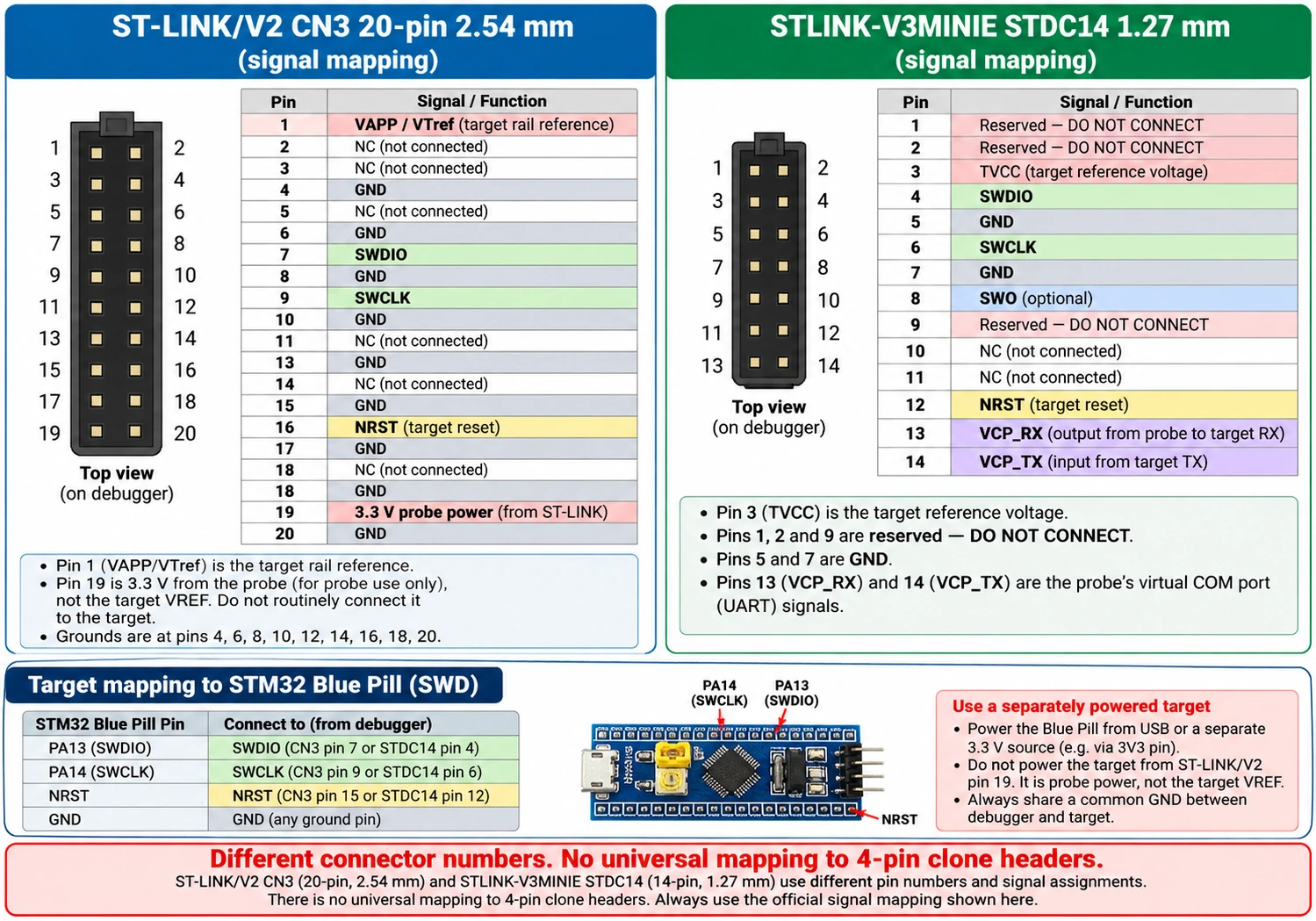
The genuine V2 and V3 use different physical connector conventions. Their wire signals share names—SWDIO, SWCLK, NRST and target-voltage reference—but pin numbers do not translate directly. The official V2 20-pin 2.54 mm connector is not the modern V3 STDC14 14-pin 1.27 mm connector, nor is either equivalent to a random small blue/black clone dongle.
Genuine ST-LINK/V2: required signals
| Genuine V2 20-pin position | Signal | What to connect on a Blue Pill |
|---|---|---|
| 1 | VAPP / target-voltage reference | Regulated target 3.3 V rail, as reference (see power notes) |
| 7 | SWDIO | PA13 / SWDIO |
| 9 | SWCLK | PA14 / SWCLK |
| 15 | NRST | NRST, recommended for connect-under-reset |
| Ground position(s) per official connector | GND | Blue Pill ground |
This list is deliberately limited to the signals required for common SWD use; it is not a substitute for the complete 20-pin ST UM1075 drawing, including connector orientation and all ground positions. A clone labelled “ST-LINK V2” may have a 4-pin or 10-pin header whose placement is unrelated to these numbers. Identify its exact PCB and continuity-check before applying power.
STLINK-V3MINIE: selected official STDC14 pins
| STDC14 position | Signal | Blue Pill target signal |
|---|---|---|
| 3 | T_VCC | Target reference voltage, 3.3 V in this example |
| 4 | T_SWDIO | PA13 / SWDIO |
| 5 or 7 | GND | GND |
| 6 | T_SWCLK | PA14 / SWCLK |
| 8 | T_SWO | Optional SWO, only if supported and configured |
| 12 | T_NRST | NRST, recommended |
| 13 | T_VCP_RX | Probe TX into target UART RX, if using VCP |
| 14 | T_VCP_TX | Target UART TX into probe RX, if using VCP |
These mappings reflect UM2910 Table 4. The VCP signal names are from the probe’s connector convention and can be confusing when copied blindly. Treat the documented signal direction as authoritative. STDC14 pins 1, 2 and 9 are reserved in this probe’s manual and must not be used as improvised 3.3 V outputs. STDC14 pin numbering requires the connector’s official key and orientation, not the visual position of a randomly rotated photograph.
Blue Pill SWD example, signal by signal: connect target PA13 → probe SWDIO; PA14 → probe SWCLK; target GND ↔ probe GND; target 3.3 V ↔ probe reference input; and target NRST ↔ probe reset if using hardware reset. Apply suitable target power separately. For a 3.3 V Blue Pill, use a stable 3.3 V rail, not a generic 5 V signal on the MCU’s VDD pin. Check whether the actual Blue Pill board has an onboard voltage regulator if powering via another input; do not confuse a board-level 5 V input with the raw MCU 3.3 V rail.
Our companion ST-LINK V2 pinout and SWD wiring guide goes deeper into probe headers and the risks of clone pin layouts. For a step-by-step first firmware upload, see Blue Pill programming with ST-LINK.
Voltage, power and protection: do not guess
A probe’s USB connector powers the probe, not necessarily the target. A target-reference pin tells level-sensitive probe circuitry what voltage the target is using. VREF is not the same function as a current-rated 3.3 V power output. Connecting a low-voltage STM32 target to an inappropriate fixed-voltage probe output can inject current into the board before its regulators start, potentially damaging sensitive devices.
There is also a known V2 caveat documented by ST: its older output implementation can drive signals at approximately 3.3 V even when the sensed target works below 3.3 V. That is why ST recommends suitable alternatives or isolation/voltage-adapter accessories when other components on a low-voltage target cannot tolerate the overvoltage. Do not interpret the V2’s 1.65–3.6 V application rating as a guarantee that every attached 1.8 V circuit is safe with no further investigation.
For a 3.3 V STM32F103 Blue Pill, the simplest reliable setup is a short SWD harness, common ground and separately verified target power. For 1.8 V STM32 boards, prefer a probe explicitly rated for that target level—such as V3MINIE—or use the approved V3SET level-shifting accessory. For isolated or noisy power systems, choose a properly isolated interface rather than tying unrelated grounds together casually. Never use the V3PWR SMU and a separate power supply on the same power net without reading its approved connection scenarios.
SWD versus JTAG versus SWV: what do you actually need?
Most ordinary STM32 learning projects should begin with SWD: two communication signals plus ground, reference voltage and often reset. SWD can halt a Cortex-M CPU, inspect source-level state in STM32CubeIDE, set hardware breakpoints and program flash. You rarely need full JTAG just because the processor supports it; JTAG consumes more pins and needs a matching probe/target header.
SWV can collect certain trace information over a target’s SWO output, but the STM32 device and debugger must support it and the clock configuration must be set correctly. SWV is not a universal real-time printf channel that works on every Cortex-M, every PCB trace or every ST-LINK. A V3’s higher SWO capacity matters if you use supported instruction/event trace features, not for normal LED blinking.
VCP is a separate convenience: some V3 probes present a USB serial port to the PC while exchanging UART data with the target. The target application still has to configure its USART pins and UART baud rate. The presence of a VCP on a debugger does not magically redirect printf() or Arduino Serial unless the firmware and wiring use the appropriate UART.
Flashing with STM32CubeProgrammer: same basic workflow on V2 and V3
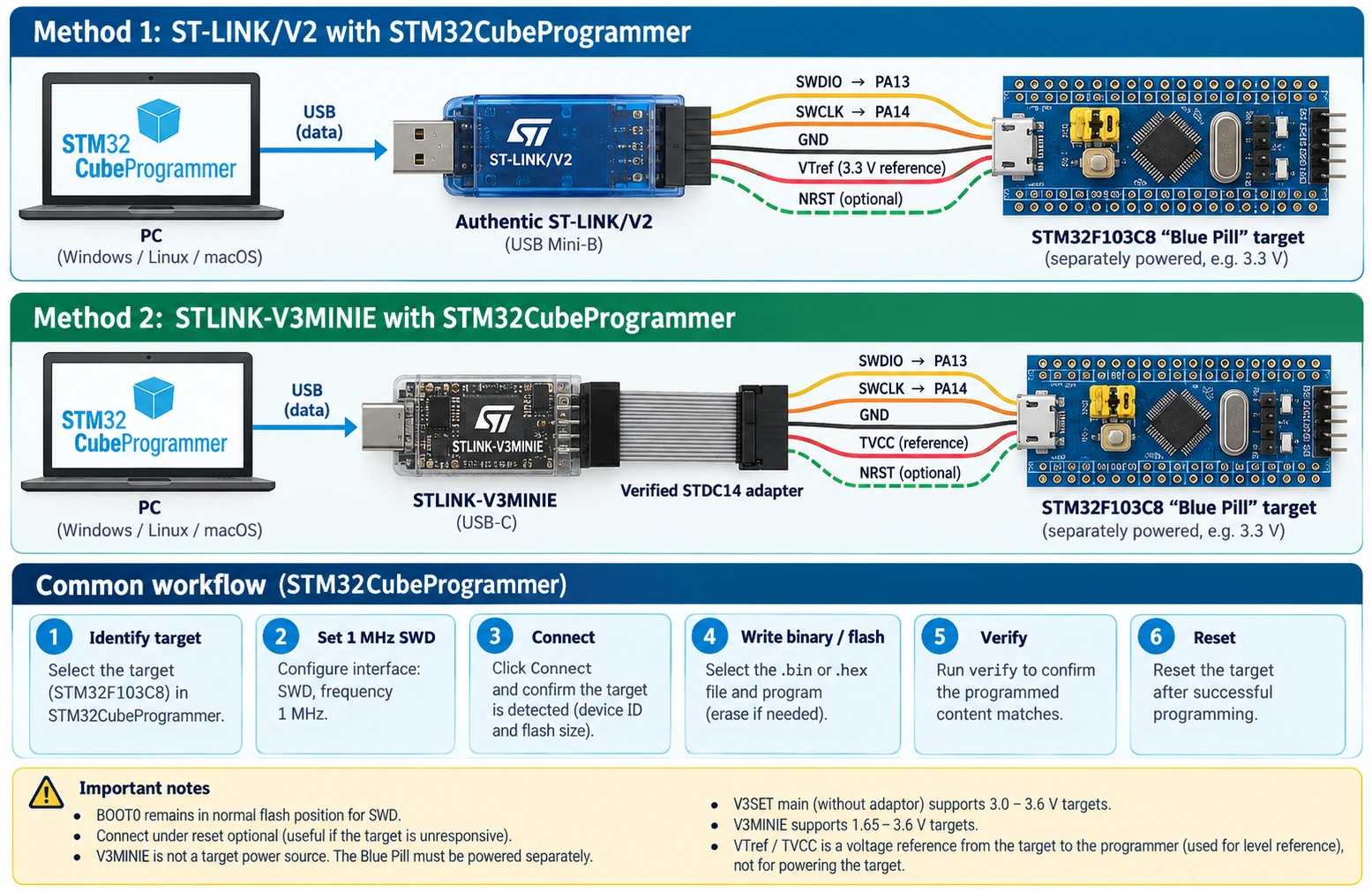
STM32CubeProgrammer recognises genuine supported ST-LINK probes. The target connection process is largely unchanged between versions: connect the PC and the probe, power the target, connect SWD reference/ground/data/clock, identify the STM32, then download and verify a binary image. The important settings are port SWD, communication speed and reset mode.
- Install a supported STM32CubeProgrammer release and appropriate driver for your operating system.
- Plug in the genuine ST-LINK; check that the program detects the probe serial number and firmware version.
- Connect SWDIO, SWCLK, GND, VTref and preferably NRST to the powered target.
- Select ST-LINK / SWD, start at 1 MHz or another stable setting, and connect.
- Confirm the reported STM32 chip identity and expected flash size before erasing or downloading.
- Choose the built
.hex,.elfor.binfile. For a raw application.bin, specify the appropriate flash start address;0x08000000is common on F103/F401 but not universal for all firmware layouts. - Download and verify. Reset/run as appropriate, then disconnect safely.
Equivalent command-line examples
For an F103C8 application linked at internal flash base (and only after checking that address), the following commands illustrate a conservative connection and flash operation:
# 1. Connect over SWD at 1 MHz and report the STM32.
STM32_Programmer_CLI -c port=SWD freq=1000

# 2. Program a raw binary at a verified address, then verify it.
STM32_Programmer_CLI -c port=SWD freq=1000 \
  -d build/firmware.bin 0x08000000 -v
On Windows, the executable is usually STM32_Programmer_CLI.exe. When using under-reset connection, wire NRST and select mode=UR; do not expect that mode to work if NRST is floating or disconnected:
# 3. Hardware reset connection can recover a target
# whose application disables or repurposes SWD-related pins.
STM32_Programmer_CLI -c port=SWD mode=UR freq=1000
The exact accepted CLI options depend on the installed version, and protected devices can reject operations. Do not add mass erase automatically to a troubleshooting script: it destroys user flash and may remove data you meant to preserve. Before changing option bytes, read the reference manual for the precise MCU and understand how security and boot settings interact.
Use the latest official STSW-LINK007 firmware upgrade utility for the particular genuine probe, and check STM32CubeProgrammer’s version-specific release notes. A firmware updater that does not detect a low-cost clone does not mean the target MCU is faulty.
Debugging with STM32CubeIDE and OpenOCD
Both generations support source-level debugging with compatible software, but the exact probe firmware, drivers and target family must be recognised by the selected debugger backend. When you start a debug session in STM32CubeIDE, the IDE loads or attaches to an executable, resolves the ELF symbols, runs the ST-LINK server or another supported backend, and uses SWD to pause at breakpoints. A V3 does not make your C code execute faster. It makes the host–target debug transport more capable.
A clean first debug test is to build a simple firmware that blinks the LED without modifying PA13/PA14, start an ST-LINK SWD debug configuration, stop at main(), inspect the GPIO register and single-step one loop iteration. If the firmware runs normally after programming but the debugger cannot attach, reduce the debug clock, reset under hardware control, check ST-LINK serial-number selection when multiple probes are attached, and verify target-voltage detection.
OpenOCD support is version- and adapter-dependent. A toolchain configured for an old stlink-v2 USB driver or protocol cannot automatically be assumed to support every V3 model or bridge feature. Check the OpenOCD build and adapter configuration actually installed. When using an integrated Nucleo ST-LINK, its connection back to the onboard target may rely on removable jumpers or solder bridges. Moving that debugger to an external board requires checking the Nucleo schematic, not just finding PA13 and PA14.
Why cheap ST-LINK V2 clones are a special case
Online listings routinely use “ST-LINK V2” to describe inexpensive blue/black USB dongles. Some do perform basic SWD programming on familiar STM32F1 boards. However, their firmware, USB IDs, pin numbering, voltage regulation, protection and compatibility may differ from the genuine product. ST’s official ST-LINK/V2 20-pin assignment does not describe a four-pin clone with SWDIO, SWCLK, GND, 3V3 labels across one edge.
A clone might expose a nominal “3.3 V” power pin, while an official STLINK-V3MINIE only provides target-voltage sensing. That does not make the clone safer: it may be poorly regulated, have limited current capability or drive signals incorrectly when the target supply is absent. Always determine whether the labelled pin is a power output or a reference input, and check it with a multimeter under the actual intended load.
If a clone is already on your bench, check its actual signal labels and PCB revision, avoid firmware-flashing it with a tool intended for a different hardware design, and use slow SWD for initial testing. For a permanent workshop, a genuine modern probe saves debugging time when working with new STM32 families or unusual low-voltage targets.
Common errors: “No STM32 target found” and similar problems
| Symptom | Most likely checks | What to do first |
|---|---|---|
| ST-LINK not detected over USB | Data cable, hub, host driver, probe firmware, counterfeit hardware | Connect directly using a known data cable; inspect device identity |
| Probe detected, no target voltage | Target is unpowered, VTref not attached, wrong ground | Measure the target VDD and connect the official reference input |
| “No STM32 target found” | SWDIO/SWCLK swapped, missing common ground, bad pin mapping | Signal-level wiring check with board documentation |
| Works at 1 MHz but not 24 MHz | Long leads, signal integrity, adapter/cable routing | Keep 1–4 MHz, shorten wiring |
| V3SET cannot debug a 1.8 V target | Main module minimum 3 V without accessory | Use proper B-STLINK-VOLT/B-STLINK-ISOL or compatible probe |
| V3MINIE does not power Blue Pill | It is not a target supply | Power the Blue Pill separately |
| Device connects only under reset | User firmware disables SWD, watchdog or low-power state | Connect NRST, select mode=UR, lower clock |
| Serial console absent on genuine V2 | Standalone V2 lacks normal VCP | Use a 3.3 V UART adapter or suitable V3 probe |
| VCP device appears, no text | Target TX/RX reversed, wrong UART settings or firmware | Match UART pins and baud; check connector signal direction |
| V3SET protocol bridge not available | MB1440 absent or unsupported firmware mode | Check adapter and STLINK-V3SET firmware documentation |
| Firmware verifies but does not run | Boot configuration, reset, wrong build or flash address | Confirm flash start, vector table, BOOT0 and reset mode |
| ST-LINK firmware update fails | Unsupported/clone probe, wrong utility, USB instability | Identify exact genuine model; do not force a mismatched image |
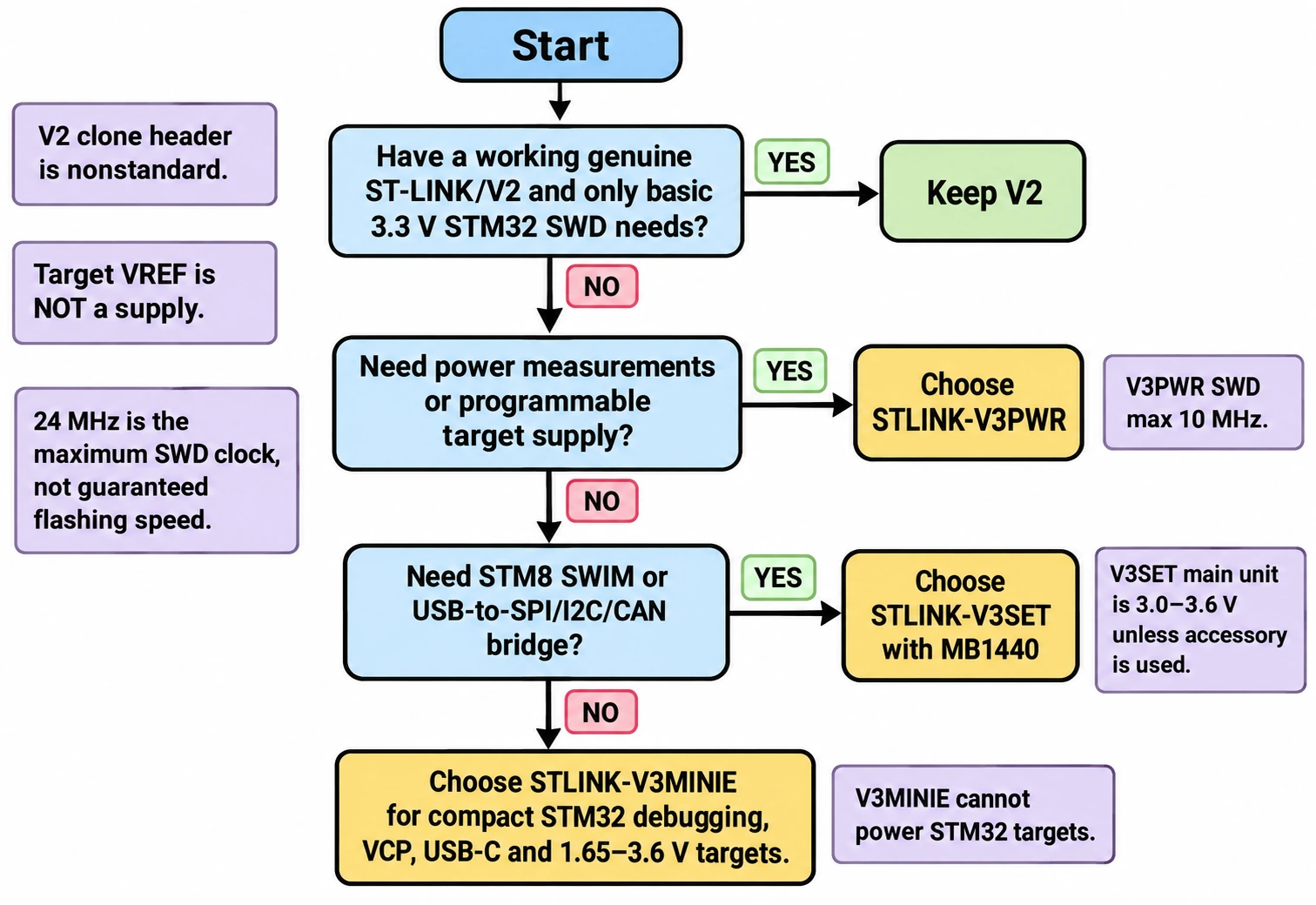
Which ST-LINK should you buy in 2026?
Choose based on your actual work, not merely the newest version number. For a Blue Pill owner who needs to flash a dozen small programs, a genuine V2 is adequate. For regular embedded development, a modern V3 is easier to justify for its VCP, faster debug interface and compact modern cabling. If your hardware is a 1.8 V prototype, voltage capability matters more than peak MHz. If your main challenge is accurate standby-current measurement, the answer may be V3PWR regardless of clock speed.
| Project | Recommended probe | Reason |
|---|---|---|
| Existing F103 Blue Pill, simple firmware updates | Keep a working genuine V2 | SWD support already sufficient |
| New STM32F4/G4 bench, repeated programming and serial logging | STLINK-V3MINIE | Compact, fast SWD, VCP, 1.65–3.6 V target interface |
| STM32 plus STM8 SWIM and USB-to-I²C/SPI experimentation | STLINK-V3SET with MB1440 | Modular adapter and multipath bridge |
| Custom 1.8 V STM32 prototype | V3MINIE, or V3SET with rated voltage accessory | Avoid V3SET main module’s 3 V minimum |
| Sleep-current profiling and source-controlled power tests | STLINK-V3PWR | Integrated source measurement instrument |
| Multiple custom PCB designs | Genuine V3 with standardised STDC14 header | Repeatable cable pinout and test access |
| Isolated/noisy or high-potential system | Proper isolated probe or designed isolator | Ground integrity and isolation are safety requirements |
Does a V3 replace a J-Link?
Not always. A Segger J-Link may offer alternative trace features, target support, software tooling or debug workflows. ST-LINK is compelling for STM32-based projects, particularly STM32CubeIDE and STM32CubeProgrammer integration. The better choice depends on your supported target list, trace needs, licensing and IDE workflow, rather than an unsupported claim that one brand is always faster.
Should you buy a V3SET when you already have a Nucleo board?
Many Nucleo boards include an onboard ST-LINK that is perfectly adequate for developing firmware on the same target. Some allow the embedded probe to be disconnected and reused with an external target, provided the exact board manual describes the jumpers and accessible signals. Check your board variant: not every Nucleo has the same ST-LINK generation, MCU-to-VCP UART route or target power arrangement. A dedicated standalone probe becomes useful when you want repeatable cables, several targets, lower-voltage support or a permanently wired debug jig.
Frequently asked questions
Can ST-LINK V2 program STM32F4, G4, H7 and U5?
The interface is SWD/JTAG, but usable support also depends on the particular target’s debug architecture, security state, current probe firmware, drivers and programming tools. For modern families, check the current ST compatibility list before assuming an old V2 or a clone works. V3 generally offers the safer modern software and voltage-support path, but no probe bypasses target security restrictions.
Is STLINK-V3MINIE better than STLINK-V3SET?
For ordinary SWD and a serial console, it can be more convenient: compact size, USB-C and 1.65–3.6 V target support. V3SET wins when you need its adapter board, STM8 SWIM support, multipath bridge or other modular interfaces. The V3SET base module itself requires the correct accessory for 1.8 V targets.
Does ST-LINK V3 support USB-C?
Some, not all. V3MINIE and V3PWR use USB-C, whereas V3SET uses Micro-B. V2 commonly uses Mini-B. Connector type alone is not proof of firmware, device authenticity or performance.
Can the probe power my STM32 board?
Usually no for genuine V2, V3MINIE and V3SET. Their USB port powers the debug hardware. Their VTref signal is a reference input. V3PWR is the specific model described here with a controllable rated target power source. Verify your board’s actual power distribution rather than borrowing power from an undocumented adapter pin.
Can ST-LINK V3 give my STM32 CAN or SPI hardware?
V3SET’s bridge lets the host computer interface with external buses through suitable probe hardware. It does not change the peripherals integrated into the target MCU. A chip without CAN still needs an external CAN controller if the firmware itself must participate in CAN traffic.
Do I need BOOT0 high for ST-LINK SWD programming?
No. SWD connects to the debug port independently of the ordinary ROM UART bootloader path. On a functioning Blue Pill you typically leave BOOT0 in normal flash-boot position. Connect-under-reset and certain recovery flows are distinct from selecting the factory ROM bootloader.
Why does my ST-LINK V2 clone show different pin numbers?
Because the authentic 20-pin connector specification does not describe the connector on your clone. Identify the actual clone model and verify each electrical signal; never apply “20-pin position 7 = SWDIO” to a four-pin connector. The target chip’s PA13/PA14 assignments remain unchanged, but the dongle’s header arrangement may differ.
Final verdict
Keep a working genuine V2 for basic STM32F1/F4 SWD development. Buy a genuine V3MINIE for a modern compact STM32-only bench with VCP and a correctly adapted STDC14 connection. Buy V3SET for modular bridges, STM8 support and broader connector experimentation. Buy V3PWR when you need controlled target power and trustworthy power measurements. In every case, verify target voltage, connector pin numbering and ground before changing a single line of firmware.
For related hands-on instructions, follow our STM32CubeProgrammer flashing guide, SWD V2 wiring reference and STM32 beginners guide.
Official technical references
- ST UM1075 — ST-LINK/V2 user manual
- ST UM2448 — STLINK-V3SET user manual
- ST UM2910 — STLINK-V3MINIE user manual
- STLINK-V3PWR official product and specifications
- STM32CubeProgrammer CLI reference
- ST firmware upgrade tool STSW-LINK007
Technical scope: specifications checked against ST documentation, October 2026. Debug clock maxima are probe specifications, not benchmarked application speeds; firmware examples are illustrative and have not been hardware-tested in this article.