
The PCF8574AliExpress price adds eight digital I/O pins to an ESP32AliExpress price using only two I²C signal lines. The PCF8574A works in the same way but occupies a different group of I²C addresses. This guide is a board and hardware reference: pin functions, actual solderAliExpress price-address options, safe 3.3 V wiring, a readable schematic and a short Adafruit Arduino example. It is not another LED-chaser tutorial.
Quick answer: PCF8574 uses 7-bit I²C addresses 0x20–0x27; PCF8574A uses 0x38–0x3F. Three address bits A0/A1/A2 select eight addresses per device family. On the Adafruit PCF8574 breakout, the three rear address solder bridges are open by default; closing A0 adds 1, A1 adds 2 and A2 adds 4. Supply a typical ESP32-compatible module from 3.3 V unless its documented circuit explicitly provides suitable 3.3 V I²C level shifting.
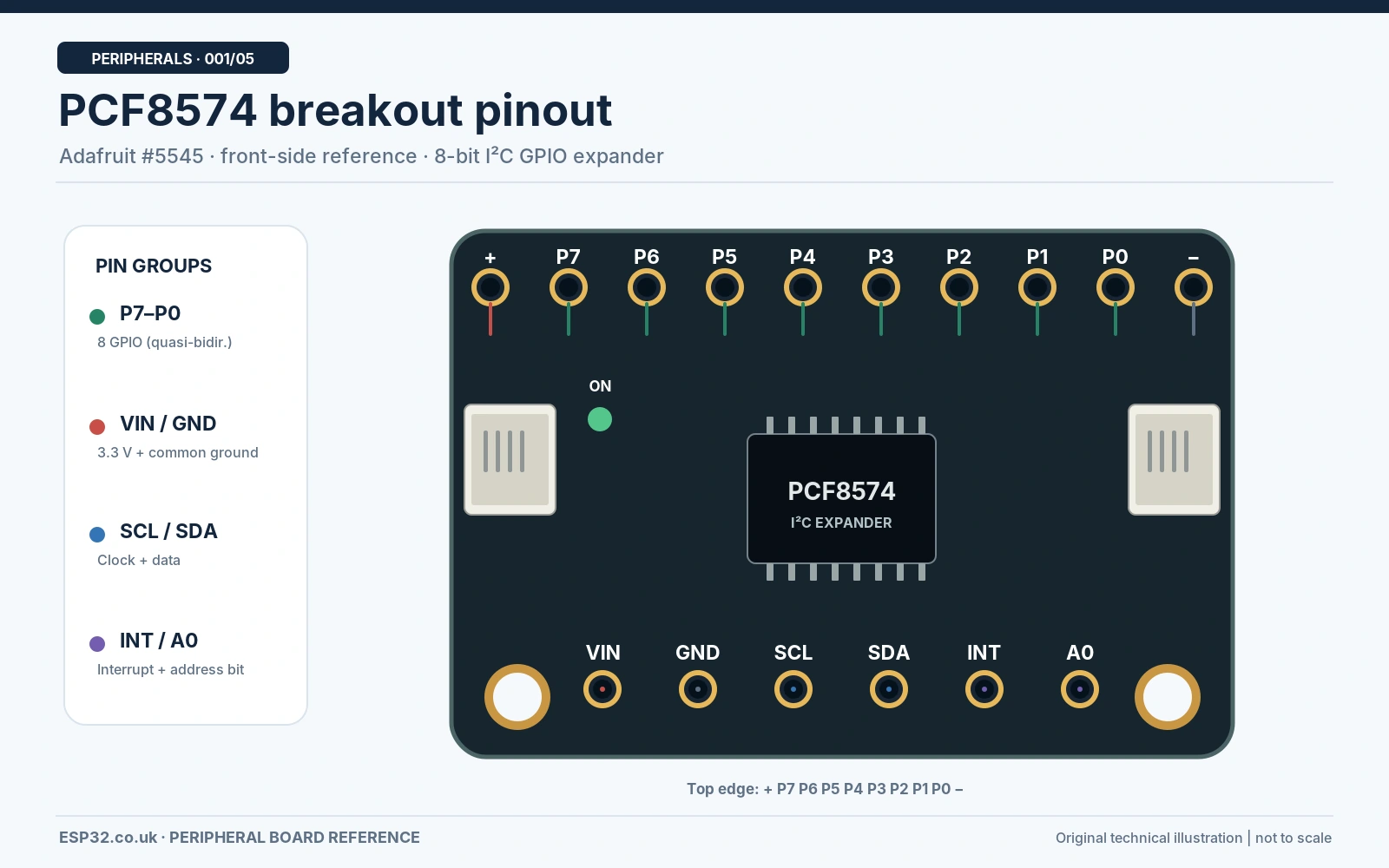
The chip itself and its surrounding breakout board are different things. Manufacturer specifications apply to the IC; header order, pull-up resistors, address-pad polarity and onboard level shifting depend on the specific module. The labelled board drawings here reference Adafruit product 5545. Generic blue modules and 1602 LCD backpacks require their own board-identification check.
PCF8574 vs PCF8574A specifications
| Feature | PCF8574 | PCF8574A |
|---|---|---|
| I/O lines | 8: P0–P7 | 8: P0–P7 |
| Interface | I²C, Standard-mode 100 kHz | I²C, Standard-mode 100 kHz |
| 7-bit device addresses | 0x20–0x27 | 0x38–0x3F |
| Address inputs | A0, A1, A2 | A0, A1, A2 |
| Port architecture | Quasi-bidirectional | Quasi-bidirectional |
| Interrupt | INT, active-LOW open-drain | INT, active-LOW open-drain |
| IC supply range (NXP variants) | 2.5–6 V; confirm actual manufacturer part | 2.5–6 V; confirm actual manufacturer part |
| SPI support | No | No |
The standard-mode 100 kHz I²C limit and quasi-bidirectional port architecture make this a simple expander rather than a drop-in replacement for an ESP32 GPIO. There are no conventional GPIO direction registers, PWM channels or analogue inputs. If you need 16 pins, consider the PCF8575; for more configurable interrupts and pull-ups see the GPIO expander comparison.
Board pinout: what each pin does
| Marking | Function | ESP32 note |
|---|---|---|
| VIN / VCC | Supply input to the breakout | Use 3V3 in this example; confirm board design |
| GND | Common ground | Connect to ESP32 GND |
| SDA | I²C serial data | GPIO21 in our classic ESP32 example |
| SCL | I²C clock | GPIO22 in our classic ESP32 example |
| P0–P7 | Eight quasi-bidirectional digital pins | P0 button input; P7 LED sink output here |
| INT | Interrupt output, active LOW, open-drain | Optional; requires a pull-up to safe MCU logic voltage |
| A0, A1, A2 | Three I²C hardware address bits | May be pins, pads or prewired on different boards |
Adafruit breakout orientation: viewed from the front with its eight expander GPIO pads along the top, the printed order across that row is P7, P6, P5, P4, P3, P2, P1, P0. Do not apply that physical order to a generic module without checking its silkscreen. The Adafruit board also exposes power rails along the GPIO row and STEMMA QT connectors for its I²C bus.
I²C addresses and solder-jumper configuration
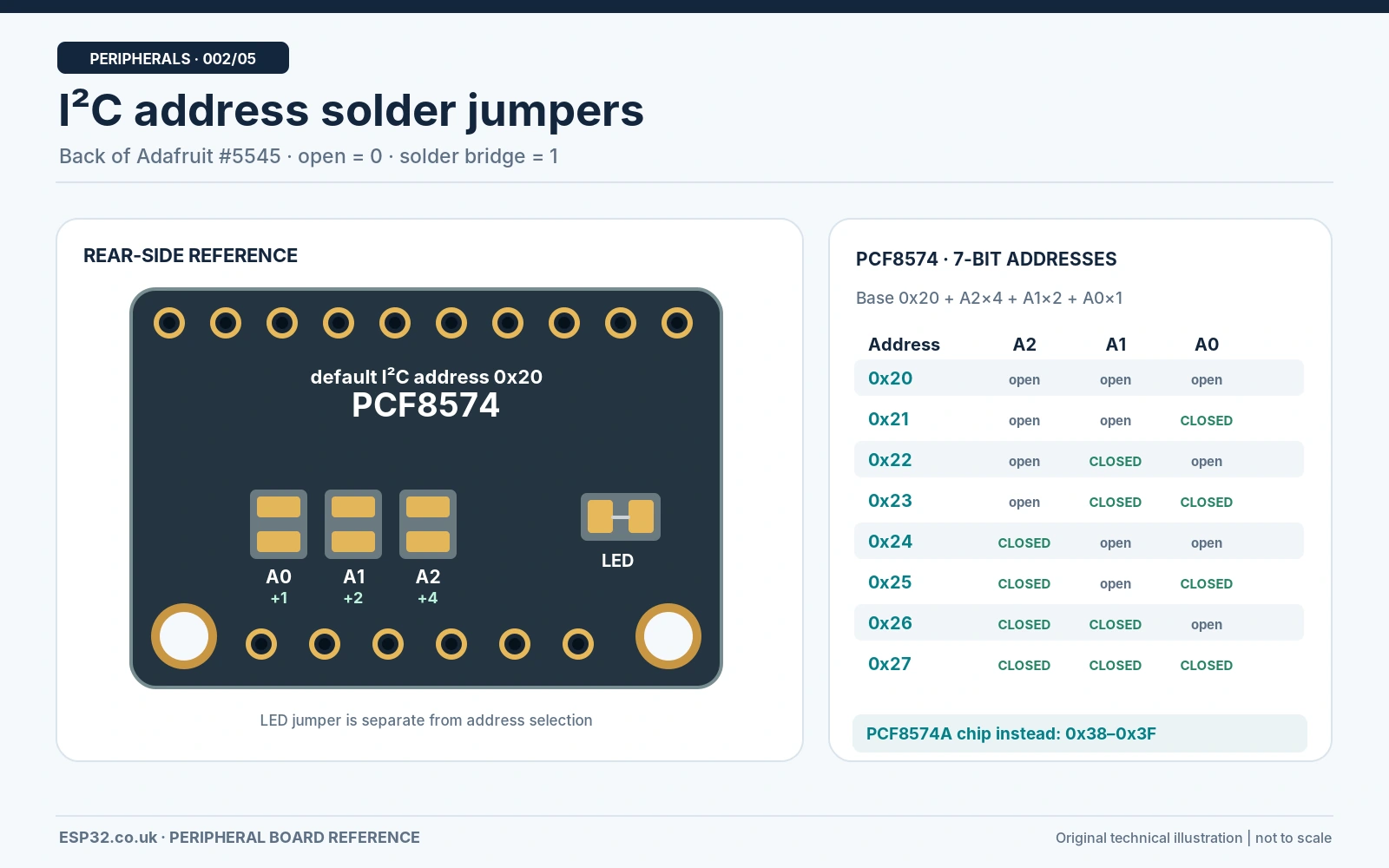
The low three address bits form a binary number: address = base + A0×1 + A1×2 + A2×4, where the base is 0x20 for PCF8574 and 0x38 for PCF8574A. The table uses 0=open / LOW and 1=closed to HIGH, exactly as on the specified Adafruit PCF8574 breakout. On other modules, bridging a pad might instead tie an input to GND; always trace the PCB or consult its schematic.
| A2 A1 A0 | Adafruit pad setting | PCF8574 | PCF8574A |
|---|---|---|---|
| 000 | All open | 0x20 | 0x38 |
| 001 | Close A0 | 0x21 | 0x39 |
| 010 | Close A1 | 0x22 | 0x3A |
| 011 | Close A1 + A0 | 0x23 | 0x3B |
| 100 | Close A2 | 0x24 | 0x3C |
| 101 | Close A2 + A0 | 0x25 | 0x3D |
| 110 | Close A2 + A1 | 0x26 | 0x3E |
| 111 | Close A2 + A1 + A0 | 0x27 | 0x3F |
Practical example: to run two PCF8574 boards on one bus, leave all bridges open on board 1 (0x20) and close A0 on board 2 (0x21). Never solder or unsolder jumpers while the module is powered. The Adafruit front A0 connection is an alternative to the rear A0 bridge: connecting A0 to VIN asserts that address bit. On a chip marked PCF8574A, changing jumpers cannot move it into the 0x20 range: its address family is fixed in silicon.
Functional schematic and electrical considerations
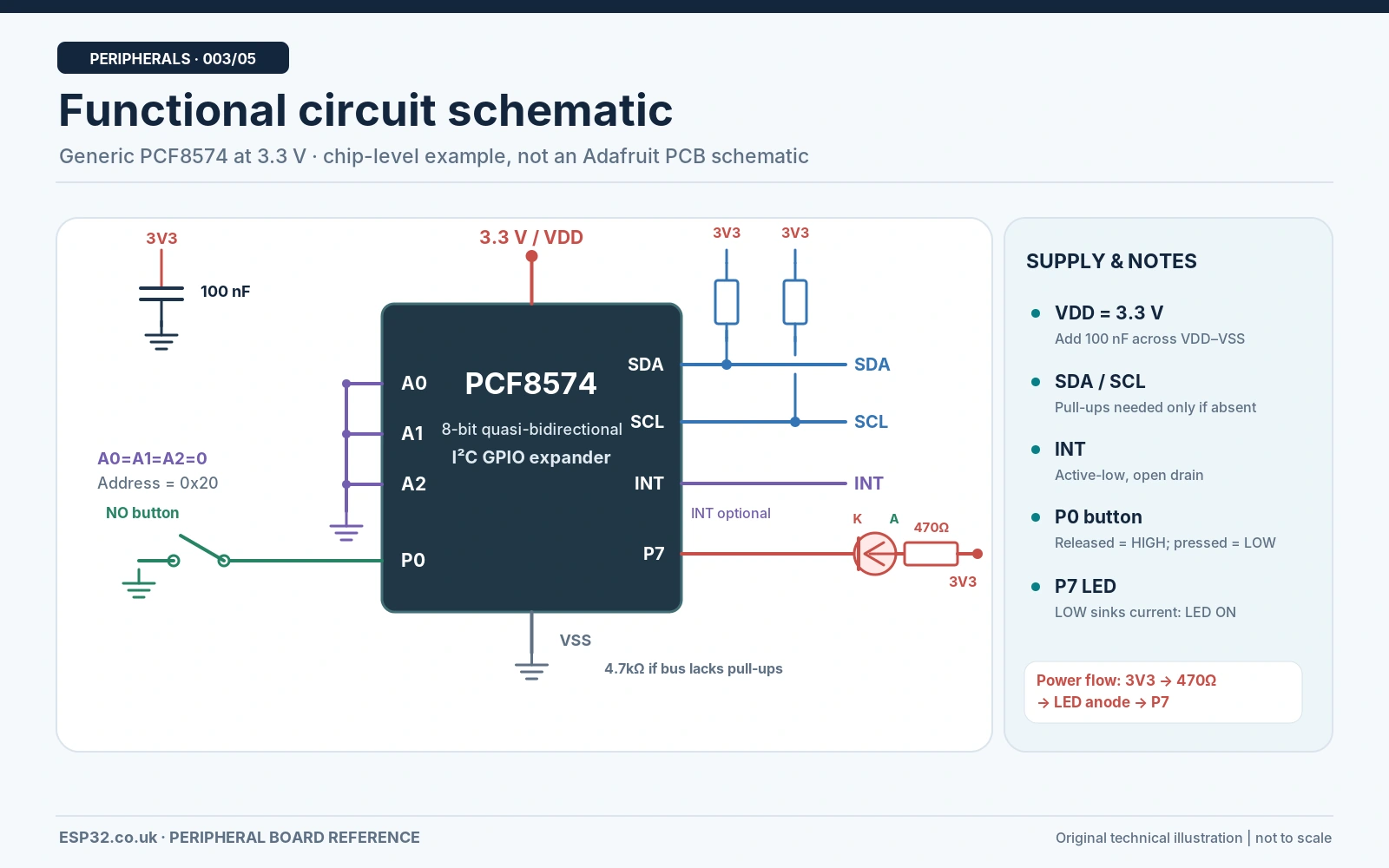
The schematic above is a verified chip-level functional circuit, not a reconstruction of every commercial PCB. It shows a single 3.3 V logic domain, shared ground, two I²C lines, a button and LED. For a discrete PCF8574 IC, supply decoupling and suitable I²C pull-up resistors are required. An assembled Adafruit breakout already includes level-shifting circuitry and 10 kΩ I²C pull-ups; duplicate resistors should not be added blindly.
- Supply: the IC supply voltage capability does not make ESP32 inputs 5 V tolerant. A generic PCF8574 module powered at 5 V may pull SDA/SCL up to 5 V and damage ESP32 GPIOs. Prefer 3.3 V or use an appropriate level shifter with a documented 5 V module.
- P0–P7: a written LOW sinks current. A written HIGH releases the strong pull-down and leaves a weak current source; the HIGH state is not a strong push-pull output.
- Inputs: keep a port bit HIGH to read an external switch; a switch to GND therefore reads LOW when pressed. For noisy or long connections, use external filtering/pull-up design as appropriate.
- INT: active LOW, open-drain. Connect it to an ESP32 input with a suitable pull-up if using interrupts. This basic sketch polls, so INT is deliberately left unconnected.
- Loads: drive small LEDs through current-limiting resistors. Do not power relays, solenoids or motors directly from the expander pins; use a suitable transistor/driver and protection.
The Adafruit breakout has its own board-specific schematic and EagleCAD design files on the official Downloads page. Refer to those files for actual onboard component values and traces. The simplified functional image here is intentionally labelled so it cannot be mistaken for that PCB schematic.
ESP32 wiring: PCF8574 over I²C
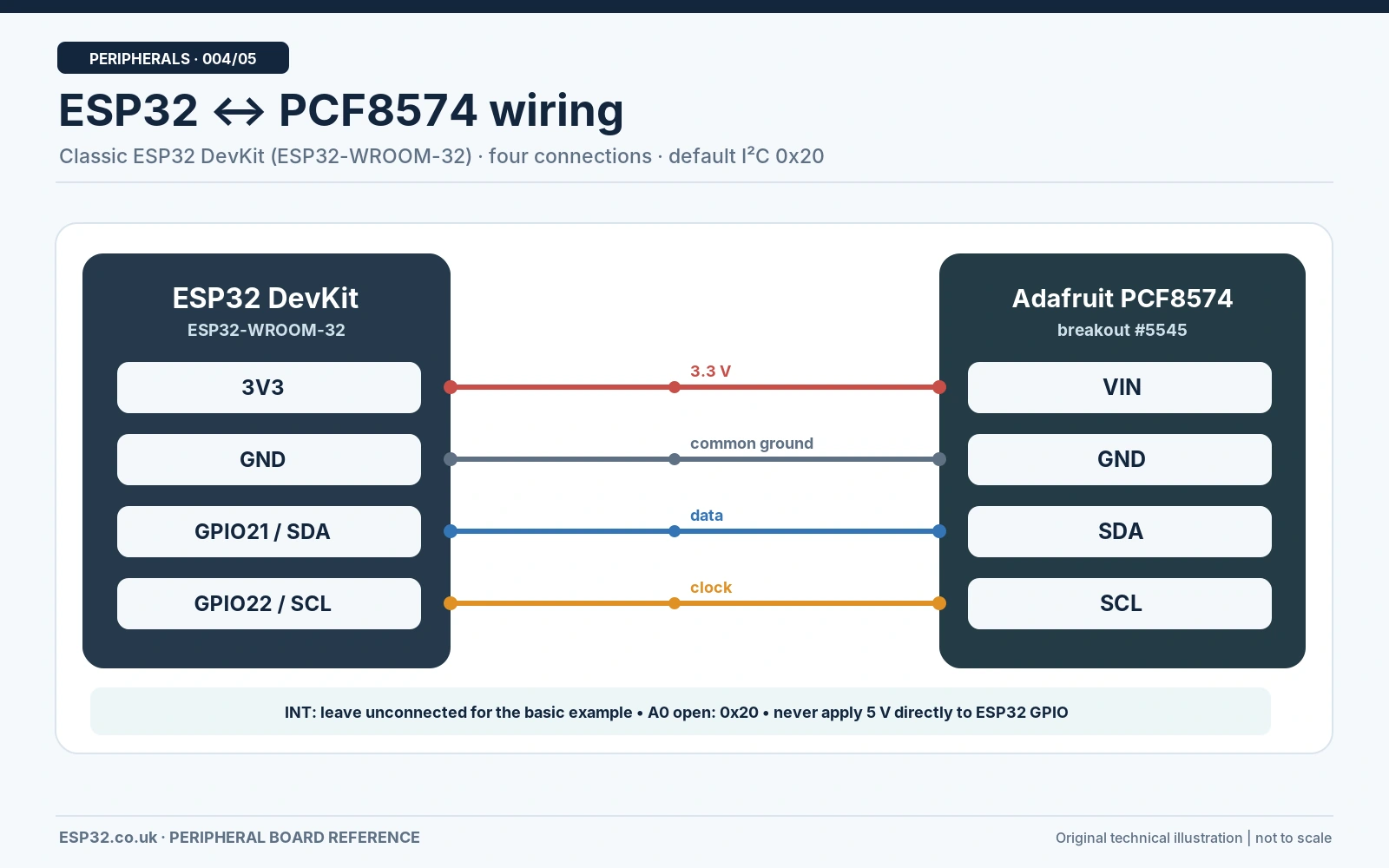
| Classic ESP32 DevKit | Adafruit PCF8574 breakout | Reason |
|---|---|---|
| 3V3 | VIN | 3.3 V supply and expander I/O levels |
| GND | GND | Common reference |
| GPIO21 | SDA | I²C data |
| GPIO22 | SCL | I²C clock |
| Not connected | INT | Optional for this polling example |
GPIO21 and GPIO22 are conventional examples for many original ESP32 DevKit boards, not universal GPIO assignments. ESP32-C3, ESP32-S3, ESP32-C6 and other variants have different board pinouts; use the actual board diagram and adjust Wire.begin(SDA_PIN, SCL_PIN). Keep the wires short during the first test and use 100 kHz bus speed.
LED and button test connections
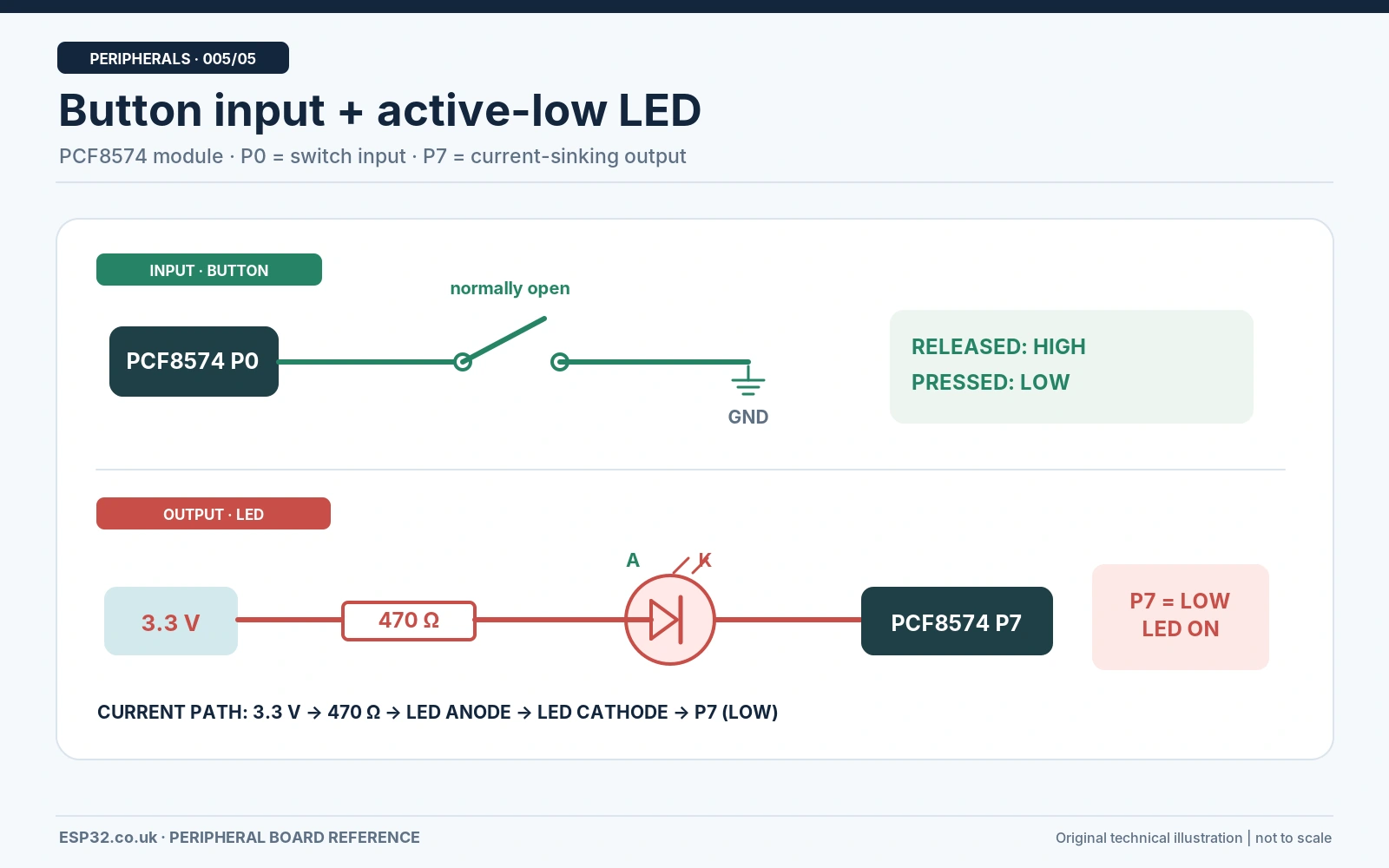
| Test component | Connection | Why |
|---|---|---|
| Pushbutton | P0 to GND, normally open | Pressed = logic LOW |
| LED cathode (−) | P7 | PCF8574 sinks current |
| LED anode (+) | Through 470 Ω to 3V3 | Current limiting; LED lights when P7 LOW |
| INT | Leave open | Sketch uses polling |
A 470 Ω resistor at 3.3 V gives only a few milliamps through a typical red LED, depending on its forward voltage. Do not connect the LED without a resistor. This test uses an external LED so it works even on boards without an onboard GPIO LED.
Arduino IDE: Adafruit library and complete ESP32 code
In Arduino IDE → Library Manager, install Adafruit PCF8574 and accept its Adafruit BusIO dependency. Select your actual ESP32 board and a working serial port, then upload the following original minimal polling example. It intentionally uses the same Adafruit_PCF8574 API as the official library examples, with explicit ESP32 I²C pins. The sketch works with a PCF8574 at 0x20; change PCF_ADDRESS to the address reported by your scanner.
#include <Wire.h>
#include <Adafruit_PCF8574.h>

constexpr uint8_t SDA_PIN = 21;       // Classic ESP32 DevKit
constexpr uint8_t SCL_PIN = 22;
constexpr uint8_t PCF_ADDRESS = 0x20; // Change to scanned 7-bit address
constexpr uint8_t BUTTON_PIN = 0;    // PCF8574 P0, not ESP32 GPIO0
constexpr uint8_t LED_PIN = 7;       // PCF8574 P7, not ESP32 GPIO7

Adafruit_PCF8574 pcf;

void setup() {
  Serial.begin(115200);
  Wire.begin(SDA_PIN, SCL_PIN);
  Wire.setClock(100000);             // PCF8574 standard-mode I2C

  if (!pcf.begin(PCF_ADDRESS, &Wire)) {
    Serial.println("PCF8574 not found. Check wiring and address.");
    while (true) { delay(1000); }
  }

  pcf.pinMode(BUTTON_PIN, INPUT_PULLUP);
  pcf.pinMode(LED_PIN, OUTPUT);
  pcf.digitalWrite(LED_PIN, HIGH);  // Active-LOW LED initially OFF
  Serial.println("PCF8574 ready: press the P0 button.");
}

void loop() {
  const bool pressed = (pcf.digitalRead(BUTTON_PIN) == LOW);
  pcf.digitalWrite(LED_PIN, pressed ? LOW : HIGH);

  static bool lastPressed = false;
  if (pressed != lastPressed) {
    Serial.println(pressed ? "Pressed: LED ON" : "Released: LED OFF");
    lastPressed = pressed;
  }
  delay(30);  // Simple polling/debounce interval
}
Expected result: Serial Monitor at 115200 baud prints PCF8574 ready. Pressing the button pulls P0 LOW and turns the P7-connected LED ON. Releasing the button turns it OFF. If the device is absent, the code prints an error instead of silently running. This example was checked against the documented Adafruit library API; it has not been claimed as physically bench-tested on every module variant.
I²C scanner: find the real address before debugging
If the Arduino example reports that the device was not found, upload this scanner first. It checks valid 7-bit I²C addresses on GPIO21/GPIO22 and prints each responding address. A scanner only proves that something acknowledged that address; it does not identify the exact IC.
#include <Wire.h>
void setup() {
  Serial.begin(115200);
  Wire.begin(21, 22); // Original ESP32 DevKit example
  Wire.setClock(100000);
  delay(200);
  Serial.println("Scanning I2C...");
}
void loop() {
  uint8_t found = 0;
  for (uint8_t addr = 0x08; addr <= 0x77; addr++) {
    Wire.beginTransmission(addr);
    if (Wire.endTransmission() == 0) {
      Serial.printf("Found device at 0x%02X\n", addr);
      found++;
    }
  }
  Serial.printf("Scan complete: %u device(s)\n", found);
  delay(3000);
}
Troubleshooting: why the PCF8574 does not work
| Symptom | Likely cause / check |
|---|---|
| Nothing appears at 0x20 | Check SDA/SCL orientation, supply, grounds and 7-bit address; scan 0x20–0x27 or 0x38–0x3F. |
| LCD backpack appears at 0x27 | This can be normal; check which PCF8574 family is fitted and how A0/A1/A2 are strapped. |
| Button always shows LOW | Inspect button wiring, solder bridge, short to GND and P0 latch/input configuration. |
| LED permanently on | LED is active LOW; verify the 470 Ω resistor and whether P7 is driven LOW. |
| Intermittent I²C failure | Look for long wiring, excess combined pull-up loading, weak supply and more than one device at the same address. |
| Board works on Arduino UNO but not ESP32 | Check whether module SDA/SCL pull-ups are at 5 V. ESP32 inputs are not 5 V tolerant. |
| INT behaves strangely | It is open-drain and needs a valid pull-up; read the input port to process a change. |
| Pinout disagrees with photo | You may have a generic module or LCD backpack, not the Adafruit product 5545 breakout. |
Frequently asked questions
Can PCF8574 and PCF8574A share an I²C bus?
Yes. Because their address ranges are different, you can use up to eight of each type on a single suitable I²C bus, subject to real electrical limitations such as pull-up loading, wiring length and system timing.
Does closing A0 always increase the address?
No universal rule exists for every breakout. The Adafruit PCF8574 product 5545 uses open=0 and closed=1 for the labelled rear pads. For a generic board, inspect its own schematic or use a continuity meter with power removed.
Can it generate PWM or read analog voltage?
No. The PCF8574 is a digital quasi-bidirectional I/O expander. For external analogue measurements, see the ADS1115 with ESP32 guide. Software-timed LED patterns are possible, but precision hardware PWM is not a feature of this IC.
Is the PCF8574 an open-drain expander?
Calling every pin a conventional open-drain output is an oversimplification. The data pins are quasi-bidirectional: they sink substantial current when LOW and have weak source behavior when HIGH. The separate INT pin is an actual open-drain interrupt output.
Useful references and related tutorials
- Adafruit PCF8574 breakout pinouts and address solder pads
- Official Adafruit breakout schematic, fab drawing and board files
- Adafruit PCF8574 Arduino installation and example
- Texas Instruments PCF8574A product data
- esp32.co.uk/: PCF8574 8-LED control tutorial
- esp32.co.uk/: GPIO expander comparison
Bottom line: choose the address range by the exact chip suffix, set A0/A1/A2 according to the actual board, supply ESP32-compatible 3.3 V logic, and remember that P0–P7 are quasi-bidirectional. With those details right, the Adafruit Arduino library makes simple digital inputs and outputs straightforward.