
The PCF8575AliExpress price is a 16-bit I²C GPIO expander: it provides sixteen additional digital input/output lines over the same two ESP32AliExpress price wires used by other I²C devices. A board with a PCF8575AliExpress price is useful for switch panels, indicator LEDs and low-speed control signals when the ESP32 is short of available GPIOs. The difficult part is often not the library; it is understanding the breakout’s two port banks, address solder jumpers and electrical limits.
Quick answer: the PCF8575 uses 7-bit I²C addresses 0x20–0x27, selected by A0/A1/A2. On the documented Adafruit PCF8575 breakout, the default is 0x20 with all three rear address bridges open. P0–P7 correspond to the chip’s first 8-bit port (P00–P07); P8–P15 correspond to its second port (P10–P17). For a classic ESP32 DevKit, wire GPIO21 → SDA and GPIO22 → SCL, supply 3V3 → VIN and share GND. These ESP32 GPIOs are examples, not universal assignments.
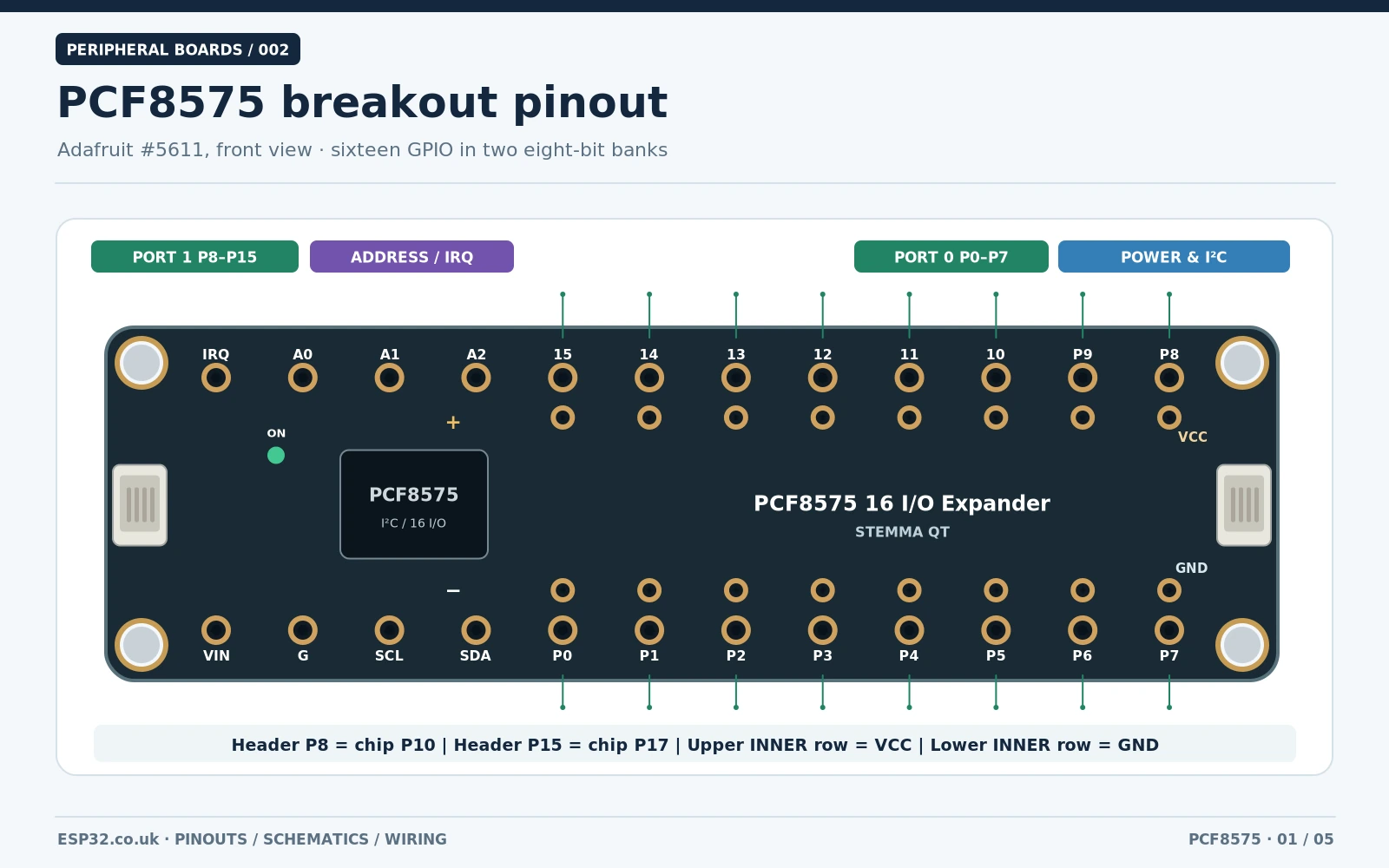
Which breakout is this? The front/rear board-layout images identify the Adafruit PCF8575 16 GPIO Expander Breakout with two STEMMA QT connectors. Popular generic blue boards can expose the same PCF8575 chip with different header positions, resistor networks and jumper polarity. Do not transfer a photograph’s pin order from one manufacturer to another. For the actual bare IC, use the Texas Instruments PCF8575 documentation.
PCF8575 specifications at a glance
| Parameter | PCF8575 details |
|---|---|
| GPIO channels | 16 quasi-bidirectional digital I/O, in two groups of eight |
| Chip pin naming | P00–P07 (port 0), P10–P17 (port 1) |
| Typical breakout naming | P0–P7 and P8–P15, numbered 0–15 in the Adafruit library |
| Bus | I²C / SMBus, up to 400 kHz Fast-mode |
| 7-bit I²C addresses | 0x20, 0x21, 0x22, 0x23, 0x24, 0x25, 0x26, 0x27 |
| Address select | Three hardware inputs: A0, A1 and A2 |
| IC supply voltage | 2.5–5.5 V (TI datasheet); supply selected breakout appropriately |
| Interrupt | Active-LOW open-drain INT output, asserted for input-change events |
| Power-up state | Ports HIGH (weakly sourced), suitable as inputs until driven LOW |
| Read/write protocol | 16 bits per transfer: lower byte first (port 0), then upper byte (port 1) |
| Hardware PWM / ADC | Not provided; these are ordinary digital I/O lines |
The PCF8575 is quasi-bidirectional, not a conventional push-pull GPIO bank and not a register-configured expander like MCP23017. A LOW output sinks current; a HIGH output is maintained by a much weaker source. This matters when you attach LEDs, pull-ups, long switch wires or external drivers. The separate INT signal, by contrast, is an open-drain interrupt output.
PCF8575 breakout pinout: two 8-bit port banks
The actual Adafruit board pinout is more useful than a generic 24-pin chip diagram when connecting jumper wires. Looking at the front of the board with the silkscreen upright, the primary bottom-edge pads start with VIN, G, SCL, SDA and continue from P0 through P7 left to right. The primary top-edge labels run IRQ, A0, A1, A2, 15, 14, 13, 12, 11, 10, P9, P8 left to right. The upper GPIO bank is thus reversed from left to right relative to the lower one.
| Breakout label | TI port pin | Adafruit Arduino index | Role |
|---|---|---|---|
| P0–P7 | P00–P07 | 0–7 | First byte / lower bank |
| P8–P15 | P10–P17 | 8–15 | Second byte / upper bank |
| VIN / VCC | VCC | — | Supply; VCC accessory rails follow VIN on Adafruit board |
| G / GND | GND | — | Common reference and lower accessory ground row |
| SDA, SCL | SDA, SCL | — | I²C data and clock |
| IRQ / INT | INT | — | Optional open-drain input-change indication |
| A0, A1, A2 | A0, A1, A2 | — | Physical I²C address inputs and jumper alternatives |
The Adafruit layout also includes additional ground pads alongside the P0–P7 row and a VCC accessory row alongside P8–P15, convenient for switches and LEDs. Those are power rails, not extra GPIOs. There are also two STEMMA QT four-pin I²C sockets. Read the actual silkscreen carefully: the top line says 15 14 13 12 11 10 P9 P8, not P8–P15 in ascending physical order.
Changing the I²C address with A0, A1 and A2 solder jumpers
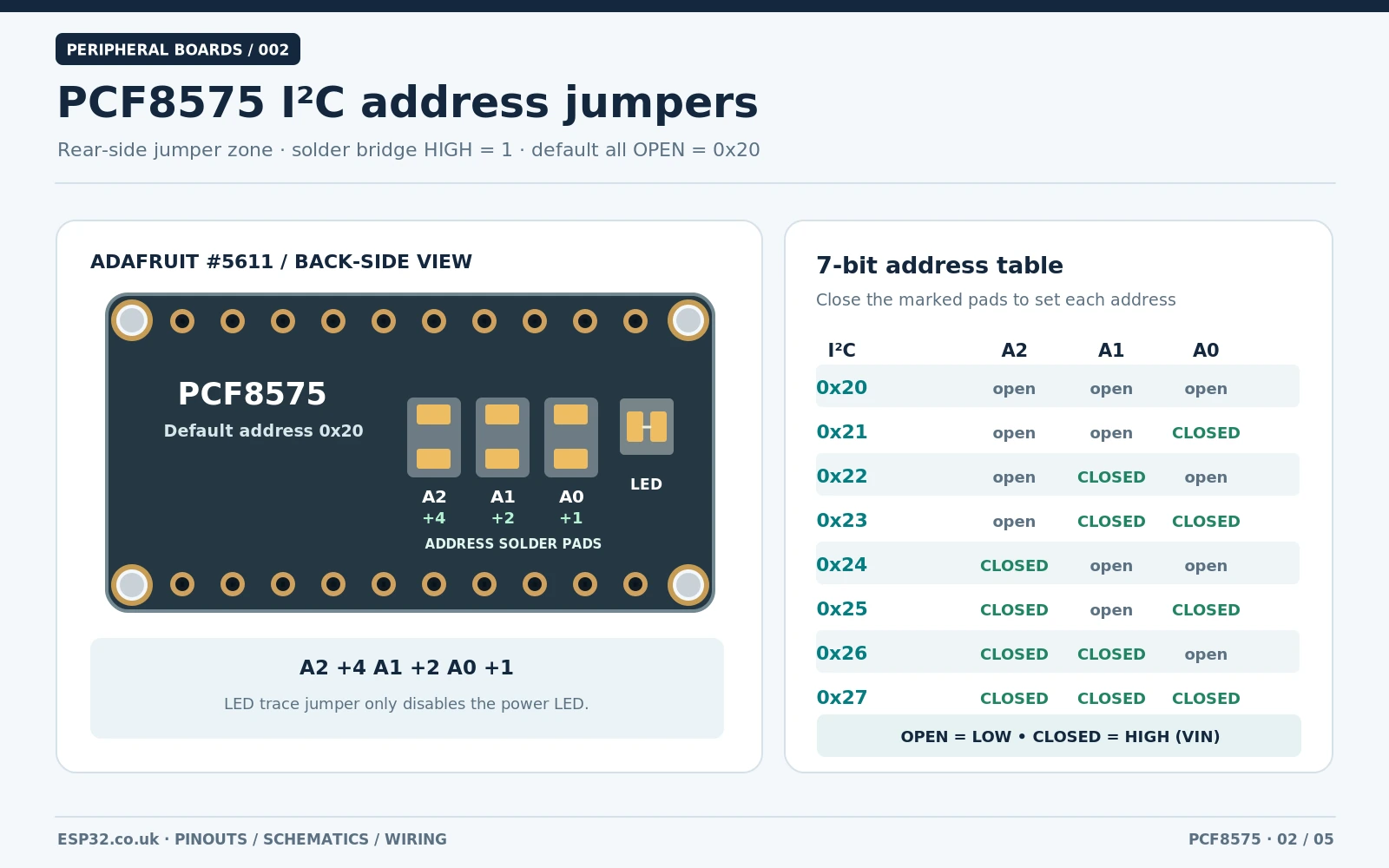
Adafruit fits three address solder pads on the rear, marked A0, A1 and A2. They are open by default, representing logic 0. Bridging a pad with solder drives its associated address input HIGH. You may instead pull the corresponding labelled front address pin to VIN. Calculate the address as 0x20 + (A0 × 1) + (A1 × 2) + (A2 × 4). The chip reads those three inputs as hardware address bits: there is no software register that moves a fixed chip from 0x20 to 0x21.
| A2 A1 A0 | Solder links closed on Adafruit rear | 7-bit address |
|---|---|---|
| 000 | None (default) | 0x20 |
| 001 | A0 | 0x21 |
| 010 | A1 | 0x22 |
| 011 | A1 + A0 | 0x23 |
| 100 | A2 | 0x24 |
| 101 | A2 + A0 | 0x25 |
| 110 | A2 + A1 | 0x26 |
| 111 | A2 + A1 + A0 | 0x27 |
Example: leave board A open at 0x20; close A0 on board B for 0x21; close A1 on board C for 0x22. Up to eight PCF8575 chips can have distinct addresses on one I²C bus, subject to bus capacitance, pull-ups and the rest of the devices attached. PCF8574 (without the A suffix) and MCP23017 can use the same 0x20–0x27 address block; two I²C devices on the same bus must never share the same address.
Do not confuse the A0/A1/A2 address jumpers with the separate rear LED solder trace. On the Adafruit board, the LED trace is a power indicator enable/disable link; cutting that marked trace turns off the onboard power LED to reduce consumption. It does not change the I²C address. On generic PCF8575 breakouts, address solder pads may be wired differently, so check continuity with power disconnected before assuming that a shorted pad selects HIGH.
PCF8575 schematic: what is really inside the circuit?
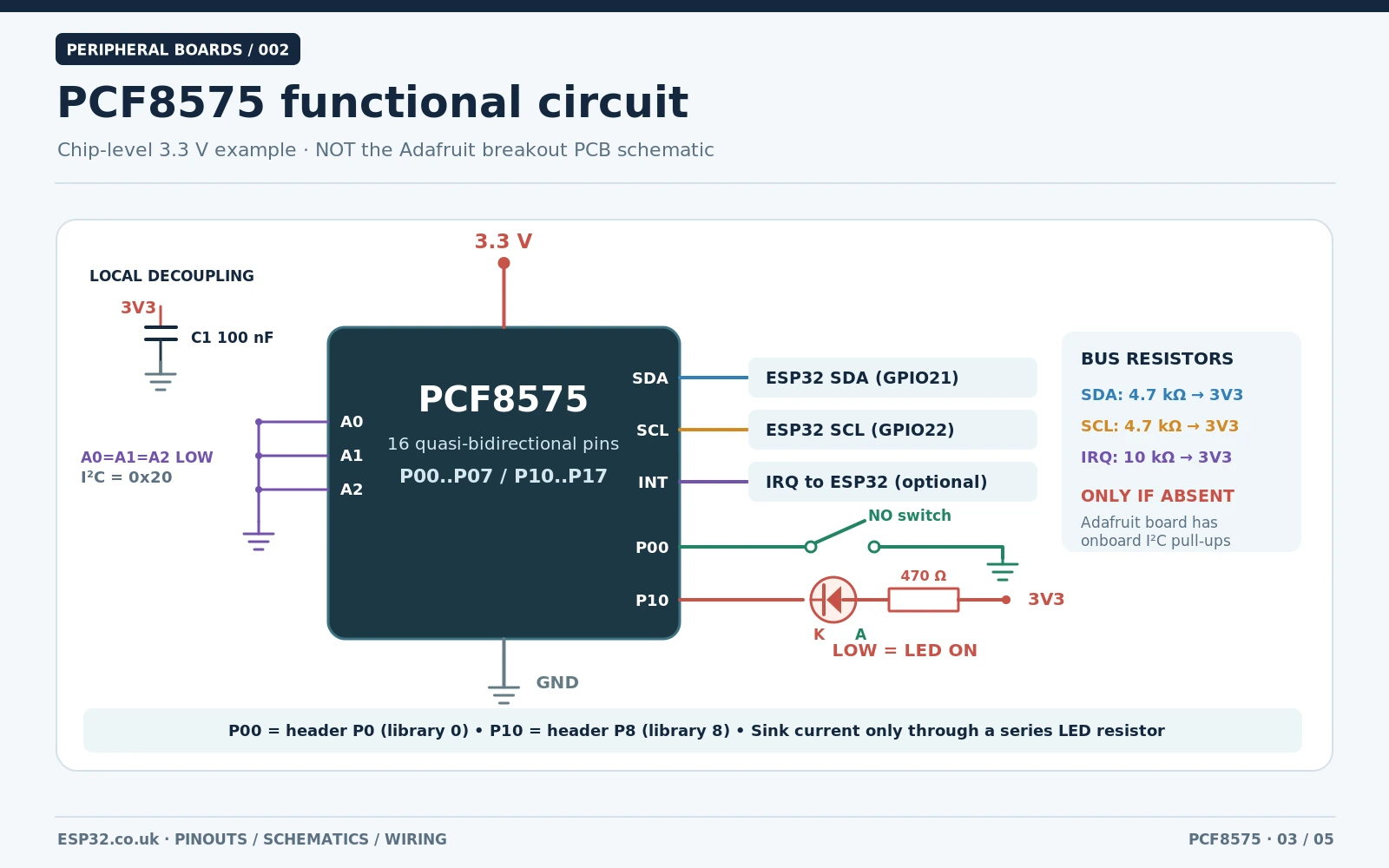
The image above is an original functional schematic for a bare PCF8575 at 3.3 V, not a reproduction of the Adafruit breakout’s full PCB design. It separates chip-level facts from parts the breakout manufacturer has chosen: a 100 nF decoupling capacitor close to VCC/GND, I²C pull-up resistors where needed, A0/A1/A2 tied to GND for 0x20, an optional pull-up on INT, one switch input and one LED-sinking output.
- I²C resistors: SCL/SDA are open-drain bus lines and require pull-ups to the correct logic rail. The Adafruit PCF8575 board already has 10 kΩ pull-ups to VIN; other modules may have different values. Avoid blindly adding parallel pull-ups.
- ESP32 safety: powering this Adafruit breakout from 5 V also brings the I²C pull-ups to 5 V. The ESP32 is a 3.3 V device and its GPIOs must not receive 5 V. Power the module from 3.3 V for this design.
- Quasi-bidirectional ports: write HIGH (1) to let a port line act as input; write LOW (0) to sink current. Never rely on a weak HIGH as a power source for a demanding load.
- LED sinking: connect 3.3 V → 470 Ω resistor → LED anode → LED cathode → P8; P8 LOW lights the LED. The small current is well suited to a basic functional check.
- Switch input: connect P0 to a normally open pushbutton to GND; released reads HIGH, pressed reads LOW. The PCF8575 has no conventional configurable pull-down.
- INT: optional, active LOW and open-drain, with a pull-up if used. A change may be acknowledged by reading the device. Never run I²C transactions directly from an ESP32 interrupt handler; set a flag and read the port in the main loop.
For the actual Adafruit PCB schematic and fabrication drawing, consult Adafruit’s official downloads page, which links its EagleCAD files. That is the authoritative source for component placement, copper traces and board revisions. This guide uses a separate electrically meaningful circuit to teach how to wire a bare IC.
Connect the PCF8575 to an ESP32 over I²C
| Classic ESP32 DevKit | Adafruit PCF8575 breakout | Purpose |
|---|---|---|
| 3V3 | VIN | Power the board and pull-ups at 3.3 V |
| GND | GND / G | Common reference |
| GPIO21 | SDA | I²C data |
| GPIO22 | SCL | I²C clock |
| Not connected | IRQ / INT | Optional; example uses polling |
| Not connected | A0, A1, A2 | Use default open jumpers for 0x20 |
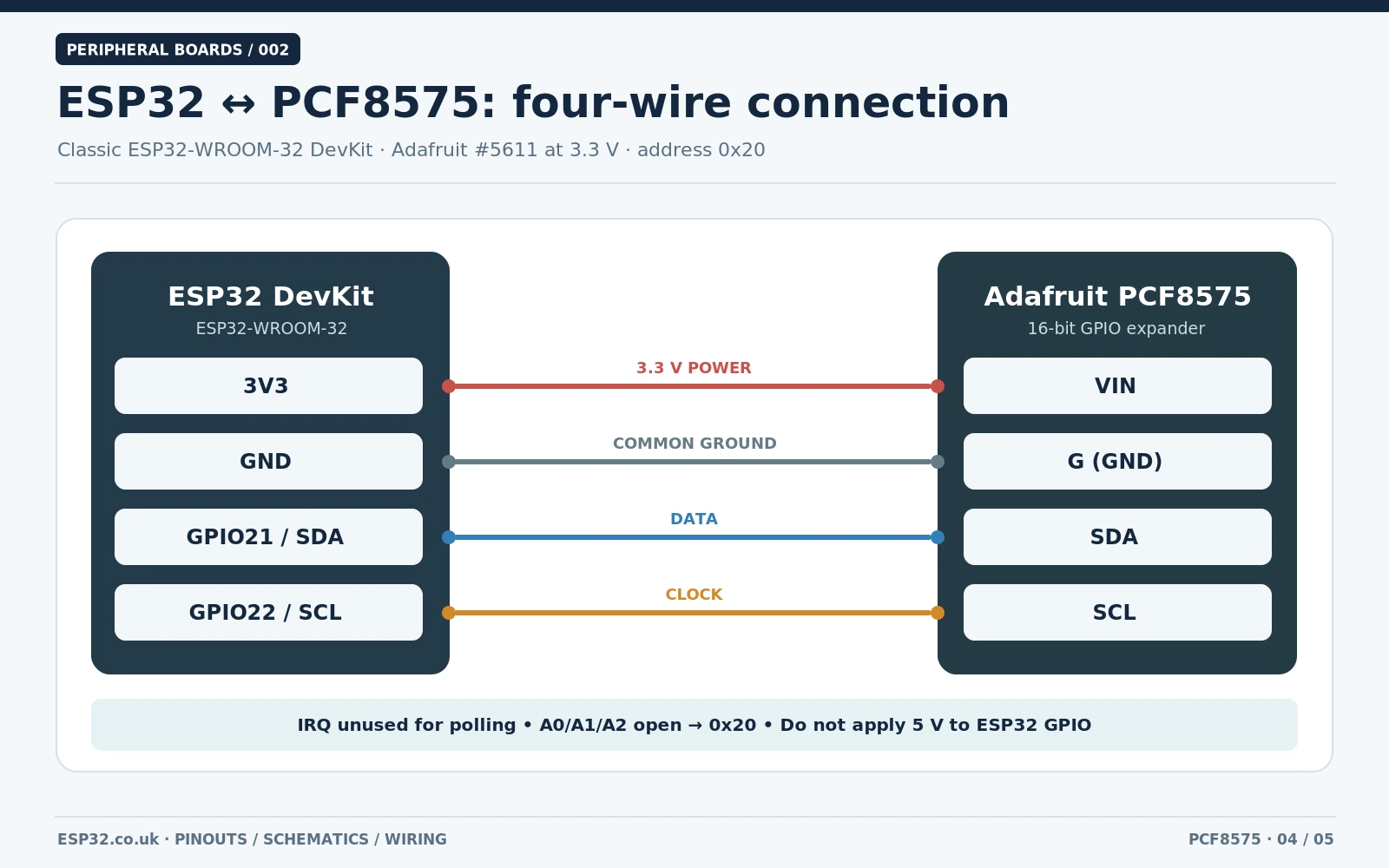
These four main connections are enough for basic communication. The classic ESP32-WROOM DevKit often uses GPIO21 for SDA and GPIO22 for SCL, but ESP32-S3, C3, C6 and other boards can have completely different accessible GPIOs. Match the Arduino sketch to the real MCU board instead of assuming pin numbers from a random photo. Use short I²C wires for first power-up, especially if multiple I²C modules share the bus.
On an original Arduino Uno R3, SDA is normally A4 and SCL is A5. When the whole bus is designed for 5 V, a compatible PCF8575 breakout can be powered from 5 V, but do not transfer those 5 V lines straight to an ESP32. Mixed-voltage systems need proper bidirectional level shifting and common ground.
One button on port 0 and one LED on port 1
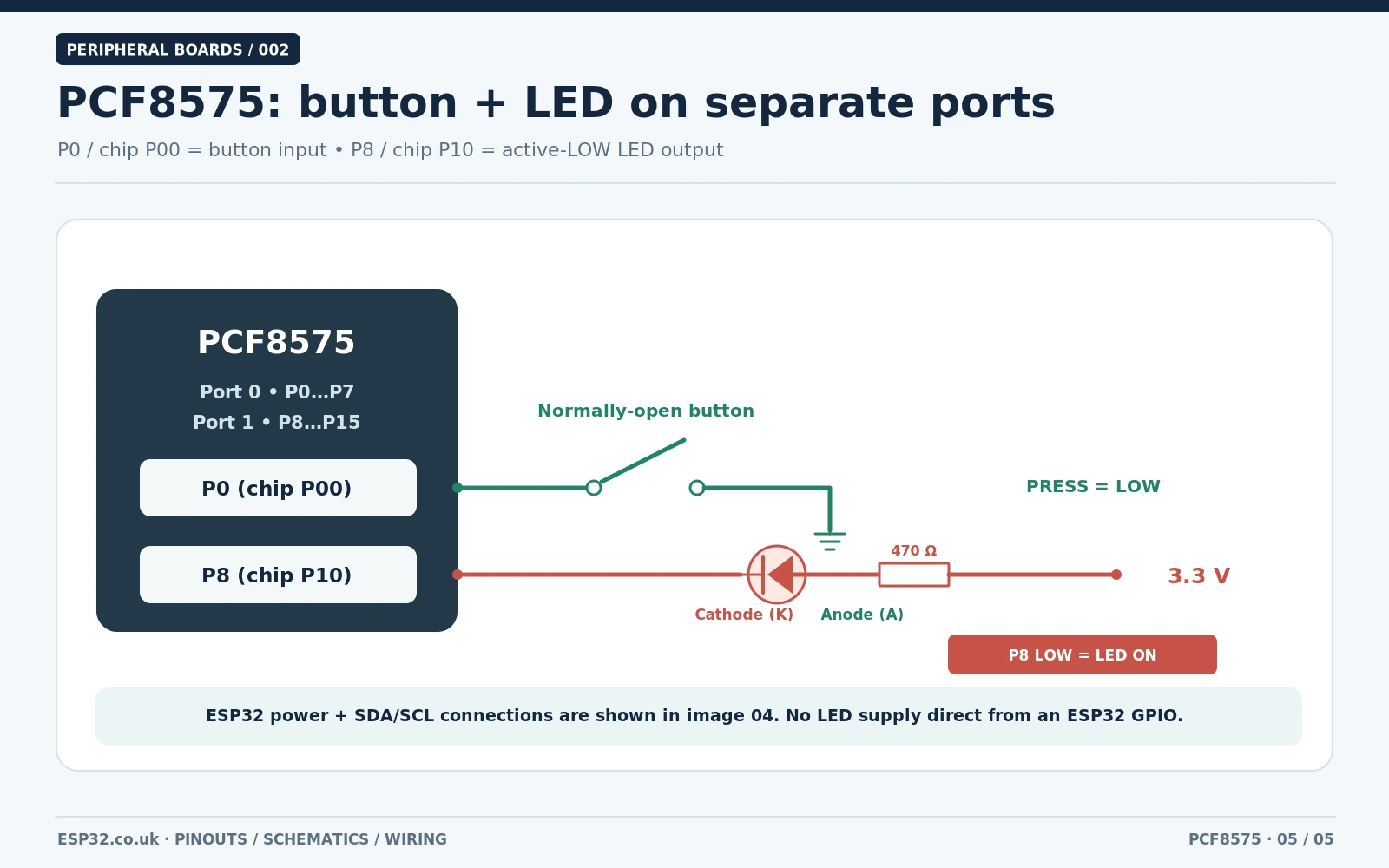
This example uses both halves of the expander: P0 (chip P00, Arduino index 0) is a button input, while P8 (chip P10, Arduino index 8) is an LED output. The red LED is active LOW, so driving P8 LOW sinks a few milliamps and lights it; driving it HIGH extinguishes it. A typical 470 Ω resistor gives about (3.3 V − 2.0 V) / 470 Ω ≈ 2.8 mA for an ordinary red LED.
| Part | Connect to | Expected behaviour |
|---|---|---|
| Pushbutton terminal 1 | P0 | Input reads LOW when pressed |
| Pushbutton terminal 2 | GND | Ground return |
| Red LED cathode (short leg) | P8 | Output sinks LED current when LOW |
| Red LED anode | 470 Ω resistor, then 3V3 | Limits current |
| IRQ / INT | Leave disconnected | Polling example only |
Verify the LED polarity and do not attach motors or relay coils directly to the expander. For relay modules and long control cables, use an appropriate driver or interface. Avoid connecting GPIO signals to voltages outside the chip’s supply rails.
Arduino IDE: Adafruit library installation and ESP32 code
Install Adafruit PCF8574 through Arduino IDE → Library Manager and accept the Adafruit BusIO dependency. Despite its name, this official library includes the Adafruit_PCF8575 class. Select your classic ESP32 board, open the Serial Monitor at 115200 baud, and upload this original short test sketch. It exercises GPIO index 0 and 8, so it proves that both 8-bit ports can be addressed, not merely the first bank.
#include <Wire.h>
#include <Adafruit_PCF8575.h>

constexpr uint8_t SDA_PIN = 21;        // Classic ESP32 DevKit
constexpr uint8_t SCL_PIN = 22;
constexpr uint8_t PCF_ADDRESS = 0x20; // All A0/A1/A2 jumpers open
constexpr uint8_t BUTTON = 0;         // PCF8575 P0 = chip P00
constexpr uint8_t LED = 8;            // PCF8575 P8 = chip P10

Adafruit_PCF8575 pcf;
bool previousPressed = false;

void setup() {
  Serial.begin(115200);
  delay(250);
  Wire.begin(SDA_PIN, SCL_PIN);
  Wire.setClock(100000);              // Safe starting clock

  if (!pcf.begin(PCF_ADDRESS, &Wire)) {
    Serial.println("No PCF8575 at 0x20. Check address and wiring.");
    while (true) delay(1000);
  }

  pcf.pinMode(BUTTON, INPUT_PULLUP);
  pcf.pinMode(LED, OUTPUT);
  pcf.digitalWrite(LED, HIGH);       // Active-LOW LED is OFF
  Serial.println("PCF8575 ready: press the P0 button.");
}

void loop() {
  const bool pressed = !pcf.digitalRead(BUTTON);
  pcf.digitalWrite(LED, pressed ? LOW : HIGH);

  if (pressed != previousPressed) {
    Serial.println(pressed ? "P0 pressed; P8 LED ON"
                           : "P0 released; P8 LED OFF");
    previousPressed = pressed;
  }
  delay(30);                         // Simple demo debounce
}
With the button untouched, the LED remains off. Pressing P0 connects it to GND, and the library reads false / LOW; the sketch drives P8 LOW to illuminate the LED and prints P0 pressed; P8 LED ON. Releasing the button returns P0 HIGH and turns the LED off. If your board is at another I²C address, change PCF_ADDRESS. This is a library-API-checked example, not a claim that every third-party module was bench-tested.
Why not write the raw bytes? At the chip level, the PCF8575 transfers a pair of bytes: P00–P07 first, then P10–P17. There are no conventional direction or output-latch registers to configure. The Adafruit library maintains a 16-bit software state and exposes pinMode(), digitalRead(), digitalWrite() and digitalWriteWord(). If you later write raw Wire transactions, ensure inputs remain written HIGH and preserve every unrelated output bit, or a whole-port update may unexpectedly change other pins.
I²C scanner: find the real PCF8575 address
If the sketch reports that the device is missing, run a small I²C address scanner before changing solder pads. It prints 7-bit addresses, not the read/write address byte you may see in certain older datasheets. A default PCF8575 normally appears at 0x20, but that address by itself cannot distinguish a PCF8575 from another peripheral sharing it.
#include <Wire.h>
void setup() {
  Serial.begin(115200);
  Wire.begin(21, 22);               // Change for your ESP32 board
  Wire.setClock(100000);
  delay(300);
}
void loop() {
  Serial.println("Scanning I2C bus...");
  for (uint8_t addr = 0x08; addr <= 0x77; ++addr) {
    Wire.beginTransmission(addr);
    if (Wire.endTransmission() == 0) {
      Serial.printf("Found I2C device at 0x%02X\n", addr);
    }
  }
  delay(3000);
}
Troubleshooting common PCF8575 problems
| Problem | Check first |
|---|---|
| I²C scan returns no addresses | 3.3 V supply, shared GND, reversed SDA/SCL, working ESP32 pins and poor breadboard connections |
| Scan shows 0x20 but sketch still fails | Another chip might be at 0x20; avoid collision with PCF8574 and MCP23017; confirm chip marking |
| Changing A0 does not change the address | Check correct PCB revision and whether the pad was bridged; measure continuity with power off |
| Only 8 pins seem to work | Remember P8–P15 are port 1; Adafruit front upper row is physically ordered 15 down to P8 |
| Input always LOW | Check stuck button/short to GND; input must have the port latch set HIGH |
| LED turns on when output goes LOW | This is intentional for a current-sinking active-LOW LED circuit |
| ESP32 resets or I²C behaves erratically | Check power integrity, long cables, effective pull-up resistance and accidentally applied 5 V to I²C |
| INT appears permanently asserted | Verify correct interrupt pull-up, read the ports and inspect changes/noise on input pins |
| Power LED on board stays lit | Adafruit has a separate LED trace jumper; address pads do not control the power LED |
PCF8575 vs PCF8574 vs MCP23017
| Feature | PCF8575 | PCF8574 | MCP23017 |
|---|---|---|---|
| Digital I/O | 16 | 8 | 16 |
| Port style | Quasi-bidirectional | Quasi-bidirectional | Individually configured GPIO |
| Addresses (7-bit) | 0x20–0x27 | 0x20–0x27 (PCF8574A: 0x38–0x3F) | 0x20–0x27 |
| Extra capabilities | Simple INT, 16-bit transfers | Simple INT, 8-bit transfers | Direction/pull-up registers, richer interrupt control |
| Best fit | Simple buttons and indicators with 16 signals | Simple expansion with 8 signals | Designs needing finer pin configuration |
Choose PCF8575 when you need many uncomplicated inputs/outputs and want to use a mature I²C library. Choose MCP23017 when you require stronger register-based per-pin direction, configurable pull-ups and more advanced interrupt features. Their I²C addresses overlap, so plan the address map before connecting several expanders.
Frequently asked questions
Can I connect eight PCF8575 boards to one ESP32?
In principle yes: A0/A1/A2 allow eight addresses, for 8 × 16 = 128 expansion lines. The practical bus must still meet capacitance, rise-time and pull-up loading limits. Do not assume eight boards with onboard 10 kΩ resistors plus long cables form a reliable bus without checking the electrical design.
Does PCF8575 support 400 kHz I²C?
Yes. The TI PCF8575 datasheet specifies up to 400 kHz Fast-mode I²C, unlike several older 8-bit PCF8574-family variants that are commonly operated at 100 kHz. Starting at 100 kHz is convenient while wiring and troubleshooting; increase speed only if the bus rise times and other devices allow it.
Are P8–P15 directly ESP32 GPIOs?
No. Those numbers belong to the PCF8575 expander and are passed to the Adafruit library object. pcf.digitalWrite(8, LOW) controls the expander’s P8; it is not the same operation as digitalWrite(8, LOW) on the ESP32.
Can I run a PCF8575 module from 5 V with ESP32?
Not directly when its I²C pull-ups rise to 5 V. The documented Adafruit PCF8575 board’s SDA/SCL pull-ups connect to VIN; supply it from 3.3 V when wiring straight to ESP32 GPIOs. Use a correctly designed bidirectional level shifter for mixed-voltage arrangements.
Does the PCF8575 provide analog inputs or PWM?
No. It provides digital I/O, not an ADC or hardware PWM controller. For 16-bit analogue measurement, the ADS1115 with ESP32 is a separate type of peripheral; for multiple servos or LED PWM channels, investigate a PCA9685 module.
References and further esp32.co.uk/ guides
- Texas Instruments PCF8575 — specifications and datasheet
- Adafruit PCF8575 — official board pinout, address pads, LED jumper
- Adafruit PCF8575 — actual breakout schematic and EagleCAD board files
- Adafruit PCF8575 — Arduino IDE library and examples
- Adafruit PCF8574/PCF8575 Arduino library source
- esp32.co.uk/ — existing PCF8575 16-button Arduino tutorial
- esp32.co.uk/ — MCP23017, PCF8574 and PCF8575 comparison
- esp32.co.uk/ — TCA9548A multiplexer for conflicting I²C addresses
Bottom line: identify the exact PCB first, map the two banks correctly, keep ESP32 logic at 3.3 V, and set the three hardware address bits before selecting the library address. With the hardware right, a 16-bit expander is straightforward to use for buttons and indicators.