A small jumper can make an STM32 board seem completely dead. Set BOOT0 one way, and the microcontroller runs your program; set it another way, reset the chip, and it waits for firmware over a serial interface instead. There is nothing wrong with the application in that second case: the processor is simply starting from a different memory region.
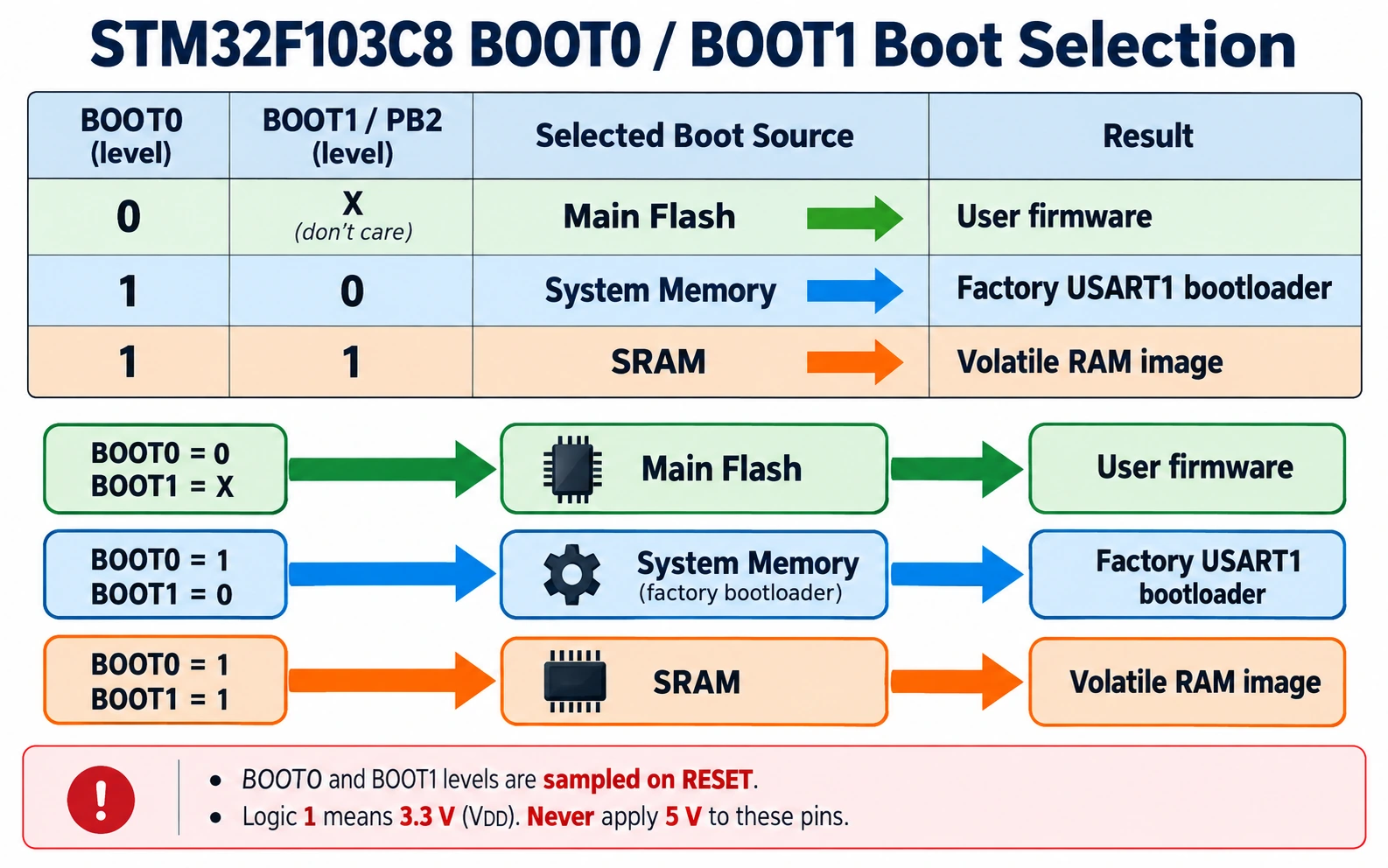
Quick answer for a genuine STM32F103C8AliExpress price Blue PillAliExpress price: leave BOOT0 LOW (0) to run firmware from internal flash. To use the ST factory USART1 system bootloader, set BOOT0 HIGH (1) and BOOT1/PB2 LOW (0), then reset or power-cycle. When programming is complete, put BOOT0 LOW and reset again. BOOT0 HIGH + BOOT1 HIGH selects SRAM boot instead, which is not the normal upload mode. These exact combinations come from ST’s RM0008 reference manual, Section 3.4, Table 9.
The rest of this guide shows what the pins actually do, how to enter and leave the factory bootloader, how to recover an apparently unresponsive Blue PillAliExpress price, and why the same jumper instructions are not reliable for every STM32 family. We will distinguish the factory ROM loader from flash-installed USB bootloaders and from ST-LINK debugging so that you can choose the correct path before changing connections or option bytes.
The three places an STM32F103 can start executing
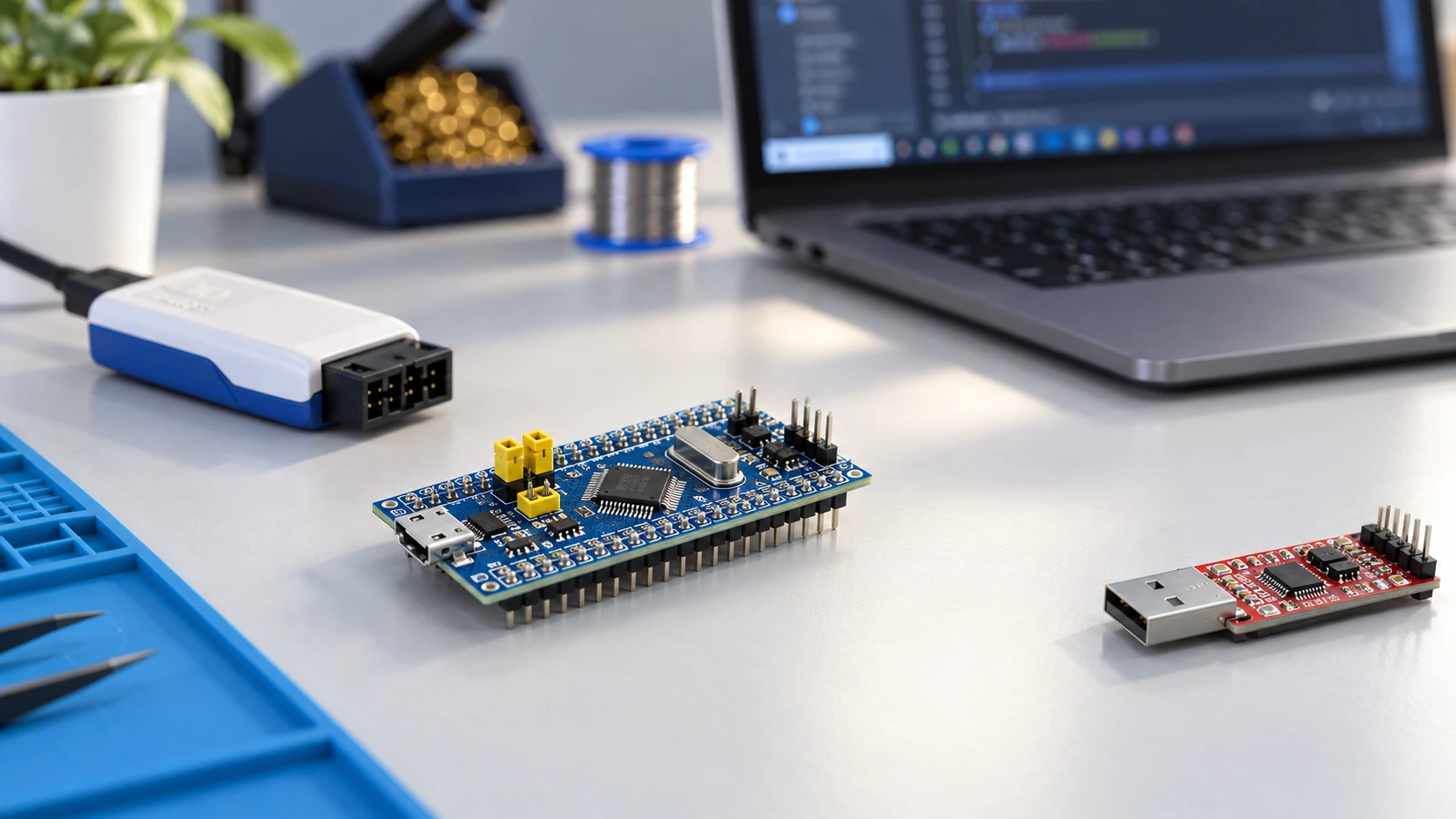
On reset, an STM32F103 chooses a boot memory according to the BOOT0 and BOOT1 levels. Boot selection is not the same as programming. It tells the CPU which memory appears at the boot address for its initial stack pointer and reset vector; it does not load a new application by itself. The STM32F103C8 has three classic selections:
| Boot memory | What runs | Typical use | What it does not do |
|---|---|---|---|
| Main flash | Your application stored in internal flash, normally starting at 0x08000000 | Normal standalone operation | Does not automatically receive a sketch over USB |
| System memory | ST’s factory-programmed bootloader | Firmware recovery or initial programming through supported ROM interfaces | Does not magically support every interface on the MCU |
| Embedded SRAM | Code already placed in RAM with valid startup data | Specialist development, tests and advanced debugging | Does not preserve an application through power-off |
Main flash is nonvolatile, so a successfully programmed firmware image usually remains intact when power is removed. SRAM is volatile. An MCU set to boot SRAM may look lifeless after a power cycle because the memory no longer contains a usable application. The system-memory bootloader, by contrast, is programmed during manufacture and is normally present even if your main flash is blank, provided the genuine MCU and its protection settings allow access.
When the CPU boots from one of these regions, the selected memory is aliased to the processor’s boot space around address 0x00000000 for vector fetching. This explains why a debugger may report an initial address or remapping you did not expect. Do not confuse this alias with the physical main-flash programming address 0x08000000 used when downloading a .bin image.
A practical way to remember the distinction is boot mode chooses what executes; a programmer chooses how new bytes get into flash. You can program flash via SWD while BOOT0 remains LOW; you can also use the serial ROM loader when the appropriate system-memory mode is selected.
STM32F103 BOOT0 and BOOT1 truth table
The truth table is short, and it is worth keeping beside the board during troubleshooting:
| BOOT0 pin | BOOT1 (PB2) | Selected boot memory | Blue Pill action |
|---|---|---|---|
| 0 (LOW) | 0 or 1 | Main flash | Run normal firmware |
| 1 (HIGH) | 0 (LOW) | System memory | Enter factory USART1 bootloader after reset |
| 1 (HIGH) | 1 (HIGH) | SRAM | Only use deliberately with a prepared RAM image |
Source: ST RM0008, Boot configuration, Table 9. In this guide HIGH means the appropriate 3.3 V logic level, never five volts applied to an MCU I/O or BOOT pin.
Important: BOOT1 is not necessarily a separate pin on every STM32 package. On the STM32F103C8 it corresponds to PB2. A common Blue Pill board exposes BOOT0 and BOOT1 jumpers, but some vendors omit, relabel or rework them. Read the silkscreen and, where possible, verify the schematic or use a meter. Do not follow a photograph’s left/right jumper position without knowing which side is 3V3 and which is ground.
The processor samples the boot selection as part of reset/startup. Merely moving a jumper while code is already running does not restart execution from another memory. Set the jumper first, then press RESET or power-cycle. After returning it to flash mode, reset again to start the user application.
What does BOOT0 physically control?
BOOT0 is a boot-selection input, not a general request to upload firmware. Pulling it high changes where the processor starts on the next reset, subject to other configuration on the device. It is not the same as the reset pin, and it is not the same as the USB D+ or D− pins. Pressing the onboard RESET button usually asserts NRST; changing BOOT0 selects a different starting memory when that reset ends.
On most familiar Blue Pill boards, there is a two-position arrangement that connects BOOT0 either to 3.3 V or to ground, often through a jumper. For a reliably reproduced setup, verify these actual electrical levels:
- Normal application: measure BOOT0 near 0 V with respect to board ground.
- Factory ROM serial bootloader: measure BOOT0 near 3.3 V and confirm PB2/BOOT1 is LOW.
- If both BOOT0 and BOOT1 are HIGH, expect SRAM boot, not the serial loader.
Don’t leave boot-selection pins floating; a loose or missing jumper can lead to inconsistent startup. The particular board may include pull-downs or other circuitry, but those vary among clone revisions. Always identify the real pin and reference ground before changing anything.
Why a board may show power but no blinking LED
A powered board can be in the system bootloader, running a defective flash image, or waiting in SRAM mode. A blue or red power LED proves only that some supply is present. Likewise, a user LED may remain off if it is not configured by the active firmware. No LED activity is not a reliable bootloader indicator. Check the boot levels, attempt a known-good SWD connection, and look for activity on the expected UART interface instead of diagnosing by LEDs alone.
Can BOOT1/PB2 still be used as an ordinary GPIO?
On a classic F103, PB2 serves as BOOT1 during reset boot selection. With normal flash boot (BOOT0 LOW), the alternate boot value is ignored by the boot-mode truth table, so the application may subsequently use PB2 according to the device’s GPIO configuration. If you depend on entering system memory, ensure that external circuitry connected to PB2 does not pull BOOT1 HIGH during reset. A load or sensor that biases PB2 can silently change the intended boot selection.
Factory ROM bootloader versus custom USB bootloader
STM32 discussions often use the word bootloader for two very different things. The distinction is central to the Blue Pill’s reputation for confusing USB behaviour.
| Question | Factory system-memory bootloader | Custom flash-resident bootloader |
|---|---|---|
| Where does it live? | Separate system-memory region programmed by ST | Ordinary user flash, installed deliberately |
| Can I overwrite it as an ordinary application? | Not under normal user-flash programming | Usually yes, through a suitable programming/debug interface |
| How is it entered? | Boot configuration (pins/option bytes, depending on MCU) | Application or bootloader-specific entry scheme |
| Interfaces available | Exact device’s list in AN2606 | Whatever the installed software implements |
| Available on blank genuine STM32F103C8? | USART1 ROM loader: yes | No, not until installed |
| USB DFU on an F103C8? | Not present in factory ROM | Possible with compatible additional USB bootloader code, hardware and upload tool |
The STM32F103C8 has a USB full-speed peripheral, but USB hardware does not guarantee factory USB DFU. ST’s AN2606 lists USART1 as the factory system-loader interface for the mainstream medium-density STM32F10xxx devices. Therefore, setting BOOT0 HIGH and plugging a Micro-USB cable into an unmodified Blue Pill does not make it appear as an STM32 DFU device.
This is not a Windows-driver problem: the firmware implementing factory USB DFU does not exist on that particular ROM bootloader. You can instead upload over ST-LINK/SWD or USART1 with a 3.3 V TTL adapter. If you want to upload firmware over the Blue Pill’s onboard USB socket later, you must first install a suitable custom USB bootloader and use the exact tool and entry procedure it expects.
On other chips—including some STM32F4, L4, G0 and newer families—the ROM loader may support USB DFU, UART, SPI, I2C, CAN or FDCAN, depending on the exact part. Never infer capability from the presence of a USB connector, a family nickname, or the fact that a programmer supports the protocol in general. Check the exact device entry in AN2606.
How to enter the Blue Pill factory UART bootloader
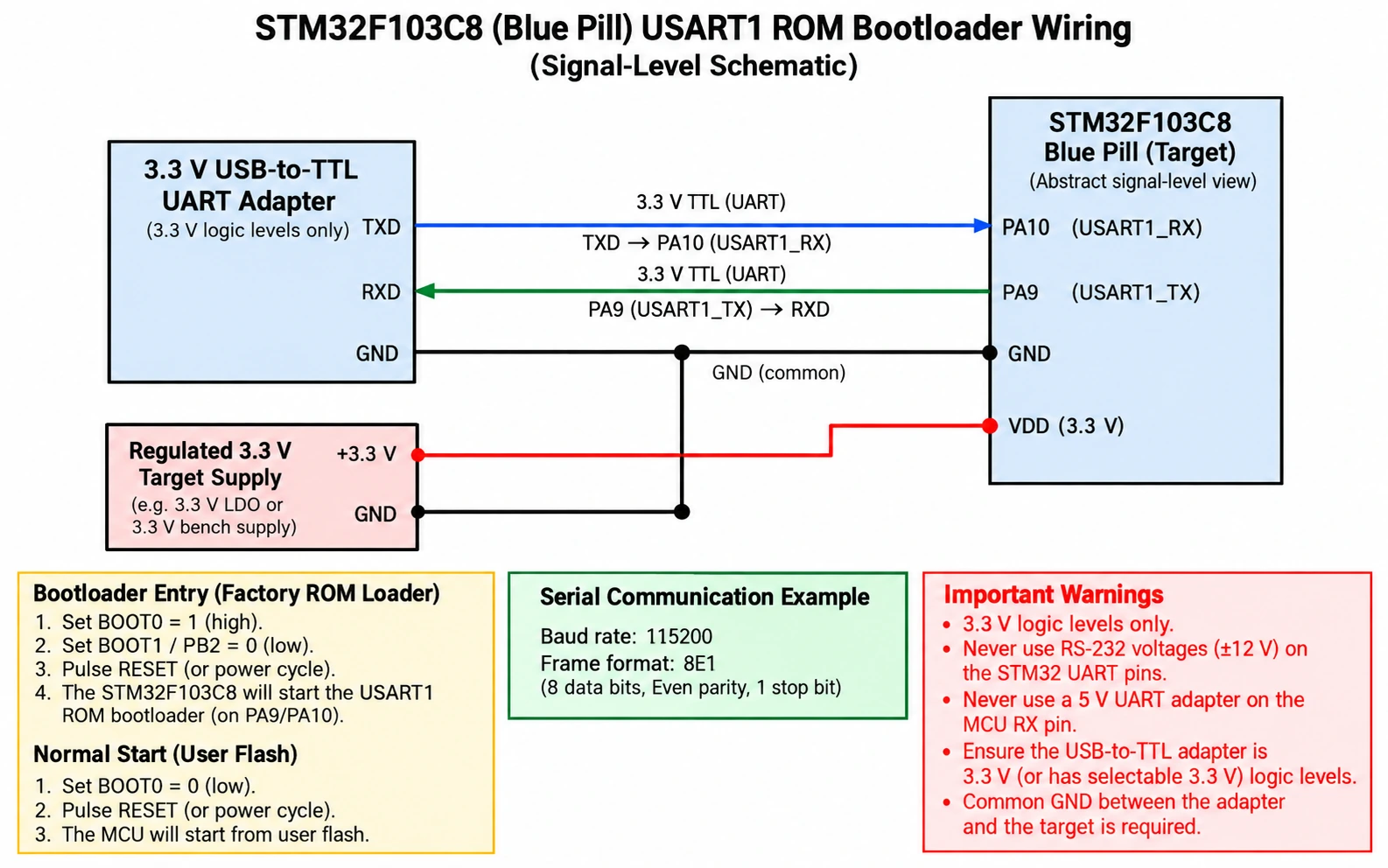
For a common genuine STM32F103C8T6 development board, the system-memory serial loader uses USART1, with PA9 as MCU TX and PA10 as MCU RX. To communicate from a PC, use a USB-to-TTL adapter explicitly set for 3.3 V UART logic—not an RS-232 interface and not a 5 V UART output.
Wiring: USB-to-UART adapter to STM32F103C8
| USB-to-UART adapter | STM32F103C8 target | Explanation |
|---|---|---|
| TXD | PA10 / USART1_RX | Adapter transmits; STM32 receives |
| RXD | PA9 / USART1_TX | STM32 transmits; adapter receives |
| GND | GND | Required shared reference |
| Target supply (separate regulated 3.3 V, as appropriate) | 3V3 / VDD | Target needs safe, stable power |
| Do not connect RS-232 or 5 V TTL TX | MCU RX | Incorrect voltage can damage the target |
A board’s existing regulator may let you power it through a correctly documented USB or 5 V input, but don’t connect multiple supplies blindly or feed 5 V directly into its 3V3 rail. Some USB-to-UART adapters provide a 3.3 V logic reference but insufficient current to power a whole board; provide an appropriate regulated target supply separately if needed.
The first thing to get right is crossing TX/RX: adapter TX goes to PA10 RX; adapter RX goes to PA9 TX. Connect the grounds before testing signals. You do not need a USB-to-UART adapter’s hardware flow-control pins for this factory serial loader.
Enter the ROM loader step by step
- Disconnect external loads likely to drive PA9, PA10 or PB2; verify that the target voltage is stable near 3.3 V.
- Connect USART1 as shown in the table: adapter TXD → PA10, adapter RXD ← PA9, shared GND.
- Select system-memory boot: BOOT0 HIGH, BOOT1/PB2 LOW. Use board jumper settings confirmed by a schematic or voltmeter.
- Press RESET or power-cycle after setting the boot levels. The factory loader starts only when the correct startup configuration is sampled.
- Open STM32CubeProgrammer, choose UART, select the actual serial port, and begin conservatively at 115200 baud, 8 data bits, even parity, 1 stop bit (8E1) with no flow control.
- Click Connect. The tool performs the required bootloader initialisation. A genuine working target should then return information that allows further commands.
- Choose your firmware file. A
.hexor.elffile carries addresses; a raw.binfile requires the correct main-flash base address, usually0x08000000for this part. - Program and verify. Avoid mass erase if you need to preserve any existing flash contents, and do not change read-protection option bytes merely to fix a serial timeout.
- Set BOOT0 LOW again, then reset. The application should start from main flash, assuming it is valid and its hardware expectations are met.
ST’s STM32CubeProgrammer UART connection documentation confirms the UART settings. The ROM communication protocol is not a normal text terminal. A serial monitor configured to 115200 8N1 and sending arbitrary text will not substitute for CubeProgrammer’s bootloader handshake and commands.
Why 8E1 matters
The F103 factory UART bootloader uses even parity and a host synchronisation sequence, unlike the familiar 8N1 used in many Arduino examples. STM32CubeProgrammer handles the handshake after the MCU boots into system memory. If you deliberately implement a serial protocol tool yourself, follow ST’s application note AN3155 — USART protocol used in the STM32 bootloader rather than guessing a byte stream from normal UART examples.
Example STM32CubeProgrammer CLI commands
The GUI is easiest for a first-time user. For repeatable programming, the CLI supports the same core operations. Substitute the actual port and file path below; COM7 is an example only. The target must already be in system-memory boot mode before these commands.
# Check the factory ROM UART connection on an example Windows COM port
STM32_Programmer_CLI -c port=COM7 br=115200 P=EVEN db=8 sb=1
# Program a raw binary into F103 internal flash, then verify
# Run only if overwriting the existing application is intended
STM32_Programmer_CLI -c port=COM7 br=115200 P=EVEN db=8 sb=1 -w firmware.bin 0x08000000 -v
For a Linux setup, replace COM7 with the actual /dev/ttyUSB* path exposed by your adapter. Adapt group permissions as needed rather than running programming utilities with elevated privileges unnecessarily. Do not pass 0x08000000 as an arbitrary offset for every MCU or every external flash target; it is the familiar main flash base of this F103 example. The commands are syntax examples drawn from ST’s MCU CLI reference, not a claim that this exact board was bench-programmed for the article.
Use ST-LINK/SWD when BOOT0 won’t cooperate
ST-LINK/SWD is usually the better first choice for development and recovery. The debugger talks through the Cortex serial-wire debug port; it does not need the MCU to start its UART ROM loader successfully. On the F103C8, connect the debugger’s SWDIO signal to PA13, SWCLK to PA14, and GND to ground. Connect NRST when you need a connect-under-reset recovery attempt. Provide an appropriately powered target and, where the probe requires it, a correctly connected target-voltage reference. Do not assume an ST-LINK VTref/VAPP signal powers the board: on many probes it is a voltage-sense input.
For normal debugging keep BOOT0 LOW. If your application repurposes or disables SWD pins too early, the SWD connection may drop. Try a slower SWD clock and Connect Under Reset (with a real NRST wire) before changing option bytes or erasing flash. This is valuable when code reconfigures PA13/PA14, enters a low-power state or faults very quickly after reset.
| Connection | STM32F103C8 MCU pin | Purpose |
|---|---|---|
| ST-LINK SWDIO | PA13 | SWD data |
| ST-LINK SWCLK | PA14 | SWD clock |
| ST-LINK GND | GND | Common ground |
| ST-LINK NRST (recommended) | NRST | Hardware reset and connect-under-reset |
| ST-LINK VTref/VAPP (when required) | Target 3.3 V rail | Reference sensing; not necessarily a supply |
Probe pin numbering varies: genuine ST-LINK/V2’s large 20-pin CN3, the 10-pin Arm Cortex Debug standard, and inexpensive clone dongles are different connector families. Wire by verified signal names, never by copying a clone’s supposed “pin 1–4” arrangement. Our ST-LINK V2 pinout and SWD wiring guide covers the connector distinction in detail. See also programming a Blue Pill with ST-LINK.
What about BOOT0 and USB DFU on newer STM32 boards?
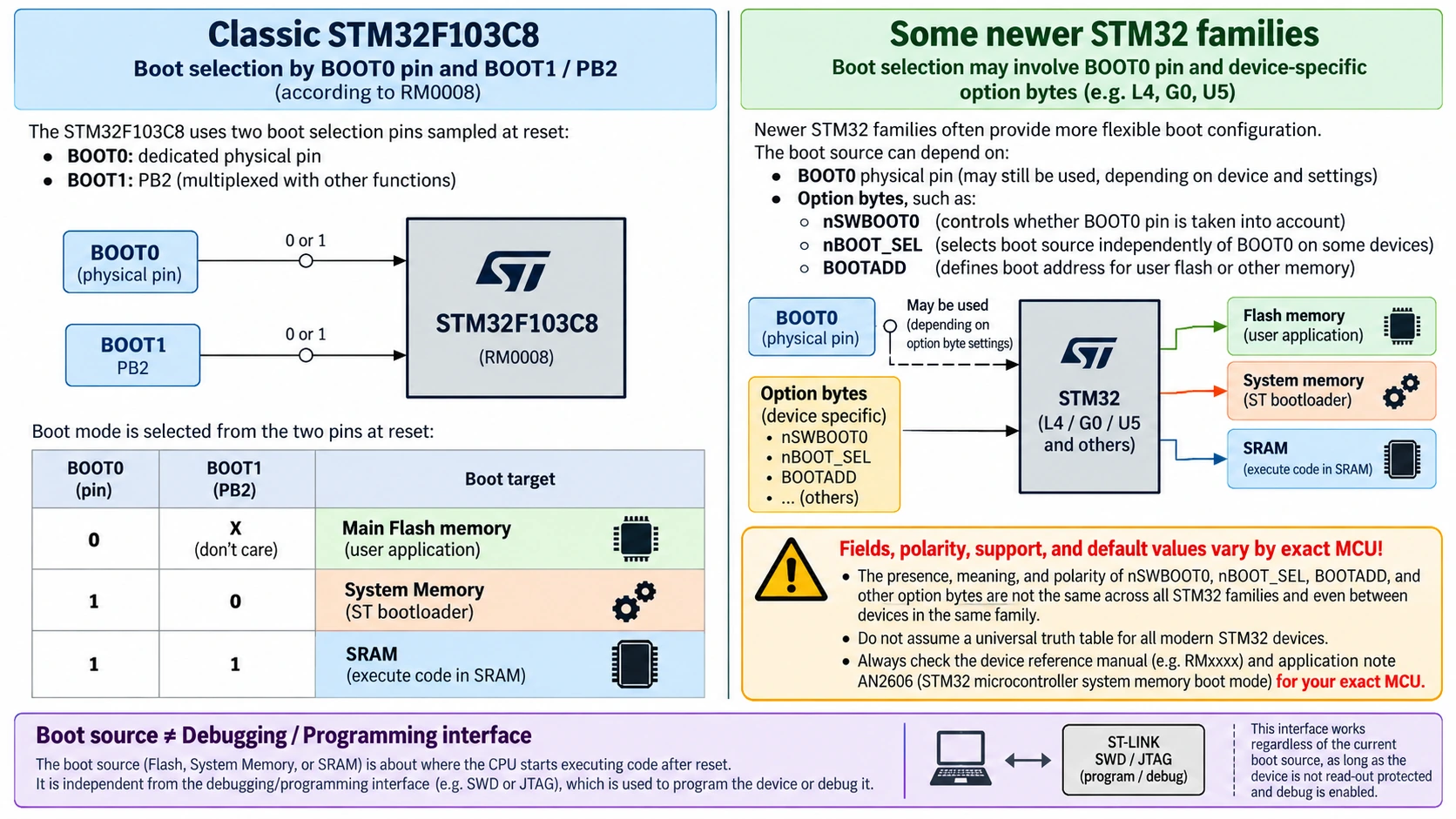
It is tempting to treat every STM32 development board as if it were a Blue Pill with two jumpers. That is precisely the wrong abstraction. A newer STM32 can select boot memory using BOOT0 pins, option bytes, boot-address fields, security configuration or empty-flash checks, depending on the exact series and variant. Physical BOOT1 is not always present.
For example, on some STM32L4 and U5 devices, a bit such as nSWBOOT0 selects whether the boot condition comes from a physical BOOT0 input or from an option byte. Other families, such as certain STM32G0 devices, have a different nBOOT_SEL / BOOT0 selection interpretation. Advanced families can also have configurable BOOTADD addresses, security states or a boot-lock control. Even similarly named bits can have different polarity or effects across reference manuals. ST warns that device-specific boot configuration is essential. Consult the exact device reference manual, AN2606 and ST’s boot-process FAQ.
| Platform | What to check | Safe starting assumption |
|---|---|---|
| STM32F103C8 Blue Pill | BOOT0 and BOOT1/PB2, RM0008 truth table | BOOT0 LOW for normal flash; HIGH + BOOT1 LOW for UART ROM loader |
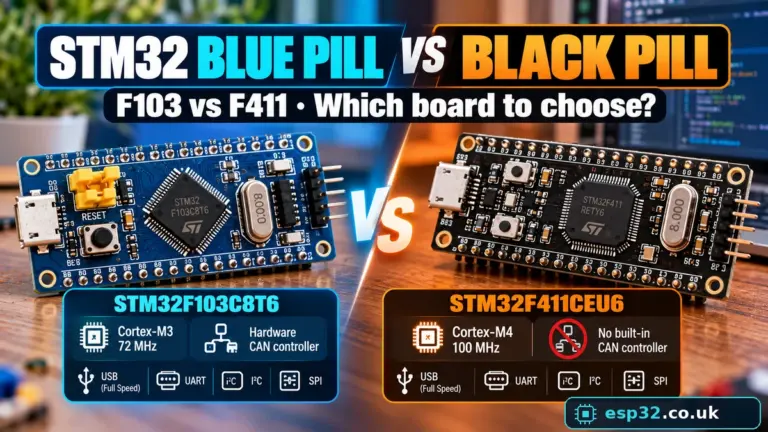
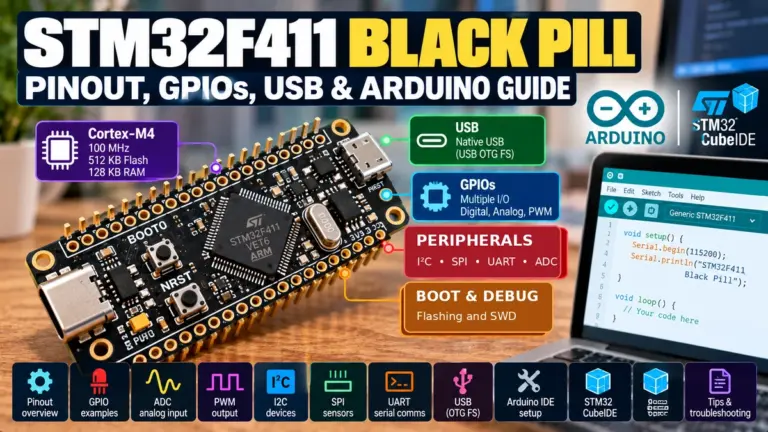
| STM32F401/F411 Black Pill | Exact MCU’s boot modes, supported ROM interfaces, board wiring | Do not apply the F103 BOOT1/PB2 table uncritically; USB DFU depends on exact chip |
| STM32 Nucleo boards | Integrated ST-LINK, target board manual, solder bridges and boot settings | Prefer onboard SWD for first programming; USB port for debugger is not automatically MCU DFU |
| G0 / L4 / U5 and newer | Boot-related option bytes and alternate boot-source selection | Read option bytes and device manual before changing any boot bit |
| Secure newer families | Boot lock, readout protection, secure boot / TrustZone state | Do not experiment with irreversible security settings as a bootloader “fix” |
For a practical selection of newer boards, see our Best STM32 Development Boards guide and STM32 for Beginners.
An empty main flash can complicate the diagnosis
Some STM32 families implement empty-flash detection or alternate boot behaviour that starts a system loader when the user flash is blank. This feature can depend on option bytes, the chip’s exact revision or reset conditions. It must not be projected backwards onto every F103: use the F103 boot table for an F103. If an unprogrammed newer chip appears to enter USB DFU without the jumper configuration you expected, verify the newer family’s documented empty-check logic before attributing the behaviour to a universal STM32 rule.
Changing boot-related option bytes is not a first troubleshooting step
STM32CubeProgrammer exposes option-byte fields such as boot-source controls and readout protection on devices that support them. This is powerful, but dangerous as a guessing game. Always read and document the current option bytes, confirm the exact part number and its reference manual, and understand which reset/reload operation applies before writing. An incorrect change can stop normal boot, block a debugger under some circumstances, erase protected content or, at the highest protection level on certain devices, create irreversible restrictions. Never casually clear RDP or mass erase to fix a missing USB port.
Factory bootloader versus flash-resident application bootloader
Many commercial products need field firmware updates with no physical access to BOOT0. Instead of asking a user to open an enclosure and move a jumper, the application may include a custom bootloader in user flash. That bootloader can verify an update and jump to an application at a later flash address. But this is a different software architecture, not the factory system-memory loader.
When using a flash-resident bootloader, you need to account for:
- Flash layout and linker scripts. The bootloader and application must not overwrite each other. The application entry point and vector table must be configured for its actual location.
- Safe reset and handoff. Interrupt state, peripheral clocks, stack pointer, vector-table mapping and watchdogs must be addressed when transferring control. A naive branch to a ROM address is not a universally safe way to enter an STM32 factory bootloader.
- Update integrity. Validate size, boundaries and image integrity before starting new firmware. Have a recoverable plan if power fails mid-update.
- Authentication when needed. A CRC can detect accidental corruption but does not authenticate an untrusted update. Security-sensitive devices need an appropriate authenticated update design.
- Recovery interface. Preserve SWD accessibility or another documented recovery path during development; don’t make a custom USB loader the only way to fix a broken USB stack.
For most makers, use ST-LINK during development and only design a custom loader when the product actually needs field upgrades. It adds complexity and occupies flash that could otherwise hold the application. A board advertised as “USB programmable” may already have such a loader installed—but you should identify which one, where it resides and which upload protocol it expects, rather than assume it is the factory STM32 DFU.
Troubleshooting: BOOT0 HIGH but no serial connection
If selecting the factory loader still produces a timeout, work through the physical boot selection and UART layer systematically rather than rewriting option bytes.
| Symptom | Most likely checks | What to do first |
|---|---|---|
| Board powers but user LED does not blink | BOOT0 still HIGH; program invalid; LED code wrong | Restore BOOT0 LOW and reset; verify flash program |
| CubeProgrammer UART timeout | BOOT1 HIGH; boot selection changed after reset; wrong COM port | Verify BOOT0 HIGH, BOOT1/PB2 LOW, reset, then select actual port |
| UART device/adapter appears on PC but MCU not detected | TX/RX reversed, no common ground, wrong voltage | Cross TXD→PA10 and RXD←PA9, share GND, use 3.3 V TTL |
| Serial connects inconsistently | Unstable power, wrong serial format, noisy wiring | Regulated 3.3 V, short wires, 8E1, lower baud |
| Blue Pill never appears as USB DFU | F103C8 factory loader has no USB DFU | Use USART1 or ST-LINK; don’t keep switching USB drivers |
| ST-LINK found but target missing | Target unpowered, PA13/PA14 wrong, wrong probe connector | Verify 3.3 V rail, common GND and SWD nets |
| ST-LINK attaches only during reset | Firmware rapidly reconfigures SWD or faults | Attach NRST; try Connect Under Reset and low SWD frequency |
| BOOT0 LOW but application still fails | Flash image invalid, wrong reset vector, clock/firmware crash | Verify programmed image/address; debug over SWD |
| BOOT0 HIGH + BOOT1 HIGH gives no serial response | SRAM selected, not system memory | Set BOOT1 LOW; reset |
| Newer STM32 ignores BOOT0 pin | Boot source chosen through option bytes, security or empty-check logic | Read exact part manual and option-byte state, do not guess |
A repeatable recovery sequence for a Blue Pill
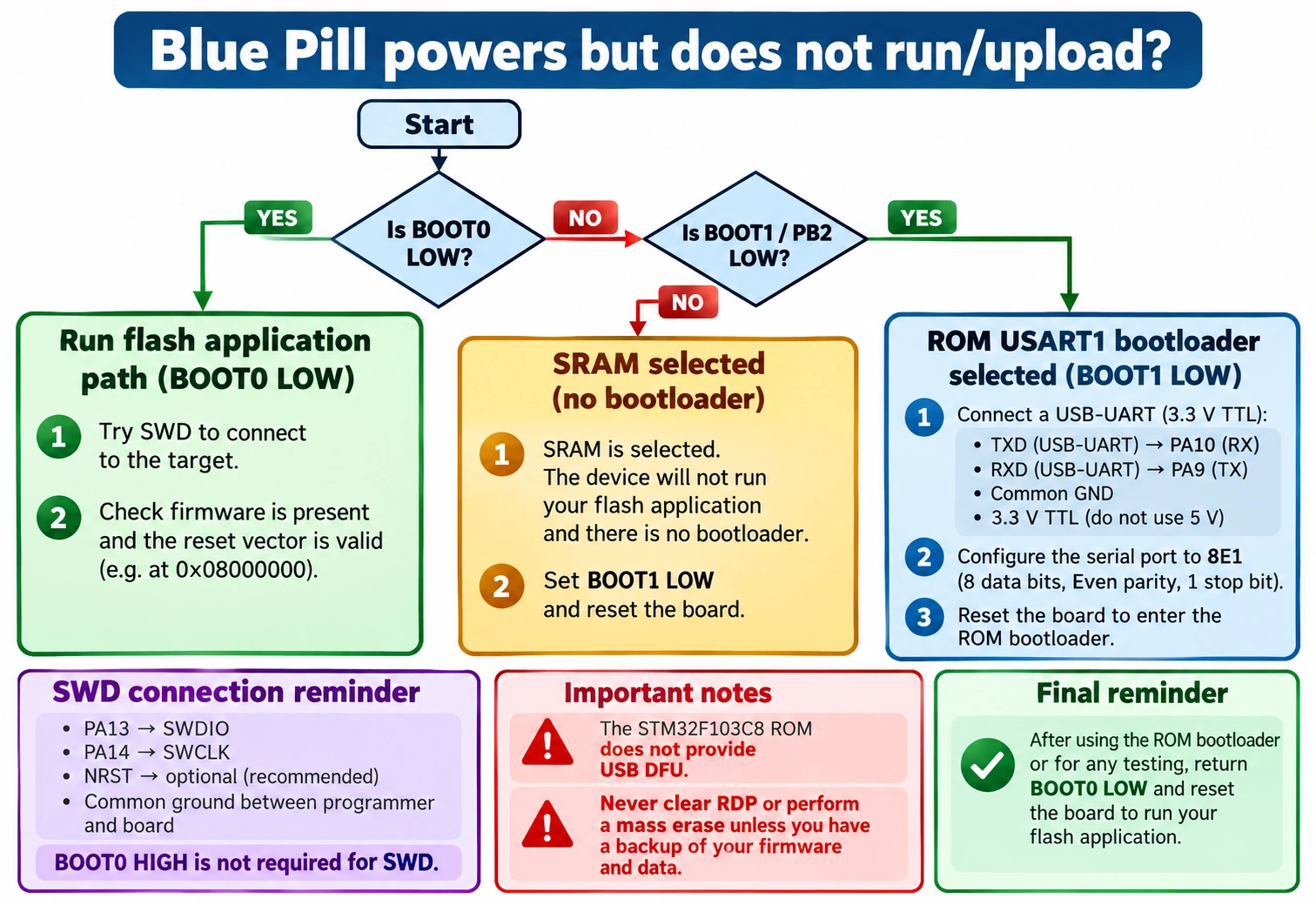
- Identify the actual chip marking. Many inexpensive “Blue Pill” boards have clone or alternative MCUs; their factory bootloader behaviour is not guaranteed to match a genuine ST part.
- Disconnect additional modules. An attached sensor or external board can pull a boot or debug signal into the wrong state.
- Check power safely. Confirm approximately 3.3 V between 3V3 and GND; never measure resistance on a powered board.
- Restore BOOT0 LOW and reset. If the app still fails, stop assuming the bootloader is the problem.
- Try SWD connection first, with correctly identified SWDIO/PA13, SWCLK/PA14 and GND. Add NRST and connect under reset if normal connection is unreliable.
- Read the existing flash and option-byte state if you need a backup. Do not perform a full erase unless losing the contents is acceptable.
- Flash a minimal known-good LED project or verify the application at
0x08000000. Use a successful verify result before resetting. - Only if SWD is unavailable, test the UART factory loader by raising BOOT0, keeping BOOT1 LOW and resetting. Check adapter crossover and 8E1.
- Return to BOOT0 LOW after programming. Reset and observe the application.
If the bootloader can talk to CubeProgrammer but the newly programmed application never runs, the failure is likely in the user flash image, linker address, clock configuration, interrupt setup or board hardware, not in the boot-selection mechanism itself. Use SWD debugging to see exactly where execution stops.
Frequently asked questions
Should BOOT0 be HIGH or LOW when programming with ST-LINK?
For typical STM32F103 development, keep BOOT0 LOW. ST-LINK uses SWD to flash and debug the MCU, so entering the USART ROM loader is not required. Other boot settings may be appropriate for specific recovery operations, but BOOT0 HIGH is not a prerequisite for SWD.
What should BOOT0 be set to after flashing a Blue Pill?
LOW (0), then RESET. Otherwise the next reset may start the system loader or SRAM mode instead of running your application. This single missed step explains many apparently successful-but-dead Blue Pill uploads.
Is BOOT1 the same pin as PB2?
On the classic STM32F103C8, yes: BOOT1 corresponds to PB2 for boot selection. Other STM32 lines may have no external BOOT1, or encode the relevant selection in option bytes. The F103 boot table must not be treated as universal.
Is BOOT0 HIGH the same as DFU mode?
No. BOOT0 helps select a boot target. On the genuine F103C8 it can select the factory USART1 loader when BOOT1 is LOW; there is no factory USB DFU on that loader. On certain other STM32 parts, system-memory boot may offer DFU if AN2606 lists it and the MCU USB data lines are wired correctly.
Can a Blue Pill be programmed with only its Micro-USB connector?
A stock genuine F103C8 does not offer native USB DFU from factory ROM. For a first upload use ST-LINK or its USART1 system loader. USB-only application uploading is possible after installing and correctly configuring a compatible flash-resident USB bootloader; this changes the boot path and uses a bootloader-specific upload tool.
Is SRAM boot useful for beginners?
Usually not. SRAM boot is useful for specialised debug workflows that arrange a valid image in volatile RAM. If both BOOT pins are HIGH after a power cycle, a typical board without prepared SRAM contents will not run a usable program.
Can I change boot mode just by changing the jumper?
Set the jumper and then reset or power-cycle to make the new selection take effect. Moving the jumper by itself does not automatically transfer a running application to a new memory region.
Can I use an ordinary RS-232 serial cable to upload firmware?
Not directly. PA9 and PA10 are 3.3 V MCU UART logic signals. Conventional RS-232 voltage levels are incompatible and potentially destructive. Use a proper 3.3 V USB-to-TTL adapter with a common ground and crossed TX/RX.
Why is my STM32 bootloader not responding even though the COM port exists?
The COM port belongs to your USB-to-UART adapter, not the target MCU. It proves the PC sees the adapter only. Check the F103 BOOT0/BOOT1 truth table, reset timing, 3.3 V target power, TX/RX crossover, common GND and 8E1 settings to establish communication with the MCU ROM loader.
Can STM32 software jump to the factory bootloader without moving BOOT0?
Some device-specific implementations can jump to a system-memory entry, but the correct sequence depends on the STM32 family, memory mapping, reset assumptions and current peripheral state. It is not simply a universally portable branch to an address. For a reliable beginners’ recovery procedure, select the appropriate physical boot mode and reset, or implement a carefully reviewed device-specific software entry procedure using the reference manual and AN2606.
Should I change nBOOT0 or nSWBOOT0 to fix a Blue Pill?
No. Those names are associated with the boot-selection option bytes on certain newer STM32 families, not the basic F103 BOOT0/BOOT1 procedure above. Do not copy option-byte instructions from a G0, L4 or U5 tutorial to an F103. Incorrect writes can be more harmful than the original problem.
Final checklist and related STM32 guides
For a typical genuine STM32F103C8 Blue Pill, remember these five facts: (1) BOOT0 LOW boots normal flash; (2) BOOT0 HIGH with PB2/BOOT1 LOW selects factory system memory; (3) USART1 programming uses PA9 TX, PA10 RX, 3.3 V TTL and 8E1; (4) factory ROM USB DFU is not provided on this chip; (5) after programming, put BOOT0 LOW and reset. ST-LINK/SWD does not require BOOT0 HIGH to flash.
Continue with the related guides: STM32 for Beginners, STM32CubeProgrammer SWD/UART/USB flashing, Blue Pill Arduino IDE 2 programming, ST-LINK V2 pinouts and Blue Pill USB troubleshooting. These links are intended for use when the corresponding cluster articles are published.
Primary technical sources
- ST RM0008 — STM32F10xxx reference manual, Section 3.4 and Table 9 (BOOT0/BOOT1 truth table).
- ST AN2606 — STM32 system-memory boot mode (part-specific factory interface and activation requirements).
- ST STM32CubeProgrammer 2.23 — UART connection and MCU CLI syntax.
- ST FAQ — STM32 boot process (family differences, option-byte selection and system loader).
Engineering note: The boot-mode table, memory choices, UART pin assignments and expected serial format are grounded in the cited documentation. Example procedures have been reviewed for technical consistency but were not physically bench-tested on a particular Blue Pill. Verify the actual board revision, chip and jumper nets before applying power or connecting a programmer.