
The STM32F407VET6 is a powerful step up from the familiar Blue Pill and compact Black PillAliExpress price boards. Its Cortex-M4F runs at up to 168 MHz, and the MCU offers USB OTG, SDIO, two CAN controllers, an Ethernet MAC, three ADCs, DAC outputs, advanced timers, and a flexible external-memory interface. It is an excellent choice when an embedded project needs several peripherals simultaneously—but there is a catch: STM32F407VET6 identifies the microcontroller, not a universal development-board layout.
Two boards sold under that chip name may have different LEDs, buttons, SPI-flash chip-select signals, oscillator footprints, debug connectors and header numbering. This guide separates the verified chip-level signals from the board-specific wiring, then walks through clock configuration, first programming, GPIO, SD cards, USB, CAN, Ethernet and troubleshooting. We use the larger STM32 F4VE V2.0 black board and the smaller DevEBox STM32F4XX-M as concrete examples. Neither is a substitute for checking the schematic of the board in your hand.
Quick answer: The STM32F407VET6 is a 100-pin LQFP Cortex-M4F MCU with 512 KiB internal flash, 192 KiB SRAM (including 64 KiB CCM), up to 168 MHz CPU clock and 3.3 V I/O supply. Common SWD signals are PA13/SWDIO and PA14/SWCLK; full-speed USB device data uses PA11/DM and PA12/DP; four-bit SDIO commonly uses PC8–PC12 plus PD2. The chip includes CAN and Ethernet logic, but boards generally still need separate CAN transceivers and an Ethernet PHY. ST STM32F407VE product page.
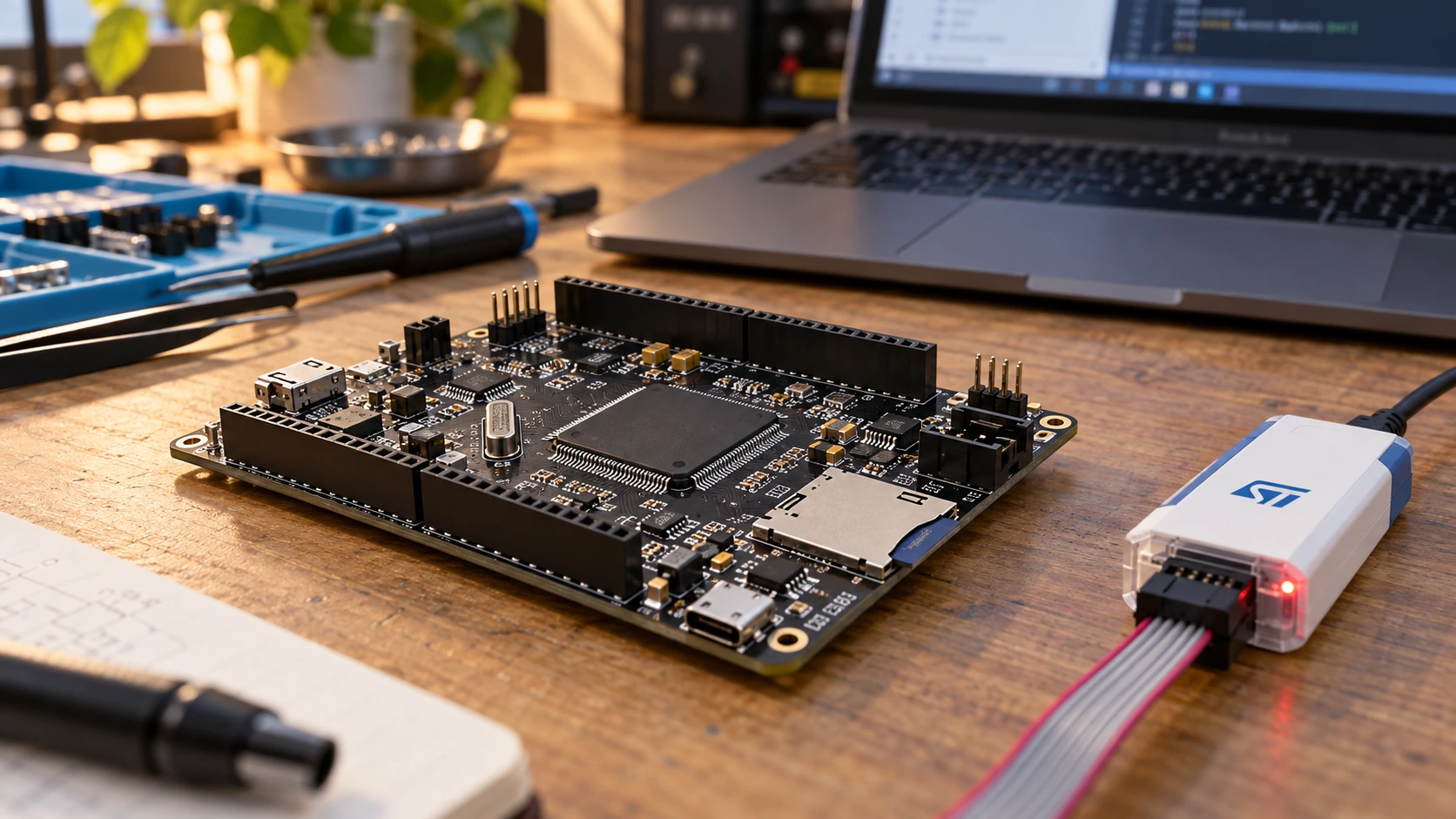
STM32F407VET6 specifications: what the chip actually provides
The VE in the part number denotes the 512 KiB flash-memory density, and the T package code corresponds to the 100-pin LQFP version. A VG chip has a different flash-density designation; avoid assuming that every F407 development board has 1 MiB simply because the F407 family extends that far. Check the actual package marking rather than a generic listing.
| Feature | STM32F407VET6 | Practical interpretation |
|---|---|---|
| CPU | Arm Cortex-M4 with single-precision FPU and DSP | Useful for control, DSP and real-time processing |
| Maximum clock | 168 MHz | Requires valid power, clock, flash-latency and bus settings |
| Internal flash | 512 KiB | Code and constant data; external SPI flash is separate |
| RAM | 192 KiB total: 128 KiB SRAM plus 64 KiB CCM | CCM is CPU-accessible but not a general DMA buffer |
| Backup SRAM | Up to 4 KiB | Retention needs the backup-domain power conditions |
| Package | LQFP100 | Not all MCU-function combinations fit available board headers |
| ADC / DAC | Three 12-bit ADCs; two 12-bit DAC channels | ADC input must stay within its analog reference range |
| USB | USB OTG FS, plus OTG HS controller capabilities | True USB high-speed mode requires the appropriate external ULPI PHY |
| CAN | Two bxCAN controllers | External 3.3 V-compatible CAN transceiverAliExpress price and bus termination required |
| Ethernet | 10/100 Ethernet MAC | Needs PHY, magnetics, RJ45 and suitable pin routing |
| SD card | SDIO peripheral | Common boards wire a microSD slot in 4-bit mode |
| Timers | Advanced, general-purpose and basic timers | Hardware PWM, capture, encoder inputs and synchronized control |
ST’s STM32F407VE product specification and RM0090 reference manual are the authority for the MCU. Board-level information comes from the specific PCB schematic.
RAM: 192 KiB does not mean every memory region supports DMA
A detail that causes remarkably confusing bugs is the split memory architecture. Regular SRAM is available to the system and peripherals through the bus matrix; 64 KiB of core-coupled memory (CCM) offers fast CPU access but is not a general DMA-accessible destination. An SDIO, SPI, ADC or UART DMA transfer can fail if a buffer is inadvertently placed in CCM. When using DMA, explicitly place buffers in accessible SRAM, and consult RM0090’s memory map and bus architecture for your transfer. A successful CPU memcpy() into a region is not evidence that the peripheral’s DMA engine can access it.
Likewise, 512 KiB internal flash does not magically turn an onboard W25Q16 SPI chip into application flash. That 16-Mbit part is typically 2 MiB of external serial data storage; it needs a driver, chip select and a suitable file format. It is not a replacement for the STM32’s internal flash or a drop-in executable memory mapping.
Which STM32F407VET6 development board do you have?
Before using any diagram, read the text on the PCB, check the USB connector, measure the dimensions and compare the board’s schematic. Here are two documented designs.
| Identification | STM32 F4VE V2.0 (larger board) | DevEBox STM32F4XX-M (compact board) |
|---|---|---|
| Example PCB size | About 62 × 85 mm | About 40 × 68 mm |
| User LEDs | PA6 and PA7, configured as sinking outputs | PA1, configured as a sinking output |
| User buttons | PA0 (active high), PE4 and PE3 (active low) | PA0 (active high) |
| SD socket | SDIO signal group PC8–PC12, PD2 | Same common SDIO signal group |
| External serial flash | W25Q16; PB0 is chip select on this revision | W25Q16; chip-select pin differs by compact-board revision—verify schematic |
| SWD access | Separate debug/JTAG connector | Five-signal SWD header on documented revision |
| USB D− / D+ | PA11 / PA12 | PA11 / PA12 |
| Oscillators on documented boards | 8 MHz HSE and 32.768 kHz LSE | 8 MHz HSE and 32.768 kHz LSE |
These facts are not interchangeable board pinouts. The F4VE V2.0 board reference and compact STM32F4XX-M reference each provide photographs, connector tables and an original schematic. An apparently similar board from another factory could change a LED, pull-up or flash chip-select net.
For example, a tutorial that toggles PA6 will blink a documented F4VE V2.0 LED, but may do absolutely nothing visible on a compact DevEBox-style board whose user LED is PA1. Neither result tells you the MCU is defective. Another example: PA6 and PA7 can be valuable timer or SPI signals, but on a PCB where they drive onboard LEDs those functions are already loading the nets.
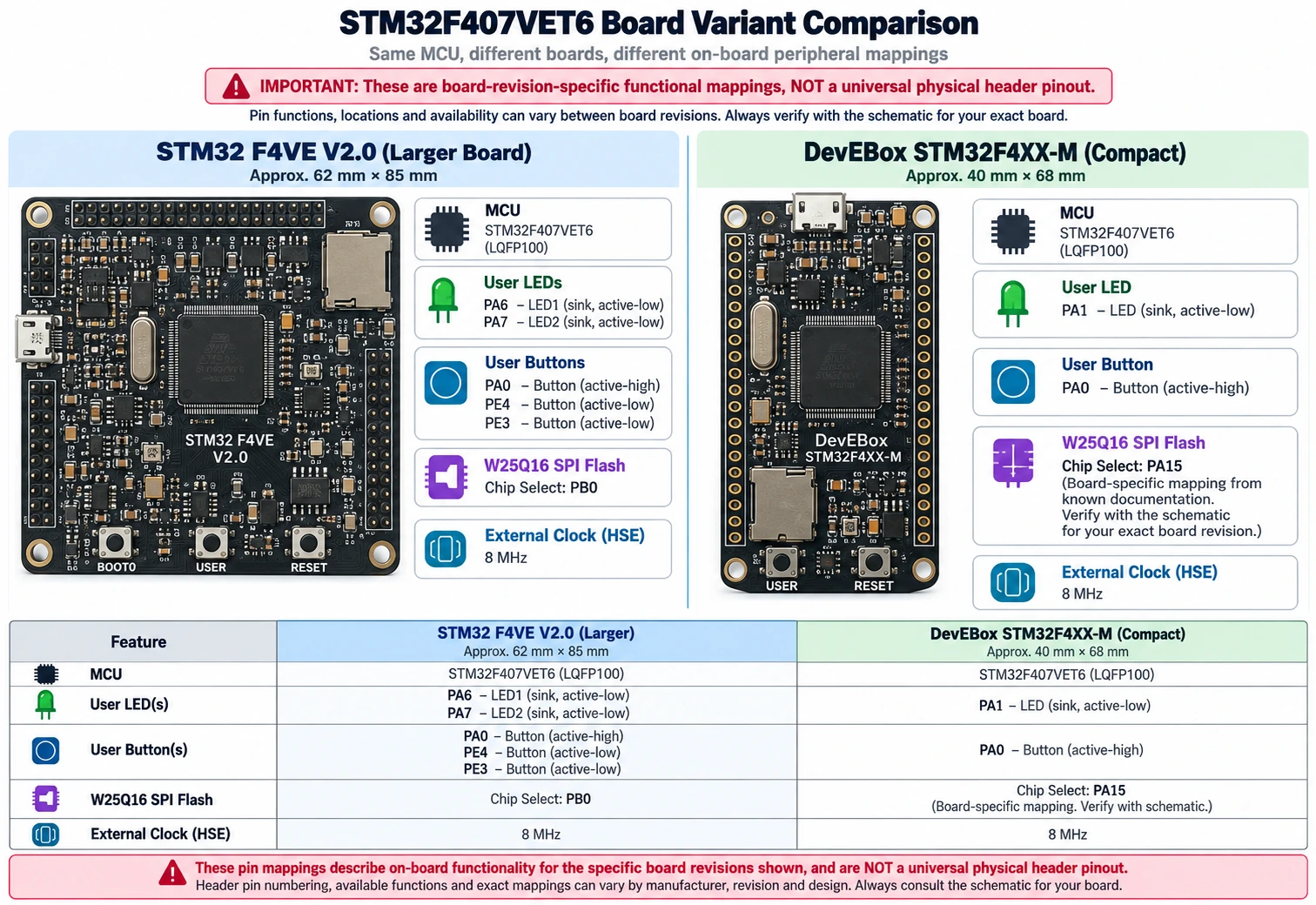
A functional map is not a physical pinout
The MCU’s datasheet assigns one or more alternative functions to each package pin. A printed board labels whatever signals its designer routed to connectors. There are three distinct numbers that must never be mixed up: MCU package pin number, GPIO signal name (such as PB8), and external connector position. Use the signal name when moving between documentation; use the board schematic before inserting a jumper wire.
A good sequence is to identify the MCU package, find the signal in the STM32 datasheet, consult the alternate-function table, then trace that net to a connector in the specific board schematic. Be especially skeptical of social-media “universal STM32F407 pinout” drawings with arbitrary header numbers.
STM32F407VET6 useful pin and peripheral reference
The following is a chip-level functional reference, not a numbered connector map. Alternate-function selections and practical availability depend on the package and board wiring.
| Interface or role | Typical MCU signals | Important condition |
|---|---|---|
| SWD programming | PA13 = SWDIO, PA14 = SWCLK, NRST optional | Keep SWD enabled while debugging |
| USART1 | PA9 = TX, PA10 = RX | 3.3 V logic; cross TX and RX to the adapter |
| USART2 | PA2 = TX, PA3 = RX | An alternative serial channel |
| USB OTG FS | PA11 = USB DM, PA12 = USB DP | Requires correct 48 MHz USB clock for application USB |
| SDIO 4-bit | PC8 D0, PC9 D1, PC10 D2, PC11 D3, PC12 CK, PD2 CMD | SD card signals are 3.3 V; card pull-ups/layout matter |
| SPI1 example | PB3 SCK, PB4 MISO, PB5 MOSI | Often occupied by onboard external flash |
| CAN1 example | PB8 RX, PB9 TX (AF9) | Must use a CAN transceiverAliExpress price |
| CAN2 example | PB12 RX, PB13 TX (AF9) | CAN2 relies on CAN1’s peripheral clock resources |
| DAC channels | PA4 = DAC_OUT1, PA5 = DAC_OUT2 | 0 to analog reference range, not a high-current output |
| ADC input example | PC0 = ADC123_IN10 | Ensure the pin is free and the analog reference is valid |
| TIM4 PWM example | PB6 = TIM4_CH1 (AF2) | Check whether an onboard radio header already uses PB6 |
| Boot/debug control | BOOT0, PB2/BOOT1 on classic F407 designs, NRST | Boot source and SWD programming are different concepts |
USB DM and DP labels are sometimes printed as D−/D+; the correct mapping is PA11 D−, PA12 D+. Do not confuse them with D+ pull-up resistors or with the USB port on an external ST-LINK debugger. Similarly, an SPI connection is a set of signals plus a chip-select line: merely having SPI1 does not make an external flash, display and radio simultaneously accessible without assigning their chip selects and addressing bus ownership.
Power supply, protection and safe initial inspection
The STM32F407 is a 3.3 V-class device, not a 5 V-powered microcontroller. Some GPIOs have specified 5 V-tolerant digital-input characteristics, but that is not permission to connect 5 V to VDD, VDDA, a non-FT pin or an analog input. Power the MCU according to its datasheet and the board’s regulator design.
A USB-powered development board normally receives 5 V at the USB connector and converts it locally to 3.3 V. The board reference for both variants above warns that their 5 V header rail is connected directly to USB VBUS without a protective power-selection circuit. Therefore do not connect independent 5 V supplies to the USB and header simultaneously unless you have confirmed a safe isolation or power-selection arrangement. The presence of an AMS1117 regulator is not proof that two 5 V sources can be paralleled.
Check these items before applying power:
- Inspect for solder bridges, a reversed microSD card adapter, damaged USB connector and incorrect jumper orientation.
- Identify the actual GND and power pins from the board’s schematic. Do not rely on an unverified pin-number diagram.
- With only one appropriate power source connected, measure the 3.3 V rail with a multimeter.
- Confirm the programmer and target share ground, and determine whether a debug probe’s VTref pin is a voltage sense input rather than a power supply.
- Avoid attaching 5 V UART adapters or sensors directly to non-5 V-tolerant pins; power the peripherals at 3.3 V where possible.
- If an analog circuit is connected, verify VDDA and the ADC reference. A 12-bit ADC does not accept a 5 V signal just because the USB cable provides 5 V.
Programming via ST-LINK and the SWD interface
Most inexpensive F407VET6 development boards do not contain an onboard ST-LINK debugger. The chip supports SWD, but you generally need a separate genuine ST-LINK or compatible probe. Use signal names, not copied connector numbers, to make the connection.
| Debugger signal | STM32F407VET6 target |
|---|---|
| SWDIO | PA13 / SWDIO |
| SWCLK | PA14 / SWCLK |
| GND | Common GND |
| Target reference | Target 3.3 V rail, only as specified for the probe |
| NRST (recommended) | NRST |
Supply the board with a stable source independent of any unverified “3.3 V” pin on a clone dongle. With STM32CubeProgrammer, first establish that the probe is recognized, then that the target MCU is recognized. These are different states. For an unreliable connection, try a conservative SWD frequency such as 100–400 kHz and connect under reset using NRST. Read the target device information before erasing or setting protection bits. Never mass-erase a board containing important firmware or calibration without first confirming that it is safe to do so.
The ST-LINK V2 connector guide contains the signal-level approach and why USB clone probes lack a universal connector pinout. If that article is not yet published when you read this guide, consult ST UM1075 and your debugger’s documentation instead.
STM32CubeMX and STM32CubeIDE: first F407 project
In the STM32CubeIDE 2.x workflow, standalone STM32CubeMX is used to configure peripherals and generate an IDE project. Select the exact part STM32F407VETx (matching your specific chip/package), not an F407 Discovery board unless your PCB really is that board. Configure SYS → Debug = Serial Wire to preserve debugging, choose an appropriate clock source, and create a project for the STM32CubeIDE toolchain.
The simplest visible sanity test on the documented F4VE V2.0 is an LED blink on PA6. That PCB drives a user LED with a sinking output, so the LED is normally active low. Set PA6 to GPIO output and initially set it high (LED off). In the generated while (1) loop use:
/* F4VE V2.0 only: PA6 drives an active-low user LED. */
while (1)
{
    HAL_GPIO_TogglePin(GPIOA, GPIO_PIN_6);
    HAL_Delay(500);
}
The GPIO clock and output configuration must be generated in MX_GPIO_Init(), and HAL_Init() plus a configured SysTick are required for HAL delays. A compact board using PA1 needs its own correct GPIO setup and GPIO_PIN_1 instead. If your project builds but the LED stays dark, verify the board variant and measure the pin before rewriting the firmware.
For a standalone board with an 8 MHz HSE crystal, a common F407 maximum-speed PLL example is:
| Setting | Value | Calculation |
|---|---|---|
| HSE source | 8 MHz | Confirm actual oscillator fitted |
| PLLM | 8 | VCO input = 8 / 8 = 1 MHz |
| PLLN | 336 | VCO = 1 × 336 = 336 MHz |
| PLLP | 2 | SYSCLK = 336 / 2 = 168 MHz |
| PLLQ | 7 | 48 MHz domain = 336 / 7 = 48 MHz |
| AHB / APB1 / APB2 dividers | 1 / 4 / 2 | HCLK 168; PCLK1 42; PCLK2 84 MHz |
The PLL values are an example, not universal board settings. This configuration requires the device’s voltage-scale, flash wait states, clock and peripheral constraints to be satisfied. A board using a 25 MHz HSE requires different PLLM/PLLN settings. A stable GPIO blink at a low default clock should come before a complex 168 MHz USB application.
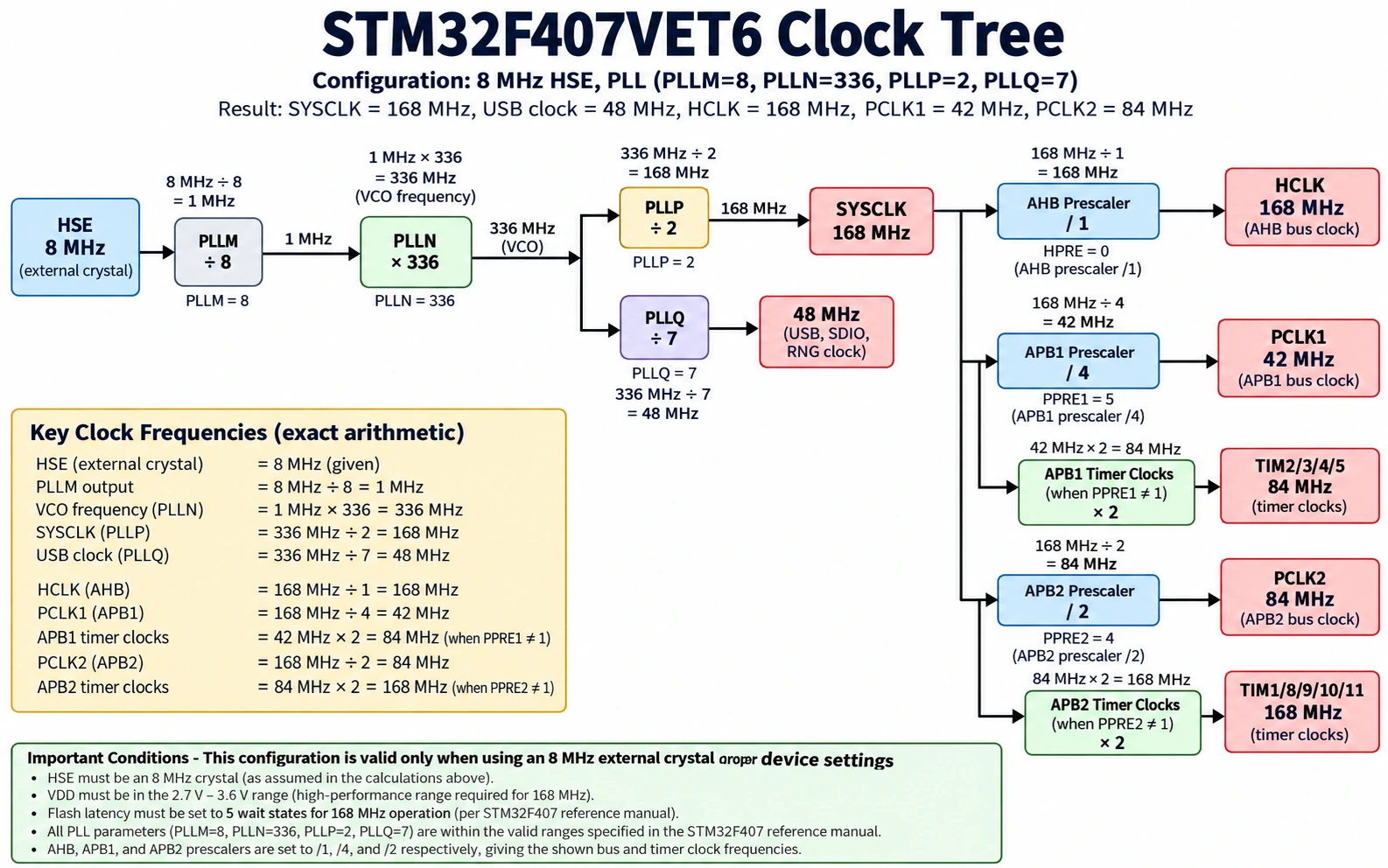
Timer clock multiplication is easy to overlook
With AHB at 168 MHz and APB1 divided by 4, the PCLK1 clock is 42 MHz, but on this F407 configuration an APB1 timer commonly receives 84 MHz, because its timer kernel clock doubles when the APB prescaler is greater than one. That difference affects PWM and periodic interrupt calculations.
For a 1 kHz PWM waveform on PB6 using TIM4_CH1, assuming the verified 84 MHz timer clock, use PSC = 83, ARR = 999 and CCR1 = 250. Then the counter clock is 84 MHz / 84 = 1 MHz, the PWM frequency is 1 MHz / 1000 = 1 kHz, and the active-high duty ratio is 250 / 1000 = 25%. PB6 uses TIM4 channel 1 alternate function AF2 on the chip. Check whether a radio connector or other load already uses that signal on your PCB. Do not connect a motor directly to a 3.3 V GPIO: use a properly designed driver with common ground and protection for inductive loads.
microSD card wiring: SDIO rather than ordinary SPI
Many F407VET6 boards include a microSD socket wired to SDIO, allowing the MCU to transfer data on four data lines rather than use an SPI connection. The common 4-bit signal mapping on the documented boards is:
| SDIO line | STM32 signal | Function |
|---|---|---|
| D0 | PC8 | Card data bit 0 |
| D1 | PC9 | Card data bit 1 |
| D2 | PC10 | Card data bit 2 |
| D3 | PC11 | Card data bit 3 |
| CK | PC12 | Clock sent by MCU |
| CMD | PD2 | Bidirectional command line |
| Power / GND | Board 3.3 V / GND | Never feed an SD card directly with 5 V |
In STM32CubeMX, enable SDIO with the bus width appropriate for initialization, configure supported clocking and DMA (if used), and add FatFs only after raw card access is working. A sensible progression is card detect or low-level initialize → read known sector → write a disposable test file → FatFs file read/write, testing error returns at each stage. SD cards can draw brief current spikes, so poor regulator decoupling and long improvised wires can mimic software problems.
An F407 uses peripheral DMA and RAM regions with specific accessibility rules. Put SDIO DMA buffers in ordinary SRAM, not CCM, and satisfy alignment requirements. Handle cache rules only on MCU variants that actually have data cache; do not blindly copy Cortex-M7 cache-maintenance code into an F407 Cortex-M4 example. If FAT filesystem mounting fails, first distinguish a physical signaling problem from the filesystem layout or formatting.
External W25Q16 flash: pin conflicts and practical storage
A W25Q16 board chip supplies about 2 MiB serial storage. On the documented larger F4VE V2.0, SPI flash uses PB3 SCK, PB4 MISO, PB5 MOSI and PB0 chip select. On some compact DevEBox versions, the chip-select may instead be PA15. This difference alone explains many tutorials that report an SPI flash ID of all zeros or all 0xFF.
SPI1 pins are multiplexed with other functions, including debug/JTAG or attached nRF24L01 connectors. Use CubeMX to reserve the correct SPI alternate functions, give the flash its correct chip-select output and start with conservative SPI clocking. Read the flash manufacturer’s JEDEC ID as a non-destructive first test; do not erase it to “test” communication. If the ID is wrong, check supply voltage, mode, SCK/MISO/MOSI, CS polarity and conflicting peripherals before altering firmware.
The MCU’s internal flash remains the normal application storage. A W25Q16 is not a plug-in upgrade to the 512 KiB of onboard program flash; accessing an external flash chip at a physical address requires specific memory controller support that a simple SPI connection does not provide.
USB: DFU, virtual serial and the external connector
The STM32F407 has an OTG full-speed USB interface whose D− and D+ lines are PA11 and PA12. The board must actually route those signals to a USB connector and provide correct hardware support. The common 8 MHz HSE clock example above produces the precise 48 MHz USB clock required for normal USB operation. A USB cable providing board power does not mean that a CDC serial port or USB DFU device has been configured.
There are three distinct scenarios:
- USB power only. The regulator and power LED work, but the PC sees no functioning MCU USB device.
- Factory system-memory USB DFU. The specific STM32F407 bootloader and supported system-memory boot configuration can expose a DFU interface where the PCB USB wiring supports it. Check the device entry in AN2606.
- Application USB CDC/HID/MSC. Your own firmware configures the USB device stack and descriptor, clock and endpoints.
Some inexpensive F4VE V2.0 boards add an external D+ pull-up resistor despite the MCU’s internal USB pull-up handling. The STM32-base board reference specifically flags R21 as a possible USB-compliance issue when both pull-ups are active. Treat this as a board-revision diagnostic issue, not a universal recommendation to remove a resistor from every STM32F407 PCB. First verify your board schematic and USB enumeration traces.
The F407 includes an OTG HS controller, but true 480 Mbit/s USB high speed needs the corresponding external ULPI PHY and connections. A basic breakout board with only D+/D− lines is not automatically a high-speed USB board.
CAN bus: built-in controller, external transceiver
Unlike the STM32F401, the STM32F407 includes two bxCAN controllers. The word controller is essential: the STM32’s TX and RX GPIO signals are not differential CAN_H/CAN_L. You still need a suitable 3.3 V I/O-compatible CAN transceiver between the MCU and the bus. Choose termination based on the bus endpoints; a typical high-speed CAN bus uses two 120 Ω terminations, one at each physical end. A short two-node test bench often measures approximately 60 Ω between CAN_H and CAN_L with power removed when both correct terminations are present.
A useful F407 test mapping is CAN1 RX on PB8 and TX on PB9 (AF9). Other pin mappings may be supported by the chip; check the actual datasheet. CAN2 examples include PB12 RX and PB13 TX (AF9), but CAN2 shares clock-resource dependencies with CAN1: enabling only CAN2 without the required CAN1 peripheral clock arrangement is a known route to confusing initialization failures.
Start with CAN1 loopback to prove the bit timing and filter setup, then connect two externally terminated transceiver nodes. For 500 kbit/s, using a hypothetical 42 MHz CAN peripheral clock, prescaler 6, BS1 = 11 time quanta and BS2 = 2 time quanta gives 42 MHz / [6 × (1 + 11 + 2)] = 500 kbit/s. That is an example only; verify actual APB1 clock, timing/sample point, transceiver, and network requirements. F407 bxCAN is classical CAN, not an FDCAN/CAN-FD peripheral. For expanded wiring details, see the site’s STM32 CAN-bus articles and ST RM0090.
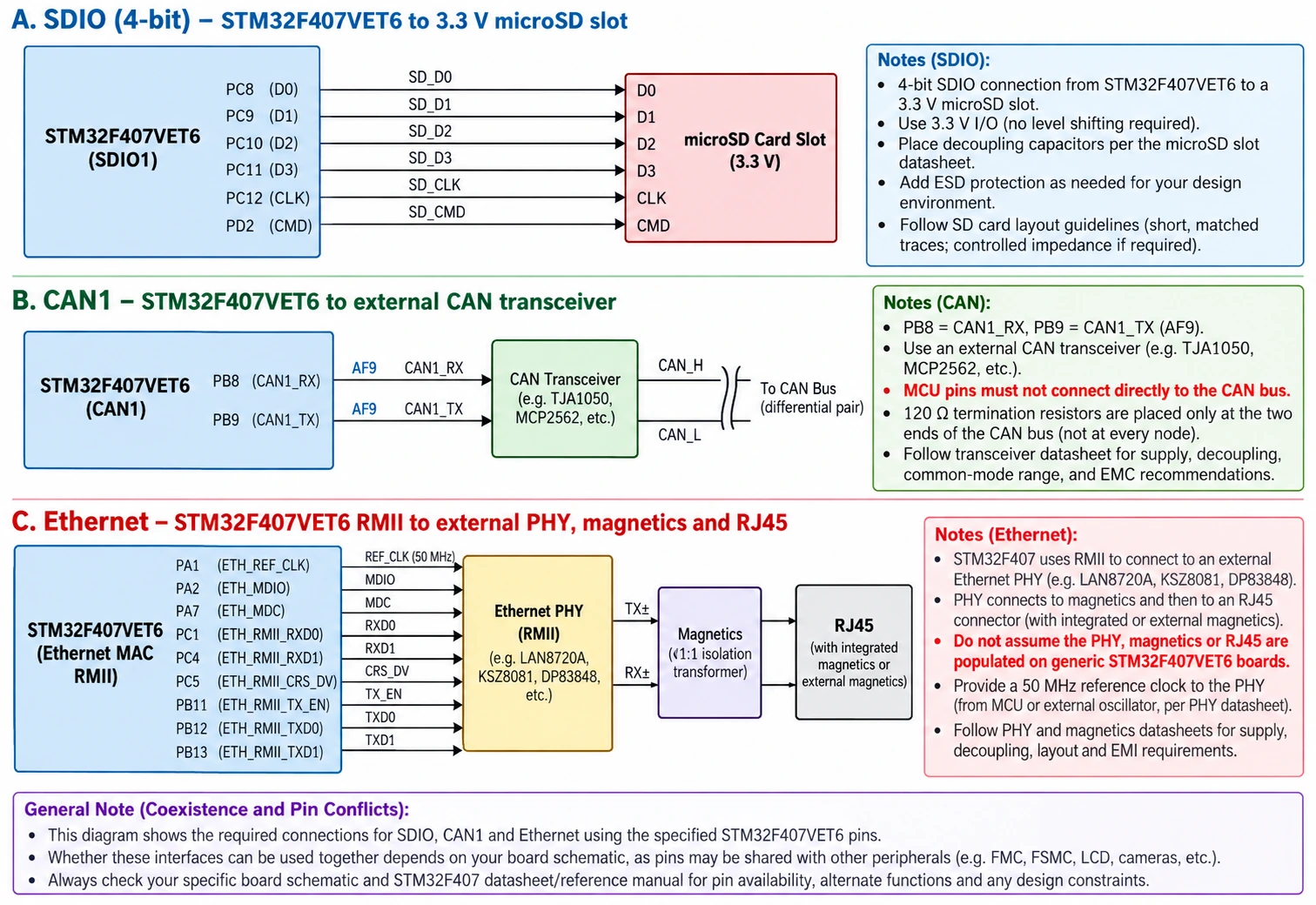
Ethernet: why a built-in MAC does not give you a LAN socket
STM32F407 silicon supports a 10/100 Ethernet MAC, including RMII or MII pin functions. The MAC creates and receives Ethernet frames; it does not generate the analog Ethernet signals needed for a twisted-pair cable. A practical 100BASE-TX implementation requires an external PHY, clock arrangement, magnetic isolation/connector design, power circuitry and a board with the requisite MCU nets routed.
On an inexpensive F4VE or DevEBox board there may be no Ethernet PHY or RJ45 socket at all, even though its product listing says “Ethernet.” That listing describes the chip feature, not an assembled network port. Before designing around Ethernet, verify the board brings out the required RMII pins, that those pins are not already allocated to SDIO, flash, display or user peripherals, and that you can provide a proper PHY/clock/reset interface. For network software, STM32CubeF4 HAL with LwIP can provide a starting point, but hardware bring-up comes first: inspect RMII 50 MHz clock, PHY address, MDIO/MDC, link-state and packet counters.
ADC, DAC and voltage-reference constraints
The F407’s three 12-bit ADCs can sample independent or synchronized channels according to the MCU’s alternate-function and analog channel tables. The two DAC outputs are on PA4 and PA5 on the supported package, subject to the pin’s other possible functions. In analog mode, check VDDA and VREF+ wiring as defined by the chosen board. Never assume that a peripheral’s output or sensor supply is the ADC reference.
A practical input example is PC0 / ADC123_IN10, provided that particular board leaves PC0 accessible and unloaded. Keep the analog input between ground and the allowed reference level, use sufficient sampling time for a high-impedance source, and decouple the reference correctly. A 0–5 V automotive or industrial sensor needs an appropriately dimensioned divider or signal-conditioning stage, even when the digital pin list mentions FT pins elsewhere.
For an application measuring a pressure sensor and logging results to SD, avoid DMA buffers in CCM and avoid blocking HAL_Delay() calls in high-rate acquisition loops. Start with polling to verify signal scaling, then introduce a timer trigger and ADC DMA into accessible SRAM when the simple version is correct.
First project checklist and recommended learning path
| Stage | Expected evidence | If it fails |
|---|---|---|
| 1. Identify board | PCB marking and matching schematic | Do not trust another board’s header layout |
| 2. Power | Stable 3.3 V rail | Remove conflicting power supplies and check regulator |
| 3. SWD connect | Device ID shown in CubeProgrammer | Check PA13, PA14, GND, NRST and VTref |
| 4. LED GPIO | Correct board-specific LED toggles | Verify PA6/PA7 versus PA1 and active-low behavior |
| 5. Clock | Known HSE measured/configured correctly | Begin at default HSI rather than assume 8 MHz HSE |
| 6. UART / USB | Data sent and recognized on correct interface | Differentiate firmware CDC from ROM DFU |
| 7. SDIO / SPI flash | Non-destructive card or flash-ID read | Check chip select, pull-ups, memory and pin conflicts |
| 8. CAN / Ethernet | Loopback / PHY link and real frames | Add physical transceiver or PHY; verify clocks |
This staged approach minimizes the number of variables. A novice can learn the basics on the site’s STM32 getting-started guide; use the STM32F407 only when the project genuinely benefits from its broader interfaces, larger RAM, processing power or I/O count.
Troubleshooting common STM32F407VET6 board problems
| Symptom | Likely explanation | Action |
|---|---|---|
| ST-LINK is visible, target is not | Missing common GND, wrong SWD pins, bad power, reset lockout | Confirm 3.3 V, PA13/PA14, NRST and low SWD frequency |
| LED firmware builds but no LED blinks | Wrong PCB variant or wrong active level | Check PA6/PA7 on large board versus PA1 on compact board |
| USB provides power but no COM port | No CDC firmware, wrong 48 MHz clock or cable, USB hardware issue | Identify whether you expect ROM DFU, user CDC or power only |
| SD card initialize fails | Wrong bus width, signal pull-ups, clock or power dips | Start at low frequency with simple card initialization |
External SPI flash JEDEC ID is 0xFFFFFF | Wrong CS pin or missing MISO response | Check PB0 versus revision-dependent CS, inspect SPI wiring |
| CAN can transmit locally but no bus ACK | No transceiver, wrong termination, mismatch in bit timing | Check physical CAN_H/CAN_L bus and another active node |
| Ethernet example never achieves link | Ethernet PHY / RJ45 absent or RMII hardware not configured | Verify presence of actual PHY and its clock/address |
| DMA transfer hangs with a valid pointer | Buffer placed in CCM or unsupported memory | Move the buffer into DMA-accessible regular SRAM |
| PWM frequency doubled or halved | APB timer clock multiplier not included | Calculate TIMx kernel clock, not just PCLK |
| Unexpected resets | Insufficient regulator headroom, supply spikes or watchdog | Scope or log 3.3 V power; audit watchdog configuration |
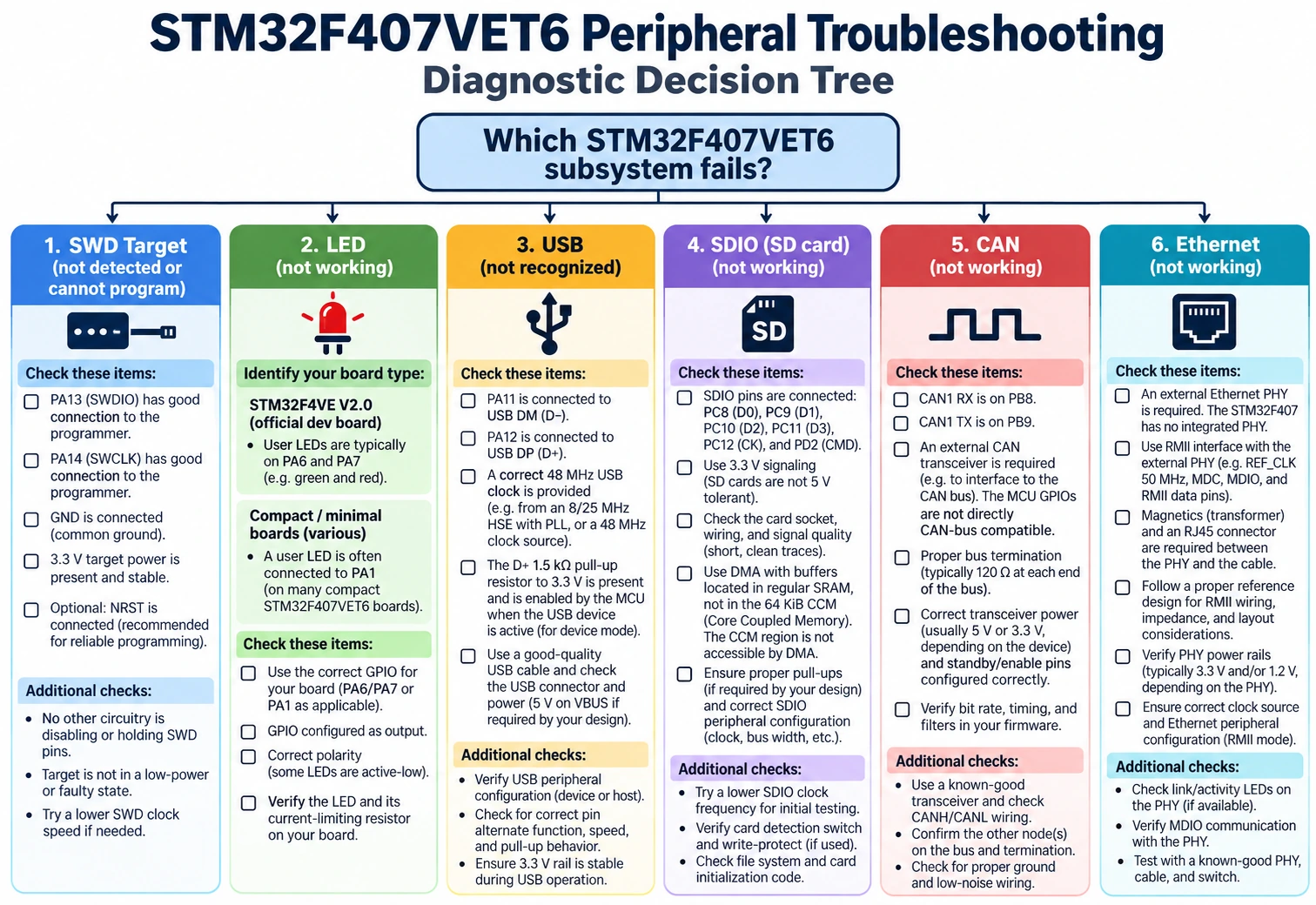
Frequently asked questions
Is the STM32F407VET6 better than a Blue Pill?
For projects requiring USB, SDIO, multi-channel DMA, digital signal processing, DAC, Ethernet MAC or classical CAN, it provides far greater capability. However, it needs more careful clock and pin planning and typically an external programmer. A Blue Pill remains sufficient for simple control applications, so “better” depends on the project.
Does the STM32F407VET6 have 1 MB of flash?
No: the VET6 part has 512 KiB of internal flash. Other F407 part numbers, including variants with a G flash-density suffix, can offer 1 MiB. An onboard W25Q16 serial chip is external data storage and does not change the internal program-flash capacity.
Can I connect a CAN bus straight to PB8 and PB9?
No. Those are MCU-level CAN controller signals. A CAN transceiver is needed to convert them to the differential physical bus. Verify transceiver logic levels, CAN bit timing and termination.
Does the board have Ethernet and USB high speed?
The MCU supports an Ethernet MAC and a USB OTG HS controller, but the assembled PCB still needs Ethernet PHY/magnetics and an external ULPI PHY for true USB high-speed operation. Do not assume a micro-USB socket or MCU datasheet feature automatically supplies these external components.
Can SDIO DMA use all 192 KiB SRAM?
No. The 64 KiB CCM region is CPU-coupled memory and is not generally accessible to peripheral DMA. Put transfer buffers in regular SRAM that the chosen DMA master can access.
What is the correct LED pin on a black STM32F407VET6 board?
There is no one answer for all boards. The documented large F4VE V2.0 design uses PA6 and PA7. The documented compact DevEBox STM32F4XX-M uses PA1. Confirm the exact PCB schematic and any board revision changes.
Sources and further reading
- ST: STM32F407VE product specification — memory, performance, interfaces and active product status.
- ST: RM0090, STM32F407 family reference manual — RCC, DMA, SDIO, bxCAN, ADC, GPIO alternate functions and timers.
- ST: AN2606 system-memory bootloader — supported boot interfaces and conditions.
- STM32-base: larger STM32 F4VE V2.0 board — original board schematic, connector mappings and USB power warning.
- STM32-base: compact STM32F4XX-M board — smaller board layout, SDIO connector and LED differences.
- MCUDev Black STM32F407VET6 board definitions — independent board documentation and pin mappings.
Bottom line: Treat STM32F407VET6 as the chip name and your board schematic as the wiring contract. Once the PCB variant, power rail, SWD connection and clocks are established, this MCU becomes a capable platform for motor control, USB devices, SD logging, multi-bus communications and networking. The hardware is flexible; the wrong universal-looking pinout is the real obstacle.