
The NUCLEO-G431RB is a strong next step after an STM32 Blue PillAliExpress price or a general-purpose Nucleo board. It combines a 170 MHz Cortex-M4 microcontroller, precise analog peripherals, motor-control timers, a built-in STLINK-V3E debugger, and familiar Arduino Uno V3 expansion headers. But there is a trap: the Arduino header labels, the STM32 pin names, the onboard serial bridge, and the clock source are not interchangeable. This guide connects them correctly.
Quick answer: The board carries an STM32G431RBT6, with 128 KB Flash, 32 KB SRAM and a maximum 170 MHz CPU clock. The green LD2 LED is D13 / PA5 and is active HIGH. Arduino D14 is PB9/I2C1_SDA and D15 is PB8/I2C1_SCL. Arduino D0/D1 use USART1 on PC5/PC4 by default, whereas the onboard STLINK-V3E virtual COM port normally uses LPUART1 on PA3/PA2. The standard board’s HSE source is a 24 MHz crystal, not the ST-LINKAliExpress price 8 MHz bypass arrangement used by some other Nucleo products.
This is a practical board-specific reference, based on ST’s UM2505 revision 7 (May 2026) and the STM32G431 device documentation. Where a solderAliExpress price bridge can change a connection, the default and the alternative are called out separately. The code is a reproducible HAL example but has not been physically tested on a particular unit for this article.
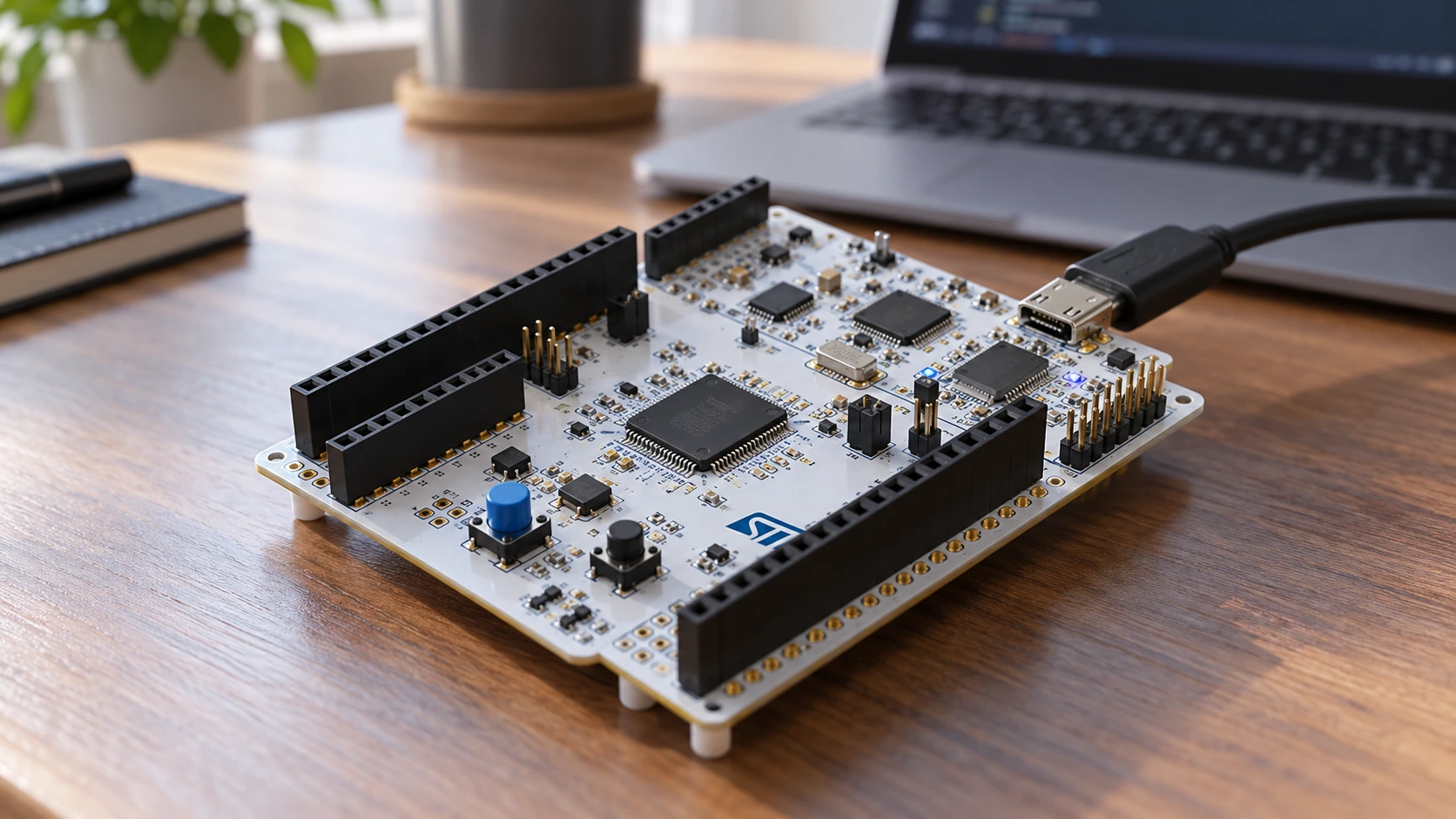
Is the NUCLEO-G431RB worth buying?
For an electronics beginner who wants only an LED to blink, a cheaper Blue Pill will work. The G431RB makes much more sense when you want to learn motor-drive PWM, ADC timing, closed-loop control, operational amplifiers, comparators, digital signal processing or CAN FD. The board comes with the debug probe built in, so an external ST-LINK is not necessary for normal development.
It also has important limits. The G431RB is not a replacement for an ESP32 when Wi-Fi or Bluetooth is required; it has no integrated radio. It does not supply a ready-to-connect CAN bus just because its MCU includes an FDCAN controller. A CAN or CAN FD project still needs a suitable external transceiver, bus wiring and termination. Its integrated USB peripheral does not turn the STLINK-V3E USB connector into a target MCU USB port.
| Item | NUCLEO-G431RB specification | Why it matters |
|---|---|---|
| Target MCU | STM32G431RBT6, LQFP64 | Confirm this exact target in CubeMX |
| CPU | Arm Cortex-M4F, up to 170 MHz | Floating-point math and real-time control |
| Program memory | 128 KB Flash | Suitable for compact embedded firmware; not unlimited |
| Working memory | 32 KB SRAM | Plan buffers, stacks and protocol allocations |
| ADCs | Two fast 12-bit ADC modules | Triggered measurements and control loops |
| Analog | Three OPAMPs, four comparators, DAC outputs | Analog front ends and thresholds |
| Timers | TIM1/TIM8 motor-control plus general-purpose timers | PWM, dead time, input capture, encoder work |
| Connectivity | FDCAN, I2C, SPI, USART/LPUART, USB device on MCU | External physical-interface hardware may be required |
| Debug probe | Onboard STLINK-V3E | Programming, breakpoints and virtual COM |
| Expansion | Arduino Uno V3 and ST morpho | Shields and direct access to signals |
Important: These are device and board capabilities, not an assurance that every peripheral is accessible on every header simultaneously. Alternate-function muxes, default onboard links and shield wiring matter. If you already have a NUCLEO-F446RE, our NUCLEO-F446RE pinout guide covers that board’s quite different serial routing and clocking.
Identify the connectors before wiring anything
There are three different kinds of connection to distinguish. CN1 is the STLINK-V3E Micro-B USB port used to supply the board and program/debug the target; it is not the target MCU’s USB data connector. CN5, CN6, CN8 and CN9 provide Arduino Uno V3 headers. The larger CN7 and CN10 ST morpho headers expose many target MCU signals and power rails. ST’s UM2505 gives the board’s authoritative mapping.
The Arduino shield footprint is convenient, but it does not automatically make every signal 5 V tolerant. Work with 3.3 V logic unless the exact pin’s datasheet explicitly permits a higher digital input voltage under the relevant operating conditions. Never apply 5 V directly to an STM32 ADC input. Keep the sensor and board grounds common when connecting digital modules.
A further practical point is solder-bridge routing: the same Arduino label can be switched to a different MCU pad on some MB1367 board configurations. In particular A4/A5 and D0/D1 need careful treatment when copying tutorials from Arduino Uno, F446 Nucleo or another G4 board.
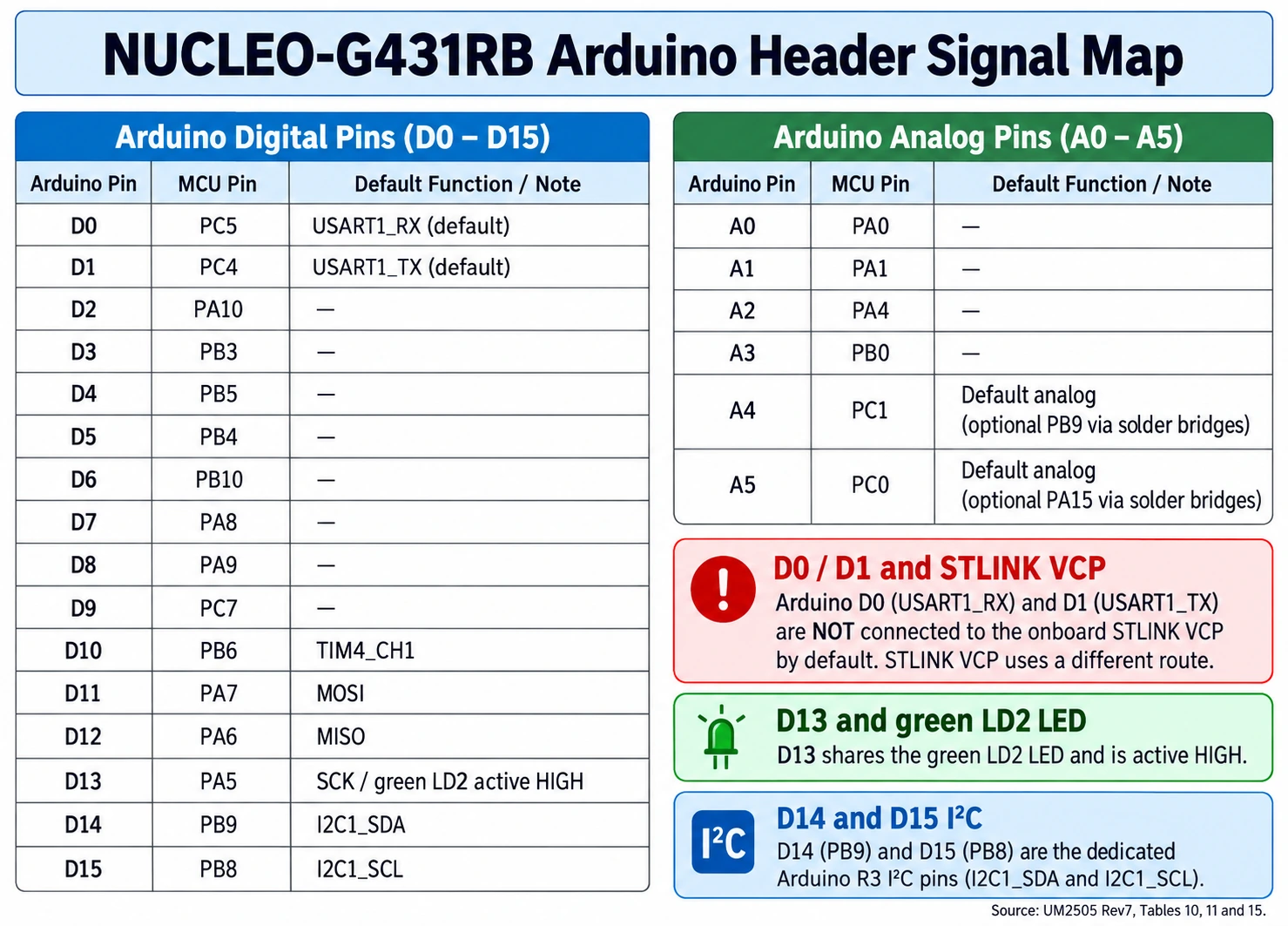
NUCLEO-G431RB Arduino digital header: D0 to D15
This table reflects the default connector functions described in UM2505. In the D0 and D1 rows the default is USART1 rather than the alternate LPUART1 route. The notation D13/PA5 means the physical Arduino connector signal named D13 is connected to the MCU GPIO called PA5; it does not mean PA5 is a physical package pin number.
| Arduino pin | STM32G431 pin (default) | Useful function or note |
|---|---|---|
| D0 / RX | PC5 | USART1_RX on Arduino connector by default |
| D1 / TX | PC4 | USART1_TX on Arduino connector by default |
| D2 | PA10 | GPIO; alternate functions must be selected explicitly |
| D3 | PB3 | TIM2_CH2 PWM-capable route |
| D4 | PB5 | Digital GPIO |
| D5 | PB4 | TIM3_CH1 PWM-capable route |
| D6 | PB10 | TIM2_CH3 PWM-capable route |
| D7 | PA8 | Digital GPIO and alternate functions |
| D8 | PA9 | Digital GPIO and alternate functions |
| D9 | PC7 | TIM3_CH2 or TIM8_CH2 option |
| D10 | PB6 | TIM4_CH1 PWM, also chip-select candidate |
| D11 / MOSI | PA7 | SPI1_MOSI; TIM3_CH2 available |
| D12 / MISO | PA6 | SPI1_MISO |
| D13 / SCK | PA5 | SPI1_SCK; onboard green LD2 LED |
| D14 / SDA | PB9 | I2C1_SDA |
| D15 / SCL | PB8 | I2C1_SCL |
Notice that D14 is SDA and D15 is SCL. Reversing these two is an easy reason for an I2C sensor not to be detected. Also note that D13 is shared with the LED: selecting SPI1_SCK on PA5 can make LD2 flicker during SPI traffic. That is expected, not necessarily a fault.
The ST morpho connector can provide other alternate function routes, but its numbered positions must not be guessed from a pinout graphic for a different Nucleo. UM2505 Table 16 is the correct source. For example, PA13/SWDIO and PA14/SWCLK are used by the onboard debug connection and should generally be left for debugging.
Analog headers A0-A5 and the A4/A5 I2C trap
The analog pins deserve their own table because STM32G4 analog features are a major reason to buy this board. The names below are Arduino analog header labels, not ADC channel numbers. ADC channel availability can vary between ADC modules.
| Analog header | Normal STM32 signal | Default role or possible alternate |
|---|---|---|
| A0 | PA0 | ADC12_IN1 |
| A1 | PA1 | ADC12_IN2 |
| A2 | PA4 | ADC2_IN17 |
| A3 | PB0 | ADC1_IN15 on G431; shared UM2505 table also lists ADC3_IN12 for other G4 variants |
| A4 | PC1 | ADC12_IN7 by default; PB9/I2C1_SDA alternative via board links |
| A5 | PC0 | ADC12_IN6 by default; PA15/I2C1_SCL alternative via board links |
An Arduino tutorial might assume SDA on A4 and SCL on A5. On the NUCLEO-G431RB factory configuration, the safer assumption is A4 and A5 are analog inputs. Use the dedicated Arduino R3 D14 PB9 SDA and D15 PB8 SCL signals for I2C. To deliberately repurpose A4/A5, verify the MB1367 solder-bridge options SB34/SB35 (A4) and SB36/SB37 (A5) and the exact MCU alternate-function assignment. Do not copy a bridge pattern without checking your board revision.
For ADC measurements, the meaningful voltage ceiling is the selected analog reference VREF+ and analog supply conditions, not an assumed exact 3.300 V. The board provides a configurable VREF+ path (including JP8). If you are calibrating a sensor, measure or establish the real reference and choose an ADC sampling interval long enough for the source impedance. Very high-value resistor dividers can cause acquisition errors if the sample-and-hold capacitor has insufficient charging time.
Onboard LED, user button, and debug signals
The green LD2 is connected to PA5 / Arduino D13, with SB6 fitted in the default configuration. On this board, unlike some active-low Blue Pill LEDs, writing a HIGH turns the LED on. The board uses a transistor to drive the LED, which also affects how user LED current is accounted for in low-power measurements.
The blue B1 USER button defaults to PC13, with SB16 on and SB21 off. It can be moved to PA0 using the corresponding bridge change. If a sample project expects B1 on PA0 but reads nothing, check that routing before blaming the HAL API. The black B2 button asserts NRST.
For debug, the target uses PA13/SWDIO and PA14/SWCLK with the onboard STLINK-V3E, plus suitable reset and power connections. Do not allocate PA13/PA14 as regular GPIO in a first project. If the debugger disconnects immediately after flashing user code, the application may have reconfigured SWD pins or the system clock incorrectly; try Connect Under Reset in STM32CubeProgrammer before contemplating any destructive recovery.
Development tools: the 2026 workflow
ST now separates the pin/clock configuration workflow from the primary IDE in current STM32CubeIDE 2.x versions. Use STM32CubeMX to create or update the board configuration, generate a project for STM32CubeIDE, and then import/build/debug the generated project in CubeIDE. The STM32CubeG4 firmware package supplies the G4 HAL drivers, startup files and examples. Install or update STM32CubeProgrammer for standalone flashing and recovery.
A safe first-project sequence is:
- Connect the board’s STLINK-V3E USB CN1 port using a data-capable cable. Confirm the green power indicator, and check the STLINK enumerates on your PC.
- In CubeMX choose Board Selector → NUCLEO-G431RB (or select STM32G431RBTx explicitly if the board project is unavailable).
- Review the clock source, pin assignments and existing board links. Enable SYS Debug: Serial Wire and configure PA5 as GPIO_Output for LD2.
- Select the installed STM32CubeG4 HAL firmware package and the STM32CubeIDE toolchain. Generate code.
- Open/import the generated project in CubeIDE 2.x, build it, then start debugging or run a programming session using the onboard STLINK.
- Flash the LED program; once it works, vary the delay or use breakpoints to verify the target really runs your build.
For installation screenshots and the generation/import process, refer to our CubeIDE and CubeMX setup guide. If a linked URL has been revised on the site, use the site’s STM32 category to locate the current guide.
First project: blink the real PA5/LD2 LED
Keep the first test deliberately simple: HAL GPIO toggling, no external components, no 170 MHz overclock configuration. In CubeMX set PA5 to push-pull output with no pull-up/down and low output speed. Preserve other default board settings where possible. CubeMX generates SystemClock_Config(), MX_GPIO_Init() and the project-specific HAL initialization functions; the code fragment below belongs in the user’s while (1) loop of main.c.
/* USER CODE BEGIN WHILE */
while (1)
{
    HAL_GPIO_TogglePin(GPIOA, GPIO_PIN_5);  // D13 / LD2
    HAL_Delay(500);                         // toggle every 500 ms
}
/* USER CODE END WHILE */
If the clock and SysTick are initialized normally, the LED alternates on and off about once every half-second, producing a roughly one-second complete blink cycle. This example assumes SB6 remains connected and GPIOA’s clock is enabled by the CubeMX-generated MX_GPIO_Init(). The generated GPIO initialization typically looks like this:
__HAL_RCC_GPIOA_CLK_ENABLE();
GPIO_InitTypeDef GPIO_InitStruct = {0};
GPIO_InitStruct.Pin = GPIO_PIN_5;
GPIO_InitStruct.Mode = GPIO_MODE_OUTPUT_PP;
GPIO_InitStruct.Pull = GPIO_NOPULL;
GPIO_InitStruct.Speed = GPIO_SPEED_FREQ_LOW;
HAL_GPIO_Init(GPIOA, &GPIO_InitStruct);
The setup example is explanatory; do not duplicate GPIO initialization in a project that CubeMX already generated. For a clean regeneration, keep your application logic within USER CODE BEGIN / END sections. If the LED is stuck, first test explicitly setting PA5 HIGH and LOW. If both produce the same result, review the debugger connection, output-mode setting, power and SB6.
Clock sources: do not copy the F446RE setup
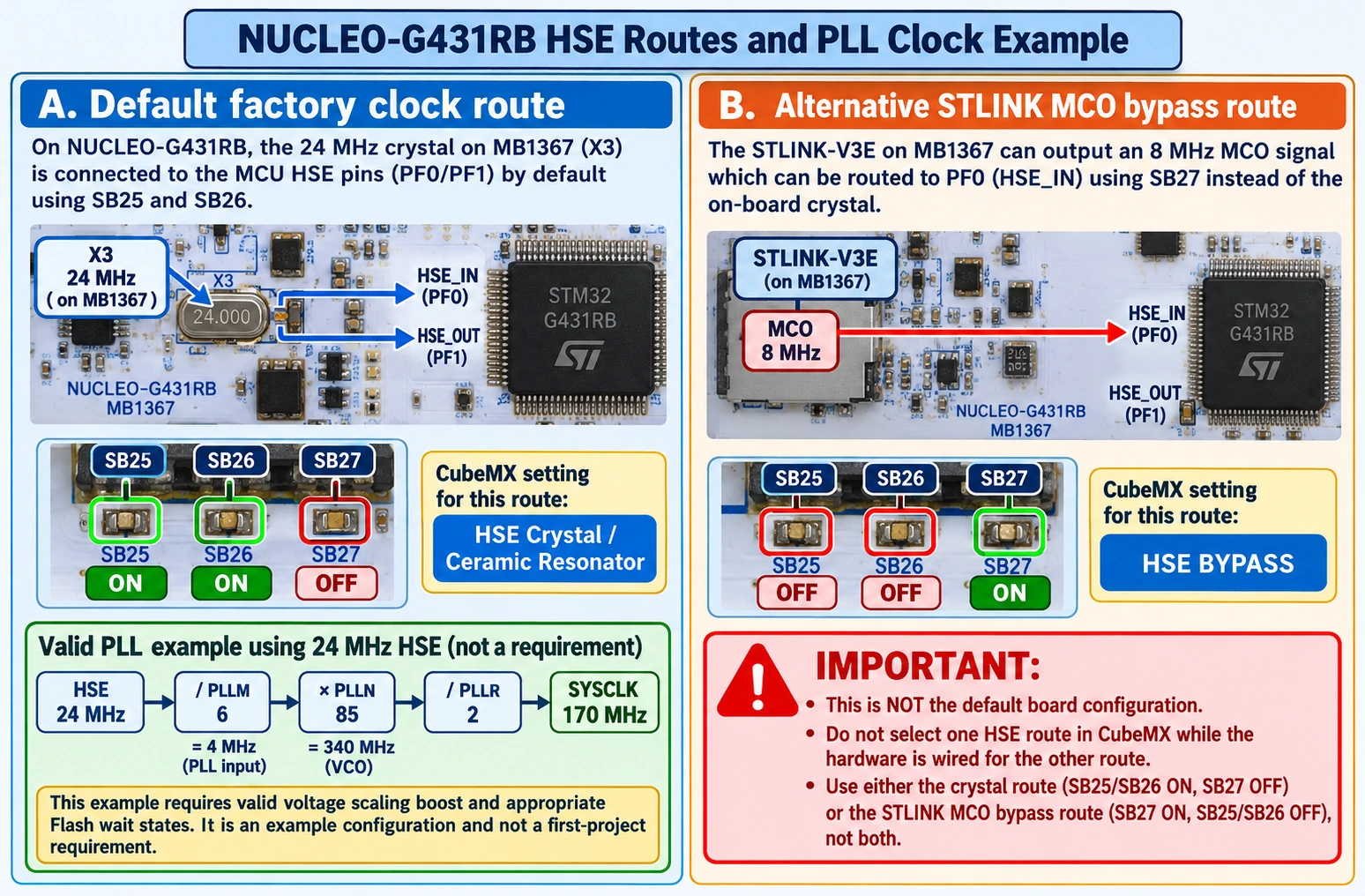
The standard MB1367 G431RB hardware defaults to an on-board 24 MHz HSE crystal, with SB25 and SB26 connected and SB27 open. An 8 MHz STLINK-V3E MCO HSE bypass is an alternative hardware configuration using SB27 connected and the crystal routing disconnected. These are mutually exclusive routes. Selecting HSE Bypass in CubeMX while the board actually uses a crystal can lead to oscillator startup failures; so can configuring a nonexistent 8 MHz crystal simply because another Nucleo tutorial does so.
For the first blink test, leave the board’s normal clock configuration intact, or use a simple internal oscillator project generated for the correct device. When 170 MHz is desirable, the software must also configure STM32G4 regulator voltage scaling/boost and Flash wait states as required by the datasheet and HAL. Do not merely change a frequency constant.
For reference, this is a clock arithmetic example for a 24 MHz HSE project, not a drop-in declaration that every board should use 170 MHz:
| PLL stage | Configuration | Calculated frequency |
|---|---|---|
| HSE source | Crystal on MB1367 | 24 MHz |
| PLLM | Divide by 6 | 4 MHz PLL input |
| PLLN | Multiply by 85 | 340 MHz PLL VCO |
| PLLR | Divide by 2 | 170 MHz PLLR output |
| SYSCLK | Select permitted PLLR clock | Up to 170 MHz with correct voltage/Flash settings |
CubeMX should evaluate PLL limits, clock selections, bus prescalers and the exact chip’s operating conditions. UART baud rates, ADC clocks and timer frequencies depend on the resultant clock tree. A timer’s source clock may not equal the APB peripheral clock when an APB prescaler is active, so calculate PWM from the configured timer kernel clock, not from the printed 170 MHz headline.
Project two: read a sensor voltage on A0 / PA0
A0 connects to PA0, a suitable ADC input. Use a variable resistor or a sensor that drives 0 to VREF+ with a common ground; do not connect a raw 5 V analog signal. In CubeMX configure PA0 as ADC1_IN1, set an appropriate sampling time and resolution, and generate the ADC1 initialization. The following one-shot pattern reads a 12-bit result using HAL polling:
uint32_t read_a0_adc(void)
{
    uint32_t sample = 0;
    if (HAL_ADC_Start(&hadc1) != HAL_OK) return 0;
    if (HAL_ADC_PollForConversion(&hadc1, 20) == HAL_OK)
        sample = HAL_ADC_GetValue(&hadc1);
    HAL_ADC_Stop(&hadc1);
    return sample;
}
For meaningful measurements, run ADC calibration in the sequence required for the chosen G4 ADC mode, ensure VDDA/VREF+ are stable, and distinguish the error case from a legitimate reading of zero in production code. A 12-bit result is nominally 0–4095. If VREF+ is 3.3 V, an illustrative conversion is volts = sample * 3.3f / 4095.0f; replace 3.3 with the actual known reference, and use suitable averaging and filtering if the source is noisy.
One of the G431’s real strengths is that the ADCs can be triggered by timers for repeatable sampling, rather than polled at irregular intervals from a main loop. That enables control-system experiments, phase-current acquisition and waveform measurements. The device’s internal OPAMPs and comparators add capabilities, but they need their own routing, voltage-limit and offset checks; they do not mean every external signal should be connected directly without conditioning.
Project three: I2C sensor on PB8/PB9
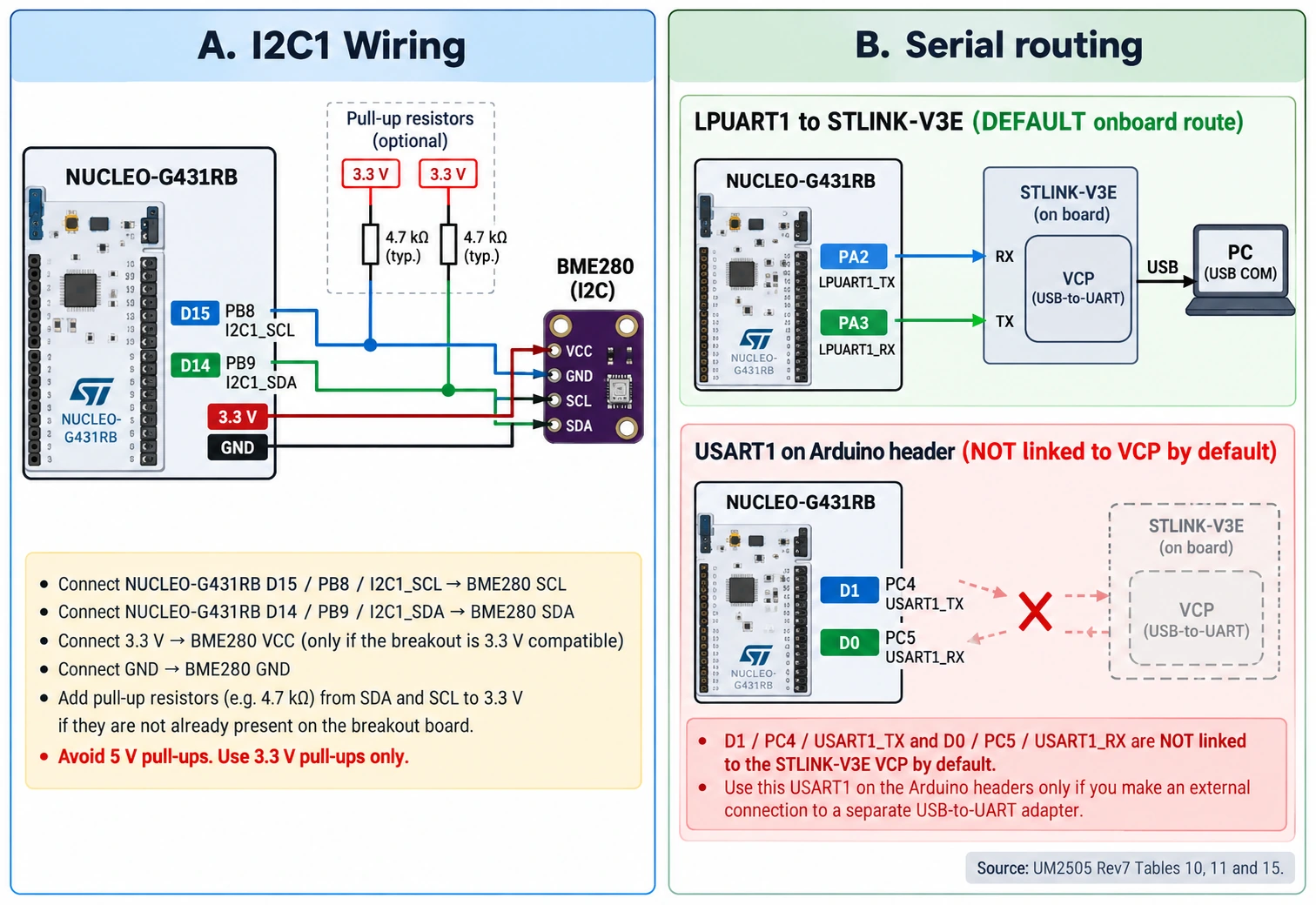
For a BME280 or compatible 3.3 V I2C breakout, the clearest route is the dedicated Arduino R3 I2C header. These are the named connections:
| NUCLEO-G431RB | Sensor module | Rule |
|---|---|---|
| D15 / PB8 / I2C1_SCL | SCL | Clock line |
| D14 / PB9 / I2C1_SDA | SDA | Data line |
| 3V3 | VCC/VIN if 3.3 V compatible | Check the particular breakout |
| GND | GND | Mandatory common ground |
I2C lines are open-drain: they need pull-up resistors to 3.3 V. Some breakouts include pull-ups and others do not. A typical starting range is 4.7–10 kΩ for a short, modest-speed connection, subject to bus capacitance and your chosen speed. Do not install duplicate strong pull-ups blindly, and do not put 5 V pull-ups on an unverified STM32 input.
In CubeMX set I2C1 to use PB8/PB9 in their correct alternate-function mode, choose a supported timing configuration and make a basic device-ready check. A BME280 commonly responds at 0x76 or 0x77 depending on how SDO is strapped. HAL takes a shifted 7-bit I2C address for many APIs:
uint8_t addr7 = 0x76;  // use 0x77 if SDO selects it
HAL_StatusTypeDef ok =
    HAL_I2C_IsDeviceReady(&hi2c1, (uint16_t)(addr7 << 1), 3, 100);
Successful ACK only establishes that a device answers at that address. It does not confirm it is a genuine BME280 rather than a BMP280, or that calibration and compensation code are correct. Read and check its chip ID, then use a suitable tested sensor driver. Our BME280 I2C wiring guide provides the general sensor concepts, while this article supplies the G431RB pins.
The serial-port trap: USART1 on D0/D1, LPUART1 on STLINK VCP
This board is not wired like a NUCLEO-F446RE in its factory configuration. Arduino D1 (TX) and D0 (RX) are connected to USART1 on PC4 and PC5, respectively. The STLINK-V3E virtual COM port (VCP) normally communicates with the target over LPUART1: PA2 TX and PA3 RX. USB creates the serial port on the computer through the debugger; the target itself does not automatically become a USB CDC device.
That distinction matters in CubeMX. If you write bytes to USART1 while listening to the default STLINK virtual COM port, you may see nothing. Configure LPUART1 for the default VCP route, and use the corresponding HAL handle generated by your project. Or deliberately change solder bridges to reroute USART1 to the onboard VCP—but only after comparing the physical board to UM2505 Tables 10 and 11.
A simplified transmit example for the default LPUART1 VCP path is:
static const uint8_t greeting[] = "NUCLEO-G431RB ready\r\n";
HAL_UART_Transmit(&hlpuart1, (uint8_t *)greeting,
                  sizeof(greeting) - 1U, 100U);
The generated project must have MX_LPUART1_UART_Init() and an appropriate baud rate, typically start with 115200 8N1. Check which COM/tty port belongs to the STLINK, and close other applications using that port. The LPUART1 route is separate from external UART adapters attached to Arduino D0/D1.
PWM and motor-control features: what makes the G431 different
A general GPIO tutorial does not show why STM32G4 exists. TIM1 and TIM8 offer advanced timer features used in motor drives, including complementary PWM outputs, programmable dead time and break/fault handling. The G431 also supplies general-purpose timers for ordinary PWM, counting, encoder interfaces, timed ADC triggering and waveform generation. Its CORDIC and FMAC hardware units accelerate particular mathematical operations; they are helpful only after you design the rest of the application correctly.
For a safe first PWM experiment, use D10/PB6, TIM4_CH1 on the Arduino header. Connect a logic analyser or oscilloscope input to PB6 and its ground to GND; do not connect a motor or relay directly to the MCU pin. In CubeMX choose TIM4 channel 1 PWM output on PB6, then select a counter prescaler, auto-reload value and compare value based on the actual TIM4 clock. With a hypothetical 100 MHz timer kernel clock, PSC=99 gives 1 MHz counter clock, ARR=999 gives 1 kHz PWM, and CCR1=250 gives 25% duty. Those numbers are an example only: if the real TIM4 source is different, recalculate.
/* After MX_TIM4_Init() and correct pin AF configuration: */
HAL_TIM_PWM_Start(&htim4, TIM_CHANNEL_1);
/* Example duty update for ARR = 999: */
__HAL_TIM_SET_COMPARE(&htim4, TIM_CHANNEL_1, 250U);
For an actual motor, use an appropriate gate driver or motor-driver module, current measurement, power-stage design and fault protections. A complementary PWM pin pair is not itself a complete half-bridge driver. Remember that timers are also useful for consistent ADC triggering; ADC sampling instant often matters more than raw CPU clock in precision control.
CAN FD: controller is not transceiver
The STM32G431 includes an FDCAN controller. That allows protocol timing and framing in firmware, but its digital TX/RX pins must connect to a CAN FD-capable transceiver, which then drives CAN_H/CAN_L. Select pins using the exact MCU datasheet alternate-function table and current CubeMX assignment, rather than assuming another board’s CAN1 pin choice is universal. The board does not become a network node simply because it has an FDCAN register block.
A working bus additionally needs the correct transceiver supply and logic compatibility, common-mode design, stub-length management and 120 Ω termination at the two physical bus ends only. Nominal and data-phase timing must fit the bus and transceiver capability. For vehicle or industrial networks, take isolation, EMC and power-transient requirements seriously. Our STM32 CAN bus guide covers classical CAN interfaces; do not treat classical-CAN-only transceivers as automatically validated for CAN FD data rates.
USB capability versus the connector you can see
The STM32G431 silicon contains a USB device peripheral, but the onboard STLINK Micro-B connector is connected to the debugger, not a drop-in direct USB socket for your target firmware. ST’s UM2505 labels CN1 as the STLINK-V3E connection. To use native target USB, check which target signals are brought to the ST morpho connector or other board pads and design the proper USB data, power/ground, ESD and connector arrangement. Do not assume a factory USB DFU workflow is available through STLINK CN1.
The USB peripheral also needs a valid clock source and appropriate middleware/device firmware. This is a more advanced project than LED, UART or I2C. If all you need is printf output to a terminal, use the provided STLINK VCP route instead of adding a second USB interface.
Power, reference voltage and measurement precautions
Start from a single, known supply path: the STLINK USB connection, or the external supply option configured as described in UM2505. The board supports an external E5V or VIN route, but the jumper and connection sequence matter. If you connect USB and an external source simultaneously, follow the documented power-source selection to avoid backfeeding or confusing voltage levels. Board VDD and analog VREF+ are separate concepts.
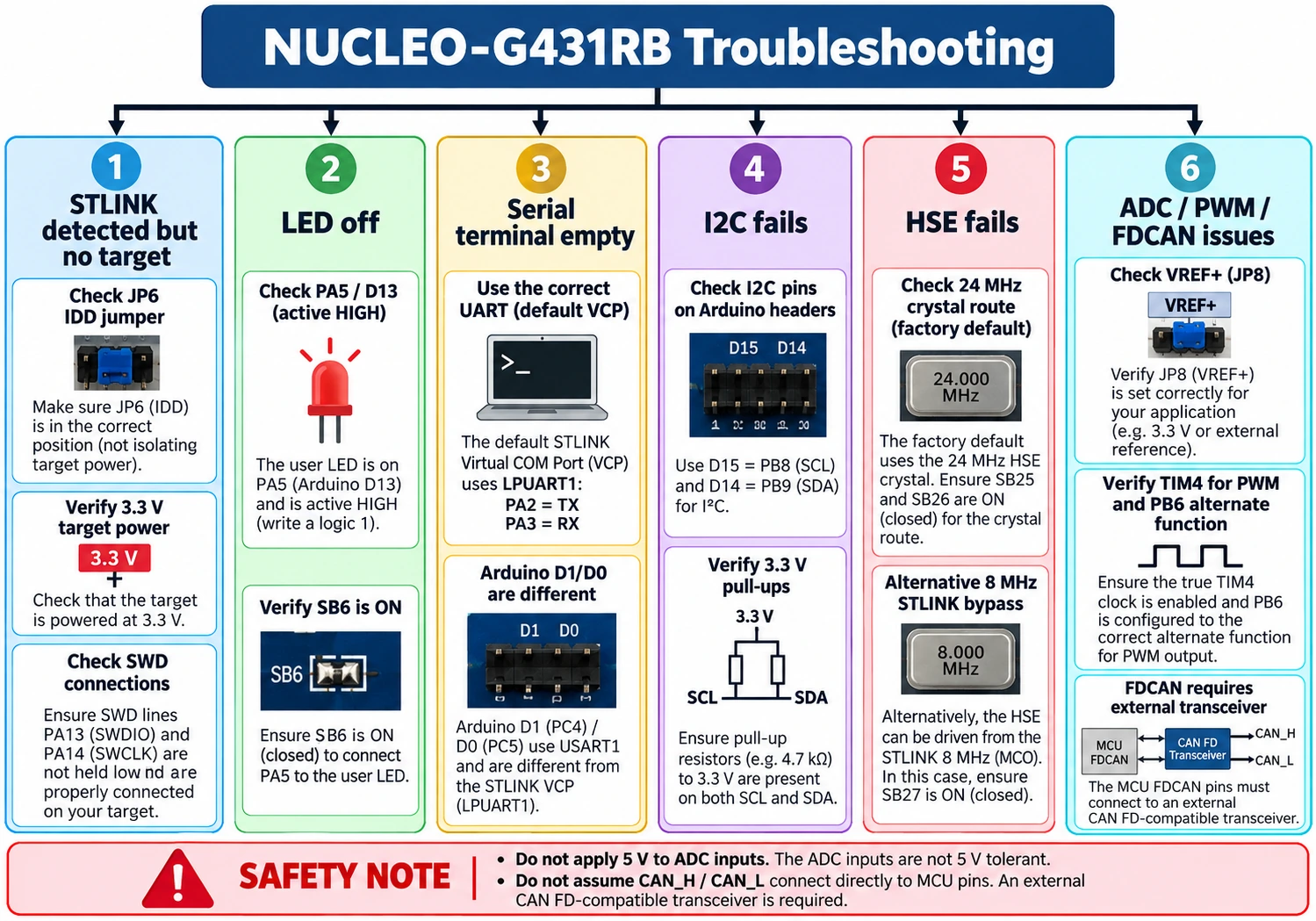
Two board parts are especially worth remembering. JP6 (IDD) is part of the target-current measurement path: removing it without an ammeter can leave the MCU unpowered while the STLINK still enumerates on USB. JP8 influences how VREF+ is supplied for analog measurements. Verify these before suspecting a dead microcontroller or an inexplicably flat ADC reading. Keep total expansion-board current within the host-port, regulator and board design limits.
Troubleshooting: follow the failing layer
| Symptom | Most useful checks | Avoid |
|---|---|---|
| STLINK appears, target MCU missing | JP6 fitted, target 3.3 V, SWD PA13/PA14, NRST; try under reset | Mass erasing as first action |
| LD2 does not blink | PA5 GPIO output, SB6 on, correct firmware, HAL tick | Using an active-low Blue Pill LED example unchanged |
| Serial terminal empty | Use LPUART1 PA2/PA3 for default STLINK VCP; check COM port/baud | Assuming Arduino D0/D1 USART1 is VCP by default |
| I2C sensor not acknowledged | D15 PB8 SCL and D14 PB9 SDA, 3.3 V pull-ups, breakout address | Following Arduino A4/A5 wiring without checking bridges |
| ADC returns wrong voltage | VREF+, JP8, sampling time, sensor ground, reference measurement | Assuming every ADC input is 5 V tolerant |
| HSE oscillator fails | Default 24 MHz crystal vs alternative 8 MHz MCO bypass, SB25/26/27 | Copying F446RE HSE setting |
| PWM frequency is wrong | Timer source clock, APB prescalers, PSC/ARR, PB6 alternate function | Using SYSCLK as TIM4 clock without checking |
| CAN FD node silent | External transceiver, selected GPIO alternate function, bus termination and timing | Connecting MCU TX/RX directly to CAN_H/CAN_L |
| USB cable powers board but no target CDC | CN1 is STLINK USB; configure target USB hardware separately | Expecting native MCU USB from the debugger port |
Questions beginners ask about the G431RB
Can I use Arduino IDE with NUCLEO-G431RB?
The official STM32duino core supports many STM32G4 Nucleo targets, but verify the installed core’s exact board definition and variant. Arduino pin aliases need to correspond to the NUCLEO-G431RB, and pin functions still follow its hardware. STM32CubeMX/CubeIDE is better when you want G4-specific ADC, comparator and timer configuration exposed fully. Our Blue Pill with Arduino IDE guide is a useful introduction to the STM32duino ecosystem, though its target and pin setup are not the same.
Does the NUCLEO-G431RB have Wi-Fi, Ethernet or integrated CAN transceiver?
No. The G431RB’s strengths are deterministic MCU peripherals and mixed-signal control. Add external networking or wireless hardware appropriate to the application. The MCU includes an FDCAN controller, but a separate transceiver is still required. The board should not be confused with other STM32G4 Nucleo variants that may expose additional dedicated connectors.
Is LD2 on PC13?
No: LD2 is PA5/D13 and it is driven active HIGH. The blue B1 user button is on PC13 by default. This confusion is common because Blue Pill boards often have a LED on PC13, and other Nucleo examples vary. Consult the board, not a chip-family shorthand.
Should I select 8 MHz HSE Bypass as on the NUCLEO-F446RE?
No, not without checking the hardware. The MB1367 G431RB typically uses its fitted 24 MHz crystal. An 8 MHz STLINK MCO bypass is an alternate solder-bridge configuration. Clock values and solder links are not transferable between boards.
Why doesn’t Serial work on D0/D1 while the STLINK USB terminal is open?
Because D0/D1 are USART1 on PC5/PC4 by default, but the STLINK virtual COM route uses LPUART1 PA3/PA2. Select the right MCU UART in firmware, use an external UART adapter on Arduino D0/D1, or deliberately reconfigure the documented bridges.
Can it drive a motor directly from a PWM pin?
No. The GPIO provides a logic control signal. Even when using TIM1/TIM8 complementary PWM, a power stage needs the right gate drivers, supply, sensing and protection. TIM4_CH1 on PB6/D10 is a safe place to learn PWM using a scope or logic analyser before connecting a suitable driver.
What to build next
After the PA5 LED test, a practical progression is: read PA0 ADC with a calibrated reference; connect an I2C environmental sensor through D14/D15; create a frequency-verified PWM output on PB6; then experiment with synchronized ADC sampling and timers. Only after those are stable should you move to external FDCAN transceivers, a motor-control power stage or advanced analog front-end routing. This turns the NUCLEO-G431RB from a board you merely flash into a board you can measure, debug and trust.
For comparison with other options, see our Best STM32 Development Boards in 2026 guide. The G431RB is not the cheapest STM32, but for learning control systems, motor PWM and real mixed-signal firmware, its onboard debug support and G4 peripherals make it a particularly useful platform.
Official technical references
- ST NUCLEO-G431RB product page — target and board resources.
- UM2505 revision 7: STM32G4 Nucleo-64 (MB1367) user manual — Arduino pin mapping, solder bridges, power, STLINK VCP and clock sources.
- ST STM32G431RB MCU specifications — memory, analog resources, FDCAN and timers.
- STM32G431 MCU datasheet — exact pad electrical ratings and peripheral functions.
Technical note: connector functions and bridge defaults are tied to the documented MB1367 board revision. Hardware revisions or deliberate user modifications can change the routing. Verify your own board before connecting external voltage or a power stage.