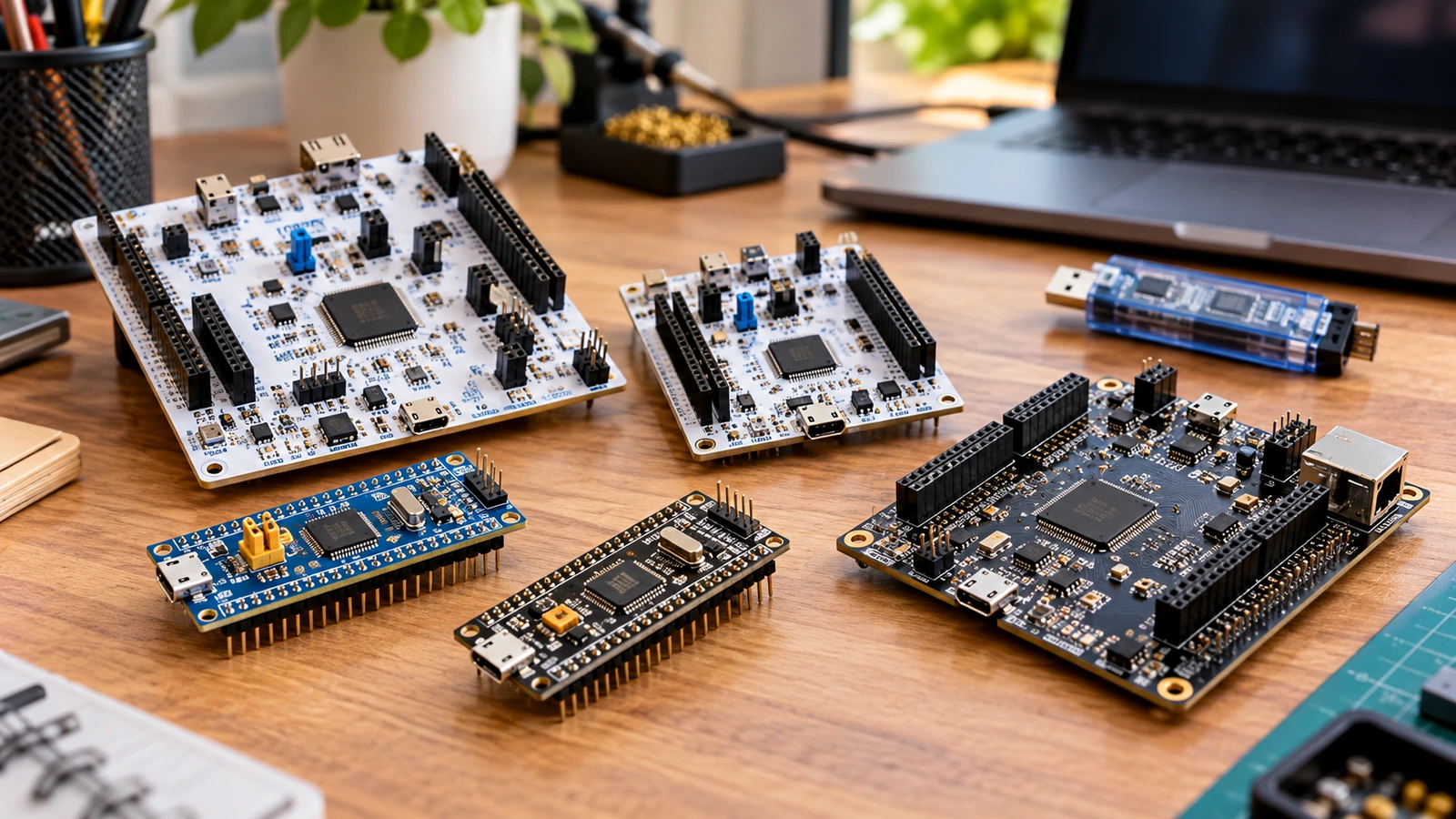
The STM32 name covers far more than a Blue PillAliExpress price or Black PillAliExpress price. Two chips with the same STM32 logo may have different CPU architectures, clock trees, pin voltage limits, peripherals, memory layouts, low-power modes and programming options. Choosing a device by maximum MHz or the number of pins on a cheap development board can result in an expensive board redesign later.
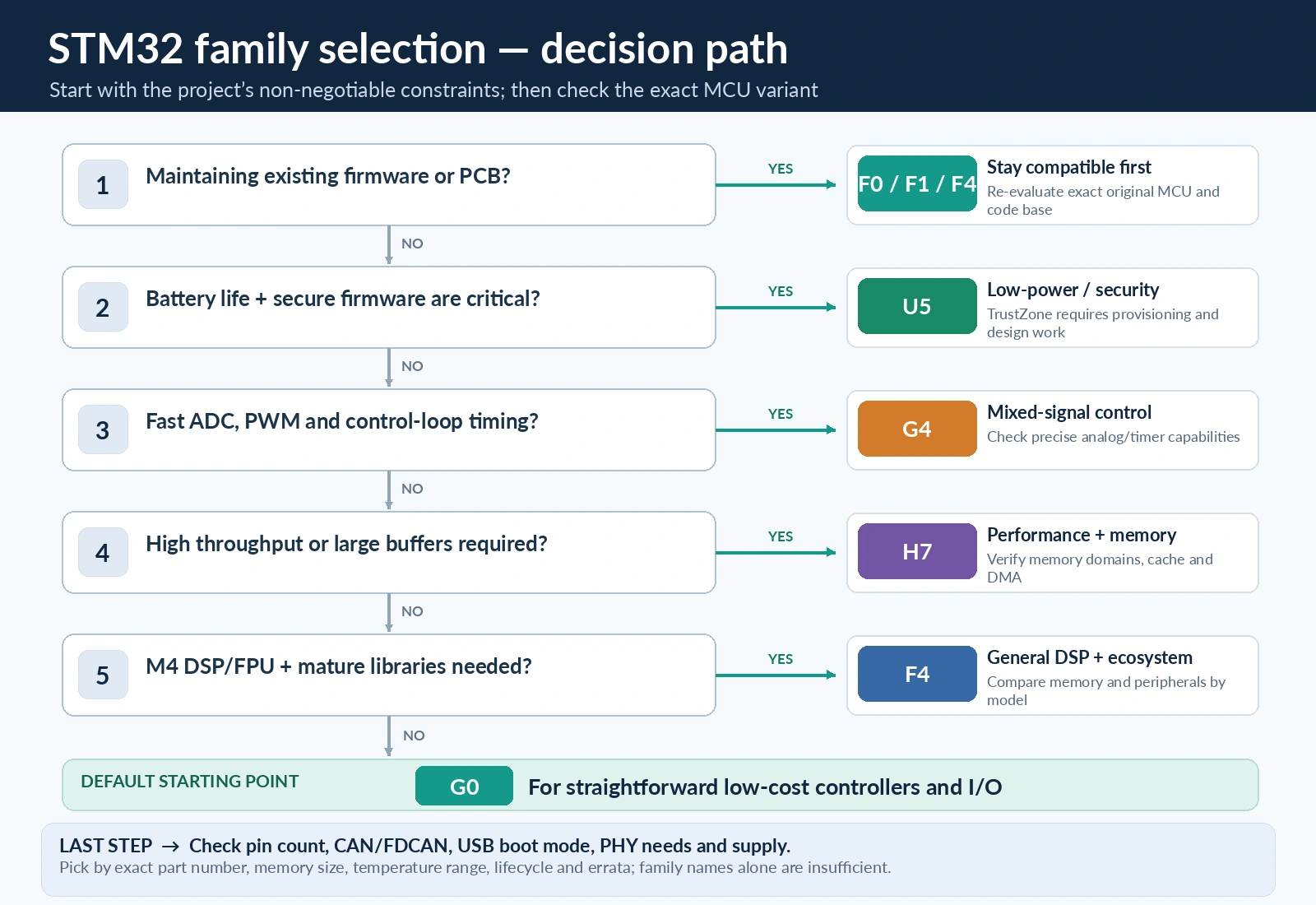
Quick answer: Choose an STM32G0 for a new, cost-sensitive general-purpose controller; an STM32G4 for fast ADCs, control loops, motor drives and many CAN FD applications; an STM32F4 for established Cortex-M4 development, DSP and broad library support; an STM32H7 when large data throughput, processing and memory bandwidth genuinely matter; or an STM32U5 for a battery-powered or security-sensitive product. The older F0 and F1 remain relevant when maintaining installed equipment or following established tutorials, but are not automatically the best choice for a fresh design.
This is a family-selection guide, not a universal pinout. The examples below refer to particular devices and development boards where necessary. Peripherals such as USB, CAN, FDCAN, Ethernet, DAC and op amps must be checked at the exact part-number level. No family name guarantees all of them.
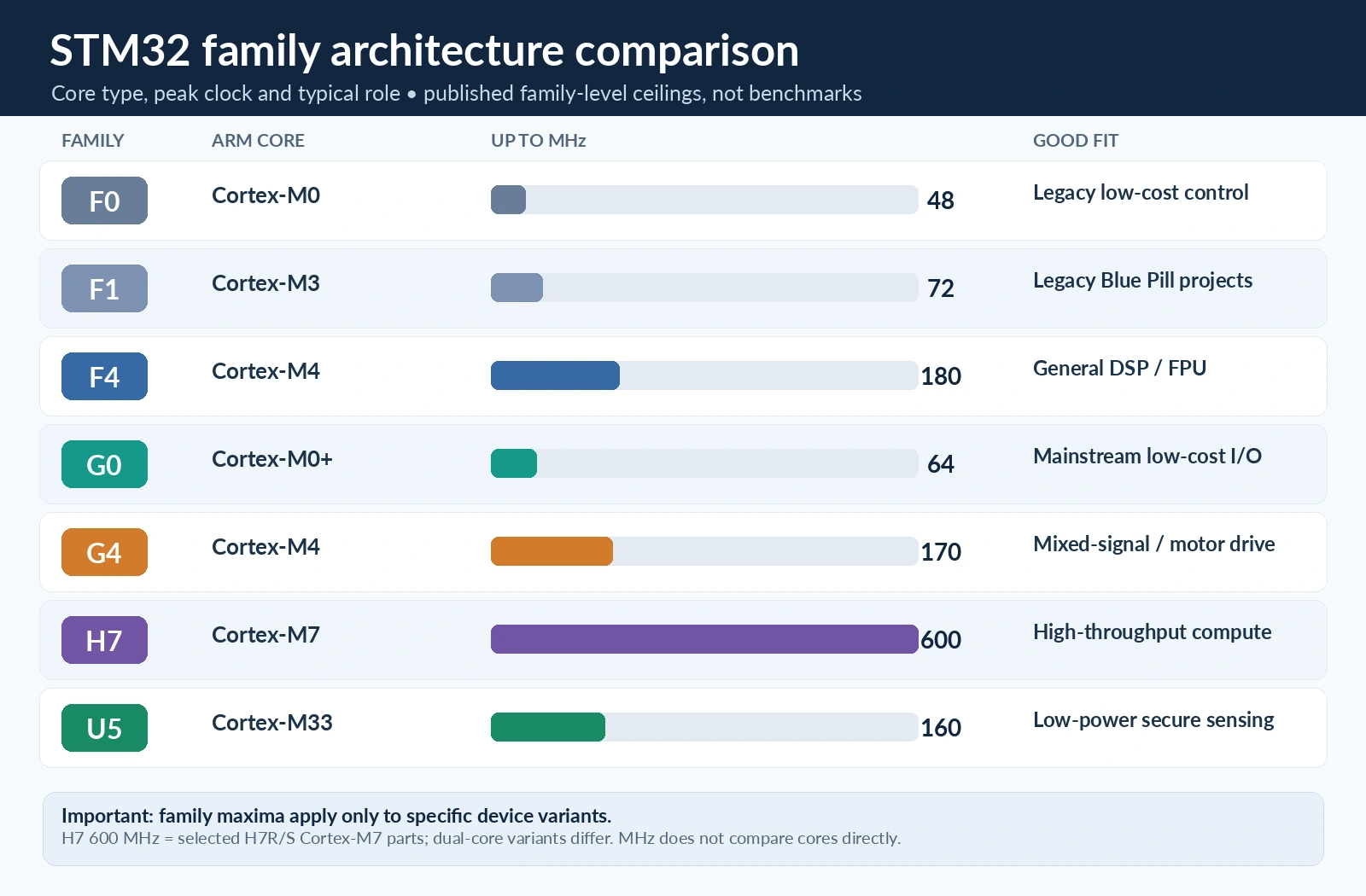
STM32 family comparison at a glance
| Family | Typical CPU core | Family speed ceiling | Design emphasis | Watch out for |
|---|---|---|---|---|
| STM32F0 | Cortex-M0 | up to 48 MHz | Established low-cost control | Older Cortex-M0 architecture; features vary by line |
| STM32F1 | Cortex-M3 | up to 72 MHz | Legacy designs, Blue PillAliExpress price ecosystem | F103 USB and bootloader differences; flash and clone variations |
| STM32F4 | Cortex-M4 with DSP/FPU on applicable lines | up to 180 MHz | General-purpose performance and DSP | F401 lacks CAN; F4 is not a single feature set |
| STM32G0 | Cortex-M0+ | up to 64 MHz | Modern mainstream cost/efficiency | No hardware FPU; FDCAN and USB are device-dependent |
| STM32G4 | Cortex-M4 with DSP/FPU | up to 170 MHz | Analog-rich real-time control | Advanced peripherals differ across G4x1/G4x3/G4x4 |
| STM32H7 | High-performance Cortex-M7; selected dual-core M7/M4 devices | up to 600 MHz on selected lines | DSP, displays, fast I/O, complex applications | Power, cache, DMA-accessible RAM and PCB complexity |
| STM32U5 | Cortex-M33 with DSP/FPU and TrustZone support | up to 160 MHz | Ultra-low power, security, connected sensing | More involved clock/power/security configuration |
The speed figures are family upper bounds, not speeds of every chip. In particular, do not assume that the familiar STM32H743 runs at the highest clock offered by newer H7 subfamilies. ST’s product selector and each device datasheet take precedence over any summary table.
Why the STM32 family letter matters more than a benchmark
STM32 naming can initially look inconsistent. The letter immediately after STM32 often signals broad positioning—F for the established general-purpose/performance generations, G for more recent mainstream or mixed-signal products, H for high performance, and U for the modern ultra-low-power range. That is a useful shortcut, not a pin-compatibility promise.
A Cortex-M0/M0+ CPU is intentionally simpler than a Cortex-M4 or M7. If the firmware spends almost all its time waiting for sensor readings and toggling a relay, the simpler part may be better. Conversely, a tight control loop that continuously computes filters, trigonometry or a three-phase motor-control algorithm can benefit enormously from a Cortex-M4 FPU/DSP architecture and suitable ADC/timer hardware.
The core alone is not the entire story. A G4 with carefully connected analog comparators and a high-resolution timer can control a switching converter more effectively than a much faster H7 without the required analog functions. Similarly, a U5 that sleeps efficiently and wakes on a sensor interrupt can outlast a higher-clocked MCU by months on the same battery—depending on the radio, peripherals, board regulator and workload.
Engineering rule: Start with hard requirements: interfaces, timing, memory, power state, supply range, package and availability. Choose the CPU performance tier after these constraints.
STM32F0: straightforward Cortex-M0 controllers
The F0 family uses Arm Cortex-M0 and reaches 48 MHz on many devices. It was designed for economical embedded control: timers, GPIO, basic ADCs and serial peripherals. Certain variants also offer USB or classic CAN, so the blanket statement “F0 has no CAN” is incorrect. The safe statement is that neither USB nor CAN is universal across F0.
An F0 may suit a product whose schematic, firmware and certification are already proven. It may also be useful for understanding minimal ARM interrupt handling and register programming. For new designs, however, compare STM32G0 and even the newer STM32C0 rather than choosing F0 simply because an old tutorial uses it.
Strengths: approachable peripherals, small code footprint and years of examples. Limitations: no floating-point unit, less compute headroom than M4/M7 families, and legacy library examples that may not match current HAL or CubeIDE workflows.
When F0 still makes sense
- You are maintaining a shipped product with a stable F0 BOM and test suite.
- Your program is mostly digital I/O, simple timer scheduling or serial command processing.
- Requalification costs exceed the savings from a different MCU.
For a new consumer or industrial product, check lifecycle status and procurement through ST’s live part page, not assumptions about the age of a family.
STM32F1: the Blue Pill generation is not the whole family
The F1 family made STM32 accessible to generations of hobbyists and commercial engineers. The best-known board is the STM32F103C8 Blue Pill, using a Cortex-M3 up to 72 MHz. Its attraction is cheap hardware, accessible SWD debugging, useful timers, ADC, I²C, SPI, USART and classic bxCAN on the relevant F103 variants.
That does not mean every F1 contains the same peripherals. For example, STM32F107 connectivity-line devices add an Ethernet MAC, whereas the usual STM32F103C8 Blue Pill does not. Likewise, USB peripheral support does not guarantee the factory ROM bootloader understands USB DFU: the medium-density F103C8 factory loader normally uses USART1, with PA9 TX and PA10 RX. A custom USB bootloader flashed by a board vendor is a different thing.
A Blue Pill can be a fine bench controller or educational platform. But inexpensive boards may use counterfeit or different MCU markings, may have a nonconforming USB D+ pull-up, and may expose different oscillator and power details. A finished design should be validated using the exact device datasheet and a known PCB revision.
Choose F1 for compatibility with a working F103 codebase, repairing an old instrument, or learning the differences between flash boot, system-memory boot and SWD. Do not choose it solely for low price without comparing current G0 and G4 alternatives.
STM32F4: a versatile general-purpose performance family
STM32F4 introduced broad Cortex-M4 DSP/FPU capability to the mainstream STM32 development ecosystem. Common parts span from the familiar F401 running at 84 MHz to faster variants such as F446 and certain F429/F469 lines reaching up to 180 MHz. ST’s F4 family ceiling is not the default clock for every device.
The Cortex-M4 DSP instructions, single-precision floating-point hardware on applicable devices and richer DMA/timer selection make F4 attractive for audio, sensor fusion, instrumentation and communications gateways. There is also a large body of application code and many affordable Nucleo and Black Pill development boards.
However, F4 is not one interchangeable peripheral package. The STM32F401 does not include a native CAN controller. The STM32F407 has classic CAN interfaces and an Ethernet MAC, but Ethernet still needs an external PHY and magnetics. Some F4 devices have a flexible memory interface or display controller; others do not. USB may be full-speed on one package and require additional external hardware for high-speed operation on another.
The practical choice is often between an affordable F401 Black Pill, a documented NUCLEO-F446RE, and a larger F407 board. These are separate hardware platforms and are covered in our detailed guides; sharing a Cortex-M4 core does not make their header maps, oscillators or DMA channels interchangeable.
STM32G0: a modern mainstream alternative to F0 and small F1
STM32G0 combines a Cortex-M0+ core running up to 64 MHz with modern clocking, power management and many peripheral combinations. It is especially relevant when the application needs reliable GPIO, modest ADC throughput, timers, serial buses or a cost-sensitive control unit rather than extensive DSP.
An M0+ is not “a weak M4”. It deliberately avoids higher-complexity execution hardware and is suitable for deterministic control tasks. The advantages often appear at board level: a smaller memory/package option, simpler application firmware and fewer reasons to run a high clock continuously.
Some G0 models provide FDCAN and USB, but verify the exact model. An STM32G071, STM32G0B1 and STM32G030 cannot be treated as one peripheral list. Pin multiplexing is equally important: an MCU advertised as having two interfaces may not expose the two required combinations simultaneously in a small package.
Good G0 projects
A relay and sensor controller that wakes every second, a low-cost industrial input module, a UART-to-I²C adapter, a thermostat with a small display, or a dedicated board-management microcontroller are natural G0 workloads. A G0 is less suitable than a G4 when the specification requires sophisticated analog signal conditioning, a high-resolution PWM converter loop or repeated floating-point transforms.
Important: G0’s Cortex-M0+ has no hardware FPU. Floating-point expressions may work in C but can be implemented through software routines; budget CPU time rather than assuming the code fails to compile.
STM32G4: mixed-signal and motor-control specialist
STM32G4 uses a 170 MHz Cortex-M4 with DSP and FPU capabilities and is optimised for control applications where the peripheral arrangement matters as much as the core. Depending on the exact chip, it can bring multiple fast ADCs, comparators, operational amplifiers, DACs, advanced timers, high-resolution timing features and FDCAN interfaces.
This makes G4 a strong candidate for brushless motor control, switched-mode power supplies, battery-management instrumentation, servo drives, power-factor control and synchronized multi-channel measurement. A conventional F4 can still drive motors, of course; the distinction is the integration and control-specific signal path.
Take an inverter current loop: a timer can define PWM switching instants, trigger ADC conversions at a selected phase of the waveform, then invoke a control interrupt or DMA transfer. Hardware comparators may shut down a gate drive immediately on an overcurrent event, without depending on the CPU reaching the next software check. These capabilities exist on selected G4 devices and pin mappings, not every G431/G474/G4x4 package.
A major distinction inside the family is between the G4x1 access line, richer G4x3 performance devices and G4x4 high-resolution offerings. ST highlights an approximately 184 ps high-resolution timer resolution for suitable G4x4 devices. Do not attribute this to every G431 chip or claim ordinary TIM4 has 184 ps steps.
G4 versus F4: what actually changes?
| Requirement | F4 approach | G4 advantage to investigate |
|---|---|---|
| Ordinary LED PWM or UART | More than enough | No special need for G4 |
| Fast current sampling | MCU ADC and timer triggering | More control-oriented ADC/trigger routing on selected devices |
| Fast fault cutoff | External protection or suitable internal features | Comparators and advanced timer break paths on selected parts |
| Motor-control algorithms | M4 DSP/FPU | M4 DSP/FPU plus analog and timing integration |
| CAN bus | Classic bxCAN on relevant F4 chips | FDCAN capability on many suitable G4 chips; transceiver still external |
| Established F4 firmware | Existing libraries may be easier | Porting requires remapping and validation |
Our NUCLEO-G431RB guide documents one board’s 24 MHz clock source and pin routing; that does not imply a generic G4 chip uses those same pins or solder bridges.
STM32H7: high throughput brings memory-system complexity
STM32H7 targets demanding embedded applications: fast digital signal processing, image pipelines, high-rate data acquisition, complex human-machine interfaces and networks that must manage multiple data streams. H7 product lines include Cortex-M7 devices and selected M7/M4 dual-core variants. Newer lines extend the headline family clock to up to 600 MHz on particular models; older H743 examples run at their own rated maximum and must not be configured from another part’s marketing number.
The jump from F4 or G4 is not just CPU speed. H7 boards may involve instruction/data caches, tightly coupled memory, multiple SRAM domains, an external-memory controller, multi-domain clocks and more demanding power and PCB layout. A fast CPU can still wait on external memory or a peripheral if its DMA buffers and bus routing are poorly chosen.
A frequent H7 mistake is putting a buffer in a RAM region that a particular DMA controller cannot access, or forgetting that CPU cache lines must be cleaned or invalidated around DMA transfers. The exact rule varies by H7 variant, memory region, DMA engine and MPU/cache configuration. A buffer in DTCM or one SRAM bank is not automatically accessible to every DMA channel.
Similarly, “has Ethernet” normally means a controller or MAC that still needs a PHY and a carefully designed board. USB High Speed may need an external ULPI PHY, depending on the chosen internal FS/HS physical layer. It is hazardous to infer the hardware population from a chip feature table alone.
When H7 is justified
Choose it when profiling shows that a G4/F4 cannot meet the processing budget, or when the required display, memory interface, network throughput and multi-channel data path clearly demand it. An H7 running a periodic relay task is rarely the simplest engineering solution.
STM32U5: low-power behaviour and security are first-class requirements
STM32U5 uses a Cortex-M33 core at up to 160 MHz with security and low-energy operation as central design goals. Devices can offer TrustZone-based separation, hardware cryptographic features, low-power sensing capabilities and substantial embedded flash. Higher-end U5 parts also support graphics-related acceleration and larger memories, but the peripheral list changes markedly by subfamily.
TrustZone capability is not the same as having a secure product by default. Firmware needs correctly defined secure/nonsecure regions, lifecycle procedures, debug access policy, flash protection and secure-update design. The toolchain project may be split into secure and nonsecure components. If your application does not need those features, do not turn them on without a deployment plan.
For battery applications, compare energy per useful operation, not just a quoted stop-mode current. You need measurements for wake frequency, active conversion duration, sensor and radio load, voltage regulators, sleep-state leakage, SRAM retention and wake-up latency. A U5 can be a very strong choice, but a poorly designed development board with a bright power LED and an always-on USB debugger can overwhelm the MCU’s sleep-current advantage.
A U5 is suitable for secure environmental monitors, battery-powered loggers, medical-style instruments requiring careful security architecture, or remote devices that sleep most of the day. An F4 or G4 may be a better fit for mains-powered real-time control where deep sleep is irrelevant.
Cortex-M0 vs M0+ vs M3 vs M4 vs M7 vs M33
| Core | Used here | Main practical distinction |
|---|---|---|
| Cortex-M0 | STM32F0 | Compact baseline 32-bit core; no FPU |
| Cortex-M0+ | STM32G0 | Efficient, compact successor; no FPU |
| Cortex-M3 | STM32F1 | Mature interrupt-capable core; no hardware FPU |
| Cortex-M4 | STM32F4, STM32G4 | DSP instructions, with floating-point hardware on the selected implementations |
| Cortex-M7 | STM32H7 | Higher performance pipeline/cache architecture and demanding memory system |
| Cortex-M33 | STM32U5 | Modern embedded core with optional TrustZone security and DSP/FPU integration in U5 implementations |
These cores all execute embedded software, but binary compatibility is not identical and startup files, linker scripts, interrupts, peripherals and HAL drivers differ. A firmware project built for F103 cannot be flashed unchanged onto an F401 or G431 and expected to work.
Floating-point example: a 1 kHz controller with several matrix multiplications or filters may favour M4/M7/M33 hardware FPU; a 1 Hz thermostat with integer conversion logic will gain little. Memory bandwidth and deterministic interrupt latency can matter as much as mathematical throughput.
Choose by peripheral, not by brand name
USB: peripheral presence is different from an upload path
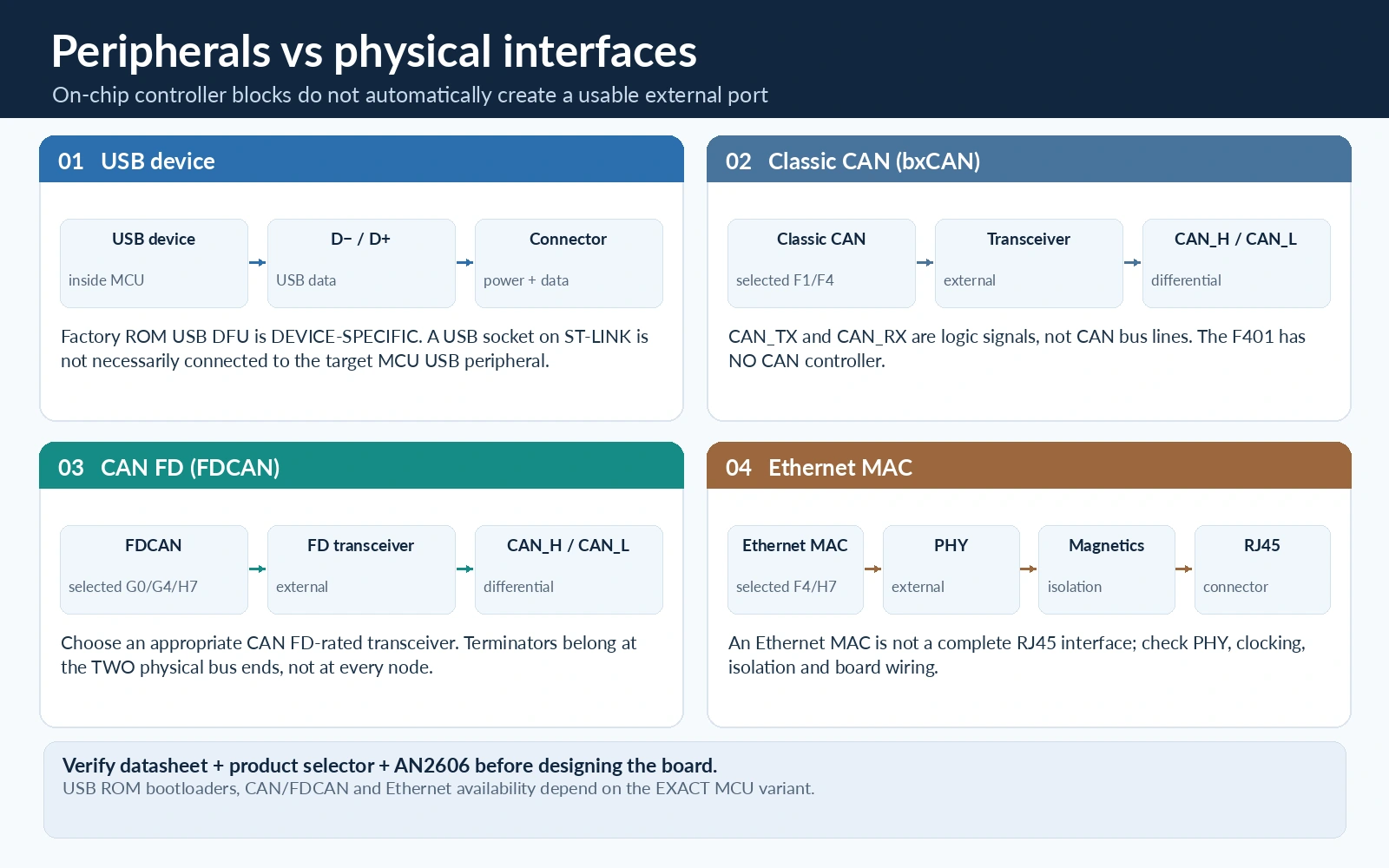
For any STM32 USB project, ask four different questions: does the MCU have the USB device/host peripheral, are its D+/D− lines available on the package, does the development board wire them to a data-capable connector, and does a factory ROM bootloader on that exact chip support the interface you intend to use? An onboard ST-LINK USB connector is usually a debug/probe port, not automatically the target MCU’s USB device connection.
The medium-density F103 Blue Pill is a common trap: its MCU offers USB peripheral capability, but not factory USB DFU over the board connector. Conversely, selected newer F4 parts include system-memory USB DFU. Check ST’s AN2606 for the exact device and bootloader revision before designing a production update path.
CAN versus FDCAN
Classic CAN and CAN FD are not interchangeable marketing phrases. A classic bxCAN controller sends and receives classical CAN frames; FDCAN-capable STM32s can provide the CAN FD controller features when properly configured with compatible physical hardware. A CAN transceiver does not add a controller to an F401, and an MCU CAN_TX/CAN_RX pin pair never connects directly to CAN_H/CAN_L. The transceiver, termination, common-mode limits, wiring and EMC layout are separate design responsibilities.
For classic CAN, an existing F103 or CAN-capable F4 can work well. For a new CAN FD design, shortlist exact G0/G4/H7/U5 parts with the required FDCAN instances, pins and RAM/message filtering resources. Check physical layer transceiver data-rate support and oscillator tolerance. Do not infer FDCAN from family alone.
ADC, DAC and precision timing
A 12-bit ADC reading does not establish measurement accuracy. Sampling capacitor settling, impedance of the input network, reference stability, temperature calibration, analog supply decoupling and the digital noise environment often dominate. A G4 provides attractive analog integration, but an F4 plus an external precision ADC could still be superior for a particularly low-noise instrument. Oversampling improves effective resolution under appropriate noise and bandwidth conditions; it does not magically make a 12-bit converter a universally accurate 16-bit instrument.
Display, audio, Ethernet and memory expansion
Once a product needs a large framebuffer, high-resolution graphics, long audio buffers or several high-throughput peripherals, SRAM capacity, memory topology, cache and external interfaces become more important. That may push the design towards specific F4/H7/U5 graphics lines. But Ethernet MAC is not an RJ45 port; a bare MCU typically requires a PHY, magnetics and connector. A USB 2.0 HS controller may similarly require the correct external PHY to reach the claimed bit rate.
Seven worked project-selection examples
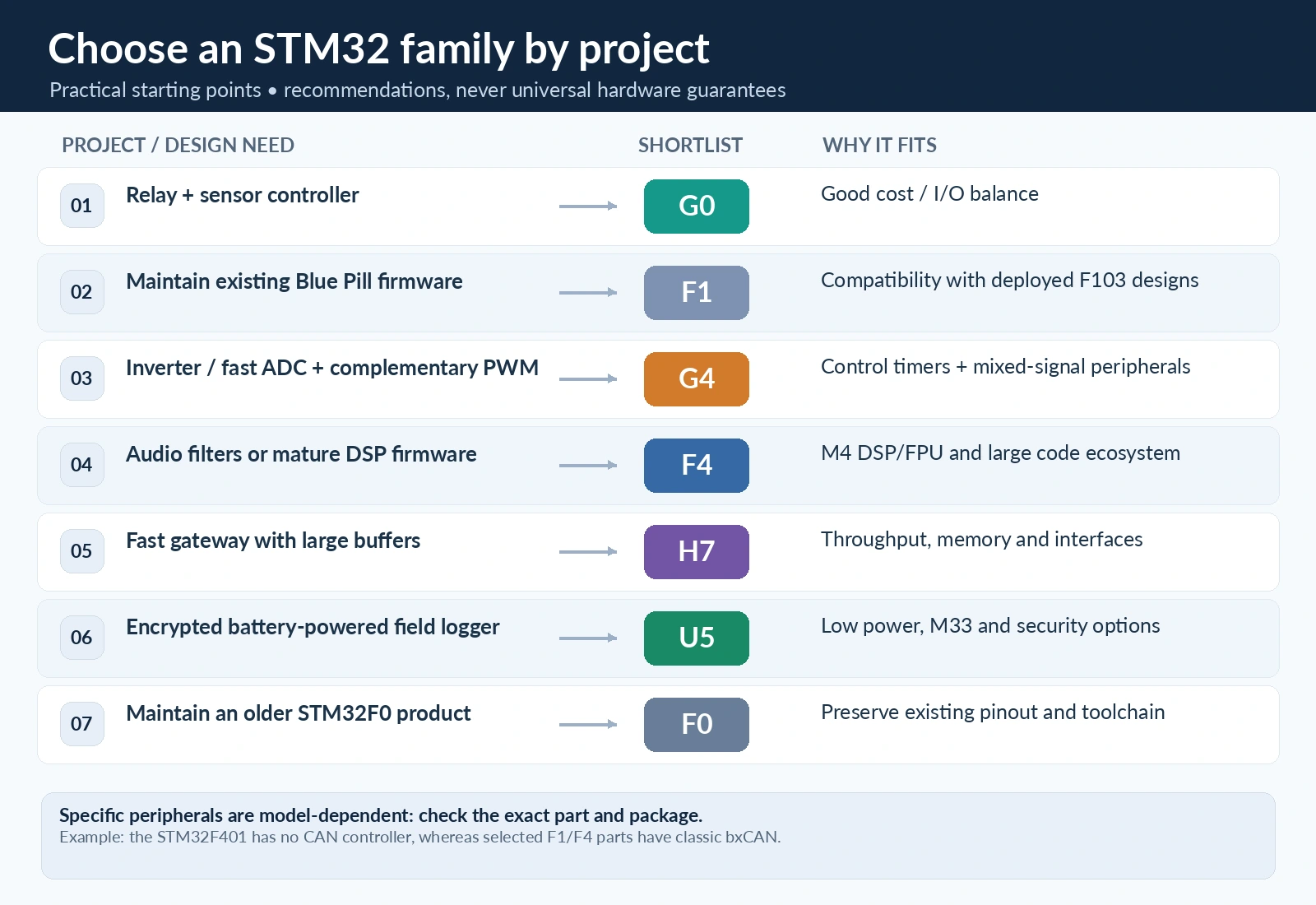
| Project specification | First family to evaluate | Why | Check before ordering |
|---|---|---|---|
| USB-to-UART control widget, simple I/O | G0 | Mainstream M0+ design | Exact USB availability and boot support |
| Replace a Blue Pill in an old system | F1 first; then G0/G4 for redesign | Firmware/PCB compatibility costs | Pin map, timers, CAN, voltage limits |
| PID loop for BLDC motor with fast current sensing | G4 | Advanced timer/ADC/comparator integration | Required trigger channels, ADC latency, safety paths |
| Compact audio effects unit | F4 or H7 | DSP/FPU and available throughput | Codec interface, sample buffers, worst-case cycles |
| Ethernet gateway with substantial parsing | F407 or H7 | Ethernet MAC on chosen parts and processing headroom | External PHY and exact RAM/DMA topology |
| Coin-cell sensor logger | U5 | Sleep behaviour and secure lifecycle options | Board leakage, wake interval, radio current |
| Simple 5 V powered relay-controller PCB | G0 (or C0) | Cost- and power-conscious | GPIO voltage tolerance and driver stages |
The table is a starting point, not a substitute for a datasheet comparison. For each project, choose at least two candidate part numbers and compare their actual bill of materials and lifecycle risk.
Quantify the choice with a performance and energy budget
A simple quantitative exercise can prevent selecting an H7 based on a headline number. Consider a sensor task that runs every 100 ms and requires 150,000 CPU cycles after measurements complete. At 48 MHz, the minimum ideal compute duration is 150,000 ÷ 48,000,000 = 3.125 ms. At 170 MHz, it is approximately 0.882 ms. Those are theoretical computation times only; code architecture, cache/memory latency, interrupt overhead and peripheral waiting can change the result.
If the MCU wakes ten times per second and processing were the only activity, that is about 31.25 ms/s of compute time at 48 MHz, versus 8.82 ms/s at 170 MHz. The faster MCU might spend more time asleep, but it might also draw significantly more current while running. A real energy comparison uses:
E_cycle ≈ V × (I_active × t_active + I_sleep × t_sleep)
Run that calculation with measured currents on the intended PCB, including external sensors and regulators. The lower-frequency MCU is not always the lower-energy choice, and the faster MCU is not automatically worse. Clock setup, flash wait states, peripheral clocks and operating voltage are part of the measurement.
For an ADC/control workload, make a second budget: sample rate × number of channels × processing cost per sample, then add the worst-case interrupt handling time and leave headroom for communication and fault protection. DMA can remove CPU copy operations but does not make memory bandwidth unlimited.
Why copying pinouts or HAL code between families fails
A GPIO named PA5 on two STM32 parts is not proof of compatible supply tolerance, oscillator connections or alternative functions. One board may connect PA5 to an LED, another to an SPI clock or nothing at all. The package can expose different pins, and the GPIO alternate-function matrix changes. Always match MCU datasheet pin table + package + board schematic.
Likewise, CubeMX-generated source uses family-specific HAL/LL drivers. On one part, an SPI peripheral has a particular clock enable macro or DMA request; on another, the peripheral could sit on a different bus or need a different DMA multiplexer configuration. The following pseudocode is deliberately portable in concept—not a cut-and-paste full HAL project:
/* Architecture-neutral design sketch, not standalone compilable firmware. */
void on_sample_ready(void)
{
    int32_t measurement = read_calibrated_sample();
    controller_update(measurement);
    set_output_safely();
}

int main(void)
{
    platform_init();        /* MCU/board-specific clocks, pins, DMA, ADC */
    configure_safety_path(); /* hardware protection where applicable */
    while (1) {
        service_communications();
        platform_idle_if_possible();
    }
}
For a real implementation, generate each chip’s startup and peripheral configuration using the correct STM32CubeMX device model; place user code in protected sections; inspect the linker memory regions; and test actual bus timing and power with instruments. Do not assume “the compiler accepts it” is proof that the hardware is safe.
Debugging and programming: SWD remains the common foundation
Almost all the devices discussed here support Arm Serial Wire Debug, commonly exposed through SWDIO, SWCLK, ground, target voltage reference and optionally reset. But the physical location of the signals depends on board and package. Genuine ST-LINK/V2 20-pin interfaces and cheap ST-LINK-style clone headers do not share universal pin numbering.
Start with the latest supported ST-LINK firmware and STM32CubeProgrammer. Confirm you can read the device ID and flash size before building a complicated application. For the STM32CubeIDE 2.x workflow, the current separation of CubeMX and CubeIDE is also relevant: choose the correct device in CubeMX, generate the project and import it into the IDE. The STM32 beginner guide explains this sequence, while our development-board comparison explains the common hardware choices.
Selection checklist for a real product
Before approving an STM32 part number, record the following in a design worksheet:
- Product lifetime and volume: target build quantities, availability channel, errata and planned service life.
- Compute workload: worst-case cycles, interrupt latency, DMA bandwidth, floating-point requirements, real-time headroom.
- Exact peripherals: number of USART, I²C, SPI, ADC, DAC, CAN/FDCAN, USB instances; modes and pin conflicts.
- Analog performance: reference accuracy, input range, source impedance, noise, calibration and comparator response.
- Memory: flash including bootloader/update area, SRAM peak, DMA-accessible banks, cache and external-memory requirement.
- Power modes: measured active/sleep current, wake sources, time-to-ready and external rail leakage.
- Physical product: actual package availability, temperature grade, GPIO tolerance, oscillator and EMC requirements.
- Security and update: verified boot, readout/debug controls, cryptographic capability, production key management.
- Development effort: current board schematic, middleware support, stable HAL/LL version, verified example projects.
- Prototype validation: ST-LINK connection, first LED, real bus captures, fault handling, production test points.
A disciplined shortlist is usually faster than choosing a cheap evaluation board and discovering its missing peripheral six months later.
Frequently asked questions
Is STM32G0 better than STM32F103 Blue Pill?
For a new compact controller, G0 is often a better part to investigate: current mainstream M0+ architecture, low-cost packaging options and modern peripheral combinations. For an existing F103 firmware/PCB, a new MCU is not a drop-in replacement. Moreover, if you need classic bxCAN, USB, or a particular timer, compare the exact G0 device’s interfaces first.
Is STM32G4 faster than STM32F4?
Not as a universal statement. G4 devices run up to 170 MHz and emphasise analog/control integration, while selected F4 parts reach 180 MHz and may have different flash accelerators, peripherals and memory. A G4 can be better for motor-control signal paths even when an F4 has a slightly higher clock; an F4 may be better for a mature DSP or communications codebase.
Does every STM32H7 have two CPU cores?
No. There are single-core and selected dual-core H7 products, with distinct frequencies and memory resources. Check the exact part-number documentation before preparing an RTOS or dual-core IPC architecture.
Is STM32U5 automatically the lowest-power STM32?
No. Power depends on sleep mode, clock, package, external components and actual workload; STM32 also has other low-power families such as U0/U3/L4. A U5 is an excellent candidate where its low-power and security features are valuable, but the lowest current in a brochure is not whole-product battery life.
Which STM32 has CAN FD?
Selected STM32G0, G4, H7 and other variants provide FDCAN, but not all parts in those families. Check the product’s peripheral table, actual pins and the transceiver. Classic CAN support on F103/F407 does not create CAN FD capability.
Can I reuse the same STM32CubeIDE project on F0 and H7?
Not without substantial regeneration and porting. Different CPU core, startup file, memory map, interrupts, clock tree and peripheral drivers are involved. Reuse high-level algorithms and well-separated protocol/application code, not an unmodified binary or board pinout.
Does an MCU with Ethernet or USB mean my development board has a working port?
No. Ethernet typically requires an external PHY and magnetics; USB requires the right data pins, connector, 48 MHz configuration or suitable PHY and firmware. Verify the board schematic and bootloader support separately.
Conclusion: which STM32 should you learn or specify in 2026?
For learning modern STM32 without needing sophisticated analog hardware, start with an accessible, well-documented G0 or F4 Nucleo board. Choose G4 when real-time control, ADC triggering and power-electronics peripherals are the centre of the project. Select H7 only when throughput or its particular high-end interfaces are justified, and U5 when energy efficiency, memory retention and secure firmware architecture are product requirements. Keep F0/F1 in your toolkit for maintaining existing systems and understanding the ecosystem.
Finally, do not let a family comparison replace the last critical step: check the exact ordering code, the current ST datasheet, application note, errata, product availability and the board schematic. A carefully chosen midrange MCU with validated analog, power and firmware interfaces usually beats a faster chip chosen from a specification headline.
Manufacturer references
- STMicroelectronics — STM32 family overview
- STM32F4 series
- STM32G4 series
- STM32G0 portfolio and products
- STM32U5 product selector
- STM32F0 devices
- STM32F1 devices
- STM32H7 series
- STM32CubeProgrammer
Technical accuracy note: this is a selection-level guide. Bench measurements, board schematics, device-specific datasheets and errata take precedence over family-wide comparisons. The project-selection examples are engineering recommendations, not hardware tests.