
The STM32F401AliExpress price Black PillAliExpress price looks like a simple breadboardAliExpress price-friendly development board, but its 40-position headers hide a capable STM32F4 microcontroller: an 84 MHz Cortex-M4 with hardware floating-point support, USB full-speed, 12-bit analog conversion, and timer peripherals that can produce accurate PWM without software delays. The difficulty is that a pin is not a single-purpose connection. PB6 can be a digital output, I²C clock, or TIM4 PWM output; PA11 and PA12 are ordinary-looking header labels but also the USB data pair. Choosing the wrong function in STM32CubeMX can break an otherwise sensible project.
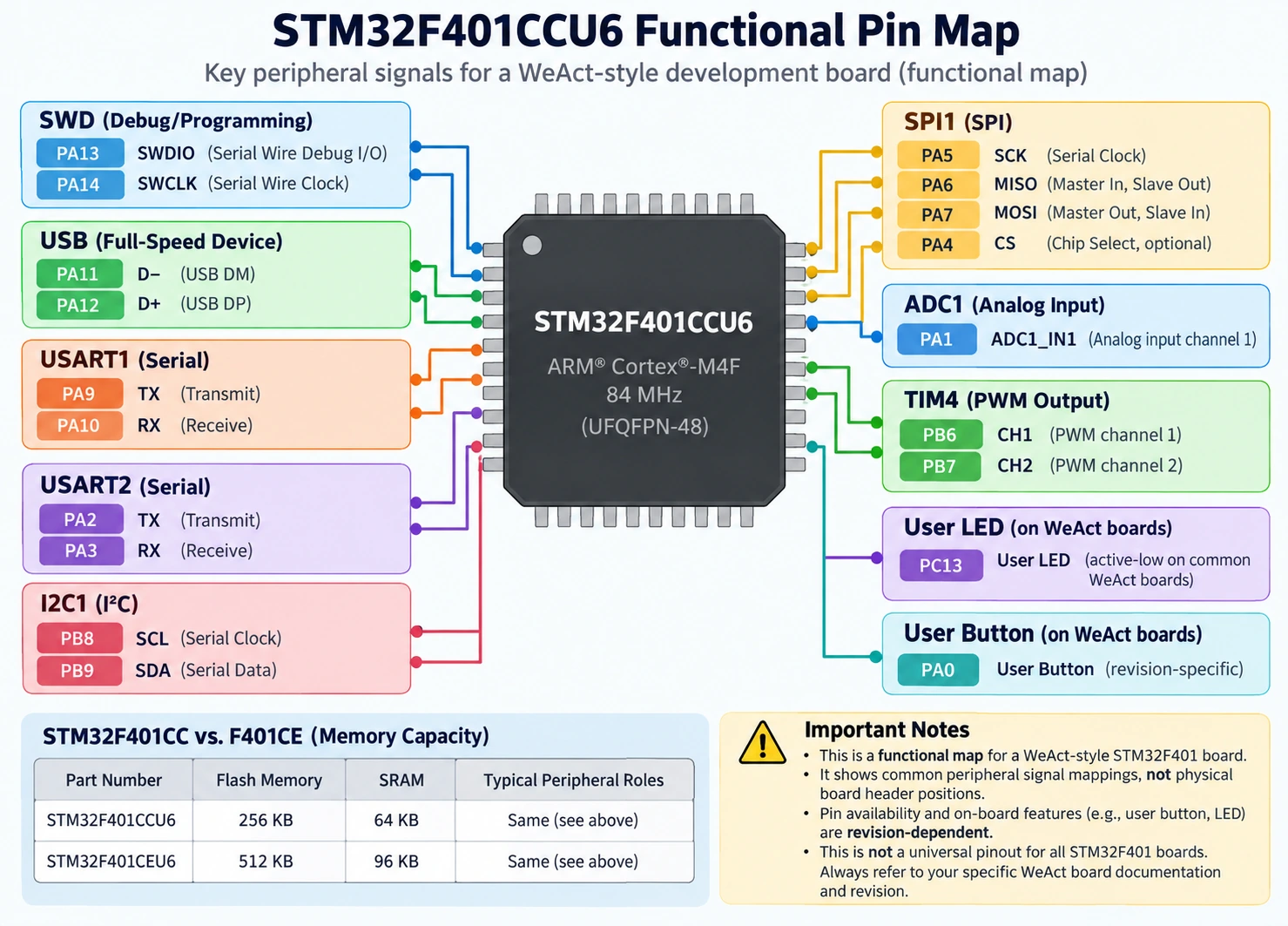
Quick answer: On a typical WeAct STM32F401CCU6 Black Pill, use PA13/PA14 for SWD, PA11/PA12 for USB D−/D+, PA9/PA10 for USART1 TX/RX, PB8/PB9 for I²C1 SCL/SDA, PA5/PA6/PA7 for SPI1 SCK/MISO/MOSI, PA1 for ADC1_IN1, and PB6/PB7 for TIM4_CH1/CH2 PWM. These are example signal assignments, not proof that every clone’s header arrangement is the same. The commonly fitted user LED is on PC13 and is active-low. Always inspect the MCU marking and the actual PCB revision first.
This guide concentrates on the STM32F401, rather than repeating our STM32F411 Black Pill pinout guide or the F401 vs F411 comparison. It covers practical pin selection, the two main F401 memory variants, USB/clock pitfalls, hardware PWM, ADC sampling, and wiring procedures that readers can reproduce. Examples use ST’s HAL and a 25 MHz HSE WeAct-style board; a generic board may have a different crystal and button layout.
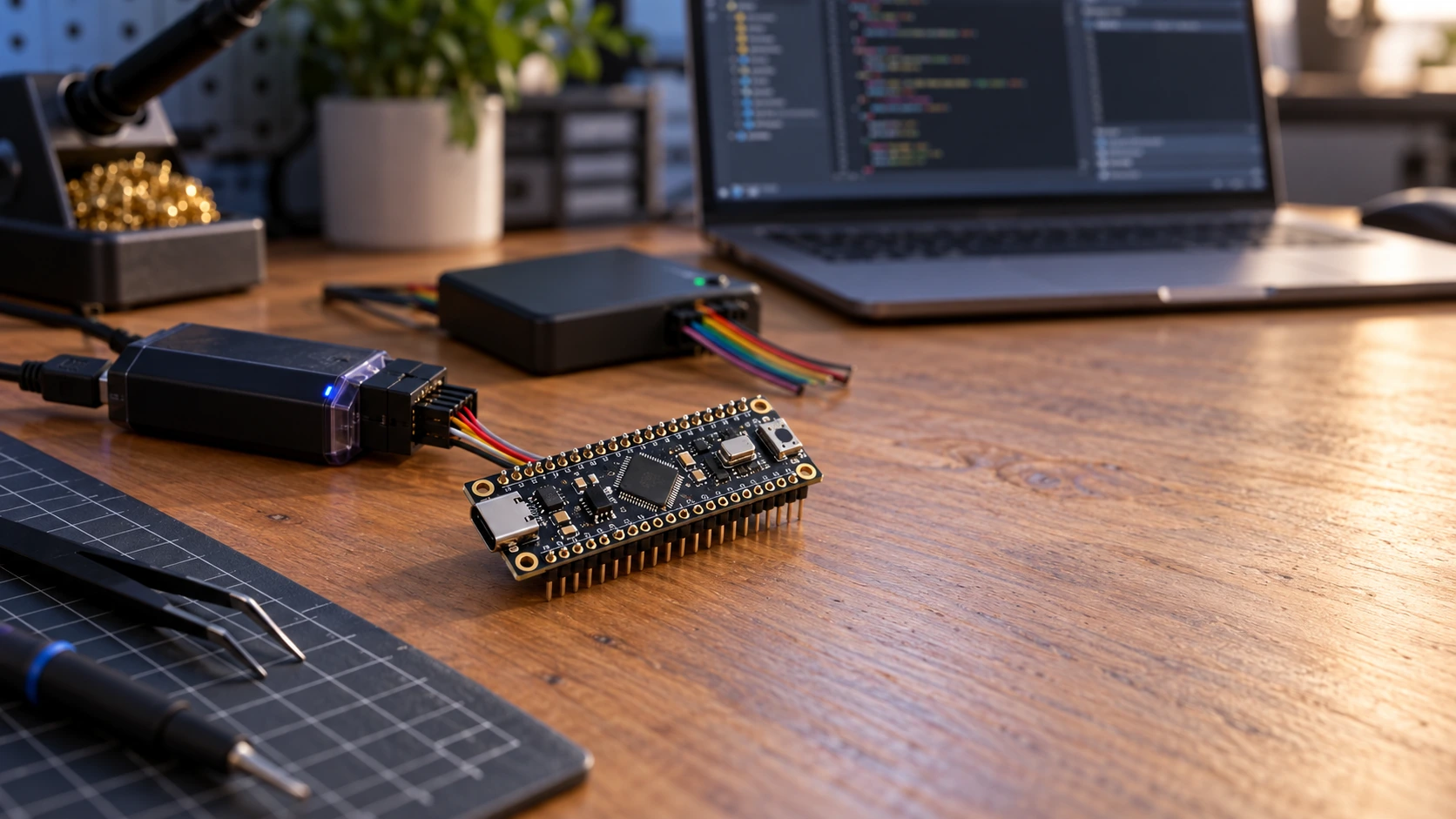
Which Black Pill do you actually have?
“Black Pill” describes a board format, not one single STM32 part number. Read the MCU package marking under a magnifier and check the board version printed on the PCB. Two F401 parts are particularly easy to confuse:
| MCU marking | Max core clock | Flash | SRAM | Typical interpretation |
|---|---|---|---|---|
| STM32F401CCU6 | 84 MHz | 256 KB | 64 KB | Common F401CC Black Pill |
| STM32F401CEU6 | 84 MHz | 512 KB | 96 KB | Larger-memory F401CE variant |
| STM32F411CEU6 | 100 MHz | 512 KB | 128 KB | Different MCU; consult F411 documentation |
The F401CC figures follow ST’s STM32F401CC product page; WeAct’s MiniSTM32F4x1 repository distinguishes the CC, CE and F411CE memory sizes. ST currently lists the STM32F401CC MCU as active, while WeAct’s repository says it discontinued sales of certain F401 board variants. Those statements refer to different things: chip lifecycle and vendor board availability.
The F401CCU6 is a 48-pin UFQFPN device, not an LQFP64 chip. The board may show labels on two long header strips, an external SPI-flash footprint, a USB-C socket, an SWD header and buttons, but the precise implementation changes with revision and manufacturer. The board’s 25 MHz HSE and 32.768 kHz LSE oscillators are documented for WeAct designs; they should not be assumed for anonymous clones.
The specifications that matter for projects
- CPU: Cortex-M4 with single-precision FPU and DSP instructions, up to 84 MHz. This is useful for filtering, sensor fusion and motor-control calculations, although peripheral configuration still determines real-time performance.
- Voltage: the MCU normally uses a regulated 3.3 V board rail, not a direct 5 V VDD connection. Its datasheet operating limits and I/O ratings must be followed.
- ADC: one 12-bit converter with multiple multiplexed channels. A 12-bit reading is nominally 0–4095, but conversion accuracy depends on reference, acquisition time and noise.
- Timers: general-purpose and advanced timer functions for PWM, input capture, encoder counting and timebases.
- USB: USB OTG FS peripheral with integrated PHY; actual use depends on the clock, PCB connections and firmware. USB-C is a connector, not a guarantee that a serial port or sketch uploader exists.
- Interfaces: USART, I²C and SPI signals share physical GPIO pins via alternate-function multiplexing.
- Not included: no native Wi-Fi or Bluetooth, and no built-in CAN controller in the STM32F401. Attaching a CAN transceiver alone will not create CAN support; use a suitable CAN MCU or external CAN controller.
For reference, the low-level peripheral details are in ST RM0368. It is the authoritative source for timer registers, clock buses, ADC control and USB peripheral behavior.
Pinout map: usable groups before physical header numbers
The first discipline is to choose by STM32 signal name (PA9, PB6, PC13), not by a generic number printed on a pinout found in a search result. That avoids confusion between STM32 HAL notation, Arduino logical pins and physical package pins. The map below lists commonly useful F401CC assignments:
| Signal or function | STM32 pin(s) | Peripheral/function | Important note |
|---|---|---|---|
| SWD programming | PA13 / PA14 | SWDIO / SWCLK | Reserve these during bring-up |
| Optional SWO trace | PB3 | SWO alternative | Shared with other peripherals |
| Onboard user LED | PC13 | GPIO output | Common WeAct board: LED is active-low |
| User pushbutton | PA0 | GPIO input | Check the board revision and polarity |
| USB full-speed | PA11 / PA12 | USB DM / DP | Requires USB-capable firmware and clock |
| USB-related functions | PA9 / PA10 | OTG VBUS / ID roles | Possible conflict with UART when enabled |
| UART serial | PA9 / PA10 | USART1 TX / RX | 3.3 V logic, not RS-232 |
| Alternative UART | PA2 / PA3 | USART2 TX / RX | Useful when USART1 pins are busy |
| I²C sensors | PB8 / PB9 | I²C1 SCL / SDA | Pull-ups should go to 3.3 V |
| SPI display/sensors | PA5 / PA6 / PA7 | SPI1 SCK / MISO / MOSI | PA4 often chosen for manual CS |
| Second SPI bus | PB13 / PB14 / PB15 | SPI2 SCK / MISO / MOSI | Check board routing |
| ADC sensor | PA1 | ADC1_IN1 | Analog voltage must remain in allowed range |
| Other analog | PA0–PA7, PB0–PB1 | ADC inputs where bonded and available | Some pins shared with button or SPI |
| PWM example | PB6 / PB7 | TIM4_CH1 / TIM4_CH2 | Hardware output with timer alternate function |
| Advanced timer PWM | PA8 | TIM1_CH1 | Useful when TIM4 pins are occupied |
| RTC crystal | PC14 / PC15 | LSE oscillator | Normally avoid when board has 32.768 kHz crystal |
| Boot selection | BOOT0 | Reset-time boot-mode input | Not ordinary application GPIO |
Important: this is a peripheral-routing guide, not a statement that every alternative function is usable simultaneously. GPIO, UART, USB, I²C, SPI and timers compete for the same pads. Check the alternate-function column for the exact F401 package and resolve pin conflicts in CubeMX before wiring a module.
Physical headers: an explicit WeAct V1.2 example, not a universal Black Pill pinout
The STM32-base WeAct F401CCU6 V1.2 board record documents two 20-position headers. Its recorded sequence is shown here so owners of that revision can identify signals; it must not be blindly applied to a V3.x or anonymous clone. “H1” and “H2” are the two header groups in that board record. Do not interpret this table as a top-view orientation guide without comparing the PCB printing.
| Position in cited board record | H1 signal | H2 signal |
|---|---|---|
| 1 | 5V rail | PB12 |
| 2 | GND | PB13 |
| 3 | 3.3V rail | PB14 |
| 4 | PB10 | PB15 |
| 5 | PB2 | PA8 |
| 6 | PB1 | PA9 |
| 7 | PB0 | PA10 |
| 8 | PA7 | PA11 |
| 9 | PA6 | PA12 |
| 10 | PA5 | PA15 |
| 11 | PA4 | PB3 |
| 12 | PA3 | PB4 |
| 13 | PA2 | PB5 |
| 14 | PA1 | PB6 |
| 15 | PA0 | PB7 |
| 16 | NRST | PB8 |
| 17 | PC15 | PB9 |
| 18 | PC14 | 5V rail |
| 19 | PC13 | GND |
| 20 | VBAT | 3.3V rail |
The words 5V rail describe the board supply connection, not the safe voltage for an STM32 GPIO. USB power usually feeds an onboard regulator. Never attach 5 V directly to an MCU 3.3 V rail, ADC input or unverified header signal. A USB-C board may also differ from older micro-USB revisions in its VBUS and connector implementation.
Before using a supplied pinout image, look for the actual board vendor, revision, MCU mark, USB connector type, button locations and oscillator values. If the pinout illustration cannot identify the board, use it as a suggestion only. A continuity meter and board schematic beat an attractive but uncertain diagram.
GPIO in practice: LED, button and safe electrical connections
The most reliable first test is the onboard PC13 LED, because it needs no external wiring. Many WeAct boards connect the LED so the MCU sinks current: GPIO LOW switches it on, GPIO HIGH switches it off. Do not transfer this statement uncritically to every board sold as “Black Pill.”
In classic STM32CubeMX, select the exact STM32F401CCUx or CE device rather than a generic F411 example. Set SYS → Debug → Serial Wire, choose PC13 as GPIO_Output, select push-pull operation and start with a conservative speed. Generate a project for STM32CubeIDE, import it and add this code where your generated while(1) executes:
/* PC13 onboard LED on many WeAct Black Pills: active-low. */
HAL_GPIO_WritePin(GPIOC, GPIO_PIN_13, GPIO_PIN_SET); /* off */
HAL_Delay(500);
HAL_GPIO_WritePin(GPIOC, GPIO_PIN_13, GPIO_PIN_RESET); /* on */
HAL_Delay(500);
CubeMX must enable the GPIOC clock and initialize PC13 as an output. Avoid writing code into a generated region that is overwritten by regeneration: keep edits inside USER CODE BEGIN / USER CODE END sections. If a LED test fails, check power, the exact chip selected, whether the board LED is indeed PC13, and whether the code reached the main loop using SWD breakpoints.
For a user button connected to PA0 on supported revisions, start with a GPIO input and use the pull configuration required by that board’s schematic. Do not assume an internal pull-up is safe or that pressing the button necessarily reads HIGH. First measure or debug the idle and pressed states, then implement edge detection and debouncing.
Can a Black Pill accept a 5 V signal?
The MCU is a 3.3 V-class device. Certain F401 digital inputs are specified with FT pad characteristics, but this does not mean every I/O is 5 V tolerant under every condition. An analog input must never exceed its allowed analog supply/reference range; USB pins and other special-function pads have their own rules. Unpowered-board injection, internal pull configurations and external circuitry need particular care. We explained the general distinction in the STM32 GPIO 5 V tolerance article; for an F401, follow its own datasheet pin-definition and electrical tables rather than borrowing a Blue Pill F103 list.
Use a proper level translator for a 5 V digital bus unless all relevant conditions are verified. On I²C buses, attach pull-ups to the required safe logic rail; a random sensor breakout may already have 5 V pull-ups. Avoid accidentally back-powering an unpowered MCU through signal lines.
USB-C: what the F401 can do and what it cannot do automatically
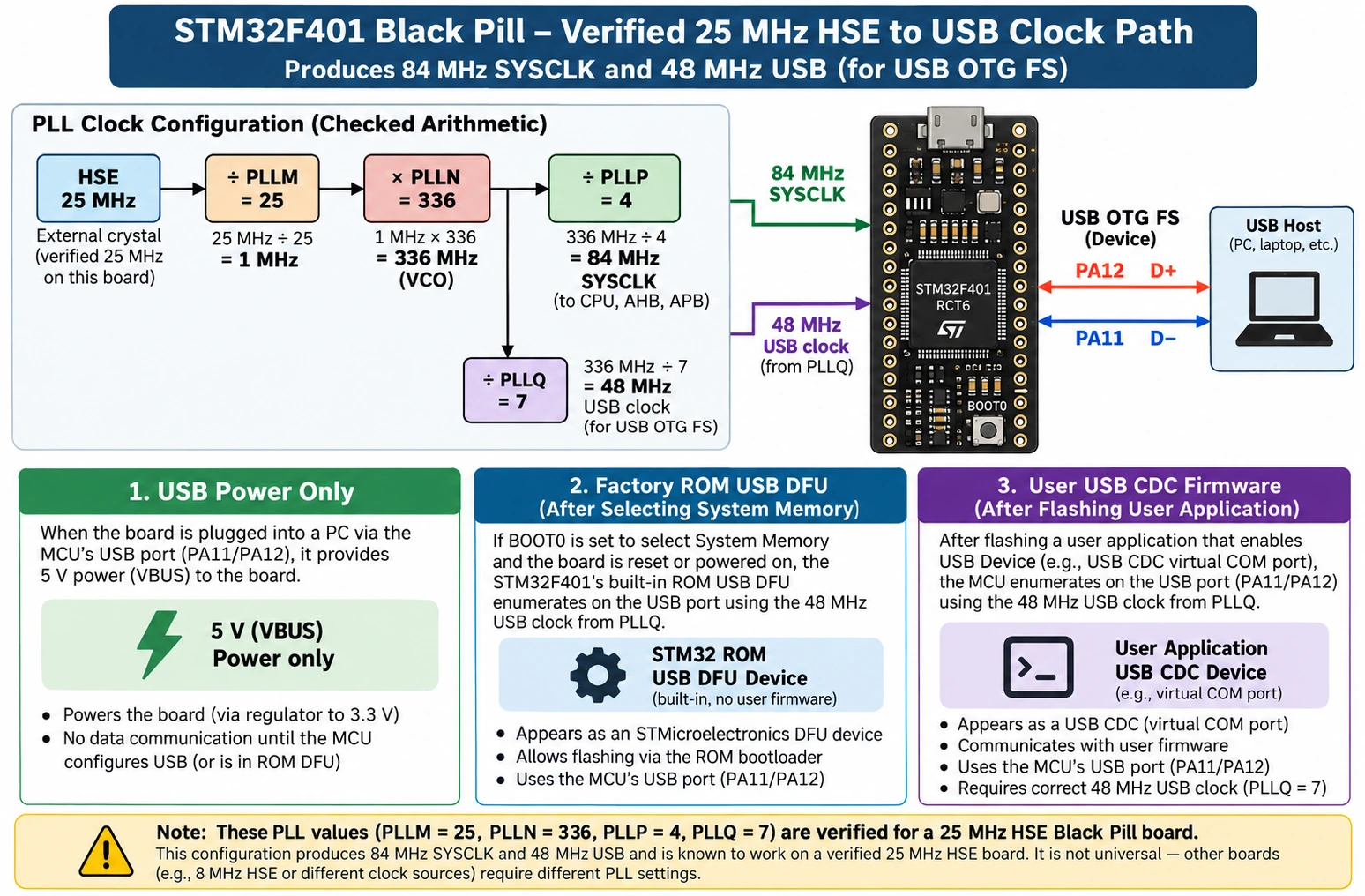
One genuine advantage over a classic F103 Blue Pill is the STM32F401’s native USB OTG FS peripheral. On the MCU, USB D− is PA11 and D+ is PA12. A board with these connected properly to a USB connector can run firmware offering USB CDC serial, HID or other supported USB classes. The host will only enumerate the device when software, clocking and hardware all agree.
There are three different situations that should not be confused:
| Situation | What the computer sees | What must exist |
|---|---|---|
| USB-C provides power only | LED turns on, but no USB device | No USB firmware required for power |
| Factory ROM DFU boot mode | A bootloader-compatible USB device | Correct boot selection, ROM bootloader and USB connection |
| User firmware implements USB CDC | Virtual serial interface | Correct USB clock and USB device firmware |
Unlike the STM32F103C8’s factory ROM, STM32F401xB/C parts support a USB DFU system bootloader, as documented in ST AN2606. On a suitable board, the BOOT0 mechanism selects system memory, and the USB connection can then be used with STM32CubeProgrammer. Confirm the boot procedure for your exact revision and release BOOT0 for normal flash execution afterward. An ST-LINK device plugged into the PC is a different USB device from the STM32’s own DFU port.
That factory DFU facility does not mean a new application will expose a COM port by default, nor does it guarantee a particular Arduino upload mode without setup. A custom bootloader installed in user flash is different again.
The 25 MHz crystal and the 48 MHz USB clock
USB full-speed needs a suitable 48 MHz peripheral clock, not simply a CPU frequency near 48 MHz. WeAct F401 Black Pill designs commonly use a 25 MHz HSE. A mathematically valid clock-plan example uses:
| PLL setting | Value | Calculation |
|---|---|---|
| HSE source | 25 MHz | Verify board crystal |
| PLLM | 25 | 25 / 25 = 1 MHz PLL input |
| PLLN | 336 | 1 × 336 = 336 MHz PLL VCO |
| PLLP | 4 | 336 / 4 = 84 MHz system clock |
| PLLQ | 7 | 336 / 7 = 48 MHz USB clock |
| AHB / APB1 / APB2 prescalers | 1 / 2 / 1 | HCLK 84, PCLK1 42, PCLK2 84 MHz |
These are illustrative configuration values consistent with the clock arithmetic; select the appropriate voltage-scale, flash latency and peripheral settings using the exact chip’s CubeMX limits and verify the generated clock tree. If a clone uses a different HSE crystal—or no populated crystal—do not copy the numbers. Use CubeMX to recompute a valid plan from the actual source.
USB troubleshooting in the right order
If the board powers up but does not enumerate, first use a known-good data-capable USB cable and another port. Inspect the connector, USB-C CC resistor implementation and PCB, then check whether you are deliberately running factory DFU or your own USB firmware. Verify PA11/PA12 assignments and the actual 48 MHz USB clock, then look at the operating system’s USB device list. A serial terminal cannot fix firmware that never enumerates a CDC endpoint. Do not install random drivers until you know what USB device should be present.
With USB OTG enabled in CubeMX, PA9/PA10 may also take OTG-related VBUS/ID functions, depending on the device mode and configuration. If you also want USART1 on PA9/PA10, resolve the peripheral-role conflict explicitly—USART2 PA2/PA3 may be the cleaner serial-debug alternative.
ADC: measuring a sensor voltage with PA1
The STM32F401 includes a 12-bit successive-approximation ADC. Pins PA0–PA7 and PB0/PB1 are among the analog-capable assignments on common 48-pin F401 variants; the ADC multiplexes channels rather than sampling all of them simultaneously. PA1 is convenient because it is often exposed on the Black Pill header and is not the usual user-button input.
For a simple experiment connect a 0–3.3 V analog source to PA1, with its ground connected to board ground. Do not connect an unscaled 5 V analog sensor. In STM32CubeMX configure PA1 → ADC1_IN1 and choose a sample time appropriate to the sensor output impedance. A poll-on-demand example is:
/* Assumes CubeMX generated and initialized hadc1 for ADC1_IN1. */
uint32_t raw = 0;
if (HAL_ADC_Start(&hadc1) == HAL_OK) {
    if (HAL_ADC_PollForConversion(&hadc1, 20) == HAL_OK) {
        raw = HAL_ADC_GetValue(&hadc1);  /* nominally 0..4095 */
    }
    HAL_ADC_Stop(&hadc1);
}
float voltage = (3.3f * (float)raw) / 4095.0f;
The 3.3f constant is a nominal VDDA/reference voltage, not a precision measurement. If your supply is 3.25 V and your application assumes 3.30 V, you inject a systematic scale error. Use measured/calibrated reference information for more serious work, and remember that ADC input loading, sampling time, PCB noise and source impedance can all produce apparent inaccuracy.
Four ADC mistakes worth avoiding
- Sending 5 V directly into PA1. An ADC input is not an FT digital input merely because another pad on the MCU supports 5 V.
- Sampling a high-impedance source too fast. Increase the sample interval or buffer the signal so the ADC sample capacitor can settle.
- Sharing a noisy supply with a motor driver. Separate power returns appropriately and decouple the analog rail; do not route high-current motor ground through the sensor reference.
- Treating the single converter as simultaneous independent converters. Scan/DMA can multiplex channels quickly, but sampling still has timing and settling constraints.
If you want a complete sensor example, a BME280 uses digital I²C/SPI, not this ADC input. Pick the peripheral appropriate to the sensor.
Timers and PWM: why PB6 and PB7 are useful
Software blinking is fine for a status LED. It is poor for precise servo pulses, motor-speed waveforms, dimming and repeatable timing under CPU load. STM32 timers produce waveforms in hardware while the processor does other work. On the F401, PB6 = TIM4_CH1 and PB7 = TIM4_CH2 are convenient choices, assuming they are exposed and not already dedicated to another device.
The frequency of an edge-aligned up-counting PWM signal is approximately:
f_PWM = f_TIM / ((PSC + 1) × (ARR + 1))
where f_TIM is the timer input clock, PSC is the programmed prescaler register and ARR is the auto-reload register. In PWM mode 1 the active-high duty is approximately CCR / (ARR + 1) for ordinary non-edge cases. The exact polarity and channel settings matter.
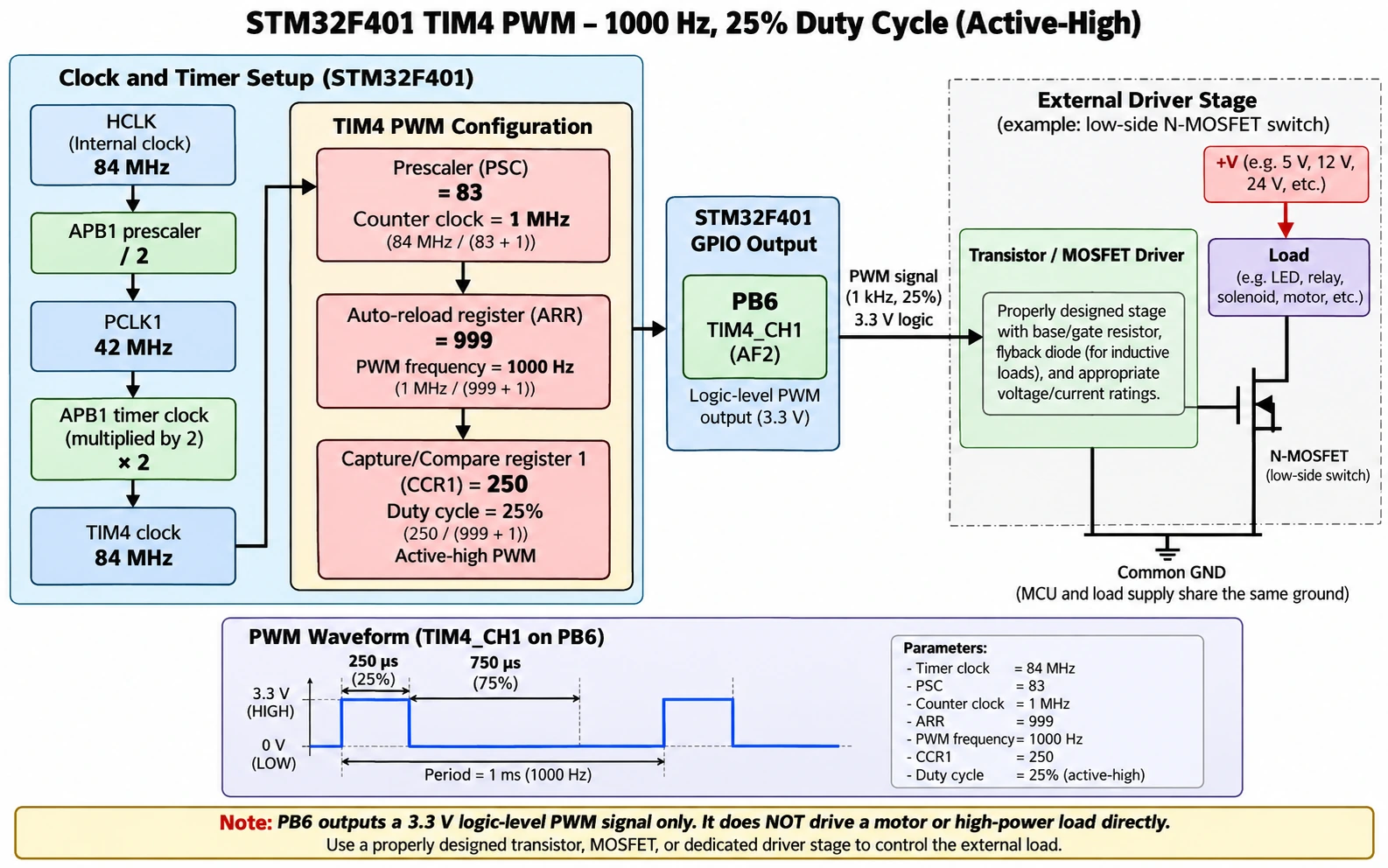
As an example, suppose the F401 runs HCLK=84 MHz, APB1 is divided by 2 to PCLK1=42 MHz, and TIM4’s input clock is 84 MHz due to the APB timer-clock multiplication rule. Choose:
| Register / setting | Value | Result |
|---|---|---|
| TIM4 input clock | 84 MHz | APB1 timer clock |
| TIM4_PSC | 83 | Counter tick = 1 MHz |
| TIM4_ARR | 999 | Period = 1,000 ticks = 1 ms |
| TIM4_CCR1 | 250 | Approximately 25% duty |
| PB6 alternate function | TIM4_CH1 (AF2) | Actual PWM output |
This produces 1 kHz PWM with approximately 25% duty on PB6. A common error is to use 42 MHz as the timer clock just because PCLK1 is 42 MHz; that makes the result half the expected frequency.
Generating the PWM in STM32CubeMX and HAL
In classic CubeMX, select TIM4 Channel 1 → PWM Generation CH1, put PB6 into the corresponding timer alternate function, set the prescaler, period and pulse registers, and generate the HAL project. The following is intended for CubeMX’s user-code sections after MX_TIM4_Init() has executed:
/* In USER CODE BEGIN 2 after TIM4 initialization. */
if (HAL_TIM_PWM_Start(&htim4, TIM_CHANNEL_1) != HAL_OK) {
    Error_Handler();
}
/* PWM is now generated in hardware on TIM4_CH1 / PB6. */

/* Later, adjust duty cycle for ARR=999: 0..1000 ticks. */
uint32_t compare = 250;  /* nominally 25% duty */
__HAL_TIM_SET_COMPARE(&htim4, TIM_CHANNEL_1, compare);
Do not drive motors, solenoids, high-power LEDs or relays directly from the MCU pin. PWM is a logic-level control signal: it should command a properly powered MOSFET gate stage, H-bridge or LED driver with appropriate current limiting and transient protection. For an LED-only demonstration, add a suitably calculated series resistor and keep the MCU pin current within the datasheet ratings.
Timer allocation for real projects
TIM1 offers advanced-control features useful for power electronics, but those functions require more than selecting an output pin: complementary outputs, dead-time and fault inputs must be validated at the actual circuit. TIM2/TIM5 are useful where long count ranges matter. TIM3/TIM4 are excellent general-purpose PWM and capture timers. As the board becomes busier, reserve timers in a pin/peripheral worksheet so an input-capture job does not silently share a channel with PWM.
For example, an RC servo typically expects a low-rate pulse train with carefully defined pulse width rather than arbitrary high-frequency duty percentages. Recalculate PSC, ARR and CCR for that actuator; do not reuse the 1 kHz LED example without adapting the design.
I²C, SPI and UART wiring examples
I²C BME280 on PB8/PB9
A BME280 breakout powered at 3.3 V can use PB8 → SCL and PB9 → SDA, configured as I²C1 with appropriate alternate functions. Connect GND → GND and check where the breakout’s pull-up resistors actually connect. Some breakout boards have level shifters and different power arrangements; the bare BME280 chip is a 3.3 V-class part. Avoid confusing an I²C module labeled VIN with a bare device’s permitted I/O voltage.
I²C buses are open-drain; the logic HIGH is supplied by pull-ups, not by forcing 5 V output from the STM32. Repeated NACK failures often trace to missing common ground, swapped pins, incorrect address, pull-ups to the wrong rail, or a module that is wired for SPI instead.
SPI display or flash on PA5/PA6/PA7
Use SPI1 SCK PA5, MISO PA6, MOSI PA7, with a chosen chip-select GPIO such as PA4 if your peripheral supports it. The actual CS assignment is application-dependent; it is not compulsory that every SPI device use PA4. On some WeAct boards the PA4–PA7 signals are routed to a footprint for optional external flash, so installing such a chip creates a real shared-bus/layout consideration.
Displays may need additional GPIOs for DC, RST or a backlight driver. SPI bus wires should be kept short and share a ground; when several devices share SCK/MISO/MOSI, each must have a correctly managed chip-select and compatible electrical signaling.
UART debug with PA9/PA10
Connect the MCU PA9 USART1_TX → 3.3 V USB-UART adapter RX, PA10 USART1_RX ← adapter TX, and connect the grounds. Never connect classic RS-232 ± voltage levels to an MCU UART. If USB OTG roles conflict with PA9/PA10 or a board peripheral already occupies them, use a different supported UART instance, such as USART2 on PA2/PA3, rather than guessing that CubeMX will reconcile the conflict for you.
Programming the F401 Black Pill: SWD and factory USB DFU
For development and recovery, a debug probe such as ST-LINK is often the least ambiguous path. Connect probe SWDIO to PA13, SWCLK to PA14, GND to GND, and where supported NRST to NRST. Provide correct target power and connect probe voltage reference as required by that probe’s documentation; do not assume an unknown probe’s pin marked 3.3V is always a safe target power output. Use our ST-LINK V2 signal-level guide for connector-specific precautions.
A typical first-session workflow is: create an STM32F401 project in CubeMX, leave Serial Wire debug enabled, generate/import into CubeIDE, build an ELF, and start an ST-LINK debug session. If CubeProgrammer can detect the probe but not the MCU, test the target voltage and SWD wiring before changing flash option bytes or mass-erasing data.
Factory USB DFU is useful for programming without an external debug probe, if the correct boot path and USB hardware work. It is not equivalent to SWD source-level debugging. On a WeAct-style board the BOOT0/reset buttons can enter ROM boot mode as described by the vendor; release BOOT0 and reset to run your ordinary application from flash. The exact entry sequence and whether drivers are needed differ by operating system and firmware state.
A board that only powers over USB but does not enumerate as DFU is not necessarily faulty: check the boot selection, data cable, USB wiring and ROM loader support. And remember that a USB CDC application will not run while the MCU is waiting in ROM DFU.
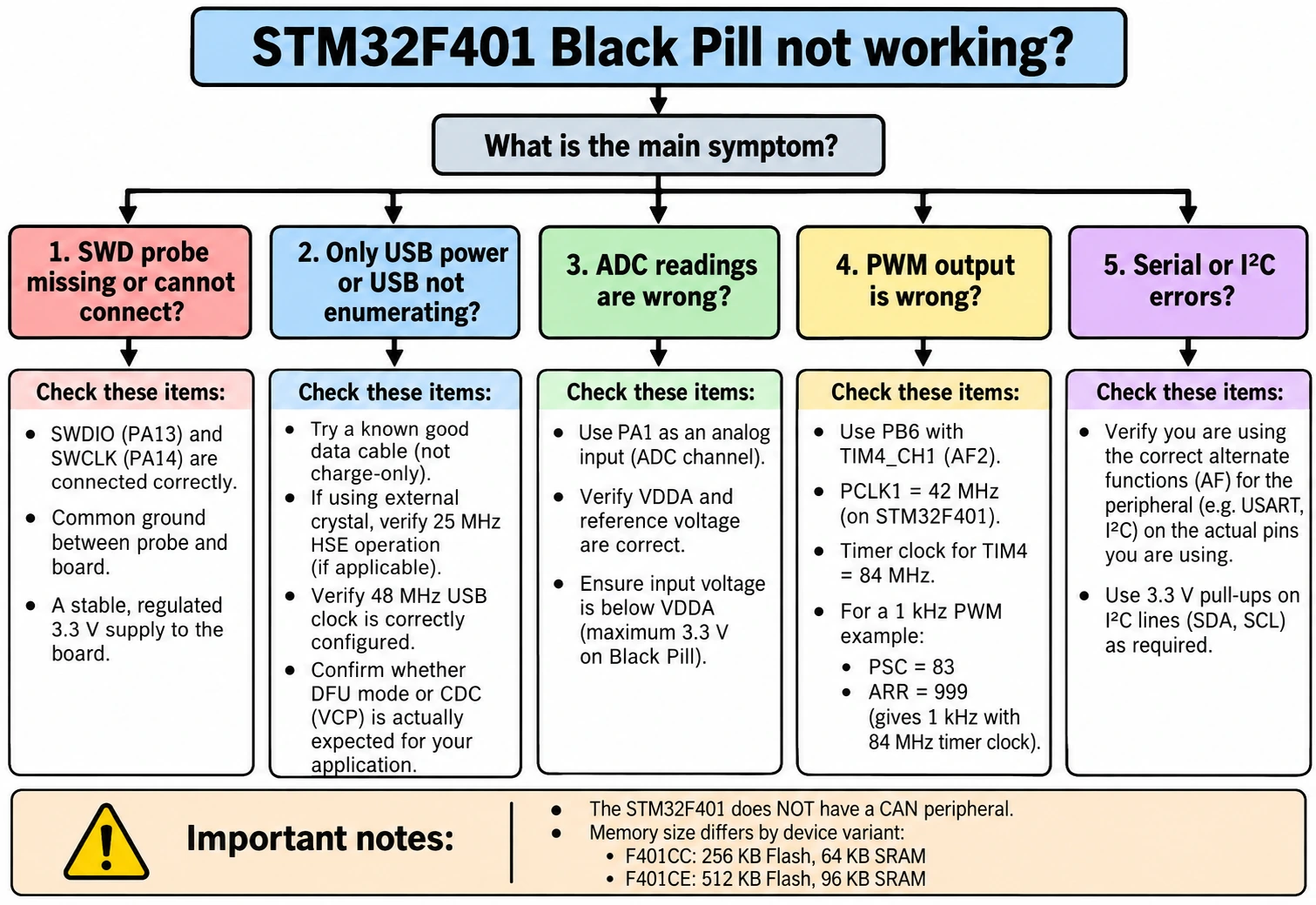
Common F401 Black Pill problems and fixes
| Symptom | Most likely checks | Practical response |
|---|---|---|
| ST-LINK is detected but no target | SWDIO PA13, SWCLK PA14, GND, target rail | Verify signals, reduce SWD frequency, consider NRST |
| LED never blinks | PC13 polarity or wrong board mapping | Try active-low LED state, debug main() |
| USB powers board, no COM port | No CDC firmware, clock or cable | Distinguish power, ROM DFU and CDC; verify 48 MHz |
| CubeMX says pin conflict | Multiple peripherals assigned same pad | Change UART/SPI/USB pin allocation |
| PWM frequency is wrong | Assumed APB clock equals timer clock | Check APB prescaler and timer clock multiplier |
| ADC seems noisy or scaled incorrectly | VDDA error, high source impedance, short sampling | Measure supply, lengthen sample time, improve wiring |
| I²C scanner finds nothing | Pull-ups, wrong voltage/address, swap | Check 3.3 V pull-ups and sensor pinout |
| DFU works but code will not run | BOOT0 left selected or invalid image | Restore flash boot and reset, inspect flash image |
| Hardware works on F411 tutorial but not F401 | Different part selection, memory, AF configuration | Rebuild using exact F401 device and datasheet |
| 5 V module behaves unpredictably | Logic mismatch or power sequencing | Use correct level shifting and common reference |
What projects suit the STM32F401CC Black Pill?
The board makes sense when you want an inexpensive MCU with more arithmetic capability than a classic F103, accurate hardware PWM, USB connectivity and several serial interfaces. It is a good fit for a small data logger, USB CDC instrument, multi-channel PWM controller, sensor dashboard, addressable display interface or encoder reader. It is not the first choice for a design needing native CAN, built-in wireless networking, Ethernet or large memory for complex graphics and networking stacks.
The 256 KB/64 KB CC model is adequate for many bare-metal and HAL applications, but libraries, middleware, USB stacks and application buffers consume memory quickly. If your project requires extra flash or RAM, check whether a genuine F401CE variant is available, or evaluate the F411 Black Pill. A larger number printed in a reseller listing does not change the actual MCU’s flash density.
If you already have a Blue Pill, you do not have to discard it: choose an F401 when USB, arithmetic or extra memory actually justify a board change. For a motor vehicle CAN project, select an MCU with integrated CAN or use a proper external CAN controller and transceiver instead of treating a CAN transceiver as the controller.
Before you wire or publish a pinout, verify these seven points
- Read the full MCU marking: F401CCU6, F401CEU6 and F411CEU6 are not interchangeable.
- Identify the exact board revision and compare its silkscreen with the vendor’s schematic.
- Confirm GND and the regulated 3.3 V rail with a meter before attaching external circuits.
- Reserve PA13/PA14 for SWD while bringing up firmware.
- Decide whether PA11/PA12 are committed to USB and whether PA9/PA10 have a USB role.
- In CubeMX, inspect alternate functions and check the 48 MHz USB clock plus APB timer clocks.
- Treat ADC limits, GPIO current and 5 V tolerance as datasheet electrical requirements, not guesses from a diagram.
Frequently asked questions
Does the STM32F401 Black Pill have a built-in ST-LINK? No. A compact WeAct-style Black Pill usually needs an external SWD debug probe for source-level debugging. The USB socket connects to the target MCU USB interface, not an integrated ST-LINK debugger.
Can I upload through USB-C without ST-LINK? On the F401, the factory USB DFU bootloader can be used when the MCU is properly placed in system-memory boot mode and the board’s USB circuit is correct. This differs from uploading a sketch to an arbitrary USB CDC serial port.
Which Black Pill pins make hardware PWM? PB6/PB7 can operate as TIM4 channels 1/2 on the F401; other timer-channel alternatives include PA8/TIM1_CH1. Assign the correct alternate function and timer in CubeMX.
What is the difference between F401CC and F401CE? Both are 84 MHz STM32F401 variants; the typical memory difference is 256 KB flash/64 KB SRAM versus 512 KB flash/96 KB SRAM. Identify the actual chip, not the seller’s title.
Is USB PA11 or PA12? USB D− is PA11; USB D+ is PA12. Neither alone can make a board enumerate without working USB firmware or factory DFU boot, clocking and PCB support.
Does the F401 Black Pill have CAN? No native CAN controller. Use a board with an STM32 that has CAN, or use an external controller plus transceiver designed for the required bus.
Why is my PWM 500 Hz instead of 1 kHz? A likely cause is a wrong timer-clock assumption or timer-divider setting. If APB1 is prescaled, many STM32 timer domains run at twice PCLK1; recalculate from the actual clock tree.
Conclusion
For a practical STM32F401 pinout, the useful question is not “what is printed next to this header?” but “what function does this MCU pad have in my exact clock and peripheral configuration?” Keep SWD accessible, protect the 3.3 V rail, allocate USB and bus pins deliberately, and use the timer hardware instead of bit-banging PWM. The F401 Black Pill is a capable small MCU board when its exact variant and board revision are respected.
Primary technical references
- STMicroelectronics STM32F401CC product page — MCU features and status.
- ST reference manual RM0368 — clock tree, timers, ADC and peripheral registers.
- ST application note AN2606 — factory bootloader and DFU availability.
- WeAct Studio MiniSTM32F4x1 project — vendor board families, crystal choices and button behavior.
- STM32-base WeAct F401CCU6 V1.2 record — revision-specific header reference.
- Zephyr Black Pill F401 board documentation — corroborating peripheral mappings.
Engineering note: The HAL snippets and configuration examples are documentation examples based on the cited MCU and board references; they have not been represented as physical bench tests. Validate generated code, board revision and pin allocations on your hardware before deploying to a safety-critical or power-electronics application.