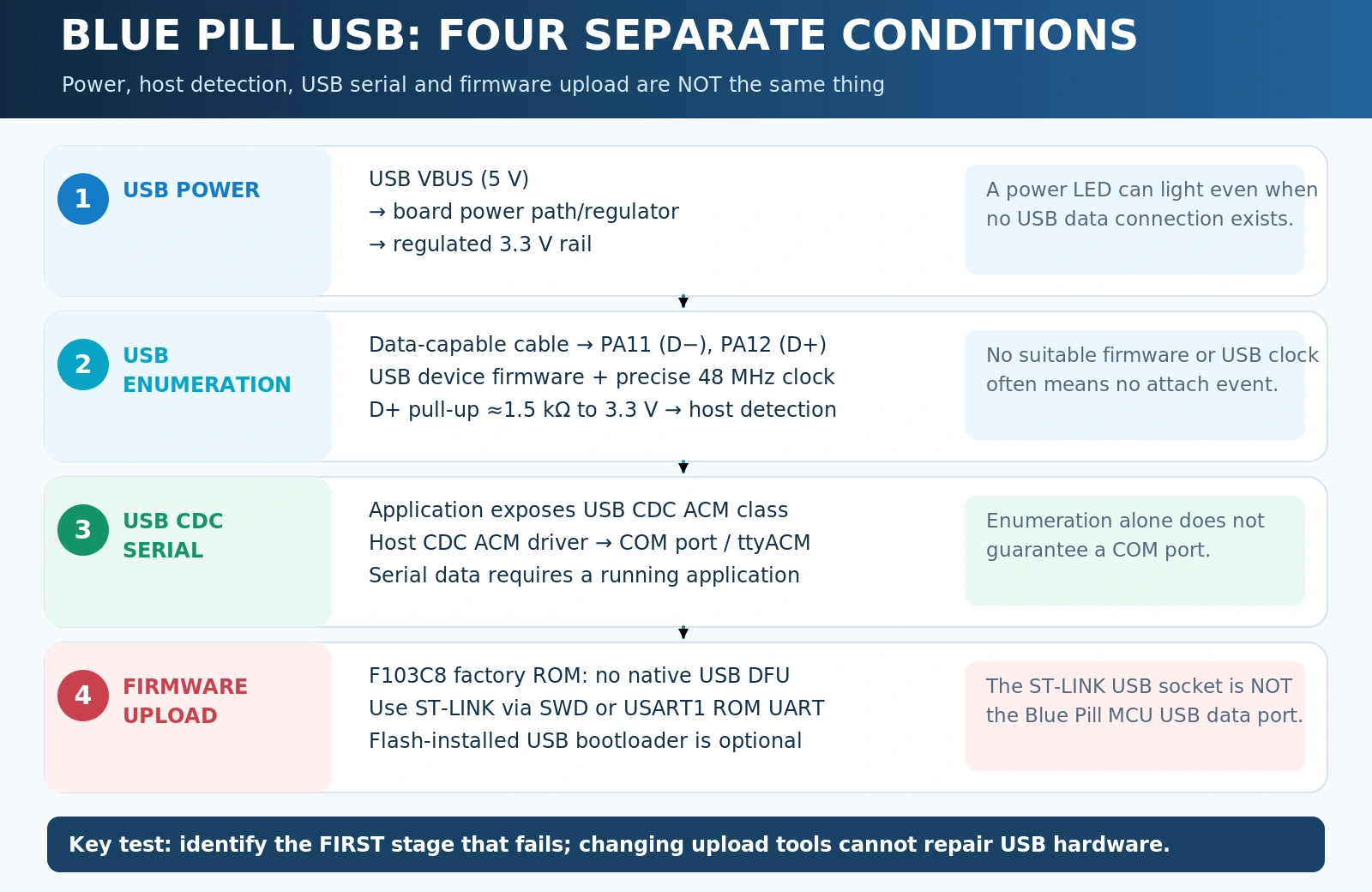
Quick answer: If an STM32F103C8AliExpress price Blue PillAliExpress price lights up when plugged into USB but does not appear on your computer, that does not automatically mean the board is defective. The board’s Micro-USB connector is wired to the STM32’s USB device peripheral, not to a built-in USB-to-serial adapter. A new Blue PillAliExpress price does not have a factory USB DFU bootloader; it needs suitable firmware before it can enumerate as a USB CDC serial device. If such firmware is installed but USB still fails, check the data cable, 3.3 V rail, PA11/PA12 signals, 48 MHz USB clock, and the external D+ pull-up resistor—often incorrectly fitted as R10 on older clones.
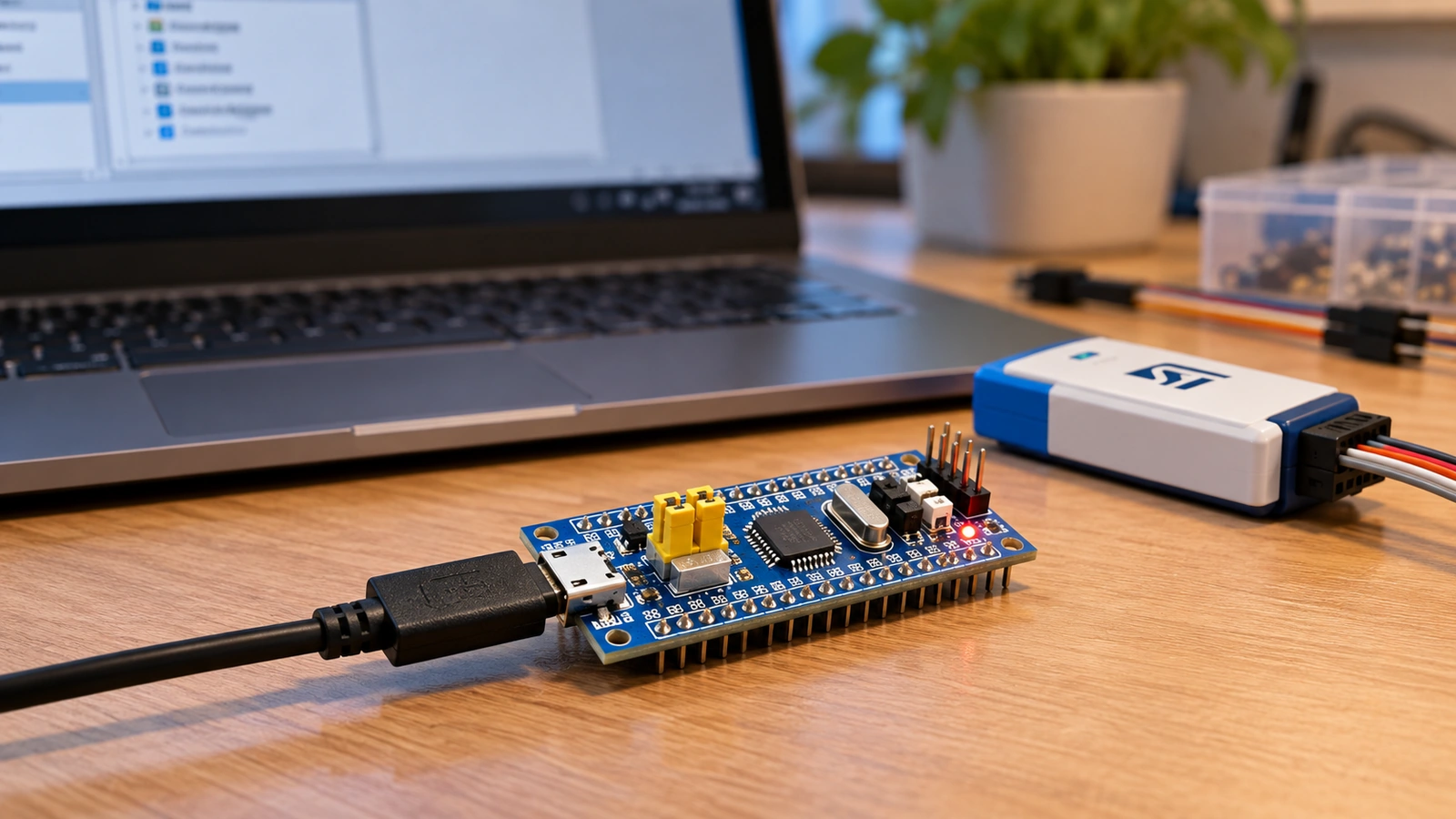
This guide starts from the symptom, not from a random driver download. It separates three common questions: “Does the computer see any USB device?”, “Does it create a COM/tty serial port?”, and “Can I flash new firmware directly over USB?” These are different problems with different solutions. If you have an ST-LINK probe, keep it connected over SWD while diagnosing USB: it gives you a reliable way to load test firmware and recover from mistakes without depending on the very interface you’re trying to fix.
Diagnose the symptom before changing anything
| What you observe | What it usually means | Best first action |
|---|---|---|
| Blue Pill power LED on, nothing new in USB device list | Power reaches the board, but the host does not detect a valid USB device | Try a known-good data cable, then check firmware, D+ pull-up and USB clock |
| Windows says Unknown USB Device / Device Descriptor Request Failed | Host detected something on the bus but could not complete enumeration | Check cable, 48 MHz clock, D+/D−, external pull-up and USB firmware |
| Device appears in USB device tree but no COM port | Firmware may expose HID/DFU/vendor class, or CDC driver binding failed | Identify USB VID:PID/class before changing drivers |
| A COM port appears, but no serial text | CDC may be working while the application sends no data, or monitor/baud assumptions are wrong | Run the CDC echo sketch below; confirm firmware uses USB CDC rather than USART |
| ST-LINK flashes successfully, USB still absent | SWD and CPU are working; the USB-specific path remains faulty | Verify USB mode, clock, PA11/PA12 and pull-up resistor |
| USB appears only on some computers or cables | Marginal hardware, resistor value, connector or signal quality | Test directly on a known-good host port; inspect board hardware |
| STM32CubeProgrammer cannot find the Blue Pill in USB DFU | Expected on a stock STM32F103C8: its ROM bootloader lacks USB DFU | Use ST-LINK/SWD or the USART1 ROM bootloader, or install a compatible custom USB bootloader |
| Board shows as Maple / HID / other bootloader briefly | A third-party bootloader may be installed and re-enumerate to the application | Identify that bootloader and its matching upload tool; do not assume factory ST DFU |
A USB power LED is only evidence of electrical power; it does not prove that the MCU booted successfully, that firmware enabled the USB peripheral, or that the host received valid descriptors. In many cases the fix is choosing the right upload method, not changing any soldered component.
How the Blue Pill USB connector actually works
The STM32F103C8T6 contains a USB 2.0 full-speed device controller with its data signals connected to these MCU pins on a conventional Blue Pill:
| USB signal | STM32F103C8 pin | Purpose |
|---|---|---|
| USB D− | PA11 / USB_DM | Differential USB data minus |
| USB D+ | PA12 / USB_DP | Differential USB data plus and full-speed attach detection |
| USB 5 V / VBUS | Board’s USB 5 V path (not an STM32F103C8 dedicated USB VBUS-sense pin) | Powers the board through its regulator on common designs |
| Ground | GND | Shared electrical reference |
| 3.3 V VDD | Board regulator output / MCU VDD | Correct operating power for the MCU and USB pull-up reference |
A typical board connects the Micro-USB receptacle’s D−/D+ lines to PA11/PA12 and uses 5 V from the connector to feed its 3.3 V regulator. The exact protection, regulator, resistor positions and header labels vary among Blue Pill clones. The STM32 itself works at 3.3 V logic: never apply USB 5 V directly to the 3V3 rail or assume a header marked 5 V is interchangeable with an MCU supply pin.
The F103 USB peripheral operates as a USB device, not a USB host. It can run USB CDC-ACM serial, HID and other device classes when the firmware implements them. It does not magically become a COM port just because you plugged in the cable. There is no CH340, CP2102 or FT232 USB-to-UART bridge on the conventional Blue Pill. That is why plugging in a brand-new board is unlike connecting an Arduino Uno or many ESP32 development boards.
ST’s AN4879 — Introduction to USB hardware and PCB guidelines documents the full-speed hardware requirements, including D+ pull-ups on parts that do not integrate them. For pin assignments and peripherals, use the STM32F103C8T6 Blue Pill pinout reference.
First five-minute test: cable, port, power and device list
Start without soldering or changing firmware settings.
- Remove extra connections. Disconnect motor drivers, 5 V sensors, jumpers and external USB-to-TTL adapters. Avoid two competing power sources.
- Use a known data-capable Micro-USB cable. A charge-only cable supplies 5 V but has no data conductors. Verify the cable with another known USB device, not merely a glowing LED.
- Plug directly into a PC USB port. Avoid flaky hubs, long extensions and adapters for the first test. Try another port and computer if available.
- Observe what changes on the host. On Windows open Device Manager, choose View → Devices by connection or inspect Universal Serial Bus controllers and Ports (COM & LPT). On Linux run
lsusband watchsudo dmesg -wwhile plugging/unplugging; a CDC device may appear as/dev/ttyACM0. On macOS inspect System Information → USB and the serial devices available to the terminal or IDE. - Check the regulated rail. If you can safely probe the board, measure 3V3 to GND with a multimeter. USB delivering 5 V does not guarantee the regulator is producing a stable 3.3 V under load.
If the host never reports any attach/detach event, suspect the data path or the absence of working USB firmware before a Windows driver. If it does report attach but fails during descriptor read, you’ve narrowed the fault: the USB signalling started but did not complete enumeration. A healthy 3.3 V rail and a working PC13 LED test do not, by themselves, prove the USB data lines or clock are correct.
Useful diagnostic distinction: lsusb identifies a USB device even if Linux has not created a serial port. A serial-port name only appears when the enumerated class is supported and bound to a suitable driver; similarly, Windows can show a valid USB device without exposing a COM port.
The most misunderstood cause: stock Blue Pill has no factory USB DFU
The STM32F103C8’s factory system-memory bootloader is a separate ROM program from any user application stored in flash. For the conventional medium-density STM32F103, the documented factory programming interface is USART1, with TX PA9 and RX PA10. It is not the native USB port.
This is particularly important if you open STM32CubeProgrammer, choose the USB connection and wait for a DFU device. A stock Blue Pill will not appear there by simply setting BOOT0 high. It may have USB hardware, but its ROM does not contain the factory USB DFU protocol. Use ST AN2606 — STM32 system-memory boot mode to verify the interface for your exact chip.
| Programming method | Works with a stock STM32F103C8? | Notes |
|---|---|---|
| ST-LINK / SWD | Yes | Recommended first upload and recovery path; SWDIO PA13, SWCLK PA14 |
| USART1 ROM bootloader | Yes | 3.3 V USB-to-TTL adapter; PA9 TX, PA10 RX; select system-memory boot |
| Factory USB DFU from ROM | No | Not available on the medium-density STM32F103C8 |
| Application USB CDC | Yes, with firmware | Requires working code that configures USB and the appropriate hardware |
| Maple / STM32duino / HID USB bootloader | Only after installation | Third-party flash-resident loader, not factory ROM; compatible upload tool required |
To use the USART1 factory loader, cross a 3.3 V TTL adapter TXD → PA10/RX and RXD ← PA9/TX, connect a common ground, set BOOT0 = 1 and BOOT1/PB2 = 0, then reset into system memory. Standard serial framing for that bootloader is 8E1. After flashing, restore BOOT0 = 0 and reset to run the application. Don’t connect real RS-232 voltages or 5 V UART logic to the MCU’s receiver. For detailed wiring and screenshots, see our STM32CubeProgrammer guide and ST-LINK V2 wiring guide.
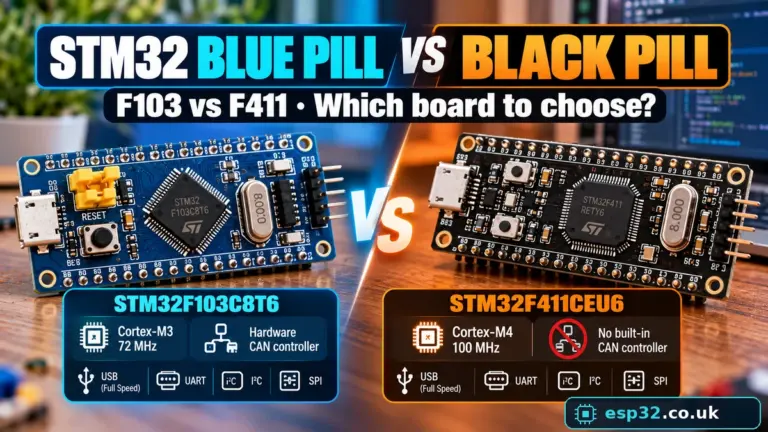
By contrast, a commonly used STM32F411 Black Pill has a factory USB DFU-capable system bootloader. This is one reason the two boards behave differently when you press BOOT0 and connect USB. See Blue Pill vs Black Pill.
Blue Pill R10 resistor problem: why the PC cannot detect USB
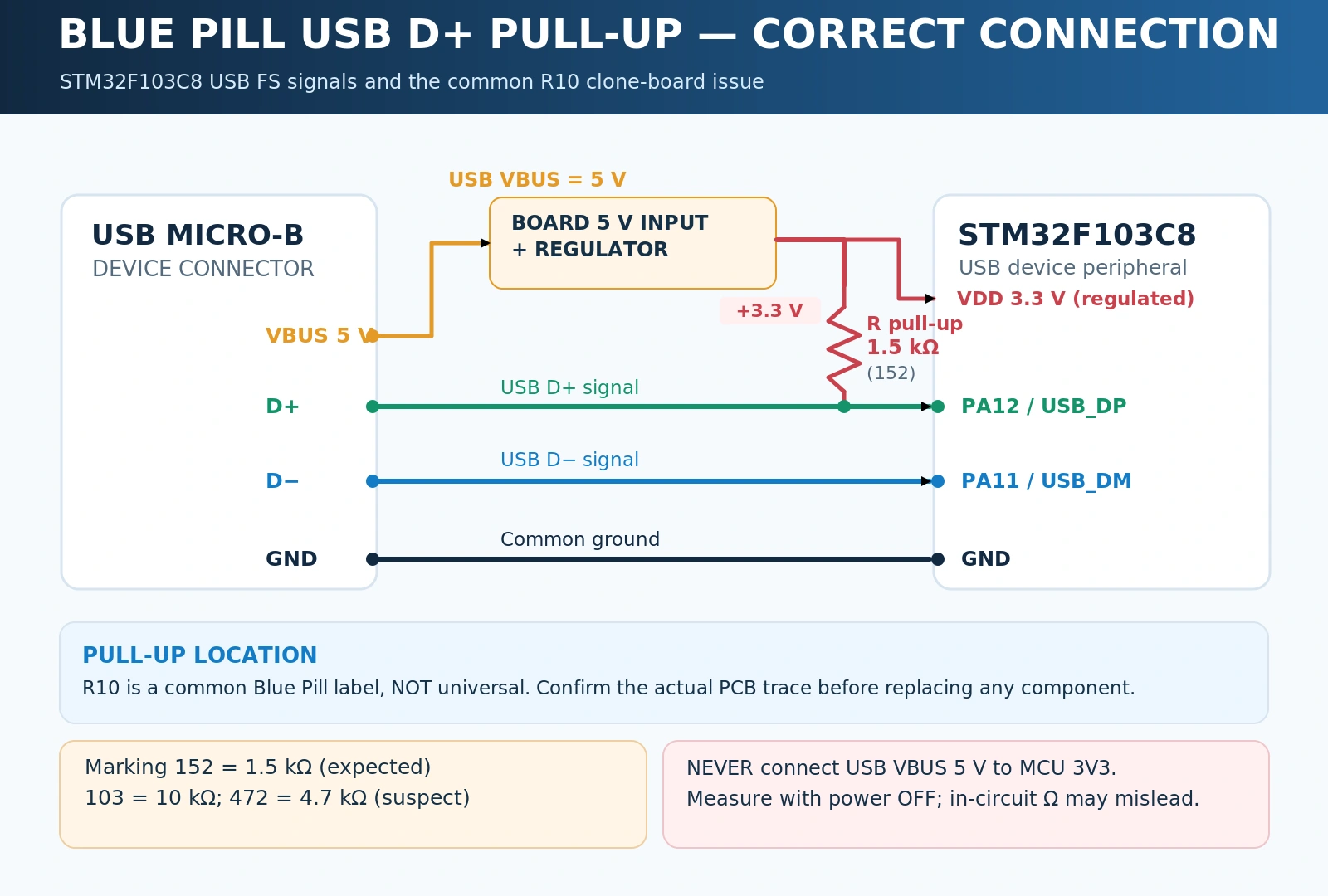
A USB full-speed device announces its presence using a 1.5 kΩ pull-up on USB D+, referenced to the device’s 3.3 V rail. The STM32F103 family needs the appropriate external pull-up circuit. ST explicitly documents the hardware requirement in AN4879.
Some older Blue Pill designs and clones shipped with 10 kΩ (marking 103) or 4.7 kΩ (472) where the expected D+ pull-up is approximately 1.5 kΩ (152). On many—but not all—Blue Pill revisions this component is labelled R10. An incorrect pull-up may prevent reliable detection, or make the board work with one computer and fail with another. However, R10 is not a universal component identifier and changing a resistor will not make a blank board develop USB firmware.
How to check safely
- Confirm the exact board revision. Inspect both PCB faces and identify the part connected between PA12 / D+ and 3.3 V. Don’t assume every resistor marked R10 serves this function.
- Disconnect ALL power and USB. Never use resistance mode on an energised circuit. Discharge the board and remove externally connected loads.
- Measure the actual net or component. A resistance reading measured in-circuit between PA12 and 3V3 can be affected by parallel MCU/circuit paths; if ambiguous, isolate one resistor end or trace the schematic instead of claiming the component is faulty from a single meter reading.
- Compare with the required design. A conventional permanently attached 1.5 kΩ D+ pull-up (or a controlled-equivalent circuit) is typical for an STM32F103 full-speed device. Other board designs may control attach/detach differently.
- Repair only after confirming the circuit. If it really has a wrong 10 kΩ pull-up, replacement with a suitable 1.5 kΩ resistor is a hardware fix; work at proper SMD rework temperature with ESD protection and inspect solder bridges before powering up.
Don’t add a random second resistor blindly. For example, a 1.8 kΩ resistor in parallel with 10 kΩ is about 1.53 kΩ, but a 1.8 kΩ resistor in parallel with an already-correct 1.5 kΩ part would be only about 818 Ω and can create a new problem. The parallel-resistor shortcut is only relevant after measuring and identifying the existing pull-up. If you’re not comfortable reworking a small SMD part, trying another known-good Blue Pill or a Nucleo board is safer and often cheaper than damaging USB pads.
The USB 48 MHz clock: firmware can run while USB fails
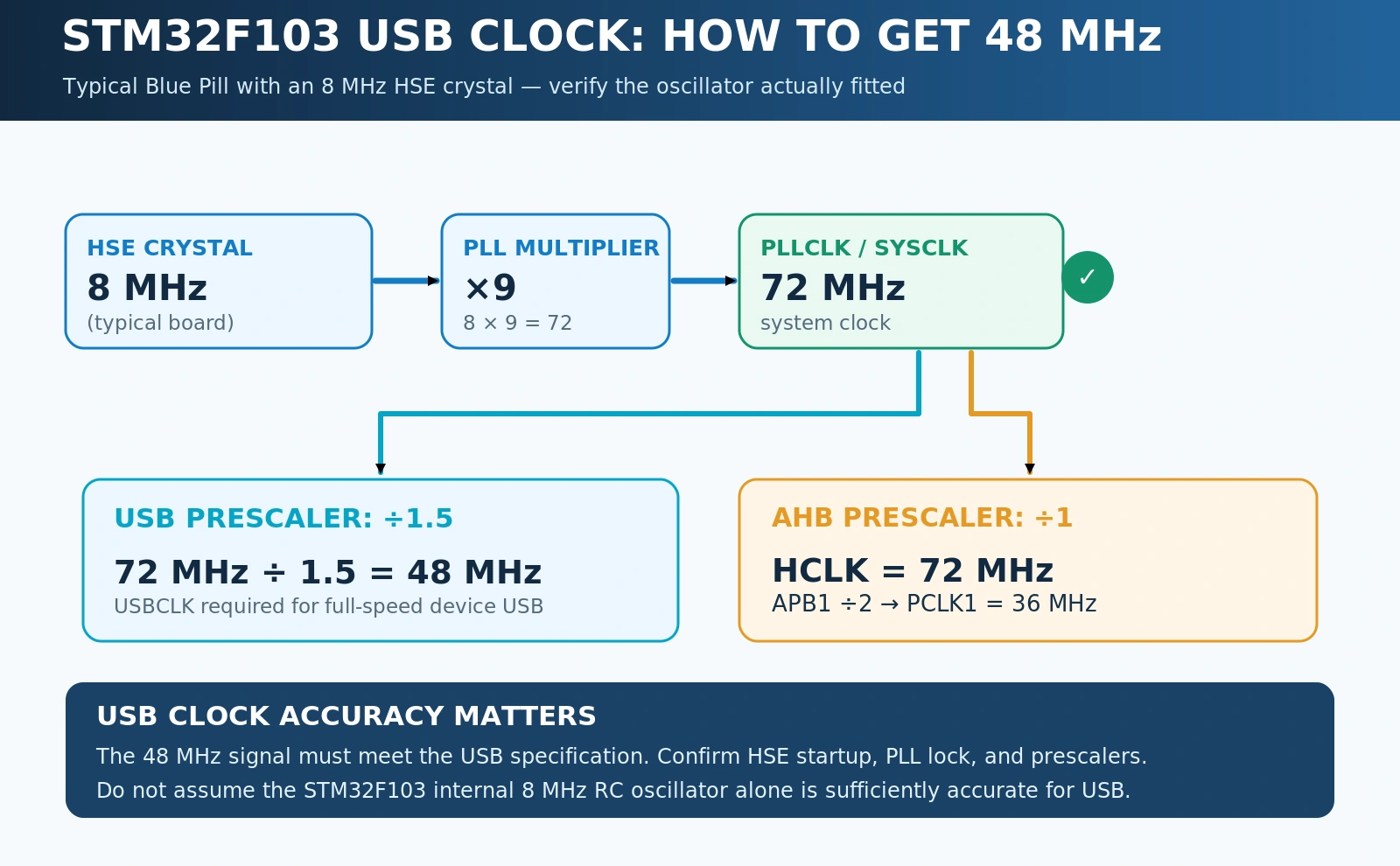
USB full-speed timing needs a sufficiently accurate 48 MHz peripheral clock. This is independent of whether the CPU successfully runs ordinary GPIO code. If your board blinks an LED but enumerates as Unknown USB Device, a misconfigured PLL/USB clock is a high-value check.
The familiar STM32F103C8 Blue Pill typically has an 8 MHz HSE crystal. One common validated configuration target, assuming the board’s crystal is indeed 8 MHz, is:
| Clock setting | Example for Blue Pill | Why it matters |
|---|---|---|
| HSE | 8 MHz external crystal | Stable reference; verify fitted oscillator |
| PLL input | 8 MHz HSE | Depends on source/prescaler settings |
| PLL multiplier | ×9 | SYSCLK becomes 72 MHz |
| USB clock prescaler | ÷1.5 | 72 / 1.5 = 48 MHz for USB |
| AHB | 72 MHz | CPU/bus configuration |
| APB1 | 36 MHz (÷2) | Respects STM32F1 APB1 frequency limit |
These are configuration targets, not proof the crystal is oscillating. Confirm the correct HSE source, target board crystal value, PLL status and actual USB clock in STM32CubeMX/firmware. On conventional STM32F103 variants, relying on the internal HSI RC oscillator for the required accurate USB clock is generally inappropriate: HSI tolerance is not equivalent to a suitably configured HSE-derived USB clock. The precise clock paths, prescalers and limits are documented in the STM32F1 reference manual and your CubeMX clock tree.
In STM32CubeMX, choose the correct STM32F103C8 device, configure RCC / HSE Crystal/Ceramic Resonator, set a valid system clock with USBCLK at 48 MHz, and enable the USB device peripheral/middleware appropriate to the application. In STM32CubeIDE 2.x, CubeMX is a separate configuration/code-generation application; import the generated project into CubeIDE to edit, build and debug. Our STM32CubeIDE 2.x and CubeMX setup guide covers the toolchain workflow.
Other clock-related symptoms include intermittent enumeration after warm resets, device descriptor errors on only some PCs, firmware that gets stuck during USBD_Start(), and CDC output that stops if the application later modifies system clocks. These symptoms are not unique to clock failures, but they justify checking the actual 48 MHz clock before repeatedly reinstalling drivers.
Working USB CDC test in Arduino IDE 2 (official STM32 core)
A basic USB CDC-ACM application lets the Blue Pill appear as a virtual serial port. The official STM32duino Arduino core supports USB CDC for the F103 Blue Pill when selected correctly. This example is deliberately simple, uses the application’s USB CDC Serial, and leaves SWD available for programming.
Build and upload the test
- Install Arduino IDE 2 and the official STM32 MCU based boards package. See our Blue Pill Arduino IDE installation guide, or the core’s official GitHub documentation.
- Select a BluePill F103C8 / matching Generic STM32F1 series definition. The exact menu grouping can change between core releases.
- Under Tools → USB support (if available) choose the option that enables CDC, often shown as CDC (generic Serial supersedes U(S)ART). This matters:
Serialmay mean UART when USB CDC is disabled. - Select STM32CubeProgrammer (SWD) as the upload method and connect your working ST-LINK. Keep BOOT0 = 0 for the application.
- Build and upload the sketch, then disconnect the ST-LINK only if your chosen power arrangement makes it safe; connect the Blue Pill’s Micro-USB data cable to the computer.
- Inspect the newly enumerated USB device and open the resulting serial port in the IDE or a terminal.
// STM32F103C8 Blue Pill — USB CDC echo/heartbeat
// Official STM32duino core; enable Tools > USB support > CDC.
// Upload first via ST-LINK (SWD), not a non-existent F103 ROM USB DFU.

constexpr uint32_t LED_PIN = PC13;  // Typical Blue Pill onboard LED: active LOW
uint32_t previousMs = 0;

void setup() {
  pinMode(LED_PIN, OUTPUT);
  digitalWrite(LED_PIN, HIGH);      // LED off
  Serial.begin(115200);            // CDC endpoint: baud is a host convention
}

void loop() {
  const uint32_t now = millis();
  if (now - previousMs >= 1000) {
    previousMs = now;
    digitalWrite(LED_PIN, !digitalRead(LED_PIN));
    Serial.println("Blue Pill USB CDC heartbeat");
  }

  while (Serial.available() > 0) {
    Serial.write(Serial.read());   // Echo any character received
  }
}
This sketch is an example to compile and run on your board, not a claim that every clone was physically tested. If the board’s LED blinks but there is no USB device, the CPU is at least executing application code; return to the USB support setting, USB clock, D+ pull-up and cable. If the USB device enumerates but sends no text, confirm the correct new serial port is open and the firmware has not blocked its main loop. Avoid blindly writing while (!Serial) {} in setup(): depending on the core and host it can prevent the rest of the application running until a terminal connects.
Baud-rate note: CDC-ACM transfers data over USB packets, not a UART bitstream on PA9/PA10. Serial.begin(115200) provides a familiar terminal setting, but it does not make the F103 USB wires operate at 115200 bits/s. Changing terminal baud does not repair enumeration failures. For an actual external UART adapter on PA9/PA10, use the appropriate UART Serial1/Uart APIs instead, and cross TX/RX correctly.
What if Arduino reports a successful upload but USB is dead?
Upload success over SWD proves the programmer could write and verify flash; it does not validate the USB peripheral, cable or PCB. First test USB CDC with a known board/cable and the proper USB option. If the host sees a valid device with the wrong class, investigate the firmware’s USB descriptors and the selected board variant. If the PC sees no device at all, a driver installation cannot make the missing electrical D+ attach happen.
If using the older Maple/STM32duino flash bootloader, understand that it is a different firmware image occupying part of application flash. Its enumeration and VID:PID can differ from a USB CDC application, and the port may disconnect/reconnect during the upload handover. Match the selected upload method to the bootloader actually installed, not the Blue Pill’s case colour or a tutorial written for a different core generation. The official STM32duino Upload Methods reference documents the distinction.
USB CDC in STM32CubeMX / STM32CubeIDE: HAL route
Arduino is not required. If you’re writing a HAL application, create a reproducible USB Device FS + CDC project in CubeMX and import it into STM32CubeIDE.
- Select the actual STM32F103C8 device or suitable board configuration. Keep SYS → Debug = Serial Wire so PA13/PA14 remain available.
- Configure RCC for your confirmed HSE oscillator, and verify 48 MHz USB clock in the clock tree. Do not generate code while the clock tree shows USB clock warnings.
- Enable USB Device FS under the MCU’s peripheral menu and choose the USB_DEVICE CDC class middleware where supported by your STM32CubeF1 package version.
- Generate the STM32CubeIDE project and import it. Preserve changes inside generated USER CODE blocks and keep middleware/package version consistent when regenerating.
- Build, program and debug using ST-LINK/SWD. Only then connect/test the target’s own Micro-USB port as a CDC device.
- For data transfer, use the CDC transmit implementation in the generated USB device middleware and manage busy/transmit return status rather than issuing unlimited sends from tight loops. Implement RX callbacks if the application needs host-to-device traffic.
Typical file names include usb_device.c, usbd_cdc_if.c and STM32Cube USB Device Library files; exact project layout depends on the STM32CubeF1 middleware generation and version. Do not copy callback code from an unrelated STM32H7 USB OTG project into an F103 USB FS design. ST’s AN4879 hardware note and the STM32F1 reference manual remain the baseline for hardware and clocks.
Why USBD_BUSY or serial output can fool you
Even with successful enumeration, a device class can appear but not pass application data. A CDC transmit routine might report busy if a previous USB transfer has not completed. Endless retry loops inside an interrupt or a startup path can prevent progress. Confirm the USB initialization path completes, let the main loop run, and check that transmit is called only when the endpoint is ready. A stable enumerated device without application data is a firmware/class-handling problem—not evidence that the D+ resistor must be replaced.
Windows, Linux and macOS: identify the device before installing drivers
Windows: Open Device Manager, unplug/replug the Blue Pill, and watch for a new entry under Ports (COM & LPT), Universal Serial Bus devices, or Other devices. View the device’s Hardware Ids to identify VID:PID if it enumerated. Windows 10/11 often bind their built-in usbser.sys driver to a correctly described CDC ACM device. If there is a descriptor failure, or nothing enumerates at all, manually forcing a COM-port driver will not fix firmware, clock, pull-up or cable problems. Avoid random driver installers marketed as a universal Blue Pill repair.
Linux: Use sudo dmesg -w to watch attach/disconnect errors, and lsusb to see recognised USB devices. A working CDC ACM application typically creates /dev/ttyACM0 or another numbered ACM port, not necessarily /dev/ttyUSB0 (the latter is often a USB-to-UART converter). If lsusb shows the device but your terminal cannot access it, inspect user permissions, dialout/equivalent groups, the active cdc_acm binding and possible services grabbing the serial device. Core and distribution-specific ModemManager interactions can cause an ACM device to be opened unexpectedly; use appropriate udev rules only after confirming enumeration.
macOS: Check System Information → USB for device enumeration, then inspect available serial devices (often /dev/cu.usbmodem* for CDC ACM). Allow for the fact that bootloaders and application firmware can use different USB descriptors and therefore appear as different devices. Again, a USB device missing from the system USB tree is not fixed by changing the terminal’s baud selection.
| Host symptom | Likely diagnostic layer | What to verify |
|---|---|---|
| No attach event at all | Cable, no firmware USB attach, VDD, D+ pull-up | Known data cable, SWD boot, power, pull-up hardware |
Device Descriptor Request Failed / repeated resets | USB electrical path, PLL/48 MHz, descriptors | Oscillator, clock tree, D+/D− continuity, firmware |
| USB device listed, no CDC port | Wrong USB class or CDC binding | Class descriptor, VID:PID, OS CDC driver |
| Port exists, application silent | Serial mapping/application logic | Arduino USB support = CDC, print path, loop not blocked |
| COM port changes after flashing | Bootloader/application re-enumeration | Select newly created serial port after reset |
| Works after tapping connector | Physical/assembly defect | Inspect USB socket joints, strain relief, solder bridges |
Other Blue Pill problems that can look like USB faults
USB connector damage. Repeated insertion on low-cost Micro-USB boards can lift shield tabs or data pads. If gently moving the connector changes the host attach event, inspect it under magnification. Do not flex the connector repeatedly to “make it work”: a lifted USB D+ trace becomes much harder to repair.
Clone MCUs and alternate PCB revisions. Some boards sold as STM32F103C8 use non-identical MCU markings, regulator configurations or oscillator components. Don’t assume a board marked STM32F103C8 in a listing is electrically identical to your particular PCB. If SWD detects a different device ID or the HSE oscillator differs from the selected clock tree, resolve that before chasing USB drivers.
Pin conflicts on PA11/PA12. The F103 USB peripheral uses PA11/PA12. Default bxCAN can also use PA11/PA12, so a project configuring CAN there cannot simultaneously expect those same pins to carry USB D+/D−. If using USB and CAN together, check the MCU’s supported CAN remapping options and board pins, plus the need for an external CAN transceiver. Don’t assume peripheral remaps are active unless the firmware explicitly configures them.
Wrong board or linker configuration. A genuine STM32F103C8 has 64 KB flash by part number. Selecting a 128 KB configuration merely because an old forum claims all Blue Pills have extra flash can result in unpredictable firmware behaviour. Use the correct device definition unless you have established otherwise for that exact silicon.
Overloading the 3.3 V regulator. Connected sensors, external displays and motor-driver logic may pull the rail down enough to destabilise the USB MCU even while an LED remains illuminated. Test the bare board with one known safe supply and measure the rail under load.
Incorrect USB power assumptions. Do not supply both an external 5 V rail and USB 5 V without understanding the board’s isolation/backfeed path. Do not drive the 3V3 pin with 5 V under any circumstances. If you are debugging with an ST-LINK, distinguish VTref sensing from a real target power output; see the ST-LINK V2 guide.
A repeatable fault-isolation sequence that avoids guesswork
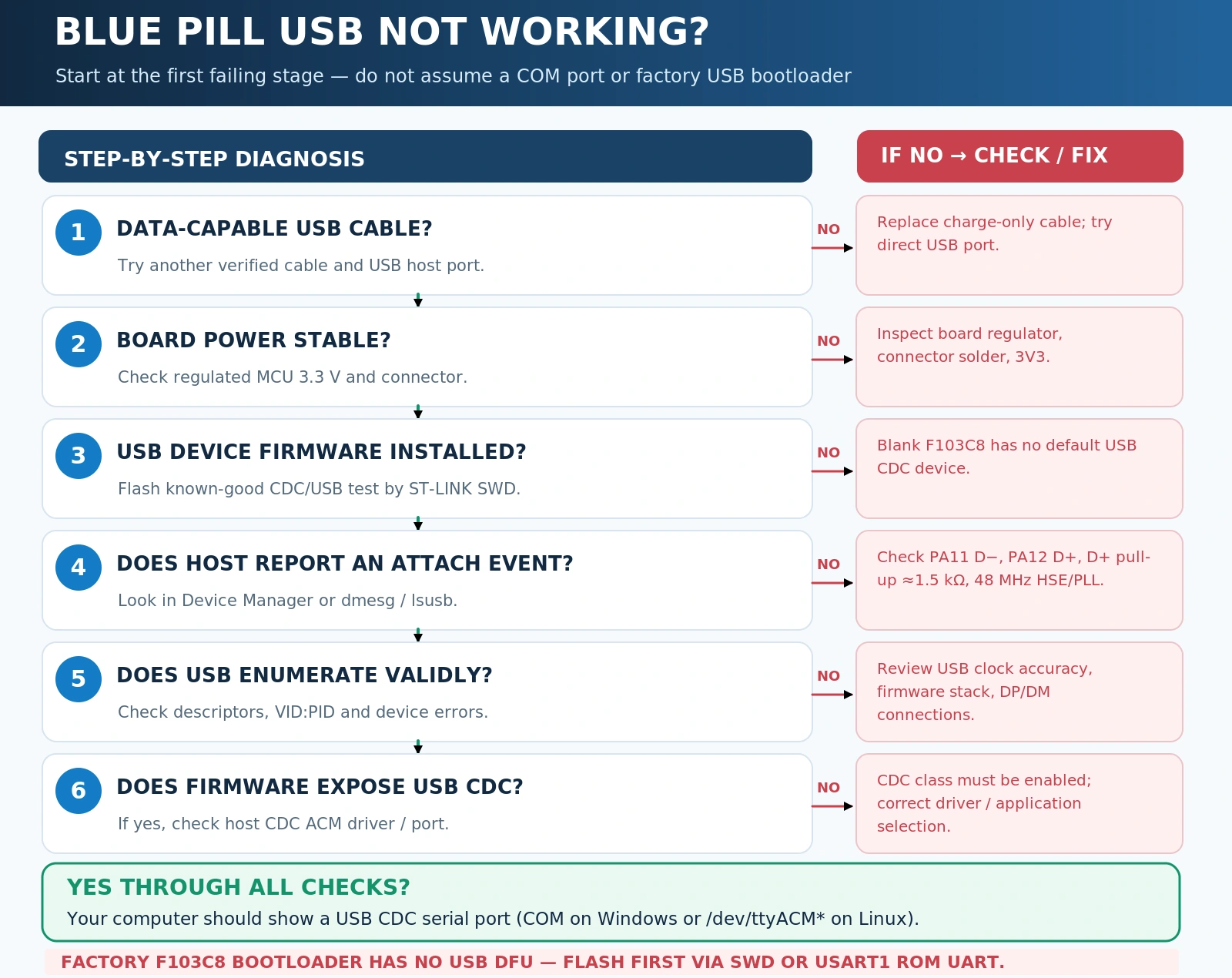
For a stubborn board, follow this order and write down what each test proves:
- Known-good data cable and USB host — establishes whether the basic physical connection works.
- Measure 3V3 and inspect connector — checks supply and obvious PCB faults.
- ST-LINK reads device and programs PC13 blink — establishes that MCU, flash and at least SWD are operational, independent of USB.
- Check that your firmware enables USB CDC/device class — a stock or UART-only application is not expected to enumerate.
- Confirm HSE and 48 MHz USB clock — isolates a frequent firmware configuration failure.
- Inspect D+ pull-up between PA12 and 3V3 — verifies the full-speed attach mechanism; identify actual board components before measurement or rework.
- Inspect PA11/PA12 continuity and pin conflicts — rules out wrong solder joints or application alternate-function conflicts.
- Review host enumeration and descriptors — separates electrical/clock errors from CDC driver and app data handling.
- Only then change bootloader or repair hardware — don’t overwrite working firmware or solder blindly when the problem is in a menu setting.
If you get stuck: Report exactly which of these checkpoints passes, whether the host shows an attach event, what VID:PID or descriptor error is reported, what SWD detects, and whether the board uses an 8 MHz HSE crystal. That information is much more useful than “USB doesn’t work.” It also helps distinguish a single bad Blue Pill from a misconfigured project affecting several boards.
Frequently asked questions
Why does my Blue Pill power LED light up but no COM port appears?
The LED only shows power. A normal USB CDC port needs valid USB-enabled firmware, working clock and USB hardware. A fresh STM32F103C8 lacks a factory USB DFU/CDC loader, so no COM port from a blank board is expected. Program a suitable CDC application via SWD/USART before checking serial enumeration.
Can I upload through Micro-USB without an ST-LINK?
Not to an unprogrammed STM32F103C8 using factory USB DFU. You can use the factory USART1 bootloader with a USB-to-UART adapter. USB-only reprogramming becomes possible after installing a compatible custom Maple/HID/other flash-resident bootloader, with the corresponding upload tool and flash layout. Keeping an ST-LINK is still wise for recovery.
Is the 10 kΩ R10 resistor definitely wrong on every Blue Pill?
No. It is a known issue on some clone/older revisions and only if the resistor is actually in the USB D+ pull-up path. The conventional full-speed attach design needs approximately 1.5 kΩ on D+ to 3.3 V. Check your board’s circuit before replacing anything, and do not assume R10 always denotes the same component.
Why does USB work but Serial.println() show nothing?
Verify that the selected core/firmware routes Serial to USB CDC rather than a hardware USART; the setting is not universal across board packages. Choose the new COM/tty port after flashing, avoid a startup loop that waits forever for a terminal, and confirm your sketch actually transmits data. Also consider CDC busy/driver handling if you’re using HAL.
Can the STM32F103C8 use USB and CAN simultaneously?
The MCU has both peripherals, but their default pin assignments overlap on PA11/PA12. A suitable CAN remap and separate CAN transceiver are necessary if the application needs both. Verify the remap against STM32F1 documentation and your board wiring; enabling both peripheral functions without checking pin ownership is not a valid design.
Does a USB-C Black Pill have the same limitation?
Not necessarily. A common STM32F411 Black Pill can use the chip’s factory USB DFU bootloader, unlike the medium-density STM32F103C8. Even with an F411, a USB connector, working data cable and correct boot mode are required. Always identify the actual MCU and consult AN2606 for its supported ROM interfaces.
Conclusion: fix the layer that is actually broken
The fastest way to repair a Blue Pill USB issue is to stop treating power, device enumeration, USB CDC serial, and USB firmware uploading as the same function. A stock F103C8 needs firmware for CDC and does not provide factory USB DFU. Once you have working application firmware, the first hardware checks are the cable, regulated 3.3 V rail, PA11/PA12, correct D+ pull-up and a valid 48 MHz USB clock. If USB still misbehaves, the host’s VID:PID and error messages will tell you whether to look at electrical signalling, descriptors/drivers or application code.
For the next steps, keep our STM32 beginner guide bookmarked, follow the Blue Pill Arduino setup guide to build a clean firmware baseline, and use CubeProgrammer over ST-LINK whenever you need predictable recovery. The result should be a repeatable test—not a stack of unexplained driver installs.
Technical references
- ST AN4879 — Introduction to USB hardware and PCB guidelines using STM32 MCUs — external D+ pull-up and USB PCB requirements.
- ST AN2606 — STM32 microcontroller system-memory boot mode — factory bootloader interfaces by MCU.
- STM32F1 reference manual RM0008 — RCC/PLL, USB clock and peripheral pin mapping.
- Official Arduino Core for STM32 and STM32duino upload methods — core USB CDC and custom bootloader behaviour.