
Quick answer: if you are choosing between the original ESP32 and the ESP32-S3 for a new project in 2026, the ESP32-S3 is the better default for most new designs. It keeps the dual-core 240 MHz class of the original ESP32 but adds a newer Xtensa LX7 CPU, vector instructions, native USB, Bluetooth LE 5, more GPIO capability and a much stronger ecosystem for PSRAM, displays, cameras, audio and edge-AI workloads. The original ESP32 is still the right choice when you specifically need Bluetooth Classic, the built-in 8-bit DACs, native RMII Ethernet MAC support, or maximum compatibility with older ESP32 projects and boards.
This is not a simple “newer equals faster” comparison. Both chips can run at up to 240 MHz and both remain excellent Wi-Fi microcontrollers. The important differences are in Bluetooth, USB, peripherals, memory options and the type of project each chip is designed for.
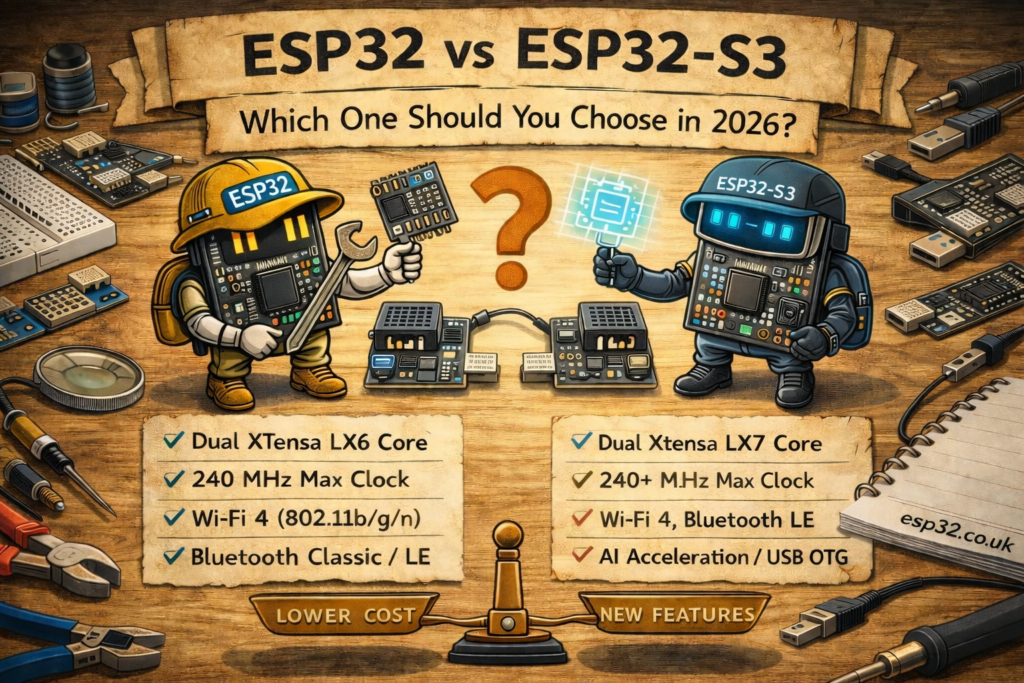
ESP32 vs ESP32-S3: Quick Comparison
| Feature | Original ESP32 | ESP32-S3 |
|---|---|---|
| CPU | Dual-core Xtensa LX6 | Dual-core Xtensa LX7 |
| Maximum CPU clock | Up to 240 MHz | Up to 240 MHz |
| Vector / SIMD instructions | No dedicated S3-style vector extensions | Yes – useful for DSP and machine-learning workloads |
| Wi-Fi | 2.4 GHz 802.11 b/g/n (Wi-Fi 4) | 2.4 GHz 802.11 b/g/n (Wi-Fi 4) |
| Bluetooth | Bluetooth Classic + BLE | Bluetooth LE 5 only – no Bluetooth Classic |
| Native USB | No | USB 2.0 Full-Speed OTG + USB Serial/JTAG |
| On-chip SRAM | About 520 KB | 512 KB |
| PSRAM | Available on suitable modules such as WROVER | Widely available on S3 modules/boards, often 2–16 MB depending on SKU |
| Programmable GPIO at chip level | Up to 34 | Up to 45 |
| On-chip DAC | Two 8-bit DAC channels | No built-in DAC |
| Native Ethernet MAC | Yes – RMII with external PHY | No native Ethernet MAC; SPI Ethernet remains possible |
| Display / camera focus | Possible, but older peripheral architecture | Much stronger fit for LCD, camera and high-bandwidth peripherals |
| Best fit | Legacy ESP32 designs, Bluetooth Classic, RMII Ethernet, built-in DAC | New USB, display, camera, audio, PSRAM and edge-AI projects |
Bottom line: for a new general-purpose ESP32 project, start with the ESP32-S3 unless one of the original ESP32’s unique features is actually required.
The Two Differences That Decide Most Projects
Bluetooth Classic: Original ESP32 Wins
The biggest reason not to move automatically to the ESP32-S3 is Bluetooth Classic. The original ESP32 supports both Bluetooth BR/EDR (Classic) and Bluetooth Low Energy. The ESP32-S3 supports Bluetooth LE only.
That matters if your project uses Bluetooth Classic profiles or older libraries built around Classic Bluetooth. Typical examples include Bluetooth audio, A2DP, SPP serial links and some legacy accessories. Code that depends on Bluetooth Classic cannot simply be moved to an S3 and expected to work.
If you only need BLE sensors, BLE advertisements, ESPHome Bluetooth Proxy functionality or modern BLE peripherals, the lack of Bluetooth Classic is usually irrelevant.
Native USB: ESP32-S3 Wins Easily
The ESP32-S3 adds one of the most useful improvements in the entire ESP32 family: native USB. It includes USB 2.0 Full-Speed OTG plus USB Serial/JTAG functionality.
That makes the S3 a much better platform for projects such as:
- USB keyboards and mice
- USB MIDI controllers
- USB CDC serial devices
- custom HID controllers
- USB device and host experiments
- boards that can be flashed and debugged without a separate USB-to-UART bridge
The original ESP32 has no native USB peripheral. Traditional ESP32 development boards therefore use a separate USB-to-UART chip such as a CP2102, CP2102N or CH340 for programming and serial communication.
CPU Performance: LX6 vs LX7
Both devices are dual-core Xtensa chips and both can run at up to 240 MHz, so the ESP32-S3 should not be described as simply having a higher clock speed. The advantage comes from its newer Xtensa LX7 architecture and vector extensions.
For ordinary Arduino tasks such as reading sensors, handling MQTT, driving relays or serving a small web interface, the difference may be modest because neither chip is being pushed hard. For DSP, image processing, audio processing and machine-learning inference, the S3’s vector instructions can produce a much larger practical advantage when the software is written to use them.
This is why the S3 appears so often in newer camera, voice, display and edge-AI boards. It is not just a faster replacement for the original ESP32; its architecture is better matched to those workloads.
Wi-Fi: Surprisingly Similar
Neither chip gives you Wi-Fi 6 or 5 GHz Wi-Fi. Both the original ESP32 and ESP32-S3 use 2.4 GHz 802.11 b/g/n Wi-Fi.
For a normal IoT node this is still perfectly adequate. Home Assistant, ESPHome, MQTT, REST, web-server and sensor projects generally do not need 5 GHz throughput. If newer networking standards are the reason you are considering a newer ESP32, look at the broader family in our ESP32 Versions Explained guide rather than assuming the S3 changes the Wi-Fi generation.
Memory and PSRAM
The on-chip SRAM figures are actually close: the classic ESP32 has roughly 520 KB, while the ESP32-S3 has 512 KB. The more important difference in real projects is the module and board ecosystem around external PSRAM.
Classic ESP32 modules such as the WROVER variants can include PSRAM, so PSRAM is not an S3-exclusive feature. However, many ESP32-S3 modules and development boards are sold in convenient flash/PSRAM combinations, making it much easier to choose a board with enough memory for:
- LVGL displays and frame buffers
- camera frame buffers
- voice-assistant audio buffers
- larger ESPHome configurations
- image processing
- machine-learning models
For those workloads, an ESP32-S3 board with PSRAM is normally the sensible choice. If you are buying an S3 specifically for a display, camera or voice project, check the exact flash and PSRAM configuration rather than assuming every board includes PSRAM.
GPIO, ADC, DAC and Peripheral Differences
At chip level the ESP32-S3 provides more programmable GPIO than the original ESP32, but board-level pin count is what actually matters when you build something. Flash, PSRAM, USB and module routing can consume or hide pins, so a specification such as “45 GPIO” does not mean that every S3 development board exposes 45 freely usable pins.
For real wiring decisions, use the pinout for the exact board. We have separate references for the ESP32 DevKitC V4 and the ESP32-S3-DevKitC-1.
Both families provide ADC capability, PWM, I²C, SPI, UART and I²S, but there are two legacy ESP32 features worth calling out.
The Original ESP32 Has Two Built-In DAC Channels
The original ESP32 includes two 8-bit DAC outputs, commonly associated with GPIO25 and GPIO26 on classic ESP32 designs. The ESP32-S3 does not include the same built-in DAC peripheral.
If an existing project genuinely depends on the internal DAC, the classic ESP32 may therefore be the easier solution. For higher-quality audio or analogue output on the S3, an external I²S DAC or dedicated audio codec is usually a better design anyway.
The Original ESP32 Has a Native Ethernet MAC
A less obvious advantage of the original ESP32 is its integrated Ethernet MAC, which can be used with an external RMII PHY. That makes the classic chip particularly useful in wired Ethernet and some PoE designs.
The ESP32-S3 does not provide the same native Ethernet MAC. You can absolutely use Ethernet with an S3, but it is typically done with an external SPI Ethernet controller such as the W5500. If you already have an RMII-based classic ESP32 design, migrating purely for the sake of using a newer chip may make the hardware more complicated rather than less.
Displays, Cameras, Audio and AI
This is where the ESP32-S3 becomes much more compelling. Its peripheral set, vector instructions, USB support and common PSRAM-equipped modules make it the stronger platform for display, camera, audio and local-processing projects.
Choose the S3 for projects such as:
- LVGL touchscreens and larger colour displays
- camera boards and image capture
- Home Assistant voice satellites
- USB control surfaces and HID devices
- local wake-word detection
- DSP-heavy sensor processing
- TinyML and edge-AI experiments
If this is the direction of your project, also see our ESP32-S3 boards comparison before buying a board, because flash, PSRAM, antenna and pin exposure vary considerably between S3 modules and development boards.
Power Consumption: Do Not Choose on the Chip Name Alone
It is tempting to assume that the newer ESP32-S3 is automatically more power-efficient. In practice, board design, regulator quiescent current, USB circuitry, LEDs, radio duty cycle, wake interval and firmware can matter more than the headline chip generation.
Both chips offer low-power and deep-sleep modes. For a battery sensor that wakes briefly, reads one sensor and returns to sleep, neither “ESP32” nor “ESP32-S3” by itself tells you the finished-device battery life.
If ultra-low-power operation is the primary requirement, compare the complete ESP32 family and the exact development board rather than choosing S3 only because it is newer.
Arduino, ESP-IDF and ESPHome Compatibility
Both chips have mature support in Arduino-ESP32 and ESP-IDF, and both are widely usable with ESPHome. Basic code using Wi-Fi, GPIO, I²C, SPI, UART and common sensors often moves between them with only board and pin changes.
But the S3 is not a drop-in replacement for every classic ESP32 project. Migration can require changes when a project depends on:
- Bluetooth Classic
- the original ESP32 DAC peripheral
- classic ESP32-specific pin numbers
- RMII Ethernet
- older libraries with assumptions about the original ESP32 registers or peripherals
- USB behaviour that differs between a USB-to-UART bridge and native USB
For a new Home Assistant node, the S3 is an excellent general-purpose option, especially when the project includes audio, a display or substantial memory use. For a simple temperature sensor, relay or MQTT node, the classic ESP32 remains entirely capable. See our Best ESP32 for Home Assistant comparison if Home Assistant is the main use case.
Which ESP32 Should You Use for Common Projects?
| Project | Better choice | Why |
|---|---|---|
| Basic Wi-Fi sensor / MQTT node | Either | Both are more than powerful enough; S3 is the better starting point for a new design |
| Bluetooth audio / A2DP / SPP | Original ESP32 | Requires Bluetooth Classic |
| USB HID / MIDI / CDC | ESP32-S3 | Native USB OTG |
| Large display / LVGL | ESP32-S3 with PSRAM | Better peripheral and memory ecosystem |
| Camera project | ESP32-S3 with PSRAM | Better fit for camera and image workloads |
| Home Assistant voice satellite | ESP32-S3 with PSRAM | Audio, memory and processing advantages |
| ESPHome relay or environmental sensor | Either | Classic ESP32 is still perfectly usable; S3 offers more future headroom |
| RMII Ethernet with external PHY | Original ESP32 | Integrated Ethernet MAC |
| Existing WROOM-32 product | Original ESP32 | Lowest migration risk |
| DSP / TinyML / edge AI | ESP32-S3 | LX7 architecture and vector instructions |
Is the ESP32-S3 Actually Faster?
Sometimes, but not simply because of clock speed. Both top out at 240 MHz. The S3’s newer LX7 cores and vector instructions make it substantially more attractive for code that can exploit those features, especially DSP and machine-learning workloads. A basic Arduino loop reading a BME280 every few seconds will not suddenly become meaningfully better just because it runs on an S3.
Should You Replace Existing ESP32 Boards with ESP32-S3?
Usually, no. If an existing ESP32 project is stable and does everything required, replacing the controller rarely creates enough value to justify the migration work.
The S3 makes more sense when you are starting a new design or when the project has outgrown the original chip because you need native USB, more convenient PSRAM options, additional GPIO, better display/camera support or more local processing.
Which One Should You Buy in 2026?
For someone buying a board today with no legacy requirement, we would choose the ESP32-S3. It is the more flexible platform for new development and gives you room to move into USB, displays, cameras, audio and heavier ESPHome projects later.
Choose the original ESP32 deliberately when your project needs Bluetooth Classic, its built-in DACs, RMII Ethernet, or exact compatibility with an existing classic ESP32 design.
Boards from the original comparison:
Frequently Asked Questions
Does ESP32-S3 support Bluetooth Classic?
No. The ESP32-S3 supports Bluetooth Low Energy, but not Bluetooth Classic BR/EDR. If your project uses A2DP, SPP or another Bluetooth Classic feature, use the original ESP32 or redesign the wireless link.
Does ESP32-S3 support Wi-Fi 6?
No. Both the original ESP32 and ESP32-S3 use 2.4 GHz 802.11 b/g/n Wi-Fi. If Wi-Fi 6 is a requirement, you need to look elsewhere in the ESP32 family.
Can ESP32 code run on ESP32-S3?
Often yes for portable Arduino or ESP-IDF code, but not always unchanged. GPIO assignments, USB behaviour and chip-specific peripherals differ, and Bluetooth Classic or classic-ESP32 DAC code will not transfer directly.
Does the ESP32-S3 have a DAC?
No. The classic ESP32 has two 8-bit DAC channels; the S3 does not. For analogue or audio output on an S3, use PWM where appropriate or an external DAC/audio codec.
Which is better for ESPHome and Home Assistant?
Both work well. For a simple relay or sensor node, either is sufficient. For a new project with voice, a display, substantial BLE activity or large configurations, the ESP32-S3—preferably with PSRAM—offers more headroom.
Which is better for cameras?
For a new camera design, the ESP32-S3 is normally the better choice, especially on a board with PSRAM. Classic ESP32 camera boards remain useful and extremely cheap, but the S3 is the stronger platform for new image-processing work.
Related ESP32 Guides
- ESP32 Versions Explained: Complete 2026 Chip & Board Comparison
- ESP32-S3 Boards Compared (2026 Guide)
- ESP32-S3 vs ESP32-S2: Which One Should You Use?
- ESP32-S3-DevKitC-1 Pinout & Safe GPIOs
- ESP32 DevKitC V4 Pinout & Safe GPIOs
- Best ESP32 for Home Assistant: S3 vs C3 vs C6 vs C5
Datasheets & External Resources
For the underlying hardware specifications, use Espressif’s official documentation:
Final verdict: the original ESP32 is not obsolete. It remains an excellent and inexpensive controller with three capabilities the S3 does not directly replace: Bluetooth Classic, built-in DAC output and native RMII Ethernet MAC support. But for most new 2026 projects, the ESP32-S3 is the stronger general-purpose choice because native USB, modern BLE, vector processing, greater GPIO flexibility and the mature PSRAM/display/camera ecosystem give it substantially more room to grow.