
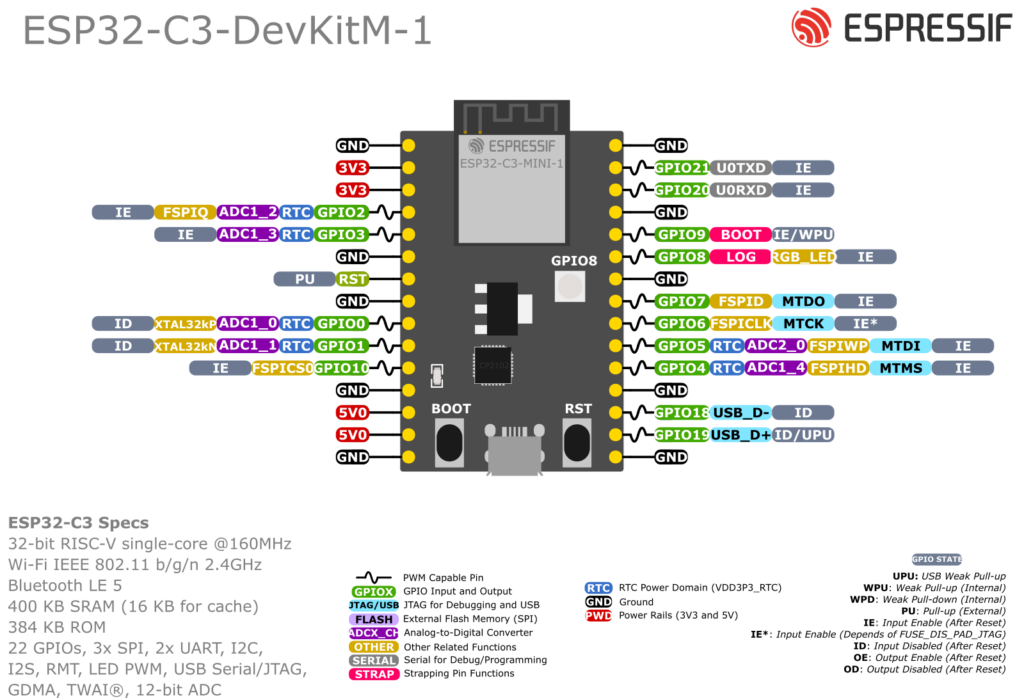
The ESP32-C3 DevKitM-1 pinout exposes GPIO0–10 and GPIO18–21. For the safest general-purpose choices, start with GPIO0, GPIO1, GPIO3, GPIO4, GPIO6, GPIO7 and GPIO10; treat GPIO2, GPIO8 and GPIO9 as boot-strapping pins.
The ESP32-C3-DevKitM-1 is Espressif’s tiny RISC-V dev board based on the ESP32-C3-MINI-1 / MINI-1U module – a very compact Wi-Fi + BLE module with 4 MB flash.
It’s designed to plug into a breadboard and expose almost all ESP32-C3 GPIOs on two 15-pin headers (J1 and J3). This guide focuses on which pins are safe to use, and how to wire ADC, I²C, SPI, UART and the onboard RGB LED.
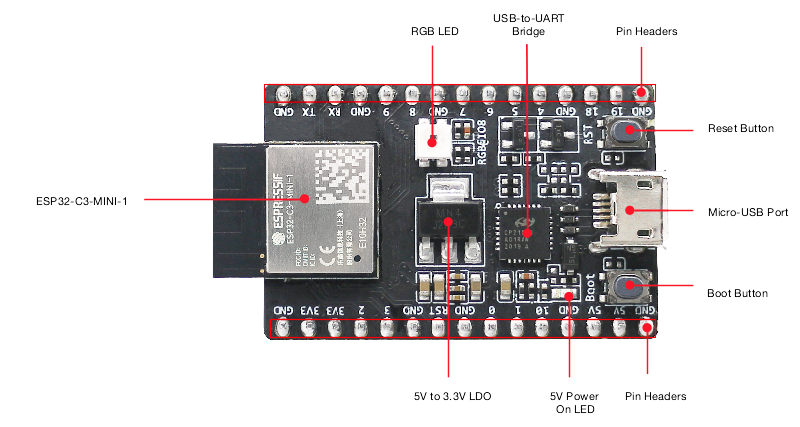
Board overview
Key specs:
- MCU: ESP32-C3 (single-core 32-bit RISC-V up to 160 MHz)
- Wireless: 2.4 GHz Wi-Fi (802.11 b/g/n) + BLE 5 (LE)
- Flash: 4 MB SPI flash
- Power:
- Micro-USB (default)
- or 5V pin
- or 3V3 pin
- USB-to-UART bridge (for flashing + Serial Monitor)
- BOOT button (enter download mode)
- RST button (reset / EN)
- Onboard RGB LED controlled via a single GPIO (WS2812-style)
All GPIOs are 3.3 V only (not 5 V tolerant).
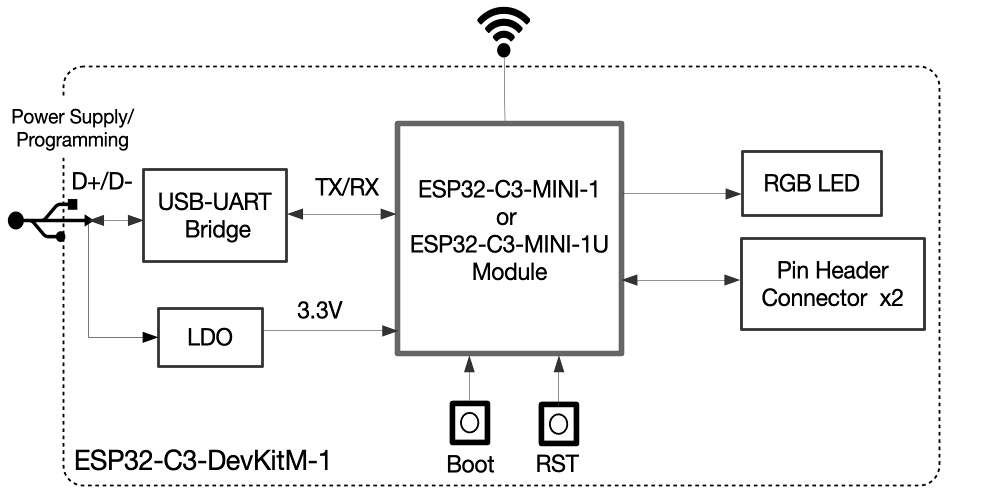
Power & control pins
From Espressif’s hardware reference:
- 5V – USB 5 V rail; can be used as input if powering from an external 5 V source.
- 3V3 – regulated 3.3 V from onboard LDO (or input if you supply your own 3.3 V).
- GND – ground.
- RST / EN / CHIP_PU – active-high enable; pulling LOW resets/powers down the chip.
- BOOT – used together with reset to enter UART download mode.
You normally do not use RST or BOOT as GPIOs.
Pin headers J1 & J3
Espressif breaks out most GPIOs on J1 (left) and J3 (right). The exact order is given in the user guide tables.
High-level view (logical, not physical order):
- GPIO0–GPIO10 are available as general-purpose I/O; GPIO0–GPIO5 are ADC-capable.
- GPIO18 (USB D−) and GPIO19 (USB D+) are broken out on J3; reserve them when using native USB.
- GPIO20 (RX) and GPIO21 (TX) are broken out on J3 and connected to the USB-to-UART bridge.
All available GPIOs except the SPI bus used for flash are broken out to the DevKitM-1 headers.
Safe GPIOs for general use
From the Espressif pin tables and module docs:
The following pins are good, boring choices for digital input/output, PWM, etc.:
- GPIO0 – ADC1_CH0, also XTAL_32K_P (RTC), safe as GPIO/ADC.
- GPIO1 – ADC1_CH1, XTAL_32K_N (RTC).
- GPIO3 – ADC1_CH3, general purpose.
- GPIO4 – ADC1_CH4, FSPIHD (can be used as GPIO when not re-routed).
- GPIO6 – FSPICLK, but available as GPIO on DevKitM-1.
- GPIO7 – FSPID, also good GPIO.
- GPIO10 – FSPICS0, good as chip-select or general output.
These are the primary “safe” pool to start from.
Pins that need extra care
- GPIO2 – ADC1_CH2 and strapping pin; level at reset selects boot mode.
- GPIO8 & GPIO9 – also strapping pins (boot configuration).
- GPIO5 – ADC2_CH0; use it as digital GPIO, but avoid it for normal one-shot ADC measurements because ESP32-C3 ADC2 results are unstable.
You can use these after boot, but:
- Avoid strong pull-downs, big capacitors or heavy loads that could force them low at reset.
- For analog measurements, use ADC1 on GPIO0–GPIO4 instead of GPIO5.
Boot / strapping pins
On ESP32-C3, the main strapping pins are:
- GPIO2 – controls boot mode configuration.
- GPIO8 – influences download-boot settings and logging.
- GPIO9 – BOOT button is tied here; pulled up, button shorts to GND.
At reset, the ROM samples these pins to decide whether to:
- Boot from flash (normal)
- Enter serial download mode
- Output boot messages, etc.
Rule of thumb:
For beginners, keep GPIO2, GPIO8, GPIO9 for internal use (BOOT button, LED) and don’t wire external circuitry that might drag them low at reset.
ADC pins
ESP32-C3 has ADC1 (5 channels) and ADC2 (1 channel):
- ADC1: GPIO0, GPIO1, GPIO2, GPIO3, GPIO4
- ADC2: GPIO5
Best practice:
- Prefer GPIO0–4 for analog sensors (thermistor, LDR, potentiometer, etc.).
- Avoid GPIO5/ADC2 for normal one-shot sampling: Espressif marks ADC2 one-shot mode unsupported on ESP32-C3 because its results are unstable.
Resolution is up to 12 bits (0–4095); usable voltage depends on attenuation (typically up to ~2.4–3.0 V). Keep inputs ≤ 3.3 V or use a resistor divider.
Onboard RGB LED
DevKitM-1 has a WS2812-style RGB LED on the board, marked “RGB”, driven by GPIO8.
- It’s powered from 3.3 V.
- To control colours you use a library like Adafruit_NeoPixel or FastLED.
Example (assuming LED on GPIO8):
#include <Adafruit_NeoPixel.h>

#define LED_PIN 8
#define LED_COUNT 1

Adafruit_NeoPixel rgb(LED_COUNT, LED_PIN, NEO_GRB + NEO_KHZ800);

void setup() {
  rgb.begin();
  rgb.show(); // turn off
}

void loop() {
  rgb.setPixelColor(0, rgb.Color(255, 0, 0)); // red
  rgb.show();
  delay(500);

  rgb.setPixelColor(0, rgb.Color(0, 255, 0)); // green
  rgb.show();
  delay(500);

  rgb.setPixelColor(0, rgb.Color(0, 0, 255)); // blue
  rgb.show();
  delay(500);
}
GPIO8 is also a strapping pin, so avoid external circuitry that changes its level during reset.
I²C pins
The ESP32-C3 I²C peripheral is fully GPIO-matrixed, so you can choose almost any free GPIO.
Good default pairs on DevKitM-1:
- Option 1 (recommended):
- SDA = GPIO4
- SCL = GPIO6
- Option 2 (if 4/6 are busy):
- SDA = GPIO1
- SCL = GPIO3
Avoid GPIO2, 8, 9 for I²C unless you’re comfortable with strapping behaviour.
Arduino example:
#include <Wire.h>

void setup() {
  Wire.begin(4, 6);   // SDA, SCL
  Serial.begin(115200);
  Serial.println("I2C on GPIO4 (SDA), GPIO6 (SCL)");
}

void loop() {
  // read/write I2C sensors here
}
SPI pins
ESP32-C3’s SPI controller can route signals to most GPIOs, but the “FSPI” pins are particularly suited for high-speed SPI. On the DevKitM-1, these include:
- GPIO6 – FSPICLK (SCLK)
- GPIO7 – FSPID (MOSI)
- GPIO4 – FSPIHD (can use as MISO)
- GPIO10 – FSPICS0 (CS)
Suggested SPI mapping for user peripherals:
| Signal | GPIO |
|---|---|
| SCLK | GPIO6 |
| MOSI | GPIO7 |
| MISO | GPIO4 |
| CS | GPIO10 |
This keeps everything on the same side of the board and away from the most sensitive boot pins.
UART / Serial
On DevKitM-1, the USB-to-UART bridge is connected to UART0 on GPIO21 (TX) and GPIO20 (RX), so Serial.begin() works without extra wiring. These pins can be remapped, but avoid sharing them while using the onboard serial bridge.
If you need an extra UART (e.g. for GPS, RS-485):
- Map UART1 or remap UART0 to spare GPIOs such as GPIO7 (TX) and GPIO6 (RX).
- Configure in Arduino with something like:
HardwareSerial Serial1(1);

void setup() {
  Serial.begin(115200);               // USB serial
  Serial1.begin(9600, SERIAL_8N1, 6, 7); // RX=GPIO6, TX=GPIO7
}
“Starter” pin recipe (safe template)
For a typical Wi-Fi sensor node with I²C sensor, ADC input and RGB status LED:
| Function | GPIO | Notes |
|---|---|---|
| I²C SDA | GPIO4 | BME280 / SHT sensor etc. |
| I²C SCL | GPIO6 | |
| Analog input | GPIO1 | ADC1_CH1 |
| Extra digital out | GPIO7 | Relay/MOSFET or SPI MOSI |
| Extra digital in | GPIO3 | Button, reed switch |
| RGB LED (onboard) | GPIO8 | With NeoPixel/FastLED |
This combination:
- Avoids heavy use of strapping pins at reset.
- Keeps ADC on ADC1 (Wi-Fi-friendly).
- Leaves GPIO0, 2, 5, 9, 10 available for expansion.
Quick cheat sheet
- Safest general-purpose GPIOs:
- 0, 1, 3, 4, 6, 7, 10
- ADC inputs (ADC1):
- 0, 1, 2, 3, 4
- ADC2 (not recommended for one-shot sampling):
- 5
- Onboard RGB LED:
- GPIO8.
- Boot-sensitive pins:
- 2, 8, 9 – don’t pull strongly low at reset.
- Nice I²C default:
- SDA 4, SCL 6
- Nice SPI default:
- SCLK 6, MOSI 7, MISO 4, CS 10
Stick to these sets and the ESP32-C3-DevKitM-1 becomes a very predictable little board for IoT sensors, Home Assistant nodes, and BLE gadgets, without “why won’t it boot?” surprises.