
Quick answer: The M5Paper Color ESP32S3 Dev Kit is a compact ESP32-S3 display computer built around a 4-inch, 400 × 600 E Ink Spectra 6 full-colour panel. It is best for weather displays, status boards, signage, Home Assistant information screens and digital art that update occasionally.
The crucial limitation is speed: M5Stack specifies a screen refresh time of approximately 15–30 seconds, depending on the colour distribution. It is therefore a poor choice for animation, video, live gauges or fast menus. The display is also not touch-enabled; interaction comes from its three user buttons, connected services or external controls.
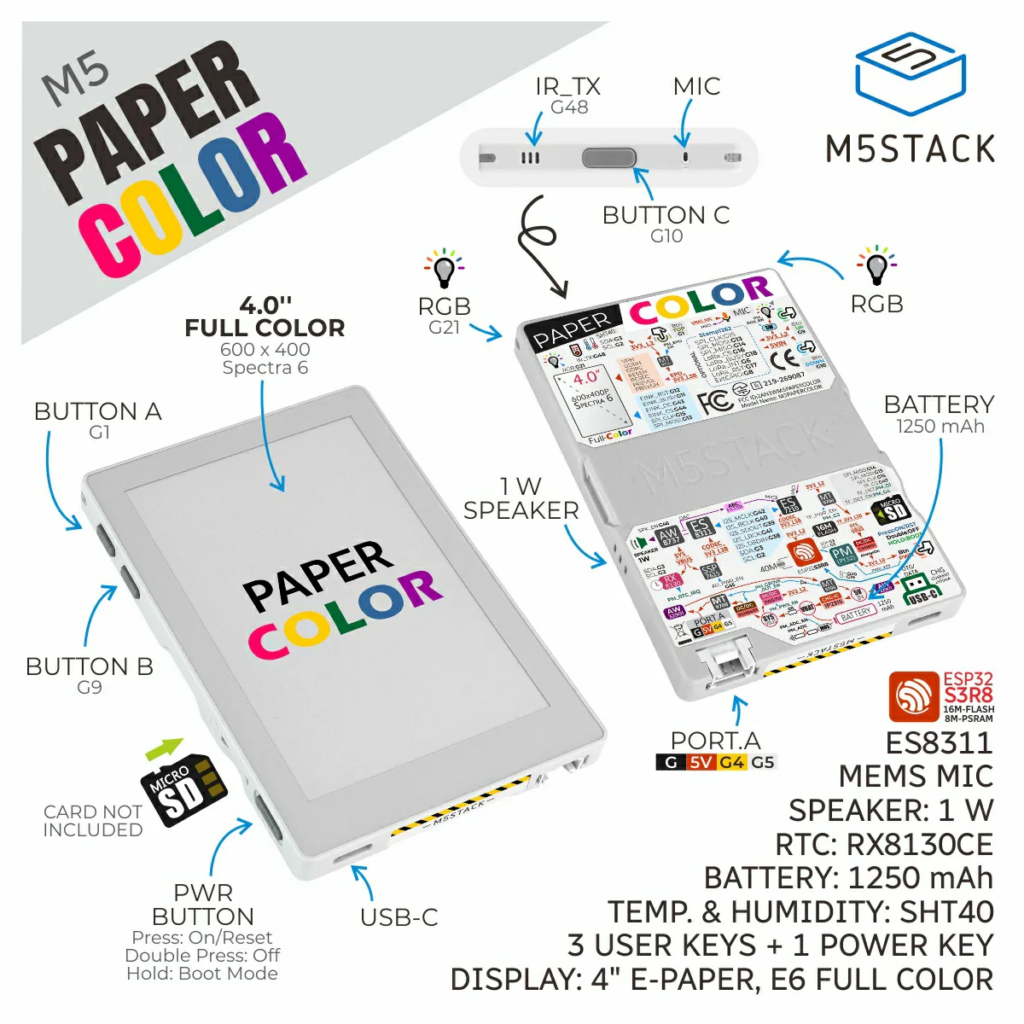
Inside are an ESP32-S3R8, 16MB flash, 8MB PSRAM, 2.4GHz Wi-Fi, a 1250mAh battery, microSD storage, an SHT40 temperature/humidity sensor, RTC, audio hardware, IR emitter and RGB LEDs. Choose it when colour and image retention matter more than rapid interaction.
What Is M5Paper Color?
M5Paper Color is basically a self-contained ESP32-S3 display computer. It is not just a bare e-paper panel. M5Stack has packaged the display, ESP32-S3 module, power management, battery, buttons, speaker, microphone, sensor, RTC and expansion connector into one ready-to-use dev kit.
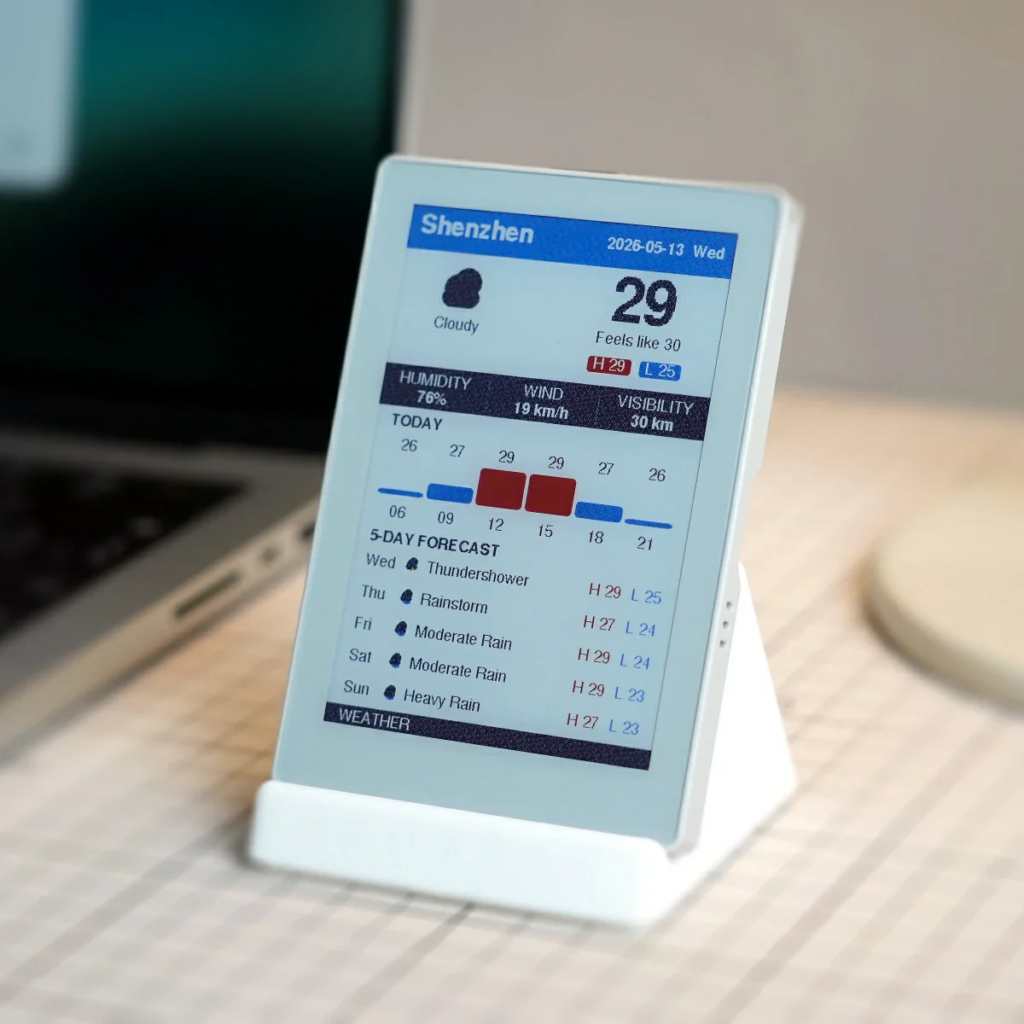
The main attraction is the 4-inch E Ink Spectra 6 full-colour display. The screen resolution is 400 × 600, which gives enough space for clear text, icons, graphs and dashboard layouts without needing a large enclosure.
This is the type of board that makes sense when you want something that looks more like a printed information card than a glowing screen.
Key Specifications
| Feature | M5Paper Color |
|---|---|
| SoC | ESP32-S3R8 |
| CPU | Dual-core Xtensa LX7, up to 240MHz |
| Flash | 16MB |
| PSRAM | 8MB |
| Wireless | 2.4GHz Wi-Fi |
| Display | 4-inch E Ink Spectra 6 full-colour e-paper |
| Resolution | 400 × 600 |
| Touch | No touch panel |
| Refresh time | Approximately 15–30 seconds |
| Battery | 1250mAh |
| Storage | microSD card slot |
| Sensor | SHT40 temperature and humidity |
| RTC | RX8130CE |
| Audio | ES8311 codec, ES7210 audio ADC, MEMS microphone, 1W speaker |
| Buttons | 3 user buttons + power button |
| Extras | IR emitter, 2 RGB LEDs, HY2.0-4P expansion port |
| Power | USB-C 5V |
| Standby consumption | 92.53µA |
| Full-load consumption | 211.97mA |
| Size | 70.8 × 103.9 × 8.5mm |
| Weight | 73.3g |
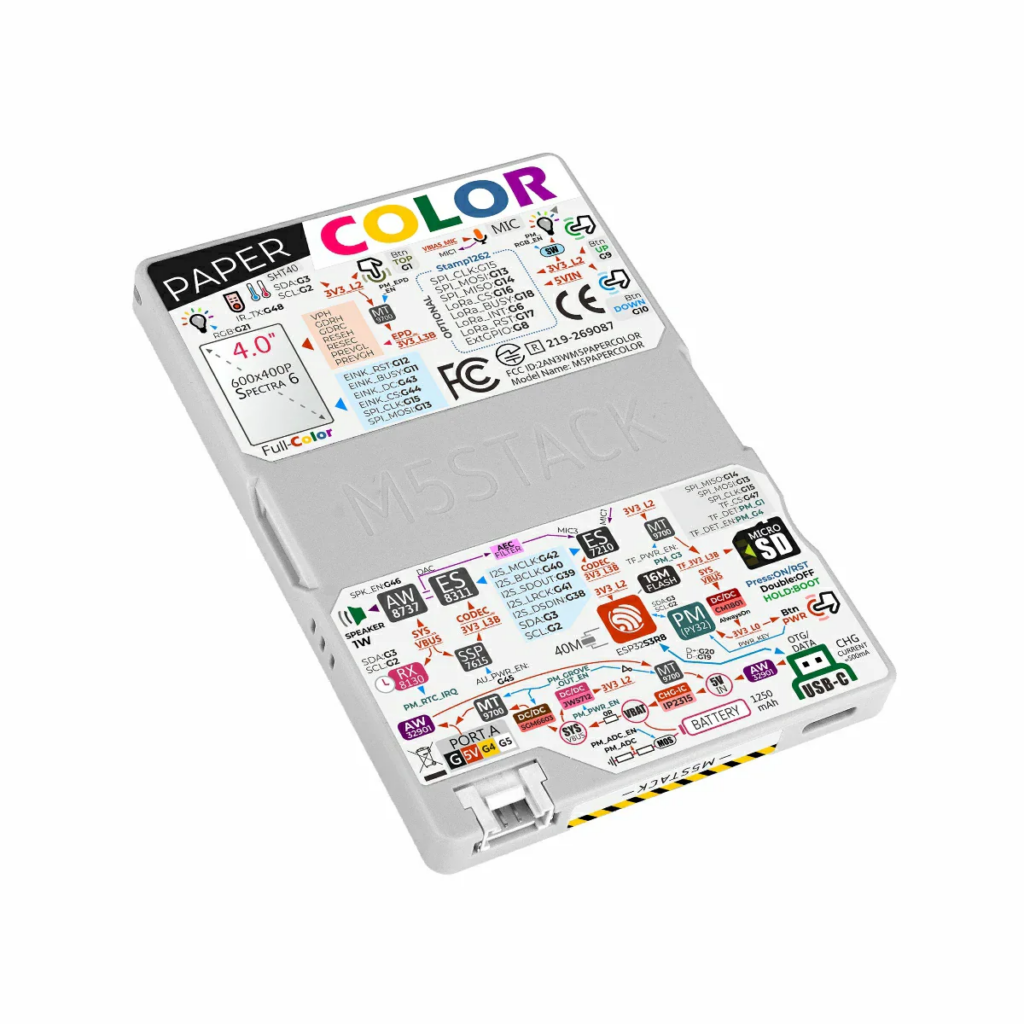
The official documentation also provides the GPIO mapping, schematics and examples for Arduino IDE, UiFlow2, ESP-IDF and PlatformIO, including M5Unified, M5GFX and M5PM1 library references.
Why Colour E-Paper Matters
Most ESP32 display projects use TFT, OLED or monochrome e-paper. TFT and OLED are bright and fast, but they consume power continuously while displaying content. Monochrome e-paper is excellent for battery life, but it limits the interface to black and white.
M5Paper Color sits somewhere in the middle. It gives you a paper-like display with colour, while still keeping the low-power advantages of e-paper.
This is useful for:
- Home Assistant status dashboards
- Weather panels
- Energy monitoring screens
- Smart calendar displays
- Room information signs
- QR code displays
- Small menu boards
- Sensor readout panels
- Art/photo display projects
- Portable data terminals
For ESP32 projects, the benefit is obvious: you get a display that can show useful information without behaving like a small tablet screen that needs constant power.
How Fast Does M5Paper Color Refresh?
M5Stack states that a screen refresh takes approximately 15–30 seconds, with the exact time depending on how complex the colour distribution is. That is the single most important specification to understand before buying it.
It works well when content changes every few minutes, every hour or only after an event. Weather forecasts, room status, energy summaries, calendars, notices and artwork fit that pattern. Animation, video, rapidly moving graphs, responsive menus and live touchscreen-style controls do not.
The benefit is that the e-paper image remains visible without a continuously powered backlight. The sensible design pattern is to fetch or calculate the new data, redraw the screen once, then return the ESP32-S3 and unused peripherals to a low-power state.
Built-In Hardware
M5Stack has included quite a lot of hardware around the ESP32-S3.
The SHT40 sensor means the board can work as a small environmental monitor without adding external modules. The RTC helps with timekeeping, especially for low-power applications. The microSD slot is useful for images, icons, fonts, logs or offline data storage.
The board also includes a MEMS microphone with AEC, an ES8311 audio codec, an ES7210 audio ADC and a 1W speaker, which makes it more flexible than a simple display board. M5Stack positions it partly for voice-interaction terminals as well as signage and display projects.
The HY2.0-4P expansion port also keeps it compatible with the wider M5Stack Grove-style ecosystem, so adding extra sensors or modules should be easier than wiring everything manually.
Battery Life and Power Management
The board includes a 1250mAh battery. M5Stack specifies approximately 92.53µA in standby and 211.97mA at full load, but those figures describe two operating states rather than a guaranteed runtime. Real battery life depends mainly on how often the ESP32-S3 wakes, connects to Wi-Fi and refreshes the display.
For long-running projects, wake on a schedule using the RTC, connect to Wi-Fi only long enough to collect fresh data, update the screen once and return to sleep. Avoid frequent polling and unnecessary redraws.
The M5PM1 power-management system lets firmware control several power domains. Where the project permits it, switch off unused display, RGB LED, microSD, audio and expansion-port functions between updates. The quoted standby current should be treated as a best-case hardware state, not as a promise that every application will run for the same period.
M5Paper Color and Home Assistant
This board could be very useful for Home Assistant users, especially for people who want a low-power status panel without installing a normal wall tablet.
Possible Home Assistant uses include:
- Room temperature and humidity display
- Solar production and battery status
- Electricity price display
- Weather forecast screen
- Alarm state display
- Door/window status display
- Calendar and reminders panel
- Air quality display
- Water tank or garden sensor dashboard
- Simple family message board
The display does not need to refresh every second. For many Home Assistant dashboards, updating every few minutes is enough. That suits e-paper much better than trying to use it like a normal LCD.
The practical route is an Arduino or ESP-IDF project that pulls data from MQTT, the Home Assistant REST API or a local server, then refreshes only when the information changes or on a sensible schedule.
This is not a drop-in Lovelace tablet: PaperColor has no touch panel and a refresh can take 15–30 seconds. Use it as an always-readable information surface, with the physical buttons reserved for simple actions such as changing pages or forcing an update.
Software Support
M5Stack officially documents Arduino IDE, UiFlow2, ESP-IDF and PlatformIO routes for PaperColor. Arduino developers can use the M5Unified, M5GFX and M5PM1 libraries for the board, display and power-management functions.
The published PlatformIO example uses the Arduino framework, 16MB flash, Octal PSRAM settings and the M5Unified, M5GFX and M5PM1 libraries. ESP-IDF users can also study M5Stack’s factory-firmware source rather than starting every peripheral driver from scratch.
The official M5Stack PaperColor documentation provides the pin map, power controls, schematics, Arduino quick start, UiFlow2 guide and example configuration.
For beginners, the harder part is the e-paper interface rather than the ESP32-S3. Design for the fixed 400 × 600 canvas, use large readable text, group changes into one redraw and prepare graphics that remain clear on a reflective colour display.
Where This Board Makes Sense
M5Paper Color makes most sense when the display is the main feature of the project.
Good project ideas:
- A Home Assistant wall dashboard
- A battery-powered weather display
- A desk calendar
- A smart room sign
- A sensor data display
- A low-power information board
- A digital photo/art frame
- A workshop status screen
- A Wi-Fi connected notice board
- A portable IoT terminal
It is less suitable for:
- Touchscreen tablet replacement
- Fast menu systems
- Video or animation
- Real-time oscilloscope-style graphs
- Gaming
- Rapidly changing dashboards
The board is much more “smart paper” than “small tablet”.
M5Paper Color vs PaperS3
The M5Paper Color and M5Stack PaperS3 use the same ESP32-S3R8 platform with 16MB flash and 8MB PSRAM, but the displays and intended interaction are very different.
| Feature | M5Paper Color | PaperS3 |
|---|---|---|
| Display | 4-inch Spectra 6 colour e-paper | 4.7-inch 16-level grayscale e-paper |
| Resolution | 400 × 600 | 960 × 540 |
| Touch | No | Two-point capacitive touch |
| Battery | 1250mAh | 1800mAh |
| Controls and sensors | Three user buttons, SHT40, RTC, IR and RGB LEDs | One physical button, BMI270 gyroscope and RTC |
| Audio | Microphone, codec and 1W speaker | Passive buzzer |
| Best suited to | Colour status displays, signage, dashboards and art | Sharp text, grayscale interfaces and touch interaction |
Choose M5Paper Color when colour coding, graphics or signage is the priority. Choose PaperS3 when you want a larger, sharper monochrome screen and touch input. “Newer” does not make either one universally better; they solve different display problems.
Verdict
The M5Paper Color ESP32S3 Dev Kit is one of the more interesting ESP32-S3 boards because it is not just another small LCD development kit. The colour e-paper display gives it a clear purpose: low-power information screens that stay readable and attractive without needing a constantly active backlight.
It is not the right board for every ESP32 project. The display refresh speed will limit what you can build. But for dashboards, Home Assistant panels, environmental displays, signage and smart information cards, it makes a lot of sense.
Buy it for a project that genuinely benefits from colour e-paper and infrequent updates. If the interface needs touch, rapid refresh or continuously moving information, a normal LCD board or the touch-enabled PaperS3 is the better fit.