If you are choosing between the ESP32-S2AliExpress price and ESP32-S3AliExpress price for a new project, the ESP32-S3AliExpress price is the better default for most users.
Both use 240 MHz Xtensa LX7 processors, both support 2.4 GHz Wi-Fi and native USB OTG, and both provide plenty of GPIO. But the S3 adds a second CPU core, Bluetooth Low Energy, more SRAM, SIMD/vector instructions, USB Serial/JTAG and several additional hardware peripherals.
The ESP32-S2AliExpress price still has reasons to exist, though. Most notably, it has two built-in 8-bit DACs, which the S3 lacks, and it remains a capable choice for Wi-Fi-only USB devices and existing S2 designs.
The short version:
- Choose ESP32-S3AliExpress price for most new projects, especially if you need BLE, more processing power, cameras, displays, audio, motor control or heavier multitasking.
- Choose ESP32-S2 if you specifically want Wi-Fi + USB without Bluetooth, need its built-in DACs, or are working with an existing S2 design.
- If you’re buying a new development board today, ESP32-S3 is generally the more versatile platform.
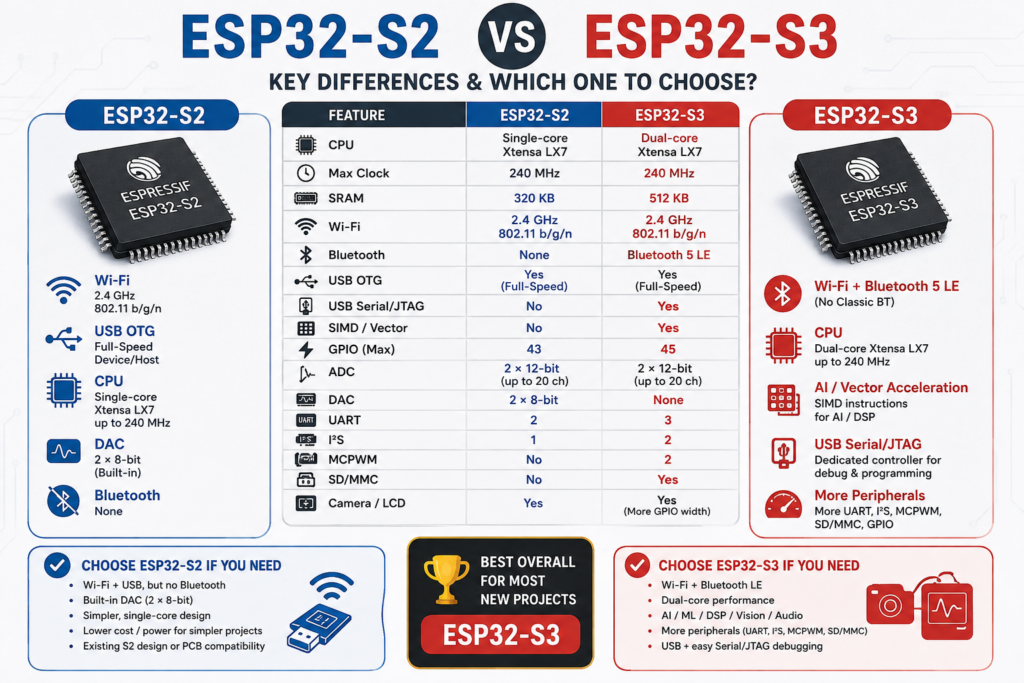
ESP32-S2 vs ESP32-S3 quick comparison
| Feature | ESP32-S2 | ESP32-S3 |
|---|---|---|
| CPU | Single-core Xtensa LX7 | Dual-core Xtensa LX7 |
| Maximum clock | 240 MHz | 240 MHz |
| SRAM | 320 KB | 512 KB |
| Wi-Fi | 2.4 GHz 802.11 b/g/n | 2.4 GHz 802.11 b/g/n |
| Bluetooth | None | Bluetooth 5 LE |
| USB OTG | Yes | Yes |
| USB Serial/JTAG | No dedicated controller | Yes |
| SIMD/vector instructions | No | Yes |
| Single-precision FPU | No dedicated S3-style FPU/SIMD combination | Yes |
| GPIO | Up to 43 | Up to 45 |
| ADC | 2 × 12-bit, up to 20 channels | 2 × 12-bit, up to 20 channels |
| DAC | 2 × 8-bit | None |
| Capacitive touch | 14 channels | 14 channels |
| UART | 2 | 3 |
| I²C | 2 | 2 |
| I²S | 1 | 2 |
| SPI | 4 | 4 |
| Camera interface | Yes | Yes |
| LCD interface | Yes | Yes |
| TWAI / CAN controller | Yes | Yes |
| MCPWM | No | 2 controllers |
| SD/MMC host | No | Yes |
Espressif’s own chip comparison confirms the major differences in CPU count, SRAM, Bluetooth, GPIO and peripheral resources.
The biggest difference: S3 has two CPU cores
Both chips use Espressif’s Xtensa LX7 architecture and can run at up to 240 MHz.
The difference is that the ESP32-S2 has one LX7 core, while the ESP32-S3 has two.
For a simple sensor node, MQTT client or small web server, that distinction may not matter much. A single S2 core is still more than capable of handling many normal IoT workloads.
The S3 becomes much more attractive as the application gets more complicated.
A second core gives you more room for combinations such as:
- Wi-Fi networking alongside application logic
- Camera capture and image processing
- Web server plus display updates
- Audio processing
- USB communication alongside other real-time work
- Multiple sensors and communications tasks
- More complex ESP-IDF or FreeRTOS applications
The S3 also has 512 KB of SRAM compared with 320 KB on the S2, giving applications substantially more internal memory before external PSRAM is considered.
For ordinary temperature sensors and relay controllers, you probably won’t notice the difference.
For cameras, graphics, audio or larger applications, you probably will.
ESP32-S3 also adds SIMD and an FPU
The S3 isn’t simply a dual-core S2.
Its LX7 implementation includes a 128-bit data bus, dedicated SIMD instructions and a single-precision floating-point unit. Espressif specifically positions these capabilities for workloads such as neural-network acceleration and signal processing.
That makes the S3 much better suited to:
- Keyword and wake-word detection
- Small neural networks
- Image classification
- Image processing
- FFTs and digital filters
- Audio processing
- Sensor-fusion workloads
You don’t need these features for normal Home Assistant sensors or an MQTT node.
But if your project involves camera + processing, audio or TinyML, the S3 is the obvious choice.
Wi-Fi is very similar, but only the S3 has Bluetooth
Both the ESP32-S2 and ESP32-S3 support 2.4 GHz 802.11 b/g/n Wi-Fi, so there is no major reason to choose one over the other for ordinary Wi-Fi connectivity.
Bluetooth is completely different.
ESP32-S2
The S2 has no Bluetooth radio.
If the project needs BLE now or might need it later, that immediately rules the S2 out.
ESP32-S3
The S3 includes Bluetooth 5 Low Energy, including 1 Mbps, 2 Mbps and coded PHY data rates as well as extended advertising support. It does not support Bluetooth Classic.
That makes the S3 suitable for:
- BLE sensors
- Bluetooth beacons
- BLE HID devices
- Keyboards and remote controls
- Wi-Fi-to-BLE gateways
- Home Assistant Bluetooth proxies
- Smartphone provisioning and configuration
If Bluetooth is part of the project, choose ESP32-S3.
USB: both have native USB, but S3 has an extra advantage
Native USB is one of the major features shared by the S2 and S3.
Both include a full-speed USB OTG peripheral with an integrated transceiver, allowing the microcontroller itself to act as a USB device or host without relying entirely on an external USB-to-UART converter.
That enables projects such as:
- USB CDC serial devices
- USB HID keyboards and mice
- MIDI controllers
- USB storage-related applications
- Custom USB peripherals
- USB host projects
But the S3 has an additional hardware block: a dedicated USB Serial/JTAG controller.
That controller is separate from the USB OTG peripheral and can provide USB serial communication, flashing and JTAG debugging directly through the chip.
This is why many S3 development boards can provide a very clean native-USB development experience without requiring the USB OTG peripheral to be permanently dedicated to programming.
For a USB peripheral project, both chips are capable.
For a new development platform where you also want easy USB programming/debugging plus USB functionality, the S3 has the stronger feature set.
GPIO and peripheral differences matter more than the raw GPIO count
The S2 provides up to 43 GPIOs, while the S3 increases that slightly to 45 GPIOs. The actual number available to you depends on the module and development board, because flash, PSRAM and onboard hardware may consume some pins.
The two chips share many important peripherals:
- SPI
- I²C
- ADC
- capacitive touch
- camera interface
- LCD interface
- LED PWM
- RMT
- pulse counters
- TWAI/CAN
- temperature sensor
- USB OTG
But there are several differences worth knowing before choosing a chip.
ESP32-S2 advantages
The most significant is the built-in DAC.
The ESP32-S2 has two 8-bit DAC channels, while the ESP32-S3 has no DAC peripheral.
That can make the S2 a better choice for projects that need simple true analogue voltage output without adding an external DAC.
Examples include:
- Basic waveform generation
- Analogue control voltages
- Simple audio experiments
- Bias/reference generation
PWM on the S3 can imitate an analogue output after filtering, but it is not the same thing as having a real DAC.
ESP32-S3 advantages
The S3 has several additional peripheral resources:
- 3 UART controllers instead of 2
- 2 I²S interfaces instead of 1
- 2 MCPWM controllers
- SD/MMC host controller
- More RMT resources
- Dedicated USB Serial/JTAG
These differences make the S3 particularly attractive for projects involving motors, audio, displays, storage or several simultaneous serial peripherals.
Camera and display projects: S3 is usually the better option
Both chips include dedicated camera and LCD interfaces, so the S2 is perfectly capable of camera and graphical-display projects.
The difference is everything surrounding those interfaces.
The S3 gives you:
- Two CPU cores
- 512 KB internal SRAM
- SIMD instructions
- Floating-point support
- More GPIO
- Two I²S peripherals
- SD/MMC host support
- Bluetooth LE
Those extra resources make a considerable difference once the project moves beyond simply transferring pixels.
For example, an S2 can make a perfectly good Wi-Fi camera or display controller.
But for:
- Local image processing
- Computer vision
- Rich graphical interfaces
- Camera + display combinations
- Audio + display projects
- On-device ML
the ESP32-S3 is much easier to recommend.
Flash and PSRAM
Both families support external flash and external RAM, and specific chip and module variants are available with different memory configurations.
The important point is that you should compare the actual module, not just the S2 or S3 chip name.
An ESP32-S3 development board with PSRAM can be dramatically more useful for a camera or graphics project than a basic S3 board without it.
PSRAM is particularly useful for:
- Camera frame buffers
- Large displays
- Graphics libraries
- Large JSON structures
- Audio buffers
- Machine-learning models
The S3 also starts with more internal SRAM — 512 KB versus 320 KB — before any external PSRAM is added.
For a simple MQTT sensor, however, neither chip necessarily needs PSRAM.
Power consumption: don’t choose based on “S2 is lower power”
Both chips support power-management and sleep modes, including low-power coprocessor functionality.
It is tempting to assume that the single-core S2 must automatically be the lower-power choice, but that isn’t a useful general rule for a finished project.
Real consumption depends heavily on:
- How long Wi-Fi stays active
- Whether BLE is enabled
- CPU frequency and workload
- Deep-sleep duty cycle
- Sensors and peripherals
- Voltage regulator quiescent current
- USB circuitry
- LEDs and other components on the development board
For battery-operated projects, the specific board design and firmware strategy often matter more than choosing S2 instead of S3.
Choose between these chips primarily for the features you need, then optimise the hardware and firmware for power consumption.
Can you replace an ESP32-S2 with an ESP32-S3?
Not as a general drop-in replacement.
Although the two chips share the LX7 architecture and many peripherals, they differ in GPIO resources, peripheral blocks, memory organisation and board/module implementations.
Software written using portable Arduino or ESP-IDF APIs may be relatively easy to move, but you should still check:
- GPIO assignments
- USB implementation
- ADC pins
- Flash and PSRAM configuration
- Touch pins
- Peripheral availability
- Board definitions
- Any chip-specific code
A PCB designed around an S2 module should not be assumed to accept an S3 module without checking the actual module pinout and footprint.
Which should you choose?
For most new projects, choose the ESP32-S3.
The combination of dual-core processing, more SRAM, BLE, SIMD instructions and additional peripherals gives it far more flexibility without giving up the S2’s key Wi-Fi and USB capabilities.
Choose ESP32-S3 if you need
- Wi-Fi and Bluetooth LE
- Dual-core processing
- More internal RAM
- Camera or vision processing
- TinyML or DSP
- Audio processing
- Rich displays and GUIs
- USB plus convenient Serial/JTAG debugging
- SD/MMC
- Motor-control PWM
- Several UART or I²S peripherals
- A flexible platform for a new general-purpose project
Typical S3 projects include:
- Home Assistant Bluetooth proxies
- Smart cameras
- Voice interfaces
- BLE gateways
- USB HID devices
- Display and touchscreen controllers
- Audio projects
- TinyML applications
- Robots and motor-control projects
Choose ESP32-S2 if you need
- Wi-Fi but do not need Bluetooth
- Native USB OTG
- A built-in analogue output
- A simpler single-core design
- Compatibility with an existing S2 project or PCB
- An S2 module that already meets your project’s requirements
Typical S2 projects include:
- Wi-Fi USB devices
- USB HID peripherals
- USB configuration tools
- Wi-Fi control panels
- Data loggers
- Projects needing the S2’s built-in DACs
- Existing commercial S2 designs
ESP32-S2 vs ESP32-S3: which is better?
For most people starting a project in 2026, ESP32-S3 is the better chip.
It keeps the important S2 features — 240 MHz LX7 processing, Wi-Fi, native USB, lots of GPIO, ADC, touch, camera and LCD support — and adds:
- A second CPU core
- Bluetooth Low Energy
- 512 KB SRAM
- SIMD/vector instructions
- Single-precision FPU
- USB Serial/JTAG
- MCPWM
- SD/MMC
- Additional UART and I²S resources
The ESP32-S2 isn’t obsolete or useless. Its two built-in DACs are a genuine advantage for some projects, and there is little reason to redesign a working S2 product just because the S3 exists.
But if you’re standing at the beginning of a new design and don’t have a specific reason to choose S2, ESP32-S3 gives you considerably more room to grow.
Bottom line: ESP32-S3 for most new projects; ESP32-S2 when its Wi-Fi-only design, built-in DACs or compatibility with an existing S2 platform specifically suit the job.