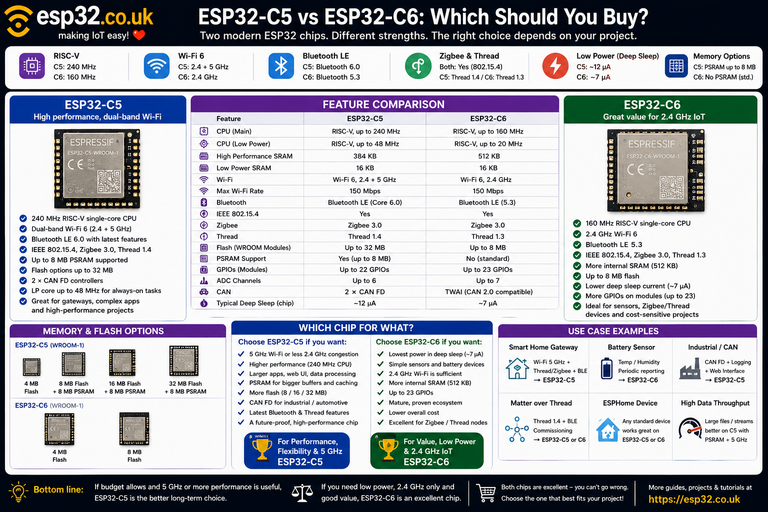
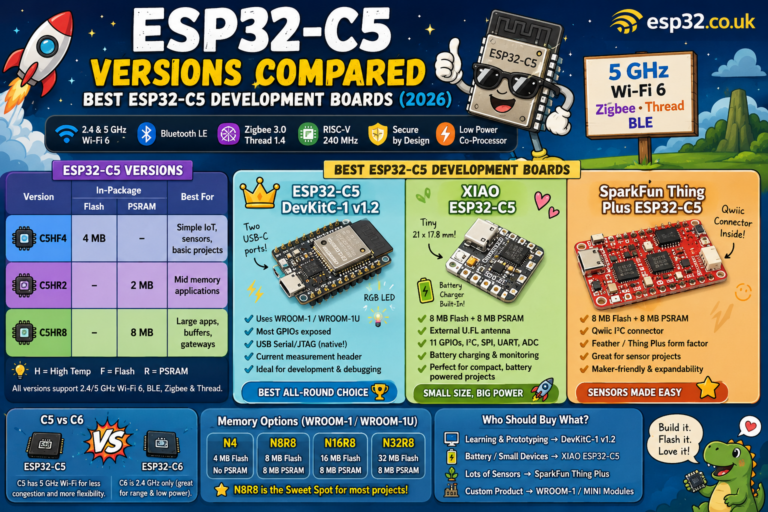
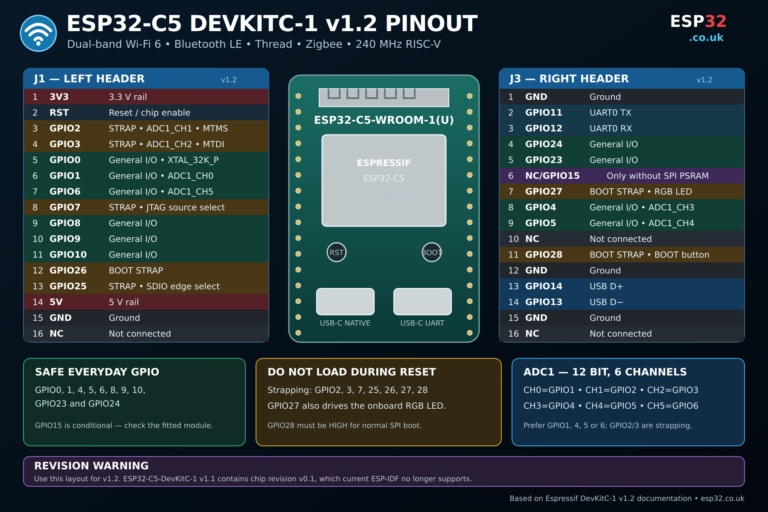
Choose the ESP32-C5AliExpress price when connectivity is the priority: it provides dual-band 2.4 + 5 GHz Wi-Fi 6, Bluetooth LE, Zigbee, Thread, a 240 MHz RISC-V CPU, a 48 MHz low-power processor and optional PSRAM. Choose the ESP32-S3AliExpress price when local processing and peripherals matter more: its dual-core 240 MHz Xtensa LX7 processor, vector/DSP instructions, USB OTG, camera interface, LCD interface and mature PSRAM ecosystem make it better for displays, cameras, audio, USB devices and edge AI. For a normal sensor or Home Assistant node, either is powerful enough. For a smart-home gateway choose C5; for a camera, touchscreen or local processing project choose S3.
Materials You’ll Need
This comparison does not require any special hardware, but these are the most useful items if you want to experiment with either platform.
| Item | Why you may need it |
|---|---|
| ESP32-C5AliExpress price development board | Test 5 GHz Wi-Fi, Zigbee, Thread and newer C5 features |
| ESP32-S3AliExpress price development board with PSRAM | Test dual-core processing, displays, cameras and USB |
| USB-C data cableAliExpress price | Programming and power |
| Breadboard | Sensor and GPIO prototyping |
| Dupont jumper wires | Connecting modules |
| I²C sensor such as SHT40/BME280 | Easy comparison project |
| Optional TFT/LCD display | Demonstrates the S3’s strengths |
| Optional camera module | Useful for S3 camera experiments |
| Optional 5 GHz Wi-Fi access point | Required to test the C5’s biggest advantage |
For the S3, a board with PSRAM is strongly recommended if displays, cameras, audio or larger applications are planned.
For the C5, an 8 MB PSRAM module/board is worth considering for demanding applications.
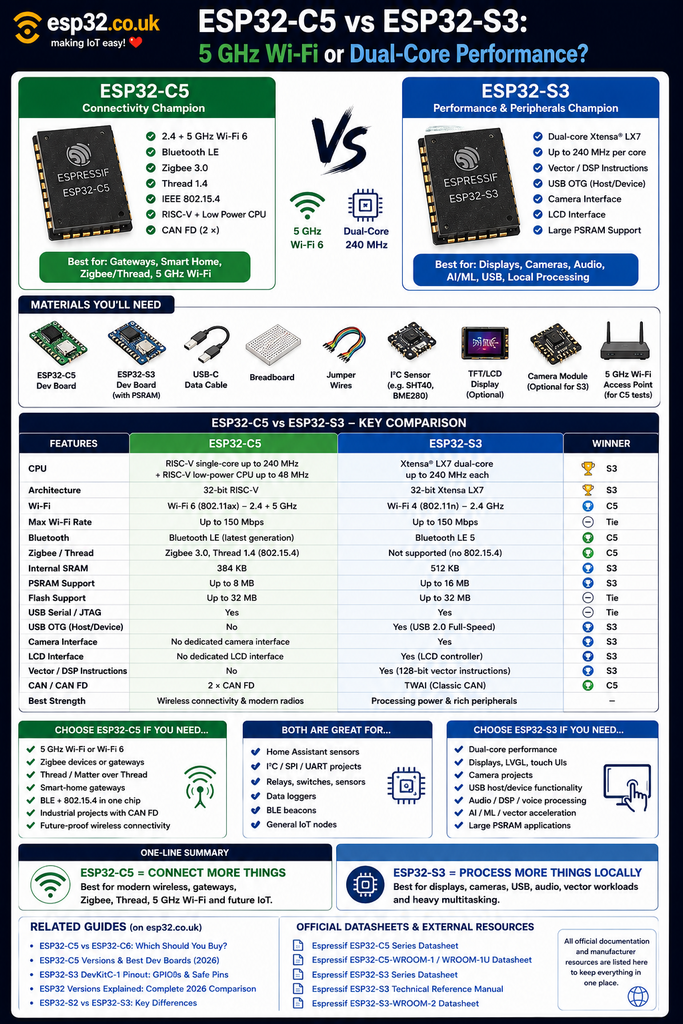
ESP32-C5 vs ESP32-S3 at a glance
These chips are much less directly comparable than their similar model names suggest.
The S3 belongs to Espressif’s performance-oriented S family.
The C5 belongs to the connectivity-oriented RISC-V C family.
That difference is visible immediately in their architecture.
| Feature | ESP32-C5 | ESP32-S3 |
|---|---|---|
| Main CPU | RISC-V single-core | Xtensa LX7 dual-core |
| Maximum CPU speed | 240 MHz | 240 MHz per core |
| Low-power CPU | RISC-V up to 48 MHz | ULP processor |
| Internal main SRAM | 384 KB | 512 KB |
| Low-power/RTC SRAM | 16 KB | 16 KB |
| Wi-Fi | Wi-Fi 6 | Wi-Fi 4 |
| Wi-Fi bands | 2.4 + 5 GHz | 2.4 GHz |
| Maximum Wi-Fi rate | 150 Mbps | 150 Mbps |
| Bluetooth | BLE, newer generation | BLE 5 |
| Zigbee | Yes | No |
| Thread | Yes | No |
| IEEE 802.15.4 | Yes | No |
| PSRAM | Up to 8 MB on current C5 WROOM configs | Up to 16 MB on S3 WROOM-2 configs |
| Flash | Up to 32 MB | Up to 32 MB |
| USB Serial/JTAG | Yes | Yes |
| USB OTG host/device | No | Yes |
| Camera interface | No dedicated camera peripheral | Yes |
| LCD interface | No dedicated LCD controller | Yes |
| Vector/DSP instructions | General RISC-V processing | 128-bit vector instructions |
| CAN | 2 × CAN FD | TWAI / classic CAN |
| Best for | Connectivity, gateways, 5 GHz | Displays, cameras, AI, USB |
The important point is that 240 MHz vs 240 MHz does not mean equal processing power.
The S3 has two 240 MHz application cores, while the C5 has one 240 MHz high-performance application core plus a separate low-power processor intended for very different tasks.
The simplest way to choose
The decision can be reduced to two questions.
If the project needs:
5 GHz Wi-Fi, Zigbee or Thread
choose:
If the project needs:
cameras, large displays, USB host/device, audio/DSP or heavy local processing
choose:
For everything else, both may work, and price, board layout and available GPIOs may decide the choice.
C5 finally brings 5 GHz Wi-Fi to this class of ESP32
The most obvious C5 advantage is:
5 GHz Wi-Fi.
ESP32-C5 supports both:
2.4 GHz Wi-Fi 6
5 GHz Wi-Fi 6
The S3 supports only:
2.4 GHz Wi-Fi 4This is not simply a benchmark advantage.
In a modern home, 2.4 GHz may already contain:
- Wi-Fi
- Bluetooth
- Zigbee
- Thread
- wireless cameras
- neighbouring networks
The C5 allows normal network traffic to use 5 GHz while its 802.15.4 and Bluetooth radios continue operating in 2.4 GHz spectrum.
That is especially attractive for smart-home gateways.
5 GHz is not automatically better
A 5 GHz signal normally offers more spectrum and less congestion, but 2.4 GHz usually travels farther and penetrates walls better.
So this:
5 GHz = always betteris wrong.
A sensor at the far end of a house may still achieve a stronger connection at 2.4 GHz.
The C5’s real advantage is choice.
It can use either band depending on the installation.
The S3 cannot.
C5 uses Wi-Fi 6, S3 uses Wi-Fi 4
There is another generational difference.
ESP32-S3
Supports:
802.11b/g/n
or Wi-Fi 4.
ESP32-C5
Adds:
802.11ax Wi-Fi 6
while remaining compatible with older Wi-Fi networks.
For IoT, Wi-Fi 6 features can improve efficiency in networks containing many devices.
The headline data rate of both chips can still reach around 150 Mbps, so the C5 advantage is not simply higher maximum speed.
For something sending:
Temperature = 22.8°Cevery minute, even Wi-Fi 4 has absurdly more bandwidth than required.
C5 is the connectivity champion
The complete C5 wireless package is:
2.4 GHz Wi-Fi 6
+
5 GHz Wi-Fi 6
+
Bluetooth LE
+
IEEE 802.15.4
+
Zigbee 3.0
+
Thread 1.4
That makes C5 one of the most flexible wireless ESP32 chips available.
The S3 offers:
2.4 GHz Wi-Fi
+
Bluetooth LE
There is no integrated 802.15.4 radio.
So an S3 cannot become a native Zigbee or Thread device through firmware alone.
S3 wins heavily on CPU architecture
The processor comparison points in the opposite direction.
ESP32-C5
Has one main:
32-bit RISC-V CPU at up to 240 MHz
plus a separate:
low-power RISC-V CPU up to 48 MHz
ESP32-S3
Has:
two Xtensa LX7 application CPU cores, each up to 240 MHz
The second S3 core can be used for real application workloads.
For example:
Core 0
Networking

Core 1
Display / processing
or:
Core 0
Camera capture

Core 1
Image processing
The C5’s 48 MHz LP core does not turn the C5 into the equivalent of a dual-core 240 MHz processor.
Its job is primarily low-power background work.
Why two cores can matter
A simple sensor barely notices.
But applications involving:
- graphics
- camera capture
- audio processing
- local web servers
- networking
- DSP
- multiple simultaneous tasks
can benefit substantially from the S3’s dual-core architecture.
For an ESPHome temperature sensor, neither CPU will be remotely stressed.
For a graphical control panel, the difference can be significant.
The S3 also has AI/DSP-oriented vector instructions
The ESP32-S3 contains special Processor Instruction Extensions designed to accelerate DSP and AI workloads.
These include:
128-bit vector operations
for operations such as:
- addition
- subtraction
- multiplication
- shifting
- comparison
- complex multiplication
This is one of the reasons the S3 became popular for:
- speech recognition
- wake-word detection
- image processing
- audio
- machine-learning experiments
- signal processing
The C5 has a newer general-purpose RISC-V architecture, but it is not intended to replace the S3’s SIMD/vector-focused processing strengths.
Does that make S3 an AI processor?
Not in the same sense as a modern PC GPU or dedicated NPU.
The S3 is still a microcontroller.
But its vector extensions can make suitably optimized workloads significantly faster than generic scalar MCU code.
For small embedded ML tasks such as:
Wake-word detection
Simple image classification
Audio features
Sensor classification
the S3 remains a very capable low-cost chip.
S3 has more internal SRAM
The internal memory comparison also favours the S3.
ESP32-C5
384 KB HP SRAM
16 KB LP SRAM
ESP32-S3
512 KB SRAM
16 KB RTC SRAM
The extra internal SRAM can be valuable for:
- network buffers
- graphics
- camera data
- DSP
- multiple FreeRTOS tasks
- large structures
But external PSRAM changes the comparison considerably.
Both can have a lot of PSRAM
The C5 is available in current WROOM configurations with:
8 MB PSRAMalongside flash options such as:
8 MB
16 MB
32 MB
The S3 ecosystem goes even further.
ESP32-S3-WROOM-2 variants are available with as much as:
16 MB PSRAM
32 MB flash
This is one reason the S3 is so attractive for graphical interfaces and imaging.
A frame buffer that would completely overwhelm internal SRAM can be stored in PSRAM instead.
For cameras, S3 is the obvious choice
This is not close.
The S3 includes a dedicated LCD and camera controller and has a mature ecosystem around camera capture.
It is widely used for:
- OV2640
- OV5640
- camera streaming
- computer vision
- QR/barcode processing
- image recognition
- smart doorbells
The C5 may technically communicate with external imaging hardware through general peripherals, but it is not the natural ESP32 for traditional parallel camera projects.
For:
ESP32 + camera
choose:
For displays, S3 is also the stronger platform
The S3 includes a dedicated LCD interface and is widely used with:
- SPI TFTs
- RGB LCDs
- LVGL
- touchscreen HMIs
- large graphical dashboards
Its dual cores, vector instructions and PSRAM options make it particularly suitable to graphical workloads.
For example:
ESP32-S3
+
8 MB PSRAM
+
480 × 320 TFT
+
LVGL
is a very common architecture.
The C5 can absolutely drive an SPI display, but if the display is central to the project, S3 is the more natural choice.
S3 has real USB OTG
This is another major difference that can easily be missed.
Both chips provide:
USB Serial/JTAG
for programming, serial communication and debugging.
But the S3 additionally provides:
USB 2.0 OTG Full Speed
support.
That allows the S3 to operate as a proper USB:
device
or:
host
depending on the application.
Potential projects include:
- USB keyboard
- USB mouse
- MIDI
- mass-storage device
- game controller
- custom USB peripheral
- USB host for compatible devices
- USB camera experimentation
The C5’s USB Serial/JTAG interface is primarily a programming/debugging interface.
If the project revolves around USB functionality:
S3 wins.
C5 wins on Zigbee and Thread
The reverse is equally clear.
S3 has no native IEEE 802.15.4 radio.
C5 does.
That means C5 can directly support:
Zigbee
and:
Thread
through the appropriate software stack.
This makes C5 much more attractive for:
- Matter devices
- smart-home gateways
- Thread routers
- Zigbee bridges
- multi-protocol controllers
- smart sensors
For modern smart-home connectivity, C5 has capabilities the S3 simply lacks.
Which is better for Matter?
It depends on how Matter will be transported.
For sophisticated Matter-over-Wi-Fi devices, either chip can potentially work depending on software requirements.
For:
Matter over Thread
the C5 is the obvious choice because it contains the required IEEE 802.15.4 radio.
The S3 would require an external Thread radio.
So for a dedicated Matter/Thread board:
C5
is much cleaner.
C5 also has CAN FD
Industrial and automotive developers get another significant C5 advantage.
C5 contains:
two CAN FD controllers
CAN FD supports larger payloads and higher data rates than classic CAN.
The S3 instead provides Espressif’s TWAI controller, compatible with conventional CAN-type networks.
Both still need an external physical transceiver.
For a new industrial device that specifically requires CAN FD:
C5
is the clear choice.
S3 has more mature camera and display libraries
Hardware specifications are only part of the decision.
S3 has been widely used for several years.
That means there are huge numbers of existing:
- Arduino examples
- ESP-IDF examples
- LVGL projects
- display libraries
- camera examples
- community boards
- GitHub projects
- troubleshooting discussions
around it.
The C5 software ecosystem is now developing rapidly, but it is younger.
This matters when building something complicated.
A slightly older chip with thousands of working examples can sometimes be easier than a newer chip with better specifications.
Both now have solid Arduino support
In 2026, C5 is no longer merely an experimental ESP-IDF target.
For ordinary development, both chips can be used with current Arduino tooling.
This makes the C5 much easier to recommend than it would have been during its early availability period.
For typical operations such as:
GPIO
I²C
SPI
UART
Wi-Fi
BLE
both are practical maker platforms.
What about ESPHome?
Both can be useful for ESPHome, but their strengths are different.
For ordinary ESPHome devices such as:
SHT40
BME280
DS18B20
Relay
PIR
mmWave sensor
either has far more processing performance than necessary.
The reasons to choose C5 for ESPHome are more likely to be:
- 5 GHz Wi-Fi
- future smart-home protocol experimentation
- more modern wireless architecture
The reasons to choose S3 are more likely to be:
- existing S3 board
- large displays
- PSRAM
- custom components doing heavier processing
For a plain sensor, buying whichever board is smaller or cheaper may make more sense.
C5 is especially attractive in congested smart homes
Imagine a Home Assistant installation containing:
40 Wi-Fi devices
25 Zigbee devices
10 Bluetooth devices
multiple neighbouring Wi-Fi networks
All of Zigbee, Thread and Bluetooth operate around 2.4 GHz.
With an S3, its Wi-Fi connection also lives there.
With a C5, its network connection can use:
5 GHz Wi-Fiwhile its Zigbee/Thread/BLE radios remain in their normal 2.4 GHz environment.
That gives system designers much more flexibility.
S3 is better for Home Assistant wall panels
A wall panel normally needs:
- display
- touch
- LVGL
- Wi-Fi
- possibly BLE
- large graphics buffers
- local UI logic
That plays directly to the S3’s strengths.
A typical configuration might be:
ESP32-S3
+
8 MB PSRAM
+
Touchscreen
+
LVGL
+
Home Assistant
In this project, 5 GHz Wi-Fi would be nice, but the display architecture matters far more.
Choose:
S3
C5 is better for smart-home gateways
A gateway has a different workload.
It may need:
Wi-Fi
+
BLE
+
Thread
+
Zigbee
This is almost a perfect description of the C5’s radio hardware.
The ability to connect the gateway to the LAN over 5 GHz is an additional advantage.
For this class of product:
C5
is considerably more attractive.
S3 is better for audio
The S3’s dual cores, vector instructions, I²S capabilities and established DSP ecosystem make it a better fit for:
- microphones
- voice recognition
- wake words
- audio effects
- spectrum analysis
- audio visualization
C5 can certainly handle ordinary I²S audio, but its primary advantage lies elsewhere.
If audio processing is central to the project:
S3
S3 is better for local image recognition
Suppose the project requires:
Camera
↓
Capture image
↓
Local processing
↓
Identify something
S3 provides:
- camera interface
- PSRAM
- dual cores
- vector instructions
- mature camera libraries
That is exactly the combination such a project needs.
C5’s 5 GHz connection could make sending images to a server attractive, but for local image processing, S3 remains the better MCU.
C5 is better when images are processed elsewhere
There is an interesting opposite case.
Suppose the ESP32’s only job is:
Collect data
↓
Send it quickly over the network
↓
Server processes it
Then local S3 compute may be less important.
C5’s dual-band network becomes more useful.
So the design philosophy matters:
process locally → S3
connect efficiently to another system → C5
Power consumption
Neither should be selected only from a headline deep-sleep number.
Current Espressif figures put the C5 around:
~12 µAin its basic deep-sleep configuration with RTC timer and LP memory retained.
S3 can reach approximately:
~7–8 µAwith RTC memory retained and its ULP processor off.
However, many PSRAM-equipped S3 modules consume additional current because external/in-package PSRAM may need to remain powered depending on configuration.
And development boards themselves can add substantial current through:
- power LEDs
- USB-UART chips
- regulators
- external circuits
For serious battery design, measure the actual board, not merely the chip datasheet.
C5’s low-power CPU is much faster
Although basic deep-sleep current does not automatically favour C5, its low-power processing architecture is impressive.
The dedicated C5 LP RISC-V CPU can run up to:
48 MHz
while the main processor is off.
That allows more sophisticated background logic without waking the main 240 MHz CPU.
Applications could include:
- sensor threshold monitoring
- event detection
- low-power preprocessing
- scheduled housekeeping
S3 also has ultra-low-power processing capability, but the C5’s LP architecture is newer and more capable for this particular style of design.
Which has more GPIO?
This depends heavily on the exact chip package and module.
It is more useful to compare actual boards than raw SoCs.
S3 DevKit boards generally expose a very large number of GPIOs and are excellent when projects require:
- displays
- touch
- sensors
- buttons
- SD card
- audio
- external buses
C5 modules expose fewer convenient GPIOs in typical WROOM implementations, although still plenty for most IoT applications.
If a project needs a lot of physical I/O:
S3 often has the easier board ecosystem.
S3 development-board choice
For general S3 development, the ESP32-S3-DevKitC-1 remains an excellent starting point.
For display, camera or larger applications, choose a version with PSRAM.
Examples of useful memory configurations include boards containing:
8 MB flash + 8 MB PSRAMor larger.
A basic S3 board without PSRAM is perfectly fine for:
- sensors
- relays
- Wi-Fi
- BLE
- GPIO
but loses one of the S3 family’s strongest practical advantages.
C5 development-board choice
For C5, the official ESP32-C5-DevKitC-1 v1.2 is the best general starting board.
For most developers, a configuration with:
8 MB flash
+
8 MB PSRAMis particularly attractive.
C5 boards are also appearing in compact formats, making them increasingly practical for finished IoT devices.
Memory configurations compared
A useful point is that both ecosystems can now support very large memory configurations.
| Memory consideration | ESP32-C5 | ESP32-S3 |
|---|---|---|
| Internal SRAM | 384 KB | 512 KB |
| LP/RTC SRAM | 16 KB | 16 KB |
| Common PSRAM option | 8 MB | 8 MB |
| Maximum current module PSRAM examples | 8 MB | 16 MB |
| Maximum flash examples | 32 MB | 32 MB |
| Best use of PSRAM | Networking, buffers, large apps | Graphics, cameras, audio, AI |
The S3 still has the richer high-memory ecosystem, especially for graphics.
C5 vs S3 for a web server
This is closer than some other comparisons.
C5 provides:
- 240 MHz CPU
- PSRAM support
- large flash
- 5 GHz Wi-Fi
S3 provides:
- dual 240 MHz cores
- more internal SRAM
- PSRAM
- mature networking ecosystem
For a heavy embedded web interface doing significant local processing:
S3 may have the CPU advantage.
For serving data over a busy wireless network where 5 GHz matters:
C5 may have the connectivity advantage.
A normal configuration page will run comfortably on either.
C5 vs S3 for BLE
Both support Bluetooth Low Energy.
C5 has the newer Bluetooth radio generation and more modern features.
For a conventional:
BLE sensor
BLE beacon
BLE proxy
the difference may not matter much.
If BLE is being combined with Thread/Zigbee:
C5
makes more sense because all of the necessary radios are already integrated.
Neither is best for Bluetooth Classic
Neither C5 nor S3 provides Bluetooth Classic.
If an application specifically depends on older Bluetooth Classic profiles, look instead at an ESP32 family member that explicitly supports it.
For modern BLE applications, this limitation is normally irrelevant.
C5 vs S3 for Matter
| Matter project | Better choice |
|---|---|
| Matter over Wi-Fi | C5 / S3 |
| Matter over Thread | C5 |
| Thread end device | C5 |
| Matter touchscreen UI | S3 or S3 + external Thread radio |
| Matter gateway | C5 |
| Graphical Matter controller | Depends on architecture |
This illustrates why neither chip simply replaces the other.
C5 vs S3 for different projects
| Project | Better choice |
|---|---|
| Simple ESPHome sensor | Either |
| Home Assistant sensor | Either |
| 5 GHz Wi-Fi node | C5 |
| Wi-Fi 6 project | C5 |
| Zigbee sensor | C5 |
| Thread device | C5 |
| Matter-over-Thread | C5 |
| Smart-home gateway | C5 |
| Industrial CAN FD | C5 |
| TFT display | S3 |
| LVGL HMI | S3 |
| Camera | S3 |
| Image processing | S3 |
| Audio DSP | S3 |
| Voice recognition | S3 |
| USB host/device | S3 |
| Large number of GPIOs | Usually S3 |
| Heavy local multitasking | S3 |
| Maximum wireless flexibility | C5 |
Why the C5 does not replace the S3
It is tempting to assume:
C5 is newer
therefore
C5 is better
That is not how the ESP32 family is organised.
C5 focuses on connectivity.
S3 focuses more heavily on local processing and rich peripherals.
The C5 gives up the S3’s second high-performance core, USB OTG and dedicated camera/LCD capabilities in exchange for a much newer radio system.
The result is not a successor.
It is a different tool.
Why the S3 is still one of the best general ESP32s
For an unknown future hobby project, S3 remains extremely difficult to beat.
It provides:
- two 240 MHz cores
- Wi-Fi
- BLE
- lots of GPIO
- native USB
- USB OTG
- camera support
- display support
- vector instructions
- mature PSRAM options
- excellent Arduino support
That covers an enormous percentage of maker projects.
If there is no specific requirement for:
5 GHz
Zigbee
Thread
Wi-Fi 6
the S3 remains an excellent default.
Why C5 may become the better default for connected IoT
For pure connected devices, however, the argument has changed.
C5 combines:
240 MHz RISC-V
+
Wi-Fi 6
+
2.4 GHz
+
5 GHz
+
BLE
+
Zigbee
+
Thread
+
PSRAM
That is an exceptionally strong radio and connectivity package.
For future:
- Home Assistant nodes
- smart-home gateways
- industrial sensors
- networking devices
- data loggers
- Matter systems
C5 is increasingly attractive.
Which one should you buy first?
For someone primarily interested in:
electronics, Arduino, displays, sensors and general projects
buy:
ESP32-S3
For someone primarily interested in:
Home Assistant, networking, Zigbee, Thread, Matter and modern IoT
buy:
ESP32-C5
That is probably the cleanest practical distinction.
Already have an ESP32-S3?
Do not replace it just because C5 exists.
Keep the S3 if:
- Wi-Fi coverage is good
- 2.4 GHz is sufficient
- Thread/Zigbee are unnecessary
- the project uses a camera
- the project uses a display
- USB OTG is needed
- dual-core performance is useful
Move to C5 when its specific connectivity features solve a real problem.
Already have an ESP32-C5?
There is no reason to buy an S3 simply to gain a second CPU core for ordinary sensor projects.
Consider S3 when the project evolves toward:
- cameras
- complex displays
- USB peripherals
- local DSP
- image processing
- high-throughput local multitasking
Again, the project should determine the chip.
Final recommendation
The ESP32-C5 and ESP32-S3 are both 240 MHz ESP32s, but they are designed for very different priorities.
Choose ESP32-C5 when the key requirements are:
5 GHz Wi-Fi, Wi-Fi 6, Zigbee, Thread, Matter, CAN FD and maximum wireless flexibility.
Choose ESP32-S3 when the key requirements are:
dual-core processing, cameras, displays, audio, USB OTG, vector/DSP acceleration and mature high-memory projects.
For Home Assistant and connected IoT:
C5 has the stronger future-facing radio platform.
For maker projects involving rich local hardware:
S3 remains the stronger general-purpose processor.
The shortest possible buying rule is:
C5 = connect more things.
S3 = process more things locally.
Official Datasheets & External Resources
All outbound manufacturer documentation is kept here rather than repeated throughout the article.
Espressif ESP32-C5 Series Datasheet
Current C5 processor, memory, wireless, CAN FD and power specifications. (documentation.espressif.com)
Espressif ESP32-C5-WROOM-1 / WROOM-1U Datasheet
Module memory configurations, 2.4/5 GHz Wi-Fi, PSRAM and module specifications. (documentation.espressif.com)
Espressif ESP32-S3 Series Datasheet
Official dual-core CPU, SRAM, vector extensions, power and peripheral specifications. (documentation.espressif.com)
Espressif ESP32-S3 Technical Reference Manual
Detailed documentation for S3 vector instructions and hardware peripherals. (documentation.espressif.com)
Espressif ESP32-S3-WROOM-2 Datasheet
Useful reference for high-memory S3 modules with up to 16 MB PSRAM and 32 MB flash. (documentation.espressif.com)