The ESP32-C5-DevKitC-1AliExpress price v1.2 is Espressif’s current dual-band Wi-Fi 6 development board. For uncomplicated digital inputs and outputs, start with GPIO0, GPIO1, GPIO4, GPIO5, GPIO6, GPIO8, GPIO9, GPIO10, GPIO23, and GPIO24. Treat GPIO2, GPIO3, GPIO7, GPIO25, GPIO26, GPIO27, and GPIO28 with care because they are strapping pins. GPIO13/14 carry native USB, GPIO11/12 are UART0, and GPIO27 also drives the onboard RGB LEDAliExpress price.
GPIO15 is conditional: J3 pin 6 is GPIO15 only when the fitted ESP32-C5AliExpress price-WROOM-1 module does not use SPI PSRAM. On modules with SPI PSRAM, that pad is used for SPICS1 and is not available as a header GPIO. This guide and its diagram describe the v1.2 header layout; the earlier v1.1 board is materially different.
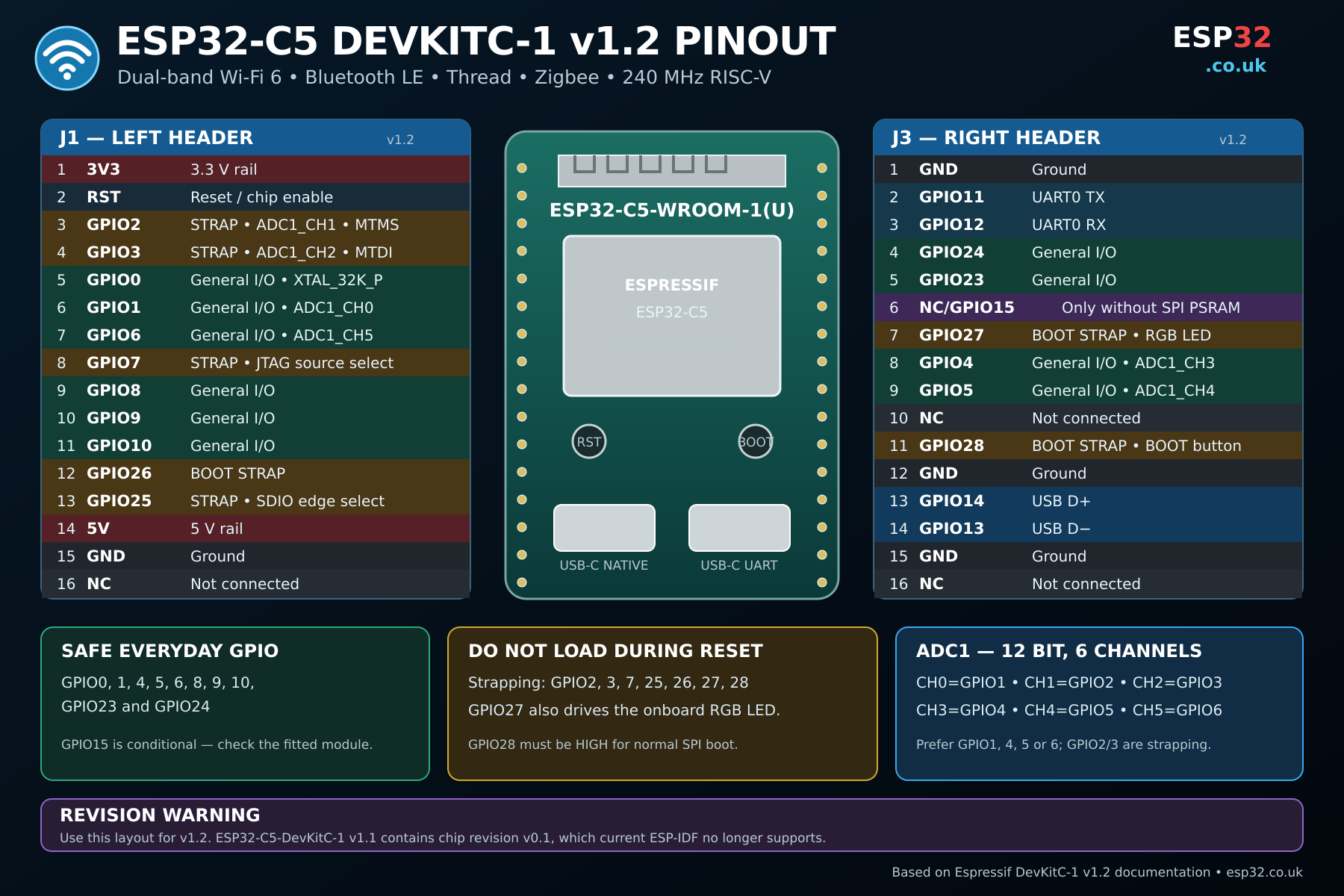
ESP32-C5 DevKitC-1 v1.2 pinout diagram
The colour-coded diagram separates everyday GPIOs from boot-strapping pins, native USB, UART0, power pins, and the module-dependent GPIO15 position. Check the board revision printed on your PCB before wiring from any pinout.
J1 and J3 header pinout
The tables below follow Espressif’s current v1.2 board documentation. “NC” means not connected on this board revision.
J1 left header
| J1 pin | Board label | Main function |
|---|---|---|
| 1 | 3V3 | 3.3 V rail |
| 2 | RST | Reset / chip enable |
| 3 | GPIO2 | MTMS, ADC1_CH1, strapping pin |
| 4 | GPIO3 | MTDI, ADC1_CH2, strapping pin |
| 5 | GPIO0 | General I/O, XTAL_32K_P |
| 6 | GPIO1 | General I/O, ADC1_CH0 |
| 7 | GPIO6 | General I/O, ADC1_CH5 |
| 8 | GPIO7 | Strapping pin, JTAG source selection |
| 9 | GPIO8 | General I/O |
| 10 | GPIO9 | General I/O |
| 11 | GPIO10 | General I/O |
| 12 | GPIO26 | Boot-related strapping pin |
| 13 | GPIO25 | Strapping pin, SDIO edge selection |
| 14 | 5V | 5 V rail |
| 15 | GND | Ground |
| 16 | NC | Not connected |
J3 right header
| J3 pin | Board label | Main function |
|---|---|---|
| 1 | GND | Ground |
| 2 | GPIO11 | UART0 TX |
| 3 | GPIO12 | UART0 RX |
| 4 | GPIO24 | General I/O |
| 5 | GPIO23 | General I/O |
| 6 | NC / GPIO15 | GPIO15 only without SPI PSRAM |
| 7 | GPIO27 | Strapping pin and onboard RGB LED |
| 8 | GPIO4 | General I/O, ADC1_CH3 |
| 9 | GPIO5 | General I/O, ADC1_CH4 |
| 10 | NC | Not connected |
| 11 | GPIO28 | Boot strapping pin and BOOT button |
| 12 | GND | Ground |
| 13 | GPIO14 | USB D+ |
| 14 | GPIO13 | USB D− |
| 15 | GND | Ground |
| 16 | NC | Not connected |
Safe GPIOs for general use
The most convenient pins for buttons, LEDs, logic-level relays, digital sensors, and similar projects are:
- GPIO0, GPIO1, GPIO4, GPIO5, and GPIO6
- GPIO8, GPIO9, and GPIO10
- GPIO23 and GPIO24
These are recommendations inferred from the published board and chip functions: they are broken out, are not listed as strapping pins, and do not carry the board’s default USB, UART0, or RGB LED jobs. Always check what your firmware and attached module require before committing a PCB.
GPIO15 belongs in a conditional category, not the safe list. It is available on J3 only with a non-PSRAM module. Check the module marking and Espressif’s board documentation rather than assuming every v1.2 DevKitC-1 exposes it.
Pins that need extra care
| Pins | Why they need care |
|---|---|
| GPIO2, GPIO3, GPIO7 | Configuration strapping pins sampled at reset |
| GPIO25, GPIO26, GPIO27, GPIO28 | Strapping pins; GPIO26/27/28 are involved in boot mode |
| GPIO13, GPIO14 | Native USB D− and D+ |
| GPIO11, GPIO12 | Default UART0 TX and RX |
| GPIO27 | Also drives the onboard addressable RGB LED |
| GPIO15 | Only exposed when the module has no SPI PSRAM |
“Caution” does not mean a pin is unusable. It means the external circuit must respect the pin’s job during startup, or that using it may disable a board feature you still need.
Strapping pins and boot behaviour
The ESP32-C5AliExpress price strapping pins are GPIO25, GPIO26, GPIO27, GPIO28, GPIO7, MTMS, and MTDI. On the DevKitC-1, MTMS and MTDI appear on the headers as GPIO2 and GPIO3. Their levels are sampled during reset and then the pins can normally be used as GPIOs.
Boot mode is controlled by GPIO26, GPIO27, and GPIO28, and normal SPI boot requires GPIO28 to be high at reset. Avoid switches, relays, and peripherals that strongly pull any strapping pin to the wrong level during power-up. If a board boots only after you disconnect a peripheral, inspect these pins first.
ADC pinout
The ESP32-C5AliExpress price has one 12-bit SAR ADC with six channels. All six reach the v1.2 headers:
| ADC channel | GPIO | Practical note |
|---|---|---|
| ADC1_CH0 | GPIO1 | Preferred general analogue input |
| ADC1_CH1 | GPIO2 | Also a strapping pin |
| ADC1_CH2 | GPIO3 | Also a strapping pin |
| ADC1_CH3 | GPIO4 | Preferred general analogue input |
| ADC1_CH4 | GPIO5 | Preferred general analogue input |
| ADC1_CH5 | GPIO6 | Preferred general analogue input |
For a new design, GPIO1, GPIO4, GPIO5, or GPIO6 are the least awkward ADC choices because GPIO2 and GPIO3 are sampled as strapping pins. Never apply more than the permitted 3.3 V-domain input to an ESP32-C5 GPIO; use an appropriate divider or analogue front end for higher-voltage signals.
USB and UART pins
Native USB port
The board’s native USB-C connector is wired to GPIO14 (USB D+) and GPIO13 (USB D−). It supports USB 2.0 full-speed operation up to 12 Mbps and can be used for flashing, USB communication, and debugging workflows. Keep GPIO13 and GPIO14 free if you need that port.
USB-to-UART port and UART0
The second USB-C connector goes through the board’s USB-to-UART bridge, which Espressif rates up to 3 Mbps. The header’s default UART0 signals are GPIO11 (U0TXD) and GPIO12 (U0RXD). They remain usable GPIOs when the console is not required, but keeping them free makes serial logging and troubleshooting easier.
Onboard RGB LED
The addressable RGB LED is driven by GPIO27. GPIO27 is also a strapping pin, so it is a poor default choice for another peripheral. Firmware that changes this pin may also light or flicker the onboard LED.
Suggested I2C, SPI, and UART pins
BME280 I²C pin-to-pin wiring (v1.2)
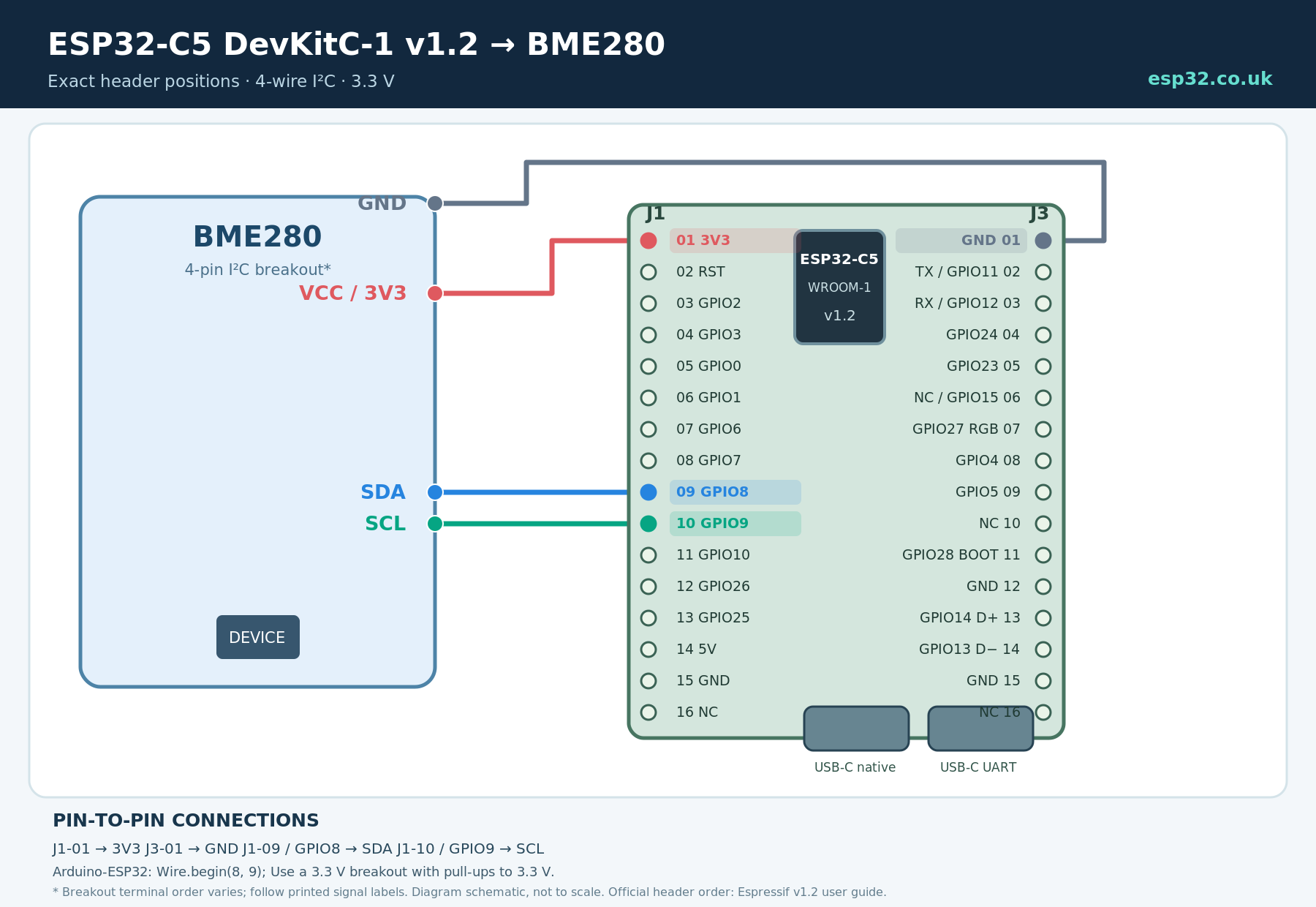
Use a 3.3 V-compatible, four-pin BME280 breakout. On the DevKitC-1 v1.2, wire J1 pin 1 (3V3) → VCC, J3 pin 1 (GND) → GND, J1 pin 9 (GPIO8) → SDA and J1 pin 10 (GPIO9) → SCL. These I²C signals are an explicit GPIO-matrix mapping, not a universal default. Pull SDA and SCL up to 3.3 V, typically using the resistors already fitted to a sensor breakout. Follow the sensor’s printed terminal labels because different BME280 modules have different terminal orders.
#include <Wire.h>

void setup() {
  Serial.begin(115200);
  Wire.begin(8, 9); // SDA GPIO8, SCL GPIO9
}

void loop() {
  // Initialize and read your BME280 sensor library here.
}
SPI module pin-to-pin wiring (v1.2)
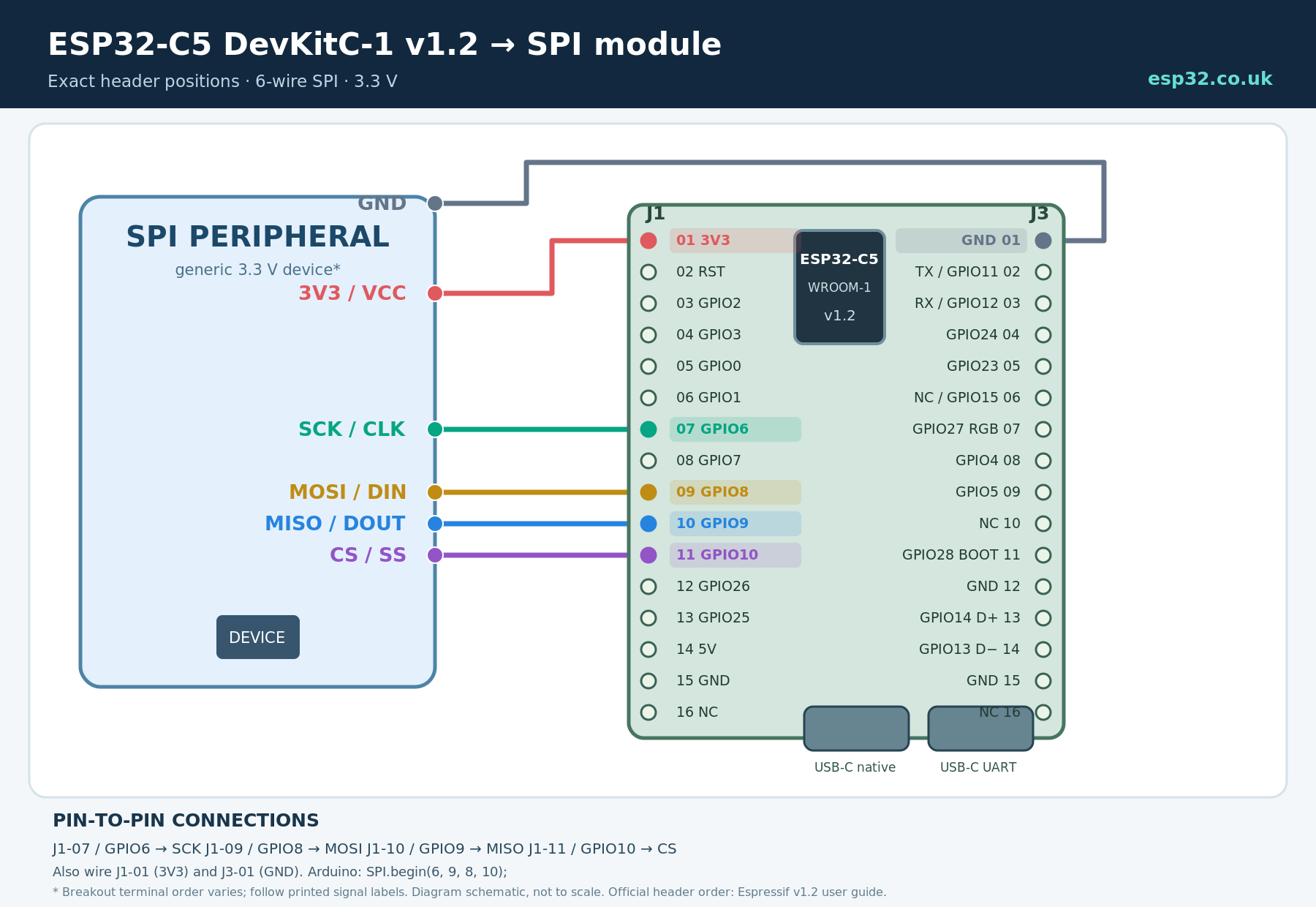
For a 3.3 V SPI peripheral, wire J1 pin 1 (3V3) → VCC, J3 pin 1 (GND) → GND, J1 pin 7 (GPIO6) → SCK, J1 pin 9 (GPIO8) → MOSI/DIN, J1 pin 10 (GPIO9) → MISO/DOUT, and J1 pin 11 (GPIO10) → CS/SS. The GPIO8 and GPIO9 signals are routed through the GPIO matrix; they are not the direct IO_MUX SPI pins. MISO goes from the peripheral’s output to the ESP32-C5 input. Do not assume 5 V-compatible power or logic unless your module specifically provides level shifting.
#include <SPI.h>

const int SPI_CS = 10;

void setup() {
  SPI.begin(6, 9, 8, SPI_CS); // SCK, MISO, MOSI, SS
  pinMode(SPI_CS, OUTPUT);
  digitalWrite(SPI_CS, HIGH); // deselect the peripheral
}
Hardware note: the wiring assignments above describe the official v1.2 header layout, not the older v1.1 board. Examples are pin-mapping references, not bench-verified complete peripheral projects. Check Espressif’s official v1.2 header documentation before wiring.
The GPIO matrix allows peripheral signals to be routed to different pins, so these are practical example mappings rather than fixed hardware defaults:
| Interface | Suggested pins | Why |
|---|---|---|
| I2C | SDA GPIO8, SCL GPIO9 | Both are free of the main board-level caveats |
| Alternative I2C | SDA GPIO23, SCL GPIO24 | Convenient adjacent safe pins |
| SPI example | SCK GPIO6, MOSI GPIO8, MISO GPIO9, CS GPIO10 | Avoids native USB, UART0, and strapping pins |
| Peripheral UART | TX GPIO23, RX GPIO24 | Leaves UART0 GPIO11/12 free for logs |
Confirm the pin routing supported by your framework and peripheral driver. A library may ship with different defaults even though the chip can route the signal elsewhere.
Power pins and voltage limits
The board exposes 5V, 3V3, and several GND pins. Its GPIOs use 3.3 V logic and are not 5 V tolerant. A sensor can be powered from the 5 V rail only when its output signals are safe for the ESP32-C5 or are level shifted.
Espressif lists three board power methods: the USB-to-UART port, the native USB port, or the 5V/GND or 3V3/GND header pins. These power options are mutually exclusive; use only one at a time.
ESP32-C5 DevKitC-1 v1.2 versus v1.1
The v1.2 guide states that boards with PW number PW-2025-04-0446 and later use the updated J1 and J3 functions shown here. Older online diagrams may therefore disagree with a current board.
The older v1.1 board contains ESP32-C5 chip revision v0.1. Espressif says current ESP-IDF releases no longer support that silicon revision; the archived v1.1 documentation points to the last supported ESP-IDF commit. For a new project, choose v1.2 rather than v1.1.
Also check the fitted module. On v1.2, J3 pin 6 is labelled NC/GPIO15 because GPIO15 is unavailable when the module uses SPI PSRAM. Board revision alone does not make GPIO15 safe or available.
If you are buying or documenting the board, look specifically for the ESP32-C5-DevKitC-1 v1.2 marking and compare the printed header labels with this pinout before connecting hardware.
Complete safe GPIO summary
| GPIO | Category | Main caveat or function |
|---|---|---|
| GPIO0 | Preferred | General I/O |
| GPIO1 | Preferred | ADC1_CH0 |
| GPIO2 | Caution | Strapping, MTMS, ADC1_CH1 |
| GPIO3 | Caution | Strapping, MTDI, ADC1_CH2 |
| GPIO4 | Preferred | ADC1_CH3 |
| GPIO5 | Preferred | ADC1_CH4 |
| GPIO6 | Preferred | ADC1_CH5 |
| GPIO7 | Caution | Strapping pin |
| GPIO8 | Preferred | General I/O |
| GPIO9 | Preferred | General I/O |
| GPIO10 | Preferred | General I/O |
| GPIO11 | Usable | UART0 TX |
| GPIO12 | Usable | UART0 RX |
| GPIO13 | Caution | USB D− |
| GPIO14 | Caution | USB D+ |
| GPIO15 | Conditional | Only without SPI PSRAM |
| GPIO23 | Preferred | General I/O |
| GPIO24 | Preferred | General I/O |
| GPIO25 | Caution | Strapping pin |
| GPIO26 | Caution | Boot-related strapping pin |
| GPIO27 | Caution | Strapping pin and RGB LED |
| GPIO28 | Caution | Boot strapping pin and BOOT button |
Frequently asked questions
Does ESP32-C5 support 5 GHz Wi-Fi?
Yes. ESP32-C5 supports Wi-Fi 6 in both the 2.4 GHz and 5 GHz bands. It also supports Bluetooth LE, Zigbee, and Thread; those radio capabilities are one of the main reasons to choose it over older ESP32 boards.
Is GPIO15 available on every v1.2 board?
No. GPIO15 is exposed only when the fitted module does not use SPI PSRAM. With SPI PSRAM, GPIO15 is used for SPICS1 and J3 pin 6 is not available as general I/O.
Which pins are best for analogue sensors?
Start with GPIO1, GPIO4, GPIO5, or GPIO6. They map to ADC1_CH0, CH3, CH4, and CH5 without the reset-time strapping caveat attached to ADC pins GPIO2 and GPIO3.
Where is the official schematic?
Use Espressif’s ESP32-C5-DevKitC-1 v1.2 user guide, v1.2 schematic, and ESP32-C5 datasheet. Owners of an early board should also check the archived v1.1 guide.
Final recommendation
For most projects, use GPIO0, GPIO1, GPIO4, GPIO5, GPIO6, GPIO8, GPIO9, GPIO10, GPIO23, or GPIO24 first. Use GPIO15 only after confirming the module has no SPI PSRAM. Reserve GPIO13/14 for native USB and GPIO11/12 for UART0 when you need those interfaces, and avoid loading the seven strapping pins during reset. Most importantly, verify that your board is v1.2 before following this header layout.