
The MCP4725 breakout board turns digital commands from an ESP32AliExpress price into a real analogue output voltage. Unlike PWM, the output is held by a 12-bit digital-to-analogue converter (DAC), making it useful for adjustable reference voltages, instrumentation setpoints, calibration circuits and slowly changing waveforms. This hardware guide covers the board pinout, schematic, solderAliExpress price address configuration, safe 3.3 V ESP32AliExpress price wiring, and a compact Arduino example using the official Adafruit MCP4725 library.
Quick answer: on an Adafruit MCP4725 #935 breakout, connect VIN to the ESP32 3V3, GND to ground, SDA to GPIO21 and SCL to GPIO22 (classic ESP32 DevKit example). Measure VOUT relative to GND. The Adafruit default address is 0x62; connect A0 high or bridge the rear address pads to use 0x63. Always confirm the board variant: SparkFun Qwiic MCP4725 modules normally use 0x60 or 0x61 instead.
Electrical warning: when powered at 3.3 V, the MCP4725 can only produce a voltage near 0–3.3 V. It cannot output 5 V or 10 V without additional appropriate analogue circuitry. It is a small-signal voltage output, not a power supply or a motor driver.
MCP4725 specifications at a glance
| Feature | Specification / implication |
|---|---|
| DAC resolution | 12-bit single channel: digital codes from 0 to 4095 |
| Nominal output range | Ground to just below VDD, referenced to the actual supply voltage |
| Chip operating supply | 2.7–5.5 V; 3.3 V is suitable for ESP32 direct logic |
| Digital interface | I²C: 100 kHz / 400 kHz; chip supports 3.4 MHz high-speed mode when the master and design support it |
| Address selection | One external A0 bit; other address bits are fixed by the manufactured chip ordering variant |
| Adafruit #935 address | Usually 0x62 with A0 low; 0x63 with A0 high |
| SparkFun Qwiic address | Commonly 0x60 by default; 0x61 with its address jumper changed |
| Output settling | About 6 µs typical for the datasheet test step, not a guarantee for any waveform or load |
| Nonvolatile memory | Built-in EEPROM can store power-on DAC code and power state |
| Reference | VDD is the DAC reference; noisy or drifting supply directly changes output |
| Power-down | Chip supports several power-down modes; ordinary library example uses normal operation |
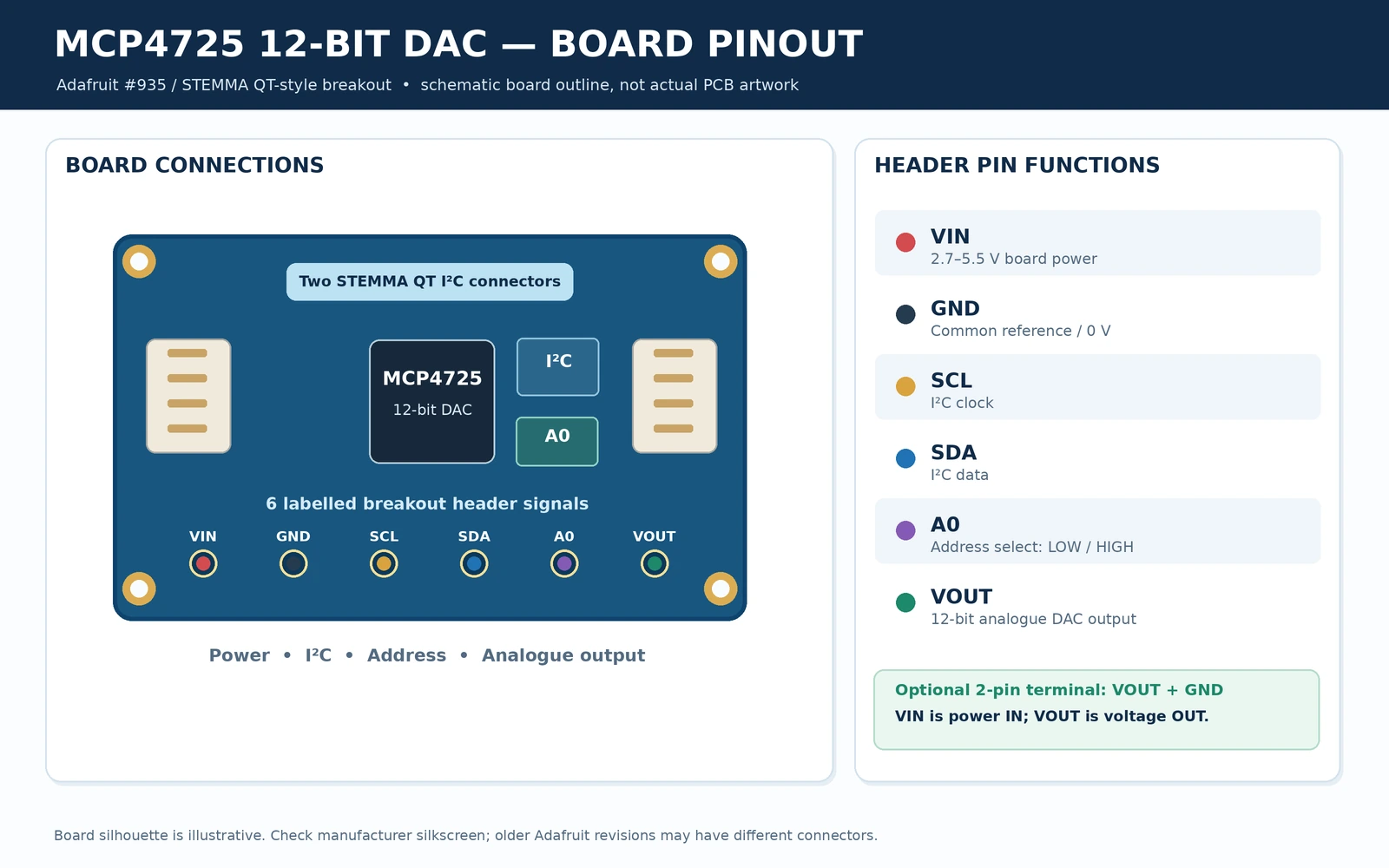
The Microchip MCP4725 is a six-pin IC. The breakout makes wiring easier by bringing out its six connections, adding I²C pull-ups or level shifting where the particular board implements them, and sometimes providing STEMMA QT/Qwiic connectors. The bare chip datasheet and the physical module schematic are not interchangeable.
Adafruit MCP4725 board layout and pinout
The modern Adafruit #935 reference board identifies a six-pin header with VIN, GND, SCL, SDA, A0 and VOUT. Older versions use VDD for the supply pin, whereas newer versions may use VIN; check the silk-screen on the exact board in front of you.
| Board label | Description | Recommended connection |
|---|---|---|
| VIN / VDD | Chip/breakout supply; also sets the DAC full-scale reference | ESP32 3V3 for a 0–3.3 V DAC |
| GND | Power and DAC-output measurement reference | ESP32 GND; multimeter negative lead |
| SCL | I²C clock | Classic ESP32 GPIO22 |
| SDA | I²C bidirectional data | Classic ESP32 GPIO21 |
| A0 / ADDR | External address select, low or high | Leave as default for 0x62 on Adafruit; connect high/bridge to select 0x63 |
| VOUT | Analogue output voltage | DMM positive lead or high-impedance ADC/reference load |
| STEMMA QT connectors | Optional 4-wire power/I²C board-to-board connection on newer revisions | 3.3 V, GND, SDA, SCL only; VOUT and A0 need their own header/terminal |
Some boards provide an optional two-way screw-terminal footprint for VOUT and GND. The physical order of that terminal is different from the six-pin header, so follow the PCB labels. Adafruit documents a 10 kΩ I²C pull-up and level-shifted logic on current boards. A cheap generic MCP4725 module may omit those features, even if it looks similar.
Bare-chip SOT-23-6 pinout (not the breakout header order)
| IC pin | MCP4725 SOT-23 signal |
|---|---|
| 1 | VOUT |
| 2 | VSS / GND |
| 3 | VDD |
| 4 | SDA |
| 5 | SCL |
| 6 | A0 |
Microchip also supplies a six-lead DFN package with a different physical pin-number arrangement. Use the package-type diagram from the datasheet, not the SOT-23 pin table above, when laying out a custom PCB.
How to change the MCP4725 I²C address
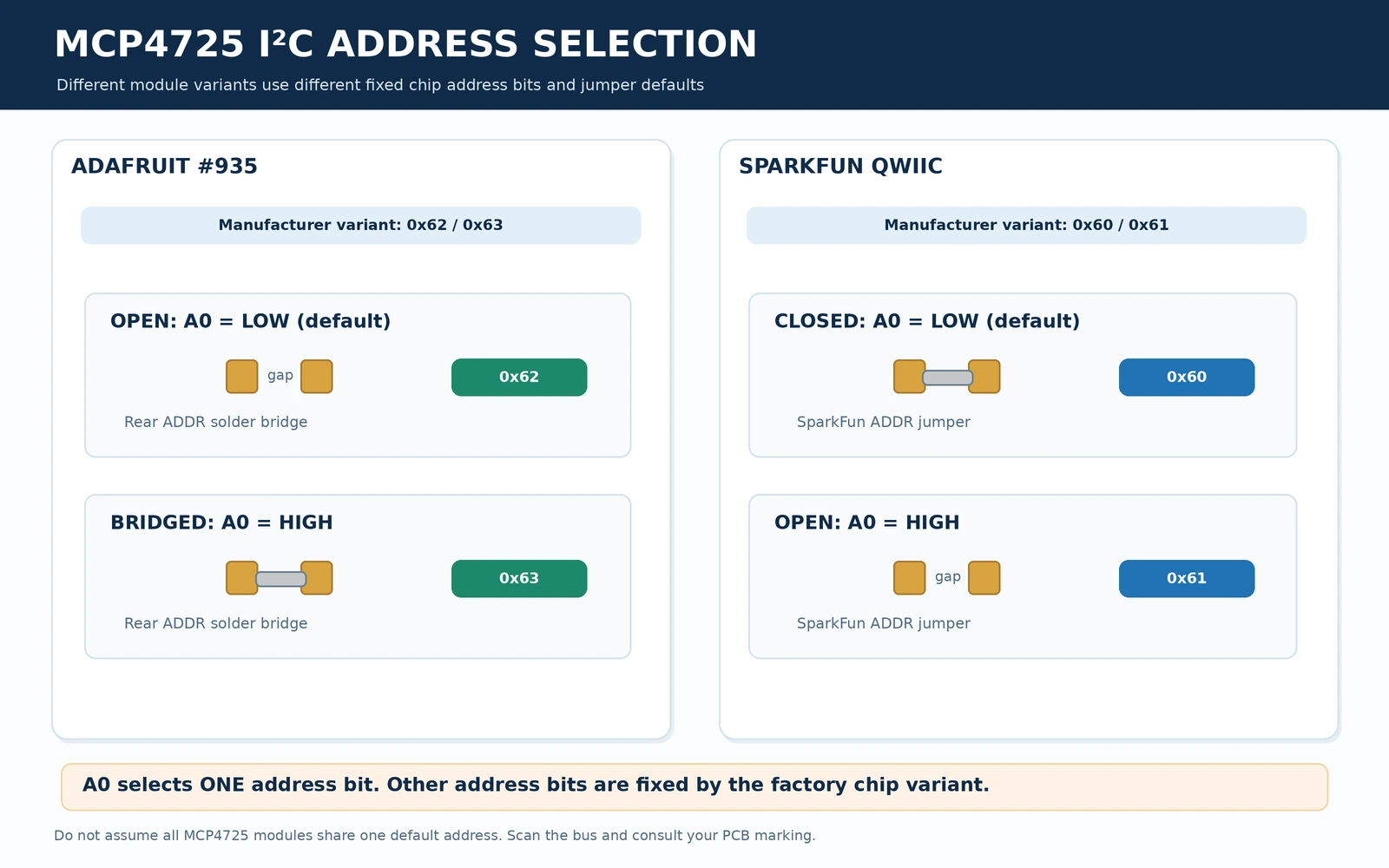
The address details are unusually easy to get wrong because tutorials for two well-known breakout manufacturers show different numbers. The MCP4725 chip implements one user-configurable address bit, A0; two more address bits are set by the factory-programmed chip variant. You cannot turn an Adafruit 0x62/0x63 chip into a 0x60/0x61 chip just by moving its A0 jumper.
| Board / chip variant | A0 low / default | A0 high / changed | Physical adjustment |
|---|---|---|---|
| Adafruit MCP4725 #935 | 0x62 | 0x63 | Close rear ADDR solder bridge or connect A0 to VIN, per revision |
| SparkFun Qwiic MCP4725 | 0x60 | 0x61 | SparkFun ADDR jumper: factory connection to ground; change jumper as documented |
| Other MCP4725 modules | Variant-dependent | Variant-dependent + 1 | Inspect the actual chip variant, address wiring and I²C scan |
The complete family of manufactured MCP4725 variants can occupy eight 7-bit addresses, but each individual chip exposes just two of them through its A0 input. If an I²C scanner reports 0x60 while your example expects 0x62, first verify the module rather than forcing an arbitrary address in software.
How to verify the address before uploading the DAC sketch
Run an ESP32 I²C scanner at 100 kHz with the module correctly powered. A single MCP4725 should normally appear at either of the expected board-specific addresses. If not, check supply, SDA/SCL orientation, actual ESP32 pins, pull-ups, and whether the board exposes an A0 pad or a solder jumper. For a complete scanner see the ESP32 I²C scanner guide.
Functional schematic: DAC, supply reference and I²C
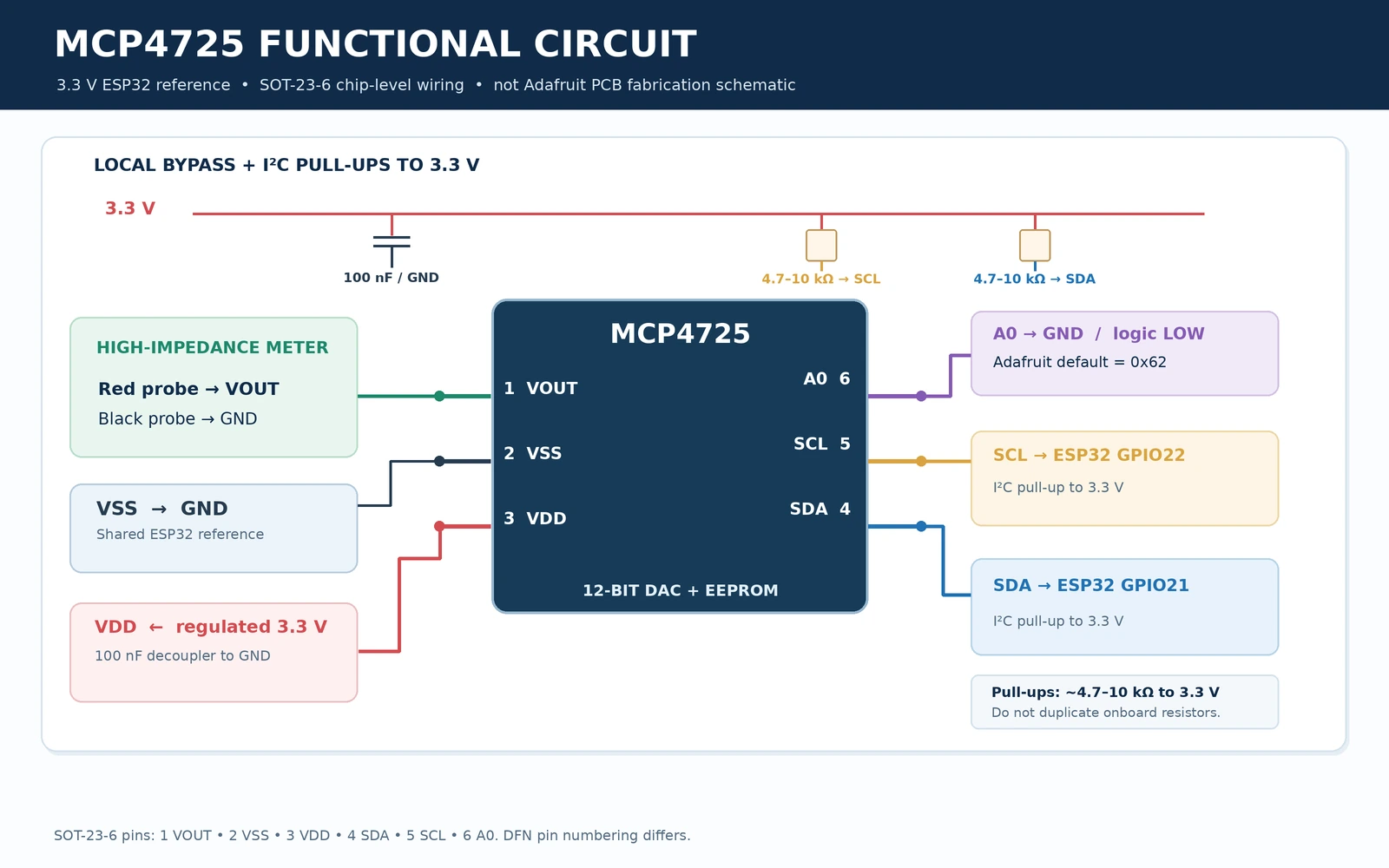
At chip level, VDD both powers the MCP4725 and acts as the analogue reference. A 100 nF decoupling capacitor placed close to VDD/VSS is a standard part of a custom-board design. The I²C lines need pull-ups to a suitable logic voltage; many ready-made boards include them. Do not blindly add more pull-ups to a bus already fitted with several modules.
The DAC uses an internal resistor-string architecture and a buffered amplifier. Under appropriate loads, its output is approximately VOUT = VDD × code / 4096. A change in supply voltage affects the output even if the software code stays constant. For instrument-grade setpoints, use a regulated, measured 3.3 V supply and calibrate for supply error and actual load conditions.
The output is specified for limited loads and is not designed to directly power a motor, relay, heating element, or strong capacitive load. If your application needs 0–5 V or 0–10 V from a 3.3 V ESP32, use a verified, separately supplied amplifier or industrial output stage with appropriate offset, gain, protection, and supply headroom.
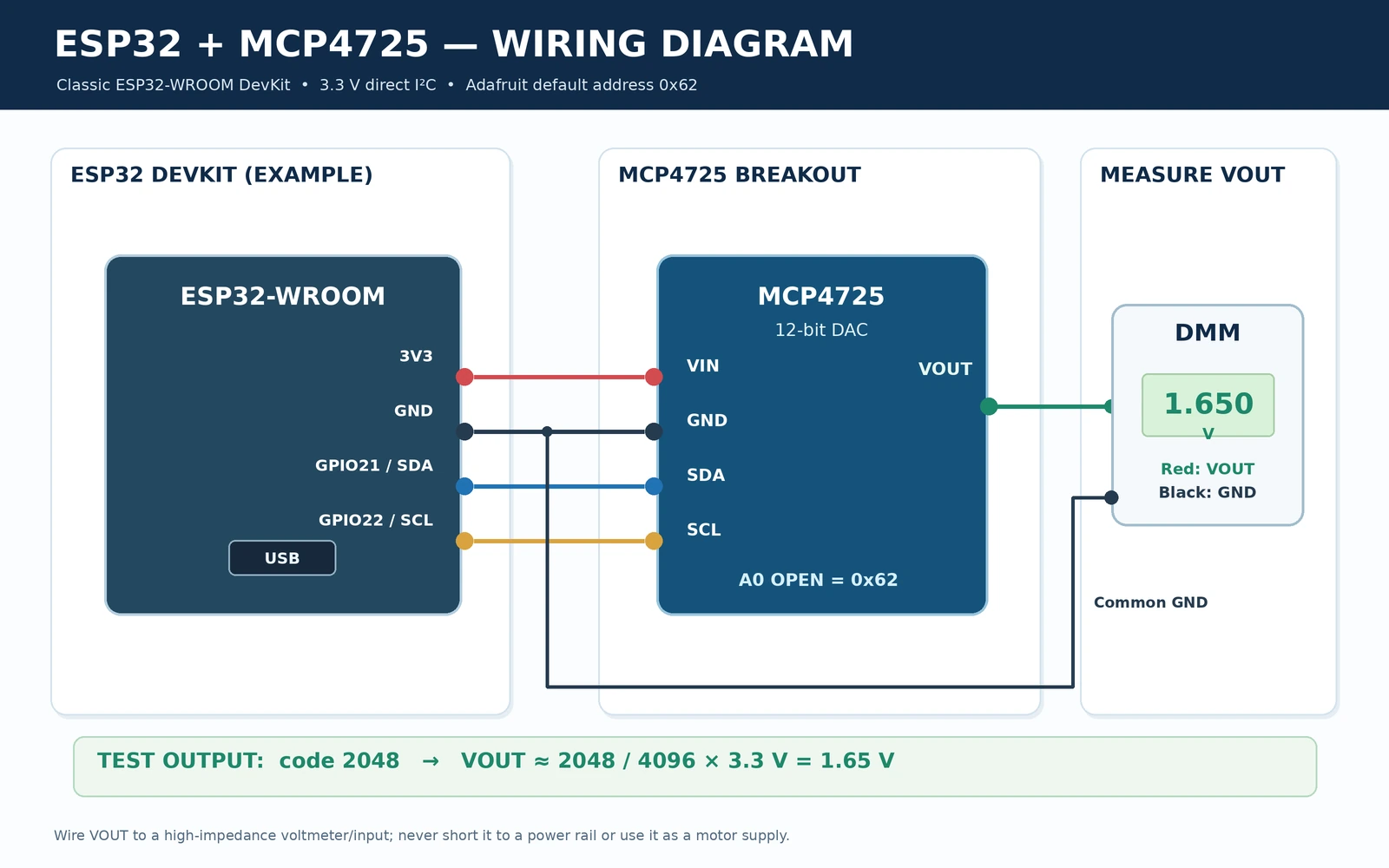
ESP32 to MCP4725 wiring diagram
| Classic ESP32 DevKit | Adafruit MCP4725 | Function |
|---|---|---|
| 3V3 | VIN / VDD | 3.3 V supply and analogue reference |
| GND | GND | Shared signal/reference ground |
| GPIO21 | SDA | I²C data |
| GPIO22 | SCL | I²C clock |
| Not connected | A0 | Keep Adafruit default address 0x62 |
| DMM positive probe | VOUT | Measure analogue voltage |
| DMM negative probe | GND | Complete the voltage measurement |
GPIO21/GPIO22 are an explicit example for many original ESP32-WROOM DevKit boards. ESP32-C3, S3 and C6 boards have different pinout choices: assign valid I²C pins for the board you actually use and update Wire.begin(SDA_PIN, SCL_PIN). I²C is shared between devices; VOUT is a separate analogue signal, not a third I²C connection.
First test with a digital multimeter
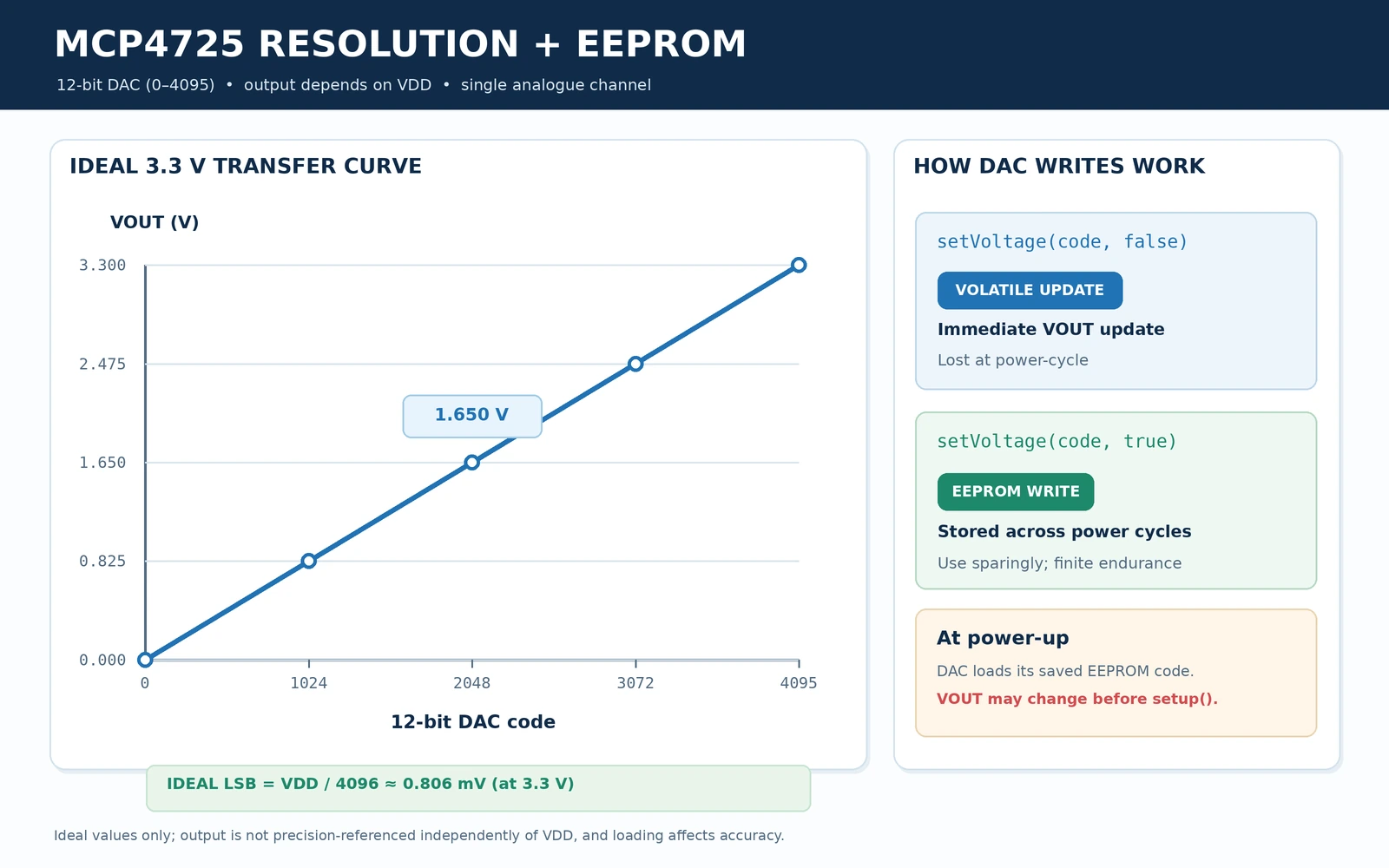
Use a high-impedance DC voltmeter and start with the DAC at code zero, then set code 2048. With a stable 3.3 V supply, expect approximately 1.65 V, allowing for ADC/DAC nonidealities and supply tolerance. Code 4095 approaches—but cannot mathematically equal—full-scale VDD. Do not connect a speaker directly as the test load; the DAC is not a speaker amplifier.
Arduino IDE example: Adafruit MCP4725 library
Install Adafruit MCP4725 from Arduino IDE Library Manager, including Adafruit BusIO if prompted. This example uses the official Adafruit MCP4725 library. The current library exposes begin(address, &Wire) and setVoltage(value, writeEEPROM). We use writeEEPROM=false for routine voltage changes to avoid writing flash-like nonvolatile storage in a continuous loop.
#include <Arduino.h>
#include <Wire.h>
#include <Adafruit_MCP4725.h>

constexpr int SDA_PIN = 21;     // Classic ESP32-WROOM DevKit
constexpr int SCL_PIN = 22;
constexpr uint8_t DAC_ADDRESS = 0x62; // Adafruit default
constexpr float DAC_VDD = 3.30f;      // Measure actual supply for accuracy

Adafruit_MCP4725 dac;

uint16_t voltsToCode(float volts) {
  if (volts < 0.0f) volts = 0.0f;
  if (volts > DAC_VDD) volts = DAC_VDD;
  uint32_t value = uint32_t((volts / DAC_VDD) * 4096.0f + 0.5f);
  return uint16_t(value > 4095 ? 4095 : value);
}

void setOutputVolts(float volts) {
  uint16_t code = voltsToCode(volts);
  // false = DAC register ONLY. Do not wear EEPROM every loop.
  if (!dac.setVoltage(code, false)) {
    Serial.println("MCP4725 I2C write failed");
    return;
  }
  Serial.printf("DAC code %u, target %.3f V (assuming %.3f V VDD)\n",
                code, code * (DAC_VDD / 4096.0f), DAC_VDD);
}

void setup() {
  Serial.begin(115200);
  delay(500);
  Wire.begin(SDA_PIN, SCL_PIN);
  Wire.setClock(100000); // Start conservatively

  if (!dac.begin(DAC_ADDRESS, &Wire)) {
    Serial.println("MCP4725 not detected: check wiring and I2C address");
    while (true) delay(1000);
  }

  Serial.println("MCP4725 connected");
  setOutputVolts(0.0f);  // Start at zero
}

void loop() {
  setOutputVolts(0.50f);
  delay(2000);
  setOutputVolts(1.65f);
  delay(2000);
  setOutputVolts(2.50f);
  delay(2000);
}
A serial log such as DAC code 2048, target 1.650 V represents the commanded value, not a voltage independently measured by the ESP32. Compare it with a DMM at VOUT; for more precision, adjust DAC_VDD to your measured supply. The source code is checked against the published API but has not been bench-tested on your own breakout.
How to save a power-on voltage to EEPROM
The MCP4725 can load its last stored DAC setting from EEPROM at power-up. This is useful for a known analogue bias or calibration level after reset, but it has two consequences: a previously stored voltage may appear before your ESP32 has started executing its setup routine; and EEPROM has a finite number of erase/program cycles. Do not call EEPROM writes in every measurement or waveform loop.
// Perform ONCE when the operator intentionally saves a default.
// 2048 is nominal mid-scale: ~1.65 V with VDD=3.3 V.
if (dac.setVoltage(2048, true)) {
  Serial.println("EEPROM write command accepted");
}
// Do NOT put writeEEPROM=true in a continuously repeating loop.
The Microchip datasheet gives an EEPROM write time of up to approximately 50 ms, and specifies EEPROM endurance and programming behavior. The Adafruit guide advises conservative usage. For repeated updates, use the volatile DAC register (false); store settings only in a deliberate configuration action. Verify the stored voltage is safe for connected actuators or reference circuits at every power-up.
12-bit DAC resolution and expected voltages
At 3.3 V nominal, one code step is 3.3 / 4096 ≈ 0.806 mV. Increasing the digital code by one adds approximately that amount to the ideal output, although actual accuracy depends on INL, offset, gain, noise, temperature, supply regulation, and load. Twelve-bit resolution does not mean every reading is accurate to 0.806 mV.
| DAC code | Ideal output if VDD = 3.300 V | Typical use |
|---|---|---|
| 0 | 0.000 V | Output minimum (subject to offset/load) |
| 512 | 0.413 V | 12.5% of full scale |
| 1024 | 0.825 V | 25% of full scale |
| 2048 | 1.650 V | Mid-scale test point |
| 3072 | 2.475 V | 75% of full scale |
| 4095 | 3.299 V | Maximum code, one LSB below VDD |
How fast can the DAC update?
The MCP4725 supports standard, fast and high-speed I²C modes, but actual output-update speed depends on the transfer command, controller, pull-up resistance, bus capacitance and Arduino library behavior. The quoted 6 µs typical settling time is not the end-to-end time to transmit a new sample over I²C. In particular, producing high-quality stereo or high-frequency audio is not a straightforward use of this single-channel I²C DAC; use a suitable dedicated audio DAC or I²S solution where audio quality and sample rates matter.
Troubleshooting MCP4725 with ESP32
| Problem | Likely cause and correction |
|---|---|
| Nothing found at 0x62 | Check I²C scan, VIN/GND, SDA/SCL orientation; your board may be SparkFun 0x60 or have A0 high. |
| DAC output never changes | Check VOUT instead of A0; measure against GND, verify setVoltage() success and that the load is not forcing the output. |
| Output is always about 0 V | Wrong I²C address, DAC not initialised, ground short, or chip in power-down; inspect wiring and code. |
| Output is closer to 3.0 V than 3.3 V at maximum | Measure actual VIN/VDD and check output load, meter calibration and module regulator voltage. |
| Output drifts with USB supply | VDD is the DAC reference; use regulated power and proper analogue ground/reference layout. |
| Voltage on power-up is unexpected | The last stored EEPROM code may load before microcontroller software runs; save a safe known setting. |
| Module becomes unreliable after continuous saves | Avoid EEPROM writes in a loop. Use setVoltage(code,false) for frequent changes. |
| Trying to output 0–10 V | A DAC powered at 3.3 V cannot produce 10 V; design an external qualified amplifier with its own supply. |
| Waveform is distorted or slow | I²C transaction rate, library overhead, output-drive and load limitations; use a scope and a proper waveform generator design. |
MCP4725 versus PCF8591, ADS1115 and ESP32 PWM
MCP4725 is a 12-bit DAC only, useful when you need finer analogue output resolution. The PCF8591 YL-40 has both ADC and DAC functionality but only 8-bit resolution. The ADS1115 is a precision-oriented ADC, not an analogue-output DAC. ESP32 PWM plus an RC filter can create an approximate low-frequency analogue signal, but ripple, filtering latency, frequency interactions and load effects are not the same as a true DAC output.
An MCP4725 also differs from a PCA9685 servo board: the PCA9685 outputs pulse-width-modulated digital signals, while MCP4725 directly provides a programmed analogue voltage. Where an analogue signal controls another circuit, confirm that its voltage input impedance, reference ground and required fault behavior are compatible with the DAC.
Frequently asked questions
Why does one MCP4725 use 0x60 and another use 0x62?
The manufactured MCP4725 variant sets some address bits. The A0 pin changes one bit on that individual chip; it does not let every board choose all eight family addresses. Check the actual board and its reference documentation.
Can MCP4725 produce a negative voltage?
No. With ordinary single-supply wiring it outputs from near ground to near its positive reference/supply. Bipolar or negative-voltage signals require a separate properly designed analogue stage.
Can I read an external sensor voltage with an MCP4725?
No. MCP4725 is a DAC, which creates an output voltage. For measuring an analogue input use the ESP32 ADC or an external ADC such as ADS1115.
Does the MCP4725 retain its last output after turning off power?
It retains the last value deliberately written into EEPROM, not necessarily every temporary DAC register update. The output may revert to that stored setting on the next power-up.
Should I connect the DAC to a 5 V device?
Only if the target input accepts a voltage within the DAC’s actual output range, the grounds are compatible, and no external voltage can feed back into VOUT. A 3.3 V DAC is not inherently a 5 V signal generator.
References
- Adafruit MCP4725 breakout pinouts — six connections, Adafruit A0 solder jumper and 0x62/0x63 addresses.
- Adafruit Arduino MCP4725 example — setVoltage and EEPROM write flag.
- SparkFun Qwiic DAC hardware guide — 0x60/0x61 and its three jumper functions.
- Microchip MCP4725 datasheet DS20002039E — supply, package pins, output and EEPROM data.
- Adafruit MCP4725 library source — API and dependencies.
Board-revision note: Photographs and solder-jumper arrangements vary between the Adafruit STEMMA QT revision, earlier Adafruit boards, SparkFun Qwiic breakouts, and generic modules. The schematic and forthcoming diagrams are verified functional references, not unsupported reproductions of any manufacturer’s PCB copper traces.