
The SHT31AliExpress price is a calibrated digital temperature and relative-humidity sensorAliExpress price from Sensirion. It communicates with an ESP32AliExpress price over I²C, has two selectable addresses, and is commonly sold on both Adafruit STEMMA QT boards and inexpensive four-pin or six-pin modules. If you need the SHT31 pinout, I²C address setting, ESP32 wiring, circuit schematic and Arduino code in one place, this board-level reference covers the details that matter before you connect power.
Quick wiring: on a classic ESP32-WROOM DevKit connect 3V3 → SHT31 Vin/VCC, GND → GND, GPIO21 → SDA and GPIO22 → SCL. The usual default 7-bit address is 0x44; pull the SHT31 ADR/ADDR input high to its own supply voltage for 0x45. The Adafruit board exposes ADR as a header pin, while some other breakout designs provide a labelled address solder bridge or pull-up option instead. Do not assume every SHT31 PCB has the same jumper arrangement.
The SHT31 is a temperature and humidity device, not a pressure sensor or a gas/CO₂ meter. The sensor chip itself is specified over 2.15–5.5 V, but for direct ESP32 connection a 3.3 V breakout supply avoids 5 V being pulled onto ESP32 SDA/SCL. The internal heater is intended for limited condensation-management operations, not continuous normal measurement.
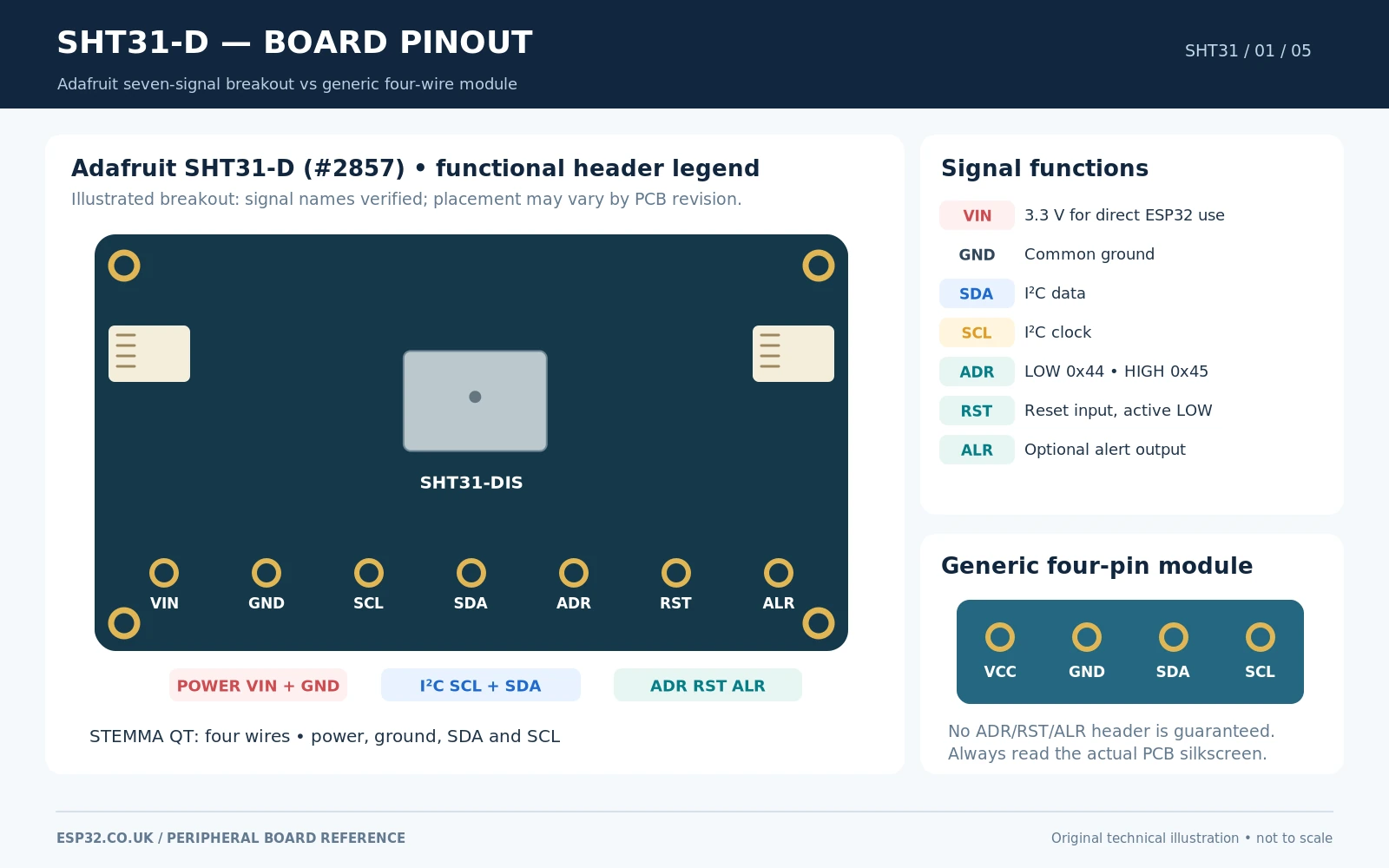
SHT31 features and electrical specifications
| Feature | SHT31 information and practical meaning |
|---|---|
| Measured quantities | Temperature (°C) and relative humidity (%RH), factory calibrated |
| Typical humidity accuracy | ±2 %RH under specified operating conditions; not a ±2% of reading statement |
| Typical temperature accuracy | ±0.2 °C over the SHT31 specified typical-accuracy range |
| Temperature measurement range | −40 to +125 °C at sensor chip level; protect electronics and cabling accordingly |
| Humidity measurement range | 0–100 %RH; prolonged very high humidity may temporarily shift readings |
| Sensor supply | 2.15–5.5 V at IC level; 3.3 V recommended for the ESP32 connection here |
| Interface | I²C, two address options: 0x44 or 0x45 |
| I²C speed | Up to 1 MHz for the sensor when bus design supports it; 100 kHz is a safe first test |
| Conversion data | 16-bit temperature and 16-bit humidity words; CRC byte follows each word |
| Conversion repeatability | High, medium and low measurement repeatability modes supported in silicon |
| Extras | Internal heater; alert thresholds and optional alert pin; hardware reset on certain boards |
| Adafruit breakout | VIN/GND/SCL/SDA/ADR/RST/ALR header and STEMMA QT connectors on current revision |
Sensirion specifies typical performance, not a guarantee that two modules in different enclosures will agree to a tenth of a degree. Heat conducted from an ESP32 module, USB regulator or nearby display can change the air temperature seen by the sensor. The resulting relative-humidity percentage then changes too, even when the actual water vapour in the room is unchanged. For meaningful monitoring, installation matters as much as choosing SHT31 instead of SHT30.
SHT31 breakout board pinout: Adafruit and generic modules
The current Adafruit SHT31-D breakout (product #2857) offers seven labelled header functions. The actual board has been revised over time, including the addition of STEMMA QT connectors, so verify the printed labels rather than assuming the same left-to-right arrangement as an older photo.
| Adafruit header label | Function | Normal ESP32 connection |
|---|---|---|
| VIN | Power for the sensor breakout | ESP32 3V3 |
| GND | Common ground | ESP32 GND |
| SCL | I²C serial clock; Adafruit board provides 10 kΩ pull-up to VIN | ESP32 GPIO22 in classic DevKit example |
| SDA | I²C serial data; Adafruit board provides 10 kΩ pull-up to VIN | ESP32 GPIO21 in classic DevKit example |
| ADR | Hardware address selection, default pulled low with 10 kΩ | Leave low/open for 0x44; connect to VIN for 0x45 |
| RST | Active-low hardware reset, pulled up to VIN on Adafruit board | Normally leave unconnected; optional active-low control |
| ALR | Alert output for programmed SHT3x threshold conditions | Optional interrupt-capable ESP32 input; not needed in basic example |
The STEMMA QT ports carry power, ground, SDA and SCL, not the auxiliary ADR, RST or ALR signals. They are electrically convenient I²C connectors, not separate I²C interfaces. On generic SHT31 boards, the connector may expose only VCC, GND, SDA, SCL, and not bring out the remaining chip functions at all. Some boards include a power LED or a voltage regulator; others do not. A seller’s “3–5 V compatible” label must be checked against the actual PCB before connecting an ESP32.
Does SHT31 use SPI?
No. The common SHT31-DIS sensor uses I²C communication, and the Adafruit SHT31-D breakout is an I²C board. It needs SDA and SCL, not MOSI/MISO/SCK/CS. Do not confuse it with SPI-based sensors or other devices sold under similar search terms.
I²C address 0x44 versus 0x45: pin, solder pad and board revision
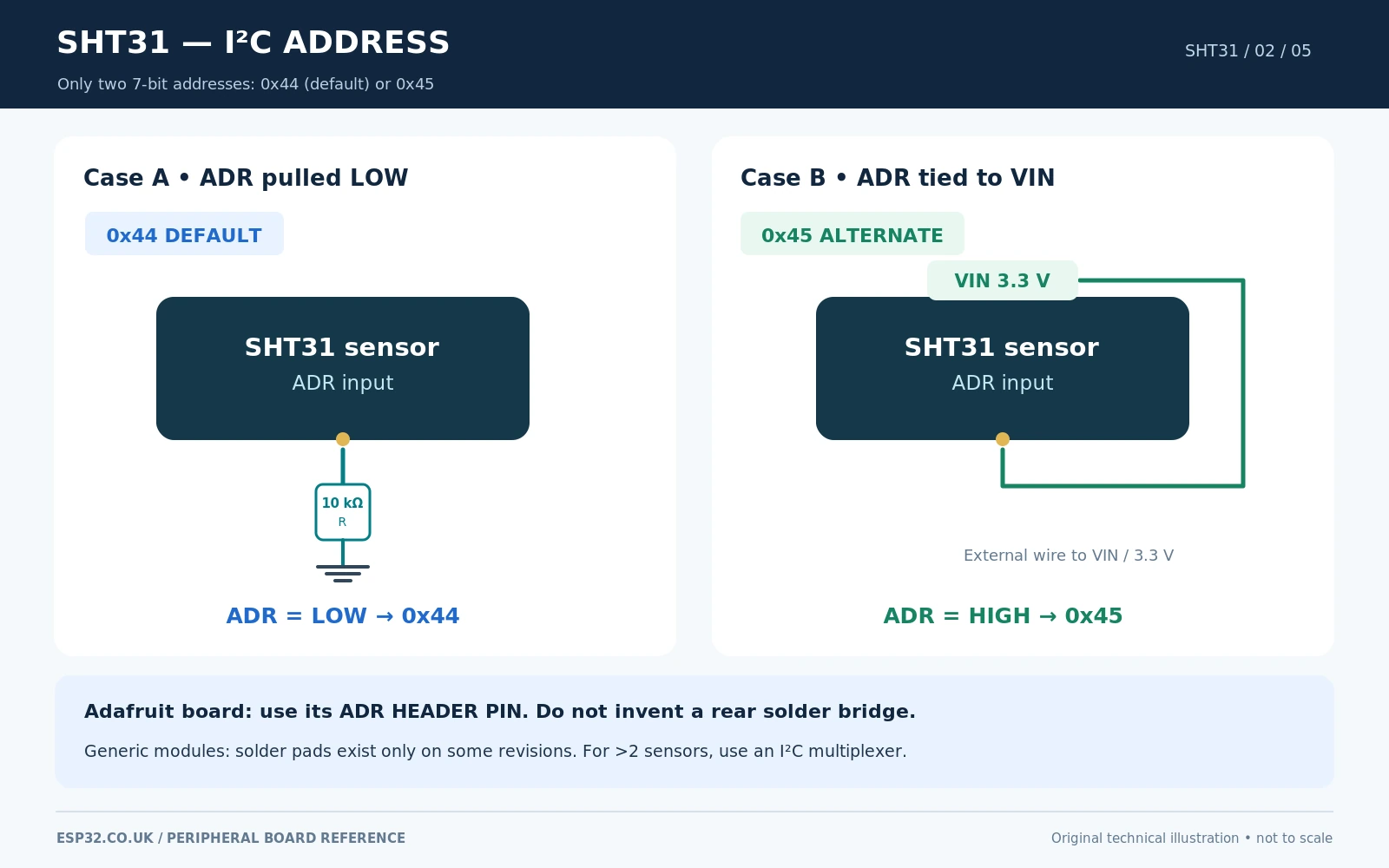
SHT31 has two standard 7-bit addresses. They are chosen by the logic state of the sensor’s hardware address input, which Adafruit labels ADR. You cannot obtain extra SHT31 addresses by inventing multiple A0/A1/A2 jumpers as found on GPIO expanders.
| ADR / address-select state | 7-bit I²C address | How to select it |
|---|---|---|
| LOW (or board default with pull-down) | 0x44 | Leave Adafruit ADR open; use default low-setting on another board |
| HIGH (tie to sensor VDD / module VIN) | 0x45 | Wire Adafruit ADR to VIN, or use the verified address solder bridge on a module designed for it |
Many low-cost modules use a solder bridge to tie ADDR high; others expose it as a separate header pin or hard-wire it low with no convenient selector. Never bridge an unidentified pad on a generic SHT31 PCB. Locate the actual ADDR label and consult that board’s schematic, or check continuity between the sensor address net and supply before soldering. Adafruit’s documented SHT31-D #2857 address method is its ADR header pin, not a mandatory rear address pad.
If two SHT31 devices share the same ESP32 I²C bus, run one at 0x44 and the other at 0x45. For more than two independent sensors with fixed or duplicate addresses, use a separate host I²C bus where supported or a TCA9548A I²C multiplexer.
SHT31 functional schematic: power, I²C, reset and alert
The chip-level circuit is simple: a 3.3 V supply, local decoupling across VDD and ground, I²C SDA/SCL pulled to the same 3.3 V rail, and a known level on the address pin. Adafruit provides approximately 10 kΩ I²C pull-ups and a 10 kΩ pull-down on ADR, plus a pull-up on its RST header. Do not add strong duplicate pull-ups automatically: several modules in parallel can result in an excessively low effective resistance.
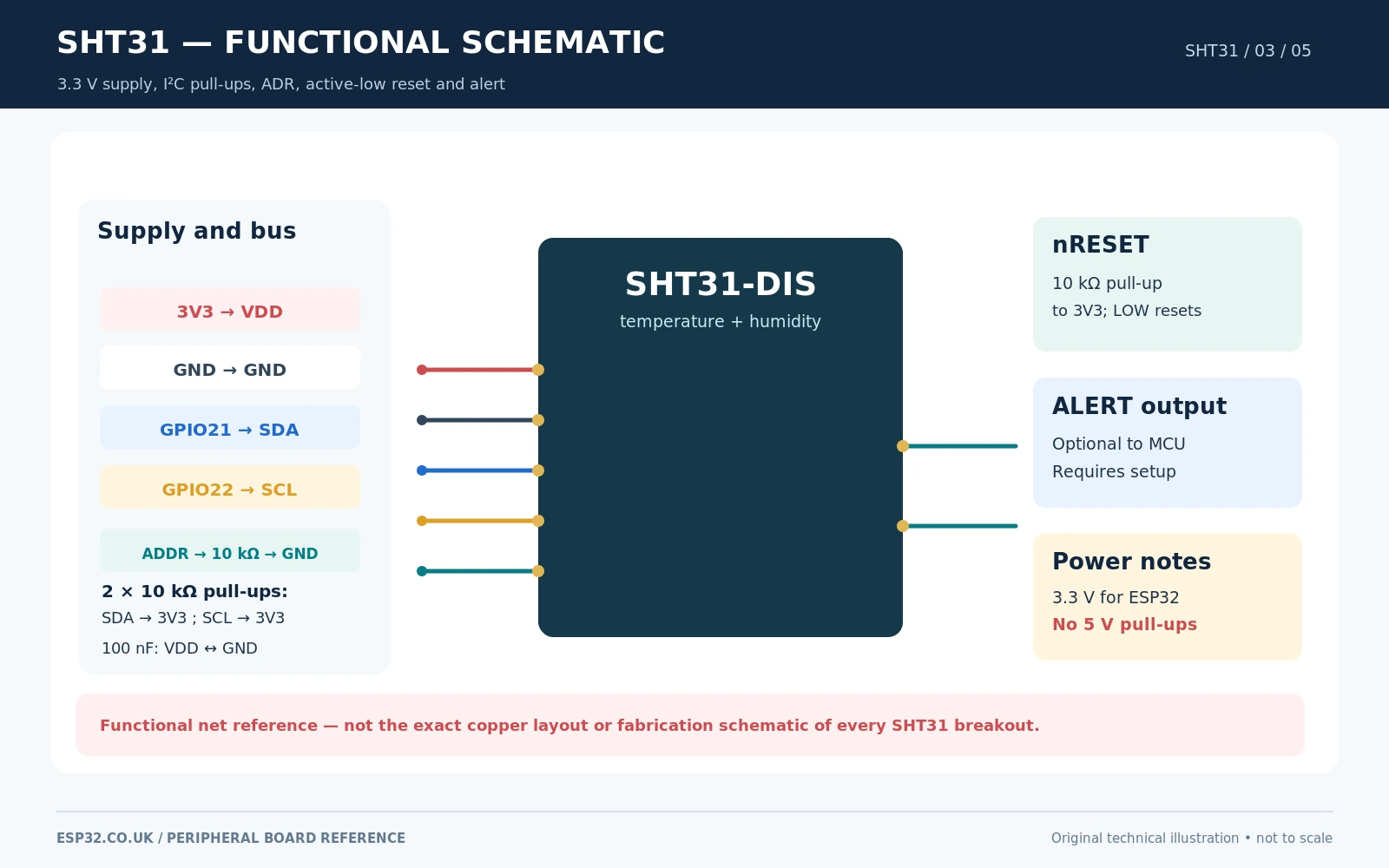
The basic Arduino sketch does not need the alert output or reset pin. RST is active low on the Adafruit board; an external controller can briefly pull it down for a hardware reset if required. The alert output can report events based on programmed threshold limits, but merely wiring ALR to an ESP32 GPIO does not automatically configure those thresholds. The short Adafruit example below uses ordinary polling instead.
Power caution: the SHT31 chip tolerates a supply up to 5.5 V, but ESP32 GPIO pins are not 5 V tolerant. If you power a module at 5 V and its SDA/SCL pull-ups go to 5 V, direct connection is unsafe. Use 3.3 V here, or an appropriately engineered interface that keeps ESP32 bus voltage within range.
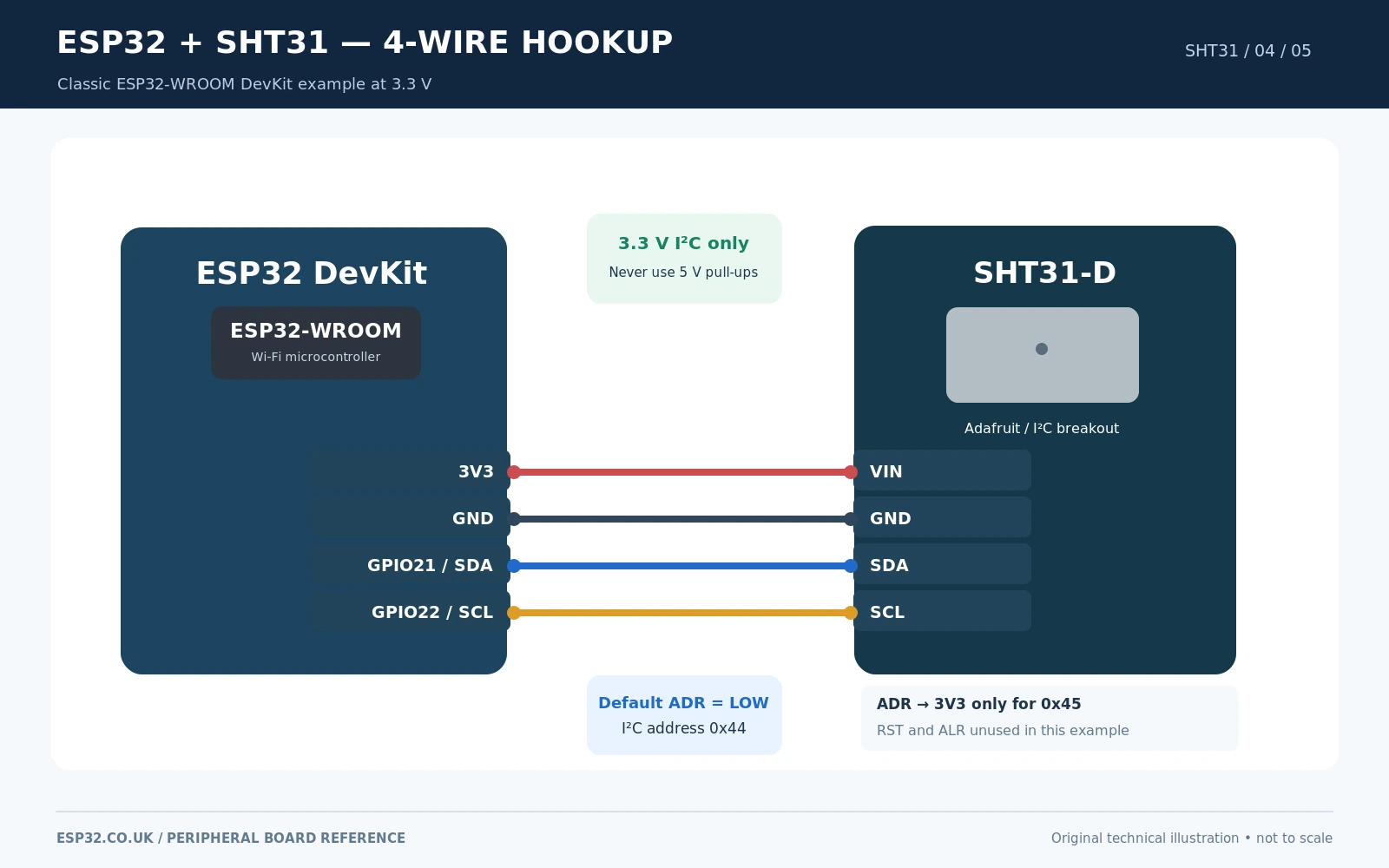
ESP32 and SHT31 wiring: four essential wires
| Classic ESP32 DevKit | Adafruit SHT31-D header | Notes |
|---|---|---|
| 3V3 | VIN | Sensor breakout supply at 3.3 V |
| GND | GND | Shared electrical reference |
| GPIO21 | SDA | I²C data, example pin |
| GPIO22 | SCL | I²C clock, example pin |
| Not connected | ADR | Defaults to 0x44; connect to VIN to select 0x45 |
| Not connected | RST | Normal operation uses onboard pull-up |
| Not connected | ALR | Optional alert output, not used in the sketch |
The exact GPIO21/22 example applies to many classic ESP32-WROOM development boards; it is not a universal GPIO mapping for ESP32-C3, ESP32-C6, ESP32-S3 and other variants. On those boards, choose appropriate exposed pins for SDA and SCL and change Wire.begin(SDA, SCL) accordingly. A STEMMA QT cable carries the same supply and bus signals as the four-wire connection; it does not alter address selection.
Can the SHT31 share SDA/SCL with a BME280 or BH1750?
Yes. I²C is designed for multiple devices on one bus, provided each active device uses a nonconflicting address and all participants share compatible bus voltage, pull-ups and a common ground. For example, SHT31 at 0x44, BH1750 at 0x23 and BME280 at 0x76 can coexist on the same correctly wired 3.3 V bus. Additional cabling increases capacitance and can reduce reliable speed.
Arduino IDE example: Adafruit SHT31 library with ESP32
Install Adafruit SHT31 Library by Adafruit in Arduino IDE Library Manager, including Adafruit BusIO if prompted. The following sketch uses Adafruit_SHT31.h, explicit ESP32 I²C pins, and the library’s readBoth() method to read temperature and humidity together. It checks for communication errors rather than printing a plausible but invalid reading.
#include <Arduino.h>
#include <Wire.h>
#include <Adafruit_SHT31.h>

constexpr int PIN_SDA = 21;       // Classic ESP32 DevKit example
constexpr int PIN_SCL = 22;
constexpr uint8_t SHT31_ADDR = 0x44; // Change to 0x45 if ADR is HIGH

Adafruit_SHT31 sht31 = Adafruit_SHT31(&Wire);

void setup() {
  Serial.begin(115200);
  delay(500);

  Wire.begin(PIN_SDA, PIN_SCL);
  Wire.setClock(100000);        // Conservative first-test I2C speed

  if (!sht31.begin(SHT31_ADDR)) {
    Serial.println("SHT31 not found. Check wiring and address.");
    while (true) delay(1000);
  }

  sht31.heater(false);          // OFF for normal ambient readings
  Serial.println("SHT31 ready: temperature and humidity");
}

void loop() {
  float temperatureC = NAN;
  float relativeHumidity = NAN;

  if (sht31.readBoth(&temperatureC, &relativeHumidity)
      && isfinite(temperatureC) && isfinite(relativeHumidity)) {
    Serial.printf("Temperature: %.2f C  Humidity: %.2f %%RH\n",
                  temperatureC, relativeHumidity);
  } else {
    Serial.println("SHT31 read failed; check I2C and sensor power");
  }

  delay(2000);
}
The example uses current published Adafruit library methods begin(), readBoth() and heater(). It is a documented Arduino starting point, not a claim of physical bench testing. If you prefer the simplest possible code, readTemperature() and readHumidity() are also supported, but the paired method avoids two distinct measurement calls.
What should Serial Monitor display?
SHT31 ready: temperature and humidity
Temperature: 23.41 C  Humidity: 48.23 %RH
Temperature: 23.42 C  Humidity: 48.28 %RH
These readings are illustrative. Open Serial Monitor at 115200 baud. If the sensor is not found, scan I²C for 0x44 and 0x45, check that SDA and SCL have not been swapped, and verify the actual breakout has 3.3 V at its power header.
How the SHT31 measurement protocol works
Under the hood, SHT3x sends measurement commands and returns digitally calibrated data. A typical single-shot high-repeatability, no-clock-stretching command is 0x24 0x00 (two bytes). The response consists of a two-byte temperature raw value plus its CRC, followed by a two-byte humidity raw value plus its own CRC. The 0x2C 0x06 command is the high-repeatability variant with clock stretching; these command families should not be conflated.
| Data returned | Bytes | Interpretation |
|---|---|---|
| Temperature raw value | 2 | Unsigned 16-bit measurement word |
| Temperature CRC | 1 | CRC-8 checks preceding two temperature bytes |
| Relative humidity raw value | 2 | Unsigned 16-bit measurement word |
| Humidity CRC | 1 | CRC-8 checks preceding two humidity bytes |
For correctly validated raw words, Sensirion defines the engineering conversions as T (°C) = −45 + 175 × rawT / 65535 and RH (%) = 100 × rawRH / 65535. The CRC-8 algorithm uses polynomial 0x31 with initial value 0xFF. Adafruit’s library performs sensor communication and validation for you, so the main sketch should normally use its API instead of duplicating low-level commands.
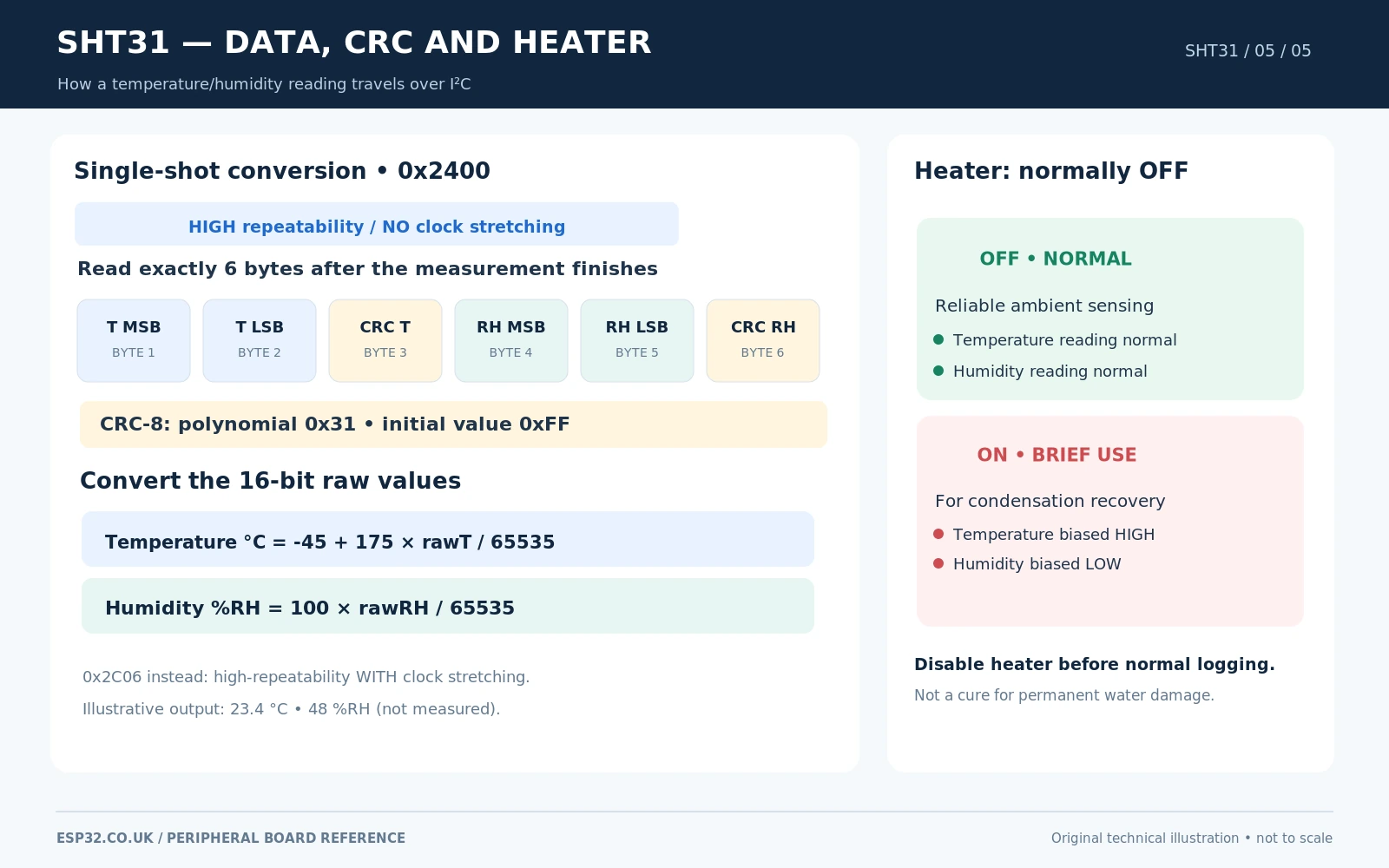
SHT31 heater: what it does and when to use it
SHT31 has a built-in heater that can briefly warm the sensing element, helping to evaporate condensation or recover from exceptionally damp exposure. The heater can bias the local temperature upward and the reported relative humidity downward while operating. It cannot be treated as ordinary automatic humidity calibration, a fan, or an indication that the surrounding air really became warmer or drier.
For indoor rooms, leave the heater disabled. To deliberately exercise the Adafruit library API after considering your application, sht31.heater(true) enables the heater and sht31.heater(false) disables it. Avoid frequent or prolonged heating, and allow the sensor to stabilise afterwards before using its readings for control decisions.
Alert pin and reset pin: are they required?
No. Ordinary room measurements need only VCC, GND, SDA and SCL. Adafruit’s breakout additionally gives access to ALR and RST. ALR is meaningful only when you configure the SHT3x alert limits; it is not a ready-made motion sensor interrupt. RST is active low and normally remains released via the module pull-up. Generic four-wire SHT31 boards generally omit both pins, so example diagrams must not assume those contacts exist.
Common SHT31 problems and fixes
| Symptom | Likely cause and practical fix |
|---|---|
| No I²C device at 0x44 | Confirm 3.3 V and shared GND, check SDA/SCL, run a bus scan, inspect ADR state; sensor may be at 0x45. |
| Readings become NaN or failures appear | Check I²C pull-up network, lead length, supply stability, bus clock and loose connectors. |
| Temperature persistently too high | Keep the sensor physically away from the ESP32 radio, voltage regulator, direct sunlight and stagnant enclosed warm air. |
| Humidity lower than expected | Heater may be active; temperature self-heating reduces relative humidity. Also check placement and airflow. |
| Two identical SHT31 sensors conflict | Set ADR LOW on one (0x44) and HIGH on the other (0x45), or use a multiplexer. |
| Alert pin never changes | Requires appropriate programmed thresholds and polarity/interrupt handling; basic read-only sketch does not configure alerts. |
| SHT31 works on Arduino Uno but not ESP32 | Some 5 V modules pull SDA/SCL to 5 V. Power the breakout at 3.3 V where supported or add proper level shifting. |
| Humidity recovers slowly after condensation | Allow moisture and enclosure surfaces to dry; a short heater intervention may help but introduces a temporary reading bias. |
| Generic breakout has no ADR/RST/ALR | Those functions may not be routed to headers. Use only the pins the actual PCB exposes; verify its design. |
SHT31 versus SHT30, SHT35 and newer SHT4x sensors
SHT31 sits in Sensirion’s SHT3x family between the lower-cost SHT30 and higher-accuracy SHT35. All three use closely related I²C interfaces and the same familiar 0x44/0x45 addressing scheme. The SHT30 vs SHT31 vs SHT35 guide compares accuracy and buying choices; this article deliberately concentrates on board connections, not another family comparison.
For a new design, SHT40 and SHT45 are worth comparing for power consumption and measurement performance. Read SHT31 vs SHT40 vs SHT45. If you want a more complex Home Assistant sensor installation, SHT31 also works with ESPHome’s sht3xd component once the I²C bus and address are configured correctly.
SHT31 FAQ
What is the default SHT31 address?
0x44 with the hardware ADR line low. The only other standard 7-bit address is 0x45 when ADR is tied high. A board sold with a different fixed address should be checked against the actual fitted chip.
Can SHT31 measure atmospheric pressure?
No. SHT31 measures temperature and relative humidity. For barometric pressure, use a device such as a BME280 or BMP280 alongside it.
Is SHT31 already calibrated?
Yes. The Sensirion device is factory calibrated for digital output, so most applications do not require manual calibration. Installation-related heat and environmental effects may still justify verification with a known reference.
Can I use 5 V power?
The sensor IC supports supplies up to 5.5 V, but direct connection of 5 V I²C lines to a 3.3 V ESP32 is not safe. Power a compatible breakout at 3.3 V, as in this article, or engineer suitable level translation.
Does SHT31 have an address solder jumper?
Some third-party boards do. The Adafruit #2857 breakout documents an ADR header pin for switching between 0x44 and 0x45. Solder-pad placement is manufacturer-specific, so check your exact PCB.
How often should an ESP32 read SHT31?
A two-second interval is adequate for most room temperature and humidity displays. A fast polling interval does not remove the underlying physical humidity response time, and frequent measurement/heating can affect sensor temperature and power budget.
Official sources and further reading
- Adafruit SHT31-D pinout documentation — current breakout header, I²C address, pull-ups, reset and alert pins.
- Adafruit Arduino setup and first measurements — compatible API and library instructions.
- Official Adafruit SHT31 Arduino library — headers, dependencies and source.
- Sensirion SHT31-DIS-F sensor specifications — operating conditions, nominal accuracy and chip capabilities.
- Sensirion SHT3x-DIS datasheet — commands, CRC, precision, heater and sensor electrical limits.
Editorial hardware scope: The pinout schematic focuses on the Adafruit SHT31-D breakout #2857 and a generic four-wire SHT31 alternative, clearly identified as different board variants. A functional schematic is not an exact reproduction of an unverified marketplace board. The Arduino example is API-checked but has not been physically bench-tested.