
The AHT20AliExpress price and AHT21 temperature/humidity sensors are compact digital devices that report calibrated measurements over I²C. They turn up on tiny four-pin breakout boards, Adafruit STEMMA QT modules and custom PCBs, but the boards are not all physically identical. This hardware reference shows how to identify the signals, connect an ESP32AliExpress price safely, understand why the I²C address cannot normally be changed, and obtain sensible readings using the popular Adafruit AHTX0 Arduino library.
Quick wiring: on a classic ESP32AliExpress price-WROOM DevKit, connect sensor VCC/VIN → 3V3, GND → GND, SDA → GPIO21 and SCL → GPIO22. Use 7-bit I²C address 0x38. Both sensor families support this address; unlike BME280 or SHT31, the commonly encountered AHT20/AHT21 modules have no selectable address pin.
The key board-level trap: Adafruit AHT20 Rev C exposes an optional tiny power-LED cut jumper. It switches off the onboard indicator LED to save power. It does not change address 0x38. Rev A and Rev B boards do not have that LED-disable jumper. A clone with differently located pads must be inspected rather than assumed to follow Adafruit’s artwork.
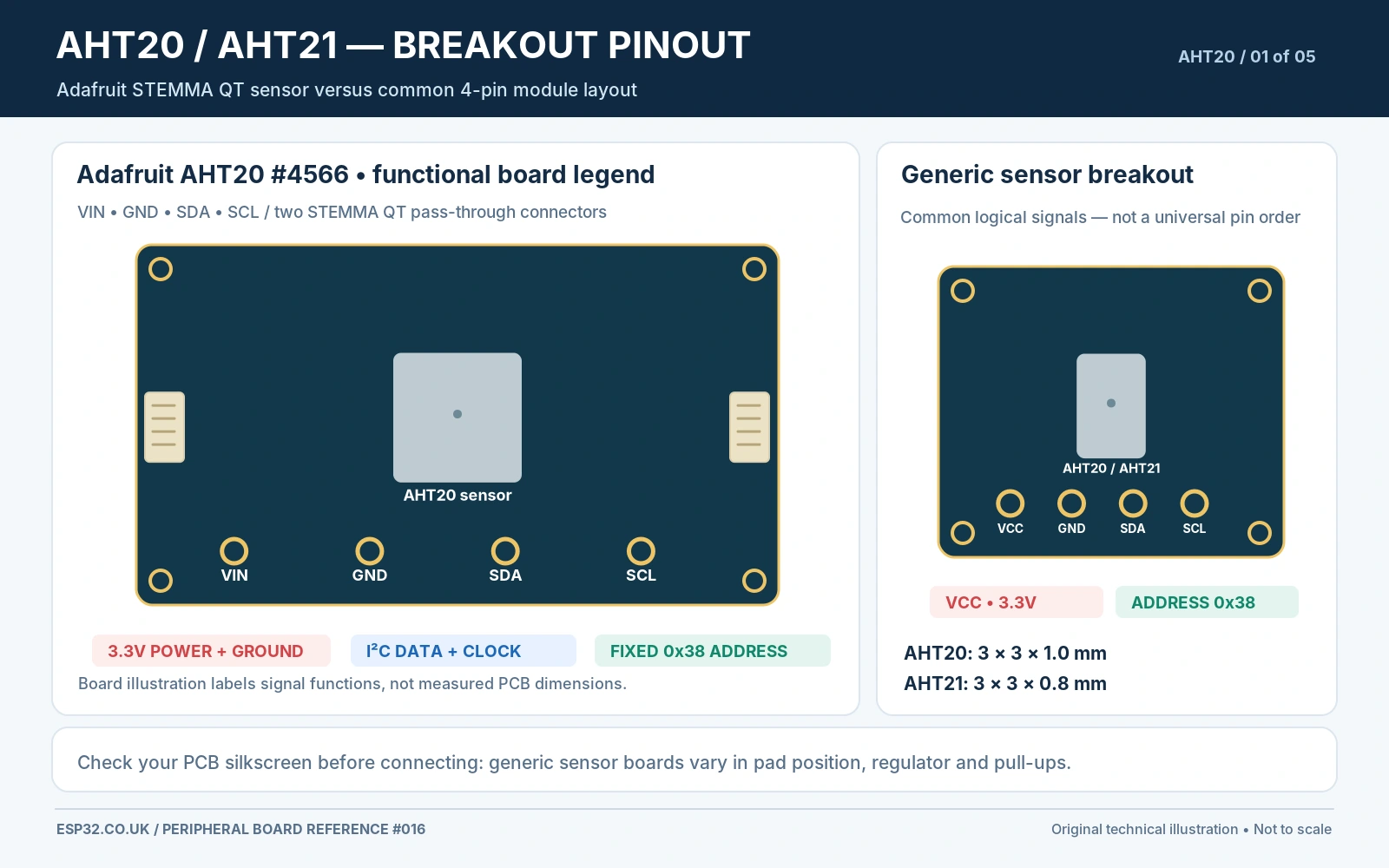
AHT20 vs AHT21 specifications and applications
| Property | AHT20 | AHT21 |
|---|---|---|
| I²C address | Fixed 0x38 | Fixed 0x38 |
| Temperature sensor | Integrated, factory calibrated | Integrated, factory calibrated |
| Humidity sensor | Integrated capacitive sensing element | Integrated capacitive sensing element |
| Typical accuracy near 25°C | ±0.3°C; ±2% RH | ±0.3°C; ±2% RH |
| Published extended temperature range | −40 to +85°C | −40 to +120°C |
| Published humidity range | 0–100% RH | 0–100% RH |
| Nominal package dimensions | 3 × 3 × 1.0 mm | 3 × 3 × 0.8 mm |
| Interface | I²C (two wires) | I²C (two wires) |
| Library recommendation | Adafruit AHTX0 (explicitly supported) | Try AHTX0 as protocol-compatible starting point; verify with actual hardware |
| Typical use | Indoor room sensors, ESPHome, datalogging | High-range temperature monitoring within its environmental limits |
The AHT21 is not simply a new solder jumper or a renamed AHT20. Manufacturer documentation describes a thinner 3 × 3 mm package and a higher published extended temperature range. Those are chip specifications; your assembled PCB may contain regulators, LED circuits, pull-ups or plastic components whose temperature limits are lower. A board with an AHT21 marking is not automatically suitable for 120°C continuous operation.
Typical accuracy figures refer to specified test conditions, not a promise of ±0.3°C or ±2% RH everywhere in the full environmental range. Sustained condensation, chemical vapours, solvent outgassing and proximity to warm electronics can all affect readings. For accurate room measurements, allow air to reach the sensor and place it away from regulators, the ESP32 RF chip and other heat sources.
Pinout: Adafruit AHT20 breakout and generic AHT20/AHT21 boards
The official Adafruit AHT20 breakout (product #4566) exposes VIN, GND, SDA and SCL on a header and provides two pass-through STEMMA QT/Qwiic-style connectors. On this particular breakout, 10 kΩ pull-up resistors connect SDA and SCL to VIN. The guide documents operation with logic-level-matched supplies between 2.7 and 5.5 V; for an ESP32 we choose 3.3 V VIN so SDA/SCL do not rise to 5 V.
| Signal marking | Purpose | ESP32 wiring / caveat |
|---|---|---|
| VIN or VCC | Power input to the breakout | 3V3 for direct ESP32 connections |
| GND | Reference for power and I²C | ESP32 GND; required even with external 3.3 V rail |
| SDA | Bidirectional I²C data | Classic ESP32 GPIO21 in this example |
| SCL | I²C clock input | Classic ESP32 GPIO22 in this example |
| STEMMA QT ×2 (Adafruit) | 4-pin keyed I²C connectors carrying same bus | Optional cable; not separate addresses or separate buses |
| LED cut bridge (only Rev C) | Disconnects power indicator LED | No change to address, measurement mode or sensor calibration |
Generic low-cost AHT20 boards often have only four labelled pins. Some include a regulator or level translator and some provide neither, even when a seller describes them as “3–5 V modules.” Do not assign the Adafruit board voltage rating to a generic clone without inspecting it. Power the typical unverified module from 3.3 V when pairing it directly with an ESP32 and inspect the board for actual pull-up resistors.
An AHT21 sold as a bare chip is an SMD device with a manufacturer-specific pad drawing, not a four-hole hobby breakout. Do not substitute the logical VIN/GND/SDA/SCL legend for the chip’s exact land pattern. Follow the manufacturer’s package drawing and pin identification for custom PCB design.
Address and solder jumpers: why both sensors stay at 0x38
The fixed 7-bit device address for AHT20 and AHT21 is 0x38. On the usual boards there is no alternate-address pin, and there is no documented solder bridge that selects 0x39, 0x44 or another address. Be careful: some generalized Arduino library headers contain a constant named an “alternate address” for related sensors; that does not grant AHT20 hardware an address-select facility.
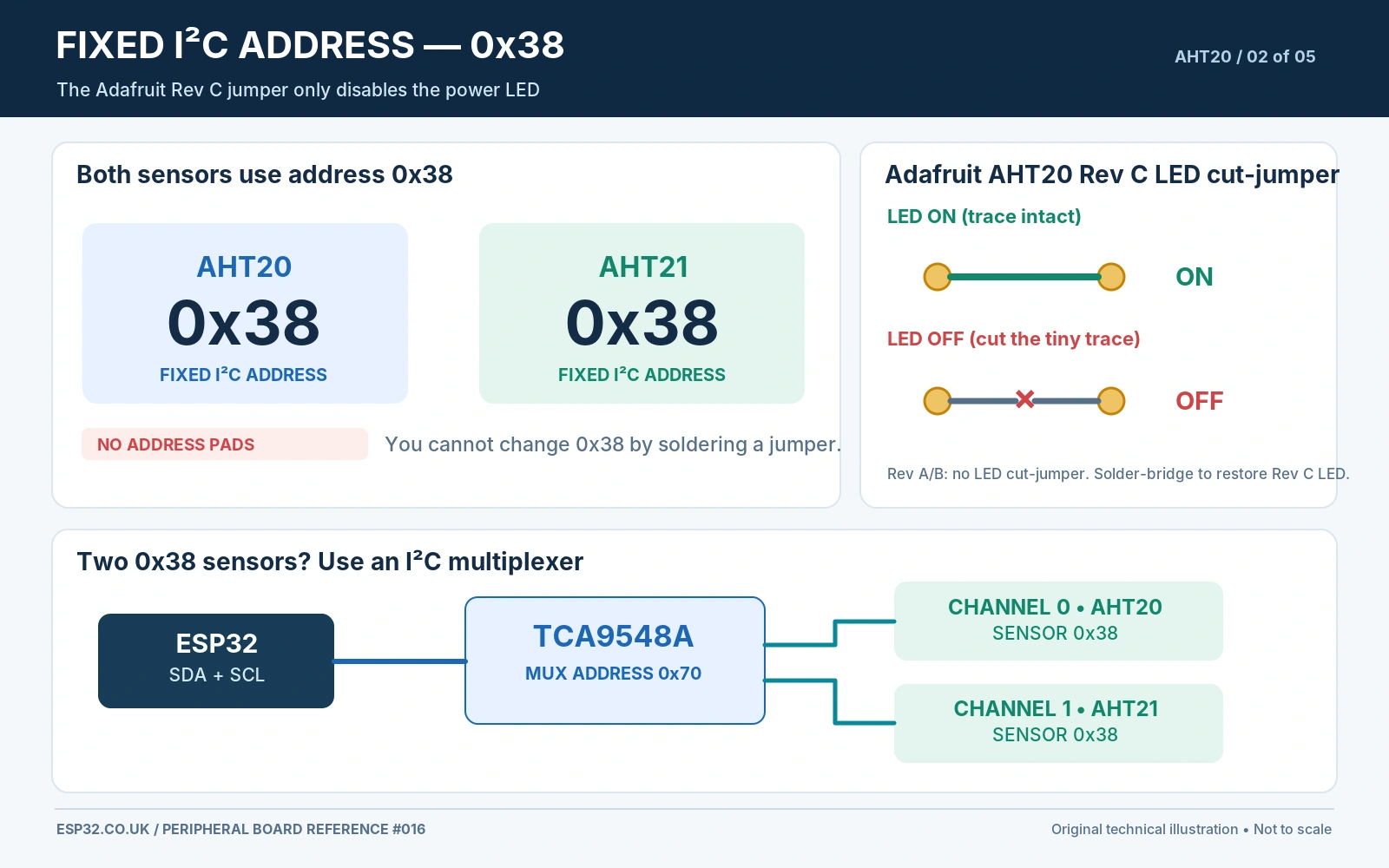
For two AHT20 sensors on the same ESP32, choose a second I²C controller when available and supported by your software, or connect each to a different port of a TCA9548A I²C multiplexer. Both sensors continue responding to 0x38, but only one downstream branch is connected at a time. Bridging the Rev C LED pads does not solve an address conflict.
What if the I²C scanner shows 0x38 but the sensor will not initialise?
An ACK at 0x38 confirms a device is answering but does not identify the exact silicon inside it. Check supply voltage, grounding, correct orientation and the sensor family. AHT10, AHT20, AHT21 and certain compatible modules can have similar bus behaviour, while initialisation and calibration commands may differ. The manufacturer’s part marking, datasheet and a realistic humidity/temperature reading are more informative than an address scan alone.
AHT20/AHT21 functional circuit schematic
A minimal reference uses the sensor supply and common ground, short I²C lines, a bypass capacitor close to the IC and pull-ups on SDA/SCL where the breakout does not already supply them. A common design starting point at 3.3 V is 4.7 kΩ on each bus line and 100 nF across VDD–GND, but bus capacitance, cable length, and existing pull-ups determine actual component selection.
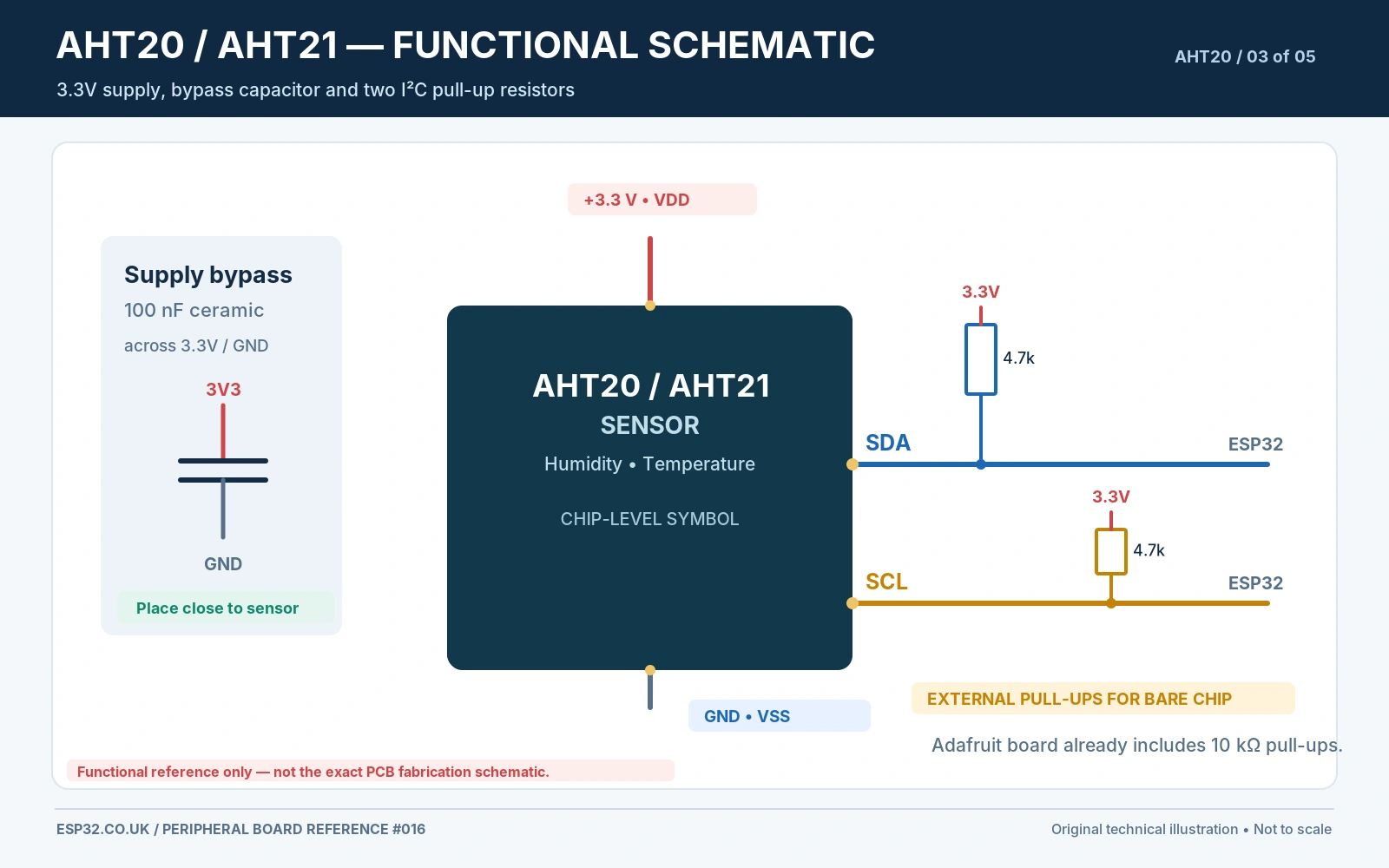
On an Adafruit #4566 board, 10 kΩ pull-ups already exist. Adding a second board adds more pull-ups in parallel; excessive parallel pull-up conductance can overload the low-level sink requirement. Conversely, a bare AHT21 IC on a custom board must have a complete supply and I²C network. In a breadboard experiment, start with one breakout and short leads rather than an elaborate high-speed cable.
The AHT20 and AHT21 are not 5 V-tolerant ESP32 GPIO accessories just because some breakout boards run from 5 V. The ESP32 itself must see signal voltages inside its limits. Keeping the whole direct-connected sensor circuit at 3.3 V is the uncomplicated approach; use rated level translation if a different bus voltage is necessary.
ESP32 wiring diagram: power, SDA and SCL
| Classic ESP32 DevKit | AHT20 / AHT21 breakout | Purpose |
|---|---|---|
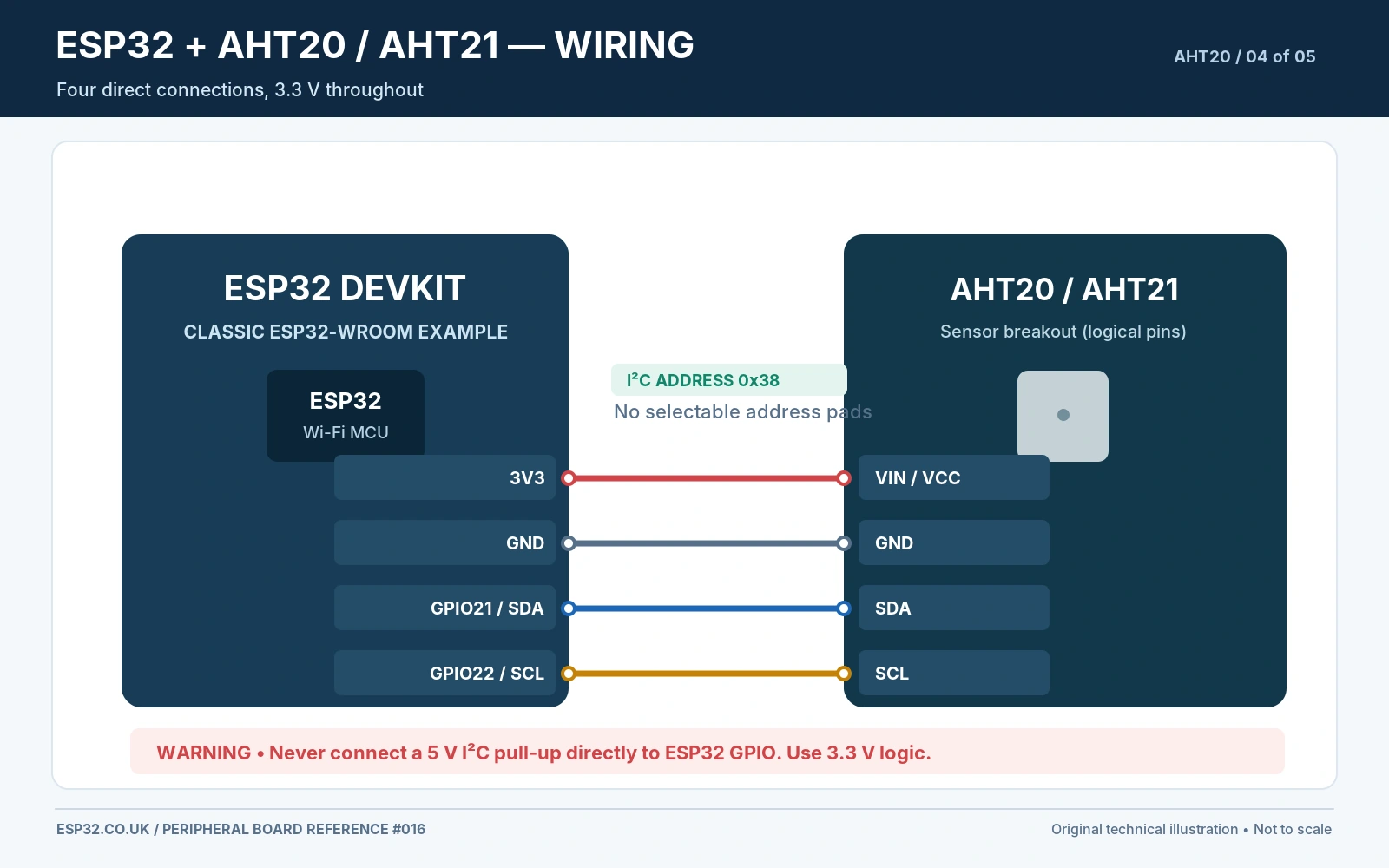
| 3V3 | VIN or VCC | Sensor and breakout power at 3.3 V |
| GND | GND | Common electrical reference |
| GPIO21 | SDA | I²C data |
| GPIO22 | SCL | I²C clock |
These GPIO choices are widely used on classic ESP32-WROOM DevKit boards. They are not universal defaults for ESP32-C3, C6 or S3. Use your actual board pinout and choose available SDA/SCL pins in Wire.begin(SDA, SCL). Do not connect SDA to SCL, and do not confuse the two identical pass-through STEMMA QT sockets with independent sensors.
Example I²C scanner before using the library
#include <Arduino.h>
#include <Wire.h>

constexpr int SDA_PIN = 21;
constexpr int SCL_PIN = 22;

void setup() {
  Serial.begin(115200);
  delay(500);
  Wire.begin(SDA_PIN, SCL_PIN);
  Wire.setClock(100000);
  Serial.println("AHT20/AHT21 I2C scan");
}

void loop() {
  Wire.beginTransmission(0x38);
  uint8_t error = Wire.endTransmission();
  if (error == 0) {
    Serial.println("Device acknowledged at 0x38");
  } else {
    Serial.println("No device response at 0x38");
  }
  delay(2000);
}
If the scanner cannot find anything at 0x38, revisit VCC/GND, connections, pull-ups, board orientation and whether the module is genuinely an AHT20/AHT21. A working sensor may fail initialisation after brownouts or persistently high humidity; remove and restore power after checking the electrical fault rather than assuming a permanent hardware defect.
Arduino example: Adafruit AHTX0 library for temperature and humidity
The widely adopted Adafruit AHTX0 Arduino library explicitly supports AHT10 and AHT20. It is a sensible first option for an AHT21 because its manufacturer’s documentation uses the same 0x38 measurement protocol, but Adafruit does not explicitly advertise AHT21 hardware validation. Treat AHT21 support as a compatibility expectation to verify with your actual module; if it fails, check the sensor-specific driver and status/CRC handling.
Install Adafruit AHTX0 from Arduino IDE Library Manager, accepting the Adafruit BusIO and Adafruit Unified Sensor dependencies. The API uses begin(&Wire) and getEvent(&humidity, &temperature), with the humidity event passed first. The sketch below prints values at a low 5-second update rate to reduce self-heating.
#include <Arduino.h>
#include <Wire.h>
#include <Adafruit_AHTX0.h>

constexpr int SDA_PIN = 21; // Classic ESP32-WROOM DevKit
constexpr int SCL_PIN = 22;
Adafruit_AHTX0 aht;

void setup() {
  Serial.begin(115200);
  delay(500);

  Wire.begin(SDA_PIN, SCL_PIN);
  Wire.setClock(100000);

  if (!aht.begin(&Wire)) {
    Serial.println("AHT20/AHT21 not initialised at 0x38");
    Serial.println("Check I2C wires, supply and sensor variant.");
    while (true) delay(1000);
  }

  Serial.println("AHT sensor ready");
}

void loop() {
  sensors_event_t humidity;
  sensors_event_t temperature;
  if (aht.getEvent(&humidity, &temperature)) {
    Serial.printf("Temperature: %.2f C  RH: %.1f %%\n",
                  temperature.temperature,
                  humidity.relative_humidity);
  } else {
    Serial.println("AHT measurement failed");
  }
  delay(5000);
}
The sketch uses the published Adafruit class and function signatures; it has not been bench-tested on a specific AHT21 clone. If the sensor seems to work but temperature and humidity are impossible (for example 100% RH continuously in a dry room), check for condensation, faulty power, driver compatibility and a blocked sensor aperture. Avoid using arbitrary calibration offsets before confirming a physical reference measurement.
Expected Serial Monitor output
AHT sensor ready
Temperature: 22.45 C  RH: 47.1 %
Temperature: 22.47 C  RH: 47.0 %
Temperature: 22.43 C  RH: 47.2 %
These lines are illustrative output only, not readings taken from a real device. Room humidity changes slowly. Large temperature jumps immediately after powering Wi-Fi or handling the breakout may be caused by local heat rather than a sudden change in room temperature.
I²C measurement sequence, data formatting and CRC
The manufacturer’s AHT21 protocol describes an initial status check, a calibration-state bit, an I²C trigger command and a measurement read. A typical transaction uses address 0x38; trigger command 0xAC with data bytes 0x33, 0x00; then wait until the busy status bit clears before reading the result. The datasheet describes an optional CRC-8 byte following the measurement payload, with polynomial 0x31 (x⁸ + x⁵ + x⁴ + 1) and initial CRC value 0xFF.
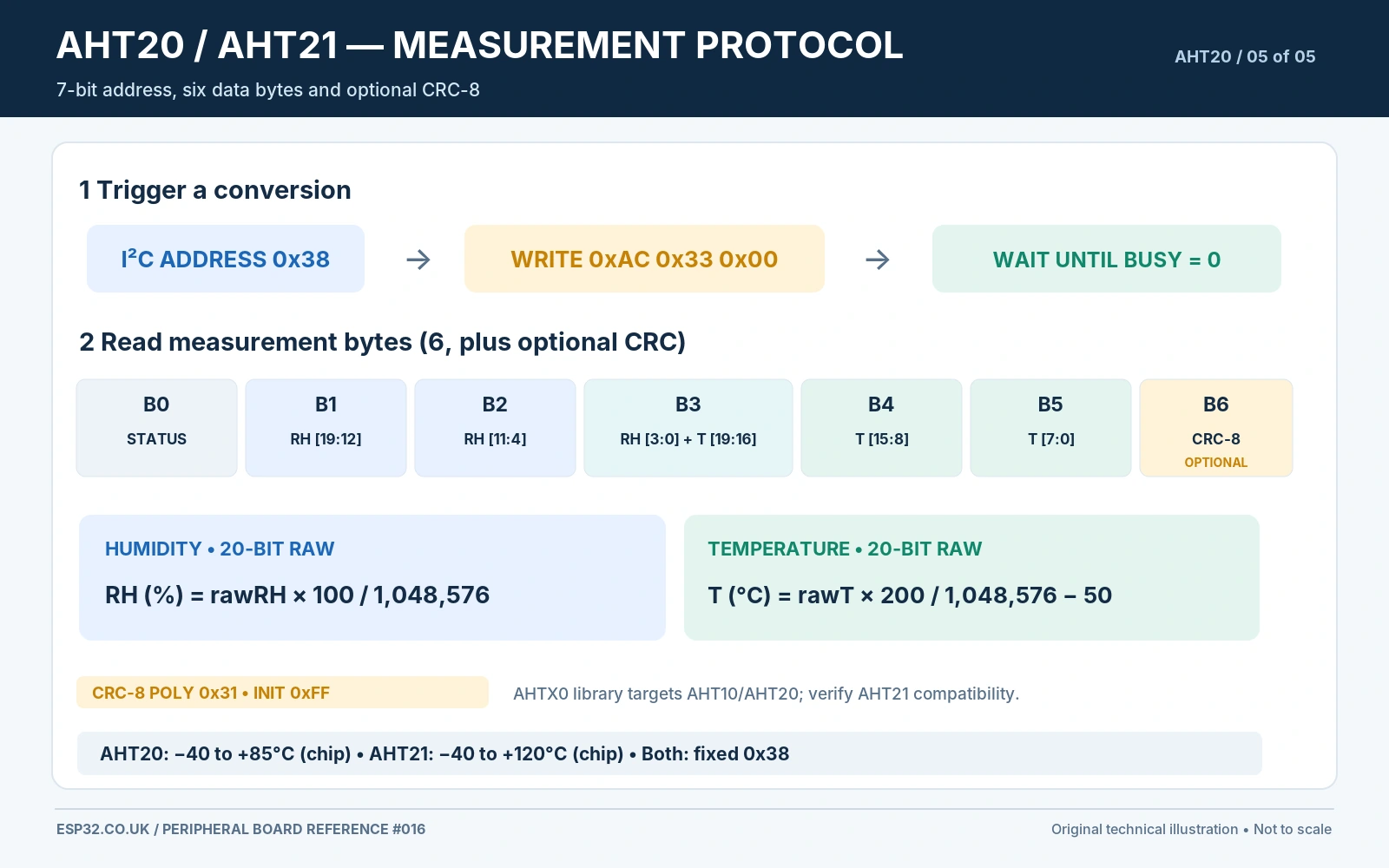
The 20-bit raw humidity and temperature fields are extracted from the returned bytes. Conversion formulas are:
RH_percent = rawHumidity * 100.0 / 1048576.0
Temperature_C = rawTemperature * 200.0 / 1048576.0 - 50.0
Those formulas convert raw codes to engineering units; they are not extra calibration stages and do not guarantee stated sensor accuracy. The Adafruit library handles the protocol internally. For a custom low-level driver, consult the exact chip datasheet and handle the busy and calibration bits rather than assuming a fixed delay is always sufficient.
Placement, condensation, self-heating and calibration
Good physical placement matters more than taking extra decimal places. Locate the sensor in moving room air away from the ESP32 antenna/regulator, heated enclosures and direct sunlight. Avoid glue, silicone sealant or solvent fumes near the sensor opening: humidity polymers are sensitive to contamination. A ventilated case is usually better than embedding the chip deep inside a sealed plastic compartment.
For long-lived room monitoring, measure every 5–60 seconds instead of continuously. The AHT21 manufacturer warns that excessive acquisition frequency produces temperature self-heating; it advises sampling intervals longer than one second when trying to limit local temperature rise. ESPHome installations usually need much less frequent readings. A fan may speed response but should not drive air from a heated PCB directly across the sensing element.
A basic calibration check is to place the module alongside a trusted thermometer and hygrometer, let both equilibrate, and record offset over a few representative conditions. Do not assume a single offset fixes humidity hysteresis or contamination. Salt-equilibrium tests are possible, but the test temperature, equilibration time and air-tightness matter. Low-cost breakout selection and thermal layout may introduce larger differences than the internal ADC precision.
AHT20 vs AHT21 vs SHT31 vs BME280: which makes sense?
Choose AHT20 for inexpensive ambient temperature and humidity measurements with an established Arduino ecosystem and reliable 3.3 V I²C integration. Consider AHT21 if a design benefits from its published higher extended temperature range and you have a verified board or custom assembly suitable for that environment. Choose SHT31 when two selectable sensor addresses and a mature sensor family simplify your design, or BME280 when you also need atmospheric pressure. None is a drop-in substitute without checking pinout, supply, library and PCB dimensions.
Related on esp32.co.uk/: AHT20 with ESPHome and Home Assistant, TCA9548A multiplexer for same-address sensors, and SHT30 vs SHT31 vs SHT35 comparison. This article deliberately concentrates on breakout hardware and Arduino code rather than repeating the ESPHome guide.
Common troubleshooting questions
| Problem | Likely cause and correction |
|---|---|
| No response at 0x38 | Check 3.3 V, ground, SDA/SCL reversal, correct ESP32 pins and pull-up network. |
| Two sensors both appear as 0x38 | Expected; no address solder bridge. Put sensors on separate mux channels or I²C controllers. |
| “Address jumper” does nothing | On Adafruit Rev C it disables only the power LED. Restore cut bridge if you want the LED back. |
| Library fails on AHT21 | AHTX0 explicitly tests AHT10/AHT20, not every AHT21 board. Confirm device identity and try a driver validated for your module. |
| Temperature always several degrees too high | Nearby ESP32 heat, sunlight, sealed case, sensor handled by fingers or excessive sampling frequency. |
| Relative humidity reads 100% for long periods | Condensation, unsuitable placement, contamination, or protocol/calibration fault. Let sensor dry under recommended conditions. |
| AHT20 board accepts 5 V but ESP32 breaks | Breakout SDA/SCL may be pulled to its VIN. Use matched 3.3 V logic and do not expose ESP32 pins to 5 V. |
| Measurement readings noisy or discontinuous | Check supply decoupling, shared ground, cable capacitance, pull-ups and whether the sensor is busy after conversion. |
Frequently asked questions
Can I solder a pad to change AHT20 I²C address?
No. AHT20 and AHT21 use a fixed I²C address of 0x38 in their published interface. Unlike the ADS1115 or PCF8574, standard devices have no address-select hardware pad. The small Adafruit AHT20 Rev C jumper is for the LED.
Is AHT21 guaranteed to work with Adafruit AHTX0?
No guarantee is made by Adafruit for every AHT21 or clone. Its datasheet uses the same address and measurement command structure, so the library is a good starting point, but verify readings, start-up/calibration behavior, and any CRC handling on your particular module.
Can AHT20 operate from an ESP32 3V3 pin?
Yes for the Adafruit board and normal small breakouts with appropriate voltage requirements. Connecting all four lines at 3.3 V avoids needing 5 V logic level translation. Confirm supply and GPIO voltage for your actual ESP32 variant and breakout.
Should I read the sensor every 100 ms?
Usually no. Room temperature and humidity change slowly; 2–60 second polling is generally more useful and reduces self-heating. Fast readings do not increase absolute accuracy.
Does AHT20 have a replaceable humidity sensing membrane?
Not usually. The sensing element is integrated in the MEMS package. Some supplied devices include a factory filter or cover, but that is not a license to scrape, wash or peel the sensing surface. Follow the manufacturer’s environmental handling guidance.
Datasheets, library and reference documents
- Adafruit AHT20 breakout documentation — official board header, 0x38 address, revision C LED bridge and 10 kΩ pull-ups.
- Adafruit AHT20 product #4566 — product and revision notes.
- Aosong/ASAIR AHT21 datasheet (May 2021) — chip dimensions, humidity/temperature range and protocol.
- Aosong product catalogue — AHT20/AHT21 technical comparison.
- Adafruit AHTX0 Arduino library — documented AHT10/AHT20 support and working examples.
- Linux kernel aht10 driver documentation — fixed 0x38 address and CRC support.
Accuracy note: These illustrations are functional engineering references. PCB silk-screen arrangement, regulators and LED configuration change between board manufacturers. The accompanying images must be generated using these exact board-specific statements—not generic imaginary solder pads or wiring.