
The INA219AliExpress price current and power monitor breakout measures the DC current flowing through a series shunt resistor, the bus voltage and calculated power, all over I²C. This hardware reference shows the actual functions of the VIN, GND, SDA, SCL, VIN+ and VIN− terminals; the Adafruit board’s A0/A1 solderAliExpress price jumpers; a practical 3.3 V ESP32AliExpress price wiring diagram; and a complete Arduino IDE example using the maintained Adafruit INA219 library.
Quick answer: Power the INA219 breakout logic from ESP32 3V3, connect GND to common ground, SDA to ESP32 GPIO21 and SCL to GPIO22 on a classic ESP32 DevKit. The positive current path is different: insert the board’s VIN+ terminal in series after the DC supply positive and connect VIN− to the load positive. The load negative returns to the supply negative. Do not confuse logic VIN with the high-side sensing terminal VIN+.
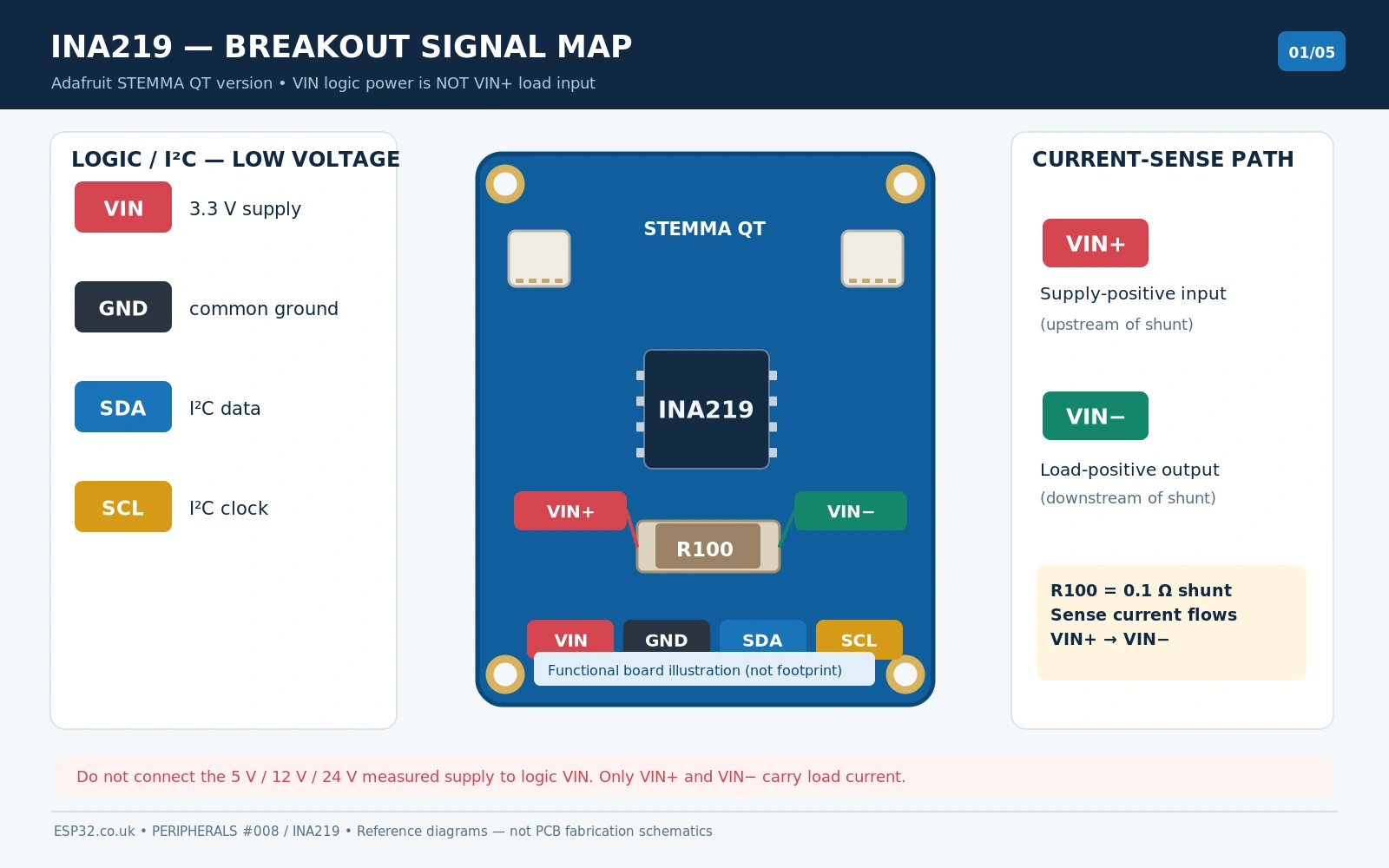
INA219 sensor and breakout specifications
| Feature | What it means in a real ESP32 project |
|---|---|
| Measurements | High-side shunt current, bus voltage and calculated DC power |
| IC supply | 3.0–5.5 V (TI INA219); choose 3.3 V for ESP32 GPIO compatibility |
| Sensed bus voltage | 0–26 V normal operating range (not 32 V just because a library preset says 32 V) |
| Shunt differential range | Programmable, up to ±320 mV full scale |
| Typical Adafruit shunt | R100 / 0.1 Ω, specified 1% on the reference board |
| Nominal input current span | ±3.2 A at 0.1 Ω and ±320 mV; thermal and electrical restrictions still apply |
| ADC | 12-bit conversion for bus and shunt readings; selectable averaging |
| I²C address | 0x40 default; Adafruit jumper settings offer 0x40, 0x41, 0x44, 0x45 |
| Chip-level addresses | 16 total possible through A0/A1 connections to GND, supply, SDA or SCL |
| SDA/SCL pull-ups | Adafruit board has 10 kΩ pull-ups to the breakout logic supply |
| Popular board variants | Adafruit original 6-pin header, updated STEMMA QT, inexpensive generic R100 breakout |
An important limitation is that the INA219 is not a mains AC current sensor. It is designed for DC rails. Do not connect it to 120/230 V mains or place an unprotected board inside a hazardous-energy system. High-voltage transients from motors, relays and solenoids can exceed device limits even if the normal supply voltage is below 26 V.
INA219 breakout pinout and the VIN versus VIN+ trap
| Terminal | Correct function | Connection for the example |
|---|---|---|
| VIN or VCC | Logic power supply for the breakout | ESP32 3V3 — not the load supply positive |
| GND | I²C/measurement reference | ESP32 GND and DC test-supply negative |
| SDA | I²C serial data | Classic ESP32 GPIO21 |
| SCL | I²C serial clock | Classic ESP32 GPIO22 |
| VIN+ / V+ | Shunt upstream sense and current input | Positive supply output of the monitored DC source |
| VIN− / V− | Shunt downstream sense and current output | Positive input of the monitored load |
The sense terminals carry the load current through a physical resistor on the module. They are not analogue GPIO pins and not a separate 3.3 V power input. In the usual high-side circuit, current follows DC source (+) → VIN+ → Rshunt → VIN− → load (+). The load negative is connected directly to the DC supply negative. INA219 GND and ESP32 GND must share the reference for the bus voltage measurement, using wiring appropriate to the circuit.
A 0.1 Ω shunt drops Vshunt = I × 0.1 Ω. At 1 A the voltage loss is 0.1 V, and the shunt dissipates I²R = 0.1 W. At 2 A it dissipates 0.4 W; at a theoretical 3.2 A full-scale condition it dissipates about 1.02 W. That arithmetic does not establish the module’s safe continuous current. Verify resistor wattage, PCB copper, terminal ratings, ambient temperature and cooling.
How the A0 and A1 address solder bridges work
The Adafruit INA219 breakout normally responds to 0x40. Two independent solder bridges on the board, labelled A0 and A1, change that address by connecting their address lines to the logic supply. The next addresses are not consecutive; soldering A1 adds 0x04.
| A0 soldered? | A1 soldered? | Adafruit breakout 7-bit address |
|---|---|---|
| No | No | 0x40 |
| Yes | No | 0x41 |
| No | Yes | 0x44 |
| Yes | Yes | 0x45 |
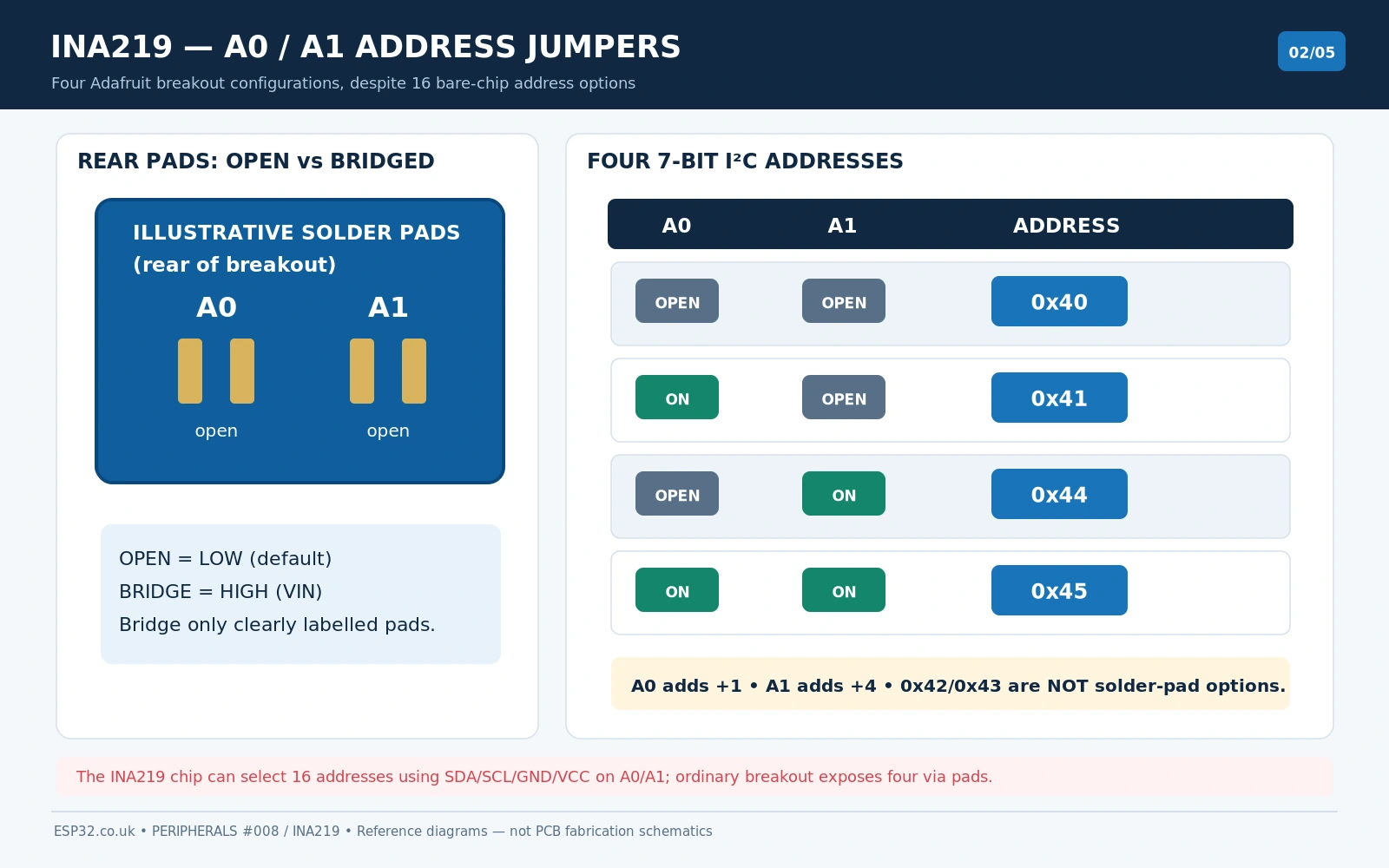
The INA219 chip itself supports 16 I²C addresses because each address-select input can be connected to GND, VCC, SDA or SCL. That does not mean the two Adafruit jumpers provide all 16. Generic modules may have a different solder-pad arrangement: trust their silkscreen and a measured I²C scan, not a diagram for another PCB revision.
For multiple sensors, give each device an available unique address and create one Adafruit_INA219 object per address. For example Adafruit_INA219 railA(0x40); and Adafruit_INA219 railB(0x41);. You select the address in the constructor, then call begin(); do not pass the address to begin().
Functional schematic: current shunt, high-side bus and I²C
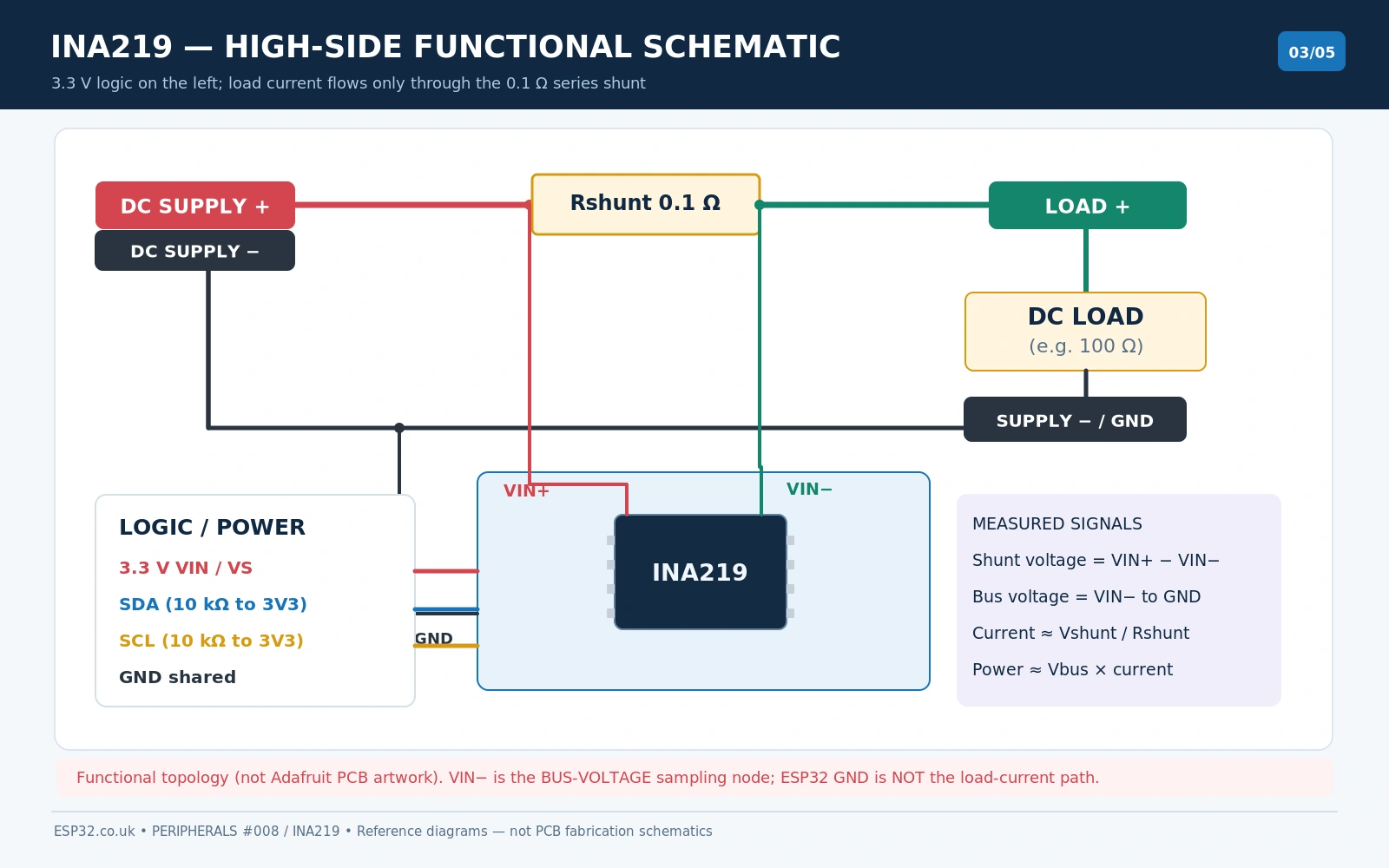
The INA219 measures two different voltages: the very small differential voltage across the shunt (VIN+ − VIN−) and the bus voltage on the load side (VIN−, measured with respect to the IC ground). Its current reading depends on the calibration register and the shunt resistance, while the power register combines bus voltage and calibrated current. Shunt voltage by itself is not load voltage.
The current sense inputs may sit at a much higher common-mode voltage than the INA219 logic supply. For example, a 12 V DC rail can be monitored while the sensor communicates with the ESP32 using 3.3 V logic, provided the entire sensing circuit obeys the INA219 absolute/operating limits and has a proper common reference. Do not use a 32 V calibration setting to justify a 32 V measured bus: Texas Instruments specifies a normal sensed bus range of 0–26 V.
The schematic should distinguish power and sense wiring visually: logic VIN=3.3 V powers the IC, but VIN+ and VIN− connect across a shunt in a separate DC load circuit. Logic SDA and SCL have pull-ups to 3.3 V on the reference Adafruit breakout; do not add 5 V pull-ups to an ESP32 bus.
ESP32–INA219 wiring: a safe low-current test
For a first bench test, choose a 5 V DC power supply and a 100 Ω resistor rated at least 0.5 W as the test load. At approximately 5 V, a 100 Ω resistor draws close to 50 mA and dissipates about 0.25 W, leaving some rating margin. Double-check supply polarity and wire the current path with the supply turned off.
| From | To | Purpose |
|---|---|---|
| ESP32 3V3 | INA219 VIN / VCC | Sensor logic power at 3.3 V |
| ESP32 GND | INA219 GND | Shared measurement/I²C reference |
| ESP32 GPIO21 | INA219 SDA | I²C data on classic ESP32 DevKit |
| ESP32 GPIO22 | INA219 SCL | I²C clock on classic ESP32 DevKit |
| 5 V DC supply + | INA219 VIN+ | Shunt upstream, current enters sensor |
| INA219 VIN− | 100 Ω load resistor (+ side) | Shunt downstream, current flows to load |
| 100 Ω resistor return | 5 V DC supply − | Complete current circuit |
| 5 V DC supply − | INA219/ESP32 GND | Common voltage reference; assess ground arrangement before using other sources |
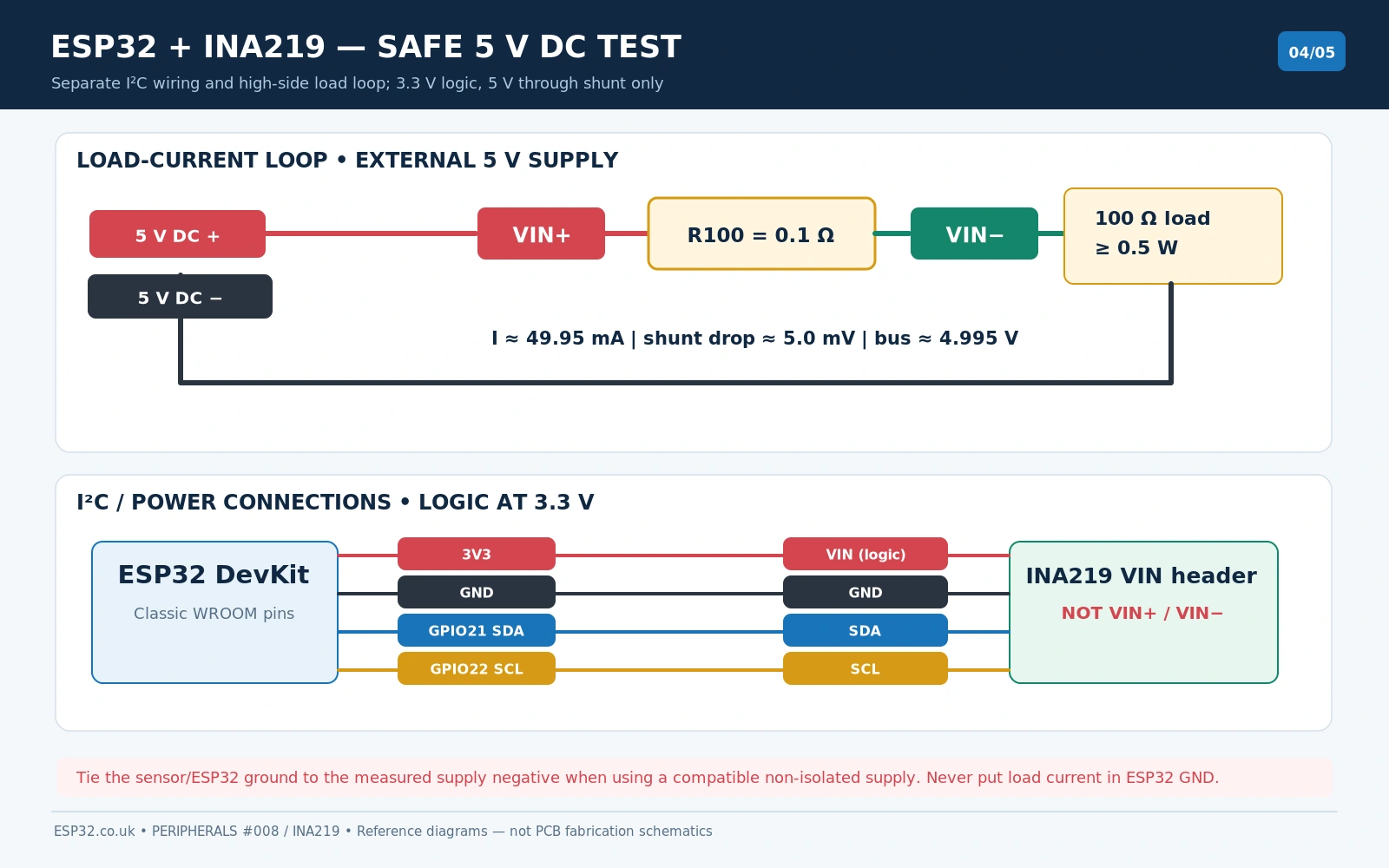
With 5 V and 100 Ω you should expect roughly I ≈ 5 / (100 + 0.1) = 49.95 mA. The shunt voltage is only about 5 mV, so the load voltage should be close to 4.995 V (ignoring cable and supply losses). These are calculated reference values, not measurements of a particular board. The shunt’s exact resistance, lead resistance and calibration influence real readings.
The example GPIOs are appropriate for a typical classic ESP32-WROOM DevKit. The ESP32-C3, ESP32-S3, ESP32-C6 and other families have different board pinouts; use the SDA/SCL pins that you actually configured with Wire.begin(SDA, SCL).
Arduino IDE example using Adafruit INA219
Install Adafruit INA219 in the Arduino IDE Library Manager; allow installation of the dependent Adafruit BusIO library. With the ESP32 board package installed, upload this standalone sketch and open Serial Monitor at 115200 baud. It uses the official Adafruit library API, but the example below has not been physically bench-tested on your particular module.
#include <Arduino.h>
#include <Wire.h>
#include <Adafruit_INA219.h>

constexpr uint8_t INA219_ADDRESS = 0x40;
constexpr int I2C_SDA_PIN = 21;   // classic ESP32 DevKit example
constexpr int I2C_SCL_PIN = 22;

Adafruit_INA219 ina219(INA219_ADDRESS);

void setup() {
  Serial.begin(115200);
  delay(500);

  Wire.begin(I2C_SDA_PIN, I2C_SCL_PIN);
  Wire.setClock(100000);

  if (!ina219.begin(&Wire)) {
    Serial.println("INA219 not found. Check power, SDA, SCL and address.");
    while (true) delay(1000);
  }

  // Stock Adafruit board uses a 0.1-ohm shunt.
  // This software preset does NOT permit 32 V at the input:
  // the INA219 specified bus-voltage range is 0–26 V.
  ina219.setCalibration_32V_2A();
  Serial.println("INA219 DC monitor ready");
}

void loop() {
  float shunt_mV = ina219.getShuntVoltage_mV();
  float bus_V = ina219.getBusVoltage_V();
  float current_mA = ina219.getCurrent_mA();
  float power_mW = ina219.getPower_mW();

  // Positive shunt voltage corresponds to current from VIN+ to VIN-.
  float source_V = bus_V + shunt_mV / 1000.0f;

  Serial.printf("Bus (VIN-): %.3f V\n", bus_V);
  Serial.printf("Shunt: %.3f mV\n", shunt_mV);
  Serial.printf("Source (VIN+): %.3f V\n", source_V);
  Serial.printf("Current: %.2f mA\n", current_mA);
  Serial.printf("Power: %.2f mW\n\n", power_mW);

  delay(1000);
}
Example serial readings: interpreting the numbers
INA219 DC monitor ready
Bus (VIN-): 4.996 V
Shunt: 4.990 mV
Source (VIN+): 5.001 V
Current: 49.90 mA
Power: 249.30 mW
These are illustrative sample values, not claimed real readings. Bus voltage is measured at the load side (VIN−) relative to GND. Adding the signed shunt voltage gives the upstream VIN+ voltage. The current will read negative if the sense direction reverses (within the supported common-mode and shunt ranges). When current reads zero despite a load, inspect the series current loop and board calibration before rewriting the code.
Shunt calibration, range and measurement accuracy
With the default Adafruit R100 shunt, Rshunt = 0.1 Ω. Current follows Ohm’s law: I (A) = Vshunt (V) / 0.1 Ω, or I (mA) = Vshunt (mV) × 10. The chip applies a software-defined calibration factor to expose current and power registers; a library calibration routine must agree with the actual installed shunt. A clone fitted with R050 or another value can give systematically incorrect current with the default calibration.
| Adafruit library preset | Use case / note |
|---|---|
| setCalibration_32V_2A() | Standard 0.1 Ω shunt, 2 A calibrated preset; 32 V refers to a register setting, not the chip’s safe 26 V operating limit |
| setCalibration_32V_1A() | Finer current scaling for lower-current measurements, with lower usable calibrated range |
| setCalibration_16V_400mA() | Higher current resolution over a narrower nominal voltage/current range |
| Custom shunt configuration | Requires correctly deriving current LSB, CAL register, gain and power LSB; not just changing R100 physically |
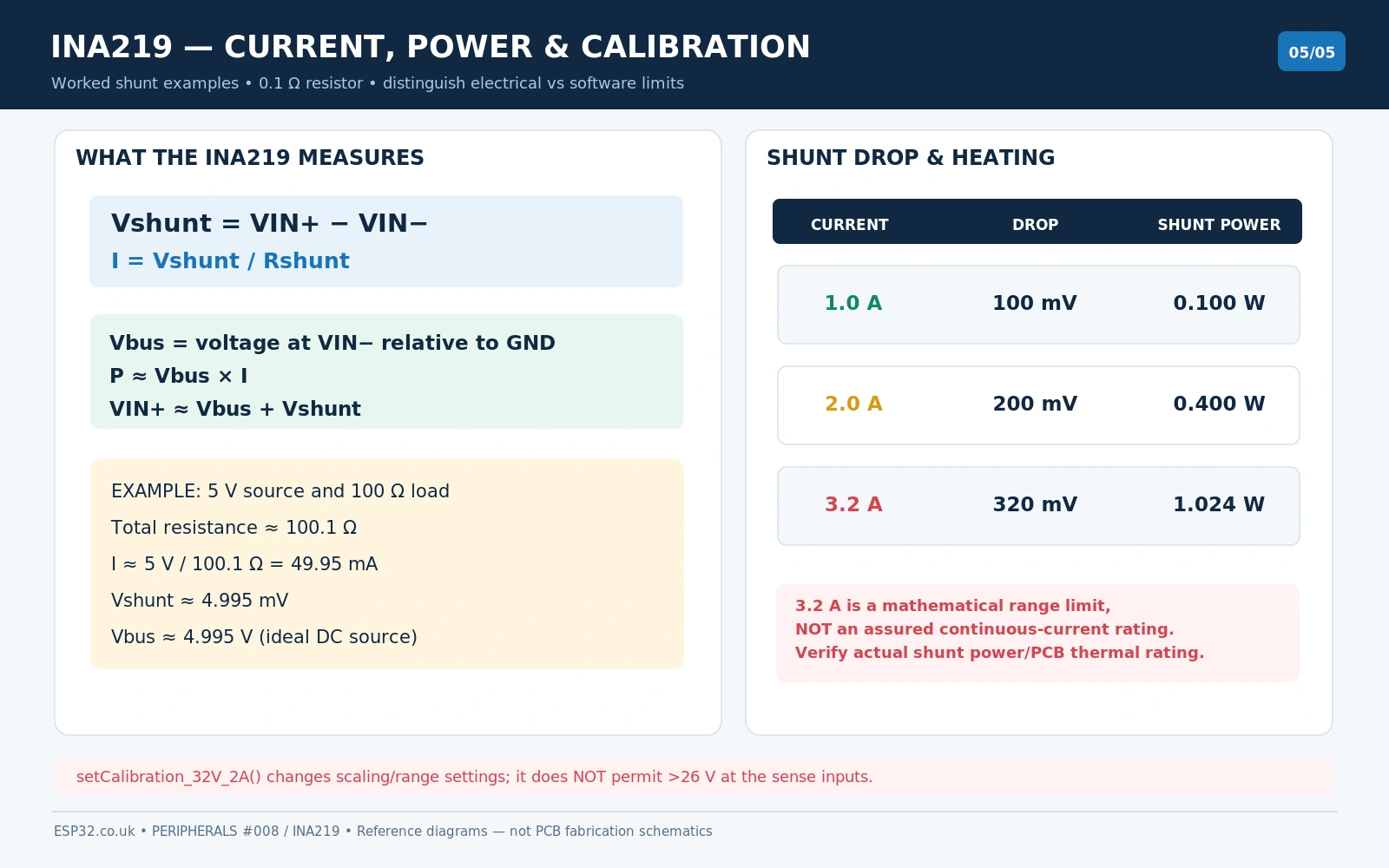
For short-duration and continuous loads, always evaluate shunt heating via P = I²R. The approximate ±3.2 A full-scale sense limit does not guarantee that every cheap INA219 module can carry ±3.2 A continuously without overheating. Evaluate the board resistor’s actual power rating, PCB traces, terminal blocks, connectors, wiring, enclosure and ambient temperature.
A0/A1 solder-jumper mistakes and other troubleshooting
| Symptom | Check |
|---|---|
| I²C scan does not show 0x40 | Use 3.3 V logic power, share grounds, check SDA/SCL routing, and scan 0x40/0x41/0x44/0x45 for a modified Adafruit board. |
| Current reads 0, bus voltage plausible | VIN+ and VIN− may not be in series with the load. A parallel voltage connection does not measure current. |
| Current sign negative | Check the current direction: normal positive flow is VIN+ toward VIN−. |
| Voltage seems high or low | Bus voltage measures the load-side VIN− relative to ground; upstream VIN+ equals bus voltage plus shunt drop. |
| Current wrong by a fixed scale factor | Read the resistor marking: R100 ≈0.1 Ω; other clone shunt values require a new calibration. |
| Board hot or shunt discoloured | Shut down; check shunt I²R, current, terminal rating, short circuits and thermal limits. |
| Works at 3.3 V but ESP32 fails with 5 V module | I²C pull-ups may reach the 5 V breakout supply; never apply 5 V SDA/SCL to a 3.3 V ESP32. |
| Power or current saturates | Review calibration range, programmable gain, bus common-mode and shunt voltage. Check for numerical overflow and ADC clipping. |
| Measurement spikes with a relay/motor | Add appropriate flyback/TVS and supply protection; inductive transients can exceed input ratings. |
| INA219 not detected with two boards | Both might share 0x40. Change A0/A1 pads appropriately; create two separate Adafruit_INA219 objects. |
INA219, INA226 or INA260: which board should you use?
The INA219 is a simple choice for a single DC current/voltage monitor, small battery test rig or ESP32 power measurement. The INA219 versus INA226 versus INA260 comparison explains the alternatives: the INA226 generally provides more measurement configuration and higher-resolution bus sensing, while the INA260 integrates a precision internal shunt to remove some external-resistor uncertainty. A future module-specific INA226 pinout guide will address that breakout separately.
For Home Assistant logging, see our existing INA219/INA226 ESP32 Home Assistant tutorial. This page intentionally targets a different search intent: physical breakout pinout, solder bridges, high-side wiring and the underlying shunt equations.
Frequently asked questions
Can INA219 measure 24 V using a 3.3 V ESP32?
Yes for a suitable 24 V DC bus, because the sensed bus input can operate up to 26 V while the logic runs at 3.3 V. Verify the entire circuit’s common-mode, differential, ground and transient conditions; leave reasonable headroom for surges. Use protective design for inductive loads. It is not intended for mains AC.
Can the INA219 power my sensor or load?
No. INA219 measures the current through a series resistor. Its VIN+ and VIN− path does not generate or regulate load power. The logic VIN input simply powers the monitor IC.
Why does my sensor show a 32 V range in software if its bus rating is 26 V?
The library names a configuration register mode that supports a nominal 32 V digital full-scale scale. Texas Instruments only specifies a 0–26 V sensing range for INA219 operation. The software setting cannot override silicon voltage limits.
Can it measure negative current?
Yes, within the shunt amplifier’s supported signed differential range and common-mode constraints. Reverse current through the resistor changes the sign. Negative bus voltage with respect to the INA219 ground is a different matter and is not the supported normal operating setup.
How many Adafruit INA219 boards can be on one I²C bus?
The two accessible solder jumpers provide four straightforward addresses (0x40, 0x41, 0x44, 0x45). The chip has 16 address combinations when the A0/A1 pins can be independently connected to all four allowed signals. The physical breakout may not expose them.
Manufacturer references and library
- Adafruit INA219 Breakout – pinout, pull-ups and address solder jumpers.
- Adafruit INA219 overview – shunt value, sense range and safety.
- Texas Instruments INA219 datasheet (SBOS448) – supply, 26 V bus, registers and addressing.
- Adafruit_INA219 Arduino library and API documentation.
Hardware scope and verification: The board-reference illustrations are designed for the Adafruit INA219 breakout family and compare common generic R100 variants, not every possible clone PCB. Exact mounting hole locations, screw terminals, component values and accessible pads can vary. The library code uses verified public API calls; no physical sensor measurement is claimed. This post contains original diagrams and code explanations rather than copied manufacturer illustrations.