
Looking for the ADS1015 breakout pinout, the address solderAliExpress price jumper, or a clear wiring example for a 3.3 V ESP32AliExpress price? This hardware reference covers Adafruit’s ADS1015 12-bit, four-channel I²C ADC breakout (product #1083, modern STEMMA QT layout) and the most common electrical mistakes. It shows the physical header layout, the rear A0 jumper, the internal measurement circuit, proper analogue input limits, and a short Arduino program using the maintained Adafruit ADS1X15 library.
Quick answer: wire VIN → ESP32AliExpress price 3V3, GND → GND, SDA → GPIO21 and SCL → GPIO22 on a classic ESP32 DevKit; connect a 0–3.3 V sensor to A0 and share its ground. The default 7-bit address is 0x48. Solder the rear A0 address jumper to select 0x49. In Arduino IDE, create Adafruit_ADS1015 ads;, initialise it with ads.begin(0x48, &Wire), and use ads.readADC_SingleEnded(0).
The ADS1015 is especially useful when conversion speed matters more than the ADS1115’s finer resolution. Both have four external analogue pins, but the ADS1015 performs conversions at up to 3,300 samples per second, versus up to 860 samples/s for the 16-bit ADS1115. Neither chip provides four simultaneous ADC engines: a multiplexer selects one input arrangement for each conversion.
ADS1015 at a glance: specifications and selection
| Characteristic | ADS1015 / Adafruit breakout reference |
|---|---|
| Converter | 12-bit delta-sigma, internally multiplexed |
| Sample rate | Selectable 128, 250, 490, 920, 1600, 2400 or 3300 samples/s |
| Analogue inputs | A0, A1, A2, A3: four single-ended measurements; supported differential combinations |
| Gain ranges | ±6.144, ±4.096, ±2.048, ±1.024, ±0.512 and ±0.256 V (ADC full-scale differential ranges) |
| Typical single-ended resolution | 3 mV/count at ±6.144 V; 2 mV/count at ±4.096 V; 1 mV/count at ±2.048 V |
| Chip power | 2.0–5.5 V; use 3.3 V on the ESP32 wiring example |
| I²C address | Default 0x48; alternative 0x49/0x4A/0x4B with suitable ADDR configuration |
| Breakout rear jumper | One A0 solder bridge: open 0x48, closed 0x49 |
| Comparator/alert | ALRT digital output, optional; can signal threshold or conversion ready |
| Output data | Signed 12-bit counts; conversion register is 16 bits with 12 result bits left-justified |
| Arduino library | Adafruit ADS1X15; select Adafruit_ADS1015 (not ADS1115) |
Texas Instruments specifies these as nominal converter capabilities. A breakout adds input filtering, logic pull-ups, header connections and sometimes a power LED, but it does not make the chip a high-voltage or galvanically isolated meter. If you need slower, finer voltage measurements, the related ADS1115 breakout reference covers the 16-bit version in detail. This article concentrates on the ADS1015 hardware, speed, quantisation and safe wiring.
Adafruit ADS1015 breakout pinout: every header signal
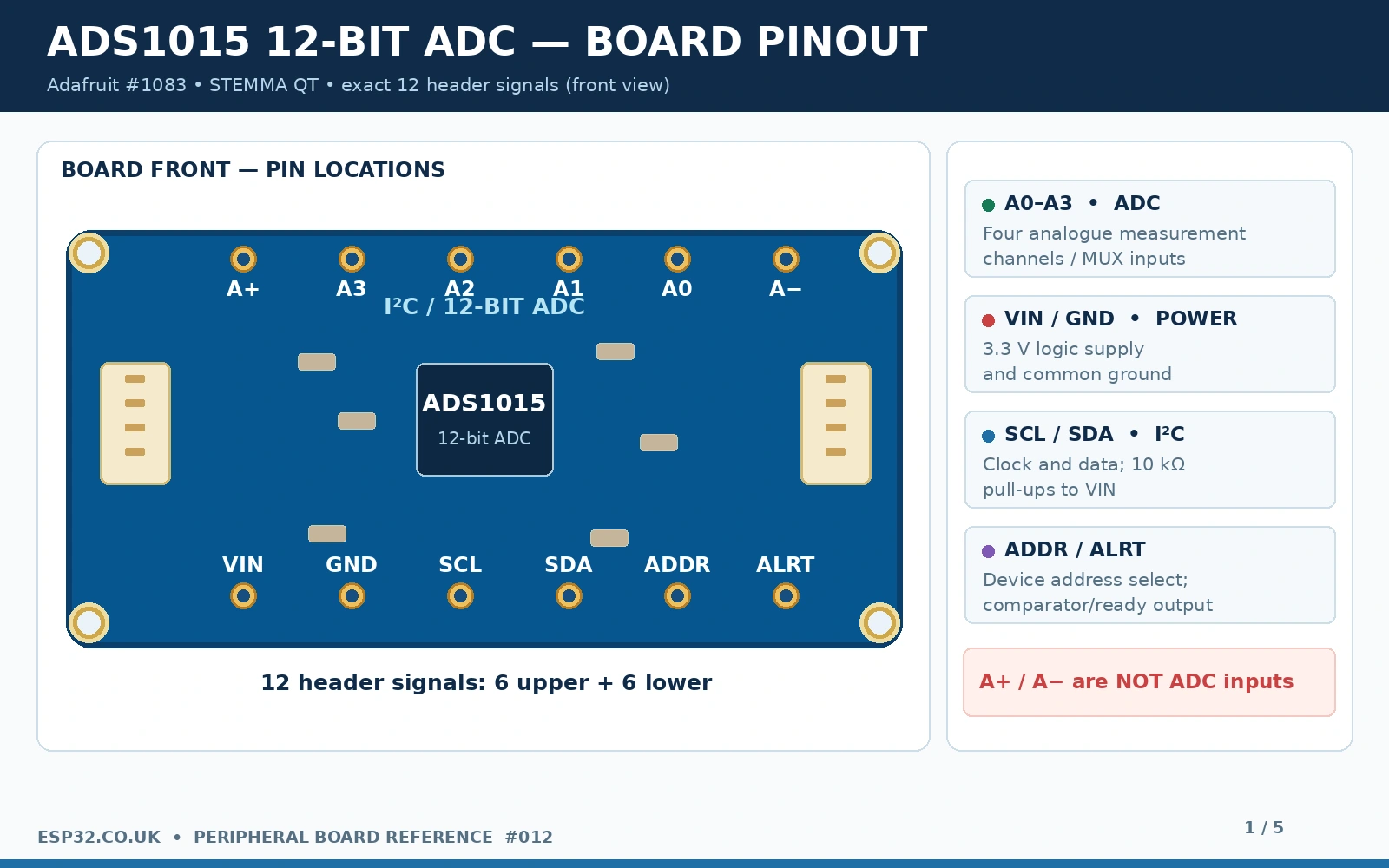
The modern Adafruit STEMMA QT ADS1015 has 12 through-hole signal pads, arranged in two groups of six, plus two JST-SH I²C connectors. With the silkscreen upright, the official photo labels the upper row A+, A3, A2, A1, A0, A−; the lower row reads VIN, GND, SCL, SDA, ADDR, ALRT. Always follow printed labels on your own PCB: generic ADS1015/ADS1115 modules may have a completely different order.
| Board pin | Meaning | Connection and caution |
|---|---|---|
| VIN | Breakout logic power | ESP32 3V3, not the measured signal |
| GND | Power and I²C reference | ESP32 GND and sensor return |
| SDA | I²C data | Classic ESP32 example GPIO21; onboard 10 kΩ pull-up to VIN |
| SCL | I²C clock | Classic ESP32 example GPIO22; onboard 10 kΩ pull-up to VIN |
| ADDR | Chip address-selection input | GND:0x48, VDD:0x49, SDA:0x4A, SCL:0x4B; do not short arbitrary pads |
| ALRT | Comparator/conversion-ready output | Optional; normally unused for polling; open-drain output needs pull-up if connected |
| A0, A1, A2, A3 | Analogue measurement inputs | Signals must remain within allowed supply-referenced pin voltages |
| A+ | Filtered positive ADC supply connection | Not an extra AIN channel; do not mistake for differential positive input |
| A− | Filtered ADC ground connection | Not an extra AIN channel; not a negative-voltage measurement terminal |
| STEMMA QT ×2 | Duplicate JST-SH four-wire I²C connections | Power, GND, SDA, SCL; may daisy-chain compatible 3.3 V devices |
The chip supports four single-ended readings, each relative to ground, and differential readings by internally subtracting selected analogue inputs. Some valid differential multiplexing options include A0–A1, A0–A3, A1–A3 and A2–A3. These inputs are not isolated from one another. Each physical AIN pin must remain within the ADC’s supply and ground limits even when the voltage difference between a pair is small.
The A+ and A− label trap
On this particular Adafruit board, A+ and A− are filtered analogue power and ground connections, not a differential A+/A− signal pair. The actual four measurement pins are A0–A3. Connecting an external analogue signal to A+ expecting an ADC reading can back-power the board or damage the input network. This confusion occurs because many other ADC modules use a “+ / −” convention for differential inputs; do not transfer that convention to this PCB.
ADS1015 rear A0 solder pad and I²C addresses
The single A0 solder jumper on the rear of Adafruit #1083 is normally open, leaving the breakout at 0x48. Bridging its two exposed pads with solder raises the ADDR selection to the alternative 0x49. That jumper is physically different from the front header labelled A0, which is an analogue channel, and from the front ADDR pin, which selects the I²C address. Do not solder the front analogue A0 expecting the I²C address to change.
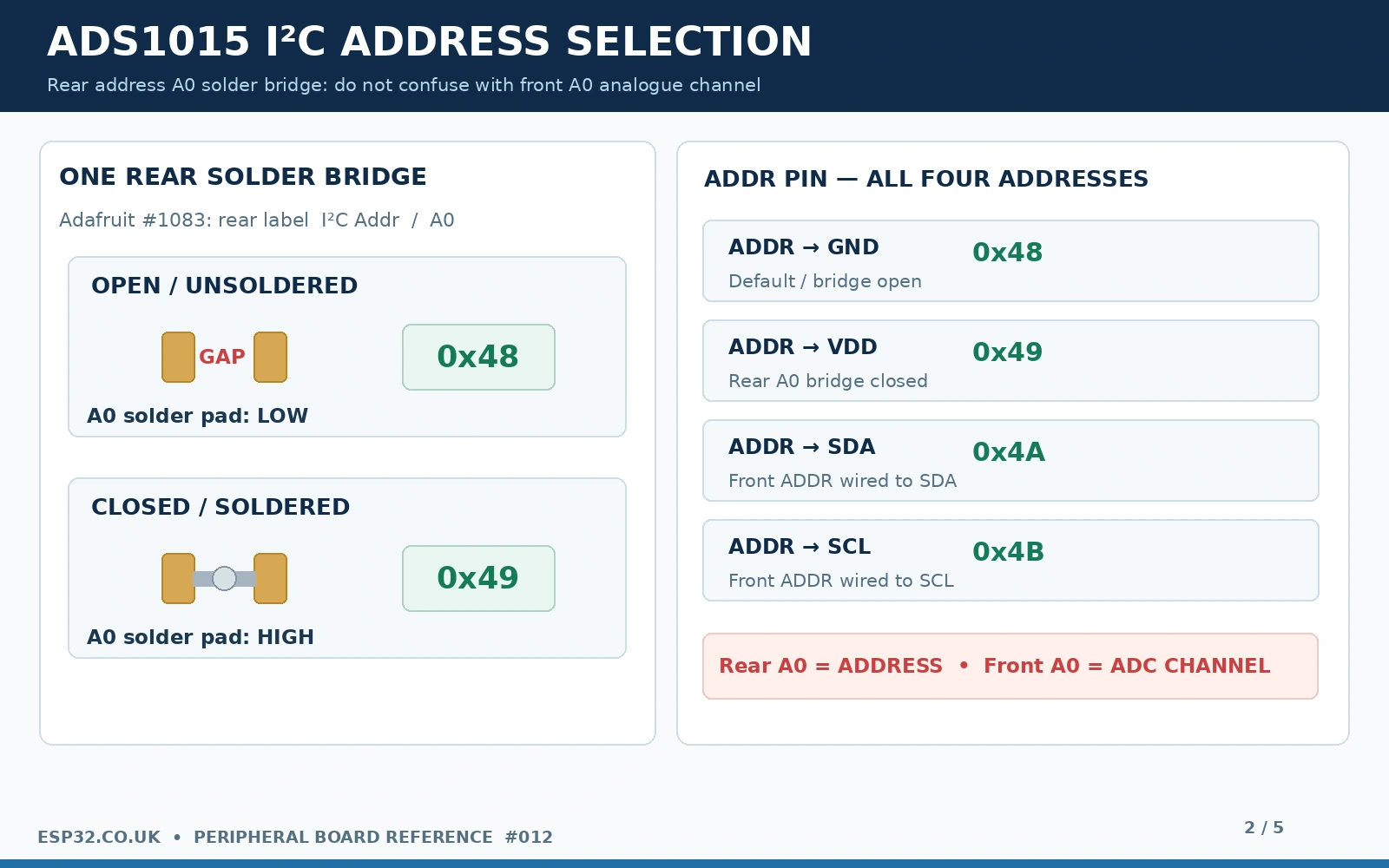
| ADDR connection / board state | 7-bit I²C address | How to obtain it |
|---|---|---|
| GND / rear A0 open | 0x48 | Adafruit breakout default |
| VDD / rear A0 closed | 0x49 | Bridge the rear A0 solder pads, or wire ADDR high as appropriate |
| SDA | 0x4A | Configure the front ADDR pin for SDA; require an electrically correct, verified setup |
| SCL | 0x4B | Configure the front ADDR pin for SCL; require an electrically correct, verified setup |
The four possible addresses belong to the chip; the standard Adafruit solder bridge directly gives you only two simple choices. When using multiple ADS1015 boards, ensure their addresses do not conflict with one another or other sensors. Do not confuse the 7-bit address 0x48 with the 8-bit read/write representation sometimes seen in logic-analyser captures. The Arduino Wire and Adafruit library interfaces expect the 7-bit address.
Functional schematic: filtered power, I²C, PGA and input mux
The ADS1015 integrates a four-channel analogue multiplexer, programmable gain amplifier, delta-sigma ADC, oscillator, internal reference and comparator. In a simplified 3.3 V breakout circuit, VIN provides power; bypass capacitors stabilise the IC; SDA/SCL use pull-ups to 3.3 V; ADDR is referenced to a valid selection; and ALRT is left unused or pulled up for interrupt operation. Adafruit’s breakout includes filtered analogue power/ground points, labelled A+ and A−, but their physical connections and component placement should not be assumed for every generic board.
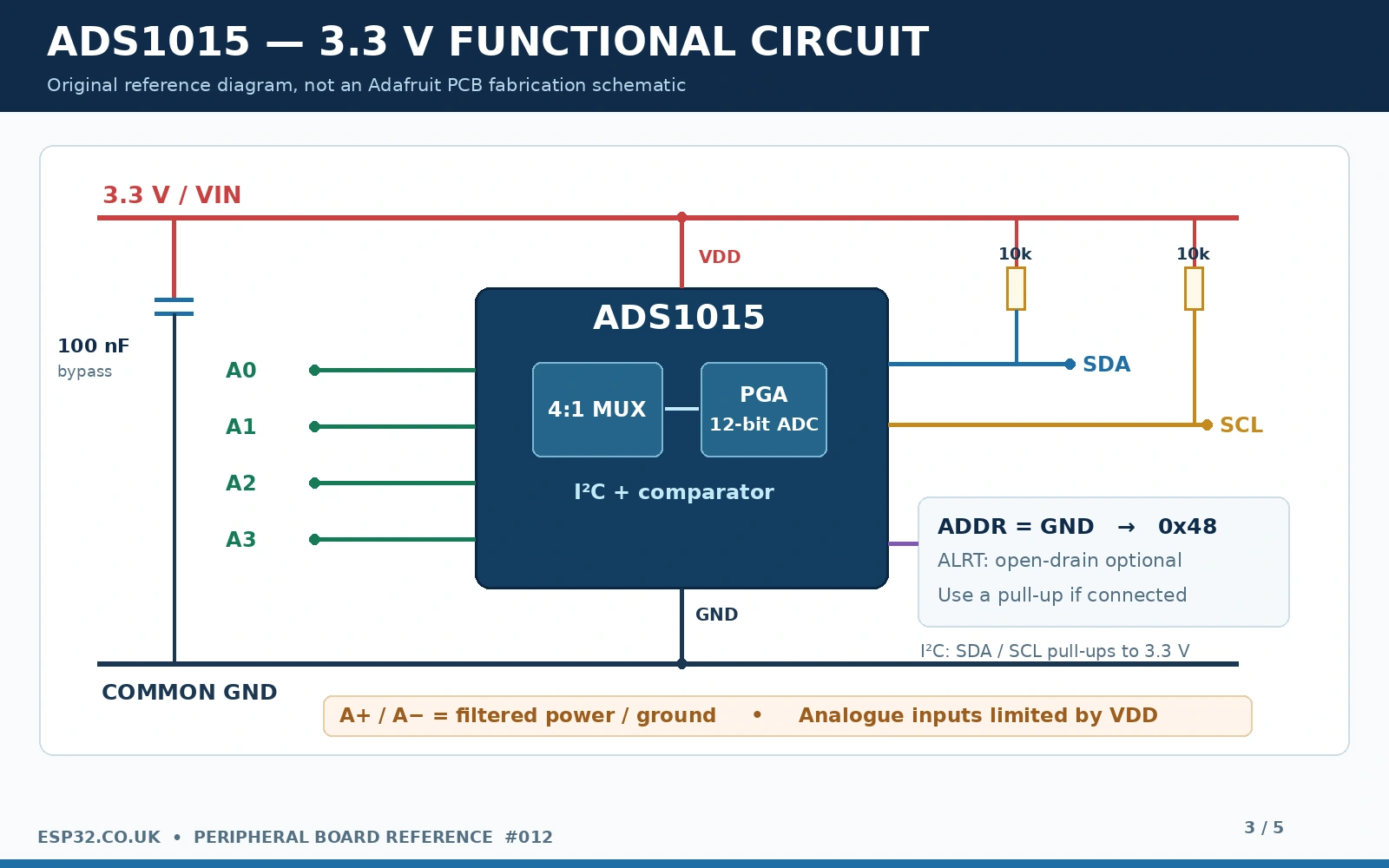
If ALRT is used as a threshold or conversion-ready line, it is an open-drain output that requires a pull-up to the receiving logic voltage. You can connect it to an ESP32 input with a suitable 3.3 V pull-up and a matching GPIO/interrupt configuration; the standard polling code below leaves it unconnected. Never tie ALRT to 5 V when it is connected directly to a 3.3 V-only ESP32 input.
The gain selection does not increase the safe input voltage
The ADS1015 PGA supports a nominal ±6.144 V full-scale range. That does not mean a device powered from 3.3 V can safely accept a 6 V sensor. Texas Instruments specifies the normal analogue input range as between GND and VDD, with absolute maximum limits close to the supply rails. Treat 0–3.3 V as the intended operating input span in our 3.3 V setup, not 0–6.144 V. Overvoltage protection must be handled externally with a carefully rated divider, clamping and/or suitable front-end conditioning.
Differential measurement measures a difference, not an isolated or bipolar-powered interface. For example, A0 at 1.20 V and A1 at 1.25 V represent −50 mV differential without putting either pin below ground. Applying −1 V directly to A0 is a different and unsafe case. Similarly, do not connect 12 V and 11.9 V to A0/A1 expecting the chip to see only a harmless 100 mV difference.
ESP32 ADS1015 connections and first 0–3.3 V test
| Classic ESP32 DevKit | ADS1015 breakout | Purpose |
|---|---|---|
| 3V3 | VIN | 3.3 V power / I²C pull-up level |
| GND | GND | Common ground |
| GPIO21 | SDA | I²C data on example ESP32-WROOM DevKit |
| GPIO22 | SCL | I²C clock on example ESP32-WROOM DevKit |
| Optional: 0–3.3 V sensor output | A0 | First single-ended ADC channel |
| Optional: ESP32 GPIO input | ALRT | Only if comparator / data-ready feature is configured |
GPIO21/GPIO22 are convenient example pins on many original ESP32-WROOM development boards. An ESP32-C3, S3, C6, P4 or another PCB may use different pins. This is a pin-to-pin connection example, not a universal ESP32-family pinout. Keep the ADS1015 and ESP32 grounds connected, and ensure the connected sensor output is referenced to that common ground.
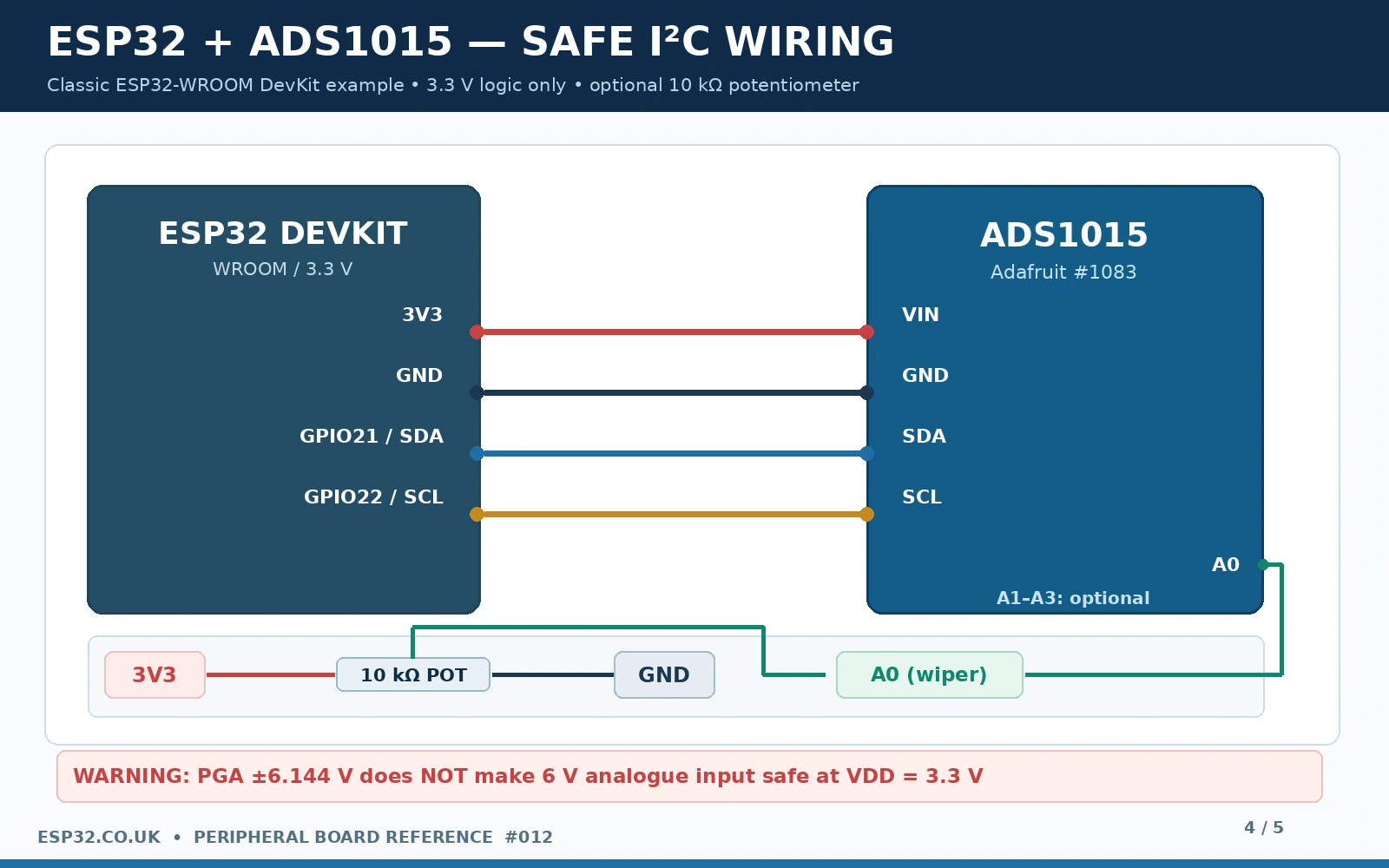
A 10 kΩ potentiometer provides a useful first test: connect its outside terminals to 3V3 and GND, and its centre wiper to A0. Rotate it from one end to the other and expect the voltage reading to change across approximately 0–3.3 V. Avoid floating A1–A3 while interpreting their values: unconnected analogue inputs can display unstable readings because their potential is undefined.
Gain settings and actual ADS1015 voltage resolution
Although both ADS1015 and ADS1115 use the same Adafruit library, they do not have the same voltage per count. The 12-bit ADS1015 offers about 2,048 signed positive counts for a positive full-scale differential range (codes 0–2047). This is why the nominal code increment at ±6.144 V is 3 mV, rather than 6.144/4096 = 1.5 mV. The positive-to-negative span across the signed 12-bit range contains 4,096 quantisation levels.
| Adafruit gain constant | Full-scale differential range | ADS1015 step size |
|---|---|---|
| GAIN_TWOTHIRDS | ±6.144 V | 3.000 mV/count |
| GAIN_ONE | ±4.096 V | 2.000 mV/count |
| GAIN_TWO | ±2.048 V | 1.000 mV/count |
| GAIN_FOUR | ±1.024 V | 0.500 mV/count |
| GAIN_EIGHT | ±0.512 V | 0.250 mV/count |
| GAIN_SIXTEEN | ±0.256 V | 0.125 mV/count |
For a normal 0–3.3 V analogue source use GAIN_ONE (±4.096 V), or leave the wider GAIN_TWOTHIRDS default for more margin. Select a narrower full-scale range only when every expected signal remains within it; otherwise the converter will saturate. The Adafruit computeVolts() helper handles the configured gain, so you do not need to hand-code the voltage-per-count factor for every mode.
Remember that gain and sampling rate are independent settings. The ADS1015 can convert up to 3300 samples/s total through its multiplexer—not 3300 samples/s from each of four inputs simultaneously. Four channels read sequentially incur four conversion times and I²C overhead. At higher rates, analogue source impedance, noise, wiring and software scheduling matter as much as the nominal ADC speed.
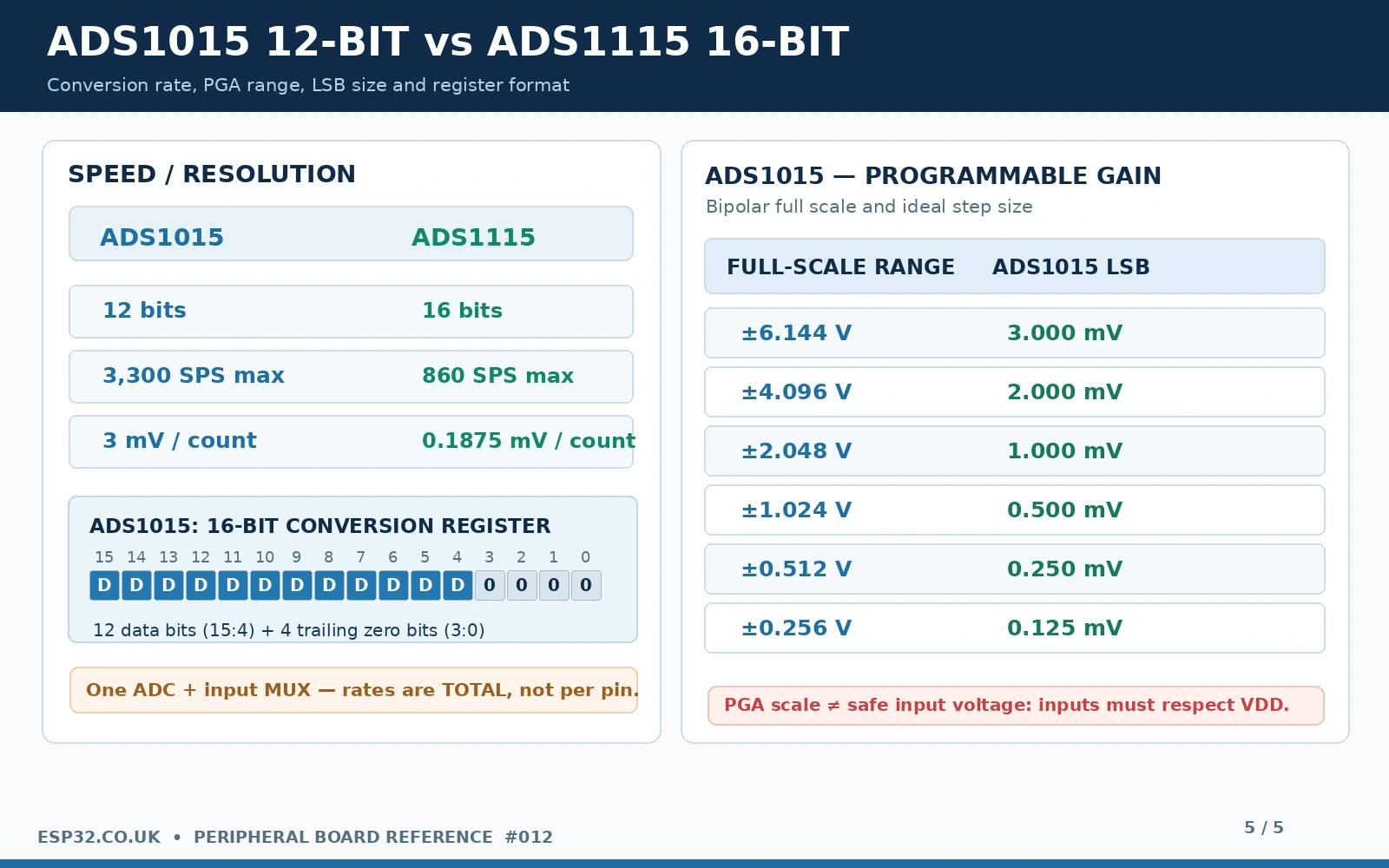
Why does the conversion register have 16 bits if the chip is 12-bit?
The ADS1015’s I²C conversion register is 16 bits wide, but only bits 15:4 contain the 12-bit two’s-complement result; the lowest four bits are zero/reserved. If you write your own register driver, sign-extend and shift the 12-bit value correctly. A raw 16-bit word is not the same as an ADS1115 conversion reading. The maintained Adafruit ADS1X15 library performs the appropriate conversion for Adafruit_ADS1015; use its API instead of blindly copying ADS1115 bit-shifting code.
Arduino IDE example: four channels using Adafruit ADS1X15
In Arduino IDE, open Library Manager and install Adafruit ADS1X15 (plus any requested Adafruit BusIO dependency). Select an appropriate ESP32 board and serial port. The following example deliberately uses Adafruit_ADS1015, not Adafruit_ADS1115. It sets explicit I²C pins, checks for the device at 0x48, chooses a ±4.096 V conversion range, then prints raw 12-bit counts and converted voltages on all four ADC channels.
#include <Arduino.h>
#include <Wire.h>
#include <Adafruit_ADS1X15.h>

constexpr int SDA_PIN = 21;       // Classic ESP32 DevKit example
constexpr int SCL_PIN = 22;
constexpr uint8_t ADS_ADDR = 0x48;

Adafruit_ADS1015 ads;            // ADS1015 = 12-bit, NOT ADS1115

void setup() {
  Serial.begin(115200);
  delay(400);

  Wire.begin(SDA_PIN, SCL_PIN);
  Wire.setClock(100000);

  if (!ads.begin(ADS_ADDR, &Wire)) {
    Serial.println("ADS1015 not found. Check I2C pins and ADDR!");
    while (true) delay(1000);
  }

  ads.setGain(GAIN_ONE);         // +/-4.096 V scaling range
  Serial.println("ADS1015 ready: four single-ended inputs");
  Serial.println("Keep each AIN pin within 0..VDD (3.3 V here)");
}

void loop() {
  for (uint8_t ch = 0; ch < 4; ch++) {
    int16_t raw = ads.readADC_SingleEnded(ch);
    float volts = ads.computeVolts(raw);

    Serial.printf("A%u: %5d counts  %7.3f V  ",
                  ch, raw, volts);
  }
  Serial.println();
  delay(500);
}
The example has been checked against the current published library API, but not bench-tested on the specific board in your hand. A potentiometer wiper at roughly 1.65 V should produce approximately 825 counts using GAIN_ONE (2 mV/count), subject to reference accuracy and noise. Unconnected channels may report arbitrary or drifting voltages; connect a known reference before judging accuracy.
Optional differential reading: A0 minus A1
To measure a small voltage difference, put both signals within 0–3.3 V and use the library’s differential API. A0 and A1 are a straightforward first pair. If measuring a shunt or bridge, ensure the inputs and source impedance suit the converter and that the common-mode voltage stays within the pin limits.
// After Wire.begin(), ads.begin() and ads.setGain() in setup:
int16_t diffCounts = ads.readADC_Differential_0_1();
float diffVolts = ads.computeVolts(diffCounts);
Serial.printf("A0 - A1 = %d counts = %.4f V\n",
              diffCounts, diffVolts);
A negative diffVolts means A1 is at a higher potential than A0; it does not require either input to be physically negative relative to board ground. Differential mode is not an isolation barrier or a method for measuring voltage across an arbitrary floating high-voltage circuit.
Continuous mode, ALERT and the fastest sample rates
The device supports single-shot and continuous-conversion modes, plus optional comparator/ALERT functionality. The polling example is the simplest starting point: select a channel, trigger a conversion and wait for the result. At fast data rates, take care not to confuse nominal sample rate with guaranteed application throughput. If you need one signal sampled continuously, configuring continuous mode and reading results when ready can avoid wasted conversion wait time.
A high-rate test should also check I²C bus timing, ESP32 task scheduling, serial-print overhead and analogue noise. Printing four floating-point values every sample over 115200 baud will severely limit the effective logging rate. Buffer data in RAM, reduce serial output and carefully benchmark one channel before claiming any application can sustain 3300 printed readings per second.
ADS1015 versus ADS1115: when is the faster ADC preferable?
| Decision factor | ADS1015 | ADS1115 |
|---|---|---|
| Resolution | 12-bit signed conversion | 16-bit signed conversion |
| Maximum nominal conversion rate | 3300 SPS | 860 SPS |
| Typical default ±6.144 V step | 3 mV/count | 0.1875 mV/count |
| Inputs / communications | Four analogue pins; I²C | Four analogue pins; I²C |
| Best fit | Faster sensor changes, modest precision, simple control | Slow, low-level precision measurements, battery and sensor calibration |
| Compatibility | Same general Adafruit library interface, ADS1015 class | Same general Adafruit library interface, ADS1115 class |
Choosing the ADS1015 solely because it has a higher numerical rate is not always wise. A noisy potentiometer or slow environmental sensor gains little from 3.3 kSPS; the ADS1115’s extra quantisation resolution may be more useful. Conversely, an application with rapidly changing inputs may benefit from the ADS1015 as long as aliasing, input filtering, multiplexer timing and software throughput have been considered. Neither is a dedicated oscilloscope or a simultaneous multichannel acquisition system.
For deeper ADS1115 comparison and calibration information, read the site’s ADS1115 wiring/gain guide or ADS1115 ESPHome calibration guide. The corresponding ADS1115 board reference covers the 16-bit PCB pinout in the same peripheral-board series.
Troubleshooting the ADS1015
| Symptom | Cause and check |
|---|---|
| I²C scan cannot find 0x48 | Check VIN=3.3 V, common ground, SCL/SDA orientation and GPIO selection. Rear A0 may be soldered to change the address to 0x49. |
| A0 input shows 0 V | Check sensor power and common ground; verify wiper voltage with a multimeter. Floating A0 can give unreliable results. |
| Every reading is clipped | Full-scale range too narrow for the signal, or sensor exceeds the supply rails. Fix wiring/conditioning; do not simply select ±6.144 V and ignore overvoltage. |
| Voltage is four or 16 times wrong | Using the ADS1115 class or treating ADS1015 16-bit register payload as true 16-bit result. Select Adafruit_ADS1015. |
| AIN reading unstable | Floating input, analogue ground noise, long wires or excessively high source impedance; reduce noise and use a driven source. |
| ADS1015 address confused with A0 analogue pin | Use rear address bridge or front ADDR selection. Front A0 near A1–A3 is a voltage input, not address pad. |
| Unexpected result on A+ or A− | Those are filtered ADC supply/ground connections on the Adafruit PCB, not differential measurement channels. |
| ALRT pin does not toggle | Comparator/ready mode is not enabled by the basic polling code. Configure it and provide a proper pull-up. |
| Can’t reach 3300 samples/s on four channels | One multiplexed converter, plus I²C and code overhead. 3300 SPS is total device conversion rate. |
ADS1015 frequently asked questions
Is ADS1015 just a cheaper ADS1115?
No. It is the 12-bit member of the same general converter family, with substantially higher maximum sample rate. The two share a similar interface but return measurements of different resolution, so their raw count scales differ. Choose based on actual required precision, speed, cost and input conditioning.
Does closing the rear A0 jumper select analogue channel A0?
No. The rear A0 address pad selects the I²C address 0x49. The front A0 header is analogue input channel 0. The names look similar but perform entirely different functions.
Can an ADS1015 powered at 3.3 V measure 5 V directly?
No. A ±6.144 V programmable ADC scale is not a 6.144 V-safe physical pin input. Design a suitable voltage divider and protect the inputs, or choose circuitry specified for the signal voltage. For nominal 3.3 V operation keep every analogue input in the 0–3.3 V range.
Can I sample A0, A1, A2 and A3 simultaneously?
No. One internal converter is time-multiplexed among channels. Software can scan all four quickly, but values correspond to separate conversion instants. Truly simultaneous multi-channel measurements require a different ADC architecture.
Can I connect a differential ±1 V sensor?
The converter can measure signed differential differences, but the absolute voltage on each physical input must remain within its allowed range relative to GND and VDD. A differential source that swings below device ground needs appropriate offset/bias or an isolated/conditioned front end.
Official references and scope
- Adafruit ADS1015/ADS1115 breakout pinouts — physical header names, 0x48/0x49 address jumper, power and filtered A+/A− connections.
- Adafruit Arduino reference — Adafruit_ADS1015 object, gain constants and analogue-reading functions.
- Texas Instruments ADS1015 datasheet — supply, 12-bit format, 3300 SPS, full-scale ranges and limits.
- Adafruit ADS1X15 Arduino driver source — available API and examples.
- Adafruit ADS1015 product #1083 — actual breakout and product revisions.
Hardware identification: board photos, jumper placement and rail protection details refer to the modern Adafruit #1083 STEMMA QT breakout. Generic low-cost blue or purple ADS1015 boards, older Adafruit revisions and ADS1115 modules may have completely different pads and layouts. Always compare the silk-screen and schematic to your physical board before soldering. The examples are documentation-checked, not claimed as bench-tested.