Quick Summary (TL;DR):
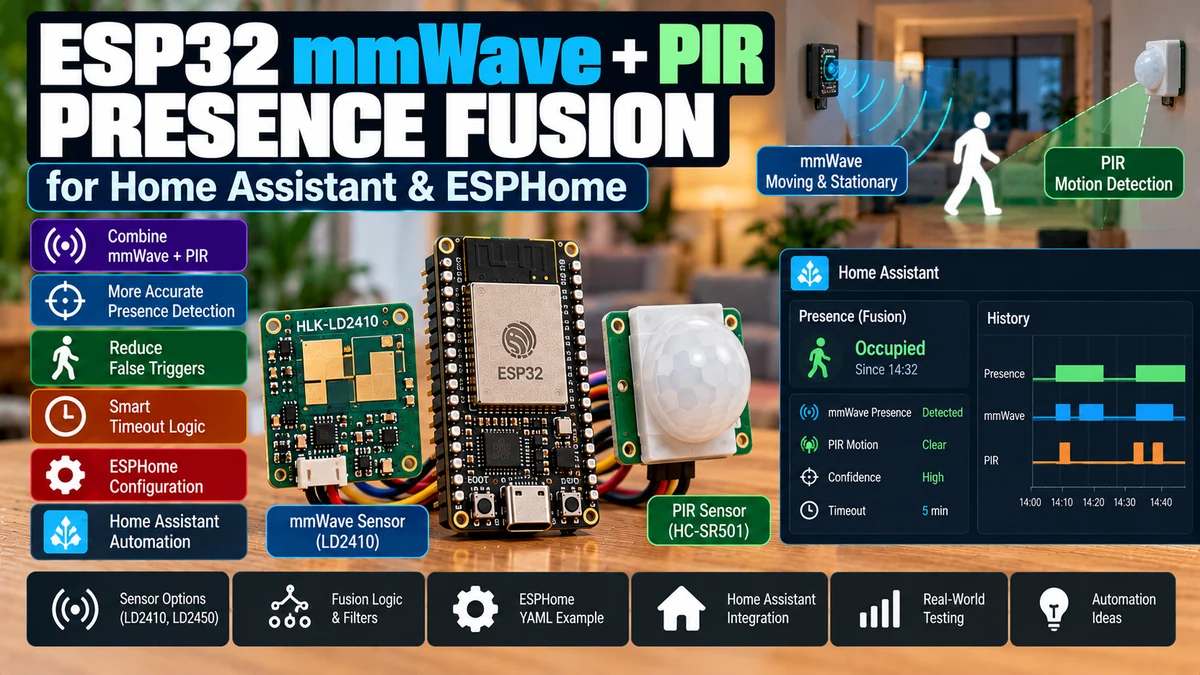
Combining a PIR motion sensorAliExpress price with a mmWave presence sensor such as the LD2410AliExpress price gives Home Assistant a much better occupancy signal than either sensor alone. The PIR is excellent at detecting a person entering because it reacts quickly to large thermal motion and usually ignores stationary objects. The mmWave sensorAliExpress price is excellent at holding occupancy while someone sits, reads, works or sleeps with very little movement. The simplest fusion rule is Occupied = PIR OR mmWave, followed by a delayed OFF. That works extremely well when the mmWave installation is already well tuned. However, simple OR fusion does not eliminate mmWave false positives: if a curtain or fan makes the radar report presence, the fused sensor will still turn ON. For difficult rooms, a stronger strategy is PIR-validates, mmWave-holds: PIR motion arms occupancy, then mmWave is allowed to keep the room occupied after PIR clears; occupancy turns OFF only when both sensors are clear for a chosen period. This stops many “empty room but mmWave still sees something” problems without sacrificing seated-person detection. Current ESPHome makes both strategies easy: GPIO binary sensors use interrupt-based edge detection by default, LD2410AliExpress price exposes has_target, and template binary sensors can combine states with delayed_off. For most rooms, start with simple OR fusion. If radar false presence still causes lights to turn on in an empty room, move to the validated/latching strategy rather than endlessly reducing LD2410AliExpress price sensitivity.
Materials You’ll Need
| Item | Why you need it |
|---|---|
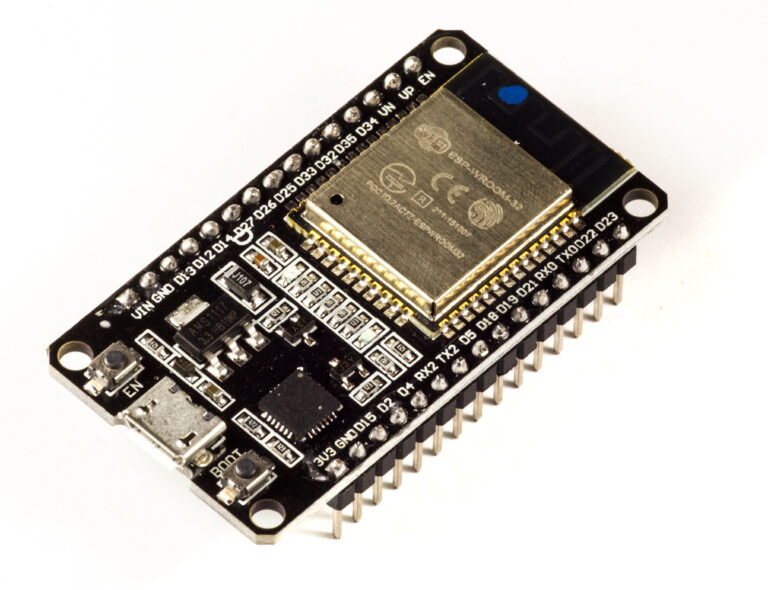
| ESP32 development board | Runs ESPHome and combines both sensors locally |
| LD2410 / LD2410B / LD2410C | mmWave stationary/moving presence detection |
| PIR sensor | Fast entry/motion confirmation |
| Stable 5 V supply | Powers ESP32, radar and PIR reliably |
| UART wiring | Full LD2410 data/configuration |
| GPIO input for PIR | Reads PIR HIGH/LOW output |
| Home Assistant | Uses the fused occupancy entity for automations |
| ESPHome 2026.x | Current LD2410, GPIO and template binary-sensor support |
| Optional lux sensor | Prevents lights turning on when daylight is sufficient |
Why Sensor Fusion Works Better Than One Sensor
| Sensor | Strength | Weakness |
|---|---|---|
| PIR | Fast detection of real body movement; cheap; low false stationary presence | Can miss someone sitting very still |
| mmWave | Can hold occupancy during tiny movements / stationary presence | Can false-trigger from fans, curtains, adjacent-room movement or reflections |
| PIR + mmWave | Fast entry + reliable stationary hold | Requires a clear fusion strategy |
The two sensors fail in different ways. That is exactly why combining them is useful.
The Three Fusion Strategies
| Strategy | Logic | Best for |
|---|---|---|
| Simple OR | PIR OR mmWave | Most rooms with well-tuned radar |
| PIR validates, mmWave holds | PIR starts occupancy; mmWave only keeps it alive | Rooms with occasional mmWave false triggers |
| Home Assistant multi-sensor state | Fuse several sensors centrally | Multi-node / multi-room logic |
Strategy One: Simple OR Fusion
PIR = ON OR mmWave = ON
→ Room Occupied = ON

PIR = OFF AND mmWave = OFF
→ wait off-delay
→ Room Occupied = OFF
This is the best default because it preserves each sensor’s strongest behaviour: PIR turns occupancy on quickly, and mmWave keeps it on while somebody is still.
ESPHome Simple OR Configuration
binary_sensor:
  - platform: gpio
    id: pir_motion
    name: "Room PIR Motion"
    device_class: motion
    pin: GPIO27

  - platform: ld2410
    ld2410_id: ld2410_radar
    has_target:
      id: mmwave_presence
      name: "Room mmWave Presence"
      device_class: occupancy

  - platform: template
    id: room_occupied
    name: "Room Occupied"
    device_class: occupancy
    lambda: |-
      return id(pir_motion).state || id(mmwave_presence).state;
    filters:
      - delayed_off: 30s
Current ESPHome template binary sensors evaluate continuously and can return a boolean state. The delayed_off filter waits before publishing OFF and cancels that OFF if either sensor becomes active again.
Why There Is No delayed_on in the Example
For lighting, you normally want immediate occupancy. PIR motion should turn the fused sensor ON without waiting.
Entry detected
→ PIR ON
→ fused occupancy ON immediately
→ light can turn on immediately
Why delayed_off Is So Useful
A person may momentarily fall below the mmWave threshold, or the PIR output may clear while they pause. A short delayed OFF prevents the fused entity from flickering.
Current ESPHome cancels a pending delayed_off if an ON state returns during the delay, which is exactly what occupancy logic needs.
How Long Should the ESPHome Off Delay Be?
| Room | Good starting range |
|---|---|
| Hallway | 5–15 s |
| Kitchen | 15–30 s |
| Office | 30–60 s |
| Living room | 30–90 s |
| Bedroom | 30–120 s |
This is only the sensor-fusion smoothing delay. You can still use a longer Home Assistant automation delay for comfort.
ESPHome Delay vs Home Assistant Delay
ESPHome fused occupancy delay
→ smooth sensor dropouts

Home Assistant light-off delay
→ human comfort / behaviour
For example, use 30 seconds in ESPHome but require the fused occupancy entity to remain OFF for 2 minutes before switching the room light off.
Home Assistant Light-Off Example
alias: Office lights off when truly empty
triggers:
  - trigger: state
    entity_id: binary_sensor.office_occupied
    to: "off"
    for: "00:02:00"

actions:
  - action: light.turn_off
    target:
      entity_id: light.office
Home Assistant’s current state trigger supports a for duration, so the entity must remain in the new state for that period before the automation fires.
The Limitation of Simple OR Fusion
Empty room
PIR = OFF
mmWave false trigger = ON
OR logic → Occupied = ON
Simple OR improves false absence dramatically, but it does not improve false presence if the mmWave sensor itself is wrong.
If your LD2410 is already calibrated and stable, that is fine. If it occasionally sees a fan or hallway, use the validated strategy below.
Strategy Two: PIR Validates, mmWave Holds
This strategy treats PIR as the evidence that a real person entered the room. Once PIR sees motion, occupancy becomes active. After that, mmWave may keep occupancy active even when PIR clears.
PIR sees entry
→ Occupancy ARMED / ON

PIR clears
mmWave still ON
→ Occupancy stays ON

PIR OFF + mmWave OFF
→ off timer
→ Occupancy OFF

mmWave false trigger while room never armed
→ ignored
This is a true sensor-fusion state machine rather than simple boolean OR.
Why Validated Fusion Reduces mmWave False Positives
Suppose a curtain produces a weak radar target at 3 AM while the room is empty. With simple OR, the curtain can mark the room occupied. With PIR-validated fusion, mmWave is only permitted to hold an already validated occupancy state. It cannot create occupancy from nothing.
Trade-Off: PIR Must See the Entry
Validated fusion assumes the PIR is positioned so a real person entering/using the room generates motion at least once.
If somebody can enter without crossing the PIR field, or the PIR is poorly placed, the radar may correctly see a person but the fusion logic will refuse to arm.
Validated Fusion ESPHome State Machine
The following implementation exposes a template binary sensor and uses a restartable clear script. PIR arms occupancy. mmWave can hold it, but mmWave alone does not initially turn it on.
binary_sensor:
  - platform: template
    id: validated_occupancy
    name: "Room Validated Occupancy"
    device_class: occupancy

  - platform: gpio
    id: pir_motion
    name: "Room PIR Motion"
    device_class: motion
    pin: GPIO27

    on_press:
      - script.stop: clear_validated_occupancy
      - binary_sensor.template.publish:
          id: validated_occupancy
          state: ON

    on_release:
      - script.execute: clear_validated_occupancy

  - platform: ld2410
    ld2410_id: ld2410_radar

    has_target:
      id: mmwave_presence
      name: "Room mmWave Presence"
      device_class: occupancy

      on_press:
        - if:
            condition:
              binary_sensor.is_on: validated_occupancy
            then:
              - script.stop: clear_validated_occupancy

      on_release:
        - script.execute: clear_validated_occupancy

script:
  - id: clear_validated_occupancy
    mode: restart
    then:
      - delay: 30s
      - if:
          condition:
            and:
              - binary_sensor.is_off: pir_motion
              - binary_sensor.is_off: mmwave_presence
          then:
            - binary_sensor.template.publish:
                id: validated_occupancy
                state: OFF
The result is deliberately asymmetric: PIR is allowed to turn occupancy ON; both sensors participate in deciding when it may turn OFF.
What Happens in Each Scenario
| Scenario | PIR | mmWave | Validated occupancy |
|---|---|---|---|
| Person walks in | ON | ON or soon ON | ON |
| Person sits still | OFF | ON | stays ON |
| Person leaves | OFF | eventually OFF | OFF after delay |
| Curtain moves in empty room | OFF | ON | stays OFF |
| mmWave false still target after occupancy was real | OFF | ON | Can keep occupancy ON until radar clears |
That last row matters: validated fusion prevents an empty-room radar false trigger from starting occupancy, but a false radar state that begins while the room is already occupied can still delay clearing. Proper LD2410 tuning still matters.
The Best Real-World Architecture
PIR
→ fast entry evidence
→ turns light / occupancy ON

LD2410
→ stationary hold
→ prevents lights OFF while person is still

Both clear
→ delayed OFF
Which PIR Sensor Should You Use?
The fusion logic works with almost any PIR module that provides a clean digital HIGH/LOW output compatible with the ESP32 input.
- AM312-style compact PIR modules
- HC-SR501-style adjustable PIR modules
- ceiling/wall PIR modules with suitable low-voltage output
- existing alarm PIR through a correctly isolated/level-compatible interface
Always verify the actual output voltage of your module. The ESP32 GPIO is a 3.3 V logic input and is not 5 V tolerant.
PIR GPIO Wiring
| PIR | ESP32 |
|---|---|
| VCC | According to PIR module requirements |
| GND | ESP32 GND |
| OUT | Example GPIO27, only if output level is ESP32-safe |
Current ESPHome’s GPIO binary sensor uses hardware interrupts by default on supported internal GPIOs, making motion edge detection efficient.
PIR Debouncing and Hold Time
Many PIR modules already hold their output HIGH for a hardware-defined period. You normally do not need a long ESPHome debounce on top of that.
If the PIR output chatters at the edge, a small binary-sensor filter can help.
binary_sensor:
  - platform: gpio
    id: pir_motion
    pin: GPIO27
    device_class: motion
    filters:
      - delayed_on: 50ms
      - delayed_off: 100ms
Do not add a 10-second delayed ON to a room-light PIR unless you genuinely want the light to wait 10 seconds before responding.
LD2410 Raw Presence
uart:
  id: ld2410_uart
  tx_pin: GPIO17
  rx_pin: GPIO16
  baud_rate: 256000
  parity: NONE
  stop_bits: 1

ld2410:
  id: ld2410_radar
  uart_id: ld2410_uart

binary_sensor:
  - platform: ld2410
    ld2410_id: ld2410_radar
    has_target:
      id: mmwave_presence
      name: "Room mmWave Presence"
    has_moving_target:
      name: "Room mmWave Moving"
    has_still_target:
      name: "Room mmWave Still"
Current ESPHome exposes moving, still and overall target states. For fusion, has_target is usually the correct hold signal because it is true for either moving or still target detection.
Do You Need PIR If LD2410 Detects Moving Targets Too?
Technically, no. LD2410 already has a moving-target classifier.
The reason to add PIR is independent sensing physics. PIR responds to changes in infrared radiation; mmWave responds to RF reflections. A curtain/fan that fools radar may not fool PIR, and a person sitting still who disappears from PIR can remain visible to radar.
Why Two Different Technologies Matter
PIR error source ≠ mmWave error source

Independent failure modes
→ more useful fusion
Two mmWave sensors with identical placement may fail in similar ways. PIR + mmWave gives more independent evidence.
Use PIR for Turn-On, Fused Presence for Turn-Off
One of the best Home Assistant patterns is not even to use the same entity for both actions.
PIR turns light ON immediately

Fused Occupancy controls light OFF
only when room is truly clear
This gives maximum responsiveness and maximum stationary-person protection.
Home Assistant Two-Stage Lighting
alias: Office light on from PIR
triggers:
  - trigger: state
    entity_id: binary_sensor.office_pir_motion
    to: "on"

conditions:
  - condition: numeric_state
    entity_id: sensor.office_illuminance
    below: 100

actions:
  - action: light.turn_on
    target:
      entity_id: light.office
alias: Office light off from fused occupancy
triggers:
  - trigger: state
    entity_id: binary_sensor.office_occupied
    to: "off"
    for: "00:02:00"

actions:
  - action: light.turn_off
    target:
      entity_id: light.office
Why Lux Should Be Separate from Presence
Presence answers “is somebody here?” Lux answers “is artificial light needed?” Mixing the two into one opaque sensor makes troubleshooting harder.
Occupancy = PIR/mmWave fusion
Lighting decision = Occupancy + Lux + Time/scene rules
Strategy Three: Fuse in Home Assistant
If the PIR and mmWave are on different ESP32 devices, Home Assistant can combine them centrally.
template:
  - binary_sensor:
      - name: "Office Occupied"
        device_class: occupancy
        delay_off: "00:00:30"
        state: >
          {{ is_state('binary_sensor.office_pir_motion', 'on')
             or is_state('binary_sensor.office_mmwave_presence', 'on') }}
Current Home Assistant template binary sensors support delay_off, making this central OR fusion straightforward.
ESPHome Fusion vs Home Assistant Fusion
| Location | Advantages | Trade-offs |
|---|---|---|
| ESPHome | Local, fast, continues even if HA temporarily unavailable; one clean entity | Best when sensors are on same ESP32 |
| Home Assistant | Easy to combine sensors from different devices/technologies | Depends on HA/network and adds central logic |
If both sensors physically connect to one ESP32, I prefer fusing them locally and exposing one clean occupancy entity plus the raw diagnostics.
Why Local Fusion Is More Robust
If Home Assistant restarts, the ESP32 can still calculate its room occupancy state locally. The raw sensors and fused binary sensor do not depend on an automation running in Home Assistant.
Home Assistant can then focus on the action—lighting, HVAC, media—not on reconstructing low-level sensor truth.
Keep the Raw Sensors Visible
Even if automations use only the fused occupancy entity, keep the raw PIR and mmWave entities available for diagnostics.
| Entity | Purpose |
|---|---|
| PIR Motion | Did thermal motion trigger? |
| mmWave Presence | Did radar see a target? |
| mmWave Moving | Is radar classifying movement? |
| mmWave Still | Is radar holding a stationary target? |
| Fused Occupancy | Final automation state |
When a light behaves incorrectly, these entities immediately tell you which sensor caused the state.
Office Example
Walk into office
→ PIR ON instantly
→ light ON
→ fused occupancy ON

Sit reading for 20 minutes
→ PIR OFF
→ LD2410 still presence ON
→ fused occupancy remains ON

Leave room
→ PIR OFF
→ LD2410 clears
→ 30s fusion delay
→ 2min HA comfort delay
→ light OFF
Bedroom Example
A bedroom benefits strongly from mmWave hold because sleeping produces almost no PIR-triggering motion.
However, use validated fusion carefully if the PIR cannot reliably see someone entering the bed area. A simple OR may be safer after the LD2410 is properly tuned.
Bathroom Example
Bathrooms often work very well with simple OR: PIR reacts instantly on entry and mmWave holds occupancy when someone is relatively still.
Keep radar max range short to avoid detecting movement outside the bathroom through a lightweight wall or open doorway.
Living Room Example
Living rooms have fans, curtains and multiple seating positions, so radar calibration matters more. If false mmWave occupancy is occasional, validated fusion can be especially useful.
Hallway Example
A hallway normally does not need stationary presence detection. PIR alone may actually be the better solution because occupancy is brief and movement-dominated.
Sensor fusion is useful only when it solves a real problem; do not add mmWave to every room by default.
Kitchen Example
Kitchen occupancy involves lots of motion, so PIR is already strong. mmWave becomes useful when someone stands relatively still at a worktop or table.
Fans and moving blinds can create radar noise, making the PIR-validates/mmWave-holds strategy attractive.
What Happens When PIR Stays HIGH for a Long Time?
Some PIR modules have adjustable retrigger/hold behaviour and may remain HIGH while motion continues. That is fine. The fusion logic simply remains occupied.
What Happens When mmWave Takes Longer to Clear?
The fused entity remains occupied until radar clears. If that delay is excessive, tune the LD2410 itself rather than only reducing the fused off-delay.
A fusion layer cannot repair an LD2410 that is permanently reporting a false target.
Why Sensor Fusion Is Not a Substitute for LD2410 Tuning
Bad mmWave tuning + fusion
→ fewer problems, but still a bad radar signal

Good mmWave tuning + fusion
→ best result
Use the LD2410 engineering-mode guide to set useful maximum gates and move/still thresholds first.
A Better Way to Think About the Sensors
| Sensor | Question it answers |
|---|---|
| PIR | Did a warm body move through my field of view? |
| LD2410 | Is radar energy consistent with a moving or still target? |
| Fusion | Given both signals, should the room be considered occupied? |
False Positive vs False Negative
| Error | Example | Fusion effect |
|---|---|---|
| False negative | PIR misses seated person | mmWave fixes it |
| False positive | mmWave sees curtain | PIR validation can reduce it |
| Both miss person | Poor placement | Fusion cannot invent a signal |
| Both false-trigger | Environmental/placement problem | Fusion may still fail |
Sensor Placement: Do Not Mount Them Identically by Habit
PIR and mmWave do not need the same ideal position. A PIR often benefits from seeing somebody move across its field, while mmWave is often placed to face the occupancy area more directly.
They can live in the same enclosure, but separate placement can sometimes improve coverage dramatically.
PIR Detects Better Across Motion Than Straight Toward It
PIR sensors typically react strongly to infrared change across their Fresnel zones. A doorway position that forces a person to cross the field can give a very fast entry trigger.
The mmWave sensor can then face into the room where stationary occupancy occurs.
One Enclosure vs Two
| Design | Advantages | Trade-offs |
|---|---|---|
| One ESP32 enclosure | Simple wiring, local fusion, one Wi-Fi device | Placement compromise |
| Separate PIR + radar locations | Best sensing geometry | More cable or another node |
Choose sensing geometry first. Convenience comes second.
Can a Door Contact Improve Fusion?
Yes, especially in bathrooms/bedrooms/offices with one entrance. A door contact adds another independent event: entry/exit state.
Door opens + PIR fires
→ strong evidence of entry

Door closes + both sensors clear later
→ strong evidence room is empty
But do not create an overly complex state machine unless simpler fusion is actually failing.
Can BLE Room Tracking Improve It?
BLE phone/watch presence can add identity or room-proximity context, but it is slower and less deterministic than PIR for light-on events.
Use BLE as supplementary context rather than the primary occupancy trigger.
Can LD2450 Replace PIR + LD2410?
LD2450 adds X/Y coordinates and zones, but it does not have the same tuning/behaviour strengths as LD2410 for highly stationary presence.
If you need where someone is, LD2450 may be the better sensor. If you need instant motion + very still occupancy, PIR + LD2410 remains a strong combination.
PIR + LD2450 Fusion
The same idea also works with LD2450: PIR provides a fast entry trigger while LD2450 zone target counts hold occupancy in the relevant area.
For example, PIR can switch the room lights on instantly, then LD2450 Desk/Sofa zones decide which lights remain active.
Do You Need Two ESP32s?
No. A single ESP32 can read LD2410 over UART and a PIR over one GPIO while running the fusion logic locally.
Use separate ESP32 nodes only when sensor placement/cabling makes that more sensible.
Power-Supply Noise
PIR and mmWave sensors are both sensitive to poor installation in different ways. A noisy or marginal power supply can create erratic behaviour that looks like bad fusion logic.
- Use a stable 5 V source.
- Share a solid common ground.
- Keep relay/motor currents away from sensor supply wiring.
- Add local decoupling where appropriate.
- Test raw sensor stability before writing complex logic.
Boot Behaviour
At boot, sensors may take time to establish valid states. Do not use room occupancy to drive safety-critical actions immediately after ESP32 startup without considering startup states.
For ordinary lighting, a brief startup uncertainty is usually harmless.
What if Home Assistant Is Offline?
If fusion runs in ESPHome, the fused binary sensor logic still exists locally, but Home Assistant automations obviously cannot run while Home Assistant itself is unavailable.
You can move simple light control into ESPHome too if local operation during HA downtime is important.
Fully Local ESPHome Light Control
binary_sensor:
  - platform: template
    id: room_occupied
    name: "Room Occupied"
    device_class: occupancy
    lambda: |-
      return id(pir_motion).state || id(mmwave_presence).state;
    filters:
      - delayed_off: 30s

    on_press:
      - light.turn_on: room_light

    on_release:
      - light.turn_off: room_light
This is fast and independent of Home Assistant, but Home Assistant-level lux/time/scene logic is often easier to maintain centrally.
Do Not Hide All Raw Entities
A beautiful dashboard with only “Occupied” is fine after the system is stable. During commissioning, keep raw PIR/mmWave entities available.
You cannot troubleshoot fusion if you cannot see which input is wrong.
Recommended Entity Naming
| Entity | Example |
|---|---|
| Raw PIR | Office PIR Motion |
| Raw mmWave | Office mmWave Presence |
| mmWave Moving | Office mmWave Moving |
| mmWave Still | Office mmWave Still |
| Final fused state | Office Occupied |
Use the final fused entity in automations. Keep the raw sensors for diagnosis and more advanced rules.
Common Problem: Light Still Turns On from mmWave False Presence
If you use simple OR fusion, that behaviour is expected: mmWave alone can turn the fused sensor ON.
Options:
- tune LD2410 properly
- reduce max range
- change placement
- switch to PIR-validated/mmWave-holds strategy
Common Problem: Validated Fusion Never Turns On
- PIR does not see entry path
- wrong PIR GPIO/polarity
- PIR output level incompatible
- PIR hold/trigger mode misconfigured
- fusion logic only allows PIR to arm occupancy, by design
Test the raw PIR entity first.
Common Problem: Occupancy Never Turns Off
- mmWave is still reporting a target
- PIR module output is stuck/retriggering
- clear script is being restarted repeatedly
- LD2410 timeout/false presence is too long
- off-delay is intentionally long
Look at both raw inputs. The fused state is only the result.
Common Problem: Light Turns Off While Sitting
That means the mmWave hold is failing or your validated occupancy was never armed.
- tune LD2410 still thresholds
- check max still gate
- improve radar placement
- confirm PIR initially armed validated occupancy
- increase fusion off-delay only after fixing radar sensitivity
Common Problem: PIR Triggers from Heater/Sunlight
PIR can also false-trigger. Strong changes in infrared energy, sunlight/heating conditions or poor placement can create motion events.
Validated fusion reduces mmWave-only false triggers, but it cannot reject a false PIR event because PIR is the arming source. Place/tune the PIR sensibly.
Common Problem: Both Sensors Trigger from a Pet
A pet can legitimately trigger PIR and mmWave, so simple sensor fusion does not automatically create pet immunity.
Use placement, pet-immune PIR hardware where appropriate, radar range/angle tuning, or more contextual logic.
Common Problem: Two-Minute Home Assistant Delay Resets on Restart
Home Assistant documents that a state-trigger for timer does not survive an automation reload or Home Assistant restart.
For ordinary room-light off delays this is normally acceptable. If the timing must survive restarts, design around a stored timestamp/helper instead.
Which Fusion Strategy Should You Use?
| Situation | Recommended strategy |
|---|---|
| LD2410 already extremely reliable | Simple OR |
| Need immediate light-on + still occupancy | Simple OR |
| Occasional empty-room radar false triggers | PIR validates, mmWave holds |
| PIR may miss entry path | Simple OR |
| Sensors on different devices | Home Assistant template |
| Critical multi-sensor logic | Custom state machine / additional sensors |
My Recommended Setup for Most Rooms
PIR raw motion
      OR
LD2410 has_target
      ↓
ESPHome template occupancy
      ↓ delayed_off 30s
Room Occupied
      ↓
Home Assistant
├─ light ON immediately on PIR
└─ light OFF after fused occupancy clear 1–3 min
Start here. Only move to the validated state machine if the room proves that simple OR is not robust enough.
Why This Is Better Than a Huge Automation
Home Assistant automations become much easier to understand if they consume one clean room-state entity.
Bad architecture:
every automation separately interprets PIR + mmWave + delays

Better architecture:
sensor fusion creates Room Occupied
all automations consume Room Occupied
This creates one source of truth and keeps lighting/HVAC/media rules simple.
Final Recommendation
PIR + mmWave is one of the most effective occupancy combinations for Home Assistant because the two technologies complement each other rather than duplicate each other.
PIR should provide speed. Use it for immediate entry/motion detection and fast light-on response.
mmWave should provide persistence. Use LD2410 to keep occupancy active while someone sits or remains nearly still.
For a well-tuned radar, the simple PIR OR mmWave template with a short delayed OFF is usually all you need. If the radar occasionally creates empty-room false presence, use PIR-validates/mmWave-holds so mmWave cannot create occupancy by itself.
Do not use fusion to avoid fixing bad sensor placement. A radar aimed at a fan and a PIR aimed at direct sunlight will still produce bad data. Start with good physical placement, tune LD2410 properly, then fuse the two clean signals into one occupancy entity. That final entity is what Home Assistant should trust.
Related ESP32 Guides
- LD2410 Tuning & False Presence: ESPHome Sensitivity Guide
- ESP32 LD2410 mmWave Presence Sensor with Home Assistant
- LD2410 vs LD2450 vs LD2420 vs RD-03D: Best mmWave Sensor
- LD2450 Zones in Home Assistant: Coordinates & Exclusion Zones
Datasheets & External Resources
All external manufacturer/framework references are collected here so the main article keeps readers inside esp32.co.uk.
- ESPHome LD2410 Component — current moving/still/overall target binary sensors and UART integration.
- ESPHome GPIO Binary Sensor — PIR GPIO input, interrupt behaviour, pull-ups and debounce filters.
- ESPHome Template Binary Sensor — local boolean fusion using lambdas.
- ESPHome Binary Sensor Filters — delayed_on, delayed_off, delayed_on_off and settle behaviour.
- Home Assistant Template Integration — central binary-sensor fusion and delay_off support.
- Home Assistant State Trigger — current state trigger and for-duration automation behaviour.