A Blue PillAliExpress price that says “STM32F103C8T6AliExpress price” is not automatically built with an STMicroelectronics chip. Some inexpensive boards use a clearly labelled compatible MCU from another manufacturer; others have been sold with devices falsely marked as STM32. Even a board with a genuine ST chip can have a defective USB pull-up, poor regulator, wrong crystal, bad soldering or damaged header. The useful question is therefore twofold: who actually manufactured the silicon, and does the whole board meet your project’s electrical and functional requirements?
Quick answer: If provenance matters, buy a genuine STM32 part or official ST development board through a trusted supply chain. If you already own an anonymous Blue PillAliExpress price, start with seller/marking evidence, check power and USB circuitry, collect read-only SWD identification data, then exercise the peripherals your application needs. An unexpected ARM debug-port ID is a useful warning, but no one software value or photograph can authenticate an MCU beyond doubt.
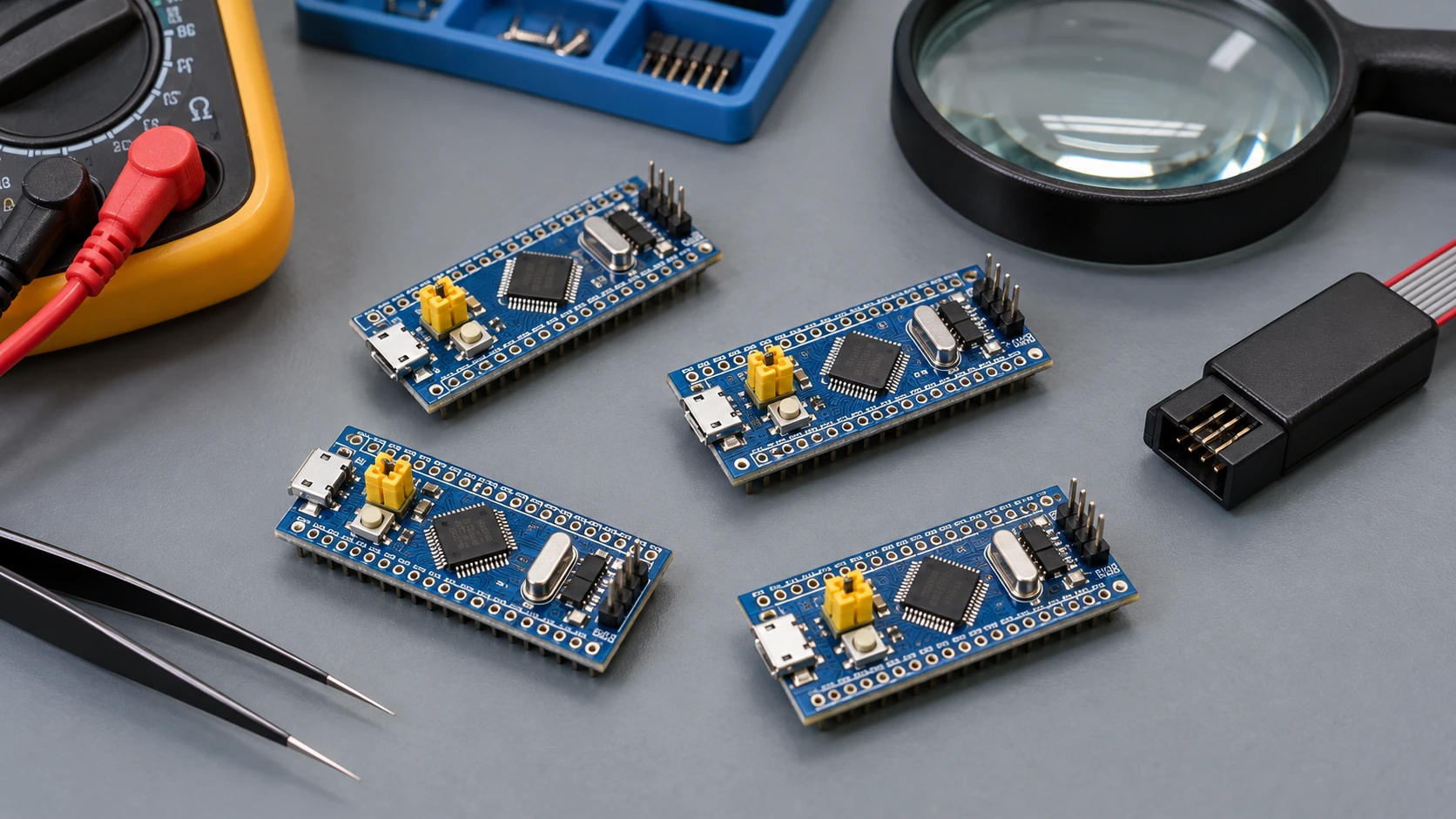
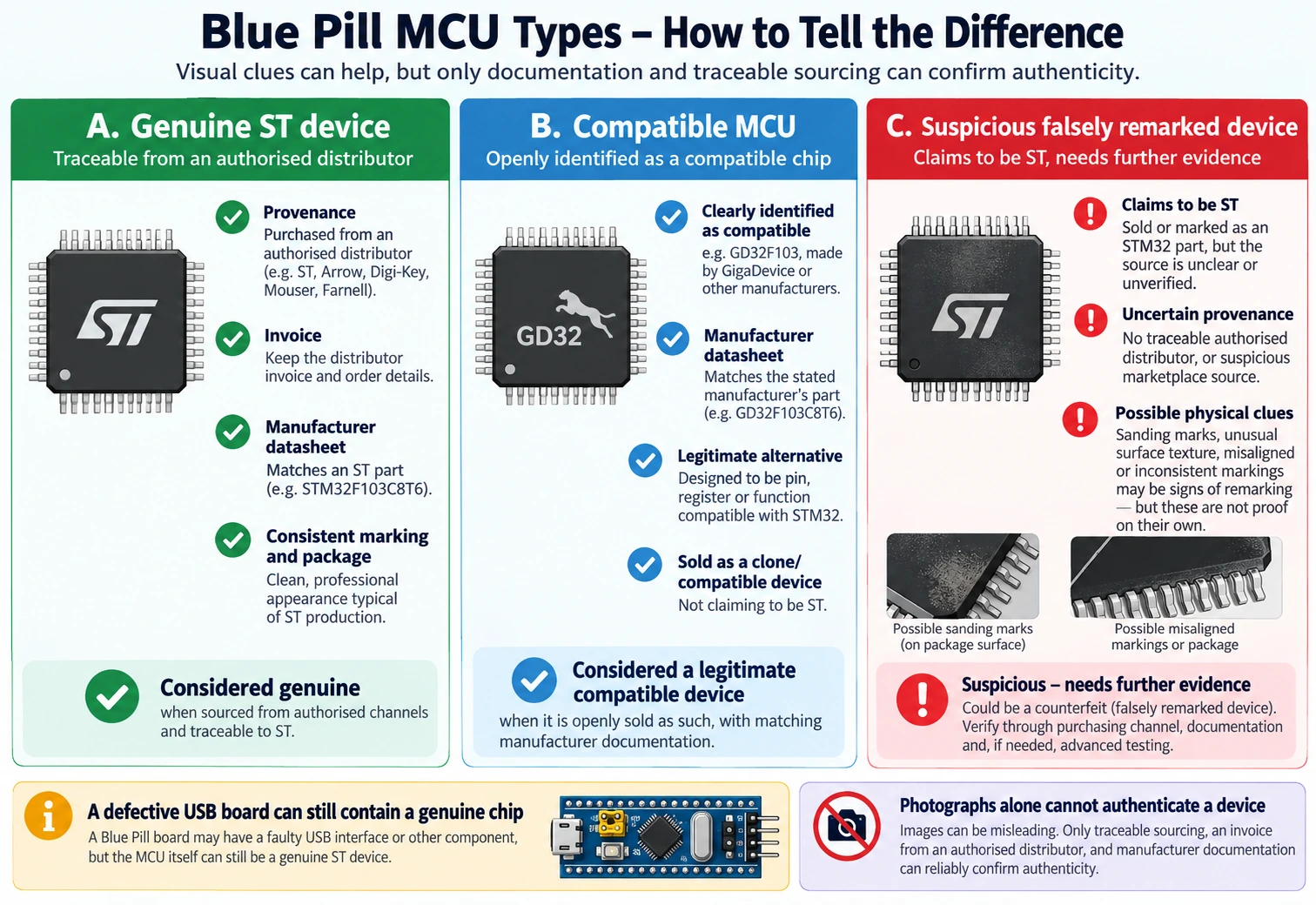
This guide is specifically about the STM32F103C8T6, the familiar blue 48-pin board with dual yellow BOOT jumpers and a Micro-USB connector. It is not a universal guide to every STM32 family or every board sold as a “Blue Pill.” Some producers sell honest compatible devices, and some counterfeiters imitate ST markings. We will distinguish them rather than call every low-cost board a fake.
First, distinguish a clone, a counterfeit and a faulty board
The terms are regularly confused in forum advice and product listings. Here is the distinction that matters when troubleshooting or buying in quantity.
| What you received | How it is labelled | What it means for you |
|---|---|---|
| Genuine ST STM32F103C8 on a third-party board | Real ST part marking | MCU is genuine, but board wiring and components still require checking |
| Legitimate compatible MCU, such as a GD32F103, clearly labelled as its own brand | Actual manufacturer and part number | Not counterfeit merely for being compatible; use that manufacturer’s datasheet and tools |
| Different silicon falsely marked “STM32F103C8T6” | Claims to be ST but was not made by ST | Counterfeit/misrepresented component; firmware compatibility and support are uncertain |
| Genuine ST chip on a poorly built PCB | Real ST marking | May fail due to USB resistor, regulator, oscillator, solder, connector or ESD damage |
| Refurbished/reworked part with altered provenance | Marking may be genuine or changed | Requires supply-chain and physical inspection, not guesswork from a boot test |
The problem with a falsely remarked chip is not that its maker is necessarily incapable of producing a good MCU. It is that you cannot rely on the characteristics, production traceability, errata, lifetime and documentation you thought you were buying. For example, a properly labelled GD32F103 is a different product with its own reference manual. Calling it an “STM32” in a BOM can introduce avoidable engineering risk.
ST itself recommends purchasing genuine products from recognised distributors and does not undertake to make its development software work with counterfeit parts. See the ST community response to Blue Pill counterfeit questions.
What a genuine STM32F103C8T6 is supposed to provide
The official STM32F103C8 product page and STM32F103x8/xB datasheet give the baseline. A genuine C8 is a 72 MHz Arm Cortex-M3 device with 64 KB of specified internal flash, 20 KB SRAM, two 12-bit ADC units, USB full-speed device hardware and a classical CAN controller. A CAN transceiver is still necessary for CAN_H/CAN_L, and the factory F103C8 bootloader does not provide USB DFU simply because USB hardware is present.
| Feature | Official F103C8 baseline | Mistake to avoid |
|---|---|---|
| Core | Cortex-M3 up to 72 MHz | A 72 MHz blink is not an authenticity test |
| Internal program flash | 64 KB specified | Reading or using more than 64 KB does not automatically prove an F103CB or genuine C8 |
| Internal SRAM | 20 KB | Do not assume 32 KB or more from an online board listing |
| ADC | Two 12-bit units | Accuracy depends on reference, calibration, sampling and PCB noise |
| SWD | PA13 SWDIO; PA14 SWCLK | Clone dongle connector position is not universal |
| USART1 ROM loader | PA9 TX; PA10 RX | Needs correct BOOT0/BOOT1 state and 3.3 V serial levels |
| USB FS | PA11 D−; PA12 D+ | USB device peripheral is not a factory USB DFU bootloader |
| bxCAN | On-chip classical CAN controller | Requires an external physical-layer transceiver |
| Voltage | MCU supply in the 2.0–3.6 V range | Blue Pill 5 V input, if present, is not a 5 V GPIO supply |
ST’s specification is the standard for a part sold as an STM32F103C8. Hardware tests may uncover differences, but even a fully functioning compatible device can imitate many of the rows above. The objective is to gather independent evidence rather than declare a silicon manufacturer based on a single register.
Which alternative chips turn up on Blue Pills?
Community investigations have documented boards using GD32F103, CKS32F103, CS32F103, CH32F103, APM32F103, HK32F103 and other compatible MCU families. Those names refer to distinct silicon lines, often intended to ease migration from an F103 design. Their instruction sets or peripheral register maps can be similar, but that does not guarantee identical debug ports, flash behaviour, USB timing, peripheral errata or boot ROMs.
A device correctly bearing a GD32 or CH32 marking may be a perfectly reasonable option if you select it deliberately and validate it. A device bearing a fake ST logo is a different supply-chain issue, even when a simple program runs. Tool support also varies: proprietary ST utilities have no obligation to recognise an unrelated chip, while some versions of open-source tools may support particular compatible devices.
The stlink open-source project’s counterfeit-chip notes document devices marked as STM32 while exposing a different debug-port identification value. The independent STM32World F103 reference discusses relabelled chips and physical signs of resurfacing. These are useful leads, but neither is a laboratory certification service for a specific board.
Seven signs that justify a closer inspection
1. Seller provenance is missing. An anonymous product listing with no invoice, lot history, schematic or MCU supplier provides little assurance. This does not prove the chips are fake, but it places the burden of validation on the buyer. A branded board with documentation is a more useful starting point than a generic picture reused by dozens of sellers.
2. The top marking looks altered. Sanding, uneven texture, irregular laser engraving or a misaligned logo can be suspicious. Genuine packages also vary by factory, date and revision, so photographs alone are weak evidence. Compare with the general arrangement in ST’s TN1433 device-marking technical note, not with a random “real versus fake” collage.
3. Debugger identifies an unexpected core or refuses the target. Some reported counterfeit F103 devices expose an ARM SW-DP ID of 0x2BA01477 rather than the commonly observed 0x1BA01477 for an original Cortex-M3 implementation. This is a serious clue when all other conditions match. It is not a cryptographic identity certificate, and probe firmware can affect what an application displays.
4. STM32CubeProgrammer reports a surprising device, flash geometry or connection error. This raises suspicion only after power, probe firmware, wiring, reset mode and SWD frequency have been checked. A software compatibility issue by itself is not enough to label the MCU counterfeit.
5. Peripheral tests differ from the documented behaviour. Reports include USB enumeration failures, unusual I²C operation, DMA interrupt surprises and debug quirks. A board may show one of these because of firmware or PCB errors, so reproduce the fault with a minimal known-good design before blaming the die.
6. The PCB has a USB D+ pull-up error. Many older Blue Pill layouts use an incorrect R10 value such as 10 kΩ or 4.7 kΩ in place of the usual 1.5 kΩ pull-up to 3.3 V on PA12/D+. That is a board implementation problem, not proof of counterfeit MCU silicon. It can occur with a perfectly genuine STM32.
7. The claimed specifications do not agree with the part marking. An F103C8 listing that promises an officially specified 128 KB flash or a built-in CAN transceiver is misleading. The F103CB is the variant associated with 128 KB flash, and CAN_H/CAN_L require external transceiver hardware regardless. A C8 chip that happens to accept writes beyond its specified 64 KB should not be used as a 128 KB production part.
Start with a safe inspection, before you connect a programmer
On a new board, inspect it unpowered. Look at both faces under magnification. Record the exact chip top mark and photograph the regulator, main crystal, connector, BOOT jumpers and any printed PCB revision. Check for solder bridges, cracked ceramic parts, lifting pads, damaged USB sockets and visibly replaced components. If many boards came from one order, preserve the packaging, supplier and batch grouping.
Confirm the regulator output before attaching sensitive peripherals. If powering the board through its USB connector or documented 5 V input, use a current-limited source or USB power meter when practical and measure the 3V3 pin with a multimeter. The MCU itself needs a regulated supply in its allowable range. Do not connect 5 V directly to the 3V3 pin to “test whether it starts.” Similarly, do not assume that the probe’s VTref signal supplies power.
On the usual Blue Pill, the user LED is connected to PC13 and is active low; that is board-specific, so confirm the PCB before relying on it. A glowing power LED merely shows a supply rail is present. It does not establish that the MCU can fetch instructions, that flash is writable or that the USB data connection is functional.
| Unpowered or low-risk check | Healthy result | What a failure could mean |
|---|---|---|
| No short between 3V3 and GND | No near-zero resistance attributable to a fault | Solder bridge, damaged regulator or other attached load |
| Regulated 3V3 with intended supply connected | Voltage in suitable MCU operating range | Regulator, cable or power wiring problem |
| Crystal and load components present where design requires them | Board populated as expected | Missing oscillator network or different revision |
| USB cable passes data to a known-good device | Known-good USB data path | Charge-only or defective cable |
| SWD header pins identified by signal name | PA13, PA14 and ground verified | Misreading generic ST-LINK clone pin order |
Treat resistance readings as diagnostics, not universal pass/fail thresholds: onboard capacitors and other circuitry affect ohmmeter readings. If the 3V3 rail appears shorted, disconnect power and troubleshoot before attempting firmware upload.
Read-only STM32 identification with ST-LINK and OpenOCD
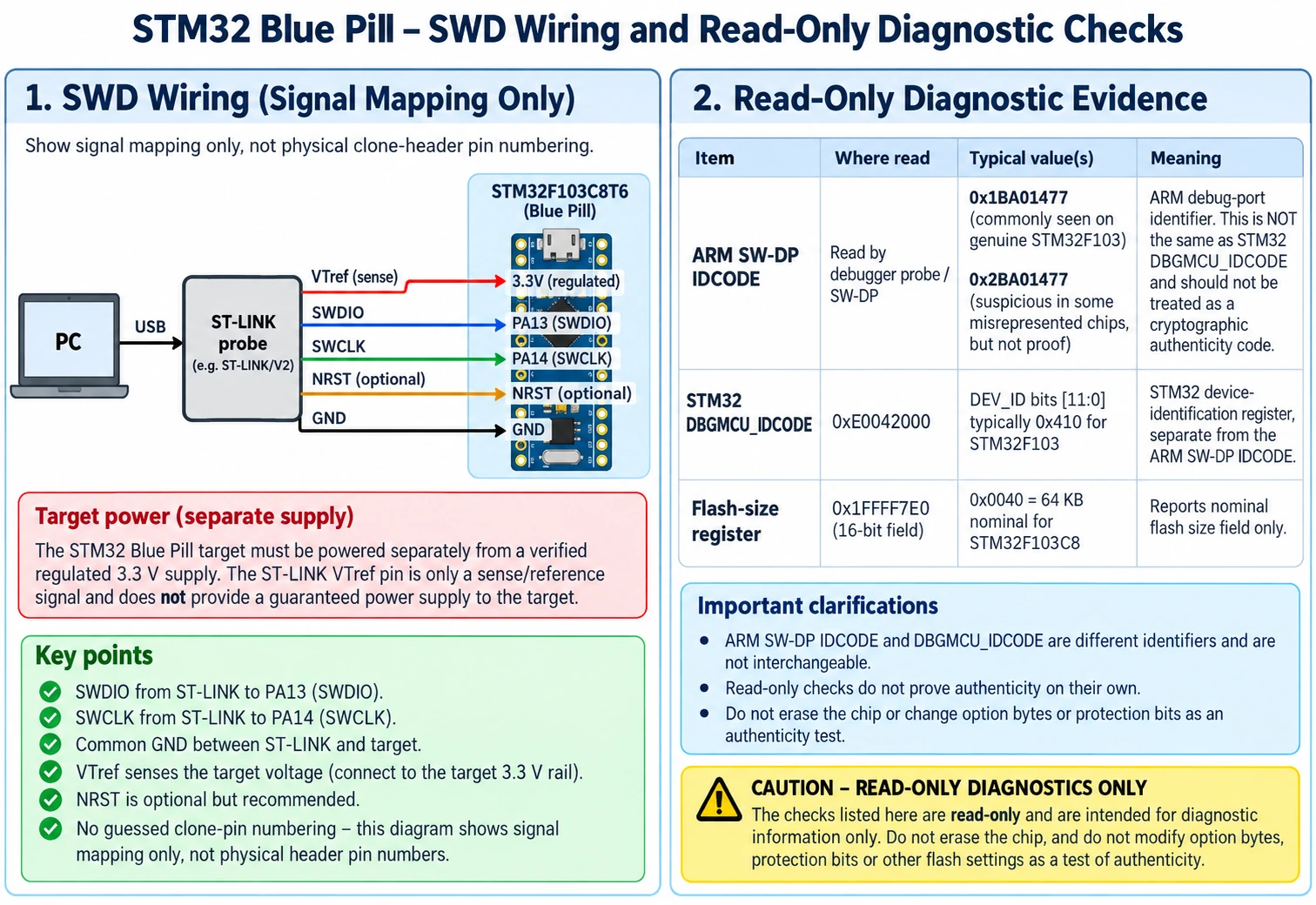
A working SWD connection is the most useful next step. For an F103 Blue Pill, connect SWDIO to PA13, SWCLK to PA14, GND to GND, and, if the debugger requires it, the target’s regulated 3.3 V to its target voltage reference input. NRST is useful for connect-under-reset recovery. Match signal names; an inexpensive four-pin “ST-LINK V2” clone dongle does not have one guaranteed physical header layout.
Start around 100 kHz to 1 MHz SWD with short connections. Power the Blue Pill correctly, leave BOOT0 low for normal flash boot, and try STM32CubeProgrammer → ST-LINK → Connect. Capture a screenshot or log of the connection, reported CPU/device identification and flash information. A connection failure can be caused by wrong wiring, insufficient ground, reset, firmware pin remapping, protection settings or a tool incompatibility—do not jump directly to a counterfeit accusation.
For a documented diagnostic record, OpenOCD can read the device-identification register and flash-size field without erasing flash. On an installation where the ST-LINK interface and STM32F1 target configuration files are provided, an illustrative command is:
openocd -f interface/stlink.cfg -f target/stm32f1x.cfg \
  -c "init; mdw 0xE0042000 1; mdh 0x1FFFF7E0 1; shutdown"
The first address is DBGMCU_IDCODE; its low 12 bits are the STM32 device identifier and the upper part contains revision information. The medium-density F103 flash-size field at 0x1FFFF7E0 is a 16-bit value in KB on genuine parts. Some OpenOCD packages use a different probe configuration path or a different command syntax; consult the version you installed. If it fails to attach, the test is inconclusive rather than a failure of authenticity.
The ARM CoreSight SW-DP identification (for example 0x1BA01477) is a different identifier from the STM32 DBGMCU device ID, and should be read from the debugger’s initial probe log, not from address 0xE0042000. Do not compare 0x410 and 0x1BA01477 as though they were two readings of the same register.
What the ID readings can—and cannot—tell you
| Observation | Interpretation | Does it prove genuine ST silicon? |
|---|---|---|
Debug port shows 0x1BA01477 | Consistent with a commonly reported genuine F103 ARM SW-DP | No |
Debug port shows 0x2BA01477 on a supposed F103C8 | Strongly suspicious; reported in certain CS32/CKS counterfeit cases | No—it points away from expected implementation, not to a verified maker |
DBGMCU DEV_ID looks like 0x410 | Consistent with F103 medium-density ID | No; compatible parts can mimic it |
| Flash-size field reports 64 KB | Consistent with F103C8 nominal flash | No |
| 96-bit unique ID can be read | Useful for inventory of boards that expose it | No; not a signed manufacturer certificate |
| STM32CubeIDE can debug LED blinking | Confirms a working debugging path and some code execution | No |
Why insist on these qualifications? These values exist to let software identify a target implementation. They are not anti-counterfeit challenge-response proofs. A different manufacturer can deliberately imitate an ID register, and even a genuine board may expose different messages through different probe versions. The most trustworthy practical conclusion is usually “consistent with the expected part”, “strongly suspicious” or “not enough evidence yet.”
Does 128 KB of flash prove the Blue Pill is real?
No. STM32F103C8 is specified with 64 KB, whereas STM32F103CB is specified with 128 KB. Many hobbyists found that certain C8-labelled chips appeared to have more writable flash than the marketed size. That observation does not establish a genuine ST die, guarantee yields across lots or make that extra space an officially supported production feature.
Do not run a “flash capacity test” on a device containing firmware or calibration data you want to keep. Destructive checks can erase user code, option bytes, wear flash or place application data outside the part’s guaranteed range. If a project genuinely needs more than 64 KB, choose a device explicitly sold and specified for the required capacity. A read-only value is useful inventory evidence, not a license to build to an unofficial limit.
A second misconception is that every debugger must recognise a chip that shares the same instruction set. Firmware tools may validate device IDs, flash programming sequences or voltage conditions. A compatible MCU may execute compiled ARM code while requiring another programmer, loader or device support package. This is an ecosystem compatibility question, separate from authenticity.
The Blue Pill USB R10 issue: a different problem entirely
The STM32F103 USB full-speed device interface uses PA11 for D− and PA12 for D+. For the conventional Blue Pill design, an approximately 1.5 kΩ pull-up on D+ to 3.3 V advertises a full-speed USB device to the host. Some historical generic PCBs fitted R10 = 10 kΩ or 4.7 kΩ, producing a weaker-than-intended pull-up and intermittent or absent enumeration. The common resistor values are documented in longstanding Blue Pill USB repair notes.
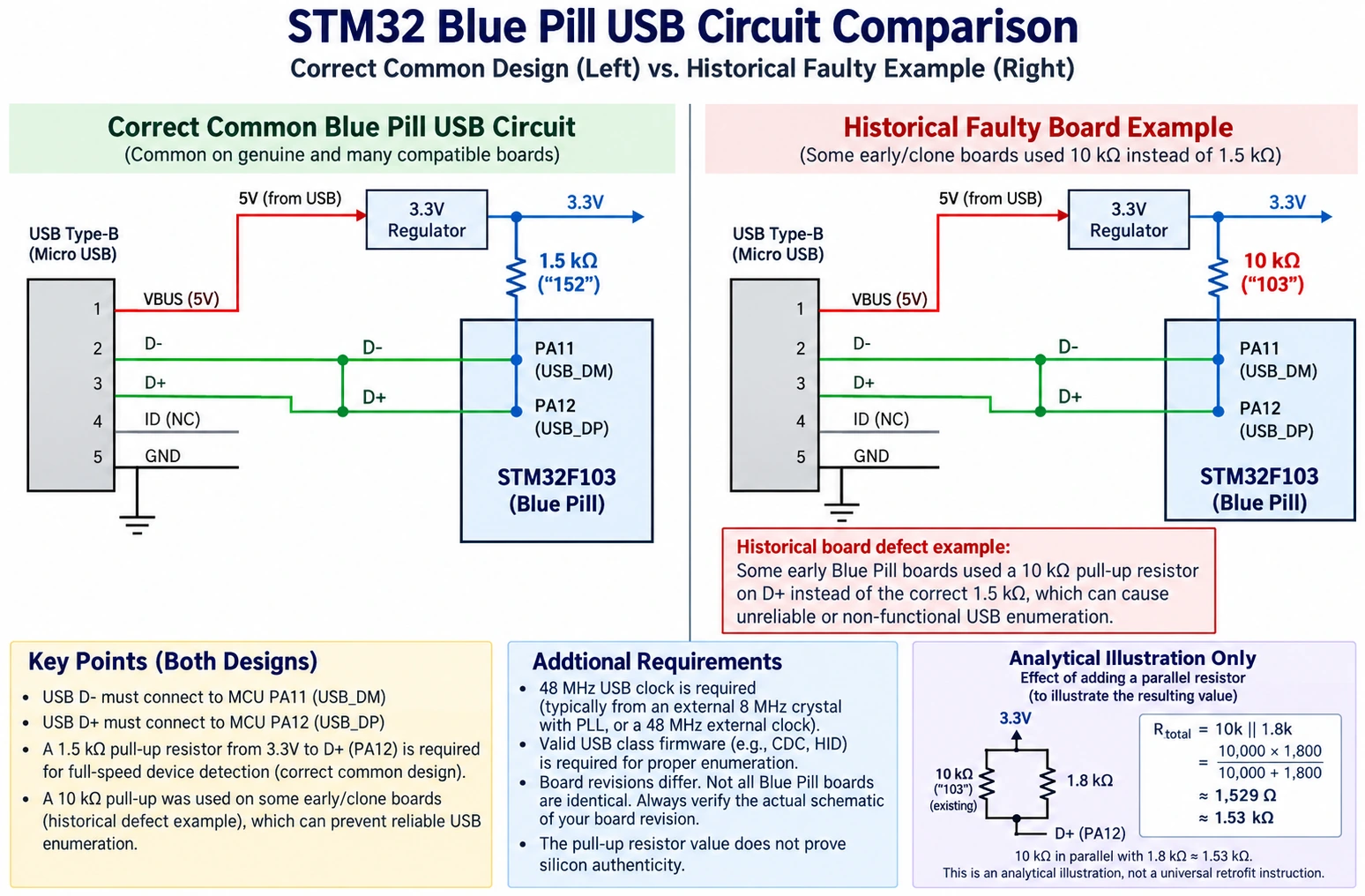
The correct diagnostic order is: use a verified USB data cable and a known-good host port; run firmware that actually enables USB CDC/HID or another supported device class; check that the MCU USB peripheral has a valid 48 MHz clock; then inspect the PCB’s actual D+ pull-up circuit. The factory F103C8 does not have a ROM USB DFU mode. Plugging a blank Blue Pill into a computer and getting only power proves very little.
To inspect a resistor, unplug all power and discharge the board. Read its SMD marking or measure the part with suitable techniques, recognising that an in-circuit ohmmeter may read parallel paths and not just R10. On traditional boards R10 is often marked 103 for 10 kΩ rather than 152 for 1.5 kΩ, but the silkscreen reference, component size and actual circuit vary by manufacturer. Verify the resistor lies between 3.3 V and D+ before changing it. Do not blindly solder a part called R10 on an unfamiliar PCB.
If you replace the component, use the correct value and safe SMD handling. Connecting a second resistor in parallel can only be recommended after calculating the actual network and verifying existing components. For a 10 kΩ resistor, a 1.8 kΩ parallel resistor yields about 1.53 kΩ, but two resistor values alone do not tell you whether the board has other USB circuitry in parallel. A competent technician should verify D+, 3V3, solder integrity and host enumeration after the repair.
An R10 correction fixes a PCB design defect; it does not authenticate the MCU. Conversely, a clone or counterfeit may enumerate perfectly if its USB function and pull-up are implemented correctly.
A practical, controlled peripheral test suite
Once power and SWD are stable, load only your own known-safe minimal firmware—and only after backing up anything you want to preserve. Do not follow mysterious “authenticity test firmware” links that request mass erase or changes to readout-protection option bytes. The aim is a reproducible functional acceptance test, not exploitation of undocumented silicon behaviour.
- PC13 LED and a GPIO output. Configure PC13 with the proper active-low polarity for a traditional Blue Pill, toggle at a measured slow rate and confirm that GPIO timing makes sense. This is a basic smoke test only.
- USART1 serial and system bootloader. Use a true 3.3 V USB–UART adapter; TX of the adapter goes to PA10 (MCU RX) and RX of the adapter to PA9 (MCU TX), with common GND. For the factory ROM loader on this MCU, set BOOT0 high and BOOT1/PB2 low, reset, then use an appropriate programming utility. Return BOOT0 low after flashing. Differences in boot ROM can be clues, not conclusive proof.
- I²C transaction. Connect a known 3.3 V sensor with correct SDA/SCL pins, pull-ups and a verified address. Check repeated transactions, not one successful ACK. A missing ACK can just as easily be an I²C wiring or supply error.
- USB enumeration and data transfer. Use a minimal tested USB firmware with a valid 48 MHz USB clock. Check enumeration over several unplug/replug cycles and try a second host. Treat R10, cable and firmware as separate variables.
- DMA and timer/PWM behaviour. Exercise specific channels, interrupt flags, capture and output signals used by your design. Confirm with a scope or logic analyser. A clone may differ in an edge case invisible to a blink program.
- Classical CAN where relevant. The F103 bxCAN controller needs an external CAN transceiver. Attach to a protected test bus at the required rate, with termination only at the two physical bus ends. Do not connect MCU TX/RX straight to CAN_H/CAN_L.
- Reset, debug and extended operation. Run repeated cold starts, SWD attach/detach and temperature/load conditions that match your real product; log errors and board revisions. A ten-minute test is not a longevity guarantee.
You do not need to complete every test for a throwaway LED demonstration. You do need to cover the interfaces your finished hardware relies upon. A CAN telemetry box should test CAN and recovery behaviour. A USB joystick should test enumeration and sustained transfers. A PWM motor controller should test timers, fault handling and supply disturbances, not just prove that an LED toggles.
A minimal PC13 test in STM32 HAL
For a conventional PC13 active-low LED, generate a standard STM32CubeMX project targeting the actual MCU, enable GPIOC clock and configure PC13 as a push-pull output at a low speed. The loop can then be as simple as:
/* Demonstration only: assumes GPIOC and PC13 were initialized. */
while (1)
{
    HAL_GPIO_TogglePin(GPIOC, GPIO_PIN_13);
    HAL_Delay(500);
}
This snippet assumes HAL_Init(), clocks and MX_GPIO_Init() are set up correctly by your generated project. Do not apply the assumed PC13 LED arrangement to unrelated Blue Pill revisions without checking their schematic. The program shows elementary GPIO functionality, not authenticity or long-term stability. If it fails, first check GPIO configuration, active-low polarity, BOOT0, board power and debugger state.
Why software often behaves differently on compatible F103 chips
“Register-compatible” never means “every documented and undocumented behaviour is identical.” Differences may arise in the flash controller, watchdog, DMA edge cases, oscillator trim, debug registers, USB timing, low-power modes, ADC characteristics and ROM bootloader. A peripheral driver developed around one silicon’s errata may not behave the same on another compatible device—even when their peripheral names look familiar.
The most responsible engineering choice is to identify the device as sold, read its own manufacturer’s datasheet and errata, and compile against a supported target. A firmware image built against ST HAL may appear to work on a GD32 or CH32, but this is not a guarantee of support. For embedded products maintained over years, unknown compatibility increases the cost of testing, bug triage and future replacement boards.
You can compare the same source application built with correctly matched toolchains and inspect behaviour under controlled conditions. Do not change both the silicon type and the board wiring simultaneously when diagnosing a failure. Note that supply ripple, USB cable routing, external crystals and protection settings can explain many apparently silicon-specific failures.
How to buy genuine STM32 boards without wasting the budget
For repeatable hardware or a project you intend to publish as a tested design, provenance is more valuable than a microscopic price difference. ST sells supported Nucleo and Discovery boards; established distributors can supply actual STM32 chips or documented third-party boards. A Blue Pill bought without a verifiable supply chain may be perfectly usable for experiments, but it is the wrong starting point for a design whose exact silicon and behaviour must remain fixed.
| Project requirement | Better buying strategy | Reason |
|---|---|---|
| Learning C, GPIO and first SWD session | Genuine Nucleo board or well-documented development kit | Known MCU, integrated debugger and reference schematic |
| Hobby prototype that already uses a generic Blue Pill | Keep it only after power, SWD and necessary peripheral checks | Avoid replacing working hardware without evidence |
| Production or repeatable commercial build | Buy traceable ST parts via authorised channels | Stable BOM, revision tracking and support |
| Low-cost clone-compatible experiment | Buy the actual compatible MCU under its real manufacturer name | Honest part identity and correct documentation |
| Mission-critical or safety-relevant controller | Formal component sourcing and qualification process | A hobby “fake detector” is inadequate assurance |
| USB product based on old Blue Pill PCB | Prefer a design with documented USB circuit or revise R10 as validated | Avoid inherited USB resistor and regulator defects |
Request the exact MCU manufacturer’s part number, board revision, schematic and sourcing statement. Keep a photograph and ID log for every purchased batch. If a supplier advertises “original STM32”, ask what documentation supports that claim. Avoid a vendor that uses stock photos, mixes MCU models silently or refuses to identify components. Purchase decisions should be judged by total engineering cost, not the cheapest listing of the week.
For esp32.co.uk/ readers, a useful compromise is ST board for reference and compatibility testing, plus cheaper clearly labelled alternatives for experimentation. That lets you separate an application-code fault from a random PCB variation. It also gives you a trustworthy reference when validating a USB interface or peripheral driver.
What to do if you suspect a counterfeit Blue Pill
Keep the board and document the evidence rather than destroying it or rewriting its marking. Photograph the MCU and PCB, save the store listing and receipt, record the debugger/tool firmware version, preserve read-only identification logs and describe repeatable peripheral failures. If the product was explicitly sold as genuine ST silicon, contact the vendor and ask for a refund or traceability evidence. In production purchasing, escalate the issue through quality/supplier channels.
Do not recommend decapsulation, chemical etching or destructive probing for everyday users. Those are laboratory methods that require specialised equipment and safety procedures; home checks are unlikely to authenticate an MCU definitively. Avoid publishing a blanket accusation about a seller based only on a blurry chip photo or a failed USB connection. Faulty PCB design, clone firmware and counterfeit component claims are different findings.
If the board is only a disposable development experiment and it works reliably, there is no need to panic or to extrapolate its behaviour to all boards from the same marketplace. If you are selling a finished product as “STM32F103C8-based,” however, you should know that the purchased MCU genuinely matches that description and can be re-sourced later.
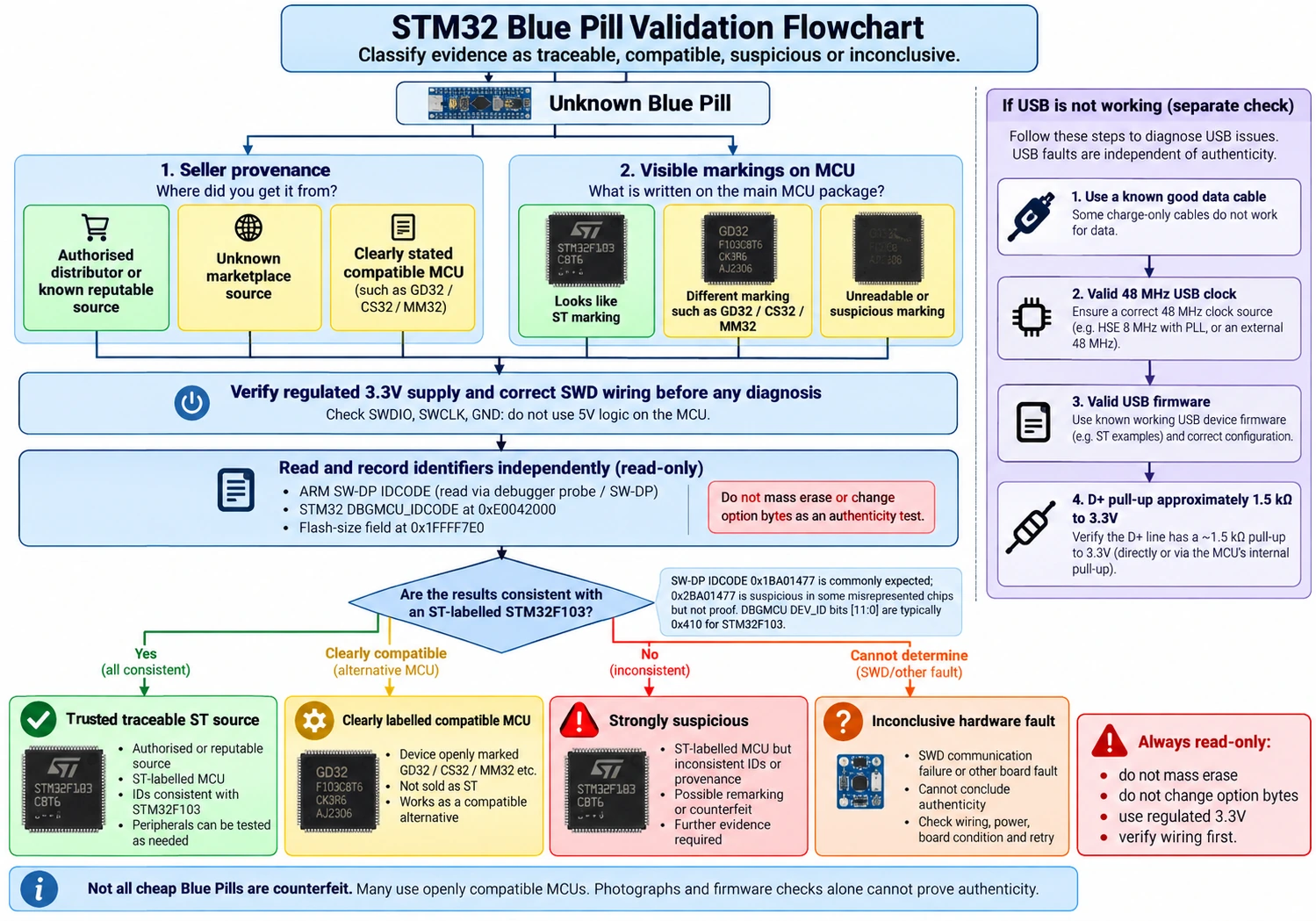
Troubleshooting matrix: symptoms and next actions
| Symptom | First checks | What would increase suspicion of wrong silicon? |
|---|---|---|
| ST-LINK says “No STM32 target found” | VDD, GND, PA13/PA14, cable, NRST, SWD clock | Different DP identification after clean connection |
| ST-LINK attaches but CubeProgrammer cannot flash | Protection state, exact part, flash algorithm, tool version | Repeatable geometry/program sequence mismatch on multiple boards |
| Blue Pill powers up but USB is invisible | Data cable, USB firmware, 48 MHz USB, R10, PA11/PA12 | Same known-good PCB/firmware works with traceable ST device but not suspect batch |
| Blink works but I²C fails | Pull-ups, GPIO open-drain, address and voltage | Reproducible silicon-specific behaviour with controlled setup |
| CAN frames missing | External transceiver, bit timing, bus wiring, 120 Ω ends | Controlled bxCAN test differs after known-good interface is verified |
| Advertised 128 KB but chip says C8 | Check part number and actual datasheet rating | Supplier’s description conflicts with official part capacity |
| Works with OpenOCD but not STM32CubeIDE | Supported target, probe/driver versions, target identification | Evidence for compatibility difference; not independently counterfeit proof |
| Device top marking is scratched or irregular | Photograph, compare general package-marking scheme, provenance | Multiple independent clues point to resurfacing or remarked silicon |
Frequently asked questions
Is every cheap Blue Pill fake?
No. Price alone does not establish authenticity. Some boards contain genuine ST devices, some use clearly identified compatible MCUs, and some are reported to contain devices falsely marked as ST. A board may also be electrically poor while its chip is genuine. Use evidence, not a marketplace price threshold.
Can a fake STM32F103 run Arduino or STM32 HAL code?
Sometimes. Many compatible parts implement enough of the instruction set and peripheral behaviour for basic firmware to run. More advanced USB, DMA, timers, flash and debug operations may differ. A successful compile, upload or blink is a functional check, not a manufacturer certificate.
Is 0x2BA01477 definitive proof that the chip is a counterfeit?
It is a well-documented warning for certain chips sold as STM32F103, especially when the packaging falsely claims genuine ST silicon. It is the ARM debug-port ID, not the F103 device ID or flash-size field. Preserve the probe log and compare against documentation; do not pretend it identifies the precise underlying die in every case.
Why does STM32CubeProgrammer see 64 KB but my app accesses more?
The genuine C8’s specified program flash size is 64 KB. Some individual devices or compatibles may appear writable beyond that range, but the observation is not an authorised memory specification. Applications relying on undocumented capacity risk failure across chip lots and should be moved to an MCU explicitly rated for their size.
Does an R10 value of 10 kΩ mean the chip is fake?
No. It means the board’s D+ pull-up design may be incorrect for reliable full-speed USB enumeration. Even a real STM32 chip can be mounted on a board with the wrong component. Likewise, fixing R10 does not prove chip authenticity.
Can I connect a 5 V Arduino Nano to the Blue Pill for testing?
Not directly to every MCU input. Blue Pill GPIO works in the 3.3 V domain. Some specific STM32 pins are conditionally 5 V tolerant as digital inputs, but ADC pins are not 5 V tolerant, and you must consider the unpowered state and datasheet injection-current conditions. Use suitable level shifting or a correctly calculated divider for a 5 V analog signal. Do not drive 5 V into the 3V3 power rail.
What if I only care that my existing board works?
Then record its actual MCU marking and PCB revision, test the peripherals you need, and keep a spare from a known batch. That can be adequate for an informal project. Do not use one successful board as proof that the next anonymous order will contain the same component.
What is the safest recommendation for a beginner in 2026?
A supported STM32 Nucleo board gives you an integrated debugger and documented schematics, avoiding much of the uncertainty found in generic Blue Pill stock. A Blue Pill remains useful for learning SWD and low-cost MCU experiments when you understand its limitations and validate the particular unit in hand.
Final checklist before trusting a Blue Pill
- ☐ Exact top marking and seller/lot information recorded.
- ☐ Board revision, oscillator, regulator and USB circuit inspected.
- ☐ Verified 3.3 V rail and safe power wiring.
- ☐ PA13/PA14 SWD and common ground connected by verified signal names.
- ☐ Read-only debugger/ID log saved; DP ID distinguished from DBGMCU device ID.
- ☐ Nominal 64 KB C8 flash rating respected.
- ☐ USB D+ resistor checked only if USB symptoms justify it.
- ☐ Peripheral and reliability tests cover the application, not just LED blink.
- ☐ Suspected counterfeit claim separated from board defects and tool mismatches.
- ☐ Production usage has a repeatable, traceable source for the MCU.
Bottom line: The fastest way to waste time is to call every USB fault a “fake STM32,” or to call every successful LED blink proof of a real one. Use a layered process: supply chain, package clues, electrical checks, read-only debug evidence and application-specific tests. When silicon identity truly matters, buy traceable ST parts rather than relying on home detection tricks.
References and further reading
- ST — STM32F103C8 official product page and STM32F103x8/xB datasheet
- ST — RM0008 STM32F103 reference manual
- ST — TN1433 STM32 device-marking schematics
- ST community guidance on counterfeits
- Open-source stlink counterfeit notes
- Blue Pill USB resistor analysis
Related guides on esp32.co.uk/: STM32 Blue Pill USB troubleshooting · STM32 BOOT0 and bootloader · ST-LINK V2 vs V3. Technical checks described here are documentation-based and have not been bench-tested on the user’s board.