The HLK-LD2450AliExpress price is a 24 GHz mmWave radar that can track up to three people and report their X/Y position, speed and angle to Home Assistant through an ESP32AliExpress price. The reliable setup is straightforward: power the bare module from 5 V, cross its TX and RX lines to a hardware UART on the ESP32AliExpress price, use firmware V2.02.23090617 or later, and configure ESPHome at the default 256000 baud.
This guide gives you the correct pinout, a current ESPHome configuration, practical zone setup and the fixes for the faults that cause most LD2450AliExpress price projects to fail.
What the LD2450 can do
Unlike a basic PIR sensorAliExpress price, the LD2450 radar does more than return a single motion state. Hi-Link specifies a 6 m maximum range, a ±60° horizontal detection angle and a 10 Hz data refresh rate. ESPHome can expose:
- presence, moving-target and still-target states
- the total number of detected targets
- X position, Y position, speed, angle and distance for targets 1–3
- target counts inside as many as three rectangular zones
- controls for presence timeout, Bluetooth, multi-target mode and zone type
- firmware version, Bluetooth MAC address, restart and factory-reset controls
That position data is the reason to choose the LD2450. One radar can distinguish a desk area from a sofa or ignore a doorway instead of treating the whole room as one detection zone.
Parts required
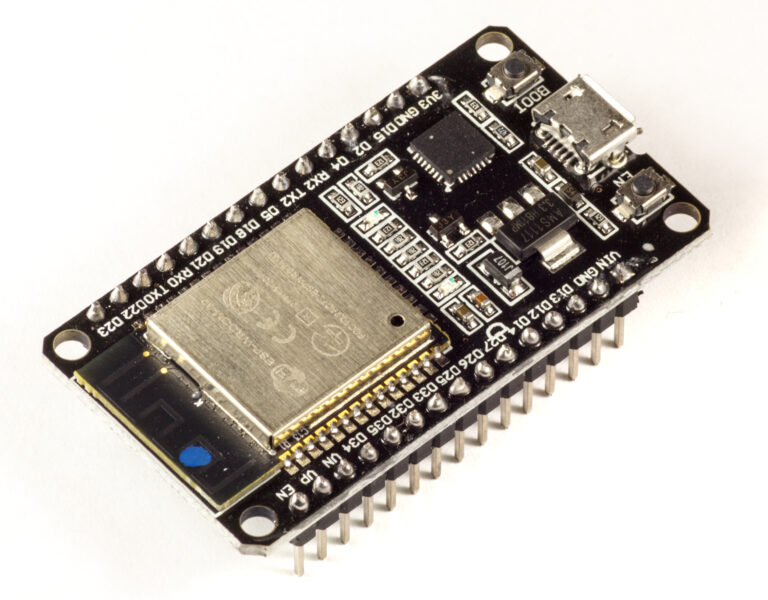
- an ESP32 development board
- an HLK-LD2450 module
- jumper wires or a suitable four-pin cable
- a stable 5 V power supply capable of more than 200 mA
- Home Assistant with the ESPHome add-on, or another ESPHome installation
A USB-powered ESP32 development board normally exposes a 5 V or VIN pin that can supply the radar, but check your board schematic before connecting it. The bare LD2450 is not a 3.3 V-powered module.
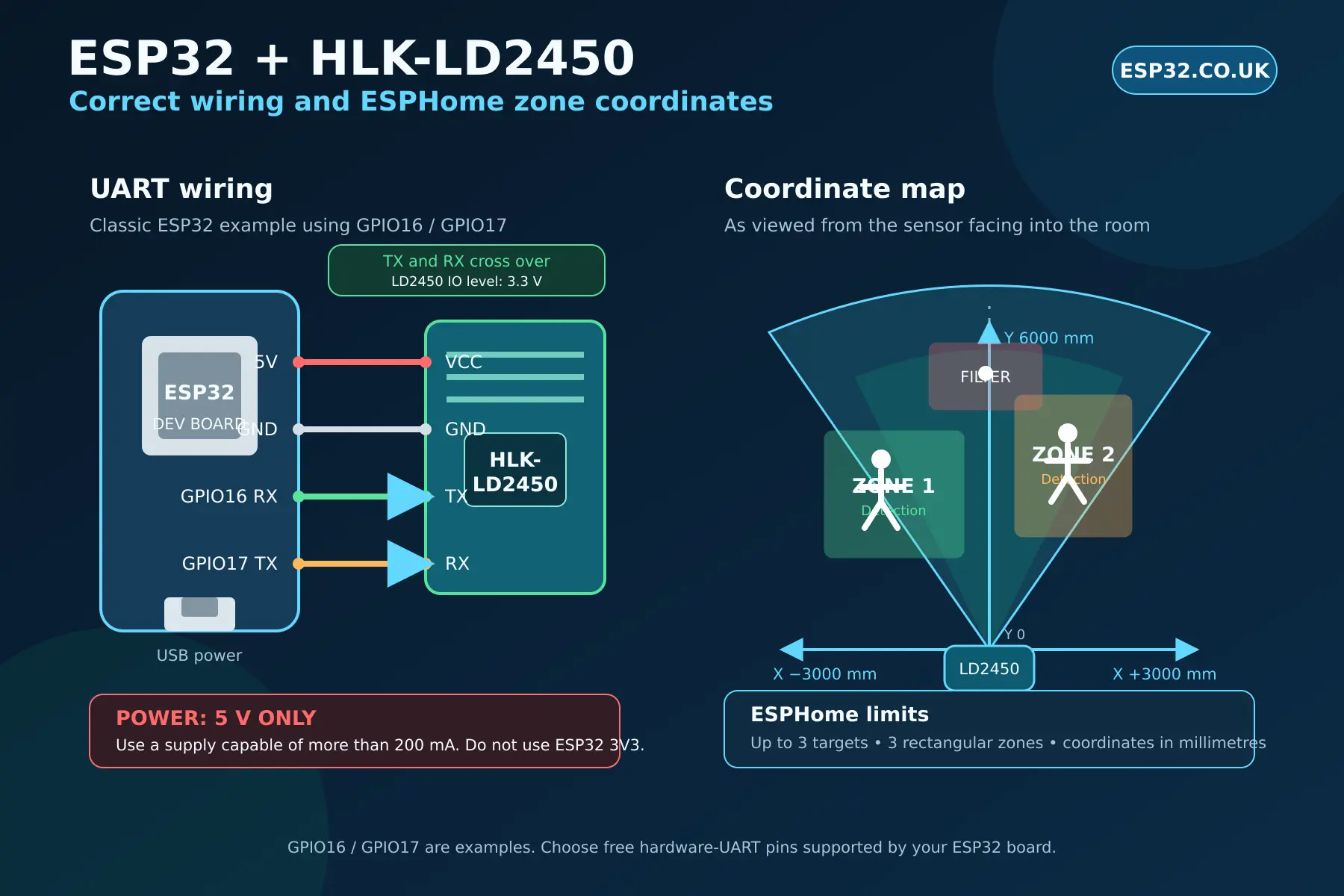
LD2450 pinout and ESP32 wiring
| LD2450 pin | Connect to ESP32 | Purpose |
|---|---|---|
| 5V / VCC | 5 V or VIN | Module power; supply must provide more than 200 mA |
| GND | GND | Common ground |
| TX | GPIO16 (ESP32 RX example) | Radar data to ESP32 |
| RX | GPIO17 (ESP32 TX example) | ESP32 commands to radar |
The serial lines must cross: LD2450 TX goes to ESP32 RX, and LD2450 RX goes to ESP32 TX. Hi-Link specifies 3.3 V IO levels, so the UART is compatible with ESP32 logic. Do not confuse that with the module supply, which must be 5 V.
GPIO16 and GPIO17 are convenient examples for a classic ESP32-WROOM development board. They are unavailable on some boards—including ESP32-WROVER designs that use those pins for PSRAM—and pin choices differ across ESP32-C3, S3 and other variants. Select two free pins supported by a hardware UART and change the YAML accordingly.
Check the LD2450 firmware first
ESPHome’s official component requires LD2450 firmware V2.02.23090617 or later. If the wiring is correct but the component does not provide usable data, check the firmware version before changing random UART settings.
You can update and configure the module with Hi-Link’s HLKRadarTool app over Bluetooth. Once the ESPHome node is working, expose the firmware text sensor shown below so the installed version is visible in Home Assistant.
Complete ESPHome YAML
This configuration uses the current native ld2450 component and current list-based OTA syntax. Replace the board type, Wi-Fi secrets and UART pins for your hardware. The example exposes the core presence states, all three targets, one configurable zone and the most useful controls without creating every possible entity.
esphome:
  name: ld2450-radar
  friendly_name: LD2450 Radar

esp32:
  board: esp32dev
  framework:
    type: arduino

logger:

api:

ota:
  - platform: esphome

wifi:
  ssid: !secret wifi_ssid
  password: !secret wifi_password

uart:
  id: uart_ld2450
  tx_pin: GPIO17
  rx_pin: GPIO16
  baud_rate: 256000
  parity: NONE
  stop_bits: 1

ld2450:
  id: ld2450_radar
  uart_id: uart_ld2450

binary_sensor:
  - platform: ld2450
    ld2450_id: ld2450_radar
    has_target:
      name: Presence
    has_moving_target:
      name: Moving Target
    has_still_target:
      name: Still Target

sensor:
  - platform: ld2450
    ld2450_id: ld2450_radar
    target_count:
      name: Target Count
    target_1:
      x:
        name: Target 1 X
      y:
        name: Target 1 Y
      speed:
        name: Target 1 Speed
      angle:
        name: Target 1 Angle
      distance:
        name: Target 1 Distance
    target_2:
      x:
        name: Target 2 X
      y:
        name: Target 2 Y
      speed:
        name: Target 2 Speed
      angle:
        name: Target 2 Angle
      distance:
        name: Target 2 Distance
    target_3:
      x:
        name: Target 3 X
      y:
        name: Target 3 Y
      speed:
        name: Target 3 Speed
      angle:
        name: Target 3 Angle
      distance:
        name: Target 3 Distance
    zone_1:
      target_count:
        name: Zone 1 Target Count
      still_target_count:
        name: Zone 1 Still Target Count
      moving_target_count:
        name: Zone 1 Moving Target Count

number:
  - platform: ld2450
    ld2450_id: ld2450_radar
    presence_timeout:
      name: Presence Timeout
    zone_1:
      x1:
        name: Zone 1 X1
      y1:
        name: Zone 1 Y1
      x2:
        name: Zone 1 X2
      y2:
        name: Zone 1 Y2

switch:
  - platform: ld2450
    ld2450_id: ld2450_radar
    bluetooth:
      name: Bluetooth
    multi_target:
      name: Multi-Target Tracking

select:
  - platform: ld2450
    ld2450_id: ld2450_radar
    zone_type:
      name: Zone Type

button:
  - platform: ld2450
    ld2450_id: ld2450_radar
    restart:
      name: LD2450 Restart
      entity_category: config

text_sensor:
  - platform: ld2450
    ld2450_id: ld2450_radar
    version:
      name: LD2450 Firmware
ESPHome strongly recommends a hardware UART at the module’s default 256000 baud. If you change the baud rate through the optional ESPHome select entity, the sensor stops communicating until the UART configuration is updated and the ESP32 is flashed again. Leave it at the default unless you have a specific reason to change it.
Understanding X, Y and sensor orientation
Mount the radar vertically so it faces into the room. From the sensor’s point of view:
- X is left/right: negative values are to the sensor’s left and positive values are to its right.
- Y is forward distance: 0 mm is at the sensor and 6000 mm is the documented maximum.
- The supported X range is −3000 to +3000 mm.
- All ESPHome zone coordinates are entered in millimetres.
Left and right are easy to reverse when you stand behind the sensor during installation. Open the target X and Y entities in Home Assistant, walk to known points in the room and write down the live coordinates before creating any zones.
Create an LD2450 zone in Home Assistant
ESPHome supports up to three rectangular zones. Each is defined by a near-left corner (x1, y1) and a far-right corner (x2, y2). The four number entities in the example let you adjust Zone 1 from Home Assistant without recompiling the ESP32.
- Set Zone Type to Detection when only targets inside the configured area should count.
- Set it to Filter when the rectangle is an area to exclude, such as a doorway or moving curtain.
- Set it to Disabled when you want normal whole-field detection without zone processing.
Start with a generous rectangle around the furniture or working area. Watch the Zone 1 target count while walking around its edges, then tighten the boundaries. Radar coordinates are measurement data rather than a perfect floor plan, so real-room testing is more reliable than estimating every dimension with a tape measure.
Useful Home Assistant automations
Desk lighting
Use a detection zone around the desk and trigger from Zone 1 Target Count above 0. Add an illuminance condition or a time window in Home Assistant so the lamp only turns on when it is actually useful.
Sofa or reading area
A second zone can keep a reading lamp or media scene active while someone remains in the seating area. Use the still-target count if you want to inspect how stationary presence behaves, but allow a sensible off-delay because radar readings can briefly change as a person shifts position.
Doorway exclusion
A filter zone over a doorway can prevent somebody walking past the room from triggering an automation intended for occupants. Confirm the doorway’s live coordinates first; an incorrectly placed filter can hide genuine presence.
Placement and tuning
- Mount it securely. Movement of the radar changes the coordinate system and makes carefully tuned zones meaningless.
- Face it into the useful area. Hi-Link specifies wall mounting, a 6 m maximum distance and a ±60° horizontal angle; use those as limits, not a promise of perfect coverage in every room.
- Test before hiding it. Verify target paths and zone counts from several positions before fitting the enclosure permanently.
- Watch moving objects. Fans, curtains and people visible through an open doorway can create unwanted targets. Reposition the sensor or use a filter zone.
- Avoid opposing radars. Hi-Link warns that multiple 24 GHz radars should not face one another directly because they can interfere.
- Keep metal away from the antenna face. Conductive material can reflect or block the radar signal.
LD2450 troubleshooting
| Problem | Likely cause | Fix |
|---|---|---|
| No entities or no target data | TX/RX not crossed, wrong pins or no common ground | Connect radar TX to ESP32 RX, radar RX to ESP32 TX and share GND |
| Module resets or behaves erratically | Powered from 3.3 V or an inadequate 5 V rail | Use regulated 5 V with more than 200 mA capacity |
| UART warnings or corrupt readings | Wrong baud rate or software UART | Use a hardware UART at 256000 baud, parity NONE and one stop bit |
| Correct wiring but component fails | Old LD2450 firmware | Update to V2.02.23090617 or later |
| Zones appear reversed | Left/right interpreted from behind the sensor | Use the sensor-facing-room viewpoint and verify X values live |
| Presence stays on too long | Presence timeout is high | Adjust the Presence Timeout entity; it affects binary presence states only |
| Zone counts do not match presence | Zone type or coordinates are wrong | Check Detection/Filter mode and confirm all four coordinates |
| Data stops after changing baud rate | ESPHome UART still uses the old rate | Update baud_rate in YAML and flash the ESP32 again |
LD2450 versus a simpler presence sensor
Choose the LD2450 when you need multiple targets, position data or zones. Choose a simpler mmWave sensor when the only question is whether a small room is occupied. The LD2450 provides much richer information, but that also means more entities, placement work and tuning.
The LD2450 is best treated as a room-mapping motion radar rather than a perfect identity or people-counting system. Targets are numbered according to the radar’s tracking output; a person is not permanently “Target 1,” and tracks can change as people cross or enter and leave the detection field.
Frequently asked questions
Can the LD2450 run from ESP32 3.3 V?
No. Hi-Link specifies a 5 V supply with more than 200 mA capacity. Its serial IO level is 3.3 V, which is why the UART lines can connect to an ESP32 without making the power input 3.3 V.
How many people can it track?
The LD2450 and ESPHome expose data for up to three targets. It is useful for automations, but it should not be treated as a safety-critical or guaranteed occupancy-counting device.
Does the LD2450 detect somebody sitting still?
ESPHome exposes both moving-target and still-target states, and Hi-Link describes sensitivity to human micro-movement. Performance still depends on placement, orientation and the person’s position, so test the intended seats rather than assuming every stationary pose will be detected equally.
Do I need Bluetooth after setup?
No. Bluetooth is useful for Hi-Link’s setup tool, but ESPHome communicates over UART. Once the firmware and settings are confirmed, you can disable the module’s Bluetooth adapter from the ESPHome switch entity if you do not need it.
Final recommendation
The HLK-LD2450 is a strong choice when one ESP32 needs to distinguish several areas in the same room. Get the fundamentals right first—5 V power, crossed UART lines, current firmware and hardware UART—then use live X/Y readings to build zones around the room you actually have.
For the authoritative component options, see the ESPHome LD2450 documentation. Hardware limits and installation guidance come from Hi-Link’s product documentation and its official module manual.