Quick answer: An STM32F103C8PriceAliExpress price Blue PillPriceAliExpress price can behave as a USB HID keyboard without a USB-to-UART adapter or a custom desktop driver. Its native full-speed USB peripheral uses PA11 (D−) and PA12 (D+). Configure a reliable 48 MHz USB clock, generate a USB Device HID project in STM32CubeMX, then modify the stock mouse-oriented HID class into a keyboard by replacing the interface and report descriptors and increasing the interrupt-IN endpoint to eight bytes. In the example below, a push-button on PB0 types a single a into a focused text editor, with a separate release report when you let go. A fresh Blue PillAliExpress price still needs an ST-LINKPrice over SWD or another supported non-USB programming method for its first firmware upload.
This esp32.co.uk/ STM32 guide shows more than a magic byte array. We explain how a USB host discovers a HID keyboard, which changes belong in the middleware, why an eight-byte key report must be paired with a proper descriptor, how to handle the stock ST transmission API’s misleading return value, and how to verify USB enumeration on Windows, Linux, and macOS. We also address button bounce, host LED requests, keyboard layouts, power and bootloader pitfalls. The target is an STM32F103C8T6 Blue Pill using the classic STM32CubeF1 USB device middleware and HAL. Generated files and API details vary by package version. The proposed code is documentation-reviewed, not physically bench-tested.
USB HID keyboard versus USB serial
A USB CDC device looks like a serial port. The USB HID class instead exposes standardized input and output reports so operating systems can recognize keyboards, mice, game controllers and other controls. With a compatible report descriptor, a keyboard usually uses the operating system’s built-in HID stack rather than installing a bespoke application driver. In contrast with the #041 USB CDC tutorial, there is no COM port to open, and the device does not send printable ASCII characters directly.
A keyboard report sends usage IDs such as 0x04 for the key labeled A on a US keyboard. The operating system interprets those IDs according to its current keyboard layout, modifier keys and focus. A user with a Greek keyboard layout may see a different character than a user with an English (US) layout. The firmware is describing a physical-key event, not encoding Unicode text. That distinction is essential when turning the tutorial into macros or keypad products.
The project sends a key only after a real, debounced button press. Deliberately do not have a USB keyboard immediately type on connection: it could send input to a terminal, browser address bar or password field. Test in an empty text editor, not inside a command prompt or banking application. USB HID is a standard interface, but pretending to be a keyboard gives an MCU control over whichever host window is focused. Treat that capability seriously.
| Topic | USB HID keyboard | USB CDC virtual COM port |
|---|---|---|
| Host presentation | Keyboard input device | Serial/COM port |
| Host application | Focused GUI, terminal or OS input subsystem | Serial terminal or serial API |
| Data format | HID reports with usage IDs | Byte stream |
| Device stack | HID class, endpoint and report descriptor | CDC ACM class and endpoints |
| Additional PC driver | Usually standard HID keyboard driver | Usually standard CDC driver |
| Typical project | Macro pad, accessibility controller, control panel | Debug console, sensor data link |
| Risk | Accidentally typing into the wrong app | Wrong serial protocol or buffering |
The F103’s integrated USB interface is full-speed device only. The Blue Pill is not a USB host that can read an external keyboard through its USB socket, and the factory F103C8 system-memory bootloader is not a USB DFU bootloader. HID firmware must already be running for the board to enumerate as a keyboard.
Hardware and safe wiring
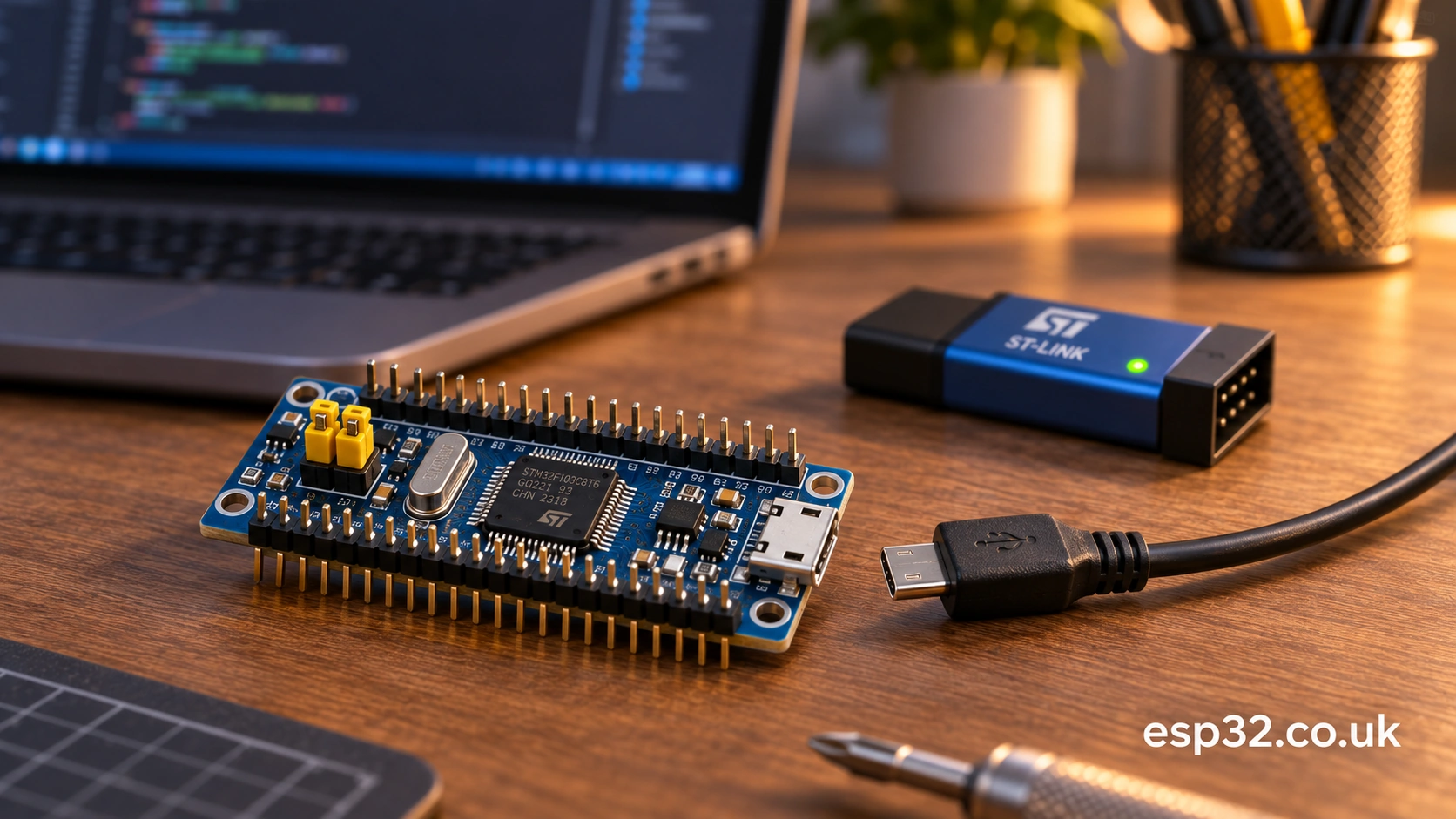
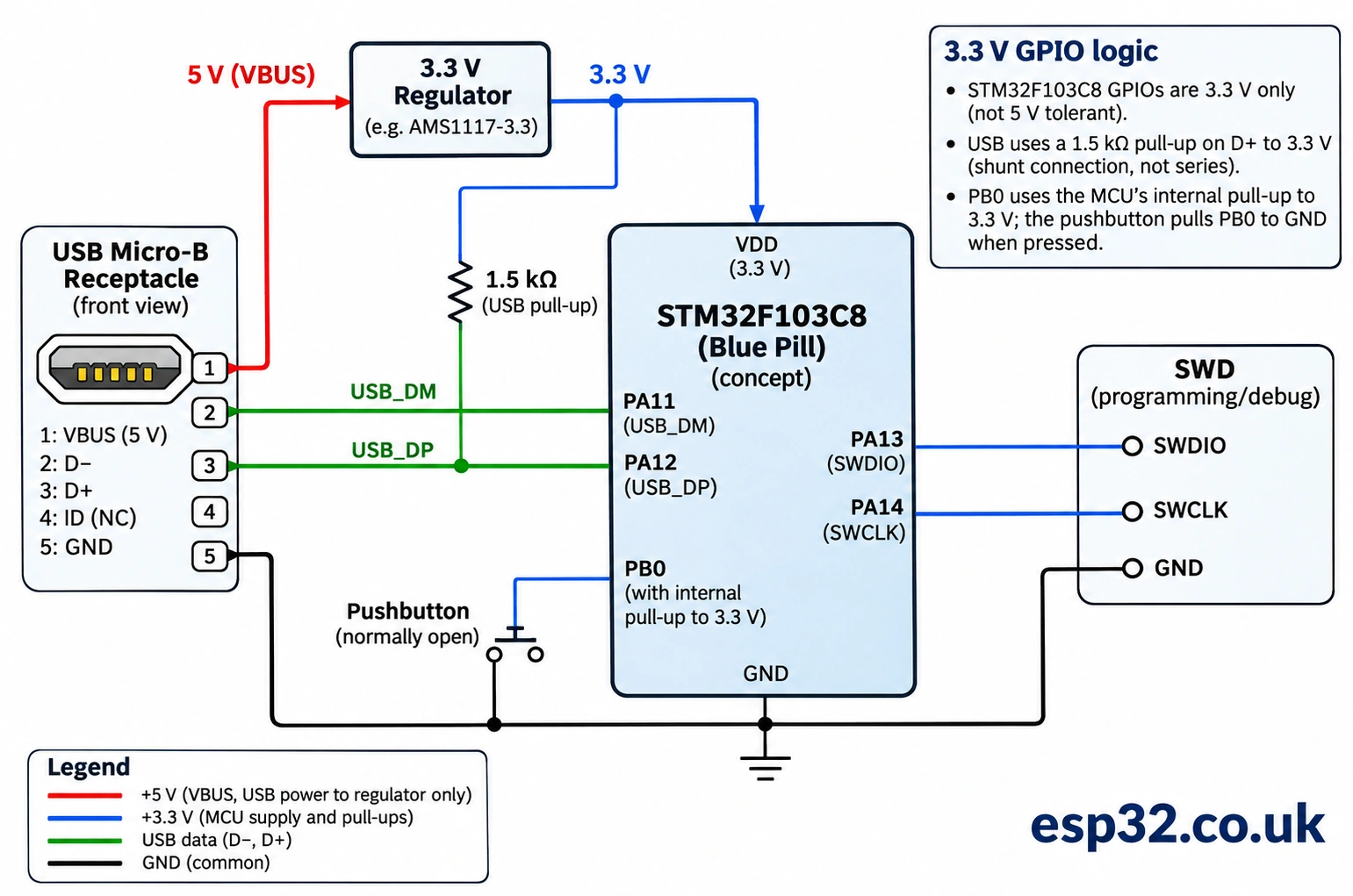
Use a Blue Pill whose chip and USB circuitry are understood, a data-capable Micro-USB cable, an ST-LINK with known SWD wiring, a normally-open push-button, and two short jumpers. An optional 100 nF decoupling capacitor across the supply rails can be useful on a breadboard, but the USB port’s existing power decoupling must remain in place. The button is not connected to USB D+ or D−.
| Connection | STM32F103C8 signal | What it does |
|---|---|---|
| USB Micro-B D− | PA11 / USB_DM | USB full-speed data minus |
| USB Micro-B D+ | PA12 / USB_DP | USB full-speed data plus |
| USB connector 5 V | Onboard regulator input, board-dependent | Powers board when designed for USB supply |
| USB GND | MCU ground | Common return |
| Button first leg | PB0 | Active-low input with MCU internal pull-up |
| Button second leg | GND | Pulls PB0 low when pressed |
| ST-LINK SWDIO | PA13 | Debug/program data |
| ST-LINK SWCLK | PA14 | Debug/program clock |
| ST-LINK GND | GND | Common debug reference |
Configure PB0 as GPIO_Input with Pull-Up in CubeMX. In that mode the unpressed switch reads HIGH and pressing it connects the pin to GND, producing LOW. Do not connect PB0 directly to 5 V. The board and the PC already share ground through USB; the same MCU cannot have two separate ground nets, so a single short button connection from PB0 to board GND is sufficient. The diagram in this article deliberately uses a logical connection rather than guessed physical pin-header positions on clone PCBs.
The classic F103 USB peripheral needs a full-speed approximately 1.5 kΩ D+ pull-up to 3.3 V. Some inexpensive Blue Pill variants have a noncompliant resistor value, often called R10, although the reference designator varies. A cable that supplies power but no data will also light the board’s LED without enumeration. Check the exact PCB revision, cable and D+ hardware if Windows or Linux never notices a new USB device. Do not wire 5 V directly to the MCU’s 3V3 pin, PA11 or PA12. When using ST-LINK alongside USB, connect target GND and VTref appropriately; avoid feeding independent conflicting power sources into the target.
How a PC recognizes a keyboard
After the device pulls D+ high and exchanges USB packets, the host reads a series of descriptors. The device descriptor identifies USB version, product IDs and basic capabilities. The configuration descriptor describes an interface and its endpoint. The HID descriptor points to a separate HID report descriptor. Finally, the host polls the interrupt-IN endpoint for actual key reports. All those pieces must agree with each other.
| Descriptor or endpoint | Essential field | Keyboard setting in this tutorial |
|---|---|---|
| Interface | bInterfaceClass | 0x03 = HID |
| Interface | bInterfaceSubClass | 0x01 = Boot Interface |
| Interface | bInterfaceProtocol | 0x01 = Keyboard (0x02 means mouse) |
| HID descriptor | Report descriptor length | 63 bytes for the complete example below |
| Interrupt IN endpoint | bEndpointAddress | Typically 0x81 (IN endpoint 1) |
| Interrupt IN endpoint | wMaxPacketSize | 8 bytes, not stock mouse’s 4 |
| Polling interval | bInterval | e.g. 10 ms for full-speed (configurable) |
| Keyboard input | Standard boot report | 8 bytes, with modifiers and six key slots |
The interface’s boot subclass and keyboard protocol help legacy boot environments understand the device, but genuine pre-boot compatibility also depends on correct keyboard reports, HID class request handling and host firmware. A correct interface byte alone is not proof that a BIOS/UEFI setup will accept the device. Modern OS recognition, not boot-menu control, is the initial acceptance test.
ST’s classic HID middleware normally starts out as a four-byte mouse. Its default usbd_hid.h defines HID_EPIN_SIZE as 0x04, and its usbd_hid.c normally sets the interface protocol to 0x02 and supplies a mouse report descriptor. Leaving any of these mouse settings in place while transmitting eight keyboard bytes is a common failure. Both the actual endpoint opening size and the configuration-descriptor advertised packet size must change together. ST’s reference middleware source and a technical moderator’s mouse-to-keyboard migration guide confirm that pattern.
Understand the eight-byte keyboard report
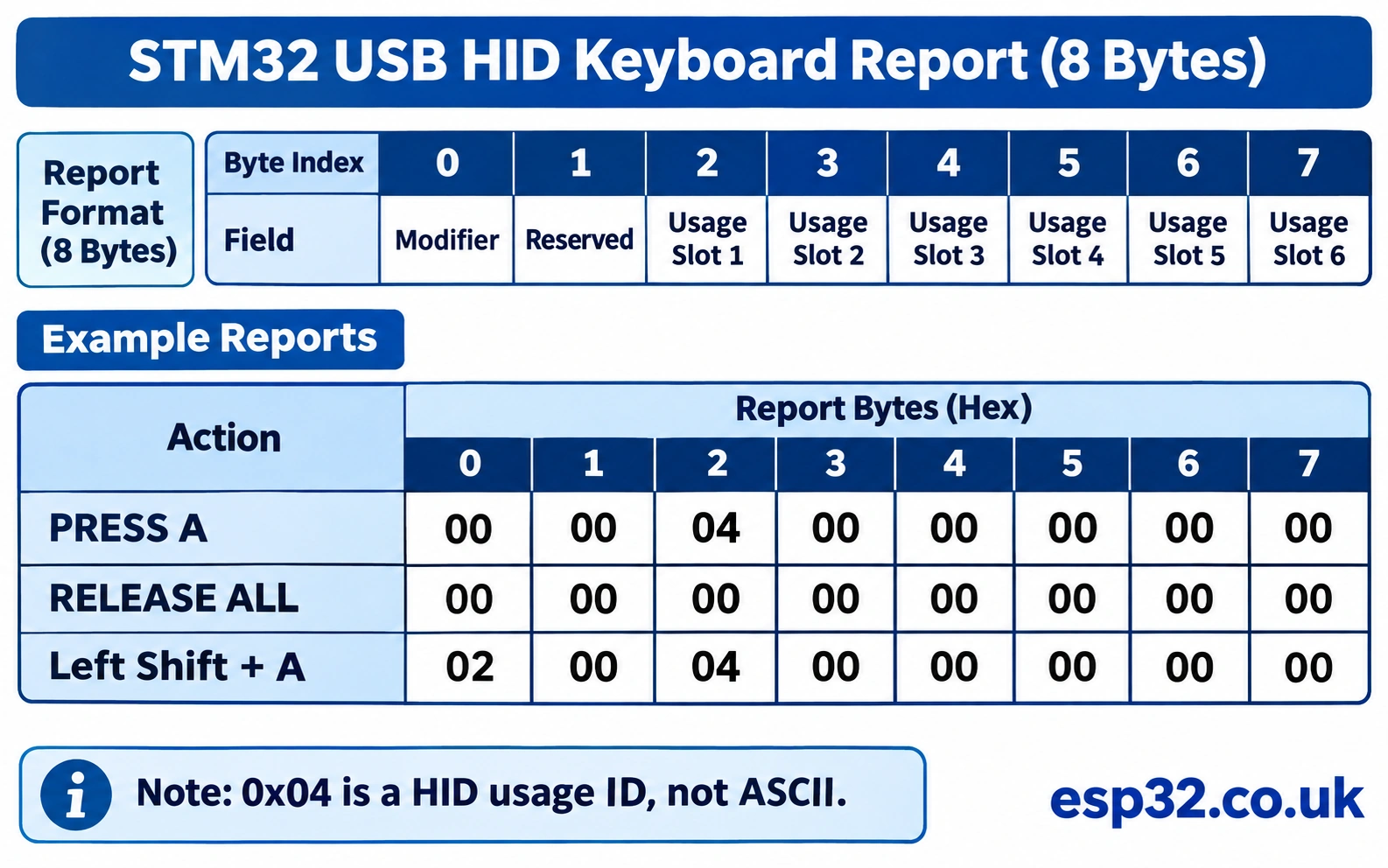
A conventional boot-style keyboard input report contains one modifier byte, a reserved byte, then up to six usage IDs. The modifier is a bitmask rather than an ordinary keycode. For example, left Shift is 0x02, left Control is 0x01, and right GUI is 0x80. The six key slots use HID keyboard page usage IDs, not ASCII.
| Byte index | Purpose | Example for pressing A |
|---|---|---|
| 0 | Modifier bits | 0x00 |
| 1 | Reserved byte | 0x00 |
| 2 | First normal key | 0x04 (A key usage) |
| 3 | Second key | 0x00 |
| 4 | Third key | 0x00 |
| 5 | Fourth key | 0x00 |
| 6 | Fifth key | 0x00 |
| 7 | Sixth key | 0x00 |
To press the A key, send 00 00 04 00 00 00 00 00. To release every key, send 00 00 00 00 00 00 00 00. Both reports matter. Merely sending an A report repeatedly does not reliably produce one A per call. The host interprets an unchanged state as the key remaining down, potentially invoking its own repeat mechanism after a delay.
An uppercase A needs a modifier plus key: 02 00 04 00 00 00 00 00 for left Shift plus A. This is not equivalent to ASCII 0x41, and it is not a way to generate arbitrary Unicode. The current keyboard layout may change the character that appears in the editor. In particular, the A key usage is a keyboard position standardized on the HID usage page.
Prepare the STM32CubeMX project
Select the actual STM32F103C8Tx part in STM32CubeMX and enable Serial Wire debugging under SYS. Configure RCC for the crystal oscillator fitted to your board. The common Blue Pill’s 8 MHz HSE ×9 yields 72 MHz PLLCLK, then the USB prescaler ÷1.5 yields the precise 48 MHz USB clock required for USB enumeration. The APB1 prescaler should be ÷2 to keep PCLK1 at 36 MHz; APB2 can remain ÷1. This is a clock example for verified 8 MHz HSE hardware, not a universal recipe for every F103 clone.
Under Connectivity → USB, enable USB device mode, then in Middleware → USB_DEVICE choose Human Interface Device Class (HID) if the installed STM32CubeF1 package exposes it. Some software distributions label it USB Device HID, and newer STM32CubeIDE 2.x workflows may have the separate CubeMX generate an IDE project. Verify that USB_DEVICE/App/usb_device.c and the class files really appear after generation. Enable the USB interrupt and ensure the low-priority USB IRQ links to the HAL peripheral controller. The USB stack handles most of that when correctly generated.
Set PB0 = GPIO_Input + Pull-Up. Name it KEY_BTN if your CubeMX version makes labels convenient, but the examples use GPIOB and GPIO_PIN_0 directly so they don’t depend on the symbolic label. Avoid EXTI for the first test: a small foreground debounce state machine is simpler, and no button ISR is required. Save the .ioc, generate the files, import into CubeIDE and build once before changing HID middleware, to establish that the base USB application compiles.
| CubeMX setting | Example selection | Why |
|---|---|---|
| MCU | STM32F103C8Tx | Match Blue Pill silicon |
| RCC | HSE crystal (verified 8 MHz) | Accurate USB reference |
| Clock | PLL ×9, USB ÷1.5 | 72 MHz system, 48 MHz USB |
| USB | USB Device Full Speed | Native PA11/PA12 interface |
| USB_DEVICE middleware | HID | Provides HID class and setup requests |
| SYS | Serial Wire | Preserve SWD recovery |
| PB0 | GPIO input pull-up | Button to GND, active low |
| NVIC | USB device interrupt enabled | Enumerate and transfer reports |
Keep the standard HID class changes in version control. CubeMX code regeneration can overwrite modified middleware files depending on package layout and project settings. If regenerated output reverts to a mouse, your button code might be perfectly correct while the host still sees a mouse. Preserve a reproducible patch rather than trusting the USER CODE markers to protect third-party library internals.
Convert the stock HID mouse into a keyboard
Make a local copy of the generated project’s USB library files and identify the exact version. Typically they live under Middlewares/ST/STM32_USB_Device_Library/Class/HID/Inc/usbd_hid.h and .../Src/usbd_hid.c. Some CubeMX projects reference an external package folder instead. The following changes assume the classic single-class HID device, not a composite HID+CDC device, and a conventional 8-byte keyboard with no Report ID. Composite devices require separate interface numbers, report IDs where needed, and different endpoint handling.
In usbd_hid.h, replace the mouse endpoint size and report length with these keyboard defaults. Retain any #ifndef wrapper that lets the project override an endpoint definition, and use the same macros consistently in your source. The default HID configuration descriptor remains 34 bytes: its topology still contains one interface, one HID descriptor and one IN endpoint.
/* Class/HID/Inc/usbd_hid.h -- single HID keyboard configuration */
#define HID_EPIN_ADDR                  0x81U
#define HID_EPIN_SIZE                  0x08U
#define USB_HID_CONFIG_DESC_SIZ       34U
#define USB_HID_DESC_SIZ              9U
#define HID_KEYBOARD_REPORT_DESC_SIZE 63U
If those macros are already defined by the library, edit their existing definitions instead of appending duplicates. Remove the obsolete mouse-length definition once you have replaced every source reference. The HID report descriptor byte count must agree with the array length and with both USB descriptor responses. Merely changing the wMaxPacketSize byte displayed to the host is not enough if USBD_LL_OpenEP() still uses a 4-byte buffer.
In usbd_hid.c, edit the interface portion of USBD_HID_CfgDesc: set its existing mouse bInterfaceProtocol value from 0x02 to 0x01, retaining bInterfaceClass = 0x03 and bInterfaceSubClass = 0x01. Change the HID report descriptor length entry to HID_KEYBOARD_REPORT_DESC_SIZE. Change the endpoint’s existing HID_EPIN_SIZE to the new 8-byte header macro. Also change the standalone HID descriptor array USBD_HID_Desc to report the new 63-byte length; the source normally contains two separate places containing the old mouse report length.
/* Values at their EXISTING positions inside USBD_HID_CfgDesc */
0x03, /* bInterfaceClass: HID */
0x01, /* bInterfaceSubClass: Boot */
0x01, /* bInterfaceProtocol: Keyboard (was Mouse 0x02) */
/* ... inside its HID descriptor ... */
0x22, /* Report descriptor type */
HID_KEYBOARD_REPORT_DESC_SIZE, /* low byte = 63 */
0x00, /* high byte */
/* ... inside its IN endpoint descriptor ... */
HID_EPIN_ADDR,
0x03, /* interrupt IN */
HID_EPIN_SIZE, 0x00, /* 8-byte max packet, little endian */
HID_FS_BINTERVAL
The snippets above are replacement fragments, not a second configuration descriptor to paste into the same C file. Keep the original surrounding configuration fields and the existing bracket structure. In USBD_HID_Desc replace the old report-length macro in exactly the same way. Then rename the original mouse array, for example HID_MOUSE_ReportDesc, to HID_Keyboard_ReportDesc and replace its contents with the 63-byte keyboard report descriptor below.
/* Class/HID/Src/usbd_hid.c -- 63-byte HID keyboard report descriptor */
__ALIGN_BEGIN static uint8_t HID_Keyboard_ReportDesc[HID_KEYBOARD_REPORT_DESC_SIZE]
__ALIGN_END = {
  0x05, 0x01,       /* Usage Page: Generic Desktop */
  0x09, 0x06,       /* Usage: Keyboard */
  0xA1, 0x01,       /* Collection: Application */
  0x05, 0x07,       /* Usage Page: Keyboard/Keypad */
  0x19, 0xE0,       /* Usage Min: Left Control */
  0x29, 0xE7,       /* Usage Max: Right GUI */
  0x15, 0x00,       /* Logical Min: 0 */
  0x25, 0x01,       /* Logical Max: 1 */
  0x75, 0x01,       /* Report Size: 1 bit */
  0x95, 0x08,       /* Report Count: 8 */
  0x81, 0x02,       /* Input: 8 modifier bits */
  0x95, 0x01,       /* Report Count: 1 */
  0x75, 0x08,       /* Report Size: 8 bits */
  0x81, 0x03,       /* Input: reserved byte */
  0x95, 0x05,       /* Report Count: 5 */
  0x75, 0x01,       /* Report Size: 1 bit */
  0x05, 0x08,       /* Usage Page: LEDs */
  0x19, 0x01,       /* Usage Min: Num Lock */
  0x29, 0x05,       /* Usage Max: Kana */
  0x91, 0x02,       /* Output: 5 LED bits */
  0x95, 0x01,       /* Report Count: 1 */
  0x75, 0x03,       /* Report Size: 3 bits */
  0x91, 0x03,       /* Output: padding */
  0x95, 0x06,       /* Report Count: 6 */
  0x75, 0x08,       /* Report Size: 8 bits */
  0x15, 0x00,       /* Logical Min: 0 */
  0x25, 0x65,       /* Logical Max: 101 */
  0x05, 0x07,       /* Usage Page: Keyboard/Keypad */
  0x19, 0x00,       /* Usage Min: Reserved */
  0x29, 0x65,       /* Usage Max: Keyboard Application */
  0x81, 0x00,       /* Input: six keycode bytes */
  0xC0              /* End collection */
};
These descriptors declare an output LED report, as conventional keyboards do. For the original stock HID implementation, merely declaring it does not mean the middleware processes SET_REPORT automatically. We’ll handle a one-byte LED output on the control endpoint below; a project that omits this feature might still type on many hosts but would not be a complete, reliable boot-style keyboard implementation.
Inside USBD_HID_Setup(), find the USB_REQ_GET_DESCRIPTOR class handler and make it return the keyboard array and keyboard length, not the mouse array and 74-byte constant. All locations need to agree. The code pattern should be:
if ((req->wValue >> 8) == HID_REPORT_DESC) {
    len = MIN(HID_KEYBOARD_REPORT_DESC_SIZE, req->wLength);
    pbuf = HID_Keyboard_ReportDesc;
}
If you use different library versions, confirm the USBD_HID_GetFSCfgDesc(), USBD_HID_GetHSCfgDesc() and other-speed function paths all return the edited configuration descriptor. The F103 has only full-speed device hardware, but the middleware may expose generic high-speed callbacks across MCU families. Do not accidentally edit only a high-speed descriptor while the board enumerates using a separate full-speed array.
Handle host keyboard LED reports
The report descriptor above advertises a one-byte Output report for indicators such as Num Lock and Caps Lock. Many operating systems transmit that value with a class SET_REPORT control request on endpoint zero. The stock classic HID implementation handles SET_IDLE and SET_PROTOCOL, but its mouse-oriented version does not generally have an application callback for keyboard LED output. A robust keyboard should accept the one-byte Output report even when your Blue Pill has no physical indicator LEDs attached.
Add the following file-scope state and endpoint-zero receive-ready function in usbd_hid.c. Register USBD_HID_EP0_RxReady in the class table entry that is currently NULL /* EP0_RxReady */. Make sure the function prototype appears before the class table. This is a targeted extension for the classic non-composite HID stack. The USB core invokes the callback after the control OUT data stage completes.
/* In usbd_hid.c, at file scope; declare before USBD_HID class table */
static uint8_t keyboard_led_report = 0U;
static uint8_t keyboard_led_rx_pending = 0U;

static uint8_t USBD_HID_EP0_RxReady(USBD_HandleTypeDef *pdev)
{
    UNUSED(pdev);
    keyboard_led_rx_pending = 0U;
    return (uint8_t)USBD_OK;
}

/* In the USBD_ClassTypeDef USBD_HID initializer:
   replace the existing NULL entry for EP0_RxReady with
   USBD_HID_EP0_RxReady (do not insert an additional field). */
Inside the USB_REQ_TYPE_CLASS / switch (req->bRequest) branch of USBD_HID_Setup(), add these cases, next to the stock GET/SET protocol and idle handling. The report type lives in the high byte of wValue: 0x02 means Output. The low byte is report ID; this example defines no report IDs, so require zero. A different HID composite or multi-report implementation needs a different decoder.
case USBD_HID_REQ_SET_REPORT:
    if ((req->wValue == 0x0200U) && (req->wLength == 1U)) {
        keyboard_led_rx_pending = 1U;
        (void)USBD_CtlPrepareRx(pdev, &keyboard_led_report, 1U);
    } else {
        USBD_CtlError(pdev, req);
        ret = USBD_FAIL;
    }
    break;

case USBD_HID_REQ_GET_REPORT:
    if ((req->wValue == 0x0200U) && (req->wLength >= 1U)) {
        (void)USBD_CtlSendData(pdev, &keyboard_led_report, 1U);
    } else {
        USBD_CtlError(pdev, req);
        ret = USBD_FAIL;
    }
    break;
The host can now set the indicator state and the firmware stores it, even though we don’t drive physical LEDs from the value. The keyboard_led_rx_pending flag is useful if you later choose to process the newly received byte in a deferred task. The stock class’s GET/SET protocol support can remain in place; because the keyboard sends the same eight-byte basic format in report and boot protocol, this simple demonstration does not need report IDs or a protocol-dependent payload switch.
One subtle USB detail: on a bus-powered device, remote wakeup and suspend handling are separate work. Do not toggle USB device state variables manually inside a button ISR to wake a sleeping host. This tutorial leaves remote wakeup disabled and treats the PB0 switch only as a local input when the host has configured the keyboard. If you need keyboard wake from suspend, implement the USB-defined remote-wakeup handshake and check whether the host enabled the feature first.
Fix the HID transmit-busy return value
Here is an unpleasant corner of ST’s classic HID API: in some versions, USBD_HID_SendReport() checks whether the HID class is idle and starts USBD_LL_Transmit() only in that case, but still returns USBD_OK even if the class was busy and the new report never started. Copying an example that treats every USBD_OK as an accepted key press can silently lose release reports, leaving a key logically held down.
Inspect your local usbd_hid.c implementation rather than assuming all firmware packages behave identically. If it has this behavior, change the existing USBD_HID_SendReport() function to return USBD_BUSY when a prior interrupt-IN packet is pending, and USBD_FAIL when not configured. Its device/class access and optional composite-class arguments are version-dependent, so retain the existing function signature, local handle lookup and endpoint address, changing only the decision/return block as appropriate:
/* Replace the state and send/return portion in the existing function.
   Keep its existing local hhid, pdev, HIDInEpAdd and arguments. */
if (pdev->dev_state != USBD_STATE_CONFIGURED) {
    return (uint8_t)USBD_FAIL;
}
if (hhid->state != USBD_HID_IDLE) {
    return (uint8_t)USBD_BUSY;
}
hhid->state = USBD_HID_BUSY;
if (USBD_LL_Transmit(pdev, HIDInEpAdd, report, len) != USBD_OK) {
    hhid->state = USBD_HID_IDLE;
    return (uint8_t)USBD_FAIL;
}
return (uint8_t)USBD_OK;
This change protects the press/release state machine that follows. It also makes debugging more meaningful: USBD_BUSY says try later rather than claiming the report was transmitted. The stock HID DataIn() callback sets the class state back to idle when the host has completed the IN transfer. If you later switch to a composite device or another ST stack generation, recheck its busy semantics and packet-buffer ownership; do not paste this fragment into a different function simply because the name looks similar.
Complete PB0 button to USB keyboard example
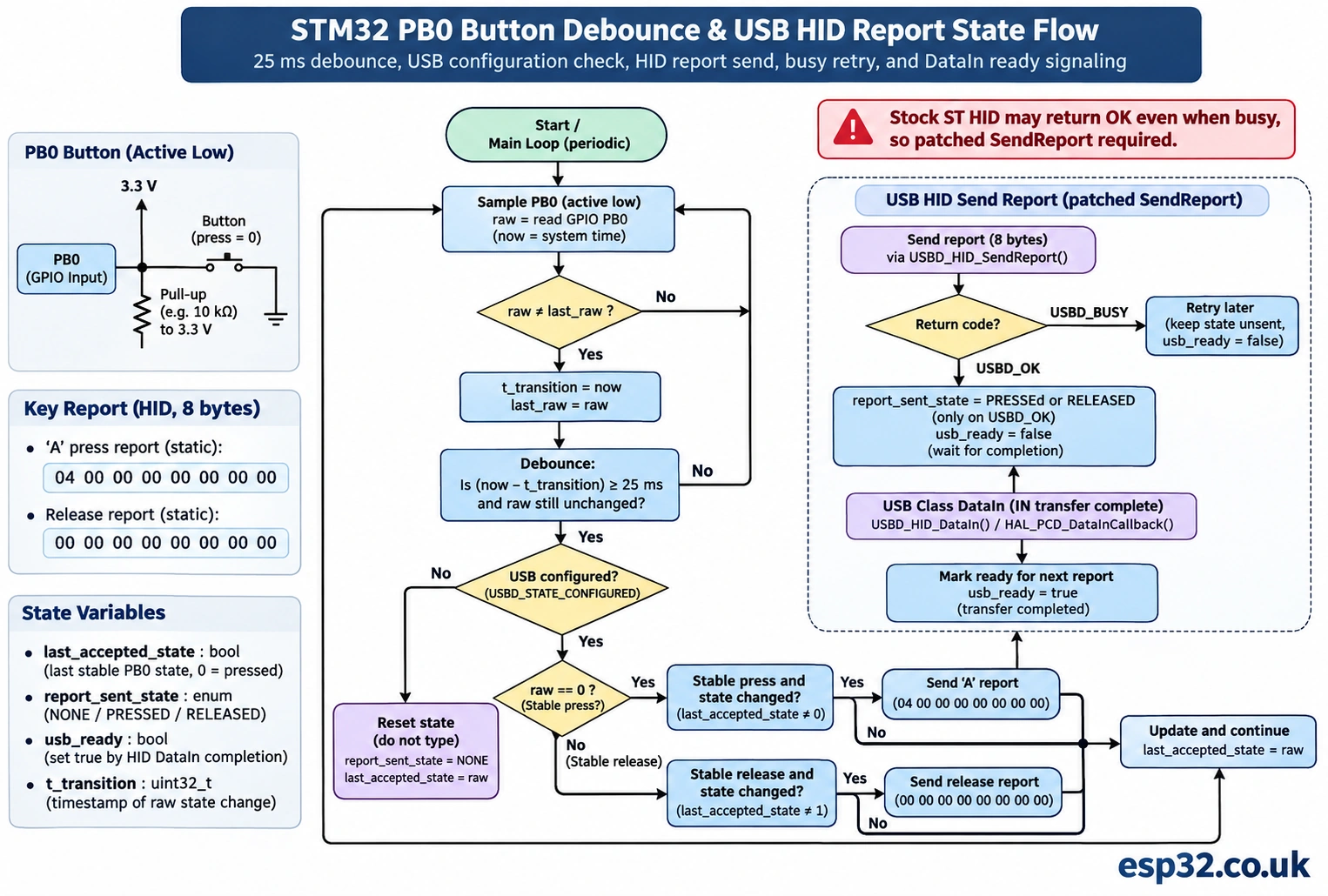
The following main.c code works with the generated F1 HAL project after the HID descriptor and API changes above. It uses foreground polling and a 25 ms debounce, sends one press report while PB0 is held LOW, then sends a release report when PB0 returns HIGH. It does not use EXTI and does not need a blocking delay to release a key. It also avoids writing to an in-flight USB packet buffer: the two eight-byte reports have static storage and are never modified.
Insert the declarations in /* USER CODE BEGIN 0 */ or other designated user-code sections, add the headers in the appropriate include section and call Keyboard_Task() from the application’s main while(1) loop, after the generated MX_USB_DEVICE_Init() call. Do not duplicate the generated main() or manually call the USB initialization twice.
/* main.c, inside an appropriate USER CODE section */
#include "usb_device.h"
#include "usbd_hid.h"
#include "usbd_def.h"

extern USBD_HandleTypeDef hUsbDeviceFS;

/* Press A, and release all keys. Both arrays remain unchanged forever. */
static uint8_t kbd_press_a[8] = {0x00, 0x00, 0x04, 0, 0, 0, 0, 0};
static uint8_t kbd_release[8] = {0, 0, 0, 0, 0, 0, 0, 0};

static void Keyboard_Task(void)
{
    static GPIO_PinState last_raw = GPIO_PIN_SET;
    static GPIO_PinState stable = GPIO_PIN_SET;
    static uint32_t change_ms = 0U;
    static uint8_t host_key_down = 0U;

    GPIO_PinState raw = HAL_GPIO_ReadPin(GPIOB, GPIO_PIN_0);
    uint32_t now = HAL_GetTick();

    if (raw != last_raw) {
        last_raw = raw;
        change_ms = now;
    }
    if ((now - change_ms) >= 25U) {
        stable = raw;
    }

    if (hUsbDeviceFS.dev_state != USBD_STATE_CONFIGURED) {
        /* Re-enumeration should begin from a released-key state. */
        host_key_down = 0U;
        return;
    }

    uint8_t desired_down = (stable == GPIO_PIN_RESET) ? 1U : 0U;
    if (desired_down != host_key_down) {
        uint8_t *report = desired_down ? kbd_press_a : kbd_release;
        uint8_t result = USBD_HID_SendReport(&hUsbDeviceFS, report, 8U);
        if (result == USBD_OK) {
            /* Accepted into USB IN transfer; retry later on BUSY. */
            host_key_down = desired_down;
        }
    }
}

/* In main's generated while(1), after MX_USB_DEVICE_Init():
while (1) {
    Keyboard_Task();
    // Other nonblocking application work
}
*/
There are two deliberate simplifications. First, this is a hold-to-press design, not a one-shot macro: keeping the physical button held keeps A held on the host. The OS may generate repeated A characters after its normal keyboard repeat delay. For one character per push regardless of how long the button is held, you can schedule a separate release after successful transmission and let a new physical press re-arm it. Second, because the host could disconnect immediately after a press or release, the code does not promise delivery across unplug/replug events. The host has its own USB device state and handles disconnects independently.
The debounce logic ignores rapid transitions until raw input has stayed steady for at least 25 ms. It is a simple time-based filter appropriate for mechanical switch bounce. It does not sample on an interrupt, and it does not guarantee unusually noisy industrial switches will behave perfectly. For heavy electrical interference, use external filtering, EMI-aware wiring and a stronger input state machine. The elapsed-time arithmetic uses unsigned uint32_t subtraction so the HAL_GetTick() wrap does not break a short debounce period.
The two immutable static packet arrays matter because USB IN is asynchronous: the middleware may keep a pointer to the payload until transfer completion. Creating a local eight-byte array on the stack, passing it to USBD_HID_SendReport() and returning immediately risks the contents being overwritten. Similarly, editing the same static array before the previous transfer completes can corrupt what the host receives. With separate fixed press/release buffers and reliable busy feedback, this basic design avoids both mistakes.
Flash and verify without typing into the wrong application
Start with the Blue Pill connected to the ST-LINK over SWD and the PB0 button connected to GND through its normally-open contacts. Keep the USB data cable disconnected during initial flash. Use CubeIDE’s debugger or STM32CubeProgrammer to flash the firmware; set BOOT0 to the appropriate normal flash boot level for the board. After a successful program and reset, connect the target’s Micro-USB port to a known-good PC USB data port. The host should register a new HID keyboard device. Some operating systems combine several keyboards under one human-readable label, so a generic USB Input Device name is not by itself a failure.
Open an empty text editor, click inside it, then press and release PB0. On an English (US) keyboard mapping, the expected outcome is a lower-case a while the device is configured. If it repeats while held, that’s host key-repeat behavior. If nothing appears, do not assume the USB clock is wrong until you check whether a HID device actually enumerated; descriptor failures and application report failures are different layers.
On Windows, check Device Manager under Keyboards and Human Interface Devices, and use USB Device Tree Viewer or a descriptor inspection tool when you need to see interface protocol, endpoint packet size and report length. You should not look for COMx; this is not the CDC device from #041. Windows may retain cached device information across firmware changes; disconnect/reconnect, use a changed product ID only when legally appropriate, or remove the old device instance while debugging.
On Linux, inspect dmesg -w, lsusb, and lsusb -v for the newly attached HID interface. Look for keyboard-specific HID descriptors and a bound usbhid device; udev and permissions for /dev/hidraw* are relevant only if you need raw HID access, not ordinary typing. For deeper descriptor debugging, inspect /sys/bus/hid/devices/.../report_descriptor and decode it with hid-tools. Be careful not to confuse a device present in the USB tree with a device whose report descriptor is actually accepted by the HID input subsystem.
On macOS, use System Information → USB to see the device and test a text editor such as TextEdit. macOS may present a keyboard setup assistant for a newly identified keyboard; this does not mean the USB hardware failed. The HID usage layout is still interpreted by the chosen input source. Keyboard shortcuts and accessibility permission prompts may differ from normal simple key entry; start with letter A rather than system shortcuts.
| Observation | Likely layer | First useful check |
|---|---|---|
| Power LED on, no USB device | Cable, D+ pull-up, 48 MHz clock, PA11/PA12 | Known data cable and measured clock plan |
| Device appears as a mouse | Stock HID descriptors still active | Protocol 0x02, old report array, regenerated class files |
| Unknown USB device / descriptor error | Descriptor structure or USB PHY | Report length, wTotalLength, correct D+ resistor |
| HID device recognized but no typing | Application state or input | PB0 pull-up, host configured, debugger watch |
| One key press sticks | Release report dropped | Busy handling, separate static report arrays |
| Characters appear wrong | OS keyboard layout | Compare HID key usage to active language layout |
| Caps Lock LED behavior strange | Output report handling | SET_REPORT and 1-byte LED state |
| Works until regenerate code | Class edits overwritten | Version-controlled patch for middleware |
Common failure: everything builds but the computer sees a mouse
This is the most characteristic failure of the STM32 classic HID project. The compiler cannot tell whether a report descriptor describes a keyboard or a mouse; both are just byte arrays. If the generated class code retains bInterfaceProtocol = 0x02, the host can treat the device as a mouse even though the MCU tries to send keyboard usage IDs. Look at the actual descriptors the USB host reads, not only your C source, because project generation and middleware copying can restore older arrays unexpectedly.
Check the length advertised in both USBD_HID_CfgDesc and USBD_HID_Desc, plus the actual report descriptor array used in the GET_DESCRIPTOR response. Confirm the endpoint IN packet size is eight in the advertised endpoint descriptor and the EP open call. For an ordinary single keyboard with no Report IDs, the report payload is exactly eight bytes. Do not append a report ID byte unless you have declared Report IDs in the report descriptor. For a combined keyboard + mouse report descriptor, the payload format will be different; that is a more advanced project.
A second descriptor trap is the device’s VID/PID. Do not distribute production firmware using someone else’s product ID or claim ST’s assigned VID/PID is yours. For a learning experiment, identify the IDs assigned by the example project and use the sample only according to the license and purpose allowed by its supplier. If you produce commercial hardware, obtain legitimate USB identifiers or an authorized PID allocation. A personalized product string is not a substitute for owning identifiers.
Common failure: key presses work but release disappears
A key release is a separate USB IN report and must be accepted by the HID class. The default ST HID USBD_HID_SendReport() implementation may return USBD_OK even when it does not submit a new report because the previous transfer is busy. If your state machine marks release as delivered on that misleading return, it will stop retrying, causing a stuck key until the next event or disconnect. The fix is to make the send API report USBD_BUSY reliably, and retry when the state clears.
Avoid huge blocking delays to paper over this race. The polling interval is not a guarantee that any particular call happens after the previous packet finished. Host scheduling, device suspend and concurrent callbacks can change timing. Correct software observes completion or reliably checks class state; it does not assume HAL_Delay(10) is always sufficient. A future keyboard project with multiple controls should queue desired input state rather than treating every tap as an independent fire-and-forget USB message.
Do you need USB HID Boot Protocol?
The terms HID report protocol and boot protocol are related but not interchangeable. In report protocol, the host parses the full HID report descriptor. A boot-capable keyboard interface exposes a standardized eight-byte input report usable by simple host firmware that may not parse all HID descriptors. A strict boot keyboard also needs appropriate class requests and LED output handling. The descriptor supplied here uses the conventional boot keyboard report format, identifies the interface as a boot keyboard, retains ST’s SET/GET protocol and idle handling, and includes the LED control-report extension above.
Even then, BIOS/UEFI support varies by host USB stack, hub, security policy and pre-boot environment. A Blue Pill appearing as a keyboard in Windows does not prove it will work inside firmware setup screens. Test that use case separately rather than advertising unconditional boot compatibility. If the product only targets desktop OS applications, a non-boot HID interface may be a reasonable alternative, but it still needs a consistent descriptor and payload format.
From one switch to a practical custom keypad
Once the single-key example works, add more switches with GPIO input pull-ups, each mapped to a distinct HID keyboard usage ID. Use a debounced state per button and assemble one eight-byte report representing all currently held keys. For two buttons, fill key slots 2 and 3 in the report with their usage IDs. For a matrix keypad, scan rows and columns in firmware and consider ghosting; diodes may be required for some multi-key combinations. Input report construction belongs in the application layer, while the USB HID class should remain an ordinary transport for complete reports.
The six-key rollover format supports up to six simultaneous ordinary keys plus modifier bits. That is a limitation of this standard eight-byte boot report, not of the entire HID protocol. NKRO keyboards can define larger bitfield reports, but a host that expects an eight-byte boot keyboard might not accept that layout in boot mode. More advanced report descriptors and protocol switching increase implementation and testing effort. For a handful of buttons, keeping the standard eight-byte format is often the best engineering choice.
For a macro pad, be thoughtful about shortcuts. Sending Control+S or a media key might be useful in one application and harmful in another. Implement a physical enable switch, a visible arming indicator and an explicit mapping configuration rather than sending a potentially destructive key sequence at power-up. If the keypad controls production machinery or accessibility equipment, consider host acknowledgment through a separate protocol: an HID keyboard report alone does not confirm that the intended application received or acted on the key.
Why not use USB Custom HID instead?
STM32Cube also offers a Custom HID class. That is appropriate when your device sends structured data to a dedicated desktop application, rather than pretending to be a conventional keyboard. However, USBD_CUSTOM_HID is not simply the keyboard HID class with another name. Its default descriptor, endpoint directions, report length and interface subclass/protocol differ from the classic HID mouse example. On many packages its default report has vendor-defined usages; an OS will not automatically convert such vendor reports into typing.
For a normal USB keyboard, the most direct route is to keep the HID interface’s Keyboard usage and proper report layout. For a configuration panel that reads knobs or transfers sensor measurements into custom software, vendor-defined Custom HID may be better. For plain serial text, the previous esp32.co.uk/ USB CDC tutorial (#041) is simpler. And if you need keyboard and CDC together over one cable, that is a composite USB device project requiring its own interface and endpoint planning, not an extra file added to a single-class example.
Troubleshooting checklist in the right order
There is little value in changing C keycodes while the PC still says Unknown USB Device. Start at power, PHY and clock; verify host enumeration; inspect class descriptors; check the application’s report state; and only then debug button bounce. The chart below keeps those layers separate. Be cautious with generated USB firmware since a small error in enumeration descriptors can make the board disappear from the OS, although SWD normally remains available for recovery.
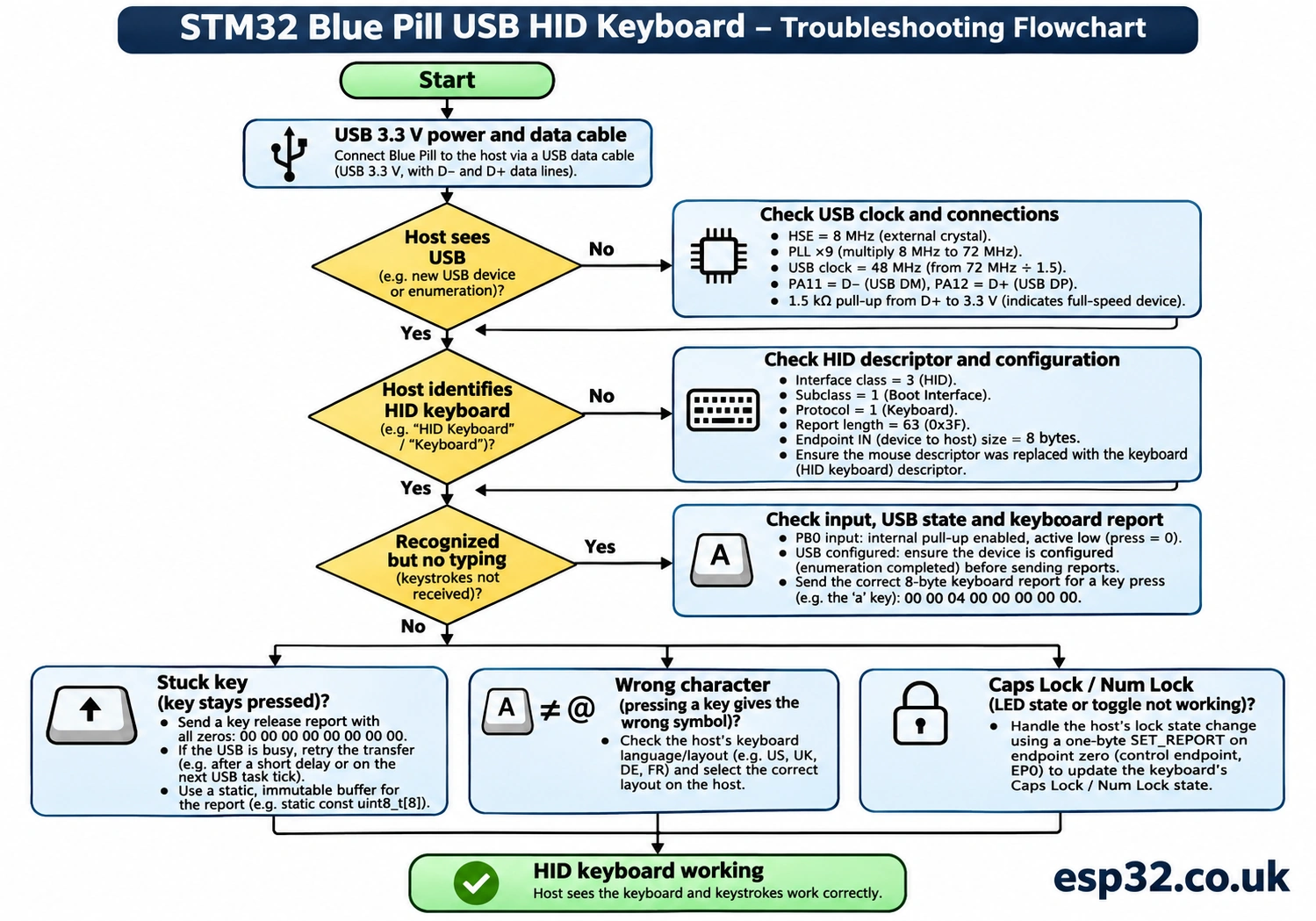
If the device appears and disappears repeatedly, inspect VBUS stability, the USB data cable, the D+ pull-up and the 48 MHz clock accuracy. Confirm that the MCU isn’t repeatedly resetting due to a power problem or watchdog. If the interface enumerates as keyboard but prints nothing, instrument the button state and the USBD_HID_SendReport result with a debugger rather than introducing additional USB text logging into a HID-only device. SWD remains the clean diagnostic interface for early HID development.
If a keystroke appears two or three times after a quick press, consider contact bounce and host key-repeat. They are different problems. Bounce produces multiple physical press/release transitions close together; repeat occurs when one press is held long enough for the OS to repeat it. A 25 ms debounce addresses the former, not the latter. If the host recognizes report changes but keyboard indicator LEDs don’t work, verify the one-byte SET_REPORT data-stage handler and the correct report type and ID, not the interrupt-IN endpoint.
Frequently asked questions
Can an STM32 Blue Pill act as a USB keyboard without an FTDI or CP2102 adapter?
Yes. The F103C8 has a native USB full-speed device peripheral on PA11/PA12, and a suitable HID firmware image can expose a keyboard interface. A USB-UART adapter is unnecessary for normal keyboard operation, but initial firmware flashing still needs SWD or a supported system bootloader interface. The factory F103C8 ROM does not make the USB socket a ready-made DFU programming port.
Why does my generated HID project identify itself as a mouse?
ST’s classic HID middleware often ships with a mouse interface protocol, four-byte endpoint and mouse report descriptor. You must replace all of those with consistent keyboard values. Changing only the data passed to USBD_HID_SendReport() does not change the USB interface advertised to the host.
Is the keyboard report ASCII or Unicode?
Neither. It contains HID keyboard usage IDs and modifier bits. The operating system applies the active keyboard layout to interpret them. To produce arbitrary text reliably across languages, implement explicit layout handling or a different application-facing transport rather than assuming that a US keyboard usage always represents the same visible character.
Why send a release report after each press?
USB keyboard input reports describe currently held keys. If you never send all-zero key slots after pressing a key, the host can continue believing it is down. A successful USB transfer only says the class accepted the packet for transport; it is not proof an application used the character.
Can I make six keys work at once?
With this standard eight-byte boot keyboard report, six regular-key slots are available in addition to modifier bits. For larger simultaneous combinations, a different report descriptor and protocol strategy is possible, but that isn’t compatible with every boot-protocol host.
Does this work in Windows 11, Linux and macOS?
A correctly implemented standard HID keyboard generally uses their built-in input drivers. The exact labels differ between operating systems, and a newly connected keyboard may trigger a host setup prompt. Hardware revisions, cable quality, descriptor correctness and keyboard layouts remain more important than the desktop OS version.
What is the difference between HID class and Custom HID middleware?
Classic HID can expose a conventional keyboard if you provide appropriate descriptors and eight-byte keyboard reports. Custom HID often starts with vendor-defined usages and may have both IN and OUT endpoints. You cannot rely on a vendor-defined report to appear as keyboard typing without a matching keyboard descriptor or application-layer driver.
Can the same USB connection provide HID keyboard and CDC serial simultaneously?
Yes, with a composite USB device that declares both interfaces and has valid endpoints, descriptor lengths and class state. That is more involved than modifying the single-class mouse example. Don’t assume you can paste the #041 CDC interface into this project without changing the USB configuration descriptor and registration flow.
Why does USB stop working after CubeMX regeneration?
Some generated project layouts replace or reference middleware files when you regenerate. That can revert keyboard-specific edits to the standard mouse class. Keep a patch for usbd_hid.h, usbd_hid.c, any control report handling and generated user code; review the diff each time.
Final project checks and next steps
The minimum end-to-end success criteria are specific: the Blue Pill boots from flash; its host sees a USB HID keyboard, not an unknown device or mouse; its interface describes a matching 63-byte report descriptor and eight-byte IN endpoint; the PB0 button reads HIGH normally and LOW when pressed; pressing produces the A usage; releasing produces an all-zero report; and the host doesn’t retain a stuck key. If you inspect LED Output reports, the control endpoint should accept the one-byte report too. These are expected outcomes to verify on hardware, not claims that this article’s sample has been lab-tested.
After that, extend the project to a three-key macro pad, a small keyboard matrix or a mode-selectable control panel. Keep the separation clear: GPIO scanning creates an input state, HID reports describe that state, and USB class middleware transports it. The rest of our esp32.co.uk/ STM32 series covers GPIO, EXTI, timers, DMA and USB CDC, which are useful building blocks for richer HID devices.
Technical references
- ST: Introduction to USB with STM32 — HID and Custom HID class roles.
- ST USB device middleware:
usbd_hid.c— actual class descriptors, setup handling and send behavior. - ST USB device middleware:
usbd_hid.h— endpoint size, report size and exported API. - ST technical moderator: mouse-to-keyboard HID migration — class-specific changes and standard report descriptor.
- Linux kernel: Introduction to HID report descriptors — report descriptor parsing and input report meaning.
- USB-IF HID specification — interface protocol, boot keyboard reports and HID requests.
Editorial note: This 2026 tutorial targets the conventional STM32F103C8T6 Blue Pill and classic STM32CubeF1 HAL USB middleware. ST may change code generation and middleware structure between package releases. Confirm the local source before applying snippets, retain SWD recovery, and bench-test the finished device before using it beyond a supervised demonstration.