
The Bosch BMP280AliExpress price measures atmospheric pressure and its own sensor temperature over I²C or SPI. It is popular in ESP32AliExpress price weather stations, low-power sensors and projects that estimate changes in altitude from pressure. Unlike the similarly named BME280AliExpress price, a BMP280 does not measure humidity. The bare sensor, the Adafruit #2651 breakout and inexpensive six-pin GY-BMP280 modules are also not electrically identical—a difference that matters for power and address selection.
Quick start: for the Adafruit BMP280 #2651 STEMMA QT breakout, connect ESP32 3V3 → VIN, GND → GND, GPIO21 → SDI/SDA and GPIO22 → SCK/SCL. Leave CS and SDO unconnected when using the board’s factory I²C configuration. Scan for 0x77 first, then 0x76. The main example below initializes those pins explicitly and tries both valid addresses.
Important: many generic modules place SDO low by default, yielding 0x76. Some have no onboard regulator or level shifters; for a 3.3 V ESP32 assume 3.3 V only unless the specific module schematic proves otherwise. Do not connect a 5 V I²C pull-up to ESP32 GPIO.
BMP280 specifications: what it measures and what it does not
| Specification | BMP280 / real-world interpretation |
|---|---|
| Measurements | Absolute barometric pressure and sensor temperature; no humidity channel |
| Pressure range | 300–1100 hPa according to Bosch’s BMP280 datasheet |
| Temperature operating range | −40 to +85 °C; observed temperature can be influenced by nearby electronics |
| Pressure accuracy | Typically ±1 hPa absolute under specified conditions; relative precision can be better |
| Bus interfaces | I²C or 3-/4-wire SPI; use 4-wire SPI for the Arduino example |
| I²C addresses | 0x76 when SDO low; 0x77 when SDO high |
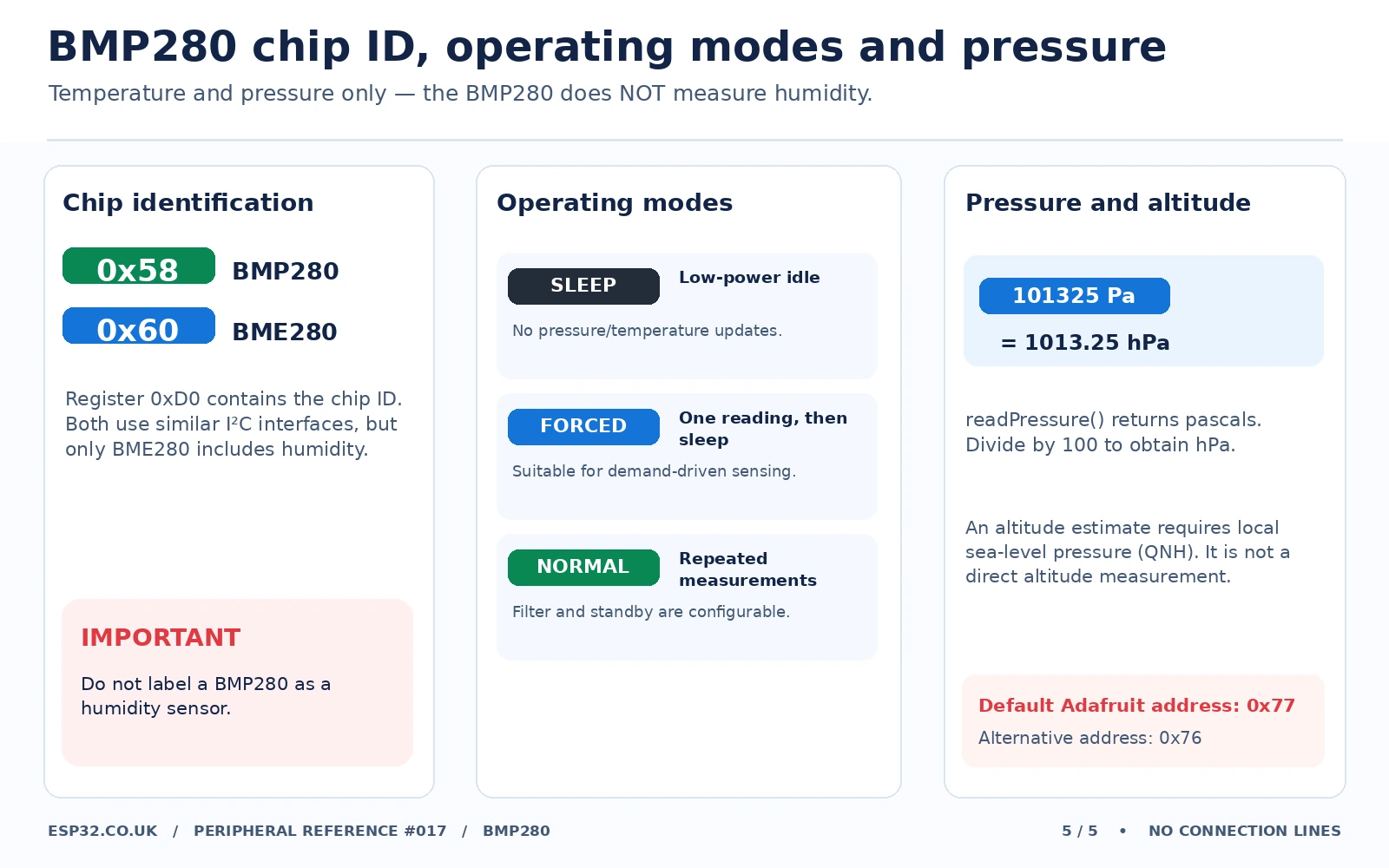
| Identity register | 0xD0 returns 0x58 for BMP280; BME280 commonly returns 0x60 |
| Sensor IC electrical supply | VDD is about 1.71–3.6 V; VDDIO is a separate low-voltage digital supply |
| Adafruit #2651 VIN | Breakout VIN accepts 3–5 V due to its regulator/level shifting; choose 3.3 V with ESP32 |
| Modes | Sleep, forced single measurement, normal repeated measurement |
| Filtering | Configurable oversampling, IIR filtering and standby timing |
| Altitude estimate | Computed from pressure plus an independently supplied sea-level pressure; not a GPS altitude |
Pressure is often displayed in hPa or mbar, but the Adafruit Arduino method bmp.readPressure() returns pascals (Pa). Divide by 100 for hPa. For example, 101,325 Pa is 1,013.25 hPa. A forecast-quality weather station should also account for local pressure trends, sensor placement and the regional sea-level pressure reference.
Board layout: Adafruit BMP280 #2651 versus generic GY-BMP280
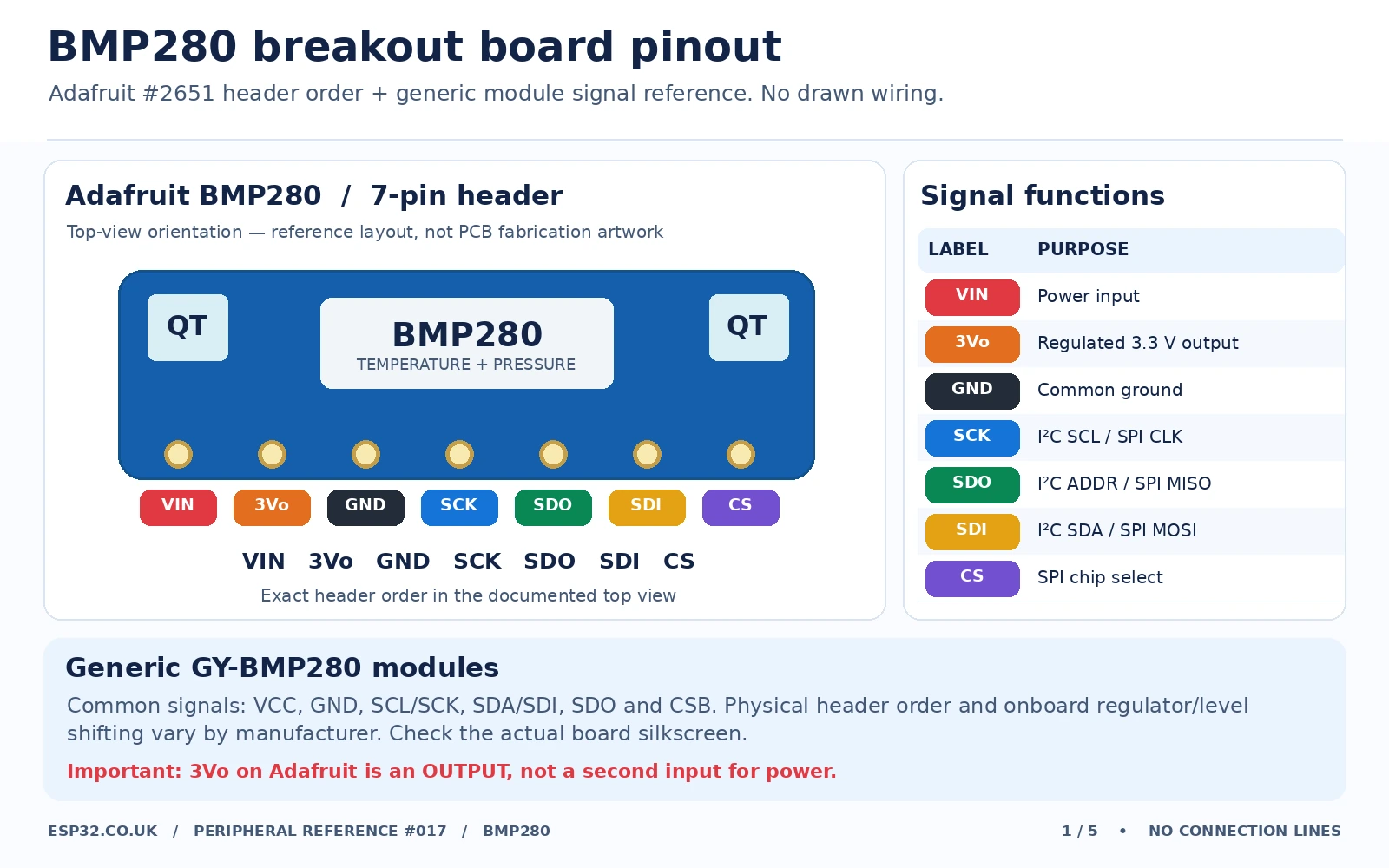
Adafruit #2651: exactly seven breakout header pins
The Adafruit board’s top-view header labels are VIN, 3Vo, GND, SCK, SDO, SDI, CS; the front photograph and documentation identify these names. There are two STEMMA QT connectors for convenient I²C cabling on recent revisions. They use the same bus as the SDA and SCL functions on the header.
| Adafruit header | Meaning | When using an ESP32 |
|---|---|---|
| VIN | Input to onboard regulator and level shifting | ESP32 3V3 |
| 3Vo | Breakout regulator’s 3.3 V output; not a second input | Normally leave unconnected |
| GND | Common 0 V reference | ESP32 GND |
| SCK | SPI clock, or I²C SCL | ESP32 GPIO22 for I²C; GPIO18 for example SPI |
| SDO | SPI MISO; in I²C mode selects address via high/low | Leave as factory default (typically 0x77), or pull to ground for 0x76 |
| SDI | SPI MOSI, or I²C SDA | ESP32 GPIO21 for I²C; GPIO23 for example SPI |
| CS | Active-low SPI chip select / mode selection | Leave in board’s default I²C condition, or ESP32 GPIO5 for example SPI |
The 3Vo connection is an output on the Adafruit board. Do not mistake it for a second place to apply arbitrary external power. Conversely, VIN on a small no-regulator GY-BMP280 may connect almost directly to the sensor’s supply rail. Board markings alone do not establish that a breakout can accept 5 V.
Generic GY-BMP280: inspect the PCB rather than assuming the same order
Common six-pin variants expose VCC, GND, SCL/SCK, SDA/SDI, CSB and SDO. Headers can be mirrored or rearranged between brands; the drawing shows signal names, not an unverified universal physical orientation. A few boards add a regulator; a small 3.3 V board may not. For direct ESP32 use, 3.3 V is the safer default and both devices must share ground.
How to choose I²C address 0x76 or 0x77
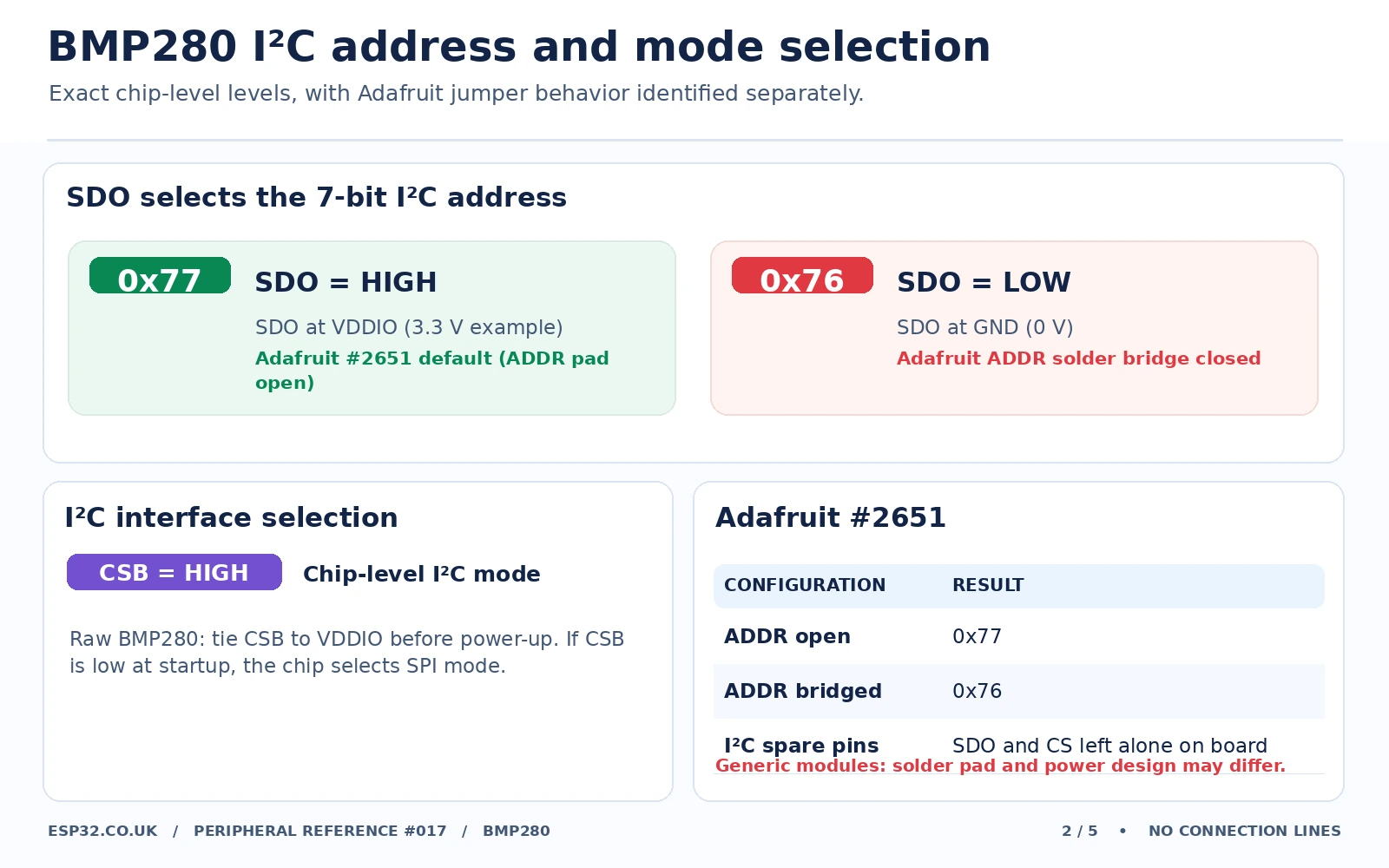
The BMP280 chip has only two normal I²C addresses because its SDO pin selects the low address bit:
| SDO level in I²C mode | Resulting 7-bit I²C address | Typical use |
|---|---|---|
| GND (LOW) | 0x76 | Common inexpensive GY-BMP280 variants, or changed address on Adafruit |
| VDDIO (HIGH) | 0x77 | Adafruit #2651 factory default and many other modules |
Adafruit #2651: the board is normally shipped as 0x77 and a rear Addr jumper is visible on documented board photographs; on the matching revision, the bridge connects the address selection to the alternate setting. You can also use the labelled SDO signal as documented. Inspect the exact board revision and test with an I²C scanner before soldering. Generic boards: SDO may be hard-wired via a resistor or an accessible pad—do not assume that an arbitrary rear bridge is an address jumper.
The CSB/CS pin is a separate issue: Bosch recommends CSB be tied to VDDIO for I²C. If the chip detects CSB LOW during startup, it may remain in SPI mode. Leaving a raw-chip CSB pin floating is not a sound design; the Adafruit breakout’s default configuration handles it, but raw-chip wiring must explicitly pull CSB high. Similarly, Bosch warns that SDO must not float when you select an I²C address.
BMP280 functional schematic and safe logic levels
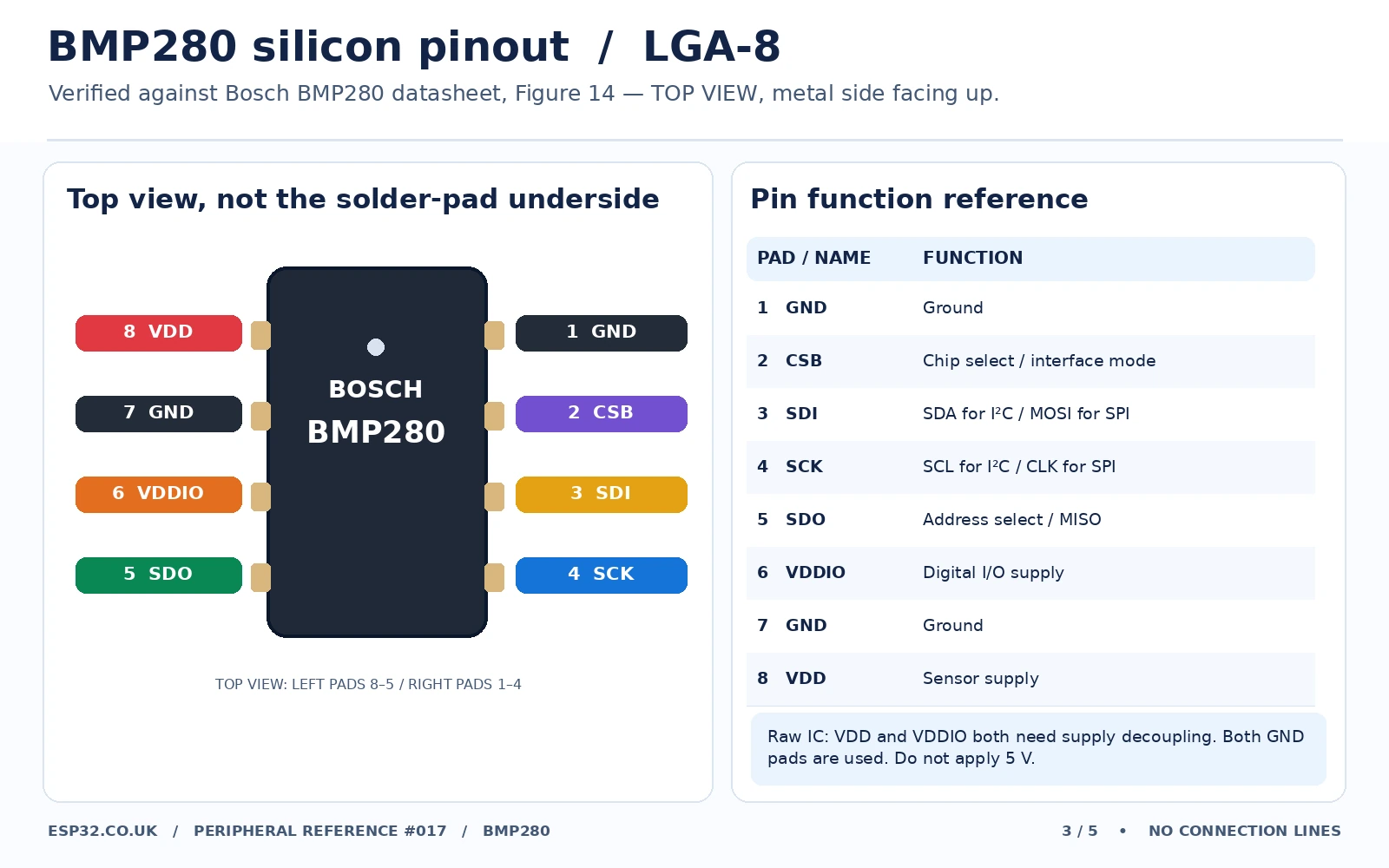
The bare Bosch sensor is an eight-pad LGA component. Its pads are 1 GND, 2 CSB, 3 SDI, 4 SCK, 5 SDO, 6 VDDIO, 7 GND and 8 VDD. The sensor is not a 5 V chip; the 5 V tolerance mentioned on some retail breakouts comes from separate onboard regulator and interface circuitry.
For a chip-level 3.3 V I²C reference: power VDD and VDDIO from an appropriate 3.3 V rail, decouple each with a 100 nF capacitor to ground close to the IC, connect SDA to SDI (pin 3) and SCL to SCK (pin 4) with suitable pull-ups to 3.3 V, tie CSB high, and tie SDO definitely high or low. Verify the pull-up population already present on the breakout before adding resistors. The image below gives the verified chip pinout rather than an AI-generated electrical schematic. Use the Bosch datasheet for the complete reference circuit.
ESP32 pin assignments: I²C and four-wire SPI
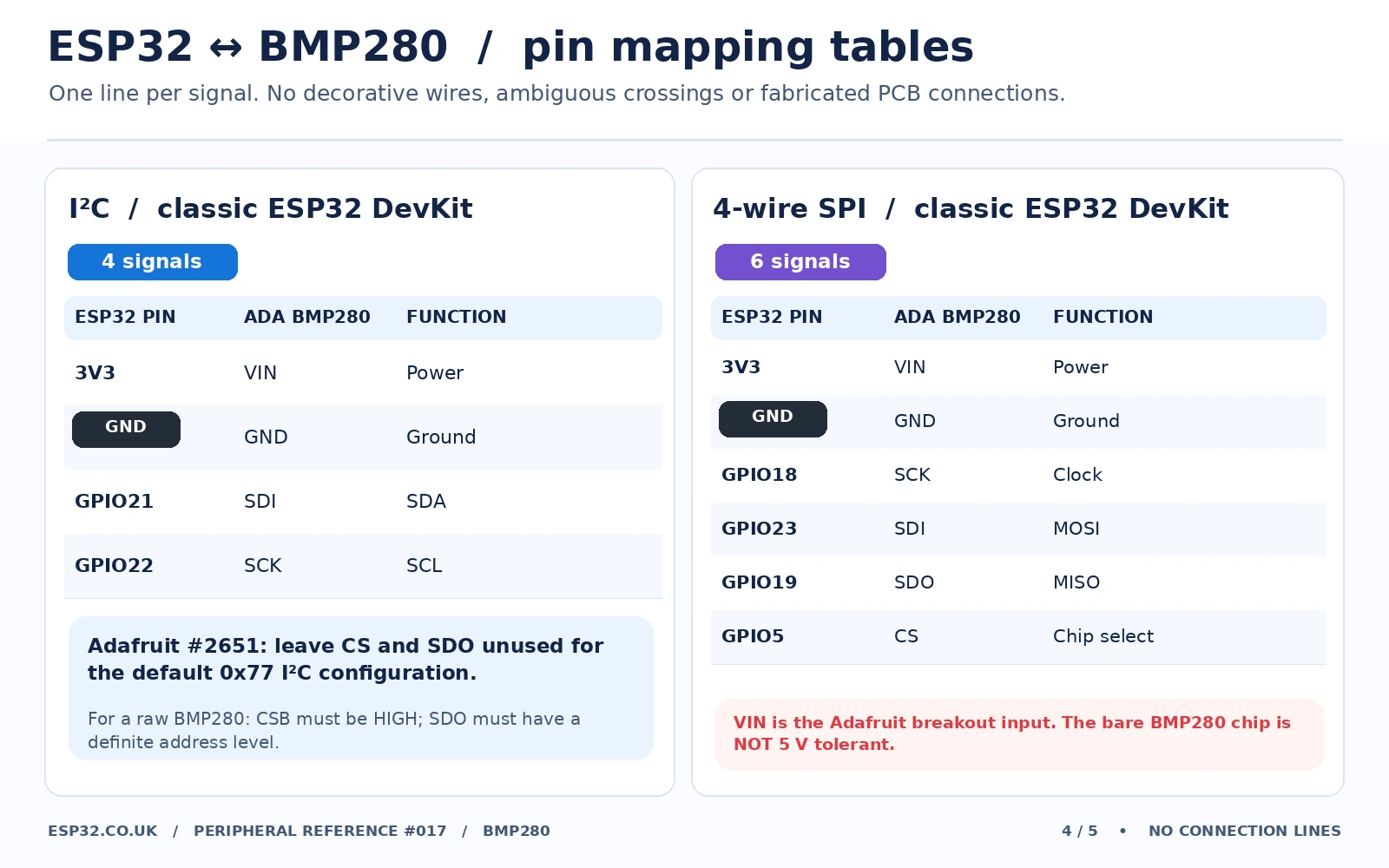
I²C wiring for a classic ESP32-WROOM DevKit
| ESP32 DevKit | Adafruit BMP280 #2651 | Generic 3.3 V BMP280 |
|---|---|---|
| 3V3 | VIN | VCC (only if board accepts 3.3 V) |
| GND | GND | GND |
| GPIO21 (SDA) | SDI | SDA / SDI |
| GPIO22 (SCL) | SCK | SCL / SCK |
| Optional address select | SDO LOW for 0x76; otherwise use documented default | Tie SDO LOW or HIGH according to desired address |
| I²C mode select | Leave CS in documented factory I²C state | CSB HIGH |
GPIO21 and GPIO22 are examples for the classic ESP32-WROOM family. On an ESP32-C3, C6, S3, etc., choose valid GPIOs appropriate to that board and update Wire.begin(SDA,SCL). Avoid 5 V signal levels on an ESP32 even if the sensor breakout can accept 5 V with other controllers.
Four-wire SPI wiring
| ESP32 classic example | BMP280 breakout signal | SPI role |
|---|---|---|
| 3V3 | VIN (Adafruit) / supported 3.3 V board VCC | Logic power |
| GND | GND | Common ground |
| GPIO18 | SCK | Clock |
| GPIO23 | SDI | ESP32 MOSI → sensor data in |
| GPIO19 | SDO | Sensor data out → ESP32 MISO |
| GPIO5 | CS | Active-low chip select |
In SPI mode, SDO is MISO rather than an I²C address setting. SPI shares SCK, MOSI and MISO across devices, while each sensor gets its own CS pin. Software must create an SPI-based BMP280 instance. Do not leave the address jumper strapped in a way that could interfere with an SPI MISO signal; consult the breakout schematic when switching modes.
Arduino IDE: read BMP280 pressure, temperature and altitude
Install the Adafruit BMP280 Library using Arduino IDE Library Manager, together with its prompted Adafruit BusIO and Adafruit Unified Sensor dependencies. The following example is for a classic ESP32-WROOM DevKit using I²C. It probes the chip-ID register at 0xD0 before starting; this helps diagnose modules sold as BMP280 that contain a BME280, a different pressure sensor, or incorrect circuitry.
#include <Arduino.h>
#include <Wire.h>
#include <Adafruit_BMP280.h>

constexpr int I2C_SDA = 21;
constexpr int I2C_SCL = 22;
constexpr float SEA_LEVEL_HPA = 1013.25f; // replace with local QNH
Adafruit_BMP280 bmp(&Wire);
uint8_t activeAddress = 0;

uint8_t readChipID(uint8_t address) {
  Wire.beginTransmission(address);
  Wire.write(0xD0); // BMP280/BME280 chip-ID register
  if (Wire.endTransmission(false) != 0) return 0xFF;
  if (Wire.requestFrom(address, uint8_t(1)) != 1) return 0xFF;
  return Wire.read();
}

void setup() {
  Serial.begin(115200);
  delay(400);
  Wire.begin(I2C_SDA, I2C_SCL);
  Wire.setClock(100000);

  for (uint8_t addr : {uint8_t(0x76), uint8_t(0x77)}) {
    uint8_t id = readChipID(addr);
    Serial.printf("Address 0x%02X: chip ID 0x%02X\n", addr, id);
    if (id == 0x58 && bmp.begin(addr)) {
      activeAddress = addr;
      break;
    }
  }

  if (!activeAddress) {
    Serial.println("BMP280 not detected. Expected chip ID 0x58.");
    Serial.println("Check power, SDA/SCL, CSB, SDO and address.");
    while (true) delay(1000);
  }

  bmp.setSampling(Adafruit_BMP280::MODE_NORMAL,
                  Adafruit_BMP280::SAMPLING_X2,
                  Adafruit_BMP280::SAMPLING_X16,
                  Adafruit_BMP280::FILTER_X16,
                  Adafruit_BMP280::STANDBY_MS_500);

  Serial.printf("BMP280 ready at 0x%02X\n", activeAddress);
}

void loop() {
  float tempC = bmp.readTemperature();
  float pressurePa = bmp.readPressure();
  float pressureHpa = pressurePa / 100.0f;
  float altitudeM = bmp.readAltitude(SEA_LEVEL_HPA);

  Serial.printf("T=%.2f C  P=%.2f hPa  alt~=%.1f m\n",
                tempC, pressureHpa, altitudeM);
  delay(2000);
}
Expected output: on a working sensor, the serial monitor reports the detected address and measurements, for example Address 0x77: chip ID 0x58, followed by T=24.70 C P=1012.43 hPa alt~=6.8 m. These are illustrative values, not bench-test results. A status value of 0xFF commonly means no response; 0x60 suggests a BME280 and calls for the matching BME library.
Optional SPI code: using the same Adafruit library
Change the physical wiring to the SPI table, then construct the sensor for hardware SPI. Keep either the I²C example or the SPI example in your sketch, not both at once.
#include <Arduino.h>
#include <SPI.h>
#include <Adafruit_BMP280.h>

constexpr int BMP_CS = 5;
Adafruit_BMP280 bmp(BMP_CS, &SPI); // hardware SPI

void setup() {
  Serial.begin(115200);
  SPI.begin(18, 19, 23, BMP_CS); // SCK, MISO, MOSI, SS
  if (!bmp.begin()) {
    Serial.println("BMP280 SPI communication failed");
    while (true) delay(1000);
  }
}
void loop() {
  Serial.printf("Pressure %.2f hPa, T %.2f C\n",
                bmp.readPressure() / 100.0f, bmp.readTemperature());
  delay(2000);
}
I²C scanner and chip-ID check: is it really a BMP280?
An I²C scanner confirms only that some device responds at an address—it does not identify whether the sensor is a BMP280 or BME280. Read register 0xD0 to identify the silicon and select the correct code:
| Observed ID at 0xD0 | Interpretation | Next action |
|---|---|---|
| 0x58 | BMP280 expected chip ID | Use Adafruit BMP280 library |
| 0x60 | BME280 expected chip ID | Use Adafruit BME280 library; humidity available |
| No reply / 0xFF | Bus/power/address failure or absent device | Check wires, bus speed, supply and CSB |
| Other value | Unknown or incompatible device, possibly another Bosch family | Consult that chip’s own datasheet and driver |
Some inexpensive modules are incorrectly advertised as BME280 although they actually hold BMP280 silicon. If a humidity sketch fails to initialize while the chip ID is 0x58, the seller’s label is not evidence of humidity capability. The site already has a BMP280 versus BME280 comparison and a separate BME280 breakout reference.
Sampling modes, oversampling and filter configuration
| Mode or setting | Practical behaviour |
|---|---|
| Sleep | Measurements stopped; registers remain accessible |
| Forced mode | One measurement, then sensor returns to sleep; well suited to low-duty-cycle battery nodes |
| Normal mode | Cycles between measurements and standby automatically |
| Temperature oversampling | Improves temperature resolution at cost of conversion time |
| Pressure oversampling | Reduces pressure noise but consumes additional time and current |
| IIR filter | Smooths short variations; too much filtering delays rapid pressure events |
| Standby time | Controls time between normal-mode conversions |
For an indoor weather station reporting every few seconds, a normal-mode setting with moderate temperature oversampling, higher pressure oversampling and some filtering is usually sensible. For a battery-powered node that wakes every minute, use MODE_FORCED and call takeForcedMeasurement() for a fresh reading. The library’s setSampling() function exposes these controls.
Pressure, altitude and sensor-placement accuracy
The pressure reading is absolute atmospheric pressure at the sensor. The convenience method readAltitude(seaLevelPressureHpa) estimates elevation by comparing that pressure with your supplied sea-level reference. Its default 1013.25 hPa is a standard-atmosphere assumption, not your real-time local sea-level pressure. Changing weather can alter the calculated altitude even if the board never moves.
Barometric altitude can be useful for relative floor-level or motion changes under stable weather, but do not present it as surveyed elevation or GPS. Avoid placing the BMP280 immediately above an ESP32 voltage regulator or in direct sun, where board heating can bias the measured temperature. Keep the sensor’s vent opening clear of adhesives, conformal coatings, water and dust. If your project requires relative humidity too, use a BME280 or a separate humidity sensor.
Common BMP280 problems and how to fix them
| Problem | Diagnosis and fix |
|---|---|
| Library cannot find sensor | Try 0x76 and 0x77, check shared ground, correct SDA/SCL and whether CSB is held high for I²C. |
| Sensor detected but ID is 0x60 | It is likely a BME280, not BMP280. Install the BME280 library instead. |
| Works on Adafruit board but not cheap six-pin module | Regulator/level-shifter differences; ensure actual module operates correctly at 3.3 V. |
| Address changes when soldering the wrong jumper | Do not assume a pad belongs to SDO. Trace or verify manufacturer markings and read address with I²C scanner. |
| Altitude is wrong by tens or hundreds of metres | Replace 1013.25 hPa with current local sea-level pressure / QNH; understand weather variations. |
| Measured temperature too high | Proximity to ESP32 CPU/regulator, enclosure warming and inadequate ventilation. |
| Reads zero or nonsense values | Incorrect library for silicon ID, floating SDO or CSB, poor connections, unsuitable supply. |
| No SPI response | MISO/MOSI reversed, CS missing, I²C-configured breakout, wrong SPI constructor or mismatched pin choice. |
| Two sensors same I²C address | Move one to other SDO level if available or use a TCA9548A channel for each. |
BMP280 vs BME280 vs BMP180: when is each a better choice?
| Part | Measurements | Bus / practical choice |
|---|---|---|
| BMP280 | Pressure and temperature | Compact, I²C or SPI; a good basic pressure breakout |
| BME280 | Pressure, temperature, relative humidity | Choose when humidity matters; similar bus/address behaviour but different library |
| BMP180 | Pressure and temperature | Older I²C design; different driver and address behaviour |
If you need to measure light as well, consider the related Bosch sensor comparison rather than inferring humidity readings from a BMP280. For identical address sensors, our TCA9548A ESP32 guide shows how to connect devices with overlapping addresses on separate I²C branches.
BMP280 FAQs
Can I use a BMP280 with 5 V?
The bare BMP280 sensor is not a 5 V silicon device. The Adafruit #2651 breakout has a regulator and level shifting and supports a 3–5 V VIN input; many generic boards do not. With an ESP32, 3.3 V and 3.3 V I²C levels are the straightforward choice.
Is the default BMP280 address 0x76 or 0x77?
Either can be correct depending on how the PCB straps SDO. Adafruit #2651 normally uses 0x77. Many generic boards tie SDO LOW for 0x76. Always check both, and never float SDO on the raw IC.
Can BMP280 measure humidity?
No. It measures pressure and sensor temperature. The BME280 includes a humidity channel and has a different chip ID and driver.
Can I run two BMP280 boards at once?
Yes: connect one as 0x76 and the other as 0x77, if each board supports that address selection, or place identically addressed devices on separate I²C multiplexer channels. With SPI, give each device its own CS pin.
Is the temperature reading room temperature?
It is the sensor’s own temperature, which can be affected by nearby circuitry and enclosure heat. For dependable ambient readings, use thoughtful placement or a dedicated well-positioned temperature sensor.
Technical references
- Bosch Sensortec BMP280 datasheet, Rev. 1.26 — silicon pin mapping, supply ratings, SDO/CSB address rules, sample modes and accuracy.
- Adafruit BMP280 #2651 pinouts and wiring — seven breakout signals, regulator/level shifting and interface pin functions.
- Adafruit #2651 breakout product — hardware revisions and board photographs.
- Adafruit BMP280 Arduino library — constructors, I²C addresses, pressure/temperature/altitude and sampling APIs.
Editorial note: This is a hardware-reference guide for the actual BMP280 and the documented Adafruit #2651 breakout, not a promise that all six-pin clone PCBs share one layout or accept 5 V. Read the silkscreen and confirm your exact module before soldering or connecting higher supply voltages. Example code follows the published Adafruit API and has not been physically bench-tested on every board.