
The BME280AliExpress price breakout pinout looks deceptively simple, until you discover that one board calls its I²C pins SCK and SDI, another calls them SCL and SDA, and the address can be either 0x76 or 0x77. This hardware-focused reference covers the Adafruit BME280AliExpress price I²C/SPI STEMMA QT breakout (product #2652) and explains what changes on common third-party modules. It includes the exact seven-hole Adafruit pinout, the rear ADDR solderAliExpress price jumper, a functional schematic, ESP32 wiring and a compact Adafruit-library sketch.
Quick setup (classic ESP32 DevKit, I²C): Connect ESP32 3V3 → VIN, GND → GND, GPIO21 → SDI (SDA), and GPIO22 → SCK (SCL). Leave Adafruit SDO and CS unconnected for the stock STEMMA QT board; use bme.begin(0x77, &Wire). Close its rear ADDR solder jumper to select 0x76 and change the code accordingly. Do not assume this jumper exists or behaves identically on a generic blue module.
1. Which BME280 breakout board is this guide for?
Bosch makes the BME280 sensor IC; breakout manufacturers choose the regulator, pull-ups, level shifting, connectors and address strap. Those choices determine whether you can use 5 V, where you solder, and which signals are exposed. The reference board in the illustrations is the black Adafruit #2652 version with two STEMMA QT connectors. Older Adafruit header-only versions can differ physically although the chip functions and library are the same.
| Board family | Recognisable features | Power and logic rule | I²C address selection |
|---|---|---|---|
| Adafruit #2652 STEMMA QT | Two white 4-pin JST-SH connectors; seven header holes; regulator and level shifting | VIN accepts 3–5 V; 3Vo is regulator output, not 5 V supply | Default 0x77; rear ADDR bridge or SDO-to-GND selects 0x76 |
| Typical six-pin blue GY-BME280 | Often VCC, GND, SCL, SDA, CSB, SDO; board revisions differ | Do not assume a regulator or 5 V tolerance; verify schematic; 3.3 V is safest | Usually SDO low = 0x76, high = 0x77; inspect onboard straps |
| Typical four-pin BME280 module | VCC/3V3, GND, SCL, SDA; I²C only on headers | Supply only at the documented voltage; 3.3 V for unverified versions | Frequently fixed via underside solder pads or resistor network, may not be changeable |
Important: The Bosch chip is not a 5 V part: sensor VDD is 1.71–3.6 V and VDDIO is 1.2–3.6 V. Adafruit makes its breakout board 3–5 V compatible with a regulator and level shifting; this does not apply automatically to anonymous modules. Bosch specifications and Adafruit pinouts are the reference.
2. Adafruit BME280 board layout and exact pinout
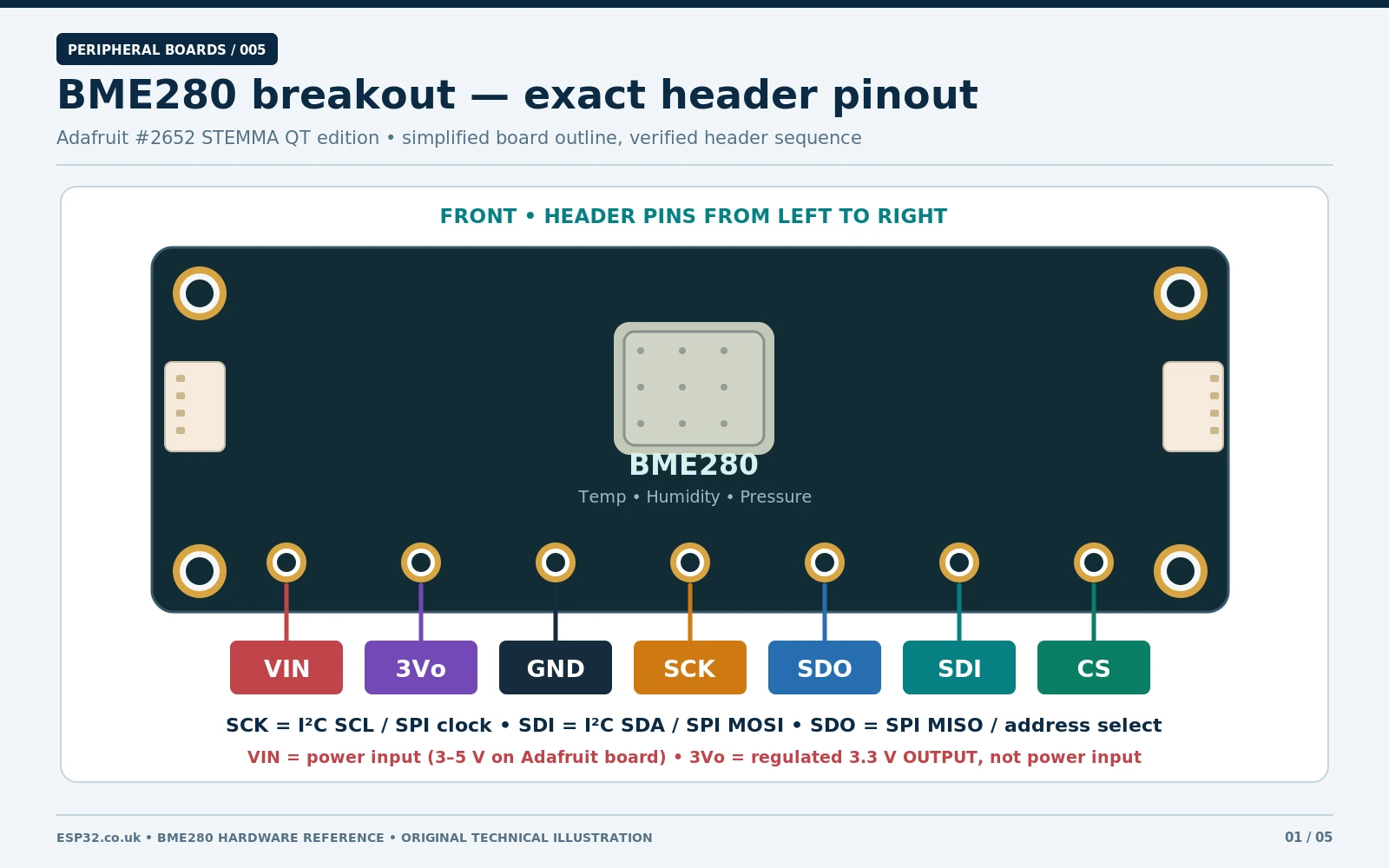
With the board upright, BME280 silkscreen across the top and the seven through-holes along the bottom, their physical order from left to right is VIN, 3Vo, GND, SCK, SDO, SDI, CS. The STEMMA QT sockets are the four-wire I²C connectors on the sides. The labels have dual meanings depending on I²C or SPI mode.
| Board pin | I²C meaning | SPI meaning | ESP32 note |
|---|---|---|---|
| VIN | 3–5 V breakout power input | 3–5 V breakout power input | Connect 3V3 for an ESP32 |
| 3Vo | Regulated 3.3 V output | Regulated 3.3 V output | Normally leave unconnected; do not feed 5 V here |
| GND | Ground reference | Ground reference | Common GND required |
| SCK | I²C SCL clock | SPI SCK clock | GPIO22 for example I²C; GPIO18 example SPI |
| SDO | Sensor address bit (high 0x77; low 0x76) | SPI MISO (sensor → controller) | Leave open on stock Adafruit I²C board |
| SDI | I²C SDA bidirectional data | SPI MOSI (controller → sensor) | GPIO21 for I²C; GPIO23 for SPI |
| CS | Must be kept high for I²C | Active-low SPI chip select | Leave open on stock Adafruit I²C board; GPIO27 for example SPI |
The most common pinout error: connect ESP32 SDA to breakout SDI, and ESP32 SCL to breakout SCK. Do not interpret SDO as I²C data-out or confuse 3Vo with VIN. The Adafruit STEMMA QT connectors carry power, ground, SDA and SCL, not SPI.
3. Change BME280 I²C address: 0x77 versus 0x76
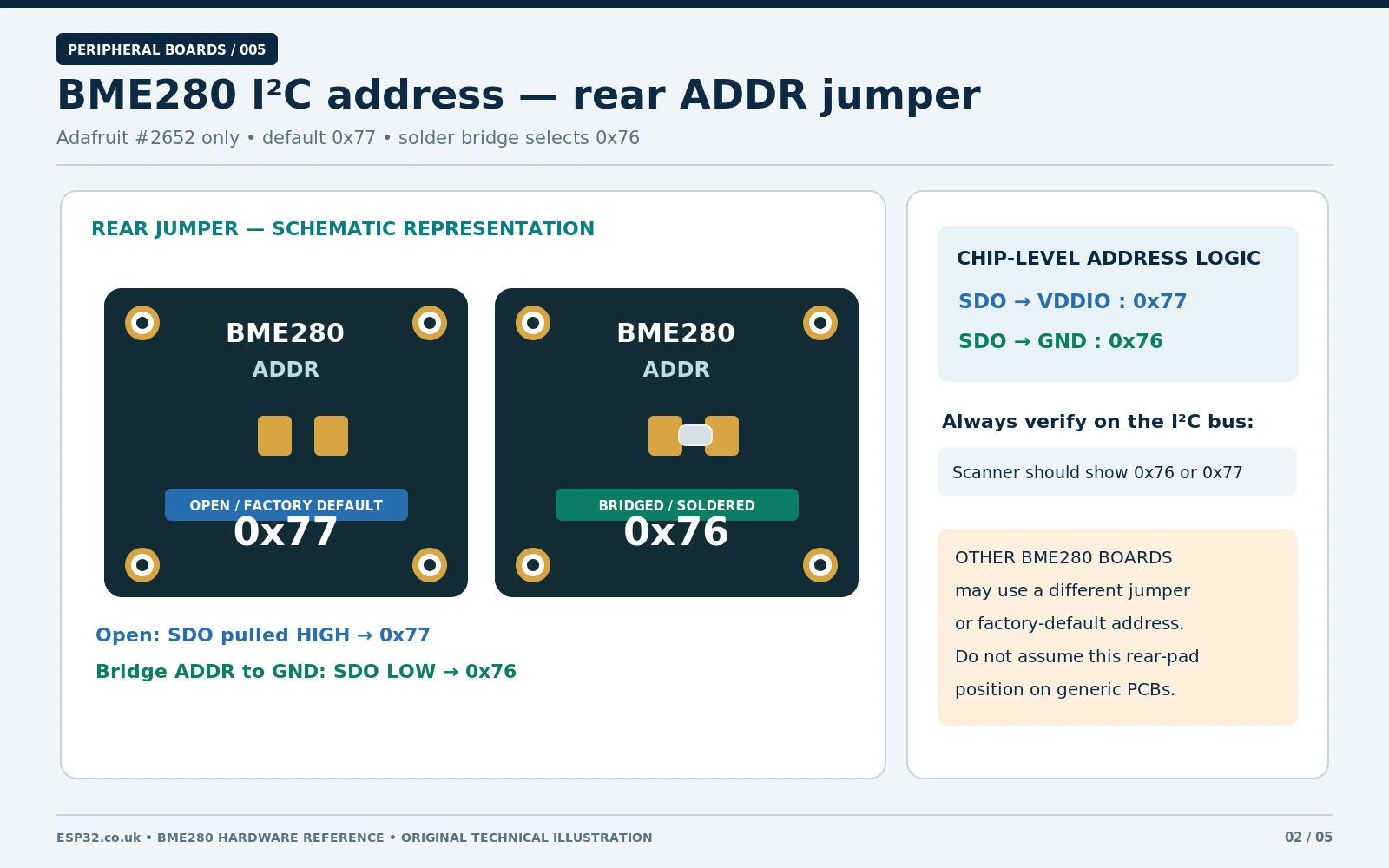
The BME280 supports only two native 7-bit I²C addresses. They come from the digital level on Bosch SDO when operating in I²C mode. The chip requires CSB high to stay in I²C mode. On the Adafruit #2652 breakout the default SDO bias gives 0x77; bridging the labelled ADDR solder jumper on the back pulls SDO low for 0x76. Alternatively a wire between the breakout SDO header and GND selects 0x76. Use one method, not unnecessary duplicate straps.
| Bosch SDO level | 7-bit I²C address | Adafruit #2652 board |
|---|---|---|
| HIGH / tied to VDDIO | 0x77 | Rear ADDR jumper open (factory default) |
| LOW / tied to GND | 0x76 | Rear ADDR jumper bridged, or SDO tied to GND |
- Disconnect power before soldering; identify ADDR on the actual revision, not a pad guessed from a product picture.
- For 0x76, bridge only the documented Adafruit ADDR pads with a small solder joint; avoid nearby traces. For 0x77, keep them open.
- Reconnect and run an I²C scanner to confirm which address appears. Update the Arduino
BME_ADDRconstant. - If using a generic board, read its schematic: an SDO pad may be pulled high, low, or switched by a three-pad resistor/jumper network. Do not solder arbitrarily across labelled VCC or ground pads.
Two BME280 sensors can share the same SDA/SCL pair if one uses 0x76 and the other 0x77. For three or more, use an I²C multiplexer such as TCA9548A, an independent bus, or SPI chip-select lines.
4. Functional BME280 schematic and why the board components matter
The diagram below is an original functional sensor-level I²C schematic, not a claim that every breakout uses exactly these resistors or matches Adafruit routing. The Bosch chip requires both supply domains in their permitted voltage ranges, local decoupling, an I²C pull-up network on SDA and SCL, CSB high for I²C, and a defined SDO logic level to fix the address. Adafruit adds a power regulator, level translators, pull-ups and STEMMA QT connectors; check its published CAD schematic for the exact PCB implementation.
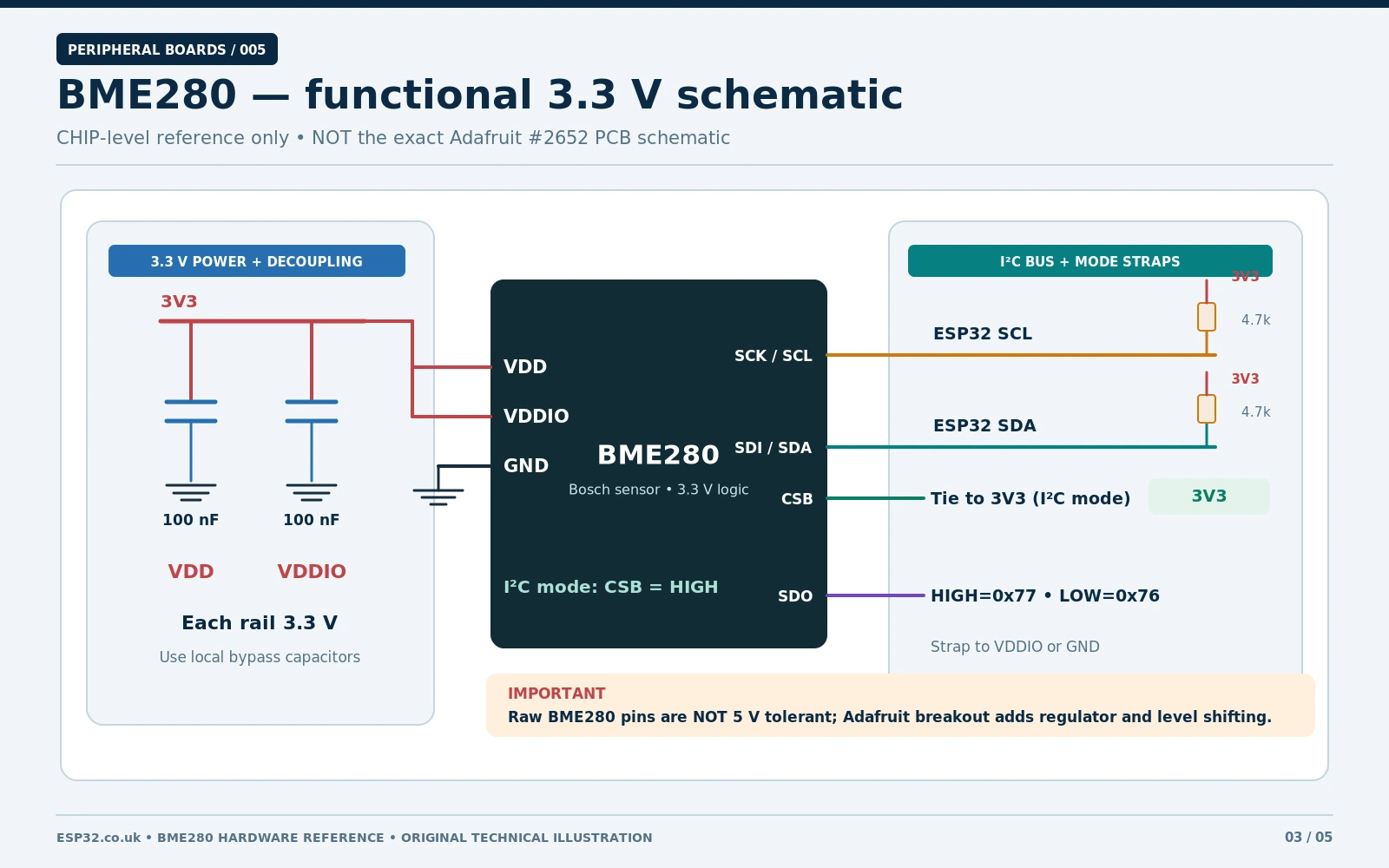
- Power: sensor VDD and VDDIO must stay within Bosch limits. A regulated 3.3 V rail is suitable for a bare chip. Provide local bypass capacitors, placed close to the sensor pins, per the Bosch reference circuit.
- I²C pull-ups: SDA and SCL need pull-ups to their logic rail. The Adafruit breakout provides pull-ups. Multiple modules with pull-ups in parallel lower the total equivalent resistance.
- Interface selection: CSB held high is essential for I²C. Bosch documents that pulling CSB low selects SPI; I²C remains disabled until the next power-on reset after SPI selection.
- Address bit: SDO tied high selects 0x77 and tied low selects 0x76. Do not leave it electrically floating on a self-designed raw-chip circuit.
- Noise and measurement placement: keep the BME280 vent unobstructed and away from ESP32 voltage regulators, processors and direct sunlight; thermal self-heating can bias reported air temperature.
For the real Adafruit PCB schematic and fabrication views, use the Adafruit Downloads page, which links both the older board and the STEMMA QT CAD source. This distinction matters: a valid functional schematic is not evidence of a specific clone PCB trace.
5. ESP32 wiring: I²C first, SPI when needed
5.1 Recommended four-wire I²C connection
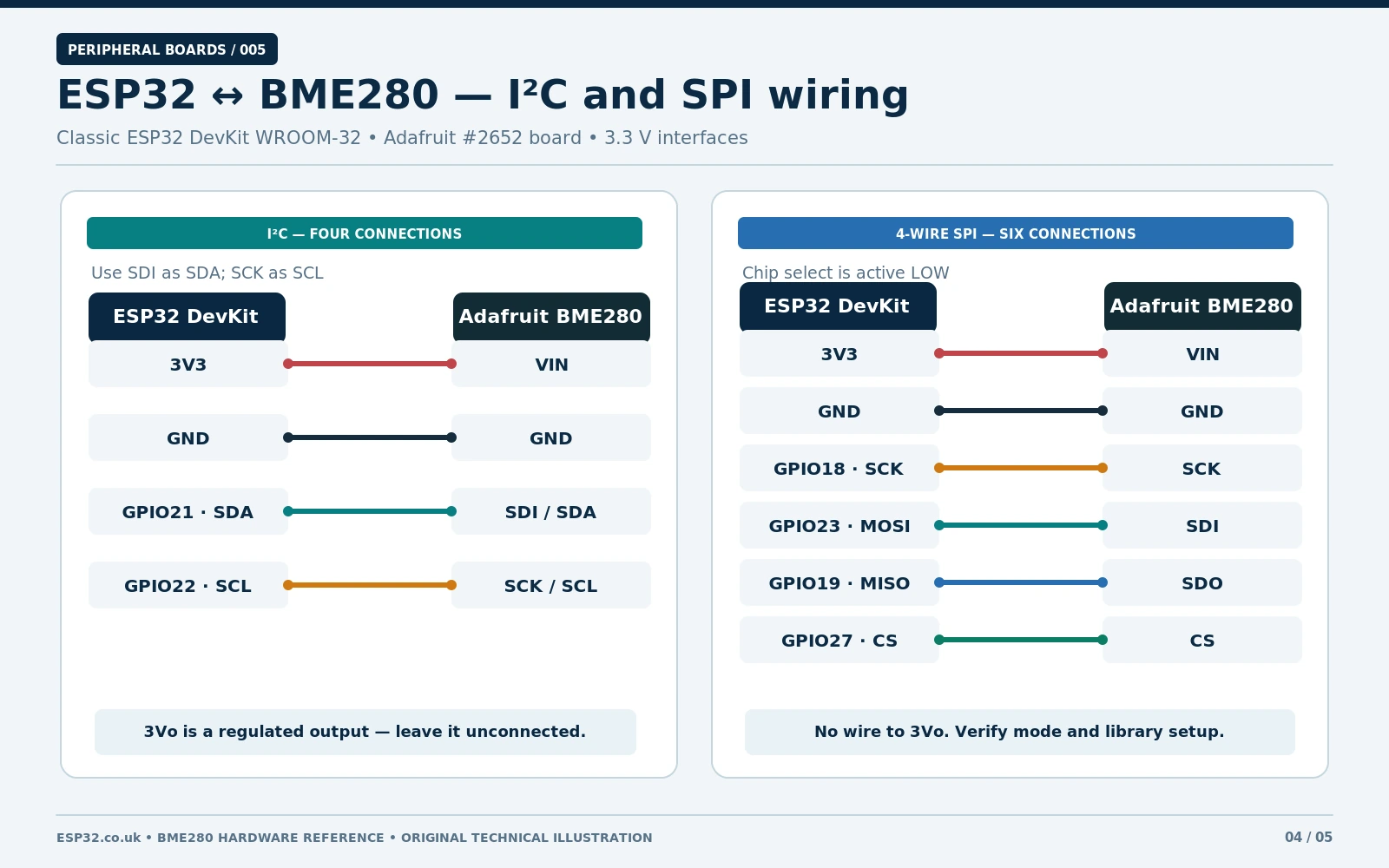
| ESP32 DevKit (classic ESP32) | Adafruit BME280 #2652 | Purpose |
|---|---|---|
| 3V3 | VIN | 3.3 V power to breakout regulator input |
| GND | GND | Common ground |
| GPIO21 | SDI | I²C SDA data |
| GPIO22 | SCK | I²C SCL clock |
| Not connected | 3Vo, SDO, CS | Stock Adafruit I²C setup; board straps handle SDO and CS |
These GPIOs are a convenient classic ESP32 example, not a universal ESP32-C3/S3/C6 pin assignment. On other ESP32 boards, check the board documentation and change Wire.begin(SDA_PIN, SCL_PIN). Start at 100 kHz I²C while debugging; short leads and correct pull-ups matter more than chasing maximum bus frequency.
5.2 Optional ESP32 hardware SPI
For SPI, connect Adafruit SCK → GPIO18, SDO → GPIO19 (MISO), SDI → GPIO23 (MOSI), and CS → GPIO27, with the same VIN/GND supply. These are explicit example GPIO choices for a classic ESP32. SPI does not use the sensor’s 0x76/0x77 I²C address; chip selection occurs through CS instead. The Bosch IC supports four-wire SPI (modes 0 and 3); the Adafruit driver handles the standard sensor transactions.
Never connect both interfaces casually. Ensure the device stays in the mode you are actually using. On a bare BME280 chip, a CSB transition low can force SPI mode until a power cycle, even if the bus scanner previously detected the device.
6. Arduino IDE: install the Adafruit BME280 library
- In Arduino IDE 2, choose Tools → Manage Libraries.
- Install Adafruit BME280 Library by Adafruit. Allow its dependencies, including Adafruit Unified Sensor and Adafruit BusIO, to install.
- Select the correct ESP32 board and serial port. The code below is intended for the classic ESP32 GPIO21/GPIO22 wiring above.
- Upload and open Serial Monitor at 115200 baud; expect one set of measurements every two seconds.
Library: Adafruit_BME280_Library. The sketch uses documented methods begin(), sensorID(), readTemperature(), readHumidity() and readPressure(). The code has been reviewed against the published API; it has not been bench-tested on a physical board for this article.
6.1 Complete ESP32 I²C example
#include <Arduino.h>
#include <Wire.h>
#include <Adafruit_BME280.h>

constexpr int I2C_SDA = 21;        // Classic ESP32 DevKit
constexpr int I2C_SCL = 22;
constexpr uint8_t BME_ADDR = 0x77; // Adafruit default; use 0x76 if ADDR closed

Adafruit_BME280 bme;

void setup() {
  Serial.begin(115200);
  delay(500);

  Wire.begin(I2C_SDA, I2C_SCL);
  Wire.setClock(100000);

  if (!bme.begin(BME_ADDR, &Wire)) {
    Serial.println("BME280 not found. Check power, SDA/SCL and address.");
    while (true) { delay(1000); }
  }

  Serial.print("Sensor chip ID: 0x");
  Serial.println(bme.sensorID(), HEX); // 0x60 for genuine BME280
}

void loop() {
  Serial.print("Temperature: ");
  Serial.print(bme.readTemperature(), 2);
  Serial.print(" C | Humidity: ");
  Serial.print(bme.readHumidity(), 1);
  Serial.print(" %RH | Pressure: ");
  Serial.print(bme.readPressure() / 100.0F, 1); // Pa to hPa
  Serial.println(" hPa");
  delay(2000);
}
Example serial values vary with the room; values below are illustrative, not a recorded sensor test:
Sensor chip ID: 0x60
Temperature: 24.30 C | Humidity: 47.1 %RH | Pressure: 1010.8 hPa
Pressure from readPressure() is in pascals; divide by 100 for hPa. Pressure is measured at the sensor location, not automatically corrected to mean sea level. If you display altitude, you must supply an appropriate sea-level reference pressure; 1013.25 hPa is only a standard example, not today’s local weather.
6.2 Optional complete ESP32 hardware SPI example
Choose this standalone sketch instead of the I²C program when using the four SPI signals from section 5.2. This sketch does not use an I²C address; BME_CS selects the sensor.
#include <Arduino.h>
#include <SPI.h>
#include <Adafruit_BME280.h>

constexpr int BME_CS = 27;
Adafruit_BME280 bme(BME_CS); // Hardware SPI

void setup() {
  Serial.begin(115200);
  delay(500);
  SPI.begin(18, 19, 23, BME_CS); // SCK, MISO, MOSI, SS

  if (!bme.begin()) {
    Serial.println("BME280 SPI init failed. Check wires and chip select.");
    while (true) { delay(1000); }
  }
}

void loop() {
  Serial.print("Temp: ");
  Serial.print(bme.readTemperature(), 2);
  Serial.print(" C | RH: ");
  Serial.print(bme.readHumidity(), 1);
  Serial.print(" % | Pressure: ");
  Serial.print(bme.readPressure() / 100.0F, 1);
  Serial.println(" hPa");
  delay(2000);
}
Adafruit provides both SPI and I²C constructors in the same library. Do not connect an I²C-only four-pin clone using this SPI sketch; it lacks exposed SPI data and chip-select pins. The GPIO mapping above is specific to classic ESP32 DevKit wiring.
7. How to detect a BMP280 sold as a BME280
One of the most useful troubleshooting checks is Bosch register 0xD0, which holds the sensor chip ID. A real BME280 reads 0x60; a production BMP280 typically reads 0x58 and cannot measure humidity. Both might acknowledge the same I²C address, so an I²C scanner alone does not prove that the purchased module is a BME280.
| Result at register 0xD0 | Interpretation | Action |
|---|---|---|
| 0x60 | Bosch BME280 | Use Adafruit BME280 library |
| 0x58 | Production Bosch BMP280 | Use an appropriate BMP280 driver; no relative humidity measurement |
| 0x56 / 0x57 | Early BMP280 sample chip IDs | Verify device identity; not BME280 |
| No response / 0xFF | Not proof of a sensor type | Check address, wiring, CSB state and supply |
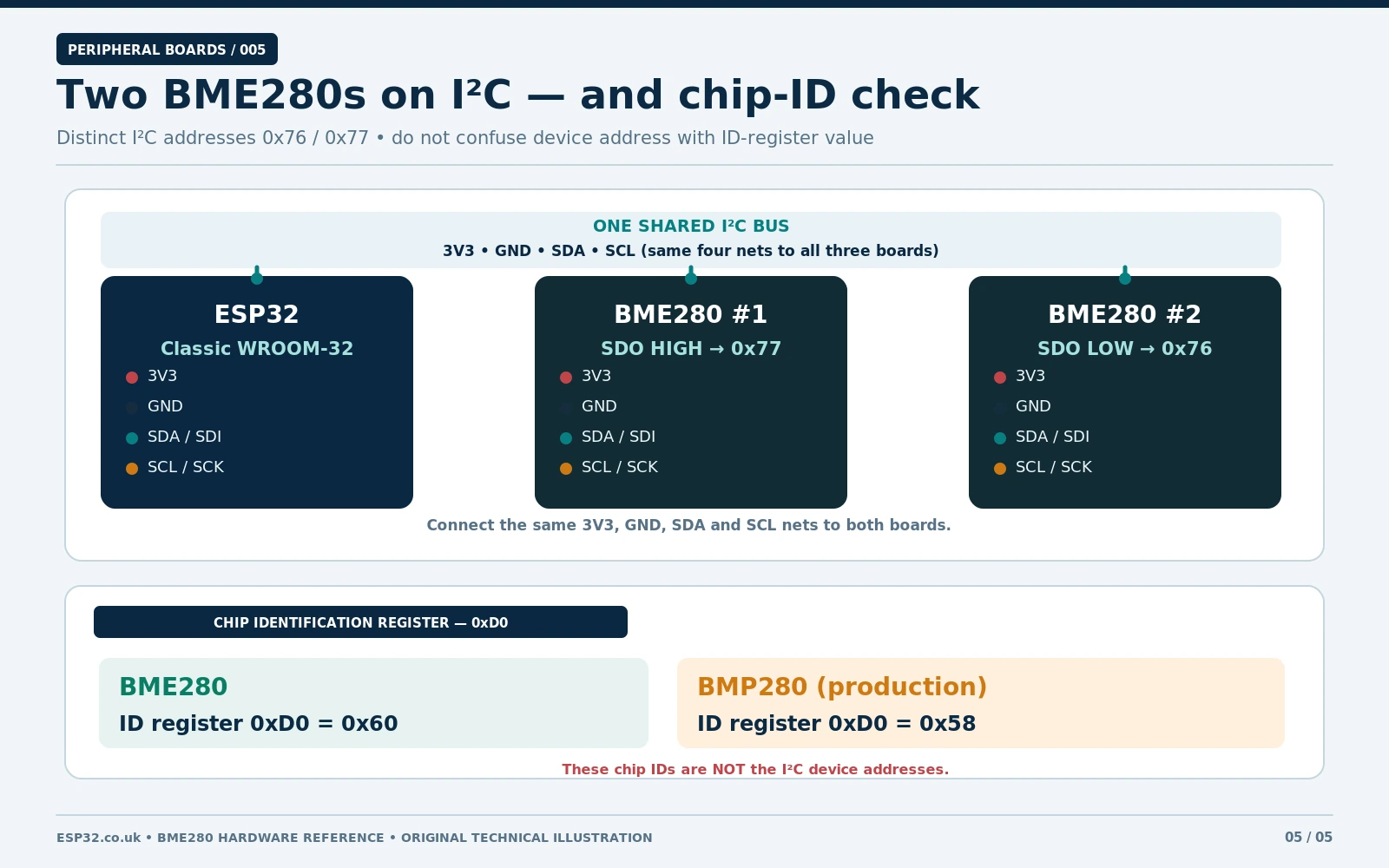
If a board was sold as BME280 but reports ID 0x58, see our dedicated BMP280 vs BME280 comparison. Do not “repair” the issue by changing the humidity formula: the BMP280 lacks the BME280 humidity sensing function.
7.1 Simple I²C scanner for 0x76 and 0x77
#include <Wire.h>
void setup() {
  Serial.begin(115200);
  Wire.begin(21, 22); // Classic ESP32 DevKit
  delay(500);
  for (uint8_t addr = 0x76; addr <= 0x77; ++addr) {
    Wire.beginTransmission(addr);
    if (Wire.endTransmission() == 0) {
      Serial.print("Device at 0x");
      Serial.println(addr, HEX);
    }
  }
}
void loop() {}
A responding 0x76 or 0x77 confirms only that an I²C device acknowledged there. Initialise the sensor and read its ID for a second check. Other devices may share these addresses, including some BMP280 modules.
8. Common faults and fixes
| Symptom | Most likely explanation | Practical check |
|---|---|---|
| BME280 not found at 0x77 | Module is strapped to 0x76; SDA/SCL reversed; CSB low | Run scanner, check rear ADDR pad and I²C pin mapping |
| No devices on bus | Wrong supply, missing GND, incorrect GPIO mapping or module stuck in SPI mode | Measure 3.3 V/GND, recheck pins, then power-cycle with CSB high |
| Scanner sees device but BME280 library fails | Device is actually a BMP280 or another chip | Read ID register 0xD0; 0x60 is BME280 |
| Humidity returns NaN / absent | Wrong sensor or corrupt communication | Verify ID and use correct library; do not assume a software bug |
| Pressure looks about 100× too large | Pa treated as hPa | Divide readPressure() by 100.0 |
| Temperature consistently high | Sensor warmed by ESP32/voltage regulator/enclosure | Move board away from heat and provide airflow |
| Multiple boards intermittently fail | Too many I²C pull-ups, long leads or mismatched logic levels | Review effective pull-up resistance and shorten wires |
| Works on 5 V Arduino but not on ESP32 | Breakout SDA/SCL lines are pulled to 5 V or pins mislabelled | Use 3.3 V logic and inspect actual regulator/level-shifter circuit |
A basic BME280 requires only I²C wiring and a small program, but knowing the exact breakout revision prevents most problems. For a step-by-step Arduino sketch explanation, see our existing BME280 Arduino/ESP32 beginner guide. For ESPHome and installation guidance, see ESP32 BME280 wiring and ESPHome guide. Those articles serve different purposes from this pinout and hardware-reference page.
9. Quick answers
What is the default BME280 I²C address?
The Adafruit #2652 defaults to 0x77. Other breakouts may default to 0x76. Bosch permits only these two chip-level I²C addresses, defined by SDO.
Can I use a BME280 module on 5 V?
Only when the specific breakout board has suitable regulation and voltage translation, such as the Adafruit board. Never feed 5 V directly into the bare Bosch BME280 or an unverified 3.3 V-only clone.
Is 3Vo on the Adafruit breakout an input?
No. Adafruit documents 3Vo as the regulator’s output. For ESP32 wiring, feed 3.3 V to VIN and normally leave 3Vo unused.
Does a BME280 have the same address over SPI?
No: the 0x76/0x77 addresses are for I²C. SPI uses a chip-select line, not a 7-bit I²C address.
What does the BME280 actually measure?
Temperature, relative humidity and ambient barometric pressure. It does not directly measure carbon dioxide, volatile organic compounds or altitude. Altitude is calculated from pressure using an atmospheric reference.
10. Original references and further reading
- Adafruit: BME280 breakout pinouts and address jumper
- Adafruit: board schematic, fab print and open CAD design files
- Bosch BME280 datasheet (chip specifications; addresses and interface)
- Adafruit BME280 Arduino library source and examples
- SparkFun board-specific pinout/jumper comparison
Hardware-specific note: PCB photos and solder-jumper positions are revision-dependent. Confirm the actual board before soldering; the image package for this article is specified separately and is not included in this XML.