Quick Summary (TL;DR):
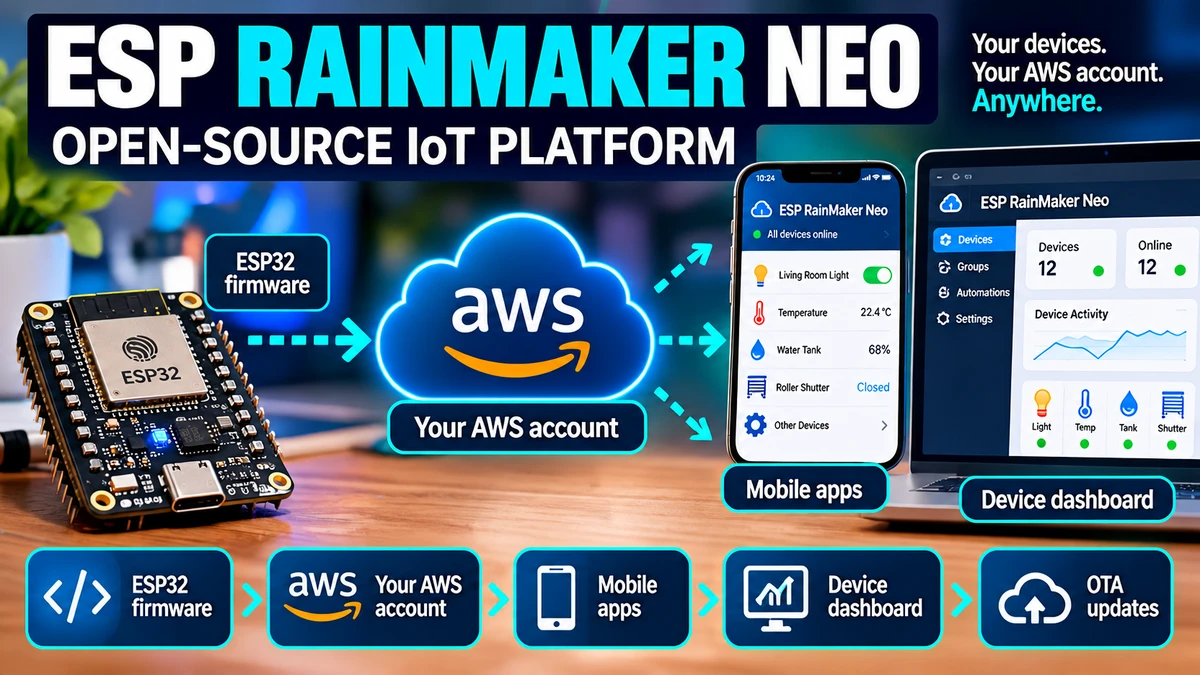
ESP RainMaker Neo, announced by Espressif on 5 August 2026, is an open-source device-to-cloud-to-phone IoT platform for ESP32AliExpress price products. It is much more than an ESP32AliExpress price library: the Neo stack includes the device firmware SDK, AWS serverless cloud backend, admin dashboard, phone-app SDK and ESP RainMaker Home reference app, all released under the Apache License 2.0. The biggest change from classic RainMaker is ownership: Neo can be deployed into your own AWS account, so you control the infrastructure, data, region, access policies, upgrade schedule and integrations. Devices connect securely through AWS IoT Core using MQTT and X.509 certificates; users/apps communicate with the same backend through REST APIs and MQTT. Espressif also runs a free public Neo deployment for evaluation and hobby use, currently limited to 20 devices per user. For production, you can install the packaged Neo stack in your own AWS account or build and modify it from source. Neo currently supports firmware targets ESP32AliExpress price, ESP32-C2AliExpress price, C3, C5, C6 and S3 on ESP-IDF 6.0.2 or later; the current Neo firmware documentation does not list H2, P4 or the new S31 as supported targets. For a hobby Home Assistant sensor, ESPHome is still much easier. For an OEM, startup or integrator that wants a branded mobile app, user accounts, device claiming, fleet management, OTA, cloud APIs and ownership of its own connected-product backend, RainMaker Neo is far more interesting than classic RainMaker was.
Materials You’ll Need
| Item | Why you need it |
|---|---|
| Supported ESP32AliExpress price development board | ESP32, C2, C3, C5, C6 or S3 are currently listed by Neo firmware docs |
| USB data cable | Flashing and serial console |
| ESP-IDF 6.0.2+ | Current supported production firmware environment |
| ESP RainMaker Neo firmware SDK | Device model, cloud connection, provisioning, OTA and local services |
| ESP RainMaker Home app | Provision/control evaluation devices immediately |
| AWS account | Required if you deploy your own private Neo backend |
| Web browser | Admin dashboard, installer and optional ESP Launchpad flashing |
| Optional custom mobile-app project | For branded commercial products using the TypeScript SDK |
What Is ESP RainMaker Neo?
RainMaker Neo is Espressif’s new open-source implementation of the RainMaker concept: give an ESP32 product everything it needs between the physical device and the user’s phone without forcing the product company to design an IoT backend from scratch.
ESP32 device
   ↕ MQTT / AWS IoT Core
ESP RainMaker Neo cloud
   ↕ REST + MQTT
mobile app / admin dashboard / integrations
The key word is complete. Many IoT projects solve only one layer — MQTT transport, a dashboard, provisioning, or OTA. Neo supplies a coordinated stack across all of those layers.
What Is Actually Open Source?
Espressif’s August 2026 announcement says the full connected-product stack is open source under Apache 2.0. That includes:
- cloud backend
- infrastructure/deployment code
- admin dashboard
- ESP32 firmware SDK and examples
- phone-app SDK
- ESP RainMaker Home reference application
That is a much bigger change than merely publishing an ESP32 client library. You can inspect, modify and deploy the backend itself rather than depending permanently on a vendor-hosted black box.
The Biggest Difference from ESP RainMaker Classic
| Question | RainMaker Classic | RainMaker Neo |
|---|---|---|
| Cloud architecture | Espressif RainMaker platform / private deployment options | Open-source AWS serverless stack |
| Backend source | Not the same fully open Neo stack | Open source |
| Deploy in your AWS account | Possible through RainMaker private offerings | Core Neo design |
| Infrastructure ownership | Depends on deployment model | Your AWS account / your region |
| Phone app | RainMaker Home | Same app can target Neo |
| Custom app SDK | Available | New Neo TypeScript SDK |
| License | Component-specific | Apache 2.0 full Neo stack |
| Operational responsibility | More platform-managed depending model | You own AWS bill, monitoring and upgrades in private deployment |
Classic RainMaker is still documented and maintained, but Neo is clearly the new architecture Espressif is positioning for developers who want full infrastructure ownership and source transparency.
The Three Ways to Use Neo
| Mode | Who hosts it? | Best for |
|---|---|---|
| Public evaluation deployment | Espressif | Hobbyists, testing, learning |
| Packaged private deployment | Your AWS account | Production without modifying backend code |
| Build from source | Your AWS account | OEMs/integrators needing backend customization |
Option One: Free Public Deployment
Espressif hosts a public ESP RainMaker Neo deployment specifically for evaluation and hobby use. The current documentation states a quota of 20 devices per user.
This is the easiest way to understand RainMaker Neo because you do not need an AWS account or cloud setup. Install ESP RainMaker Home, select the Neo deployment, flash an example, provision the ESP32 and control it.
ESP32 devkit
→ flash example
→ scan QR / provision Wi-Fi
→ Espressif public Neo cloud
→ RainMaker Home app
For evaluating the device model, app experience and provisioning workflow, this is far easier than deploying your own cloud first.
Option Two: Deploy Neo in Your Own AWS Account
This is the most interesting production model. Espressif provides a CloudFormation-based installer that deploys Neo into an AWS account you control.
Your devices then connect to your AWS IoT Core endpoint, users live in your Cognito pools, and data is stored in your DynamoDB/S3 resources.
You also choose the AWS region, which matters for latency, operational policy and data-residency requirements.
What AWS Services Does Neo Use?
- AWS IoT Core — MQTT device connectivity and X.509 authentication
- AWS Lambda — serverless backend processing
- API Gateway — REST APIs
- DynamoDB — device/user/platform data
- Cognito — end-user and administrator identity
- S3 — assets/firmware/data storage
- CloudFront — distribution/front-end delivery
- SQS — asynchronous queues
- CloudWatch — logs and operational visibility
- ECS Fargate — used for some bulk-registration workload paths
The important design characteristic is that most components are serverless and pay-per-request rather than permanently running virtual machines.
How Much Does RainMaker Neo Cost?
The open-source Neo software itself does not create a traditional per-device software licence fee. In a private deployment, you pay the underlying AWS charges generated by your deployment.
Espressif’s deployment documentation explains that there are no always-on application servers in the normal architecture, so an idle deployment costs relatively little beyond stored data, logs and distribution resources.
Cost then grows with:
- number of devices
- MQTT message rate
- API usage
- time-series retention
- OTA traffic
- stored data
- CloudWatch logging
- CloudFront/data transfer
This is attractive for fleets that start small because infrastructure usage can scale with the actual product fleet rather than forcing a large fixed server footprint.
But ‘Open Source’ Does Not Mean ‘No Operating Cost’
You still own the AWS bill, IAM/security configuration, quotas, monitoring, backup strategy and operational decisions for a private deployment.
Neo removes a huge amount of software development effort; it does not remove cloud operations as a responsibility.
Optional Enterprise Modules
Espressif plans optional paid enterprise support/modules around Neo rather than putting the core platform behind a proprietary licence.
- ESP Insights integration
- administrator SSO
- role-based access control
- audit logs
- managed upgrades
- business analytics
- support SLAs
- enterprise governance capabilities
These modules are separate from the base open-source package. That gives small teams a usable open platform while creating a commercial support path for larger fleets.
How ESP32 Devices Connect
Neo devices use MQTT through AWS IoT Core. Device identity is based on secure credentials/certificates rather than a simple shared MQTT username and password.
AWS IoT Core uses X.509 mutual TLS for device authentication, and topic rules route messages into the Neo backend.
ESP32
  ↓ TLS + X.509
AWS IoT Core MQTT
  ↓ topic rules / handlers
RainMaker Neo device state + services
MQTT Port 443
The current firmware configuration defaults to MQTT over port 443, which is useful because restrictive networks are much less likely to block it than traditional MQTT port 8883.
Neo can still be configured for other supported MQTT transport choices, but the default is designed for real-world consumer networks rather than laboratory LANs.
Device Data Model
RainMaker is not based on hard-coded device types in the cloud. The firmware describes its device, services and parameters, and the app/backend use that model to render controls and synchronize state.
Node
├─ Device: Light
│   ├─ Power: bool
│   ├─ Brightness: 0..100
│   └─ Colour temperature
└─ Services
    ├─ OTA
    ├─ Timezone
    ├─ Scheduling
    └─ System control
That is one of RainMaker’s strongest ideas: you define the product semantics in firmware instead of manually creating a matching cloud schema for every new ESP32 product.
Provisioning: BLE or SoftAP
On real ESP32 hardware, Neo supports Wi-Fi provisioning using Bluetooth LE or SoftAP. A QR code can carry the information the mobile app needs to discover and securely provision a device.
The user experience is similar to a commercial smart-home product: scan/add device, enter Wi-Fi credentials, assign the device to a room and begin controlling it.
Assisted Claiming
RainMaker Neo supports assisted claiming during provisioning. The purpose is to give each physical node its cloud identity securely without forcing a maker to manually paste certificates into every device.
For production manufacturing, Neo also supports factory-provisioned NVS credentials and pluggable identity providers.
OTA Firmware Updates
OTA is a core Neo feature rather than an add-on script. The current firmware stack uses AWS IoT Jobs plus MQTT file streams, with resume capability, signature verification and rollback diagnostics.
The admin dashboard can upload firmware, associate metadata such as model/platform/version, and create rollout jobs.
For a commercial fleet, this is a major reason to choose a platform such as RainMaker Neo instead of building remote-control functionality around a raw MQTT broker.
Schedules Run on the ESP32
One of Neo’s best architectural choices is that schedules and automation triggers can be evaluated on the node itself.
That means a scheduled action can continue even if the internet or cloud backend is temporarily unavailable.
Cloud/app creates schedule
      ↓
schedule stored on node
      ↓
ESP32 evaluates locally
      ↓
action can still occur during internet outage
This is much more robust than a cloud-only automation where every timed action requires a successful round trip to an external server.
Local Control
Neo also includes optional local HTTP control and on-network challenge/response mechanisms in the firmware service stack.
The RainMaker Home app documentation states that devices can be controlled locally when the phone and node share the same WLAN, while cloud connectivity provides remote access when away from home.
RainMaker Home App
There is no separate “RainMaker Neo” phone app. The current ESP RainMaker Home app supports both classic RainMaker and Neo.
On first launch, the app can point either to Espressif’s public Neo deployment or to a private Neo deployment.
- device provisioning
- remote control
- local WLAN control
- Homes and Rooms
- device sharing
- schedules
- automations
- account management
Three Mobile-App Strategies
| Approach | Best for |
|---|---|
| Use ESP RainMaker Home | Evaluation, internal deployments, pilots |
| Rebrand the reference app | OEM that wants its own name/icon/colours quickly |
| Build your own app | Full product UX ownership |
The custom-app path uses Espressif’s Neo TypeScript SDK. That SDK covers authentication, provisioning, device control and MQTT/API interaction against your deployment.
Why This Matters for OEMs
Building a polished IoT mobile app is much more work than creating a few buttons. You need account flows, password reset, secure credential storage, provisioning, MQTT state synchronization, offline handling, sharing, device grouping and updates.
RainMaker Neo gives an OEM working implementations of those pieces rather than only a cloud API specification.
Admin Dashboard
Private Neo deployments include a web admin console for fleet operations.
- register/manage nodes
- organise groups
- inspect device status
- manage firmware
- create OTA jobs
- deployment settings
- administrative functions
That makes Neo a device-management platform as well as an end-user remote-control backend.
Supported ESP32 Chips in September 2026
The current Neo firmware documentation lists these ESP-IDF targets:
| Target | Current Neo firmware status |
|---|---|
| ESP32 | Supported |
| ESP32-C2 | Supported |
| ESP32-C3 | Supported |
| ESP32-C5 | Supported |
| ESP32-C6 | Supported |
| ESP32-S3 | Supported |
| ESP32-H2 | Not listed |
| ESP32-P4 | Not listed |
| ESP32-S31 | Not listed in current Neo SDK docs |
That list is important. Do not assume every chip supported by ESP-IDF is automatically supported by the current RainMaker Neo firmware SDK.
Why H2 Is Not an Obvious Neo Target
RainMaker Neo’s current hardware workflow assumes Wi-Fi provisioning and direct cloud connectivity. ESP32-H2 has no integrated Wi-Fi, so it cannot independently connect to AWS IoT Core the same way a C3/C6/S3 can.
An H2 product could exist behind a bridge/gateway architecture, but that is not the same thing as H2 being a normal Neo firmware target.
Why P4 Is Not Listed
ESP32-P4 has no integrated Wi-Fi/Bluetooth. Like H2, it normally requires Ethernet or a wireless companion chip. The current Neo firmware target list does not include P4, even though Arduino/ESP-IDF support for P4 itself is mature.
For a P4-based product, you would currently need to design the connectivity/cloud architecture deliberately rather than assume the standard Neo ESP32 path applies unchanged.
What About ESP32-S31?
S31 is an obvious future candidate because it integrates Wi-Fi 6 and is positioned for next-generation AIoT, but the current Neo firmware documentation does not list esp32s31 among supported targets.
Because both S31 and Neo are extremely new August/July 2026 technologies, check the current firmware SDK target list before basing a production design on that combination.
ESP-IDF Requirement
The current Neo firmware documentation requires ESP-IDF 6.0.2 or later for supported production targets.
ESP-IDF 5.5 may still appear in CI/compile coverage, but the documentation explicitly says earlier branches are not supported for the normal development path.
Is There Arduino RainMaker Neo Support?
Neo’s current official firmware path is ESP-IDF-first. The firmware SDK is consumed as an ESP-IDF component.
That is different from saying you can never combine Arduino-style code with the platform, but a new Neo product should be planned around the documented ESP-IDF integration rather than assuming a drop-in Arduino library experience equivalent to ESPHome.
RainMaker Neo vs ESPHome
| Question | ESP RainMaker Neo | ESPHome |
|---|---|---|
| Primary audience | Product companies / OEMs / fleets | Home Assistant users / DIY |
| Cloud required | Cloud backend is core to remote/fleet model | No; Home Assistant/local API can be fully local |
| Mobile app | Reference app + SDK + custom branding | Home Assistant app |
| User accounts | Built in | Handled by Home Assistant |
| Provisioning | Consumer-product BLE/SoftAP + claiming | Typically YAML/Improv/ESPHome provisioning workflows |
| Fleet OTA | Cloud dashboard / AWS IoT Jobs | ESPHome/Home Assistant OTA device management |
| Backend ownership | Your AWS account possible | Your Home Assistant server |
| Device fleet at consumer scale | Designed for it | Not its primary purpose |
| Home automation integrations | Voice/cloud ecosystem + APIs | Native Home Assistant ecosystem |
| Ease for one sensor | Complex | Extremely easy |
For Home Assistant Users: ESPHome Is Still the Default
If your goal is “connect an SHT45 to an ESP32 and see temperature in Home Assistant,” RainMaker Neo is unnecessary complexity.
Home Assistant personal project
→ ESPHome

Commercial connected product with your own users/app/cloud
→ RainMaker Neo
ESPHome gives you native Home Assistant discovery, entities, OTA, local API and hundreds of components with minimal code.
Does RainMaker Neo Integrate Directly with Home Assistant?
The current Neo documentation does not present a native Home Assistant integration as a core supported feature. Neo exposes REST/MQTT APIs, so integration is technically possible, but that is different from having a first-class official Home Assistant integration.
If Home Assistant is the primary user interface, ESPHome or direct MQTT is generally a much simpler route.
RainMaker Neo vs Plain MQTT
A plain MQTT broker solves message transport. RainMaker Neo solves much more:
- device identity
- user identity
- claiming/provisioning
- device data model
- state synchronization
- mobile app
- sharing
- rooms/groups
- OTA jobs
- time-series data
- admin dashboard
- remote APIs
- voice-assistant linking
If you only need five ESP32 devices to publish telemetry to Mosquitto, use MQTT. If you need 50,000 consumers to securely claim and manage purchased devices through a branded app, raw MQTT is only one small part of the required system.
RainMaker Neo vs Blynk / Similar Hosted IoT Platforms
The defining Neo advantage is infrastructure/source ownership. Instead of permanently building around a proprietary hosted backend, you can deploy Neo into your own AWS account and modify the source.
The cost is operational responsibility: you now own the AWS deployment, upgrades, monitoring and cloud architecture decisions.
Alexa Support
The public Neo evaluation workflow currently supports linking devices with Amazon Alexa. This makes it possible to test voice control without first building a custom integration.
For production/private deployments, voice-assistant setup becomes part of your deployment/integration work rather than a magical property of the ESP32 firmware.
Google Home and SmartThings Status
The current Neo documentation marks Google Home and SmartThings integration paths as coming soon / pre-public certification paths rather than fully general production integrations.
This is a good example of why a newly released platform should be evaluated based on current documentation, not only the long-term roadmap.
Node-Side Automations vs Cloud Automations
Neo supports schedules and condition-based automations, but its firmware architecture deliberately allows important rule evaluation to happen on the node.
For embedded control this is desirable: the cloud becomes the configuration/control plane, not a mandatory real-time loop for every light switch or timed action.
Time-Series Data
Neo can publish and retain time-series device information through the cloud stack. Firmware includes queueing/backoff controls so temporary upload failures do not immediately break application logic.
For high-frequency sensors, message rate and retention should be designed intentionally because they directly affect cloud usage/cost.
Publish Budgeting
The current firmware SDK includes MQTT publish budgeting/rate-limiting. This exists for a reason: a firmware bug that publishes hundreds of messages per second can become a cloud-cost and fleet-stability problem.
For commercial IoT, controlling telemetry rate is not just network optimisation — it is financial engineering.
Security Model
Neo uses cloud/device identities rather than one shared fleet password. Devices connect to AWS IoT with certificate-based authentication; users authenticate through Cognito and apps obtain temporary credentials for signed requests/MQTT access.
This separation is much closer to a production IoT security model than a hobby MQTT broker with one username/password embedded in every device.
Data Ownership
When Neo is deployed privately, the AWS account and its data stores belong to you. That gives the product owner control over region, retention, access, backups and downstream analytics integrations.
It also means you are responsible for complying with whatever privacy/security obligations apply to your users and product.
Can You Run Neo Completely On-Premises?
The current Neo backend is specifically built around AWS managed/serverless services. “Open source” means you can inspect and modify the code; it does not mean the documented deployment is a Docker Compose stack you can move unchanged onto a Raspberry Pi.
You could theoretically build a substantially different backend from the open specifications/code, but the supported Neo architecture is AWS-centric.
Can You Use Neo Without the Cloud?
Not as the complete RainMaker Neo product model. Local controls and node-side schedules can continue working during outages, but account management, remote access, fleet OTA, cross-network state and many platform services depend on the backend.
If your design goal is explicitly “no cloud whatsoever,” ESPHome/Home Assistant, local MQTT or a custom LAN protocol is a better fit.
A Simple Neo Product Architecture
ESP32-C3/C6/S3 product
├─ hardware drivers
├─ RainMaker Neo device model
├─ BLE/SoftAP Wi-Fi provisioning
├─ MQTT/TLS → AWS IoT Core
└─ local schedules/control
          ↕
Neo backend in your AWS account
├─ users / auth
├─ device state
├─ OTA
├─ telemetry
├─ dashboard
└─ APIs
          ↕
your branded mobile app
Example: Smart Plug Company
Imagine you want to sell a smart plug rather than build one for yourself. The engineering problem is not only “toggle GPIO5.”
- How does a customer claim the plug?
- How do two family members share it?
- How do you reset ownership when it is sold?
- How does the mobile app discover capabilities?
- How do you update 20,000 plugs safely?
- How do you identify firmware/model mismatches?
- How do you authenticate each physical device?
- How do you offer Alexa control?
- How do you support users remotely?
RainMaker Neo is aimed at solving that entire product lifecycle, not just the relay command.
Example: Home Assistant DIY Sensor
Now imagine you only want one temperature sensor in your own house. You already run Home Assistant.
ESP32 + SHT45
→ ESPHome YAML
→ native Home Assistant API
→ done
Deploying Cognito, AWS IoT Core, Lambda and a mobile app would be technically impressive but objectively unnecessary.
Best ESP32 for Trying RainMaker Neo
| Board | Verdict |
|---|---|
| ESP32-C3 DevKit | Best cheap evaluation board; current Neo examples use C3 |
| ESP32-C6 | Excellent modern choice; Wi-Fi 6 + BLE + 802.15.4 hardware |
| ESP32-S3 | Best for richer UI/audio/camera product prototypes |
| ESP32-C5 | Good when dual-band Wi-Fi 6 matters |
| Classic ESP32 | Supported and widely available |
| ESP32-H2 | Not a current standard Neo firmware target |
| ESP32-P4 | Not in current Neo target list |
| ESP32-S31 | Not yet listed in current Neo target list |
Why C3 Is a Great First Neo Board
Espressif’s public flashing walkthrough currently uses an ESP32-C3 devkit. C3 is cheap, compact, has Wi-Fi/BLE and is powerful enough for switches, lights, plugs and many basic connected-product examples.
You do not need S3-class performance to understand the cloud/app architecture.
When S3 Makes Sense
Choose S3 when the Neo product also needs display, camera, voice/audio or heavier local processing. Its mature board/module ecosystem makes it an excellent production-prototype chip while remaining on the current supported Neo list.
When C6 Makes Sense
C6 is interesting for products that may combine RainMaker’s Wi-Fi cloud connectivity with local Thread/Zigbee/802.15.4 functions. The exact bridge/product architecture still needs to be designed carefully, but the hardware gives more smart-home flexibility than C3.
Who Should Use RainMaker Neo?
- ESP32 product startups
- OEMs building branded connected appliances
- system integrators managing fleets
- companies that want their own mobile app
- teams that want cloud source transparency
- businesses that require control of their AWS account and data region
- developers who do not want to build claiming, OTA, user accounts and app infrastructure from scratch
Who Probably Should Not Use It?
- someone adding one sensor to Home Assistant
- a local-only smart-home installation
- a project already happy with ESPHome
- a tiny MQTT telemetry experiment
- a battery Thread endpoint with no direct Wi-Fi/cloud requirement
- a maker who does not want to operate any cloud infrastructure
Advantages of ESP RainMaker Neo
- full stack is open source
- Apache 2.0
- deploy into your own AWS account
- device claiming/provisioning
- secure MQTT/AWS IoT architecture
- mobile app and TypeScript SDK
- admin/fleet dashboard
- OTA infrastructure
- node-side schedules/automations
- local control support
- production-oriented identity model
- optional enterprise support rather than mandatory closed backend
Disadvantages / Trade-Offs
- AWS knowledge becomes part of your product stack
- you own cloud monitoring and upgrades
- cloud costs still exist
- current supported-chip list is narrower than the entire ESP32 family
- new platform — integrations are still evolving
- not a native Home Assistant-first solution
- ESP-IDF-first firmware development
- much more infrastructure than a hobby project needs
Is Neo Vendor Lock-In?
There are two different kinds of lock-in to consider.
Espressif software lock-in is much lower than with a closed proprietary IoT cloud because the backend, firmware SDK and app stack are open source under Apache 2.0.
AWS architectural lock-in remains meaningful because Neo is built from AWS IoT Core, Lambda, DynamoDB, Cognito, API Gateway and related services. Moving the backend to another cloud would require substantial engineering.
Less Espressif-cloud lock-in
≠
cloud-provider independence
What Happens If Espressif Stops Hosting the Public Neo Deployment?
The public deployment is meant for evaluation/hobby use, not as the only production path. Because the platform can be deployed into your own AWS account and the stack is open source, a product does not need to depend permanently on Espressif continuing to host a free public service.
That is one of the strongest strategic improvements Neo makes over purely vendor-hosted IoT platforms.
Can You White-Label It?
Yes. The phone-app documentation explicitly describes three paths: use the stock ESP RainMaker Home app, rebrand it, or build your own application with the Neo TypeScript SDK.
For a real consumer product, rebranding/custom-app support is essential because customers normally expect the manufacturer’s own app rather than “install Espressif RainMaker Home.”
Production Checklist Before Choosing Neo
- Confirm your exact ESP32 target is supported by the current Neo firmware SDK.
- Decide public evaluation vs private AWS deployment.
- Estimate MQTT/API/time-series/OTA usage and AWS cost.
- Decide stock, rebranded or custom mobile app.
- Design factory credentials and claiming.
- Plan OTA partition sizing and signing.
- Define telemetry retention.
- Plan AWS monitoring/alarms and backup strategy.
- Confirm Alexa/Google/SmartThings requirements against current integration status.
- Define data-residency/privacy requirements.
RainMaker Neo vs Building Your Own AWS IoT Backend
You can absolutely connect an ESP32 directly to AWS IoT Core and build everything yourself. Neo’s value is the large amount of infrastructure above that transport layer that you no longer need to invent.
| Capability | Raw AWS IoT project | RainMaker Neo |
|---|---|---|
| MQTT connection | You build/configure | Provided architecture |
| Device data model | You design | Provided |
| Claiming | You design | Provided |
| User accounts | You build | Provided |
| Phone app | You build | Reference + SDK |
| OTA workflow | You build | Provided |
| Admin dashboard | You build | Provided |
| Schedules/local service model | You build | Provided |
| Backend source ownership | Yes | Yes |
If your company already has a mature AWS IoT platform, Neo may be unnecessary. If you are starting from zero, it can remove months of undifferentiated backend work.
My 2026 Recommendation
| Scenario | Recommendation |
|---|---|
| One Home Assistant ESP32 sensor | ESPHome |
| Local-only automation | ESPHome / MQTT |
| Prototype consumer smart plug | Try Neo public deployment |
| Startup launching branded ESP32 product | Strongly evaluate Neo |
| OEM wants own AWS/data ownership | Neo is particularly attractive |
| Large enterprise needs RBAC/audit/SLA | Neo + evaluate enterprise modules |
| Need unsupported H2/P4/S31 target today | Verify roadmap or use another architecture |
Decision Flow
Is this mainly your own Home Assistant project?
 └─ YES → ESPHome
 └─ NO
     Are you shipping a connected product to users?
      └─ NO → MQTT / custom local stack may be enough
      └─ YES
          Need branded app + accounts + OTA + fleet backend?
           └─ YES → evaluate RainMaker Neo
           └─ NO → simpler stack may still win

Want full backend source + your own cloud account?
 → RainMaker Neo becomes especially compelling
Final Recommendation
ESP RainMaker Neo is one of the most important Espressif software releases of 2026 because it changes the RainMaker proposition from “use Espressif’s IoT platform” to “start with a complete open-source connected-product platform and run it in infrastructure you control.”
For makers, the free public deployment is worth trying because it shows how a real consumer ESP32 product can be provisioned, claimed, controlled remotely and managed from a phone without first writing a cloud backend.
For commercial teams, the real value is the combination of device firmware + AWS backend + user identity + OTA + dashboard + mobile-app stack. Those are exactly the pieces that turn an ESP32 prototype into a supportable connected product.
But RainMaker Neo is not automatically the “best ESP32 software.” For Home Assistant, ESPHome remains dramatically simpler and more local. For a basic telemetry project, MQTT may be enough. Neo becomes valuable when you are solving the product ecosystem, not only the microcontroller firmware.
ESPHome → build your smart-home device
MQTT → move your device data
RainMaker Neo → build and operate your connected-product ecosystem
Related ESP32 Guides
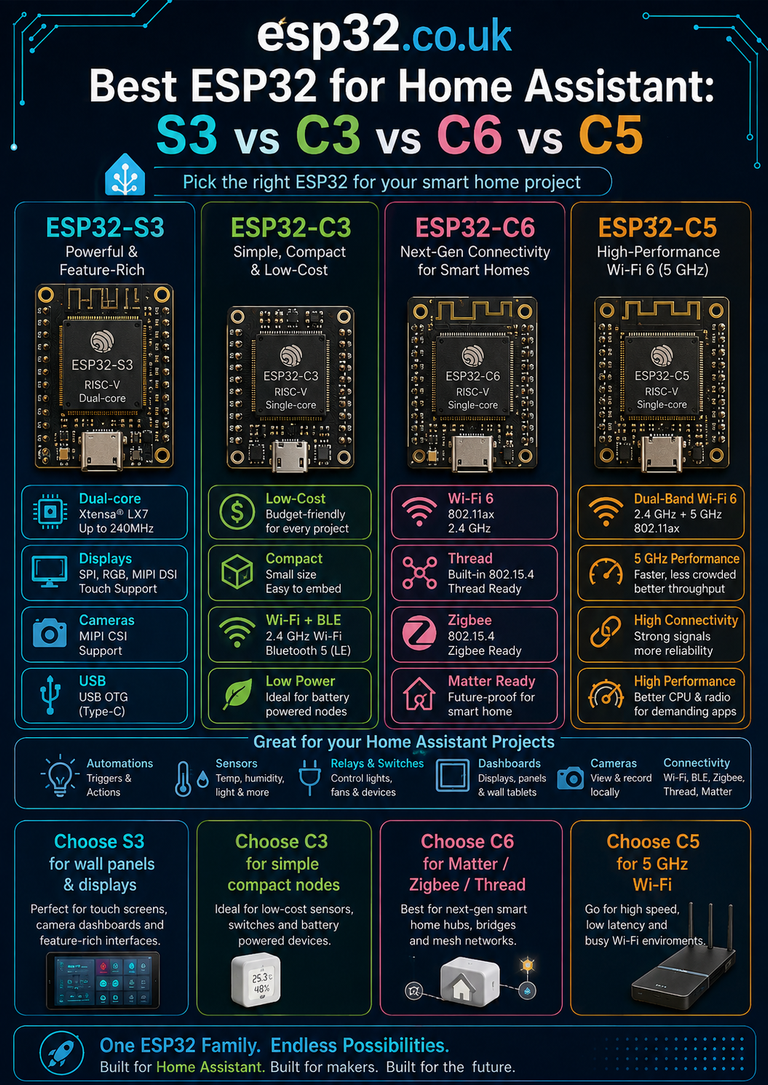
- Best ESP32 for Home Assistant: S3 vs C3 vs C6 vs C5
- ESP32-C3 SuperMini Pinout + Safe GPIOs
- ESP32-C6 SuperMini Pinout + Safe GPIOs
- ESP32-S31 vs ESP32-S3: Is the S31 the New S3?
- ESP32 Versions Explained: Which Board Should You Buy?
Datasheets & External Resources
All external manufacturer/framework references are collected here so the main article keeps readers inside esp32.co.uk.
- Espressif ESP RainMaker Neo Announcement — official 5 August 2026 release, Apache 2.0 open-source stack and enterprise-module positioning.
- ESP RainMaker Neo Documentation — firmware, deployment, cloud, dashboard and phone-app documentation.
- RainMaker Neo Get Started — public evaluation, private packaged deployment and build-from-source paths.
- Neo Firmware Supported Targets — current ESP-IDF requirement and supported ESP32/C2/C3/C5/C6/S3 targets.
- Neo Cloud Backend Overview — AWS IoT Core, Cognito, serverless backend and 20-device public quota.
- Neo Private Deployment Guide — AWS ownership, operational responsibilities and cost model.
- Neo Firmware Architecture — MQTT, OTA, schedules, local control and platform architecture.
- Neo Phone Apps — stock app, rebranding and custom TypeScript SDK options.
- ESP RainMaker Neo GitHub — open-source cloud backend, infrastructure and admin dashboard.
- ESP RainMaker Neo Firmware SDK GitHub — open-source device firmware SDK.