An ESP32-C6 can remain connected to Wi-Fi while participating in a Thread network, yet a project that works on the desk may become unreliable during an upload, a reconnect or a burst of application traffic. Sometimes the problem is the radio. Sometimes the Thread link is healthy and the failure sits in IPv6 routing, service discovery or the application itself. Treating every unavailable device as a coexistence fault makes both diagnosis and the eventual fix harder.
The useful starting point is to identify what the C6 is doing, which connection actually fails and what happens immediately before that failure. This esp32.co.uk/ guide develops that into a practical workflow: inspect the supported roles, collect a small evidence set, run controlled workloads and choose fixes that address the observed cause.
The examples use ESP-IDF v5.5.1 as a named reference release. They are diagnostic procedures, not measured latency or reliability results. No hardware measurements were supplied for this article. The accompanying records and results tables therefore remain blank, ready for readings from your own firmware and installation.
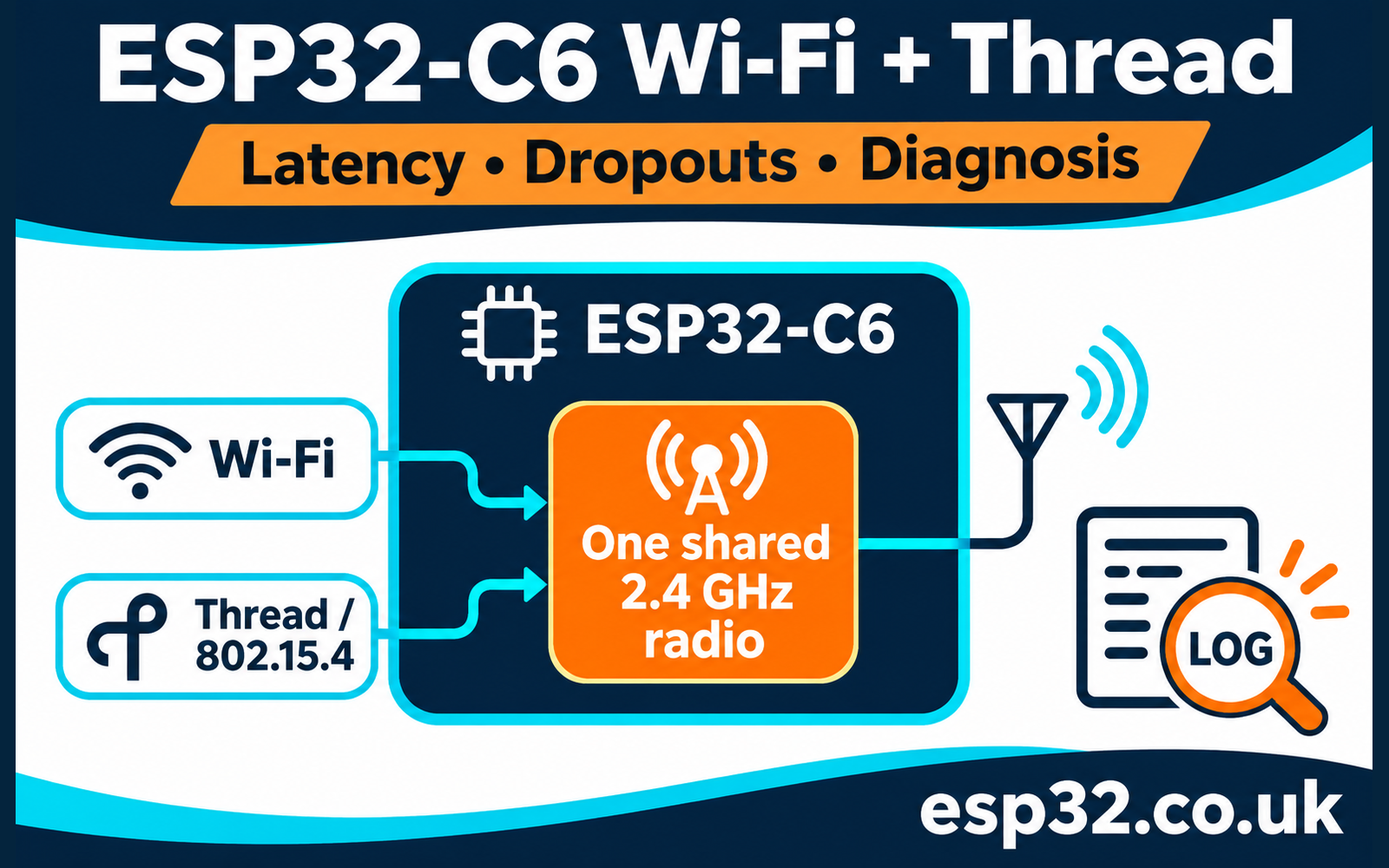
Start with the shared radio and the actual Thread role
The ESP32-C6 datasheet describes 2.4 GHz Wi-Fi, Bluetooth LE and IEEE 802.15.4 sharing the RF hardware and antenna. The C6 does not offer the C5’s 5 GHz Wi-Fi option. Enabling another protocol does not create a second independent receiver, even when both network stacks appear active to your application.
Espressif’s v5.5.1 coexistence guide distinguishes the combinations below. These are vendor support classifications, not timings measured for this article. The router column refers to the Thread forwarding role, not your household Wi-Fi router.
| C6 Wi-Fi operation | Thread operation | Espressif classification |
|---|---|---|
| Station connected | End device | Supported, stable performance |
| Station connected | Router | Supported, unstable performance |
| Station connected | Scanning | Supported, unstable performance |
| SoftAP connected | Router | Unsupported |
The guide also explains priority-based sharing: ordinary 802.15.4 reception can lose access while other radio activity takes precedence. Do not reinterpret a Wi-Fi/BLE time-slice illustration as a guaranteed 50/50 Wi-Fi/Thread allocation.
Use this distinction to set expectations before tuning. A configuration can build successfully and still have an unsuitable operating role for the workload. Conversely, a stable-category end-device configuration can still fail because of poor signal, software faults or an overloaded parent. The support table establishes the starting conditions; your acceptance test establishes whether the whole installation works.
Separate end devices, routers and border routers
A Thread end device communicates through a parent and does not forward traffic for other nodes. A router forwards mesh traffic and must remain available to neighbours. A sleepy end device adds deliberate receive gaps to save energy. OpenThread’s roles and device-types primer explains these relationships and the distinction between full and minimal devices.
A border router connects Thread to another IP network, such as Ethernet or Wi-Fi. That function is different from the node’s Thread forwarding role. Record the observed Thread role as well as whether border routing is enabled. Do not infer that every device called a border router has the same radio behaviour throughout every experiment.
This matters when interpreting a changing fault. A router-capable node can be a child during one run and have a forwarding role during another. Its configuration file may be unchanged while its responsibilities differ. Save role transitions with timestamps, and treat an unexpected transition during a comparison as a meaningful change in conditions.
If you only need a Matter-over-Thread sensor, first establish whether Wi-Fi needs to remain enabled after commissioning at all. Matter and Thread are different layers, and a Thread endpoint does not become a Wi-Fi endpoint simply because its chip supports Wi-Fi. The existing C6 Matter-over-Thread setup guide provides the wider commissioning context.
Identify which kind of dropout you have
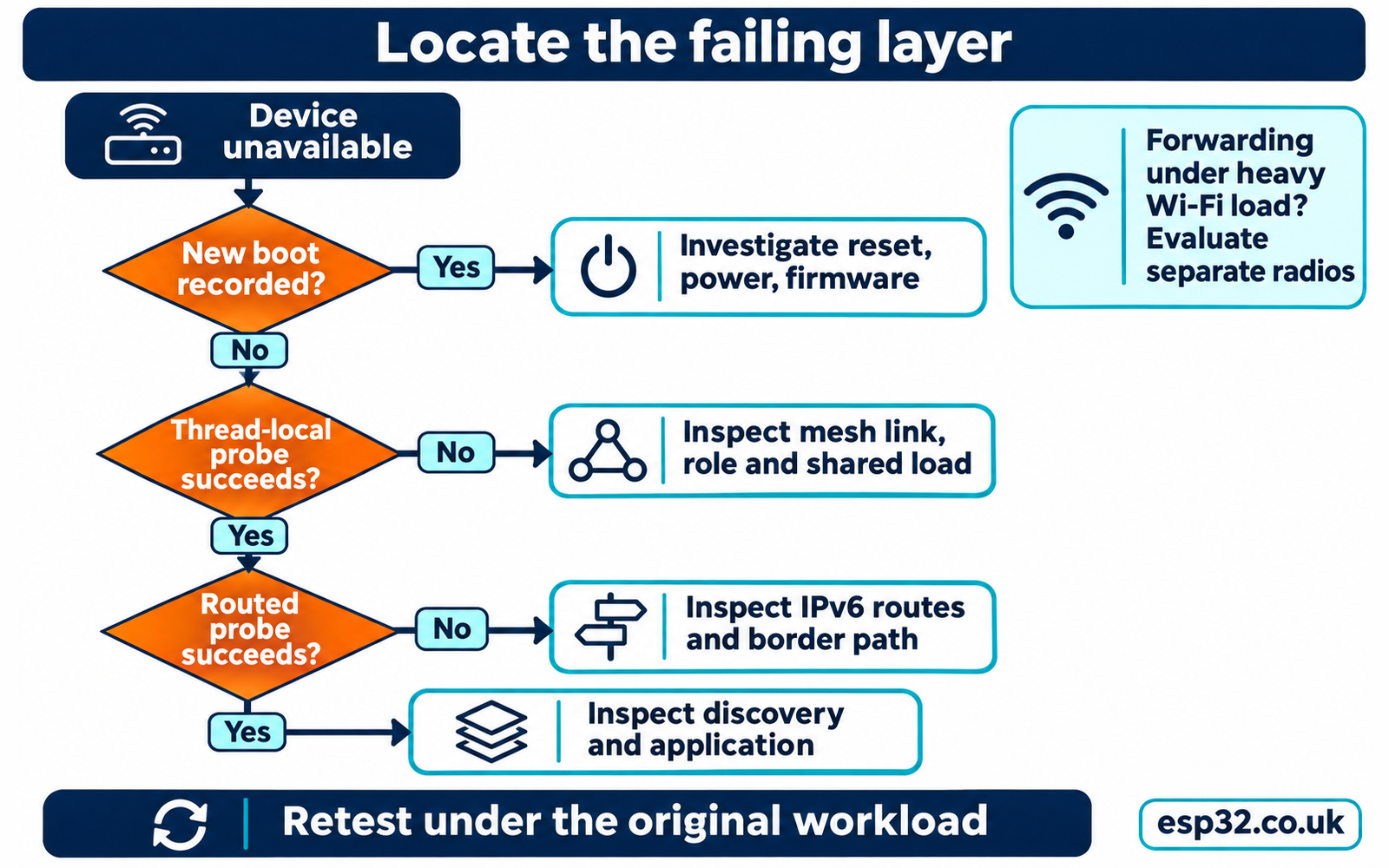
Replace the word dropout with an observable event. Did Wi-Fi disconnect? Did the Thread node become detached? Did an IPv6 request time out while both connections remained established? Did the controller mark the device unavailable after service discovery failed? These events require different evidence and can occur independently.
Use three separate indicators: Wi-Fi connection state, Thread attachment state and application request outcome. Add a reset or boot identifier so a device reboot cannot masquerade as a brief network interruption. Record the first failure time and the recovery time, including whether recovery required user intervention.
| Observation | First place to investigate |
|---|---|
| Wi-Fi disconnect event, Thread remains attached | Access point, roaming, reconnect policy and shared-radio activity |
| Thread detaches or changes parent repeatedly | Mesh link, parent availability, role and traffic correlation |
| Thread-local traffic works, LAN-to-Thread traffic fails | Border routing, IPv6 path and infrastructure network |
| Direct address works, application discovery fails | Service registration, discovery and controller state |
| Both links restart with a new boot record | Power, reset cause, watchdog or firmware failure |
The table proposes investigation paths; it does not diagnose a fault from one symptom. A common power interruption could disrupt both protocols. A shared software queue could delay requests without disconnecting either network. Preserve enough evidence to distinguish those cases before changing radio settings.
Capture a compact evidence set before changing anything
Start with board model, module and antenna, firmware identity, SDK version, application configuration and power arrangement. Record the Wi-Fi BSSID, operating channel, width and security mode. For Thread, record channel, network identity, current role, parent or neighbour information and whether the test crosses a border router.
Keep credentials out of the diagnostic bundle. A complete operational dataset can contain network keys, and Wi-Fi command transcripts can contain passwords. Store any necessary recovery material securely, then export a redacted record for comparison or publication. A network name by itself does not establish that two devices possess the same operational dataset.
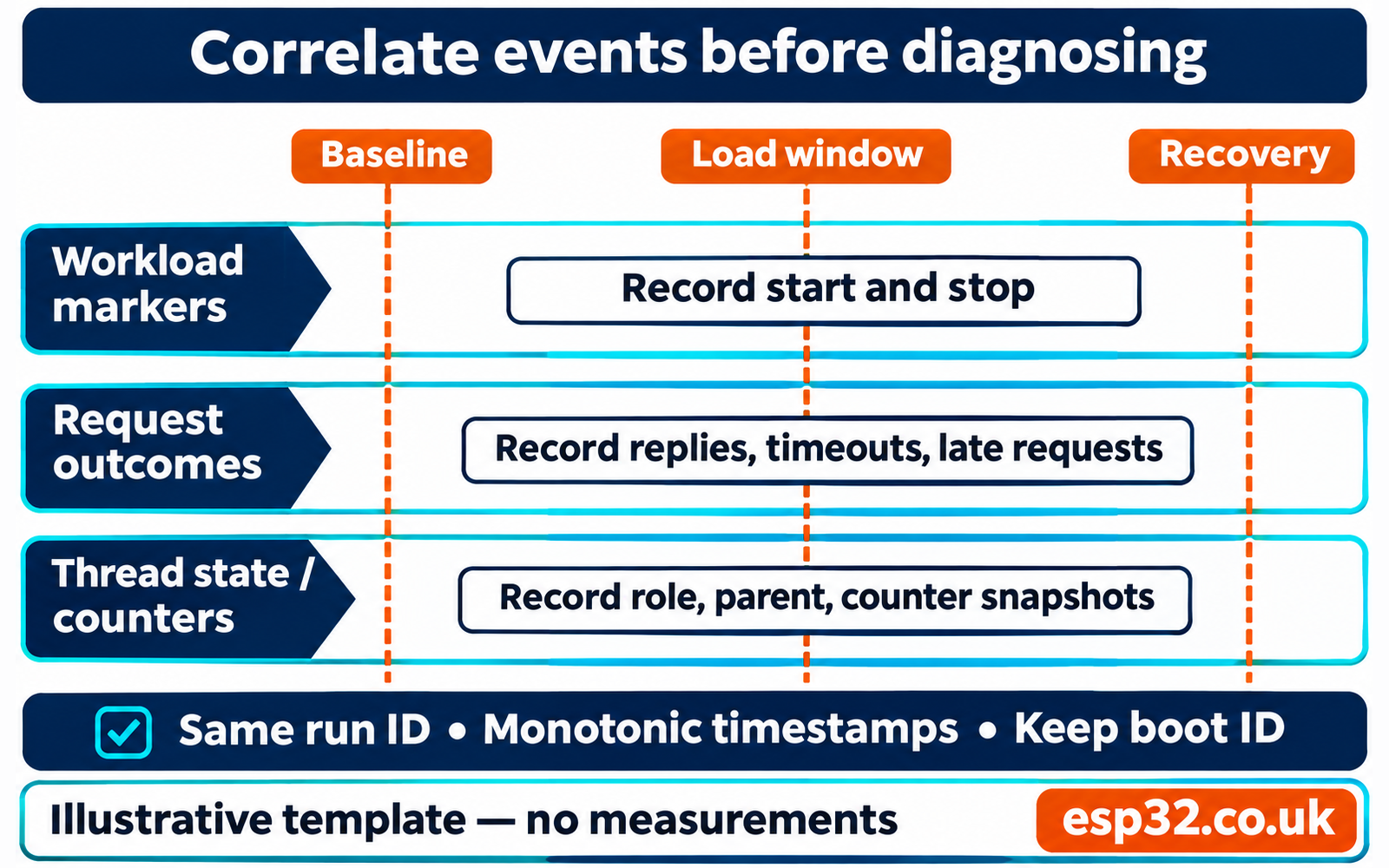
Use a monotonic clock for timings within each device. A clock adjusted by network time can jump during an experiment. To correlate two devices, retain a shared run identifier and an explicit start marker; do not subtract timestamps from unsynchronised clocks and call the result one-way latency. Round-trip timing on one observer avoids that particular ambiguity.
Prefer a short event log to a continuous flood of debug output. Capture Wi-Fi disconnect reasons, Thread role changes, restart events and workload start/stop markers. Add periodic heap and queue observations where your application supports them. Keep the raw log as well as a summary, because the order of events often matters more than their final totals.
Use a separate Thread peer and a wired observer
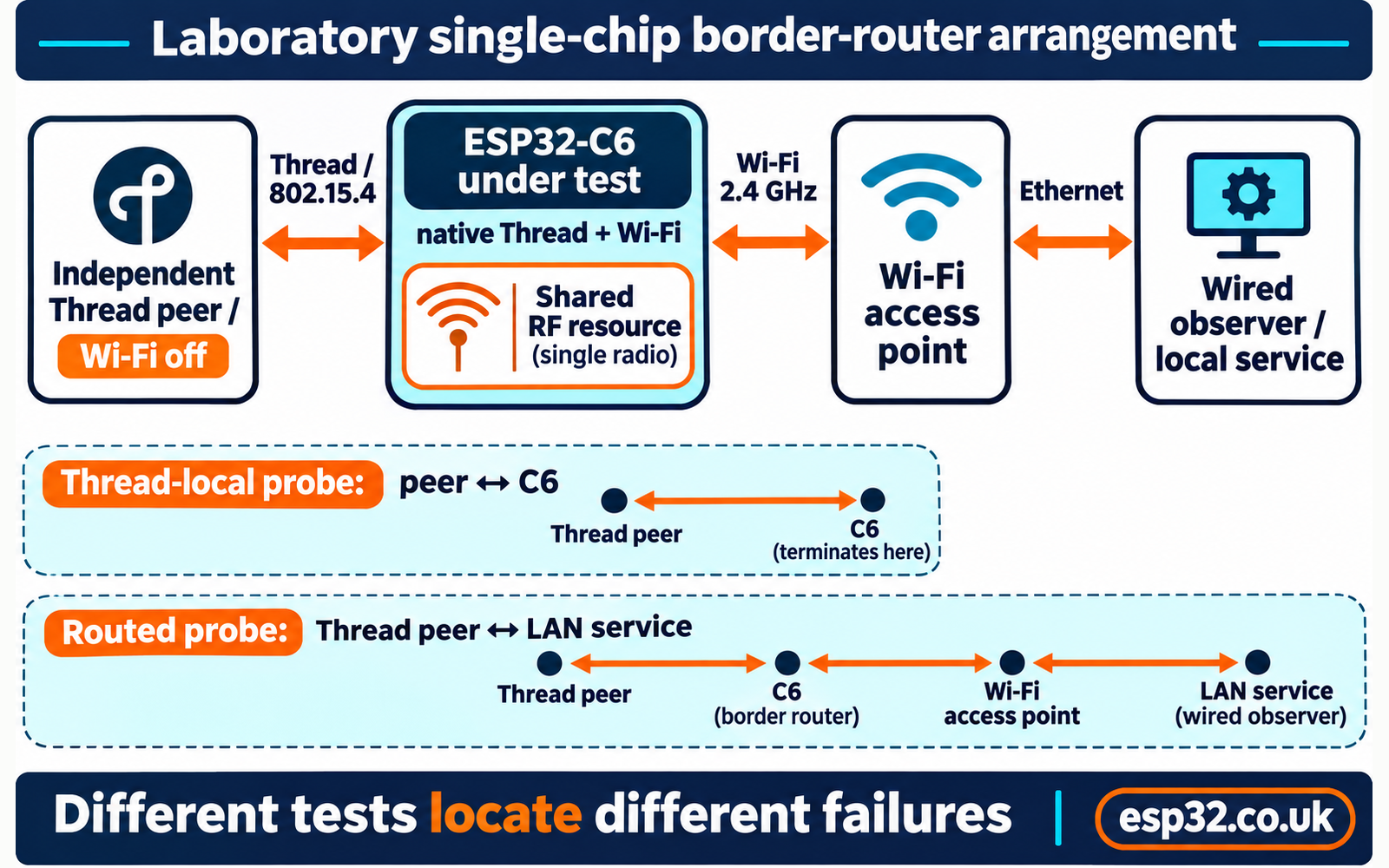
A useful laboratory setup has a C6 device under test, a separate Thread peer and a computer connected to the access point by Ethernet. The peer can run a compatible OpenThread CLI build on an H2 or another C6. Keep Wi-Fi disabled on that peer so the peer does not introduce another internal coexistence problem into the measurement.
The wired computer can observe the infrastructure path and host any local application service you need. Avoid an internet endpoint for the first comparison. A remote service adds routing and server delays that can change while your local hardware remains untouched. Keep the access point, antennas and power supplyPrice in fixed positions.
For a single-chip border-router experiment, the C6 sits between the Thread peer and the Wi-Fi LAN. Measure Thread-local communication to the C6 separately from traffic that continues through it to the computer. Those two paths let you ask whether a failure exists on the mesh link or only when border forwarding is involved.
This is a test arrangement, not an instruction to replace your working home border router. Use spare boards and an isolated test network for firmware experiments. Keep the deployed network’s dataset and recovery procedure intact. Flashing an example over a commissioned device changes much more than a coexistence option and can remove the evidence you were trying to inspect.
Establish a versioned ESP-IDF reference
Espressif’s v5.5.1 ot_br example can run on a single C6 using its native radio. Its README identifies software coexistence and native OpenThread radio configuration for that arrangement. It also cautions that the single RF path affects performance and recommends a two-SoC arrangement for Wi-Fi-based border routing.
If you are building a laboratory reference, copy the example into a new directory from an activated v5.5.1 ESP-IDF environment. The following commands use a POSIX-style shell. In PowerShell, use its normal folder-copy command and the corresponding environment-variable syntax.
idf.py --version
git -C "$IDF_PATH" describe --tags --always --dirty
cp -R "$IDF_PATH/examples/openthread/ot_br" ./c6-coex-lab
cd c6-coex-lab
idf.py set-target esp32c6
idf.py menuconfig
idf.py build
idf.py -p YOUR_SERIAL_PORT flash monitor
Save the effective sdkconfig, dependency lock file, binary and build log. Select the console interface you connected, rather than assuming a USB connector always carries the configured UART console. The example component manifest permits compatible dependency updates, so retain resolved component versions as well as the SDK tag.
For native single-C6 testing, inspect these effective settings. They are relevant entries, not a complete configuration file. An external-RCP configuration describes a different arrangement and should have a different run identifier.
CONFIG_OPENTHREAD_ENABLED=y
CONFIG_OPENTHREAD_RADIO_NATIVE=y
CONFIG_ESP_COEX_SW_COEXIST_ENABLE=y
The coexistence Kconfig source includes Wi-Fi/802.15.4 in the software-coexistence dependencies despite the menu label mentioning Wi-Fi/Bluetooth. Check generated settings; do not assume the label excludes Thread or that pasting an unavailable option enables a feature. This article has not compiled or flashed that reference firmware on a C6.
Inspect the running network without resetting it
Use help from the actual firmware before copying diagnostic commands. An OpenThread CLI, an ESP extension CLI and a Matter application’s shell are not interchangeable. A stock production build may expose none of these commands. Use its supported diagnostics or reproduce the behaviour in a laboratory build instead of assuming an undocumented shell exists.
On a compatible OpenThread CLI, begin with read-only queries. The official command reference describes their purpose; available commands and output fields depend on the compiled OpenThread version and features.
help
state
mode
channel
rloc16
ipaddr
parent
neighbor table
counters mac
counters mle
Capture the same queries before and after a workload. Record unsupported commands as unavailable. A router’s lack of parent information is not automatically a fault, and a child need not maintain the same neighbour table as a router. Interpret output in the context of the recorded role.
In the ot_br example’s documented manual mode, the Wi-Fi extension uses the command pattern below. Use a temporary laboratory password and redact it from the saved transcript. Configuration must enable the relevant CLI extension and manual mode; the example Kconfig separately controls automatic startup.
wifi
wifi state
wifi connect -s C6_COEX_TEST -p YOUR_TEST_PASSWORD
These commands do not provision a complete Thread network. Use the versioned ot_cli setup example on spare laboratory devices to establish a matching dataset, or retain the existing supported commissioning flow. Avoid factory resets, fresh dataset creation or arbitrary channel changes as the first response to a deployed device becoming unavailable.
Measure the mesh path separately from the infrastructure path
First send small unicast probes between the independent Thread peer and the C6’s mesh-local endpoint address. Select the endpoint address from the node’s current address list; avoid an address identifying a different service or role. Confirm replies before starting the interference experiment. This gives you a Thread-local control that does not require successful forwarding onto the LAN.
The upstream OpenThread CLI source reference documents the ping argument order. On a compatible build, this pattern sends twenty requests with a sixteen-byte data payload at one-second intervals. Replace the entire address placeholder before use; it is not a literal IPv6 address.
ping <PEER_THREAD_IPV6> 16 20 1This is a smoke test, not enough evidence for a strong tail-latency claim. Preserve sequence numbers and missing replies. Use a longer predeclared observation window for the actual comparison, and keep the probe load identical between scenarios. An excessively frequent probe can become a significant part of the Thread workload you are trying to study.
Then test the infrastructure path using an appropriately routed Thread address, such as the endpoint’s advertised off-mesh-routable address. A mesh-local address working inside Thread does not establish LAN reachability to it. Verify the observer has the necessary IPv6 route and return path before interpreting a failed cross-network probe as lost radio traffic.
Finally test the real application request, including its acknowledgement. Keep all three results labelled: mesh-local probe, routed probe and application transaction. A successful ICMP reply does not prove a controller subscription, name lookup or automation completed. A failed application request does not establish that the underlying radio detached.
Build a workload ladder that changes one variable
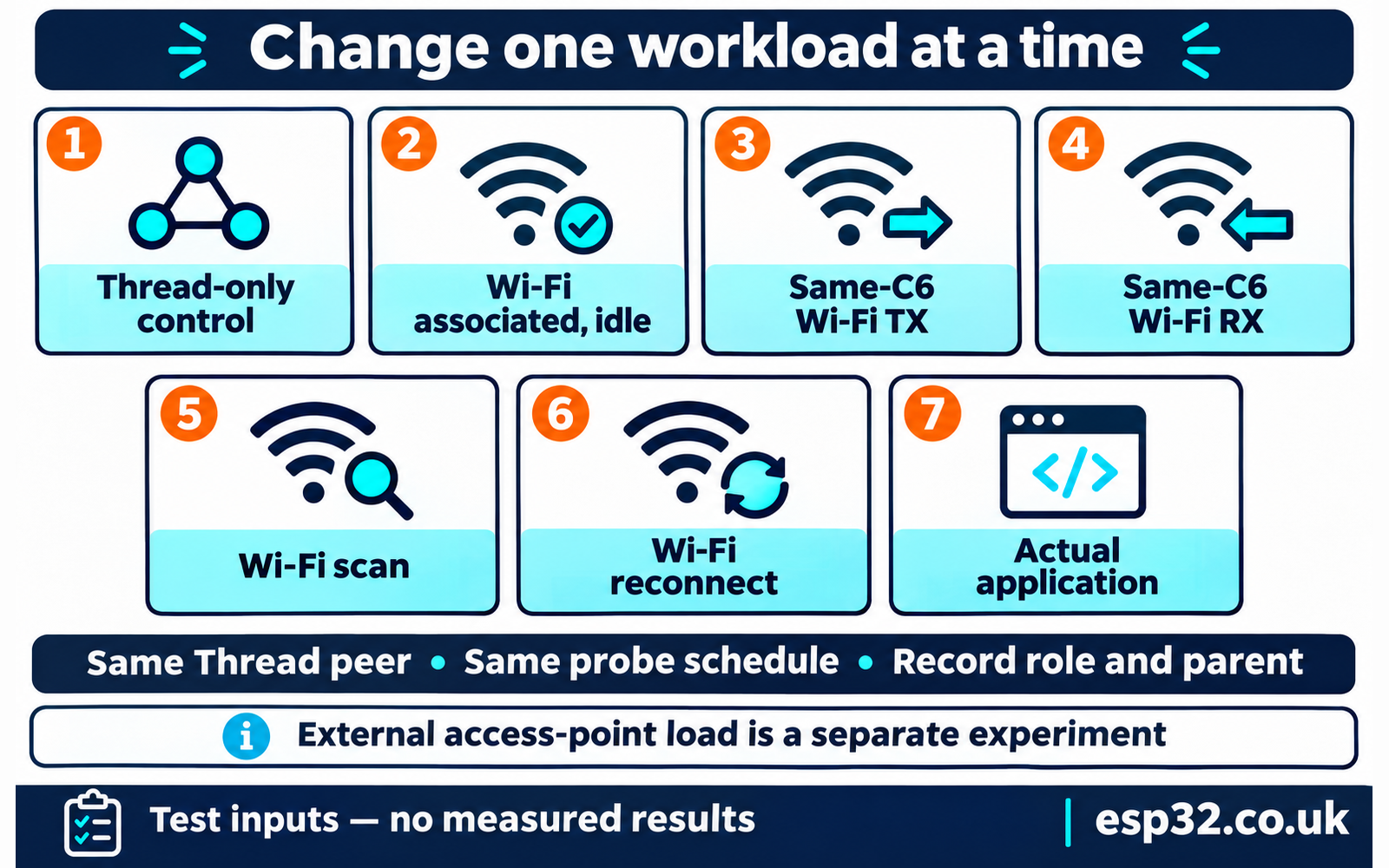
Start with Thread operating without C6 Wi-Fi activity, where your firmware supports that control. Next associate Wi-Fi and leave it idle. Then apply controlled C6 Wi-Fi transmit traffic, receive traffic, scanning or reconnect activity in separate runs. Finish with the actual application workload. Use the same Thread peer, addresses, roles and probe schedule throughout each comparison.
Record how the load is generated and how much traffic actually passes. Loading the access point from another laptop tests the external RF environment; it does not directly exercise the C6’s internal Wi-Fi traffic path. Both experiments are useful, but they answer different questions and need separate labels.
Do not flash a Wi-Fi-only throughput example and call its result a simultaneous Thread test. The replacement firmware has removed the other stack. For same-C6 traffic, use a service already present in the instrumented application or integrate a controlled socket workload while keeping OpenThread running. The stock ot_br example is not promised here to provide a general Wi-Fi bulk-load command.
Start modestly and increase the offered traffic in declared steps. Keep transmit and receive directions separate. An uncontrolled saturation test can reveal a failure boundary, but it does not represent a normal sensor workload. Record achieved throughput, queue behaviour and recovery after the traffic stops, rather than saving only the worst timeout screenshot.
Repeat each scenario several times, alternating the order where practical. A Thread-only control may require a separate firmware profile; if it changes code or topology, disclose that limitation. If a node changes role or parent during a series, keep the event and decide whether the affected interval needs a separate analysis.
Report latency together with missing and late requests
For each scenario, record scheduled attempts, transmitted requests, replies and application deadlines. Give every request an identifier. If the observer misses its own sending slot, record that separately from an unanswered transmitted packet. Otherwise a stalled test computer can make an embedded radio look worse than it is.
Median round-trip time describes a typical completed request. A higher percentile describes the slower part of that completed set. Neither includes a timeout unless you deliberately define a censored statistic. Report missing replies and deadline misses alongside percentiles so a configuration cannot appear fast merely because its slowest requests never completed.
State the percentile method and sample count. The included offline summariser uses nearest-rank p95: sort completed RTTs and select rank ceiling of 0.95 times the completed count. With few samples, this is coarse and can equal the maximum. Treat it as a descriptive statistic for that run rather than a guarantee about future behaviour.
The CSV helper accepts completed replies, timeouts, send failures and scheduled requests that were not sent. It reports completed-sample RTT statistics plus an on-time fraction over all recorded attempts. Its deadline comparison uses the declared round-trip deadline. It does not infer one-way delay, radio packet-loss probability or the cause of a missing response.
Copy the blank templates before testing, then run the helper against a completed measurement CSV. The supplied header-only file deliberately produces a no-results message. The utility is an analyser; it does not generate traffic or capture the device’s logs.
python tools/summarise_probes.py probe-results.csvDo not pool runs with different payloads, roles or firmware settings into one headline percentile. Compare their summaries side by side, and retain individual records. For an intermittent fault, the timeline around the first failure may tell you more than a large combined average.
Read counters as evidence, not a verdict
Take before-and-after snapshots of MAC and MLE counters and work with their deltas. Retain the boot identifier because a reboot or reset can make a counter decrease. Do not subtract blindly across resets or combine lifetime counts from two devices. Keep the observation interval and workload identifier beside every snapshot.
MAC retries, acknowledgement outcomes and channel-access errors describe different parts of delivery. A rise in retries is a reason to examine conditions, not proof that the coexistence scheduler caused them. MLE attachment and parent-change counters help identify topology churn. The raw names and meanings should be checked against the command output for the actual build.
Use a timing correlation: did retry activity rise during the controlled load, did it settle after the load stopped and did the same pattern repeat? Then compare an external access-point load with same-C6 traffic. That combination is more informative than declaring a cause from one large lifetime counter.
For firmware diagnostics, call OpenThread APIs with the locking required by the ESP port. The ESP-IDF OpenThread guide requires the OpenThread lock for calls from other tasks. Copy a compact snapshot while holding the lock, release it, and perform slow formatting or storage afterwards. Do not run network operations or long serial prints while holding that shared lock.
Treat scanning and reconnect storms as separate faults
A device that repeatedly scans and reconnects is operating under different conditions from one that remains associated. Record scan requests, disconnect events, reason codes and reconnect attempts. Look for application logic that starts a new attempt before the previous attempt has finished or triggers a scan after every failed application request.
Use a bounded reconnect policy with backoff and a clear owner for connection state. Separate an application-server timeout from a Wi-Fi link failure. If the LAN service is unavailable while the station remains connected, repeatedly tearing down Wi-Fi may add radio work without repairing the original problem. Retain enough error information to make that distinction.
Test commissioning and normal operation separately. A setup access point, Bluetooth commissioning and a Thread attach sequence can create a different protocol mix from the steady-state device. A problem that occurs only during onboarding should not automatically change the normal-operation configuration, and a clean steady-state run does not validate the commissioning path.
When you adjust retry logic, verify recovery as well as peak traffic behaviour. Delaying every retry can reduce activity but leave a device offline too long after a brief outage. Define an acceptable recovery interval, measure it and keep the user-visible requirement next to the configuration change.
Plan channels without confusing interference and arbitration
Wi-Fi and Thread both use the 2.4 GHz environment on a C6, but their channel numbering systems differ. Matching channel numbers does not establish matching frequencies, and choosing a different number does not prove separation. Record both systems explicitly and use the access point’s actual operating width when evaluating the surrounding RF environment.
Start with a 20 MHz Wi-Fi baseline and a documented, locally permitted channel plan. Observe neighbouring networks and your own access point load. If you change a channel, repeat the same workload at the same location. Label that as an environment experiment rather than silently merging it with the original run.
Channel planning can reduce external interference; it cannot give the same C6 two simultaneous receive paths. A busy access point can affect a Thread receiver even when the C6’s Wi-Fi task is idle. Conversely, changing the external environment may leave delays caused by the C6’s own shared work unchanged. Use the separate workloads to investigate that distinction.
Do not issue an isolated channel-setting command on a commissioned Thread endpoint as a general fix. Network-wide channel changes involve the operational dataset and coordinated migration. Follow the network’s supported management process and preserve recovery access. There is no universally best Thread channel that this guide can prescribe independently of equipment, neighbours and network management.
Check power policy and scheduling before tuning priorities
Wi-Fi modem sleep changes receive timing. The v5.5.1 Wi-Fi guide documents the trade-off and notes that disabling modem sleep does not remove coexistence time sharing. A controlled comparison of power-save policies can help identify timing effects, but it is not a way to grant Wi-Fi exclusive or continuous ownership of the radio.
For a sleepy Thread device, include the intended wake and receive schedule in the acceptance test. Compare battery-oriented operation with its own deadline requirements. A slower response caused by deliberate sleeping should not be diagnosed as random dropout without examining whether the request missed the expected receive opportunity.
Inspect task behaviour too. A long callback, busy polling loop, excessive logging or repeated memory allocation can delay useful work even when the physical link remains available. Use bounded queues and short callbacks, and move processing into ordinary application tasks. The ESP OpenThread API reference describes the stack main loop; application code must leave it able to run.
Avoid copying dual-core task-pinning advice into a C6 project. Its main application processor and low-power core do not behave like two interchangeable application cores. Keep SDK defaults as the baseline, observe scheduling and memory behaviour, then change one supported setting at a time. An unexplained priority increase can move the fault into another task.
Rule out resets and power-path problems
Keep the serial boot record and reset reason in the same evidence bundle as network events. If both stacks disappear and the device starts a new boot sequence, first establish why it restarted. Coexistence tuning cannot repair a supply dip, an exhausted task stack or an application watchdog failure. A reboot counter makes this distinction visible even when the dashboard only shows an availability gap.
Repeat the failing workload with a known-good supply and data cable, keeping the antenna position unchanged. Check voltage at the board during activity if you have suitable instrumentation. An unloaded supply reading does not establish that the board remains adequately powered during a burst. Avoid introducing a second USB power feed while attaching diagnostic equipment.
Record the exact board revision and intended supply input. The C6 DevKitC and DevKitM comparison helps distinguish common development boards, but verify their own schematics before changing connections. A module specification and a complete board’s power behaviour are different things.
After correcting a reset or supply issue, repeat the original network experiment from the baseline. Keep the failed run rather than relabelling it as an RF loss measurement. That preserves the evidence trail and prevents a later reader from attributing the improvement to a radio setting that was never responsible.
Distinguish IPv6 and discovery faults from RF faults
If the Thread-local probe succeeds while a routed request fails, check address scope, advertised prefixes, the observer’s route, return traffic and the border router’s infrastructure interface. If direct routed traffic succeeds but discovery fails, inspect service registration and discovery separately. A cloud or dashboard availability indicator is several steps removed from the radio.
Home Assistant’s Thread documentation includes IPv6 troubleshooting and network-credential management. Use the actual installation’s supported diagnostics rather than treating a visible Thread network name as proof that the controller, border router and endpoint have a working common path.
For Matter, discovery adds its own evidence. Google’s Matter discovery documentation explains that Thread service discovery uses border-router proxying. Consequently, successful local Thread communication can coexist with a broken discovery path on the infrastructure network. Keep those observations separate in the fault report.
Test a simple, trusted LAN arrangement before investigating a segmented network. Then reintroduce the intended network boundaries with a documented IPv6 and discovery policy. Do not disable security controls globally just to make a test pass. The goal is to identify the missing route or service path and restore the intended connectivity precisely.
Recognise when the architecture needs to change
If reliable forwarding under sustained Wi-Fi activity is a product requirement, compare the single-C6 design with a separate Wi-Fi host and 802.15.4 radio. Espressif’s border-router guidance favours separate SoCs and antennas for that use. In an RCP arrangement, also record the host/radio firmware pairing, transport settings and any transport-reset events.
Separating the radios removes the particular single-RF-path constraint, but it does not eliminate external interference, host scheduling faults or a poor antenna installation. Test the replacement architecture against the same application deadline and recovery requirements. A hardware change should produce measurable evidence of the improvement you need, rather than simply move the fault to a less visible interface.
For an endpoint, the smaller change may be to remove an unnecessary always-on Wi-Fi service or use a genuine end-device profile appropriate to the application. Do not disable forwarding on a deployed mesh node without considering the devices relying on it. A role change can alter coverage and parent availability elsewhere in the network.
Confirm the hardware family before purchasing or reflashing. The similarly named ESP32-C61 and ESP32-C6 differ in Thread capability, and changing to a C5 instead of a C6 does not by itself validate a complete border-router design. Choose an architecture and firmware combination that is documented for the required job.
Keep a result sheet that supports the conclusion
Complete the table only after collecting observations. A blank cell means unmeasured; zero means an actual measured value. Report replies and deadline success with latency, and retain restart, detach and parent-change evidence separately. The proposed workload names below are inputs to the investigation, not evidence that any scenario has passed.
| Scenario | Recorded role | Replies / attempts | Completed RTT median | Completed RTT p95 | On-time / attempts |
|---|---|---|---|---|---|
| Thread-only control | |||||
| Wi-Fi associated, idle | |||||
| Same-C6 Wi-Fi transmit | |||||
| Same-C6 Wi-Fi receive | |||||
| Wi-Fi scan or reconnect | |||||
| Actual application load |
Use milliseconds for RTT fields and state the deadline, payload and observation duration in the session record. Split scan and reconnect into separate runs, and add an external-RF-load scenario when needed. Preserve a baseline after each major change so a later improvement remains traceable to a specific configuration.
Verify the fix under the conditions that caused the fault
Retest the original failing workload, then check quiet operation, recovery after a connection interruption and the intended installation position. Keep the real application active for the acceptance run. A synthetic probe is valuable for locating the fault, but the final requirement is a completed application job within its declared deadline.
Write the conclusion at the level the evidence supports: which layer failed, which change was made and how the repeated test behaved afterwards. Until those observations exist, the correct result is an open diagnostic record. Shared-radio limitations explain what to investigate; a repeatable set of attachment events, request outcomes and configuration records establishes what actually happened in your C6 project.