
Looking for the ADS1115AliExpress price breakout pinout, the ADDR solderAliExpress price jumper, or the correct way to connect its four analog inputs to an ESP32AliExpress price? This hardware reference is for the Adafruit ADS1115 16-bit, four-channel ADC STEMMA QT breakout (product #1085, 2022-onward layout). It explains the physical connections, the actual board address options, the analog voltage limits, a functional circuit, and short Arduino examples using the current Adafruit ADS1X15 library.
Quick setup: On a classic ESP32 DevKit, connect 3V3 → VIN, GND → GND, GPIO21 → SDA, GPIO22 → SCL. Leave the rear address jumper open for 0x48. To read 0–3.3 V from a 10 kΩ potentiometer, connect its ends to 3V3 and GND, and its wiper to the breakout A0 input. In software use Adafruit_ADS1115, ads.setGain(GAIN_ONE) and ads.computeVolts(ads.readADC_SingleEnded(0)).
This is a board-reference guide, not a replacement for your existing ADS1115 with ESP32 gain and voltage-reading tutorial or the ADS1115 ESPHome calibration guide. Those cover application workflows; this page concentrates on what is physically on the breakout, its solder pads, power rails and safe configuration.
Which ADS1115 breakout does this pinout describe?
Adafruit updated product #1085 to the STEMMA QT / Qwiic form factor on 22 June 2022. The current board has two small JST-SH I²C connectors and a grouped set of labelled through-hole pins. An older Adafruit PCB, a common blue/purple ADS1115 clone, and an ADS1015 breakout can look quite different. Do not copy header positions or reverse-side solder locations between versions simply because they contain an ADS1115 chip.
| Specification | ADS1115 / current breakout |
|---|---|
| Converter | 16-bit signed delta-sigma ADC with internal reference and PGA |
| Channels | 4 single-ended A0–A3, or supported differential pairs via input multiplexer |
| Analog input multiplexer | A0−A1, A0−A3, A1−A3, A2−A3; single-ended A0–A3 |
| Programmable sample rates | 8, 16, 32, 64, 128, 250, 475, 860 samples/second, total conversion stream |
| Supply voltage | IC: 2.0–5.5 V; this ESP32 example: 3.3 V |
| I²C addresses | 0x48, 0x49, 0x4A, 0x4B through ADDR selection |
| Default I²C address | 0x48 when Adafruit rear A0 address bridge is open |
| Connector options | Through-hole headers or either of two STEMMA QT I²C connectors |
| ADC input voltage | For normal operation each analog input is between GND and VDD |
| Alert output | ALRT is programmable ALERT/RDY; optional, not needed for polling |
| Arduino library | Adafruit ADS1X15 with <Adafruit_ADS1X15.h> |
The ADS1115 does not offer four independent simultaneous ADCs. It contains a multiplexer feeding one converter, so requesting four channels sequentially divides the available conversion capacity among them. The advertised 16-bit resolution also does not mean 16 noise-free bits in every circuit; sample rate, gain, sensor output impedance, layout and noise matter.
ADS1115 board pinout explained
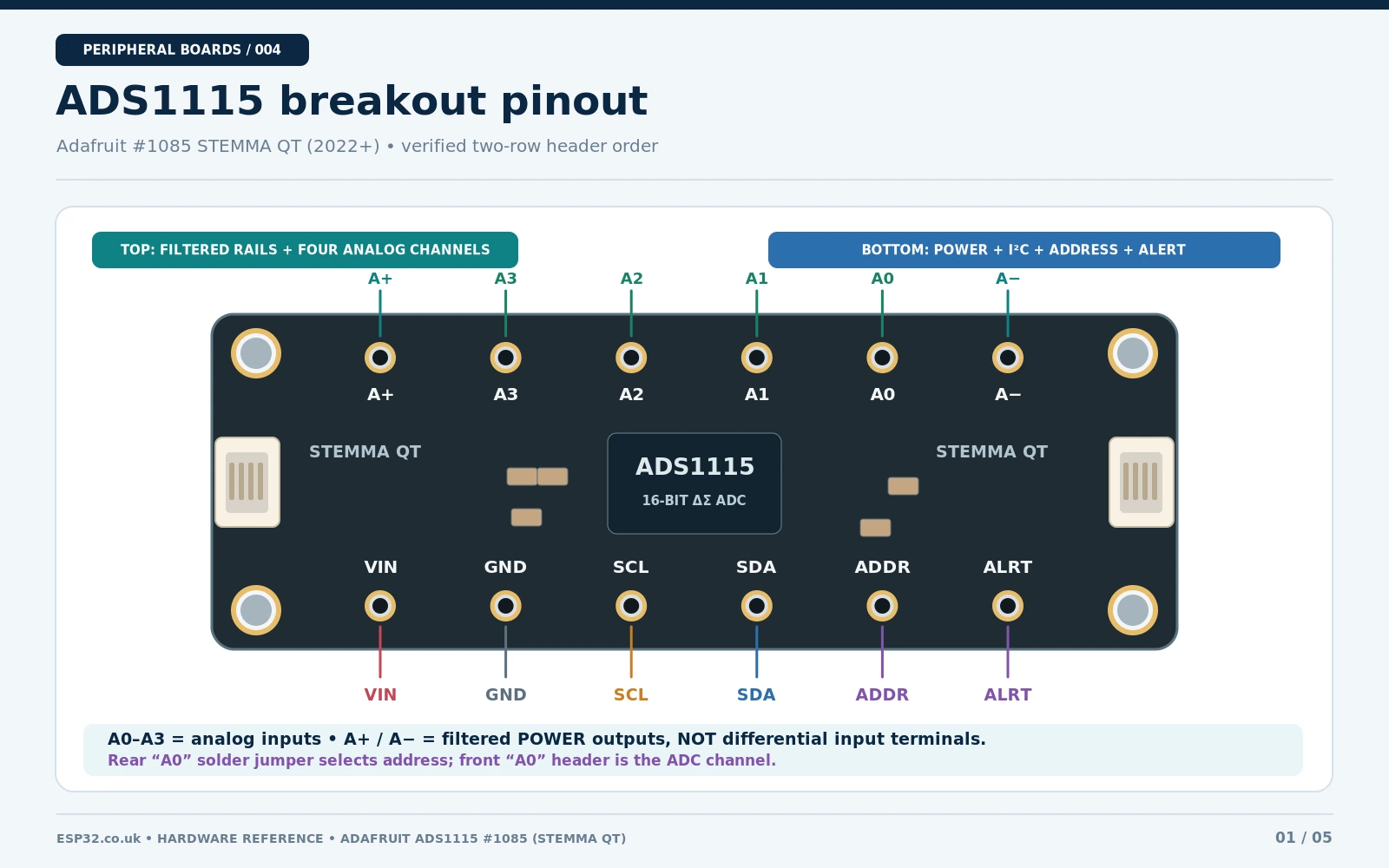
The current Adafruit board labels the four inputs A0, A1, A2, A3. These are ADC inputs and are unrelated to the rear solder jumper also labelled A0. The breakout also exposes VIN, GND, SDA, SCL, ADDR, ALRT and filtered analog-rail points A+/A−. Only the actual silkscreen and original Adafruit PCB artwork should define their physical order in any image.
| Breakout label | Meaning | Use / caution |
|---|---|---|
VIN | Supply rail | For this ESP32 wiring use 3.3 V; I²C pull-ups go to VIN |
GND | Digital ground | Common with ESP32 and analog signal ground |
SCL | I²C clock | Adafruit board has a 10 kΩ pull-up to VIN |
SDA | I²C data | Adafruit board has a 10 kΩ pull-up to VIN |
ADDR | Address-selection input | GND/VDD/SDA/SCL choose 0x48–0x4B |
ALRT | Comparator ALERT / conversion-ready | Optional open-drain output; pull-up needed in appropriate circuits |
A0–A3 | Analog input channels | Each must be within the powered chip supply rails for normal operation |
A+ | Filtered analog positive rail | This is not an ADC signal input or power input |
A− | Filtered analog ground | This is not a differential signal input |
Do not confuse an ADC channel A0 with the rear I²C address A0 solder bridge; the address setting does not affect the analog channel mapping. And do not use A+/A− as ordinary differential inputs: Adafruit identifies them as the filtered ADC power supply and ground connections.
Change ADS1115 I²C address: 0x48, 0x49, 0x4A or 0x4B
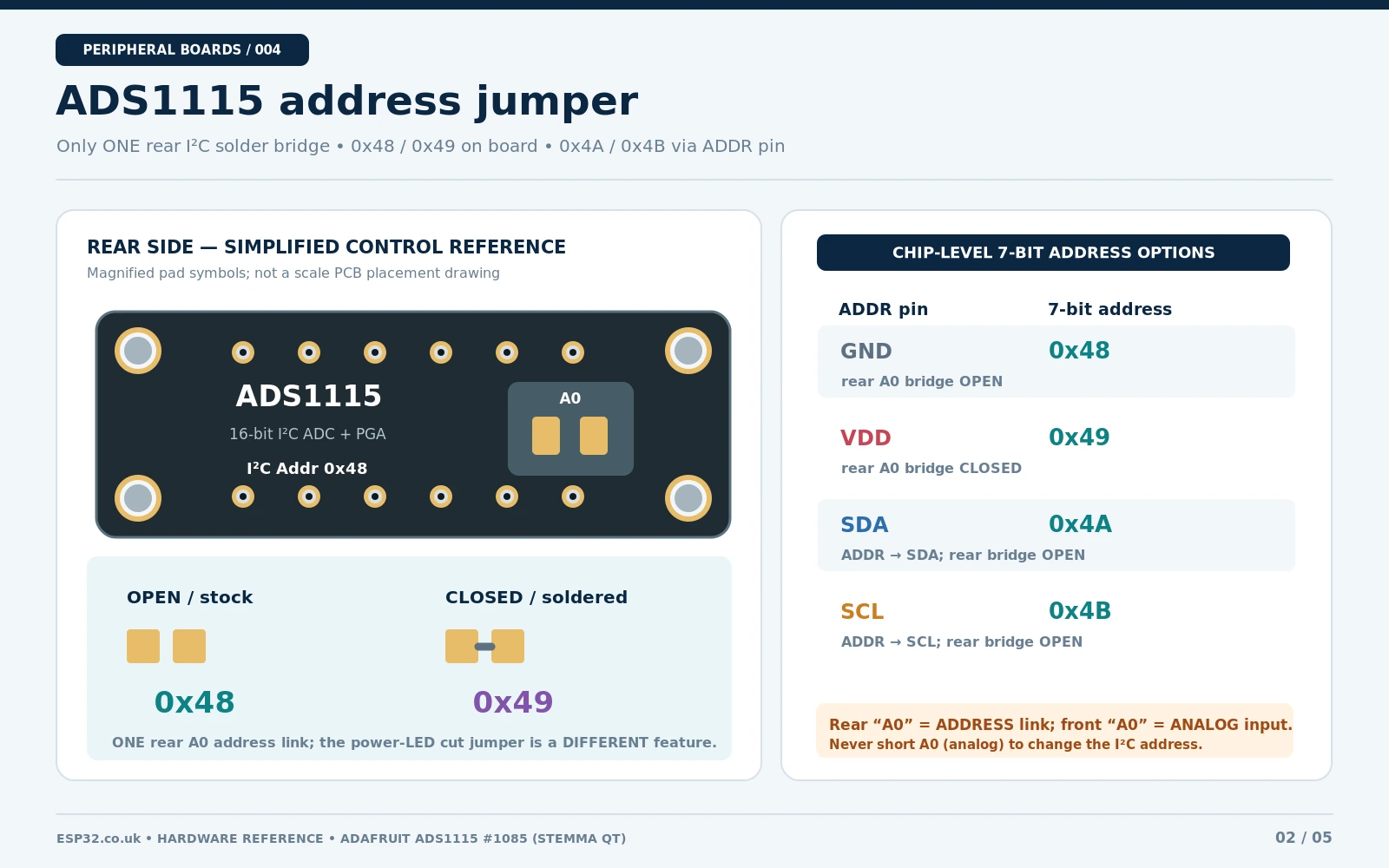
The ADS1115 chip has one address-select pin called ADDR. This is different from three-bit-address expanders like the PCF8574 or MCP23017. Its address depends on which of four electrical nodes the ADDR pin is connected to. The current Adafruit board adds a convenient single rear solder bridge labelled A0 that makes a quick change from 0x48 to 0x49; that bridge alone cannot select all four addresses.
| ADDR connection | 7-bit I²C address | Adafruit breakout method |
|---|---|---|
GND | 0x48 | Leave rear address A0 solder bridge open (default) |
VDD | 0x49 | Close rear address A0 solder bridge, or configure external ADDR appropriately |
SDA | 0x4A | Rear jumper open; wire external ADDR to SDA |
SCL | 0x4B | Rear jumper open; wire external ADDR to SCL |
For example, if a second board uses the closed A0 bridge, call ads.begin(0x49, &Wire) for that board. Two identical boards left at 0x48 cannot both be independently addressed on the same I²C segment. For 0x4A or 0x4B, do not close the 0x49 jumper as well; its address strap would conflict with the external selection. Check the exact clone PCB before attempting the same arrangement.
The separate power LED cut-jumper on the Adafruit rear PCB is not an address setting: cutting its trace disables the on-board power indicator. Power off before soldering or cutting, protect the nearby parts, and verify the resulting address using an I²C scanner.
ADS1115 gain settings and actual input-voltage limits
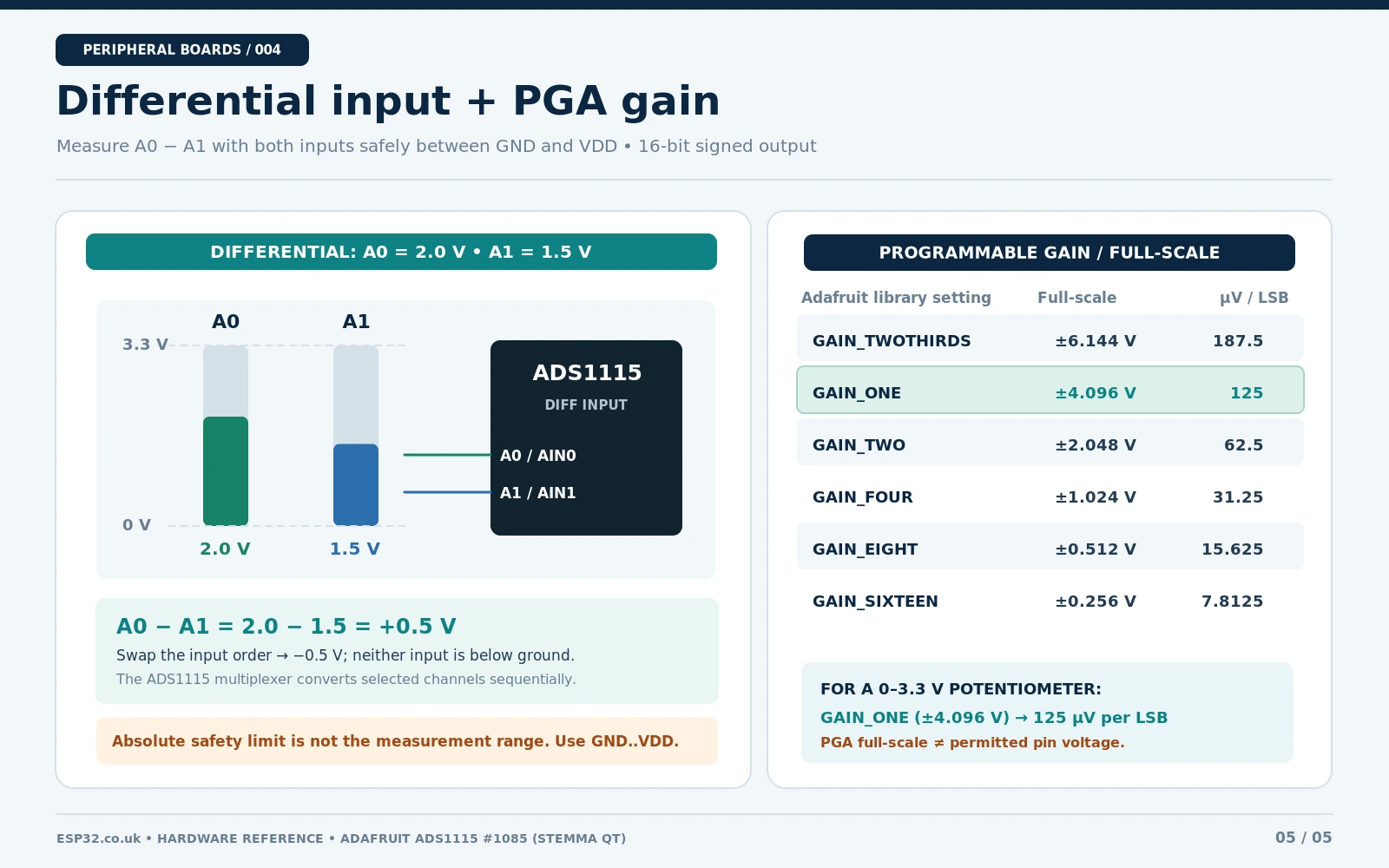
The programmable gain amplifier changes how the ADC codes map to differential voltage. It does not extend the safe voltage that can be applied to a powered input. Texas Instruments specifies an ADC full-scale differential measurement range from ±0.256 V to ±6.144 V, but for normal operation every AINx pin must stay within GND to VDD. The absolute-maximum stress boundary is GND−0.3 V to VDD+0.3 V; this stress rating is not a recommended measurement range.
Electrical warning: With ADS1115 powered at 3.3 V, do not apply 5 V to an analog input—even if software uses GAIN_TWOTHIRDS (±6.144 V). A negative differential reading is possible when A0 is below A1, but neither physical pin should be driven below ground.
| Adafruit gain | PGA differential full-scale | Ideal LSB size | Practical note |
|---|---|---|---|
GAIN_TWOTHIRDS | ±6.144 V | 187.5 µV | Full-scale code range exceeds a 3.3 V supply; it is not a 6.144 V input protection setting |
GAIN_ONE | ±4.096 V | 125 µV | Good starting gain for a 0–3.3 V potentiometer |
GAIN_TWO | ±2.048 V | 62.5 µV | Signals above +2.048 V saturate even though pins can remain within supply |
GAIN_FOUR | ±1.024 V | 31.25 µV | Use for sub-volt signals with appropriate common mode |
GAIN_EIGHT | ±0.512 V | 15.625 µV | Measure low differential voltages with adequate noise control |
GAIN_SIXTEEN | ±0.256 V | 7.8125 µV | Watch sensor offset, impedance and noise |
The ADS1115 returns a signed 16-bit code. At each gain, positive differential full-scale is represented by 32767 (0x7FFF); in ordinary single-ended mode with the negative input at ground, the usable range is the nonnegative half of the bipolar encoding, not 0–65535. Use the library’s computeVolts(raw) instead of hard-coding a counts-to-volts constant that becomes wrong when gain changes.
ADS1115 functional circuit and schematic references
At chip level, a typical ADS1115 circuit includes VDD/GND, local decoupling, I²C SDA/SCL pull-up resistors to the same logic voltage, a defined ADDR connection, the optional open-drain ALERT/RDY output, and one or more analog sources referenced to ground. The Adafruit PCB also adds ferrite-bead isolation to its analog supply/ground, plus 10 kΩ I²C pull-ups. Do not mistake a conceptual circuit for the manufactured PCB schematic.
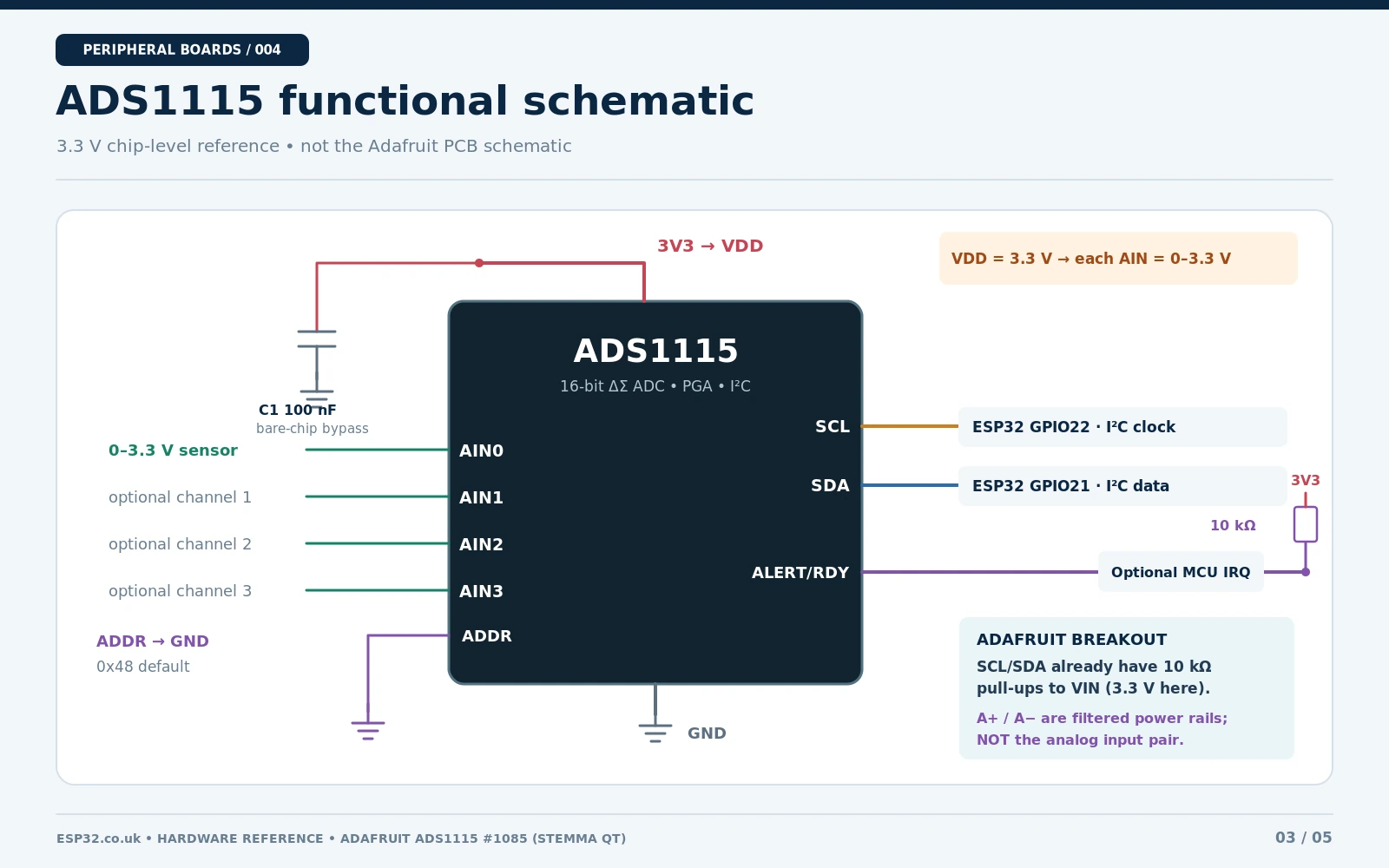
For the precise Adafruit PCB revision, use the official Downloads / board schematics. For ADC electrical ratings, register definitions and front-end details, use the Texas Instruments ADS1115 datasheet. Do not add redundant I²C pull-ups to every STEMMA breakout without calculating effective parallel resistance and bus capacitance.
Wire ADS1115 to ESP32 and a 10 kΩ potentiometer
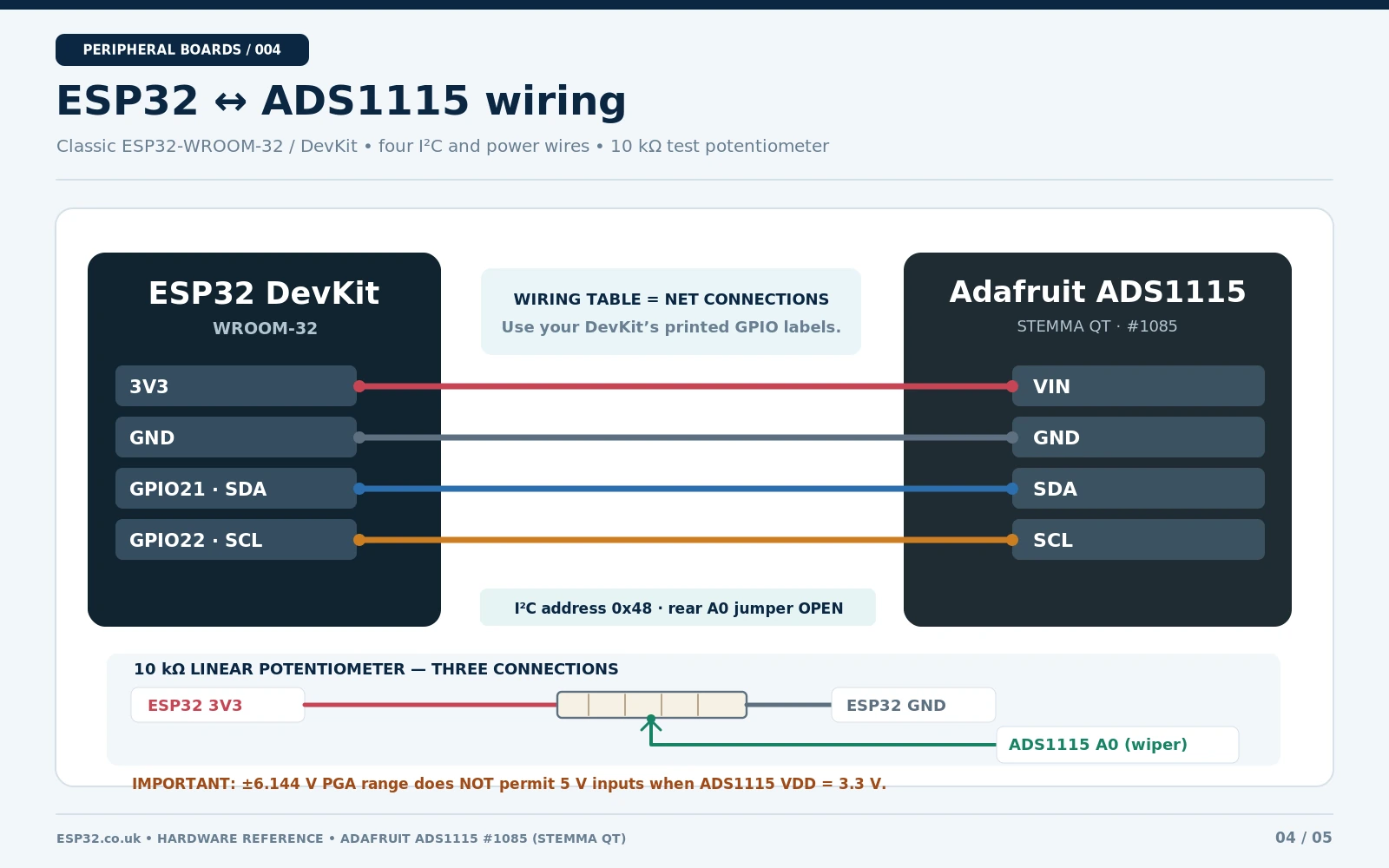
The simplest real-world test is a 10 kΩ potentiometer across the ESP32’s 3.3 V and ground rails. The wiper produces an adjustable voltage between those limits. Connect that to ADS1115 A0. This safely explores the converter’s useful range without feeding it arbitrary external voltages.
| Classic ESP32 DevKit pin | Adafruit ADS1115 breakout | Purpose |
|---|---|---|
3V3 | VIN | 3.3 V power, matched I²C logic |
GND | GND | Shared return for ESP32, ADS1115 and sensor |
GPIO21 | SDA | I²C data |
GPIO22 | SCL | I²C clock |
| 10 kΩ pot top terminal → 3V3 | — | Potentiometer supply high end |
| 10 kΩ pot bottom terminal → GND | — | Potentiometer supply low end |
| 10 kΩ pot centre wiper | A0 | Variable 0–3.3 V input |
| Not connected | ALRT | Optional comparator interrupt |
| Rear address bridge open | ADDR logic low | Default I²C address 0x48 |
The wiring diagram intentionally covers a classic ESP32-WROOM-32 DevKit with GPIO21 SDA and GPIO22 SCL. Other ESP32 families and small boards may have different exposed pins; substitute the actual pins in both hardware and Wire.begin(). On 5 V Arduino boards, the Adafruit breakout can be supplied at the host logic voltage when using compatible hardware, but this guide deliberately keeps the ESP32 I²C bus at 3.3 V.
Install Adafruit ADS1X15 in Arduino IDE
- Open Library Manager in Arduino IDE 2 and install Adafruit ADS1X15 by Adafruit.
- Accept or install the Adafruit BusIO dependency when prompted.
- Select your correct ESP32 board and serial port, wire the ADS1115 to 3.3 V and verify the jumper is open for address
0x48. - Use the modern header
<Adafruit_ADS1X15.h>, the typeAdafruit_ADS1115, andbegin(address, &Wire). - Open Serial Monitor at
115200baud and adjust the potentiometer; do not test by driving A0 with unverified external supplies.
Arduino example: read ADS1115 A0 and convert to volts
This complete sketch uses a single ADC channel, explicitly sets the ESP32 I²C pins and uses the Adafruit library’s own voltage conversion, which follows the selected gain. The example is designed to compile with the current library API; results described below are expected behaviour, not a claim of a physical bench test.
#include <Wire.h>
#include <Adafruit_ADS1X15.h>

constexpr int ESP32_SDA = 21;
constexpr int ESP32_SCL = 22;
constexpr uint8_t ADS_ADDR = 0x48;

Adafruit_ADS1115 ads;

void setup() {
  Serial.begin(115200);
  delay(300);
  Wire.begin(ESP32_SDA, ESP32_SCL);
  Wire.setClock(100000);

  if (!ads.begin(ADS_ADDR, &Wire)) {
    Serial.println("ADS1115 not found: check VIN, GND, SDA, SCL and ADDR.");
    while (true) { delay(1000); }
  }

  // ±4.096 V PGA range, but each analog input MUST stay within 0–3.3 V.
  ads.setGain(GAIN_ONE);
  Serial.println("ADS1115 ready. Turn the 10k potentiometer.");
}

void loop() {
  int16_t raw = ads.readADC_SingleEnded(0); // physical A0 input
  float volts = ads.computeVolts(raw);

  Serial.print("A0: ");
  Serial.print(raw);
  Serial.print(" counts, ");
  Serial.print(volts, 4);
  Serial.println(" V");
  delay(500);
}
As the 10 kΩ potentiometer turns, you should see an A0 voltage that approaches 0 V at one end and 3.3 V at the other, subject to contact resistance, supply tolerance and measurement noise. With GAIN_ONE, the positive scale is 125 µV per ideal count. Do not assume the serial values will read exactly 0.0000 or 3.3000: the ESP32 supply, ADC offset and PCB noise affect real measurements.
Differential measurement: A0 minus A1
In differential mode the ADS1115 measures the difference between two analog inputs. It is useful when a sensor output and its reference are both at nonzero positive voltages. For example, if A0 = 2.00 V and A1 = 1.50 V, the expected differential signal is +0.50 V. If the two levels swap, the result is approximately −0.50 V. Both pins are still physically at 0–3.3 V.
// Use after Wire.begin(...), ads.begin(0x48, &Wire)
// and ads.setGain(GAIN_ONE) in setup().
int16_t signedCounts = ads.readADC_Differential_0_1();
float differenceVolts = ads.computeVolts(signedCounts);
Serial.print("A0 - A1 = ");
Serial.print(differenceVolts, 5);
Serial.println(" V");
Other supported differential selections include A0−A3, A1−A3 and A2−A3; use the exact matching API method. This is one multiplexed ADC, not two simultaneously sampled channels. Differential measurements do not grant an isolated measurement input, permit a negative voltage on an ADC pin, or automatically reject large differences in ground potential. Keep the source within the ADS1115 input common-mode and supply limits.
Using a resistor divider for voltages above 3.3 V
A divider can reduce a higher positive low-voltage DC signal to a safe ADS1115 input. For a 0–16 V source, an example is 47 kΩ from source to A0 and 10 kΩ from A0 to GND. The ideal ratio is 10/(47+10) = 0.17544, so 16.0 V at the top produces approximately 2.81 V at A0. Recover the source voltage in software by multiplying the ADC voltage by 5.7. This example assumes an already safe, isolated DC source with a common reference and does not provide surge protection.
A divider by itself is not sufficient protection if supply transients, reversed polarity, a disconnected ADC supply or voltages beyond 16 V are possible. Use correctly rated resistors, appropriate clamps or input protection, and verify resistor tolerance and effective ADC input loading before treating a voltage measurement as accurate. Do not connect mains, a non-isolated circuit or an automotive electrical system directly to an unprotected breakout.
Troubleshooting and common ADS1115 mistakes
| Symptom | Check / likely explanation |
|---|---|
| No device at 0x48 | VIN 3.3 V, common GND, SDA/SCL not swapped, rear jumper state, I²C scanner |
| Scanner finds 0x49 instead | Rear A0 solder jumper closed or external ADDR tied to VDD |
| Wanted 0x4A or 0x4B but still 0x48 | Use physical ADDR-to-SDA or ADDR-to-SCL connection on the correct breakout; open rear address bridge |
| Reading clips near 2.048 V | PGA is set to GAIN_TWO; select GAIN_ONE for a 0–3.3 V source |
| Negative raw differential counts | A0 is below A1; this is valid when both pins remain within their permitted supply rails |
| Single-ended values are noisy | Floating A0, weak source, long cables, noisy supply, 860 SPS high data rate, insufficient filtering |
| Only one chip visible with two attached | The two breakouts share one I²C address; change one jumper or ADDR connection |
| Input damaged or unexpectedly wrong | Potential 5 V/negative input while powering chip at 3.3 V, source overvoltage or supply sequencing fault |
| Code fails to compile | Install current Adafruit ADS1X15 library and use current class/header/methods |
ADS1115 vs ESP32 internal ADC and ADS1015
Use an ADS1115 when you need a convenient I²C interface, programmable gain, a better-specified precision signal path, or measurements that benefit from its delta-sigma architecture. Use the ESP32 internal ADC when board space, speed or cost matters more and the analog limitations are acceptable. The ADS1015 has a closely related interface but is a 12-bit converter and can operate at substantially higher sample rates; never label an ADS1015 board as an ADS1115 without inspecting the installed IC and module revision.
For related reading, see our ADS1115 ESP32 voltage-reading tutorial, ADS1115 ESPHome calibration reference, and ESP32 I²C scanner guide. The Adafruit ADS1115 STEMMA QT breakout and Adafruit ADS1X15 library are manufacturer and code references.
Frequently asked questions
Can the ADS1115 measure 5 V when powered from an ESP32 at 3.3 V?
No. The ±6.144 V gain range describes the ADC coding scale, not an exemption from supply-rail input limits. Use a properly designed divider, buffer or suitable front end for higher voltages.
Does closing the Adafruit A0 solder jumper enable ADC channel A0?
No. The rear solder bridge labelled A0 is an I²C address jumper. Closing it changes the default I²C address from 0x48 to 0x49; analog input A0 is a separate front-board connection.
How do I use four ADS1115 boards on one I²C bus?
Assign different ADDR connections: GND, VDD, SDA and SCL for 0x48, 0x49, 0x4A and 0x4B. On Adafruit’s breakout, only 0x48/0x49 are directly switched by its single rear solder jumper; use the exposed ADDR pad for the other two and verify bus wiring.
What are A+ and A− on the Adafruit ADS1115 board?
They are filtered analog power/ground connections, not the positive and negative differential ADC inputs. For differential conversion connect sensors to the ADC inputs A0–A3 and select an appropriate multiplexer pair.
Does this article reproduce the complete Adafruit PCB schematic?
No. The illustration is explicitly a chip-level functional circuit. Use the manufacturer’s downloadable files for the complete as-built PCB, and always identify the breakout revision when comparing photographs and solder-jumper locations.