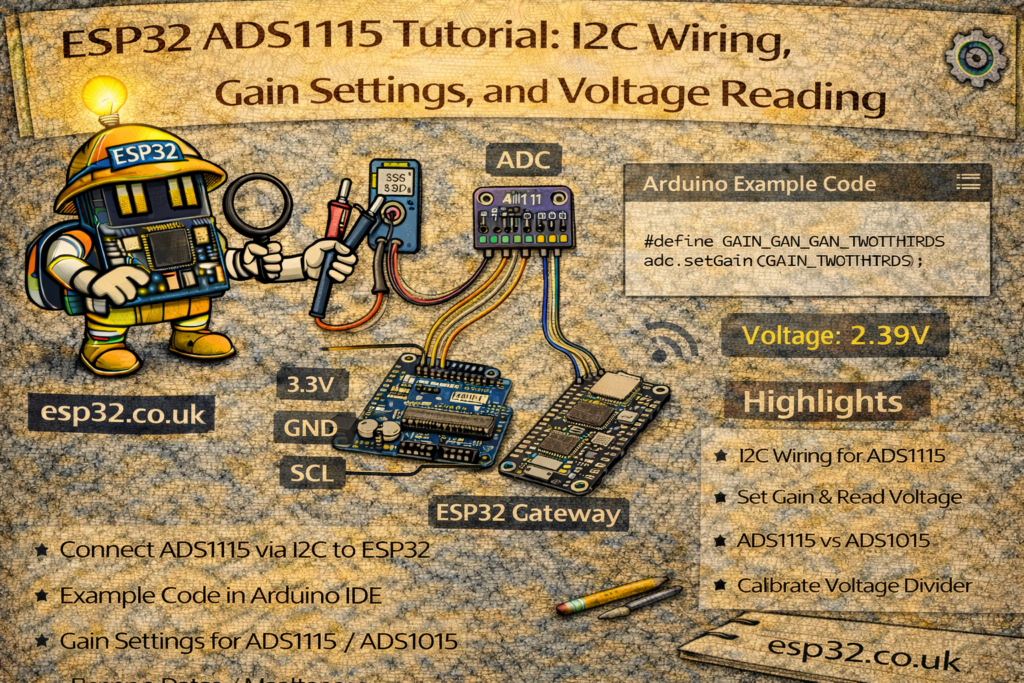
This guide shows how to wire an ADS1115AliExpress price to an ESP32AliExpress price, choose the right gain, and understand the Adafruit ADS1X15 example so you get accurate voltage readings.
The ADS1115AliExpress price (16-bit) and ADS1015 (12-bit) are very popular external ADC chips. They talk over I²C, give you 4 analog inputs, and include a programmable gain amplifier (PGA) so you can measure both tiny and relatively high voltages very accurately.
They’re ideal when:
- The ESP32AliExpress price’s internal ADC noise / non-linearity annoys you
- You need more channels (4 extra inputs)
- You want stable, repeatable readings for sensors, battery monitoring, shunt resistors, etc.
In this tutorial we’ll:
- Explain what the ADS1115AliExpress price / ADS1015 actually do
- Show how to wire them to an ESP32
- Explain the gain settings
- Go line-by-line through the Adafruit example you posted
- Give a cleaned-up ESP32 + ADS1115 example you can reuse in your projects
1. ADS1115 vs ADS1015 – what’s the difference?
Both chips are almost identical; the difference is resolution and speed:
- ADS1015
- 12-bit resolution
- Up to ~3300 samples per second
- ADS1115
- 16-bit resolution (much finer steps)
- Up to ~860 samples per second
Common features:
- 4 analog inputs: AIN0, AIN1, AIN2, AIN3
- Single-ended (measure each vs GND) or differential
- Programmable gain (different voltage ranges)
- I²C interface, typical default address 0x48
- Supply: ~2.0–5.5 V
For most ESP32 sensor projects, ADS1115 is the nicer choice because of the higher resolution. The Adafruit library supports both with the same API.
2. Hardware wiring – ADS1115 / ADS1015 to ESP32
Assume a typical breakout board (Adafruit clone style):
Power & I²C:
VDD→ 3.3 V from ESP32GND→ ESP32 GNDSCL→ ESP32 I²C SCL (e.g. GPIO 22 on many devkits)SDA→ ESP32 I²C SDA (e.g. GPIO 21 on many devkits)ADDR:- To GND → address 0x48 (default)
- To VDD → 0x49
- To SDA → 0x4A
- To SCL → 0x4B
ALERT→ optional (interrupt output for threshold/comparator mode)
Analog inputs:
AIN0–AIN3→ your sensor signals- All signals should be between GND and VDD
- For voltages above VDD, you must use a voltage divider
Example minimal test wiring:
- Potentiometer:
- One side → 3.3 V
- Other side → GND
- Wiper → AIN0
- AIN1–3 can be left unconnected for testing, or tied to GND / 3.3V via resistors.
3. Installing the Adafruit ADS1X15 library
In the Arduino IDE:
- Go to Tools → Manage Libraries…
- Search for
Adafruit ADS1X15 - Install “Adafruit ADS1X15” (by Adafruit)
Then at the top of your sketch:
#include <Wire.h>
#include <Adafruit_ADS1X15.h>
And create either:
Adafruit_ADS1015 ads;   // 12-bit
// or
Adafruit_ADS1115 ads;   // 16-bit
4. Gain settings – what do they actually do?
Inside the ADS1115/ADS1015 is a programmable gain amplifier (PGA). It selects the full-scale voltage range of the ADC:
// ads.setGain(GAIN_TWOTHIRDS);  // +/- 6.144 V
// ads.setGain(GAIN_ONE);        // +/- 4.096 V
// ads.setGain(GAIN_TWO);        // +/- 2.048 V
// ads.setGain(GAIN_FOUR);       // +/- 1.024 V
// ads.setGain(GAIN_EIGHT);      // +/- 0.512 V
// ads.setGain(GAIN_SIXTEEN);    // +/- 0.256 V
Important:
- These are input ranges of the ADC, not “allowed” input voltages.
- The real maximum you must respect is VDD + 0.3 V (and not below GND −0.3 V).
- If VDD = 3.3 V, you should never exceed ~3.6 V on any AIN pin.
So the 6.144 V range setting is still fine when powered at 3.3 V – it just assumes your input is within ±6.144 V and scales accordingly, but you must clamp it with a voltage divider if needed.
Practical choices (ESP32 @ 3.3 V):
- For sensors that output 0–3.3 V
→ useGAIN_ONE(±4.096 V), or keep the defaultGAIN_TWOTHIRDS(±6.144 V). - For small signals (0–200 mV across a shunt resistor, etc.)
→ useGAIN_SIXTEEN(±0.256 V) for maximum resolution.
If you don’t call setGain(), the Adafruit library defaults to GAIN_TWOTHIRDS.
5. The Adafruit example – explained line by line
Here’s your example:
#include <Adafruit_ADS1X15.h>

//Adafruit_ADS1115 ads;  /* Use this for the 16-bit version */
Adafruit_ADS1015 ads;     /* Use this for the 12-bit version */

void setup(void)
{
  Serial.begin(9600);
  Serial.println("Hello!");

  Serial.println("Getting single-ended readings from AIN0..3");
  Serial.println("ADC Range: +/- 6.144V (1 bit = 3mV/ADS1015, 0.1875mV/ADS1115)");

  // The ADC input range (or gain) can be changed via the following
  // functions, but be careful never to exceed VDD +0.3V max, or to
  // exceed the upper and lower limits if you adjust the input range!
  //                                                                ADS1015  ADS1115
  //                                                                -------  -------
  // ads.setGain(GAIN_TWOTHIRDS);  // 2/3x gain +/- 6.144V  1 bit = 3mV      0.1875mV (default)
  // ads.setGain(GAIN_ONE);        // 1x gain   +/- 4.096V  1 bit = 2mV      0.125mV
  // ads.setGain(GAIN_TWO);        // 2x gain   +/- 2.048V  1 bit = 1mV      0.0625mV
  // ads.setGain(GAIN_FOUR);       // 4x gain   +/- 1.024V  1 bit = 0.5mV    0.03125mV
  // ads.setGain(GAIN_EIGHT);      // 8x gain   +/- 0.512V  1 bit = 0.25mV   0.015625mV
  // ads.setGain(GAIN_SIXTEEN);    // 16x gain  +/- 0.256V  1 bit = 0.125mV  0.0078125mV

  if (!ads.begin()) {
    Serial.println("Failed to initialize ADS.");
    while (1);
  }
}

void loop(void)
{
  int16_t adc0, adc1, adc2, adc3;
  float volts0, volts1, volts2, volts3;

  adc0 = ads.readADC_SingleEnded(0);
  adc1 = ads.readADC_SingleEnded(1);
  adc2 = ads.readADC_SingleEnded(2);
  adc3 = ads.readADC_SingleEnded(3);

  volts0 = ads.computeVolts(adc0);
  volts1 = ads.computeVolts(adc1);
  volts2 = ads.computeVolts(adc2);
  volts3 = ads.computeVolts(adc3);

  Serial.println("-----------------------------------------------------------");
  Serial.print("AIN0: "); Serial.print(adc0); Serial.print("  "); Serial.print(volts0); Serial.println("V");
  Serial.print("AIN1: "); Serial.print(adc1); Serial.print("  "); Serial.print(volts1); Serial.println("V");
  Serial.print("AIN2: "); Serial.print(adc2); Serial.print("  "); Serial.print(volts2); Serial.println("V");
  Serial.print("AIN3: "); Serial.print(adc3); Serial.print("  "); Serial.print(volts3); Serial.println("V");

  delay(1000);
}
5.1 Choosing your chip
//Adafruit_ADS1115 ads;  /* Use this for the 16-bit version */
Adafruit_ADS1015 ads;     /* Use this for the 12-bit version */
- Comment out one, enable the other depending on what you soldered:
- ADS1115 → uncomment
Adafruit_ADS1115 ads; - ADS1015 → leave as is
- ADS1115 → uncomment
5.2 Setup – Serial and basic info
Serial.begin(9600);
Serial.println("Hello!");

Serial.println("Getting single-ended readings from AIN0..3");
Serial.println("ADC Range: +/- 6.144V (1 bit = 3mV/ADS1015, 0.1875mV/ADS1115)");
- Starts serial at 9600 baud, prints some status messages so you know everything is alive.
- The full-scale range shown here is the default for
GAIN_TWOTHIRDS.
5.3 Gain comments
The big comment block simply documents each gain option:
- What range you get (±X V)
- What voltage per bit you get, for:
- ADS1015 (12-bit)
- ADS1115 (16-bit)
If you uncomment one of those setGain() calls, the chip will use that new range.
5.4 Initializing the chip
if (!ads.begin()) {
  Serial.println("Failed to initialize ADS.");
  while (1);
}
ads.begin()talks to the chip over I²C (default address0x48).- If it fails, it prints an error and stops.
- If it succeeds, the ADS is ready to sample.
On ESP32, if you are using custom I²C pins, you should call Wire.begin(SDA, SCL) before ads.begin().
5.5 Reading all four channels
int16_t adc0, adc1, adc2, adc3;

adc0 = ads.readADC_SingleEnded(0);
adc1 = ads.readADC_SingleEnded(1);
adc2 = ads.readADC_SingleEnded(2);
adc3 = ads.readADC_SingleEnded(3);
- Each call:
- Configures the ADC to measure one single-ended channel
- Waits for the conversion
- Returns a signed 16-bit raw value
For single-ended measurements within range:
- Values will generally be non-negative when input ≥ 0 V
- If the input somehow goes slightly below 0 V (not recommended) you can get negative values.
5.6 Converting to volts
volts0 = ads.computeVolts(adc0);
...
computeVolts()takes:- The raw ADC value
- The current gain setting
- Knows if you’re using ADS1015 or ADS1115
And returns a floating-point voltage in volts.
No need to manually calculate scale factors; just set the correct gain and call computeVolts().
5.7 Printing the results
Serial.println("-----------------------------------------------------------");
Serial.print("AIN0: "); Serial.print(adc0); Serial.print("  "); Serial.print(volts0); Serial.println("V");
...
delay(1000);
- You get one line per channel: raw counts + volts.
delay(1000)means one reading per second.
You can change the delay to whatever you want (100 ms, 10 s, etc.).
6. ESP32-friendly ADS1115 example (ready to use)
Here’s a version specifically tuned for ESP32 + ADS1115 @ GAIN_ONE (0–4.096 V).
You can paste this directly into Arduino IDE:
#include <Wire.h>
#include <Adafruit_ADS1X15.h>

Adafruit_ADS1115 ads;  // Use ADS1115 (16-bit)

void setup() {
  Serial.begin(115200);
  delay(1000);

  Serial.println();
  Serial.println("ESP32 + ADS1115 single-ended example");

  // Use ESP32 hardware I2C pins (change to match your board)
  // Commonly: SDA = 21, SCL = 22 on classic devkits
  Wire.begin(21, 22);

  // Set gain so full-scale range is +/-4.096V (good for 0-3.3V sensors)
  ads.setGain(GAIN_ONE);

  if (!ads.begin(0x48)) {   // 0x48 is the default I2C address
    Serial.println("Failed to find ADS1115 at 0x48. Check wiring and address!");
    while (1) {
      delay(1000);
    }
  }

  Serial.println("ADS1115 initialized.");
  Serial.println("Using GAIN_ONE (+/- 4.096 V).");
}

void loop() {
  int16_t adc0 = ads.readADC_SingleEnded(0);
  int16_t adc1 = ads.readADC_SingleEnded(1);
  int16_t adc2 = ads.readADC_SingleEnded(2);
  int16_t adc3 = ads.readADC_SingleEnded(3);

  float v0 = ads.computeVolts(adc0);
  float v1 = ads.computeVolts(adc1);
  float v2 = ads.computeVolts(adc2);
  float v3 = ads.computeVolts(adc3);

  Serial.println("-------------------------------------------------");
  Serial.printf("AIN0: %6d  %.4f Vn", adc0, v0);
  Serial.printf("AIN1: %6d  %.4f Vn", adc1, v1);
  Serial.printf("AIN2: %6d  %.4f Vn", adc2, v2);
  Serial.printf("AIN3: %6d  %.4f Vn", adc3, v3);

  delay(1000);
}
You can adapt:
- The I²C pins in
Wire.begin(…) - The gain in
ads.setGain(...) - The I²C address in
ads.begin(0x48)if you changedADDR.
7. Typical use cases
A few project ideas you can mention at the end of the article:
- Battery monitor
- Voltage divider into one channel for 0–12 V or 0–24 V batteries.
- Use ADS1115 for high resolution SOC estimation.
- Current sensing via shunt resistor
- Measure the small voltage across a shunt using GAIN_SIXTEEN.
- Compute current = V / R.
- Multi-sensor node for ESP32 / Home Assistant
- Up to 4 analog sensors with good resolution and stability.
- Temperature, pressure, soil moisture, light sensors, etc.
- Precision knob or sensor reading
- Potentiometer input to ADS1115 for very fine position reading.
8. Troubleshooting checklist
If you see “Failed to initialize ADS.”:
- Check GND is common between ESP32 and ADS board
- Check VDD is actually connected (3.3 V or 5 V)
- Confirm SDA/SCL pins match your
Wire.begin(...)configuration - Confirm ADDR wiring matches the address in
ads.begin(address) - Try scanning I²C with an I²C scanner sketch to see what address the board responds to
If readings look noisy:
- Add a 100 nF capacitor from AINx to GND near the board
- Use shielded/twisted pair for long sensor wires
- Try a higher gain for small signals, or more averaging in software