
A lot of old-school timer setups are too predictable. The same lamp comes on at the same time, stays on for the same length, and switches off the same way every night. That is fine if your goal is only to have a light on, but it is weak if you want the house to look genuinely lived in.
Home Assistant is much better for this because it can combine presence detection, sunset timing, random delays, and different room choices to make the house behave more like normal people actually live there. The Home Assistant community has been using this general idea for years, including “holiday” and “away lighting” automations that randomize both timing and which lights are used.
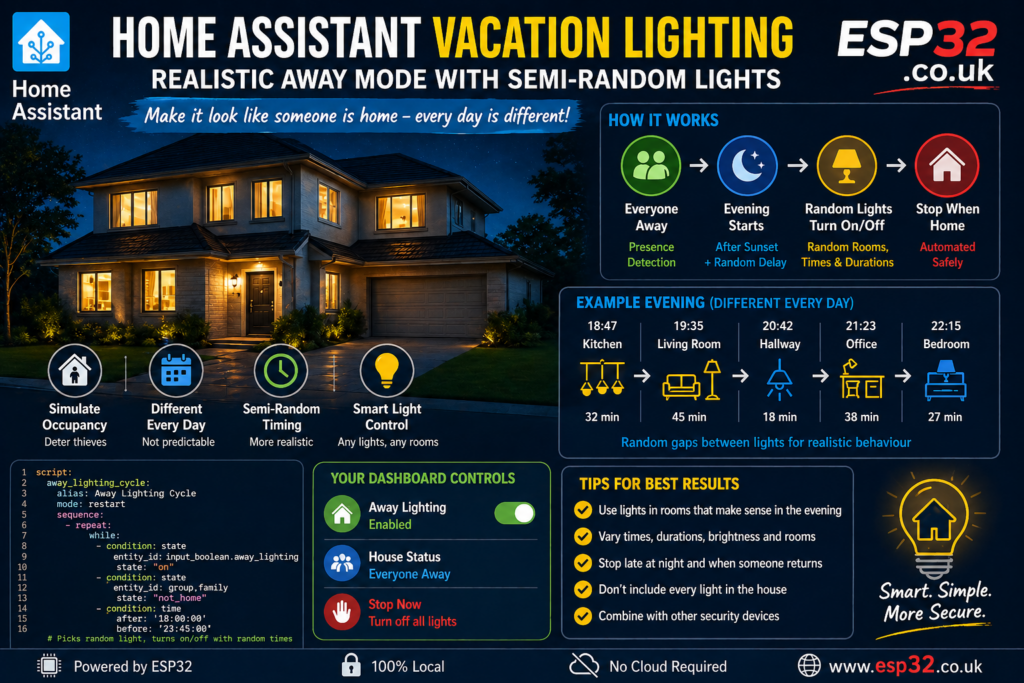
Why fixed timers are not good enough
A normal house does not behave like this:
- hallway lamp on at exactly 19:00 every day
- living room lamp off at exactly 22:30 every day
- exactly the same rooms used every night
That looks scheduled because it is scheduled.
A better setup should do a few things:
- only run when all residents are away
- start around normal evening hours, not in the middle of the day
- choose from sensible rooms only
- vary the start times and durations
- leave some dark gaps between activity
- behave differently every day
That is the difference between “light automation” and something that actually resembles occupancy simulation. Community examples and blueprints for Home Assistant away lighting use this same principle: shuffled room order, random delays, and variable on-times rather than a fixed timer pattern.
The basic idea
Instead of one rigid automation, we create a small system:
- one helper to enable vacation lighting
- one group of lights that are allowed to participate
- one automation to start the sequence when the house is empty and evening begins
- one script that picks a random light, turns it on for a random time, turns it off, waits another random time, then repeats
- one automation to stop everything if someone comes home or the night gets too late
This gives you a pattern that feels human rather than mechanical.
Which lights should be included
Do not include every light in the house.
Use lights that make sense for normal evening activity, such as:
- living room lamps
- dining room lights
- kitchen under-cabinet or main light
- hallway lights
- office lamp
- bedroom bedside lamp occasionally
Avoid unrealistic choices like:
- all lights on at once
- bathroom lights every night for long periods
- garden floodlights cycling strangely
- children’s room lights turning on late every night
- very bright main lights in rooms people usually do not use
The goal is not chaos. The goal is believable occupancy.
Create a helper for Away Lighting
Create an input_boolean helper in Home Assistant called:
input_boolean.away_lighting
This gives you a simple on/off switch from the dashboard.
Example YAML if you prefer to define it manually:
input_boolean:
  away_lighting:
    name: Away Lighting
    icon: mdi:home-lightbulb
Create a light group
Create a group containing only the lights you want to use for occupancy simulation.
Example:
light:
  - platform: group
    name: Away Simulation Lights
    entities:
      - light.living_room_lamp
      - light.dining_room_lamp
      - light.kitchen_light
      - light.hallway_light
      - light.office_lamp
      - light.bedroom_bedside_left
You can also just keep a list of entities inside the script, which is what I’ll do below because it gives better control.
How the automation should behave
A realistic evening usually looks more like this:
- activity starts sometime after sunset
- one or two living areas are used first
- lights stay on for a while, not just two minutes
- there are gaps between room changes
- occasionally a hallway or bedroom lamp appears briefly
- everything winds down later at night
So the automation should not just pick a random light every 30 minutes forever. That becomes weird too.
A better pattern is:
- start within a time window after sunset
- prefer “main evening” rooms most of the time
- occasionally use a secondary light
- randomize on-time and off-time
- stop at a sensible cutoff time
- kill the whole thing immediately if someone returns
Main script: semi-random away lighting
This script loops while:
input_boolean.away_lightingis on- everyone is away
- the time is still within the evening window
It chooses a light from a list, turns it on, waits a random amount of time, turns it off, then waits again before the next cycle.
script:
  away_lighting_cycle:
    alias: Away Lighting Cycle
    mode: restart
    sequence:
      - repeat:
          while:
            - condition: state
              entity_id: input_boolean.away_lighting
              state: "on"
            - condition: state
              entity_id: group.family
              state: "not_home"
            - condition: time
              after: "18:00:00"
              before: "23:45:00"          sequence:
            - variables:
                lights:
                  - light.living_room_lamp
                  - light.dining_room_lamp
                  - light.kitchen_light
                  - light.hallway_light
                  - light.office_lamp
                  - light.bedroom_bedside_left                chosen_light: "{{ lights | random }}"                on_minutes: "{{ range(12, 56) | random }}"
                off_minutes: "{{ range(5, 31) | random }}"                brightness_pct: >
                  {% set levels = [35, 45, 55, 65, 75] %}
                  {{ levels | random }}            - service: light.turn_on
              target:
                entity_id: "{{ chosen_light }}"
              data:
                brightness_pct: "{{ brightness_pct }}"            - delay:
                minutes: "{{ on_minutes }}"            - service: light.turn_off
              target:
                entity_id: "{{ chosen_light }}"            - delay:
                minutes: "{{ off_minutes }}"
This already gives you something much better than a fixed schedule because:
- the chosen light changes
- the brightness changes
- the duration changes
- the spacing between events changes
The Home Assistant community regularly uses this same kind of templated randomness in away-lighting automations, with random delays and random room order to avoid obvious repetition.
Start automation
This automation starts the script only when:
- away lighting is enabled
- everybody is away
- it is evening
Using sunset plus a random delay makes the start time move every day.
automation:
  - alias: Start Away Lighting In The Evening
    mode: single
    triggers:
      - trigger: sun
        event: sunset
        offset: "00:20:00"    conditions:
      - condition: state
        entity_id: input_boolean.away_lighting
        state: "on"
      - condition: state
        entity_id: group.family
        state: "not_home"    actions:
      - delay:
          minutes: "{{ range(0, 61) | random }}"
      - service: script.away_lighting_cycle
So if sunset is 20:10, one day it may start around 20:35, another around 21:02, another around 20:23.
That alone makes it much less obviously scheduled.
Stop automation
This one stops the simulation when:
- someone comes home
- the helper is turned off
- the night gets too late
automation:
  - alias: Stop Away Lighting
    mode: single
    triggers:
      - trigger: state
        entity_id: group.family
        to: "home"
      - trigger: state
        entity_id: input_boolean.away_lighting
        to: "off"
      - trigger: time
        at: "23:45:00"    actions:
      - service: script.turn_off
        target:
          entity_id: script.away_lighting_cycle
      - service: light.turn_off
        target:
          entity_id:
            - light.living_room_lamp
            - light.dining_room_lamp
            - light.kitchen_light
            - light.hallway_light
            - light.office_lamp
            - light.bedroom_bedside_left
Make it feel more human
The basic version works, but you can make it better.
1. Weight the rooms
Real people use some rooms more than others.
So instead of choosing each light equally, you can bias the list by repeating more likely lights:
lights:
  - light.living_room_lamp
  - light.living_room_lamp
  - light.living_room_lamp
  - light.dining_room_lamp
  - light.dining_room_lamp
  - light.kitchen_light
  - light.kitchen_light
  - light.hallway_light
  - light.office_lamp
  - light.bedroom_bedside_left
That makes living room and kitchen more common without needing complex logic.
2. Use different behaviour in early and late evening
Early evening can use brighter shared rooms. Late evening can prefer softer lamps.
You can do this with a template:
chosen_light: >
  {% set early = [
    'light.living_room_lamp',
    'light.dining_room_lamp',
    'light.kitchen_light'
  ] %}
  {% set late = [
    'light.living_room_lamp',
    'light.hallway_light',
    'light.office_lamp',
    'light.bedroom_bedside_left'
  ] %}
  {% if now().hour < 21 %}
    {{ early | random }}
  {% else %}
    {{ late | random }}
  {% endif %}
That feels much more believable than kitchen lights at 23:30 every night.
3. Sometimes use two lights together
People often move between spaces or leave one room lit while using another.
A useful trick is to occasionally turn on a second light for a short overlap:
- variables:
    overlap_enabled: "{{ [true, false, false] | random }}"
    second_light: >
      {% set others = lights | reject('equalto', chosen_light) | list %}
      {{ others | random }}- choose:
    - conditions:
        - condition: template
          value_template: "{{ overlap_enabled }}"
      sequence:
        - delay:
            minutes: "{{ range(3, 12) | random }}"
        - service: light.turn_on
          target:
            entity_id: "{{ second_light }}"
          data:
            brightness_pct: "{{ [30,40,50,60] | random }}"
Do not overdo this. Sometimes is human. Constant overlap is not.
4. Skip some evenings entirely
A fully “active” house every single night can also look fake.
You can randomly skip a night or start later on some days:
conditions:
  - condition: template
    value_template: "{{ [true, true, true, false] | random }}"
That gives you a 75 percent chance of running on a given evening.
Best practical version
The best real-world setup is usually:
- a helper to enable it only when needed
- a family presence group
- a weighted set of sensible lights
- sunset-based start with random delay
- variable on/off times
- different room choices earlier vs later
- hard stop late at night
- immediate stop when somebody returns
That gives you a house that looks inhabited, but not robotically predictable.
A more advanced idea: use your real history
If you want the truly clever version, Home Assistant can also simulate occupancy by replaying patterns closer to your real home behaviour rather than inventing a random one from scratch. The community has explored this idea for a long time, including occupancy simulators and away-lighting tools meant to mimic real usage instead of obvious timers.
That is more advanced, but even the simpler approach in this article is already much better than a fixed timer plug.
Safety and common-sense rules
A few things matter here:
- only use lights that are safe to leave automated
- avoid devices that generate heat unnecessarily
- do not run bright lights all night
- do not make the house look unnaturally active
- combine this with proper door, lock, camera, and alarm security
This is not a replacement for actual home security. It is just one extra layer.
Good dashboard controls
Make a simple dashboard card with:
Away Lightingtogglegroup.familypresence status- current active away-mode lights
- a manual emergency off button
That way you can enable it quickly before a trip and disable it instantly if needed.
Final thoughts
The best anti-theft lighting is not “random chaos” and it is not “same timer every day.” It sits in the middle.
You want the house to behave like people live there:
- mostly evening activity
- mostly sensible rooms
- some variation in brightness
- some variation in timing
- different pattern every day
That is exactly the sort of thing Home Assistant is good at.