
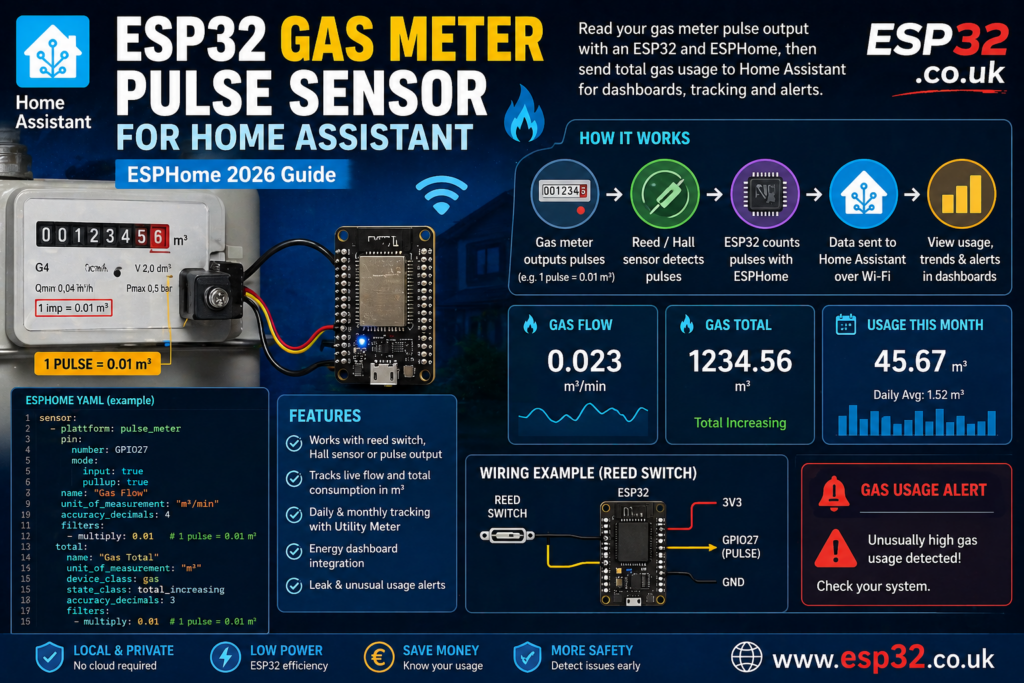
Gas is one of the cleanest Home Assistant utility projects because it gives you something genuinely useful without needing cloud services or a paid device ecosystem. Home Assistant supports gas tracking directly in its energy tools, and ESPHome’s pulse_meter component is a good fit for slow pulse sources such as domestic gas meters because it measures time between pulses instead of only counting inside fixed intervals.
Why this project is worth doing
A simple gas pulse reader can give you:
- total gas consumption in m³
- daily, monthly, and yearly usage tracking
- billing-friendly history with Utility Meter
- abnormal usage alerts
- a fully local setup with no cloud dependency
Home Assistant’s gas documentation is built around the idea of feeding it a cumulative gas consumption sensor, while utility_meter is the official way to turn that lifetime total into daily and monthly helper entities.
Which gas meters this works with
This project works best with gas meters that provide a pulse output or that have a moving magnetic target which can be read externally using a reed switchAliExpress price or Hall sensorAliExpress price. In practice, many domestic gas meters expose one pulse for a fixed gas volume, commonly something like 0.01 m³ per pulse or 0.1 m³ per pulse. The exact value depends on the meter, so you need to check the meter label or documentation before doing any conversion math. That pulse-to-volume factor is the whole project.
If your gas meterAliExpress price has no usable pulse output and no simple magnetic trigger point, this exact approach is not the right one. Then you are in “camera or custom reader” territory, which is much less elegant. The good version of this project is when the meter already gives you a clean event per known gas volume.
What you need
- an ESP32 development board
- a pulse source from the gas meter
- either a reed switch, Hall sensor, or dry-contact output
- jumper wires
- optional enclosure
- Home Assistant
- ESPHome
The most important thing you need to know is the meter constant, for example:
- 1 pulse = 0.01 m³
- 1 pulse = 0.1 m³
- 10 pulses = 1 m³
Everything else is just wiring and scaling. Home Assistant expects gas usage sensors in valid gas units such as m³, and ESPHome’s pulse_meter gives you both a live pulse-rate sensor and a cumulative total pulse count that you can convert to those units.
Sensor choice
Reed switch
A reed switch is usually the simplest option when the meter has a magnetic target or provides a dry-contact type pulse.
Pros:
- simple
- cheap
- easy to wire
Cons:
- can bounce if filtering is poor
Hall effect sensor
A Hall sensor is often cleaner than a reed switch when there is a magnetic target on the meter.
Pros:
- no mechanical contacts
- can give a more stable digital signal
Cons:
- some cheap modules are designed around 5V logic and need checking before connecting to an ESP32
Direct pulse output
If the gas meter already gives you a clean pulse output, that is usually the best case.
Pros:
- least guesswork
- no magnetic alignment games
Cons:
- depends entirely on what the meter exposes
Whichever option you use, ESPHome’s pulse_meter is still the useful bit because it handles pulse frequency and cumulative counts on a GPIO input.
Wiring
The wiring depends on the sensor type, but the typical simple case is:
- one side of the pulse contact to GND
- the other side to an ESP32 GPIO
- enable the internal pull-up on that GPIO
That way the input sits high normally and goes low when the pulse contact closes. For active Hall modules, wiring is usually 3.3V, GND, and signal to a GPIO, but you must make sure the output voltage is safe for the ESP32. Do not casually feed 5V logic into ESP32 pins.
For the examples below, I’ll assume the pulse input is on GPIO27.
How the pulse math works
pulse_meter reports pulses per minute by default, and its total sensor gives you the accumulated pulse count. For gas, the total sensor is the important one because Home Assistant’s gas dashboard wants total gas consumption, not just momentary pulses.
The math is simple:
- gas flow in m³/min = pulses per minute × m³ per pulse
- total gas in m³ = total pulses × m³ per pulse
Example:
- if 1 pulse = 0.01 m³
- then 10 pulses = 0.1 m³
- and 100 pulses = 1 m³
That is why the meter constant matters so much. Get that wrong and every graph after that is fiction.
ESPHome YAML example for 1 pulse = 0.01 m³
This example assumes:
- your gas meter gives 1 pulse per 0.01 m³
- the pulse input is on GPIO27
- you want a live gas flow sensor and a total gas sensor for Home Assistant
esphome:
  name: esp32-gas-meter
  friendly_name: ESP32 Gas Meteresp32:
  board: esp32dev
  framework:
    type: arduinologger:api:ota:wifi:
  ssid: !secret wifi_ssid
  password: !secret wifi_passwordsensor:
  - platform: pulse_meter
    pin:
      number: GPIO27
      mode:
        input: true
        pullup: true
    name: "Gas Flow"
    id: gas_flow
    unit_of_measurement: "m³/min"
    state_class: measurement
    accuracy_decimals: 4    internal_filter: 20ms
    internal_filter_mode: EDGE
    timeout: 30s    # pulse_meter is pulses/min by default
    # 1 pulse = 0.01 m³
    filters:
      - multiply: 0.01    total:
      name: "Gas Total"
      id: gas_total
      unit_of_measurement: "m³"
      device_class: gas
      state_class: total_increasing
      accuracy_decimals: 3      # total is raw pulse count
      # 1 pulse = 0.01 m³
      filters:
        - multiply: 0.01
ESPHome documents that pulse_meter supports internal_filter, timeout, and a total section for accumulated pulse counts, while Home Assistant’s gas docs require a cumulative gas consumption sensor in supported gas units such as m³.
If your meter is 1 pulse = 0.1 m³
Use:
filters:
  - multiply: 0.1
and inside total:
filters:
  - multiply: 0.1
Because each pulse already represents a tenth of a cubic meter. Same logic, different constant.
Tuning the debounce filter
This is where most DIY pulse projects either become stable or become annoying.
ESPHome’s internal_filter discards pulses shorter than the configured time, and it supports different filter modes. That is useful for rejecting switch bounce or noise. The default is tiny, so for real-world meters you will usually want something more conservative.
A sensible starting point is:
20msfor a reasonably clean pulse input- higher if you are seeing duplicate counts
- lower only if you are certain you are missing real pulses
If your total climbs faster than the physical meter, you are usually counting phantom pulses. That is not “interesting signal behaviour.” It is just bad filtering or bad wiring.
Adding it to Home Assistant
Once the ESPHome node is online:
- check that Gas Total only moves upward
- let Home Assistant gather statistics
- add the Gas Total sensor to the gas section of the Energy dashboard
Home Assistant’s gas documentation says it can track gas consumption directly when you provide the amount of gas being consumed, and the Energy FAQ explains that if an entity does not appear, the first things to check are its device_class, state_class, unit, and whether statistics are being generated without errors.
A note about units and sensor class
For gas, Home Assistant expects a total consumption sensor in a supported gas unit such as m³. The safest practical setup for this kind of article is:
- total sensor in m³
device_class: gasstate_class: total_increasing
That combination is aligned with how Home Assistant documents gas usage and how its Energy system filters acceptable entities.
Daily and monthly tracking with Utility Meter
The Energy dashboard is useful, but you will usually also want cleaner daily and monthly counters for billing checks and dashboards. That is exactly what utility_meter is for. It can track daily, monthly, yearly, and tariff-based cycles from a source sensor.
Add this to configuration.yaml:
utility_meter:
  gas_daily:
    source: sensor.gas_total
    cycle: daily
    periodically_resetting: false  gas_monthly:
    source: sensor.gas_total
    cycle: monthly
    periodically_resetting: false  gas_yearly:
    source: sensor.gas_total
    cycle: yearly
    periodically_resetting: false
Replace sensor.gas_total with the actual entity ID from your ESPHome node. Home Assistant’s docs note that if your source is a domestic utility total that does not normally reset, periodically_resetting should be disabled.
Calibrating the total to match the real meter
ESPHome supports pulse_meter.set_total_pulses, which lets you set the raw accumulated pulse count directly. The important detail from the docs is that this action uses raw pulses, not the converted engineering value shown on your Home Assistant sensor.
Example with 1 pulse = 0.01 m³:
- physical meter reads 1234.56 m³
- raw pulse count =
1234.56 / 0.01 - raw pulse count = 123456 pulses
Optional API action:
api:
  actions:
    - action: set_gas_total
      variables:
        new_total: int
      then:
        - pulse_meter.set_total_pulses:
            id: gas_flow
            value: !lambda "return new_total;"
That is useful after first install, after testing, or whenever you want the ESPHome total to line up exactly with the physical gas meter again.
Useful automations
Gas usually changes more slowly than electricity or water, so the useful automations are more about pattern detection than instant drama.
Unexpected daytime gas usage
Good for spotting background heating demand when you think the system should be idle.
automation:
  - alias: Gas usage unexpected during daytime
    triggers:
      - trigger: numeric_state
        entity_id: sensor.gas_flow
        above: 0.01
        for: "00:20:00"
    conditions:
      - condition: time
        after: "10:00:00"
        before: "16:00:00"
    actions:
      - action: notify.mobile_app_your_phone
        data:
          title: "Unexpected gas usage"
          message: "Gas flow has been present for 20 minutes during the day."
Away-from-home gas activity alert
automation:
  - alias: Gas usage while away
    triggers:
      - trigger: numeric_state
        entity_id: sensor.gas_flow
        above: 0.01
        for: "00:10:00"
    conditions:
      - condition: state
        entity_id: person.your_name
        state: "not_home"
    actions:
      - action: notify.mobile_app_your_phone
        data:
          title: "Gas usage while away"
          message: "Gas consumption was detected while nobody is home."
These are not a substitute for proper gas safety devices. They are just useful monitoring logic layered on top of consumption data.
Common problems
The total never changes
Usually one of these:
- wrong GPIO
- wrong pulse constant assumption
- sensor not aligned with the magnetic target
- wrong pull-up logic
- sensor output not compatible with the ESP32 input
The total changes too fast
Usually:
- switch bounce
- electrical noise
internal_filtertoo low- bad wiring
- wishful thinking about what one pulse represents
The sensor does not appear in Energy
Check:
- total sensor is a
sensor - unit is a supported gas unit such as
m³ device_classandstate_classare correct- there are no statistics errors
That is straight from Home Assistant’s Energy guidance.
My daily values look right but the lifetime total is off
That usually means you started from zero instead of calibrating to the real gas meter, or you missed a few pulses early on due to bad alignment. The fix is usually calibration plus better physical mounting.
Good dashboard ideas
Once the setup works, add:
- a monthly gas tile
- a daily gas history graph
- a comparison card for this month vs last month
- heating season trend views
- a combined utility dashboard with electricity, water, and gas
Home Assistant’s overall energy system is designed to let you track electricity, gas, and water together, so this article also fits neatly beside the water and electricity meter projects.
Final thoughts
This is one of those projects that looks boring until you actually have it. Then it becomes useful all the time. A simple ESP32 pulse reader turns a dumb gas meter into a proper Home Assistant data source with long-term statistics, daily and monthly summaries, and alerts when usage patterns look wrong. That is a lot of value for a very small amount of hardware, assuming you get the pulse constant and filtering right.