
The TCA9548AAliExpress price is an eight-channel I²C switch that lets an ESP32AliExpress price communicate with up to eight separate SDA/SCL branches. Its best-known application is using several sensors that share a fixed I²C address, but the breakout also solves a more subtle problem: isolating a troublesome I²C segment while keeping the upstream controller connected. This guide is a board-level pinout and configuration reference for the TCA9548AAliExpress price, with verified address pads, a functional schematic, an ESP32 wiring diagram, and short Arduino examples using the standard Wire library.
Quick answer: power a typical breakout from ESP32 3V3, connect upstream SDA to GPIO21 and SCL to GPIO22 on a classic ESP32 DevKit, and wire each same-address sensor to a different downstream SDn/SCn pair. The multiplexer defaults to address 0x70; solder bridges A0, A1 and A2 on applicable breakout boards select 0x71–0x77. Choose channel n by writing 1 << n to 0x70.
What is the TCA9548A, and what does it actually switch?
Texas Instruments calls the TCA9548A a low-voltage, bidirectional, eight-channel I²C/SMBus switch with reset. It is not an eight-port independent I²C controller, an I²C address translator, a sensor power switch or a galvanic isolator. All selected branches share the same upstream bus transactions; the chip simply connects or disconnects the downstream SDA/SCL pairs through pass gates.
| Specification | Meaning on an ESP32 project |
|---|---|
| Channel count | Eight: channel 0 through 7, each with an SDA and SCL pair |
| Multiplexer I²C address | 0x70 by default; 0x70–0x77 via A0/A1/A2 |
| Channel selection | One control byte, with one bit per channel; 0x00 deselects all |
| Multiple channels | Permitted, but enabling same-address devices together recreates the collision |
| RESET pin | Active LOW; clears selected channels and resets switch I²C state machine |
| Supply range — IC | 1.65–5.5 V for the TI silicon; check the particular breakout Vin rating |
| I²C speed | Standard/Fast mode, up to 400 kHz subject to wiring and downstream devices |
| Power to sensors | Not switched: downstream sensors still require their own correct power and GND |
| Logic levels | Passive pass-gate architecture can support level translation with correctly chosen supply/pull-ups |
After power-up or an asserted reset, the chip starts with all eight downstream channels disabled. That is why an I²C scanner on the upstream pins may initially find the multiplexer at 0x70 but no sensor behind it. The sensor does not disappear: its SDA/SCL pair is merely disconnected until you choose its channel.
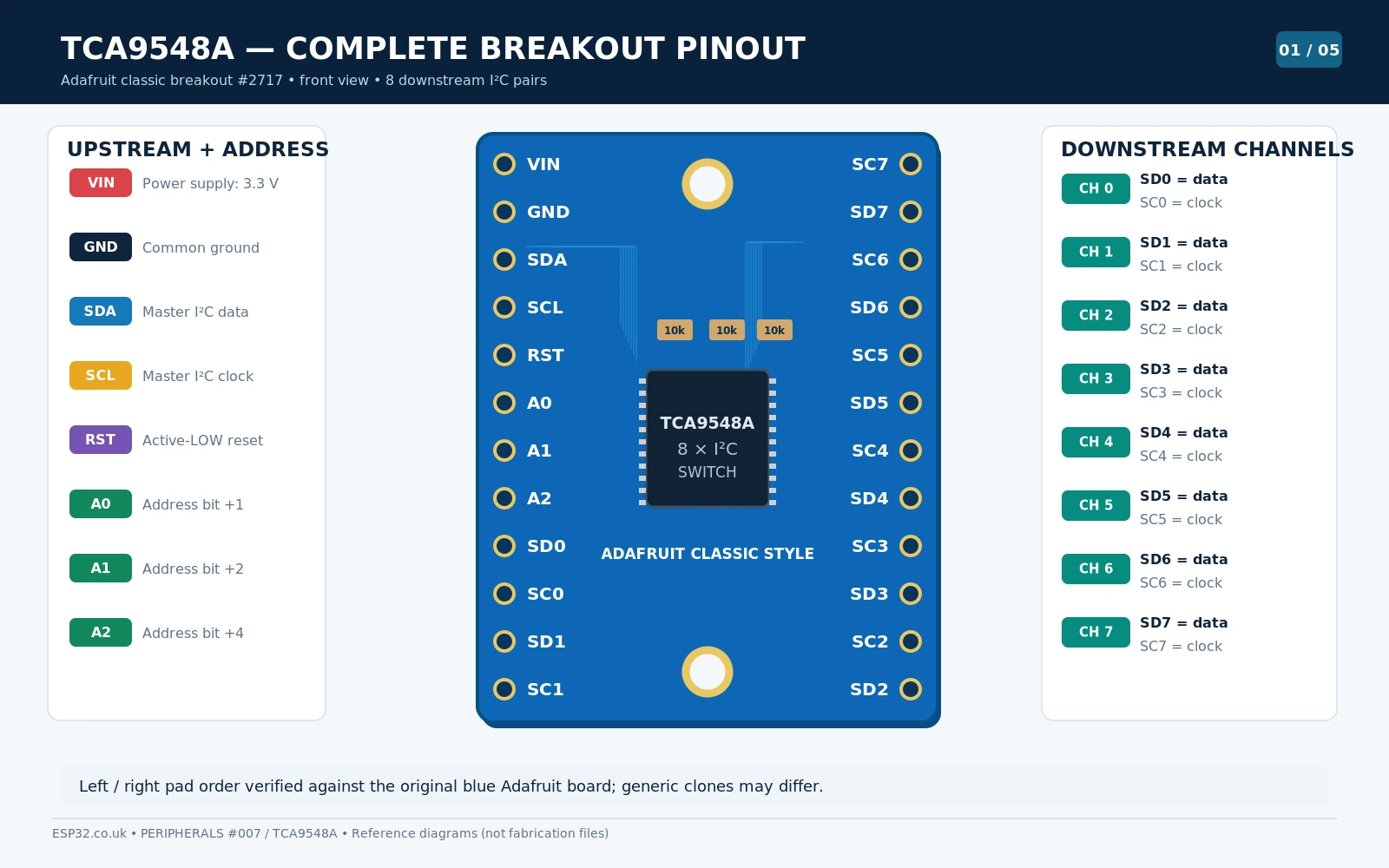
TCA9548A breakout pinout: upstream and eight downstream buses
| Board label | Electrical function | Where to connect |
|---|---|---|
VIN / VCC | Power supply to the breakout | ESP32 3V3 in this tutorial |
GND | Power and signal reference | ESP32 GND; shared with sensors |
SDA | Upstream bidirectional I²C data | ESP32 GPIO21 example |
SCL | Upstream I²C clock | ESP32 GPIO22 example |
RST / RESET | Active-low hardware reset | Leave pulled high by breakout; optional ESP32 control |
A0, A1, A2 | Hardware address bits | Normally LOW; bridge/jumper to VIN for other mux addresses |
SD0 / SC0 | Channel 0 data / clock | First downstream I²C device |
SD1 / SC1 | Channel 1 data / clock | Second downstream I²C device |
SD2…SD7 / SC2…SC7 | Remaining six independently switchable I²C pairs | Additional devices or branches |
The first letter of the downstream markings matters: SDn is data (SDA), SCn is clock (SCL). On other manufacturers’ boards you may instead see SDA0/SCL0 through SDA7/SCL7. One pair belongs to each channel; never combine SD0 with SC1. The multiplexer does not provide separate VIN/GND power terminals for every pair on most simple breakout boards, so share the correct supply and ground separately.
Adafruit’s classic TCA9548A breakout exposes the upstream VIN/GND/SDA/SCL/RST, address inputs and eight downstream pairs on header pads. Do not confuse it with the newer PCA9548 STEMMA QT board, which can look quite different. Use the exact version and PCB revision for the board drawings rather than blindly copying a photograph of another vendor’s module.
I²C address jumpers A0, A1, A2: which pads do you solder?
On the Adafruit TCA9548A breakout there are three normally-open solder jumpers on the rear, marked A0, A1 and A2. All open means LOW/LOW/LOW and address 0x70. Bridging an address jumper ties that bit HIGH and adds its weight to 0x70: A0 adds 1, A1 adds 2 and A2 adds 4. The following table is the complete 7-bit address map:
| A2 pad | A1 pad | A0 pad | 7-bit mux address |
|---|---|---|---|
| Open | Open | Open | 0x70 |
| Open | Open | Bridged | 0x71 |
| Open | Bridged | Open | 0x72 |
| Open | Bridged | Bridged | 0x73 |
| Bridged | Open | Open | 0x74 |
| Bridged | Open | Bridged | 0x75 |
| Bridged | Bridged | Open | 0x76 |
| Bridged | Bridged | Bridged | 0x77 |
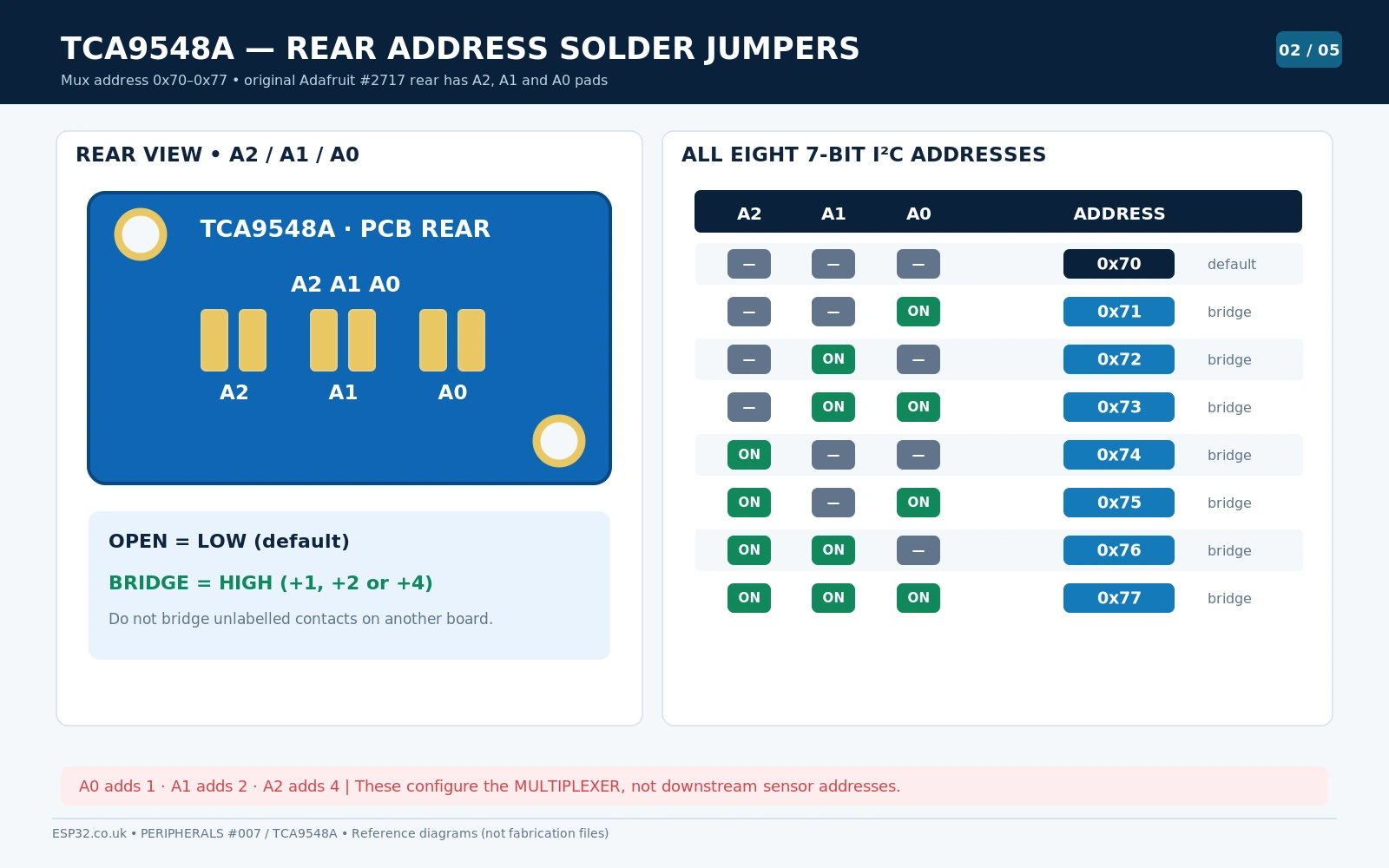
Before soldering, disconnect USB and external power. A small solder bridge between the two halves of the correct labelled pad is sufficient; a bridge to an adjacent trace may damage the module. Other brands expose removable address jumpers or simple solder islands in different positions. If in doubt, inspect the PCB marking and continuity rather than guessing from an unrelated photograph.
Important distinction: when two BME280 modules both use 0x77, leave their addresses alone. They can remain identical because each sits on a different downstream channel. There is no need to change the mux from 0x70 unless you use multiple multiplexers or 0x70 conflicts with another upstream device.
Functional schematic: pull-up resistors, RESET and voltage domains
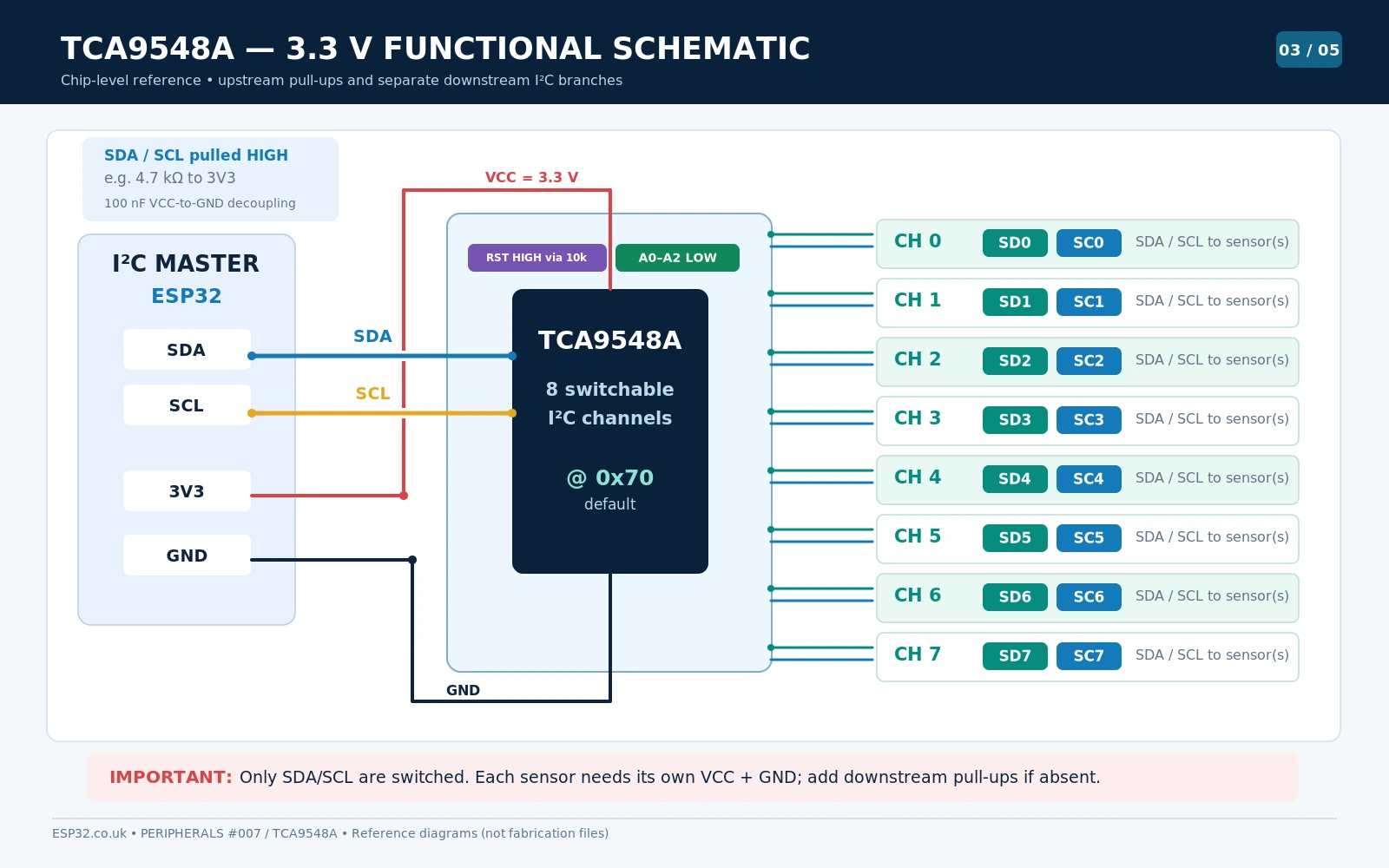
A basic circuit has VCC at 3.3 V, its ground connected to the ESP32 and all sensors, RESET pulled high, A0/A1/A2 tied low for 0x70, and a suitable decoupling capacitor near the IC supply. Upstream SDA/SCL need pull-up resistors to the host logic voltage. Each downstream branch also needs appropriate pull-ups, which are often already fitted on the attached sensor module.
The Adafruit original breakout documentation explicitly notes that the downstream SDn/SCn lines do not have pull-up resistors installed on that board. If the downstream sensor has no pull-ups, add suitable ones to the correct downstream rail. At 3.3 V, 4.7 kΩ is a common starting value for short, lightly loaded wiring, but the final resistance depends on bus capacitance, chosen clock speed and the combined pull-ups of every connected board.
Can the TCA9548A connect 5 V sensors to a 3.3 V ESP32?
The TI device has a pass-gate architecture that can support differently pulled-up bus voltages with appropriate supply and Vpass design. However, that is not permission to expose an ESP32 pin directly to 5 V. Keep the upstream ESP32 bus pulled to 3.3 V, account for the multiplexer’s VCC/threshold requirements and the selected channel pull-ups, and make sure every sensor’s VCC and signal limits are respected. For a first build, keep both upstream and downstream sensors at 3.3 V.
Does RESET reboot my sensors?
No. Driving RST LOW resets the switch, disables all downstream channels and restores its I²C control logic. It does not remove power from or reset the sensors connected to SDn/SCn. Leave RESET unconnected if your breakout already pulls it high. If you connect it to an ESP32 GPIO, drive the pin HIGH during normal operation and briefly LOW only when you intentionally want to reset the mux. A generic board without a pull-up must have RESET held at a defined HIGH level.
ESP32 wiring: two BME280 sensors with the same address
Here is a practical arrangement with two 3.3 V BME280 sensor boards, each fixed or configured to address 0x77. The ESP32 uses one I²C controller and the multiplexer selects which BME280 receives each transaction. These GPIOs are typical for a classic ESP32-WROOM DevKit; change them for ESP32-C3/S3/C6 and other boards as needed.
| ESP32 / supply | TCA9548A | Function |
|---|---|---|
| 3V3 | VIN or VCC | 3.3 V mux supply |
| GND | GND | Shared ground |
| GPIO21 | Upstream SDA | I²C master data |
| GPIO22 | Upstream SCL | I²C master clock |
| — | RST | Leave HIGH via on-board pull-up |
| — | A0/A1/A2 | Leave open or LOW for 0x70 |
| Sensor | Connect its SDA to | Connect its SCL to | Power |
|---|---|---|---|
| BME280 #1, address 0x77 | TCA SD0 | TCA SC0 | 3.3 V and shared GND |
| BME280 #2, address 0x77 | TCA SD1 | TCA SC1 | 3.3 V and shared GND |
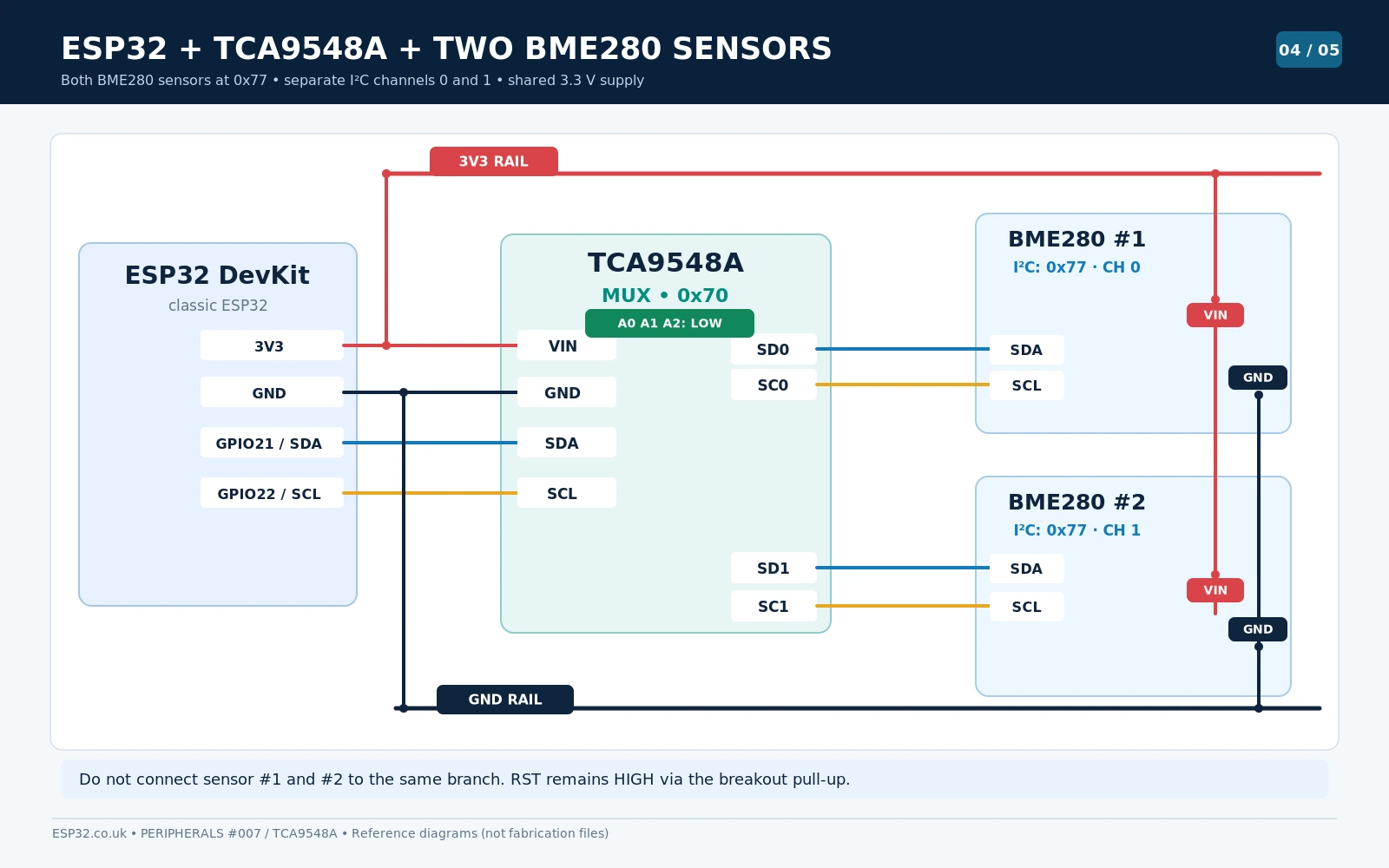
If you are wiring a generic BME280 module with I²C/SPI selection pins, check that CSB is held HIGH for I²C and SDO is set for the intended address. Adafruit and other breakout manufacturers may already tie these pins appropriately. A BME280 sensor connected to channel 0 still uses its regular 0x76 or 0x77 address; channel numbers and device addresses are different concepts.
Arduino IDE example 1: scan all eight TCA9548A channels
You do not need a dedicated Arduino TCA9548A library. A one-byte write through Wire is all that is required for channel selection. First install the ESP32 boards package in Arduino IDE, choose your board and upload this complete sketch. It scans the upstream bus, selects each channel in turn and prints which addresses answer on that channel.
#include <Arduino.h>
#include <Wire.h>

constexpr uint8_t TCA_ADDR = 0x70;
constexpr int SDA_PIN = 21;
constexpr int SCL_PIN = 22;

bool selectChannel(uint8_t ch) {
  if (ch > 7) return false;
  Wire.beginTransmission(TCA_ADDR);
  Wire.write(uint8_t(1u << ch));
  return Wire.endTransmission() == 0;
}

bool disableAllChannels() {
  Wire.beginTransmission(TCA_ADDR);
  Wire.write(uint8_t(0x00));
  return Wire.endTransmission() == 0;
}

void scanCurrentBus() {
  for (uint8_t addr = 0x08; addr <= 0x77; ++addr) {
    Wire.beginTransmission(addr);
    if (Wire.endTransmission() == 0) {
      Serial.printf("  Found 0x%02X\n", addr);
    }
  }
}

void setup() {
  Serial.begin(115200);
  delay(700);
  Wire.begin(SDA_PIN, SCL_PIN);
  Wire.setClock(100000);

  // Ensure sensors on all downstream channels are initially isolated.
  if (!disableAllChannels()) {
    Serial.println("TCA9548A not found at 0x70. Check wiring/address.");
    return;
  }

  Serial.println("Upstream bus (all mux channels disabled):");
  scanCurrentBus();

  for (uint8_t ch = 0; ch < 8; ++ch) {
    Serial.printf("Channel %u:\n", ch);
    if (selectChannel(ch)) scanCurrentBus();
    else Serial.println("  Multiplexer select failed");
  }
  disableAllChannels();
}

void loop() {
  delay(1000);
}
While a channel is selected, the mux itself still appears on the upstream bus at 0x70; this is expected. You may also see other devices that are physically attached to the upstream bus. The presence of the same 0x77 on channels 0 and 1 is exactly the point of the experiment. If a sensor is not found, check its supply, I²C pull-ups, channel number and board-specific address configuration.
Example Serial Monitor output
Upstream bus (all mux channels disabled):
  Found 0x70
Channel 0:
  Found 0x70
  Found 0x77
Channel 1:
  Found 0x70
  Found 0x77
Channel 2:
  Found 0x70
...
Channel 7:
  Found 0x70
Illustrative result: a real scan will reflect the connected modules, pull-up networks and addresses. If the multiplexer is set to another address, change TCA_ADDR accordingly.
Arduino IDE example 2: read two BME280 modules using Adafruit_BME280
For a working sensor demonstration, install Adafruit BME280 Library via Arduino IDE Library Manager and accept the suggested dependencies (including Adafruit Unified Sensor). The library is common and actively used; the multiplexer itself is controlled by the standard Wire library. Create separate Adafruit_BME280 objects because the two physical sensors maintain separate calibration and measurement state.
#include <Arduino.h>
#include <Wire.h>
#include <Adafruit_BME280.h>

constexpr uint8_t MUX_ADDR = 0x70;
constexpr uint8_t BME_ADDR = 0x77;   // Both sensors use 0x77
constexpr int SDA_PIN = 21;
constexpr int SCL_PIN = 22;

Adafruit_BME280 bme0;
Adafruit_BME280 bme1;

bool tcaSelect(uint8_t channel) {
  if (channel > 7) return false;
  Wire.beginTransmission(MUX_ADDR);
  Wire.write(uint8_t(1u << channel));  // One branch at a time
  return Wire.endTransmission() == 0;
}

void printSensor(uint8_t channel, Adafruit_BME280 &bme) {
  if (!tcaSelect(channel)) {
    Serial.printf("Channel %u: mux I2C error\n", channel);
    return;
  }
  Serial.printf("BME280 ch%u: %.2f C, %.1f %%RH, %.1f hPa\n",
                channel, bme.readTemperature(),
                bme.readHumidity(), bme.readPressure() / 100.0f);
}

void setup() {
  Serial.begin(115200);
  delay(500);
  Wire.begin(SDA_PIN, SCL_PIN);
  Wire.setClock(100000);

  if (!tcaSelect(0) || !bme0.begin(BME_ADDR, &Wire)) {
    Serial.println("BME280 at mux channel 0 not found");
    while (true) delay(1000);
  }
  if (!tcaSelect(1) || !bme1.begin(BME_ADDR, &Wire)) {
    Serial.println("BME280 at mux channel 1 not found");
    while (true) delay(1000);
  }
}

void loop() {
  printSensor(0, bme0);
  printSensor(1, bme1);
  delay(2000);
}
Each call to bme.readTemperature(), readHumidity() or readPressure() sends one or more I²C transactions. Therefore the correct channel must be selected before calling the library, not only at startup. The code intentionally keeps only one channel active at a time. If your BME280 board uses 0x76, change BME_ADDR; if the two sensors use different addresses, pass the appropriate address when initialising each object.
For full ESPHome and Home Assistant configuration instead of Arduino IDE, see our earlier TCA9548A ESPHome multi-sensor tutorial. This hardware reference is designed to complement that page, not compete with its automation-specific instructions.
Channel-mask register: choosing one bus, several buses or none
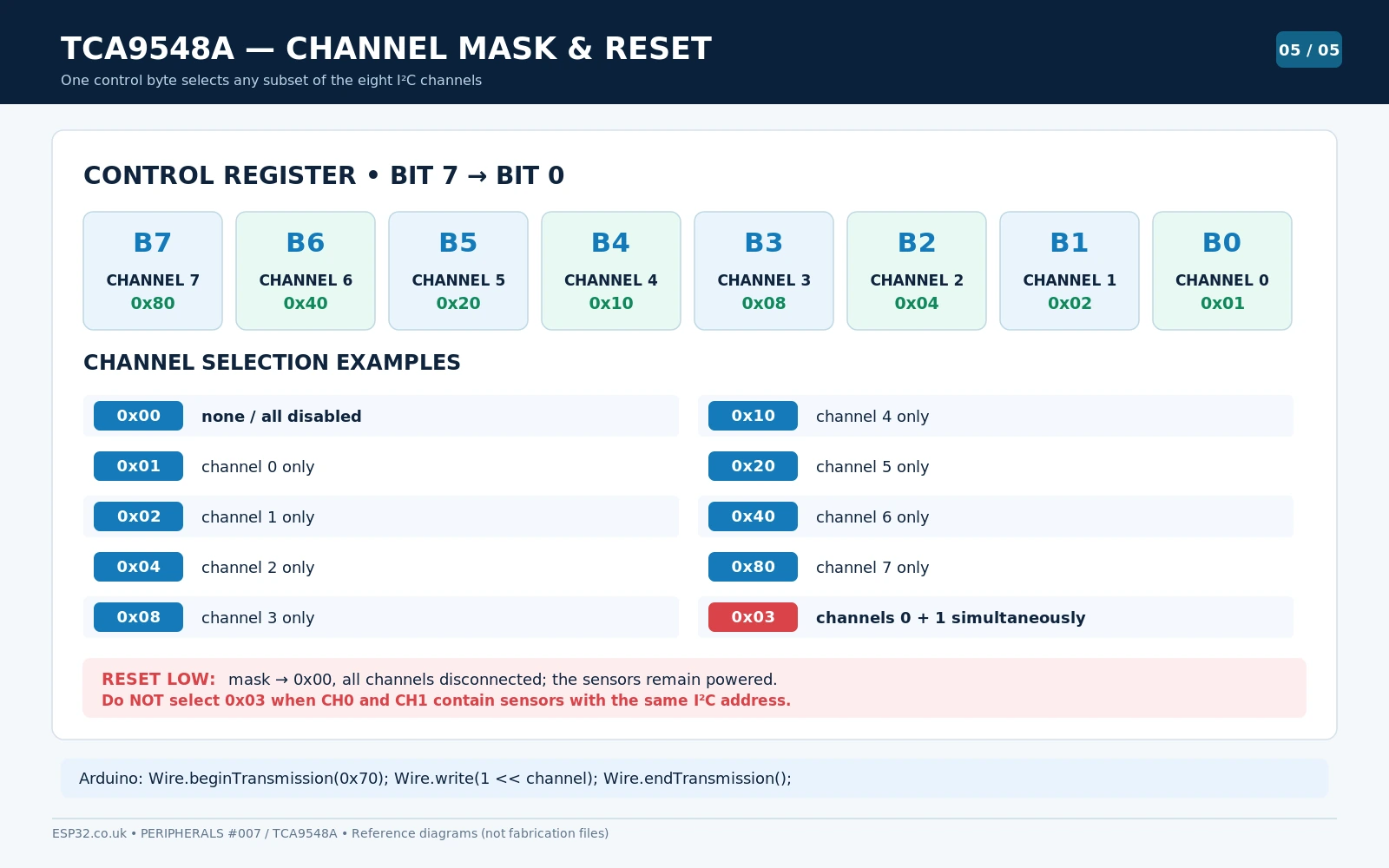
| Byte written to mux at 0x70 | Connected downstream channel(s) |
|---|---|
0x00 / 00000000 | None; all isolated |
0x01 / 00000001 | Channel 0 only |
0x02 / 00000010 | Channel 1 only |
0x04 / 00000100 | Channel 2 only |
0x08 / 00001000 | Channel 3 only |
0x10 / 00010000 | Channel 4 only |
0x20 / 00100000 | Channel 5 only |
0x40 / 01000000 | Channel 6 only |
0x80 / 10000000 | Channel 7 only |
0x03 / 00000011 | Channels 0 and 1 connected together: avoid if same-address devices |
Multiple channels can be active simultaneously because each bit in the mask is independent. It is useful in a few deliberately designed systems with distinct addresses and correctly chosen pull-ups. But enabling two channels carrying identical BME280 addresses 0x77 reconnects the collision you were trying to avoid. For same-address modules, use 1 << channel, selecting precisely one branch before each transaction.
Pull-ups, cable length, reset recovery and practical limits
- Missing pull-ups: Adafruit’s TCA9548A breakout has no downstream pull-ups. Some sensor breakouts add them, but a bare IC or unusual module may not. Use a sensible resistor value and verify rise time when increasing wire length.
- Too many pull-ups: each enabled channel can place another set of resistors on the shared bus. Paralleling low-value pull-ups can create excessive sink current. Use one channel at a time unless the network is designed for a combined load.
- Long wiring: the TCA9548A does not make I²C a long-distance interface. Cable capacitance, star wiring, EMI and ground noise still matter. Slower clocks, short runs and suitable buffering help.
- Stuck SDA/SCL: RESET can disconnect a problematic downstream branch and reset the mux state machine, but it cannot repair a shorted upstream wire or an unpowered device pulling the host bus low.
- Power cycling: switching a channel does not remove sensor power. Devices remain powered and may need their own hardware reset for a complete restart.
- Host pins: GPIO21/22 are common choices on the original ESP32 but not universal defaults on all ESP32 family boards.
TCA9548A troubleshooting table
| Symptom | Likely cause and check |
|---|---|
| Only 0x70 appears in a scanner | No channel enabled. Select it first, then scan. The mux itself is still visible. |
| Mux not found at 0x70 | Inspect VIN/GND/SDA/SCL, solder-pad settings, RESET held LOW, or change address in sketch. |
| Both BME280s return identical readings | Check whether both are actually selected together or software always reads the same channel. |
| No devices on one channel | Verify SDn to sensor SDA and SCn to sensor SCL, sensor supply, common GND and pull-ups. |
| Channel 0 works but channel 1 fails | Wrong channel number or wiring; confirm the second sensor 0x76/0x77 address. |
| SDA stuck LOW even after changing channel | The upstream bus may itself be stuck, or the stuck downstream channel remains selected. Deselect/reset and check physical bus. |
| ESP32 resets when 5 V sensor attached | Potential incorrect pull-up voltage, ground or power wiring; ensure all ESP32-facing pins remain in 3.3 V range. |
| Two multiplexers both respond at 0x70 | Set one board to another address with A0/A1/A2 pads and update each sketch. |
TCA9548A versus PCA9548A and other I²C expansion solutions
The PCA9548/PCA9548A family and TCA9548A are related switch products, but do not assume every similarly named board has the same footprint, voltage rating or pull-up network. Adafruit also offers a PCA9548-based STEMMA QT breakout whose connectors and solder pads differ physically from the classic TCA9548A breakout. Check the exact chip marking and board revision first.
If you only need more digital outputs rather than more I²C branches, consider our PCF8574 / PCF8575 / MCP23017 GPIO expander comparison. If your sensors allow hardware address selection, often changing A0/A1/A2 or a solder pad is simpler than introducing a multiplexer. For scanning any ESP32 bus, our ESP32 I²C scanner guide is a useful diagnostic companion.
Frequently asked questions
Does the TCA9548A have eight different I²C addresses for its channels?
No. The multiplexer itself has one address, normally 0x70. Its eight channels are enabled by the bits of a control byte. Every downstream sensor keeps its original I²C address.
Can it use all eight channels simultaneously?
Yes, the control register allows any combination of channel bits. However, if two active channels carry devices at the same address, the host sees both and the original conflict returns. The safe default for identical sensors is one channel selected at a time.
Do I need an Adafruit TCA9548A Arduino library?
Not for basic Arduino IDE applications. Wire.beginTransmission(muxAddress), Wire.write(1 << channel) and Wire.endTransmission() are sufficient. Use the usual sensor-specific library, for example Adafruit_BME280, after selecting the correct channel.
Will it work with 1.8 V and 5 V I²C sensors?
The IC supports level translation with correct pass-gate and pull-up design; the details depend on VCC, each bus pull-up rail and the lowest logic voltage in the system. It is not a universal plug-and-play 5 V protection circuit. For direct ESP32 wiring, keep the upstream lines at 3.3 V and check every downstream device.
What happens if I pull RST to ground?
An active-low reset deselects all channels and resets the multiplexer’s I²C state machine. It does not reset sensor power. Release RST back HIGH to resume operation and explicitly select a new channel.
References and hardware documentation
- Texas Instruments TCA9548A product and specifications — electrical limits, operating supply, channel-switch behavior, reset and bus speed.
- Texas Instruments TCA9548A datasheet (Rev. H) — register bitmask and voltage-translation design requirements.
- Adafruit TCA9548A classic breakout pinouts — VIN, SDA/SCL, RESET, address inputs and all eight SD/SC pairs.
- Adafruit multiple-multiplexer and solder-pad reference — rear A0/A1/A2 bridge assignments.
- Adafruit same-address BME280 example — separate library instances and explicit channel selection.
Board-accuracy note: The diagrams in this guide refer to the classic Adafruit-style TCA9548A breakout and to a 3.3 V ESP32. Not all TCA9548A modules have the same header positioning, rear pad layout or pull-ups. Inspect the exact board revision before using its visual pinout in a physical circuit.