
For most developers, the ESP32-C6-DevKitC-1 is the better board to buy. Both boards provide the same core ESP32-C6 features — 160 MHz RISC-V CPU, 2.4 GHz Wi-Fi 6, Bluetooth LE, Zigbee and Thread — but the DevKitC-1 uses the larger ESP32-C6-WROOM-1 module with 8 MB flash and 23 GPIOs, while the DevKitM-1 uses the compact ESP32-C6-MINI-1 with 4 MB in-package flash and 22 GPIOs. DevKitC also exposes GPIO10 and GPIO11, giving it slightly more expansion flexibility. Choose DevKitM-1 when compact size matters or when a project will eventually use the smaller MINI module; otherwise, the extra flash and GPIO flexibility make DevKitC-1 the stronger general-purpose choice. (Espressif Systems)
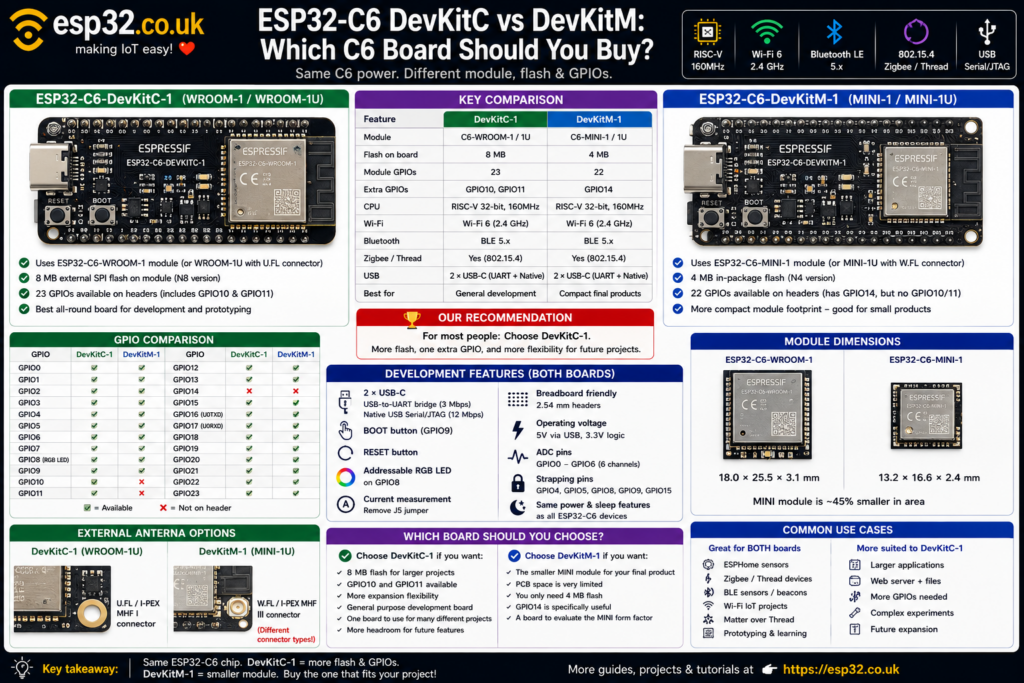
ESP32-C6 DevKitC and DevKitM at a glance
The two official Espressif boards can look confusingly similar.
Both include:
- ESP32-C6
- 2.4 GHz Wi-Fi 6
- Bluetooth LE
- IEEE 802.15.4
- Zigbee
- Thread
- USB Serial/JTAG
- USB-to-UART converter
- two USB-C ports
- BOOT button
- RESET button
- addressable RGB LED
- current-measurement jumper
- breadboard-friendly headers
The important difference is the module mounted on the board.
The DevKitC uses:
ESP32-C6-WROOM-1 / WROOM-1U
The DevKitM uses:
ESP32-C6-MINI-1 / MINI-1U. (Espressif Systems)
That change affects flash capacity, available GPIOs, module dimensions and external-antenna connector options.
| Feature | ESP32-C6-DevKitC-1 | ESP32-C6-DevKitM-1 |
|---|---|---|
| Module | C6-WROOM-1 / 1U | C6-MINI-1 / 1U |
| Flash on official board | 8 MB | 4 MB |
| Module GPIOs | 23 | 22 |
| CPU | 160 MHz RISC-V | 160 MHz RISC-V |
| Wi-Fi | Wi-Fi 6, 2.4 GHz | Wi-Fi 6, 2.4 GHz |
| Bluetooth | BLE 5.x | BLE 5.x |
| Zigbee / Thread | Yes | Yes |
| Native USB | Yes | Yes |
| USB-to-UART | Yes | Yes |
| RGB LED | GPIO8 | GPIO8 |
| Current measurement | J5 | J5 |
| External antenna option | WROOM-1U | MINI-1U |
| Best for | General development | Compact prototypes |
Espressif currently sells the DevKitC-1 as the N8 8 MB version and the DevKitM-1 as the N4 4 MB version. (Espressif Systems)
Both boards use the same ESP32-C6 architecture
Choosing DevKitC instead of DevKitM does not give a faster processor.
Both are based on the ESP32-C6 family.
The ESP32-C6 includes:
- 32-bit RISC-V main CPU
- up to 160 MHz
- 512 KB high-performance SRAM
- 16 KB low-power SRAM
- 320 KB ROM
- 2.4 GHz Wi-Fi 6
- Bluetooth Low Energy
- 802.15.4 radio
- Zigbee 3.0
- Thread 1.3
- USB Serial/JTAG
- ADC
- SPI
- I²C
- UART
- I²S
- PWM
- RMT
- TWAI
- hardware cryptographic accelerators
For normal Arduino or ESP-IDF code:
DevKitC-1
vs
DevKitM-1
does not mean:
fast board
vs
slow board
The difference is primarily module packaging and development-board expansion.
The biggest difference: WROOM vs MINI
The easiest way to understand the boards is to look at the modules.
DevKitC-1
Uses the:
ESP32-C6-WROOM-1
or external-antenna:
ESP32-C6-WROOM-1U
The WROOM module provides the ESP32-C6 with external SPI flash and exposes 23 GPIOs. (Espressif Documentation)
DevKitM-1
Uses:
ESP32-C6-MINI-1
or:
ESP32-C6-MINI-1U
The MINI module uses an ESP32-C6FH4 with 4 MB flash integrated inside the chip package, reducing the module footprint and component count. The MINI family exposes 22 GPIOs. (Espressif Systems)
That is why the “M” board exists.
It is not supposed to be a more powerful DevKitC.
It is intended to demonstrate the smaller MINI module.
DevKitC has twice the flash
This is probably the most meaningful difference for hobbyists.
The official current boards are:
ESP32-C6-DevKitC-1-N8
→ 8 MB flash

ESP32-C6-DevKitM-1-N4
→ 4 MB flashFour megabytes is still plenty for many applications:
- ESPHome sensors
- MQTT nodes
- simple Zigbee devices
- Arduino projects
- relays
- environmental sensors
- basic Matter experimentation
But 8 MB provides more room for:
- larger applications
- bigger OTA partitions
- web interfaces
- embedded files
- certificates
- logging
- more complex firmware
- future expansion
If the price difference is small, 8 MB is preferable simply because there is little disadvantage to having more flash.
Does 4 MB matter for ESPHome?
A normal ESPHome sensor node can comfortably fit within 4 MB.
For example:
ESP32-C6
+
BME280
+
Home Assistant API
+
Wi-Fi
+
OTA
does not require 8 MB.
So the DevKitM is perfectly adequate for many Home Assistant projects.
The advantage of the DevKitC appears when projects become more complicated or firmware size increases.
Extra flash is particularly useful when partitioning space for:
Application A
Application B / OTA
Filesystem
NVS
For experimenting with many different C6 features over several years, the DevKitC’s 8 MB gives more headroom.
GPIO availability is slightly different
The boards do not expose exactly the same GPIO set.
This is easy to miss because they use the same ESP32-C6 family.
DevKitC-1 exposes
The current DevKitC header includes:
GPIO0
GPIO1
GPIO2
GPIO3
GPIO4
GPIO5
GPIO6
GPIO7
GPIO8
GPIO9
GPIO10
GPIO11
GPIO12
GPIO13
GPIO15
GPIO16
GPIO17
GPIO18
GPIO19
GPIO20
GPIO21
GPIO22
GPIO23DevKitM-1 exposes
The DevKitM provides:
GPIO0
GPIO1
GPIO2
GPIO3
GPIO4
GPIO5
GPIO6
GPIO7
GPIO8
GPIO9
GPIO12
GPIO13
GPIO14
GPIO15
GPIO16
GPIO17
GPIO18
GPIO19
GPIO20
GPIO21
GPIO22
GPIO23Notice the unusual difference.
DevKitC
has:
GPIO10
GPIO11
but not GPIO14 on its header.
DevKitM
has:
GPIO14but not GPIO10 or GPIO11.
So the DevKitC provides one additional exposed GPIO overall, but the exact pin numbers are also different.
GPIO comparison
| GPIO | DevKitC | DevKitM |
|---|---|---|
| GPIO0–9 | ✅ | ✅ |
| GPIO10 | ✅ | ❌ |
| GPIO11 | ✅ | ❌ |
| GPIO12 | ✅ | ✅ |
| GPIO13 | ✅ | ✅ |
| GPIO14 | ❌ | ✅ |
| GPIO15–23 | ✅ | ✅ |
This is important when copying pin mappings between C6 tutorials.
Code written for:
#define SENSOR_PIN 14on DevKitM will obviously need changing on DevKitC.
Likewise, a project using GPIO10 or GPIO11 on DevKitC cannot simply be moved unchanged to DevKitM.
ADC pins are almost identical
ESP32-C6 provides ADC channels on GPIO0 through GPIO6.
Both boards expose:
GPIO0
GPIO1
GPIO2
GPIO3
GPIO4
GPIO5
GPIO6
so the practical analog capabilities are essentially the same. (Espressif Systems)
This gives:
| GPIO | ADC |
|---|---|
| GPIO0 | ADC1_CH0 |
| GPIO1 | ADC1_CH1 |
| GPIO2 | ADC1_CH2 |
| GPIO3 | ADC1_CH3 |
| GPIO4 | ADC1_CH4 |
| GPIO5 | ADC1_CH5 |
| GPIO6 | ADC1_CH6 |
For normal sensor projects, there is therefore no meaningful ADC advantage to either board.
Both have the same strapping pins
The ESP32-C6 strapping pins relevant to these boards are:
- GPIO4
- GPIO5
- GPIO8
- GPIO9
- GPIO15
Espressif identifies these as pins whose logic state is sampled during startup/reset to control chip configuration. (Espressif Systems)
So neither board has an advantage here.
For beginner GPIO selection, it is still sensible to avoid attaching circuits that strongly force these pins HIGH or LOW during reset.
Both use GPIO8 for the RGB LED
Both boards include an addressable RGB LED connected to:
GPIO8
Espressif documents this identically for both development boards. (Espressif Systems)
GPIO8 is also a strapping pin.
That means the onboard LED connection should be remembered when using GPIO8 for another purpose.
For general external hardware, another GPIO is usually easier.
Both have two USB-C connections
This is one of the best features of the official C6 development boards.
Both include:
USB-to-UART USB-C
Connected through an onboard USB-to-UART bridge.
Useful for:
- flashing
- Serial Monitor
- normal development
- power
The bridge supports transfer rates up to 3 Mbps. (Espressif Systems)
Native ESP32-C6 USB-C
Connected directly to the C6 USB Serial/JTAG interface.
It supports USB 2.0 Full Speed at up to:
12 Mbps
and can be used for:
- flashing
- native USB communication
- JTAG debugging
- power
There is therefore no meaningful USB advantage to either board.
Native USB pins
On both boards:
GPIO12 → USB D−
GPIO13 → USB D+These pins can technically be GPIOs, but using them for other peripherals conflicts with the ESP32-C6’s native USB connection.
If USB Serial/JTAG is required, keep GPIO12 and GPIO13 reserved.
Both have hardware UART0 pins
Both boards expose:
GPIO16 → U0TXD
GPIO17 → U0RXDThese are convenient for:
Again, there is no difference between the boards for these peripherals.
Both support current measurement
Both boards include a J5 current-measurement jumper.
Removing J5 breaks the supply path to the ESP32-C6 module so an ammeter can be inserted in series to measure module current. Reinstalling the jumper restores normal operation. (Espressif Systems)
This is especially useful when testing:
- deep sleep
- Wi-Fi power consumption
- Thread end devices
- Zigbee battery devices
- BLE sensors
The DevKitM does not provide a special low-power measurement advantage simply because the module is smaller.
Both boards provide the same measurement arrangement.
DevKitM really is the smaller-module design
The MINI module is substantially smaller than the WROOM module.
Current Espressif dimensions are approximately:
ESP32-C6-WROOM-1
18.0 × 25.5 × 3.1 mmESP32-C6-MINI-1
13.2 × 16.6 × 2.4 mmThat is a major difference when designing a custom PCB.
The development board itself is still a prototyping board with USB connectors and pin headers, but the DevKitM provides a better representation of what a compact finished product using the MINI module could look like.
Why choose the MINI module for a custom product?
The MINI module makes sense when:
- PCB area is limited
- 4 MB flash is sufficient
- fewer GPIOs are required
- the design needs a smaller certified module
- BOM/PCB compactness matters
Typical examples include:
- smart switches
- small sensors
- wall-mounted devices
- smart bulbs
- compact Matter nodes
- battery sensors
- consumer IoT products
For a development bench, however, compactness often matters less than having more pins and flash available.
That favours the DevKitC.
External antenna versions
Both board families are available with either onboard PCB antennas or external-antenna modules.
DevKitC
Uses:
ESP32-C6-WROOM-1
→ PCB antenna

ESP32-C6-WROOM-1U
→ external antenna connectorDevKitM
Uses:
ESP32-C6-MINI-1
→ PCB antenna

ESP32-C6-MINI-1U
→ external antenna connectorFor most breadboard projects, the PCB antenna version is easiest.
Choose the external-antenna version for:
- metal enclosures
- cabinets
- poor antenna placement
- long-range testing
- controlled antenna positioning
Important: the external antenna connectors are different
This is an easy detail to miss.
The current C6-WROOM-1U uses an external antenna connector compatible with formats including:
- U.FL
- I-PEX MHF I
The C6-MINI-1U uses a smaller third-generation connector compatible with:
- W.FL
- I-PEX MHF III
So an antenna pigtail bought for a DevKitC-1U may not physically fit a DevKitM-1U.
Check the connector before ordering antennas.
Wi-Fi capability is identical
Both use ESP32-C6, so both provide 2.4 GHz Wi-Fi 6.
ESP32-C6 supports IEEE 802.11ax features while remaining backwards compatible with 802.11b/g/n networks. (Espressif Documentation)
Neither board supports 5 GHz Wi-Fi.
If 5 GHz support is required, the newer ESP32-C5 family is the relevant option rather than choosing between these two C6 boards.
For C6:
DevKitC Wi-Fi
=
DevKitM Wi-Fi
The module form factor does not provide one board with faster Wi-Fi than the other.
Zigbee and Thread capability is identical
Both provide the ESP32-C6’s integrated IEEE 802.15.4 radio and therefore support Zigbee and Thread development. (Espressif Systems)
This makes either board useful for:
- Zigbee sensors
- Zigbee routers
- Thread end devices
- Matter-over-Thread experimentation
- multiprotocol IoT development
Buying DevKitC rather than DevKitM does not unlock an extra radio.
Bluetooth capability is identical
Both boards also use the same ESP32-C6 Bluetooth LE subsystem.
The current module datasheets list Bluetooth 5.3 certification and features including:
- 1 Mbps
- 2 Mbps
- long-range PHY rates
- extended advertising
- BLE Mesh
- LE power control
Neither board supports Bluetooth Classic.
Arduino support
ESP32-C6 is now listed as stable in the official Arduino-ESP32 project. (Espressif Systems)
That means both boards can be used for conventional Arduino development involving:
- GPIO
- ADC
- I²C
- SPI
- UART
- Wi-Fi
- BLE
- Zigbee
- USB
with current Arduino-ESP32 support. (Espressif Systems)
From an Arduino perspective, the main differences remain:
Flash size
GPIO availability
Module type
rather than processor compatibility.
Which is better for ESPHome?
For a normal ESPHome sensor:
Either board works.
Typical project:
ESP32-C6
+
SHT40
+
Home Assistant
will not care whether the module says MINI or WROOM.
The DevKitM’s 4 MB flash is sufficient for many standard ESPHome applications.
However, if purchasing one C6 board to keep on the development bench for many different projects, the DevKitC-1 is easier to recommend because:
- 8 MB flash
- one extra exposed GPIO
- GPIO10/11 available
- more general expansion headroom
Which is better for Zigbee development?
DevKitC-1, slightly.
Not because the radio is different — it isn’t.
The advantage is simply the larger flash and additional exposed GPIO.
A Zigbee temperature sensor may work identically on either board.
But during experimentation, extra flash and pins are useful when adding:
- displays
- buttons
- status LEDs
- debugging interfaces
- other sensors
So the DevKitC gives more room to change the project later.
Which is better for Matter and Thread?
Again:
DevKitC-1 for general development.
Both have the required 802.15.4 hardware, but the additional flash capacity is useful when experimenting with larger networking frameworks.
For a finished compact Thread sensor whose final product may use the MINI module:
DevKitM-1 becomes more relevant.
It gives the developer a board closer to the eventual module architecture.
Which is better for breadboards?
Both are explicitly designed by Espressif to connect to breadboards and jumper wires. (Espressif Systems)
The choice is therefore not nearly as dramatic as:
large development board
vs
tiny XIAO board
Both are conventional development boards.
DevKitM’s module itself is smaller, while DevKitC gives more header capability.
For pure prototyping, DevKitC remains the stronger option.
Which is better for low-power development?
Essentially a tie.
Both include:
- current-measurement jumper
- same ESP32-C6 architecture
- same low-power capabilities
and both allow the module current to be measured directly using J5. (Espressif Systems)
The development boards themselves contain USB bridges, LEDs and regulators, so they are not necessarily representative of the final deep-sleep consumption of a minimal custom PCB.
If designing a production battery product, eventually test the actual custom hardware.
Which board has the better module for production?
That depends entirely on the finished device.
WROOM is attractive when:
- additional GPIO matters
- more flash matters
- PCB space is available
- maximum prototyping flexibility matters
MINI is attractive when:
- PCB area matters
- 4 MB is sufficient
- fewer GPIOs are needed
- the enclosure is small
This is really the reason Espressif offers both module families.
DevKitC advantages
The ESP32-C6-DevKitC-1 wins on:
- 8 MB flash
- 23 module GPIOs
- GPIO10 and GPIO11 exposed
- more expansion flexibility
- better general-purpose development headroom
- WROOM module ecosystem
Its biggest disadvantage is simply that the WROOM module is physically larger.
DevKitM advantages
The ESP32-C6-DevKitM-1 wins on:
- smaller MINI module
- compact module footprint
- demonstration platform for MINI-based product designs
- GPIO14 exposed
- 4 MB in-package flash reduces module component complexity
Its main disadvantages are:
- only 4 MB flash on the official DevKitM-1
- one fewer GPIO overall
- no GPIO10/11 headers
What both boards do equally well
For many projects there is effectively no difference.
Both are equally capable for:
- BME280
- SHT40
- DS18B20
- LD2410
- relays
- MQTT
- Home Assistant
- BLE beacons
- Zigbee sensors
- Thread nodes
- basic Matter development
If the project only needs five GPIOs and a few hundred kilobytes of firmware, the extra DevKitC resources may never be used.
When should DevKitM be chosen?
Choose ESP32-C6-DevKitM-1 when:
- compactness matters
- the final design will likely use ESP32-C6-MINI-1
- GPIO14 is specifically useful
- 4 MB flash is plenty
- the MINI module is the actual hardware being evaluated
For a developer designing a small commercial C6 sensor, the DevKitM can be the more relevant reference board.
When should DevKitC be chosen?
Choose ESP32-C6-DevKitC-1 when:
- this is the first C6 board being purchased
- the board will be used for many different experiments
- 8 MB flash is desirable
- extra GPIO matters
- GPIO10/11 are useful
- firmware size may grow
- the board is mainly for breadboard development
For most hobbyists and general ESP32 developers, this is the better choice.
Final verdict
If both boards are sitting in a shopping cart and the price difference is small:
Buy the ESP32-C6-DevKitC-1.
The fundamental C6 performance is the same, but the DevKitC gives:
8 MB flash
vs
4 MB
and:
23 GPIOs
vs
22 GPIOs
with GPIO10 and GPIO11 available for additional expansion. Espressif’s current product listings identify the official DevKitC as the N8 8 MB board and DevKitM as the N4 4 MB version. (Espressif Systems)
The recommendation is therefore:
ESP32-C6-DevKitC-1 = best general-purpose C6 development board
ESP32-C6-DevKitM-1 = best when the smaller MINI module is specifically useful
Neither is faster, and neither has better Zigbee, Thread, BLE or Wi-Fi hardware.
The real decision is:
more flash and GPIO flexibility vs a smaller module architecture.