
The MCP23017AliExpress price adds 16 configurable digital I/O pins to an ESP32AliExpress price using just SDA and SCL. Unlike the PCF8574AliExpress price and PCF8575 quasi-bidirectional expanders, it provides conventional direction registers, output latches, optional input pull-ups, input polarity inversion and two interrupt outputs. The key to making the module work is choosing the correct breakout-board pinout and its three I²C address settings before writing code.
Quick answer: An MCP23017 on a compatible 3.3 V breakout normally appears at 0x20 with its three address inputs LOW. On the Adafruit STEMMA QT breakout, three open rear solder bridges select that default; closing the bridges marked +1, +2 and +4 can select any address through 0x27. For a classic ESP32 DevKit: 3V3 → VIN, GND → GND, GPIO21 → SDA, GPIO22 → SCL. The simple Arduino example later uses Adafruit_MCP23X17.
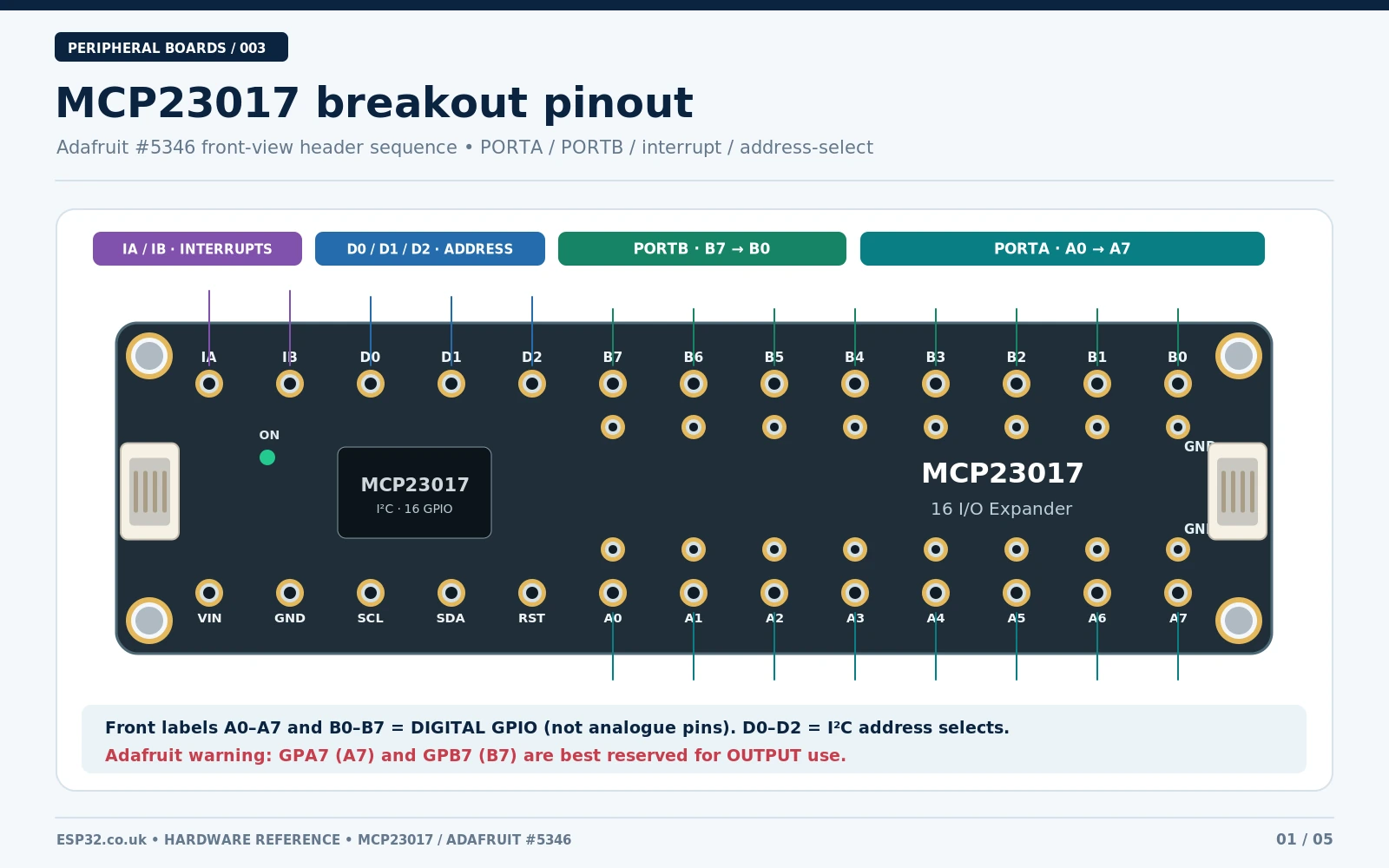
The board layout in this guide refers specifically to the Adafruit MCP23017 I²C GPIO Expander Breakout with STEMMA QT connectors, GPIO ground pads, D0/D1/D2 and IA/IB pins. Generic blue MCP23017 modules, DIP chips and other breakouts may have completely different physical header orders, default pull-ups and address-link positions. Their chip-level functions are the same, but their PCB pinouts must not be assumed identical. See the manufacturer pinout guide before connecting a board.
MCP23017 specifications and what the pins mean
| Characteristic | MCP23017 / Adafruit breakout |
|---|---|
| Type | 16-bit I²C general-purpose digital I/O expander |
| Digital I/O | GPA0–GPA7 (PORTA) and GPB0–GPB7 (PORTB) |
| Arduino library numbering | 0–7 = GPA0–GPA7; 8–15 = GPB0–GPB7 |
| Address range | 7-bit 0x20–0x27 via three hardware address inputs |
| Chip supply | 1.8–5.5 V according to Microchip; use 3.3 V when wired as illustrated to ESP32 |
| I²C speed | 100 kHz and 400 kHz at suitable voltage; 1.7 MHz mode needs stricter conditions and is not required here |
| GPIO configuration | Direction, internal input pull-ups, output latch, polarity inversion |
| Interrupts | Two configurable outputs, INTA for PORTA and INTB for PORTB; optional mirroring |
| Reset | Active-LOW RESET; breakout front label RST |
| LED drive | Push-pull outputs may source or sink current within device and total-current limits; always use an LED resistor |
| Analog inputs/PWM | Neither ADC nor hardware PWM is provided by MCP23017 |
| I²C vs SPI | MCP23017 is I²C; MCP23S17 is the related SPI version |
The A in GPA0 means PORTA, not analog input. The same distinction matters when reading the Adafruit front label D0: it is the hardware I²C address bit, not GPIO channel GPA0. The chip-level address-input names A0/A1/A2 can otherwise be confused with its GPIO pins.
Important: Adafruit documents a silicon-related I²C readout hazard involving GPA7 and GPB7. For reliable new designs, reserve these channels for outputs only, especially on modules whose silicon revision is unknown. The chip has 16 physical GPIO pins, but this is an important limitation if you are designing a 16-button input bank. Use GPA0–GPA6 and GPB0–GPB6 for inputs, or choose a different expander if you need all sixteen inputs.
Board pinout: PORTA, PORTB, power and control
Both ports contain eight bits, but the library pin number is a convenient continuous index rather than the chip’s physical package pin number. This prevents common errors when copying example code. The correct library mapping is:
| Breakout / chip signal | Library pin ID | Function |
|---|---|---|
| GPA0 | 0 | Digital GPIO bank A |
| GPA1 | 1 | Digital GPIO bank A |
| GPA2 | 2 | Digital GPIO bank A |
| GPA3 | 3 | Digital GPIO bank A |
| GPA4 | 4 | Digital GPIO bank A |
| GPA5 | 5 | Digital GPIO bank A |
| GPA6 | 6 | Digital GPIO bank A |
| GPA7 | 7 | Digital GPIO bank A |
| GPB0 | 8 | Digital GPIO bank B |
| GPB1 | 9 | Digital GPIO bank B |
| GPB2 | 10 | Digital GPIO bank B |
| GPB3 | 11 | Digital GPIO bank B |
| GPB4 | 12 | Digital GPIO bank B |
| GPB5 | 13 | Digital GPIO bank B |
| GPB6 | 14 | Digital GPIO bank B |
| GPB7 | 15 | Digital GPIO bank B |
Additional breakout connections: VIN is supply power; GND is ground; SDA and SCL are I²C data and clock; IA and IB are the two interrupt outputs; RST resets the device when pulled LOW; D0/D1/D2 select its I²C address. The two STEMMA QT connectors carry the same four-wire I²C bus. Multiple boards can share it when their addresses differ.
On Adafruit’s breakout there are also individual ground pads for the GPIO. These are handy when wiring momentary switches, but do not confuse the extra ground pads with additional MCP23017 GPIO signals. The exact front-board row order must be taken from the official front-view pinout—a generic MCP23017 PCB image cannot substitute.
Changing the I²C address using solder jumpers
The Adafruit board ships with three rear address bridges open. They are silkscreened +1, +2 and +4, corresponding to the front header inputs D0, D1 and D2. The bridges change the 7-bit address by tying the corresponding selection line HIGH. Close a bridge with a small solder link only after turning off power; inspect for shorts with magnification.
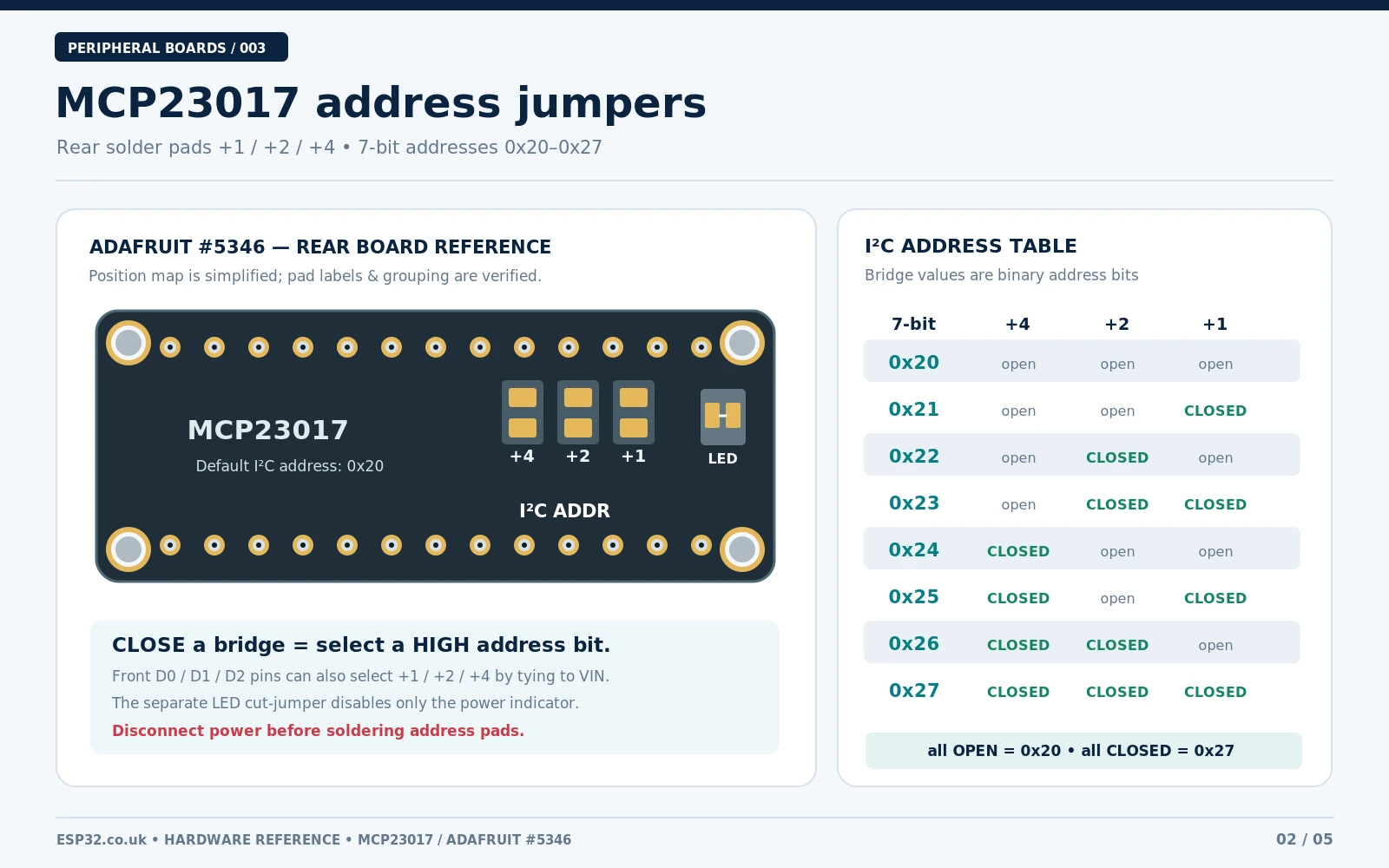
| +4 / D2 | +2 / D1 | +1 / D0 | 7-bit address |
|---|---|---|---|
| Open | Open | Open | 0x20 |
| Open | Open | Closed | 0x21 |
| Open | Closed | Open | 0x22 |
| Open | Closed | Closed | 0x23 |
| Closed | Open | Open | 0x24 |
| Closed | Open | Closed | 0x25 |
| Closed | Closed | Open | 0x26 |
| Closed | Closed | Closed | 0x27 |
For instance, closing +4 and +1, while leaving +2 open, makes the device 0x25. Then initialise the library with mcp.begin_I2C(0x25, &Wire). If you use the front hardware pins instead of solder, connect D0/D1/D2 to the appropriate logic rail according to the manufacturer’s guidance; never leave bare IC address pins floating on an unverified generic board.
Important: The separate rear power LED cut-jumper disables the indicator LED when its trace is cut. It does not change the I²C address. Likewise, an MCP23017 is not a PCF8574A: the latter has a different chip family and address options, despite similar-looking boards.
MCP23017 functional schematic and internal registers
At the chip level, the essential connections are straightforward: supply and a local decoupling capacitor, I²C pull-ups to the bus logic voltage, three defined address inputs, an inactive HIGH reset and optional interrupt lines. The Adafruit breakout already implements the required board-specific support circuitry, including I²C pull-ups; do not add a second set without considering the combined resistance.
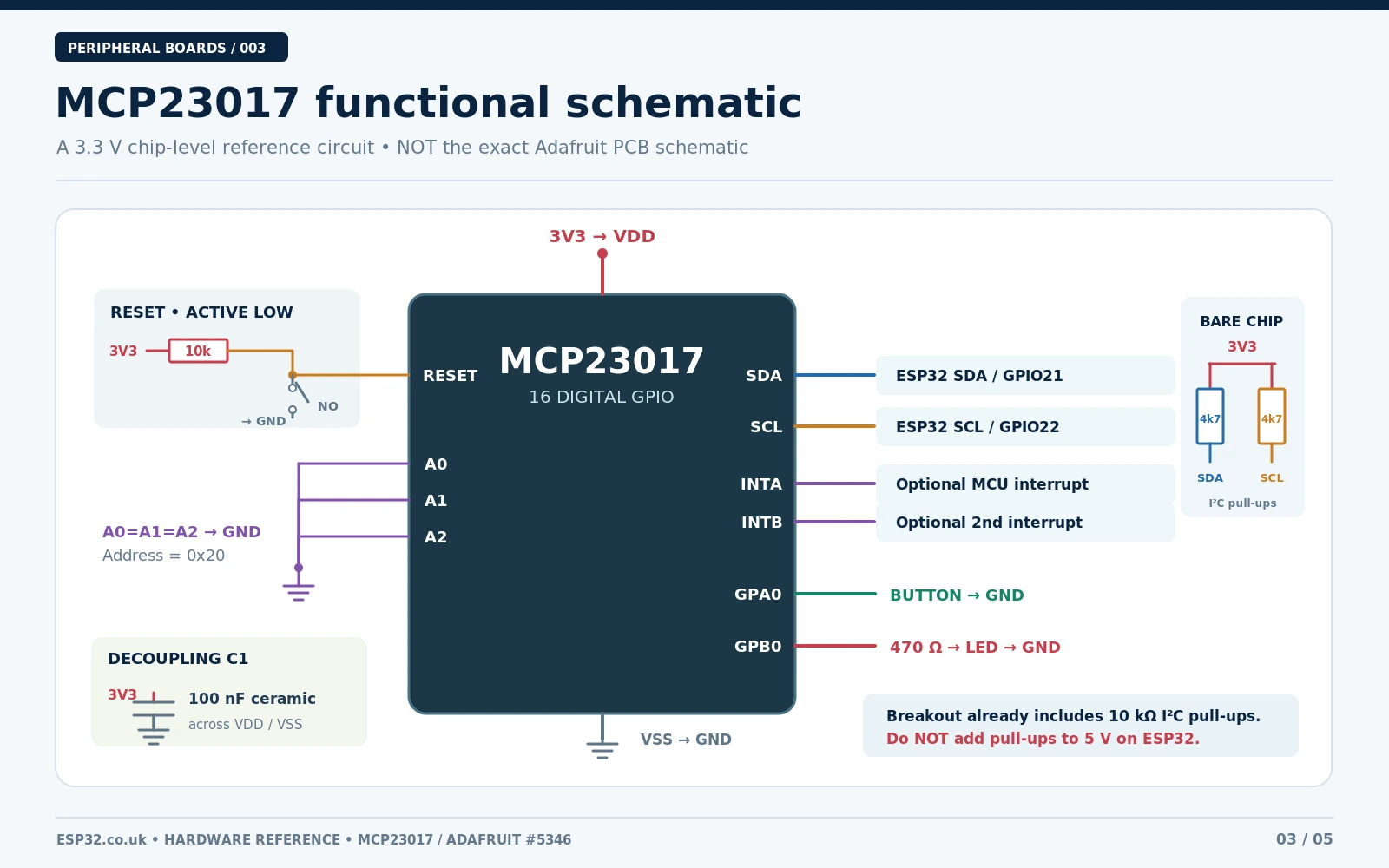
The functional drawing is not a reproduction of Adafruit’s PCB netlist. For a true manufacturer schematic and precise copper layout, refer to the official Downloads / EagleCAD files and schematic. Drawings of generic modules should be labelled by their own revision.
| Register | Purpose |
|---|---|
IODIRA / IODIRB | Select input (1) or output (0) for each GPIO |
GPPUA / GPPUB | Enable internal pull-up resistors for inputs |
GPIOA / GPIOB | Read port state or access pin values |
OLATA / OLATB | Hold output latch values |
GPINTENA / GPINTENB | Enable interrupt-on-change for selected input pins |
INTCONA / INTCONB | Select interrupt comparison against previous state or DEFVAL |
DEFVALA / DEFVALB | Reference value used in default-value interrupt mode |
INTFA / INTFB | Interrupt-source flags |
INTCAPA / INTCAPB | Capture port states when an interrupt occurs |
IOCON | Interrupt mirror/polarity/drive and register addressing behaviour |
This distinction matters when migrating from PCF8575: MCP23017 has true I/O direction control. Its input pull-ups are configurable rather than relying on quasi-bidirectional current sourcing. Each output can drive HIGH or LOW, so a small LED plus a resistor can run in either direction, subject to the IC’s limits. For relay coils, motors, solenoids or high-current loads, add the appropriate driver stage and flyback protection.
ESP32 to MCP23017 wiring (classic ESP32 DevKit)
Use a common 3.3 V supply and logic reference for the example. The official Adafruit STEMMA QT breakout is documented for 3–5 V use, but a low-cost generic module might pull SDA/SCL to its own VCC. Supplying such a module at 5 V and connecting it directly to the ESP32 can expose the ESP32 pins to an unsafe voltage. When in doubt, power the module from 3.3 V and check its pull-up circuit.
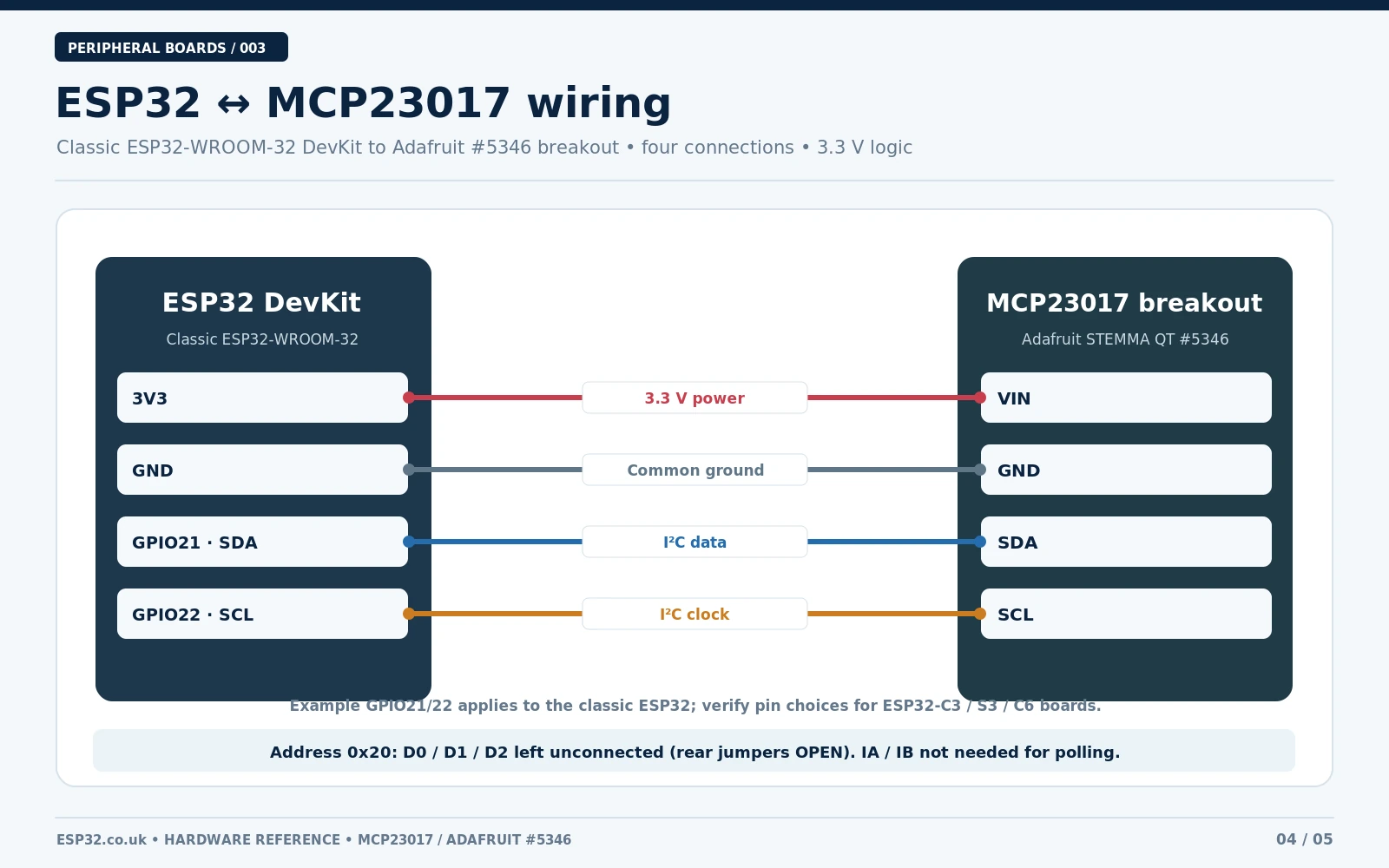
| ESP32-WROOM-32 DevKit | MCP23017 Adafruit breakout | Why |
|---|---|---|
3V3 | VIN | 3.3 V supply, matched to ESP32 logic |
GND | GND | Shared 0 V reference |
GPIO21 | SDA | I²C data |
GPIO22 | SCL | I²C clock |
Optional GPIO27 | IA | Interrupt indication for PORTA in advanced example |
| Not connected | IB | Port B interrupt optional |
| Not connected | RST | Normal operation; reset already handled by breakout |
| Open rear address bridges | D0/D1/D2 | Use 7-bit address 0x20 |
GPIO21/GPIO22 are a conventional choice for many classic ESP32 development boards. GPIO assignments on ESP32-C3, ESP32-C6, ESP32-S3 and custom boards can differ. Match your board’s real pins and pass the chosen assignments to Wire.begin(SDA, SCL). For a quick check, run an I²C scanner before adding the LED/button code.
Install the Arduino library
- In Arduino IDE 2, open Library Manager and install Adafruit MCP23017 Arduino Library.
- Install any requested dependency such as Adafruit BusIO when prompted.
- Select the correct ESP32 board package and serial port.
- Power the expander at 3.3 V as shown. Keep the rear address bridges open for
0x20. - The current Adafruit header is
<Adafruit_MCP23X17.h>; older code usingAdafruit_MCP23017.hormcp.begin()may refer to an obsolete library API.
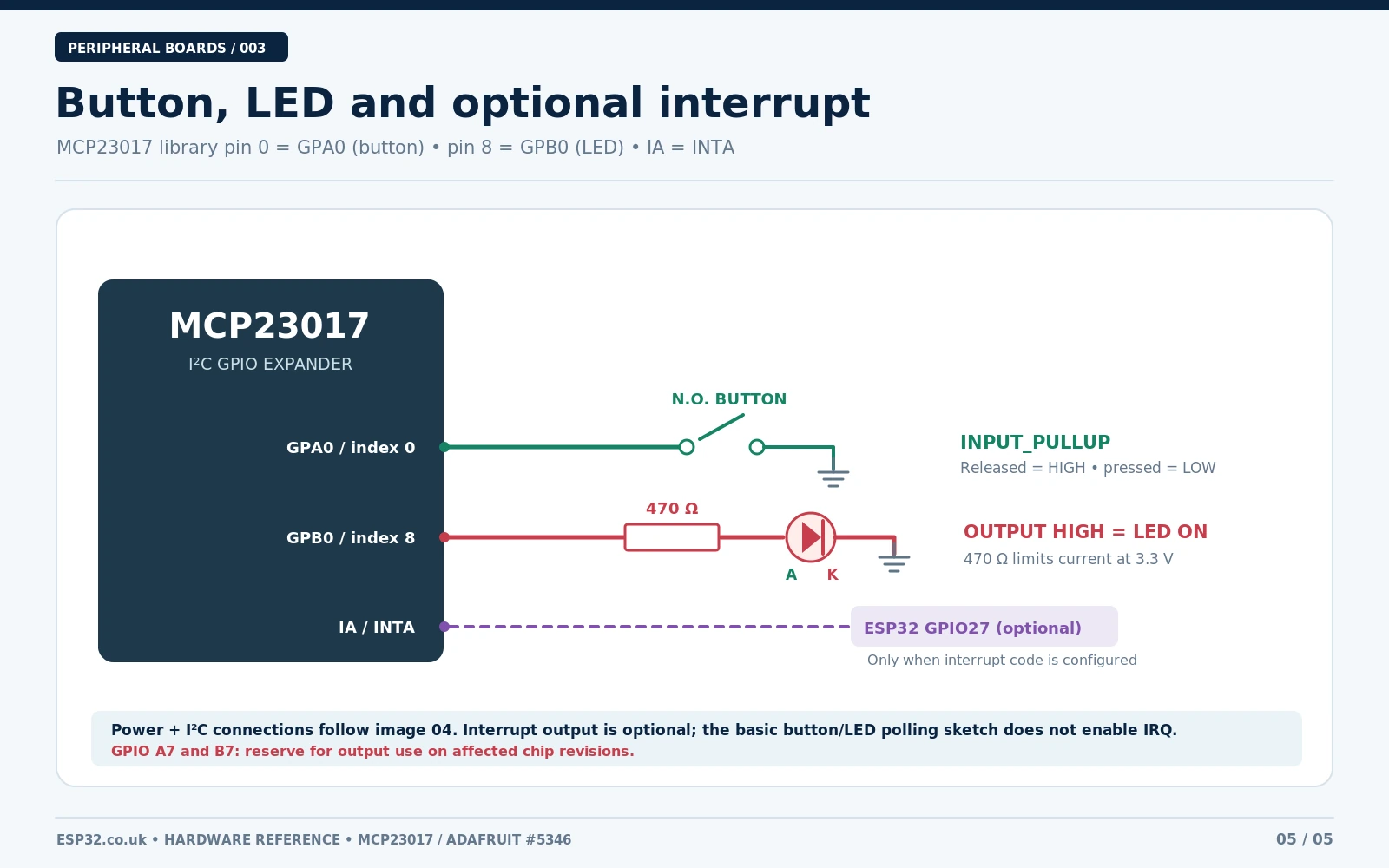
The following example uses the manufacturer-maintained Adafruit MCP23017 Arduino Library. In that library, GPA0 = 0 and GPB0 = 8. This is a small, directly usable ESP32 sketch rather than a generic pseudocode fragment.
Arduino example: button on GPA0 controls an LED on GPB0
Wire a normally-open button between GPA0 and GND. Wire an LED anode through a 470 Ω series resistor to GPB0, with its cathode going to GND. This example drives the LED HIGH when the button is pressed and LOW otherwise. It deliberately avoids GPA7 and GPB7 as inputs.
#include <Wire.h>
#include <Adafruit_MCP23X17.h>

constexpr int SDA_PIN = 21;      // classic ESP32 DevKit
constexpr int SCL_PIN = 22;
constexpr uint8_t MCP_ADDR = 0x20;
constexpr uint8_t BUTTON = 0;   // GPA0, Adafruit pin ID 0
constexpr uint8_t LED = 8;      // GPB0, Adafruit pin ID 8

Adafruit_MCP23X17 mcp;

void setup() {
  Serial.begin(115200);
  delay(300);
  Wire.begin(SDA_PIN, SCL_PIN);
  Wire.setClock(100000);       // reliable starting point

  if (!mcp.begin_I2C(MCP_ADDR, &Wire)) {
    Serial.println("MCP23017 not found. Check power, SDA/SCL, address.");
    while (true) delay(1000);
  }

  mcp.pinMode(BUTTON, INPUT_PULLUP);
  mcp.pinMode(LED, OUTPUT);
  mcp.digitalWrite(LED, LOW);
  Serial.println("MCP23017 ready: press the GPA0 button.");
}

void loop() {
  bool pressed = (mcp.digitalRead(BUTTON) == LOW);
  mcp.digitalWrite(LED, pressed ? HIGH : LOW);

  static bool lastReported = false;
  if (pressed != lastReported) {
    Serial.println(pressed ? "Button PRESSED" : "Button released");
    lastReported = pressed;
  }
  delay(25);  // simple polling delay; not a robust debounce filter
}
Expected behaviour: the Serial Monitor at 115200 baud first shows a ready message. Pressing the button on GPA0 pulls its internally pulled-up input LOW. The sketch then drives GPB0 HIGH, lighting the series-resistor LED, and prints Button PRESSED. Releasing the button switches the LED off. The 25 ms delay reduces output activity but a fully debounced interface should also validate that the contact state remains stable for a chosen interval.
If the expander does not initialise, the sketch reports an error before attempting to use the GPIO pins. The library’s begin_I2C(address, &Wire), pinMode, digitalRead and digitalWrite method names match the current Adafruit header. A real hardware bench test should still be performed on the exact PCB revision before labelling the design production-ready.
I²C scanner for 0x20–0x27
With the board connected but no peripherals attached to its GPIO, run this scanner if the library says it cannot find the MCP23017. A valid address can be anywhere from 0x20 to 0x27; a response at 0x20 is the expected default for the Adafruit board with all address links open.
#include <Wire.h>
void setup() {
  Serial.begin(115200);
  Wire.begin(21, 22);
  delay(200);
}
void loop() {
  for (uint8_t a = 0x20; a <= 0x27; a++) {
    Wire.beginTransmission(a);
    if (Wire.endTransmission() == 0) {
      Serial.printf("I2C device found at 0x%02X\n", a);
    }
  }
  delay(2000);
}
A scanner only confirms that some device acknowledges an I²C address: it does not prove its identity. If another GPIO expander or sensor uses 0x20 on the same bus, move one MCP23017 to a different address using the rear jumpers. For eight devices the available addresses are 0x20–0x27, allowing up to 128 physical GPIO lines before accounting for system electrical and bus-loading limits.
How INTA and INTB work, and when to use them
Unlike a simple 16-input polling loop, MCP23017 can notify the ESP32 when a configured input changes. Its two interrupt outputs are IA/INTA for PORTA and IB/INTB for PORTB. You can configure their active polarity, output type and optional mirroring (both IRQ pins responding to either port). The GPINTEN, INTCON, DEFVAL, INTF and INTCAP registers determine what is detected and how its source is read.
For a first experiment, keep the button on GPA0 and connect the breakout’s IA to GPIO27 on the classic ESP32. The Adafruit API supports mcp.setupInterrupts(true, false, LOW) for mirrored, active-driven LOW interrupt outputs, followed by mcp.setupInterruptPin(0, CHANGE). In the main loop, monitor the ESP32 interrupt pin and read the captured state using mcp.getCapturedInterrupt() or clear the pending event with mcp.clearInterrupts(). Avoid doing I²C reads or writing serial output inside an ESP32 ISR; have an ISR set a volatile flag and handle the bus in the loop instead.
With unmirrored interrupts, a change on PORTB is signalled by IB rather than IA. Setting IOCON.MIRROR combines the two interrupt sources, but clearing an interrupt still requires observing the relevant port’s captured/current state. You may prefer polling for a handful of slow mechanical buttons; IRQs become valuable when several inputs are monitored and the ESP32 should avoid continuously requesting the whole bus.
MCP23017 versus PCF8575 and PCF8574
| Feature | MCP23017 | PCF8575 | PCF8574 |
|---|---|---|---|
| Channels | 16 | 16 | 8 |
| I/O behaviour | Configured input or push-pull output | Quasi-bidirectional | Quasi-bidirectional |
| Input pull-ups | Per-pin configurable | Weak source when set HIGH | Weak source when set HIGH |
| Interrupt outputs | Two, configurable | One, change detection | One, change detection |
| I²C default | Typically 0x20 | Typically 0x20 | 0x20 for PCF8574; PCF8574A range starts at 0x38 |
| Best fit | Flexible GPIO and interrupts | Simple 16-line expansion | Economical 8-line expansion |
Choose MCP23017 when you need strong software control over input versus output behaviour, bank-specific IRQs, pull-ups or interrupt capture. Choose PCF8575 for uncomplicated 16-line digital expansion where quasi-bidirectional electrical behaviour suits the circuit. Neither part should be treated as an ADC, PWM driver or direct motor/relay driver. For ADC channels, the ADS1115 is a different board family.
Troubleshooting: common MCP23017 mistakes
- No device at 0x20: swap-check SDA/SCL, confirm common ground, verify 3.3 V at VIN, scan 0x20–0x27 and inspect the +1/+2/+4 solder bridges.
- GPIO wiring seems reversed: remember Adafruit pin IDs 0–7 correspond to GPA0–GPA7, while 8–15 correspond to GPB0–GPB7. A package pin number is not a library pin ID.
- Button reads continuously LOW: ensure the button is normally open to GND and configured as
INPUT_PULLUP; verify the switch is not bridging adjacent PCB pads. - LED does not light: check polarity, resistor location and GPB0 rather than GPA0. The 470 Ω resistor belongs in series with the LED.
- Unexplained bus lockups: do not use GPA7/GPB7 as inputs on affected silicon; check pull-up voltage and excessive capacitance or long wiring.
- Interrupt stays asserted: make sure the port capture/current state has been read or its IRQ cleared in the library, and check whether level-versus-change mode suits the switch.
- Two devices respond together: give them unique I²C addresses using different solder-bridge combinations.
- Wrong library examples: prefer
Adafruit_MCP23X17.handbegin_I2C(), not outdated interfaces from pre-2.x tutorials.
Official references and related esp32.co.uk/ articles
- Adafruit MCP23017 breakout pinout and address jumpers — physical board reference and known GPA7/GPB7 warning.
- Adafruit downloads: schematic and EagleCAD files — verify exact PCB traces.
- Microchip MCP23017 official product page and datasheet — IC-level specifications and interrupts.
- Adafruit MCP23017 Arduino library — supported methods and pin numbering.
- esp32.co.uk/: MCP23017 with ESP32 and ESPHome — configuration-specific follow-up.
- esp32.co.uk/: MCP23017 vs PCF8574 vs PCF8575 — module choice.
- esp32.co.uk/: PCF8575 Arduino example — simpler quasi-bidirectional alternative.
Bottom line: use the correct breakout pinout, keep the ESP32 bus at 3.3 V, select an unused address from 0x20–0x27, and distinguish address inputs from GPIO A-bank pins. Start with the Adafruit Arduino button/LED sketch; add interrupts only when the application needs them. When designing a button bank, do not overlook Adafruit’s GPA7/GPB7 input warning.