A search for the best STM32 development board produces an unusually confusing shortlist. One listing shows a tiny Blue Pill for pocket money. Another recommends a Black PillAliExpress price with a faster Cortex-M4. ST’s own catalogue spans compact Nucleo-64 boards, large Nucleo-144 boards, motor-control specialists, ultra-low-power platforms and wireless microcontrollers. They are all STM32, yet they are not interchangeable.
This guide makes the choice practical. We compare the actual board, the microcontroller mounted on it, programming hardware, important peripherals and the type of project it suits. We also explain which tempting specifications are misleading, what an external ST-LINKAliExpress price adds to the price, and which boards we would choose for learning, CAN communication, embedded control, battery-powered sensors and more demanding work.
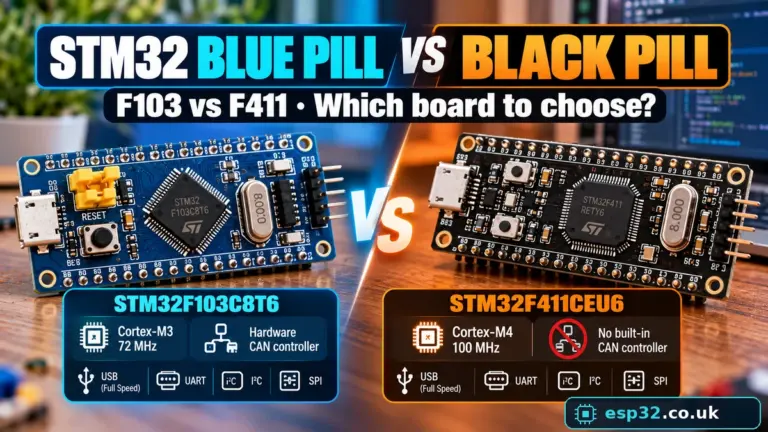
Quick verdict: Choose NUCLEO-F401RE as a broadly useful first STM32 learning board: an official board with integrated ST-LINKAliExpress price and a manageable Cortex-M4. Pick an STM32F103C8 Blue Pill only if budget, small size or F103-specific CAN work matters and you can handle its clone/debugger caveats. Choose a Black Pill with STM32F411CE for a compact faster F4 design, but check the exact chip and do not assume it has CAN. For specialist projects, a suitably selected G4, L4/U5, H7 or WBA Nucleo is usually more sensible than buying the fastest device indiscriminately.
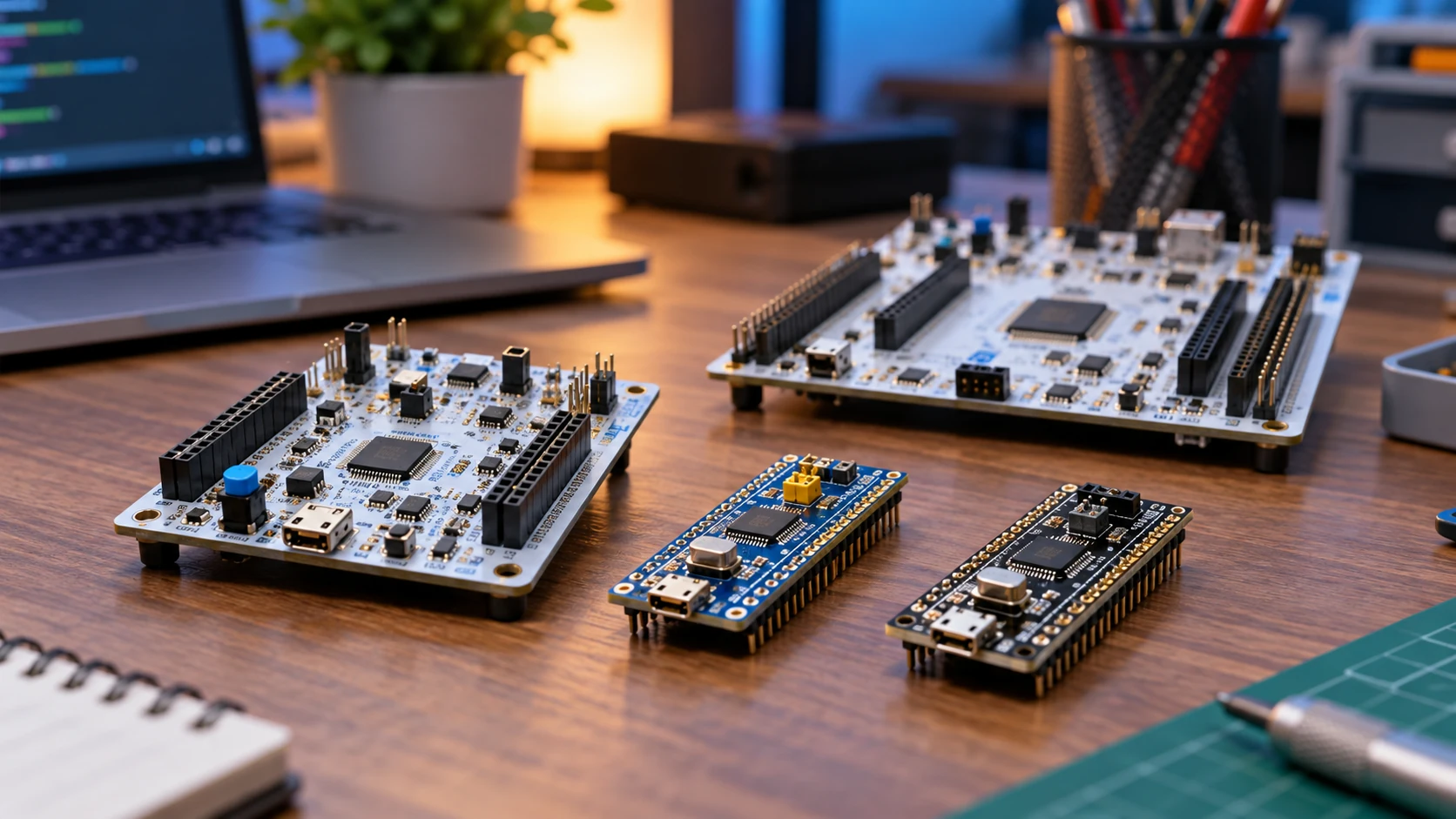
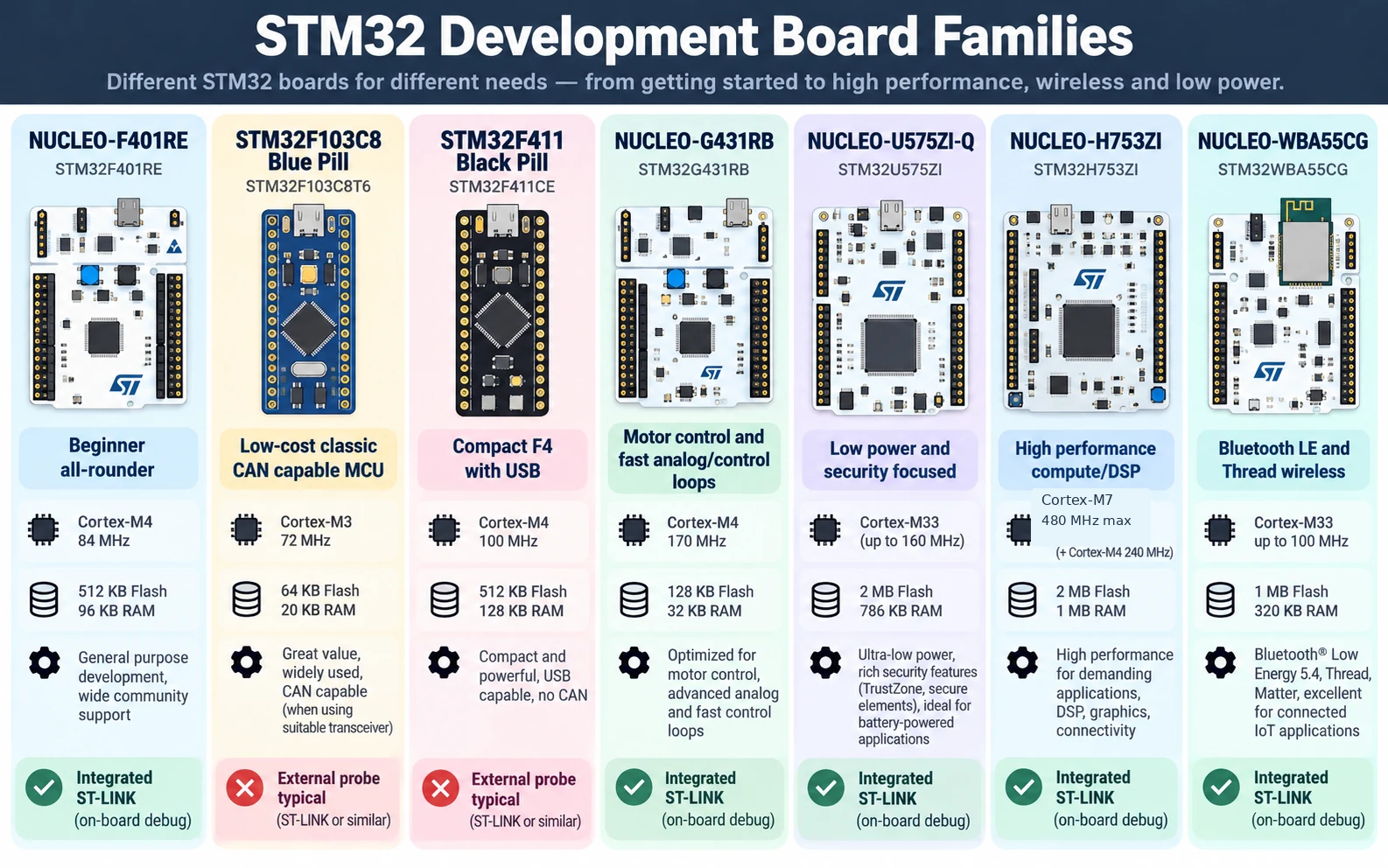
The best STM32 boards at a glance
The table deliberately avoids unverified shop prices. Retail offers vary by country, genuine-versus-clone status, included pins/cables and whether an ST-LINK is already in the package. The recommendations are based on technical fit and development friction—not on affiliate commissions or a claim that one chip is universally superior.
| Board | Main attraction | Programming/debugging | Best for | Important limitation |
|---|---|---|---|---|
| NUCLEO-F401RE | General-purpose Cortex-M4 learning platform | On-board ST-LINK | First serious STM32 project, HAL, debug | No integrated Wi-Fi/Bluetooth; no bxCAN |
| STM32F103C8 Blue Pill | Very small and widely documented | External SWD probe normally needed | Cheap prototypes, classic F103, CAN via external transceiver | Clones and inconsistent flash/USB circuitry |
| STM32F411CE Black Pill | Compact, comparatively capable Cortex-M4 | External SWD probe normally needed | Embedded control, USB-capable F4 projects | F411 has no CAN controller |
| NUCLEO-G071RB | Current low-cost mainstream G0 platform | On-board ST-LINK | Simple industrial I/O and low-complexity firmware | Not designed for heavy DSP processing |
| NUCLEO-G431RB | G4 timers, analog and control focus | On-board ST-LINK | Motor control, power electronics, fast ADC/controls | More peripheral complexity than a beginner needs |
| NUCLEO-L476RG | Established low-power STM32L4 | On-board ST-LINK | Sensor logging, sleep/wakeup experiments | Not the highest-performance choice |
| NUCLEO-U575ZI-Q | Modern ultra-low-power/security-oriented U5 | On-board ST-LINK | Low-power products, more complex secure firmware | Larger board and steeper configuration learning curve |
| NUCLEO-H753ZI | High-performance STM32H7 Nucleo-144 | On-board ST-LINK | DSP, intensive control and high-throughput firmware | Greater complexity, memory/cache considerations |
| NUCLEO-WBA55CG | STM32 with integrated 2.4 GHz wireless radio | On-board ST-LINK | Bluetooth LE, Thread/Matter investigations | Wireless stack development and protocol constraints |
A crucial distinction: the board name identifies a populated development PCB; the part number identifies the MCU. Two visually similar Black Pill boards can carry different chips with different flash, RAM and peripherals. Conversely, a large Nucleo PCB can be easier to use than a tiny board because it includes the debugger and accessible connectors.
How we selected these boards
We applied five tests. First, does the target peripheral exist on the exact MCU? A library cannot conjure up a CAN controller or a USB peripheral that is absent from silicon. Second, can you actually program and debug it? The cost of an external probe or an afternoon of wiring should count against a supposedly cheap option. Third, are ST documentation and examples available for that board? Fourth, can you safely connect your sensors and power source? Finally, is the board a sensible fit rather than an overpowered distraction?
We also checked current manufacturer product status. Some popular articles keep recommending boards that have become obsolete or not recommended for new designs. For example, ST currently identifies the older NUCLEO-H743ZI as obsolete, recommending NUCLEO-H753ZI as its replacement, while the NUCLEO-WBA52CG is marked not recommended for new design in favour of the WBA55CG. An existing project may still justify an older board, but it should not automatically head a new 2026 buying list.
A board comparison cannot substitute for a final datasheet and schematic review. Available peripheral channels, pin multiplexing, voltage tolerance and physical connectors depend on exact device, package, board revision and jumpers. Treat the table as a shortlist, not as wiring approval.
1. NUCLEO-F401RE — best overall for learning STM32
The NUCLEO-F401RE is an excellent point of entry because it removes two common sources of frustration: missing debugging hardware and unclear board configuration. Its STM32F401RE is an Arm Cortex-M4-class part, and the Nucleo-64 platform provides an integrated ST-LINK debugger/programmer, Arduino Uno V3-style expansion headers and additional ST morpho connectors. You can follow a clear sequence: plug in the debugger USB connection, configure the board in STM32CubeMX, build in STM32CubeIDE, then set breakpoints and inspect variables.
For a beginner, that is more valuable than a headline clock speed. A properly working debugger turns a silent failing MCU into an understandable program. UART output, timer configuration, DMA experiments and ADC sampling all become substantially easier to diagnose once you can halt execution and inspect peripheral registers. The supplied ST software packages and board-specific examples are also useful starting points.
The F401RE is not the right board for every project. It does not include Wi-Fi or Bluetooth radio hardware. More importantly for vehicle enthusiasts, it does not provide an on-chip CAN peripheral: choose a different STM32 family or add an external CAN controller as well as a transceiver. Do not confuse an SPI-connected CAN module with the presence of internal CAN hardware. The F401RE’s primary advantage is a dependable learning and debugging setup.
Buy it if: you want to learn STM32 properly, write C with HAL, move beyond Arduino-style sketches, and keep using the board for increasingly complex peripheral exercises. For the walkthrough, see our STM32 for Beginners guide, prepared as article #001 in this series.
2. STM32F103C8 Blue Pill — best tiny board for inexpensive experiments
The Blue Pill became popular because the STM32F103C8T6 combines an Arm Cortex-M3 core, useful timers and serial interfaces, ADC capability and a built-in classic CAN controller in an inexpensive narrow PCB. It is small enough for perfboard prototypes and there is a large body of community information. On the commonly sold F103C8 part, the advertised flash memory is 64 KB; some boards are reported to expose more, but software should not assume an undocumented capacity.
The catch is that Blue Pill is a community nickname, not a controlled manufacturer board specification. Sellers may use different regulators, LED arrangements, USB pull-up circuits or clone MCUs. Some boards work perfectly with the open-source STM32 Arduino core; others create time-consuming driver, clock or USB problems. The label on the listing is not evidence that the silicon is genuine.
Blue Pill boards also commonly lack an integrated ST-LINK. Programming with an external SWD probe is straightforward once you connect SWDIO, SWCLK, GND and target-voltage reference correctly, but those extras affect both the real cost and the initial learning curve. Bootloader-over-UART alternatives can work, yet a proper debugger remains far more useful for serious work. A USB connector on the board does not guarantee a preinstalled USB bootloader or USB serial port.
One genuinely useful differentiator is the F103’s bxCAN controller. It can help with classic CAN experiments, provided you also fit a compatible external CAN transceiver, termination where required and suitable power/grounding. The MCU’s logic pins are not a physical CAN bus interface by themselves. Our existing Blue Pill pinout guide and STM32 CAN tutorial give the deeper board-specific detail.
Buy it if: small footprint, low entry cost or STM32F103 compatibility is central to the project and you already have (or are prepared to use) a debugger. For a first-ever microcontroller, a Nucleo often saves more time than the Blue Pill saves money.
3. STM32F411 Black Pill — best compact F4 development option
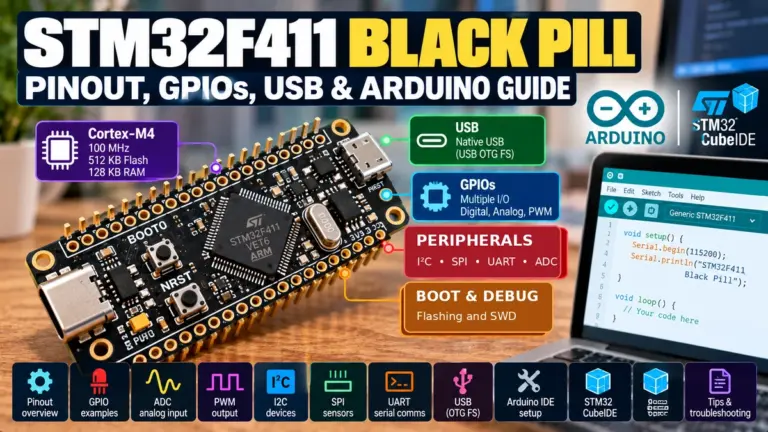
A typical Black Pill is a narrow board populated with an STM32F401 or STM32F411, with a USB connector and headers along both edges. The common STM32F411CE variant features a Cortex-M4 core running up to 100 MHz, making it attractive for embedded projects involving sensors, timing, signal processing and native USB where the precise board wiring supports it.
You must check the suffix, rather than reading only the words Black Pill. An F401CC board and an F411CE board differ in memory and peripheral specifications. Pin mappings, onboard LED location, oscillator arrangements and boot options can also vary between board batches. A tutorial compiled for one does not automatically produce a safe pinout for the other.
A frequent mistake is assuming the Black Pill is automatically better for automotive projects because it is faster than the F103 Blue Pill. STM32F411 does not have a CAN controller. For CAN work, the F103 may actually be the more direct choice, or a modern STM32 with a suitable FDCAN/bxCAN peripheral can be selected. A bare transceiver connected to an MCU without CAN hardware does not magically provide native CAN; an external controller would also be necessary.
The Black Pill normally requires external SWD access for the full debugging experience. For many projects that is acceptable: a compact final PCB matters more than the convenience of onboard ST-LINK. Our F401 versus F411 comparison and F411 pinout guide cover the variants in detail.
Buy it if: you need compact STM32F4 hardware, have verified the exact chip and can accept external debugger wiring. Do not pay for an F411 specifically because of a peripheral it does not have.
4. NUCLEO-G071RB — best straightforward modern STM32G0 board
For plain embedded I/O, the NUCLEO-G071RB deserves more attention than it gets in hobbyist rankings. It represents the mainstream STM32G0 family, aimed at practical low-cost embedded designs rather than maximum computation. The official Nucleo-64 includes a built-in ST-LINK and accessible headers, so the development experience is predictable while the underlying MCU remains closer in spirit to a compact production controller.
This makes sense for relay-control logic, reading switches, basic communication bridges, serial devices, small measurement instruments and embedded products that do not require high-end DSP. You can focus on state machines, watchdogs, timers and robust I/O handling rather than spending your time configuring high-performance cache and memory domains.
The G0 family is not just a renamed F1. Peripheral instances, USB availability, ADC capabilities, timers and pin multiplexing vary across individual G0 parts. Use the STM32G071RB reference manual and board schematic when checking a feature. A code example written for an F103 is not automatically compatible at register level, even if equivalent functionality exists in HAL.
Buy it if: your goal is realistic general embedded control and you value an official debug-friendly platform without the complexity of a large H7.
5. NUCLEO-G431RB — best for motors, measurement and control loops
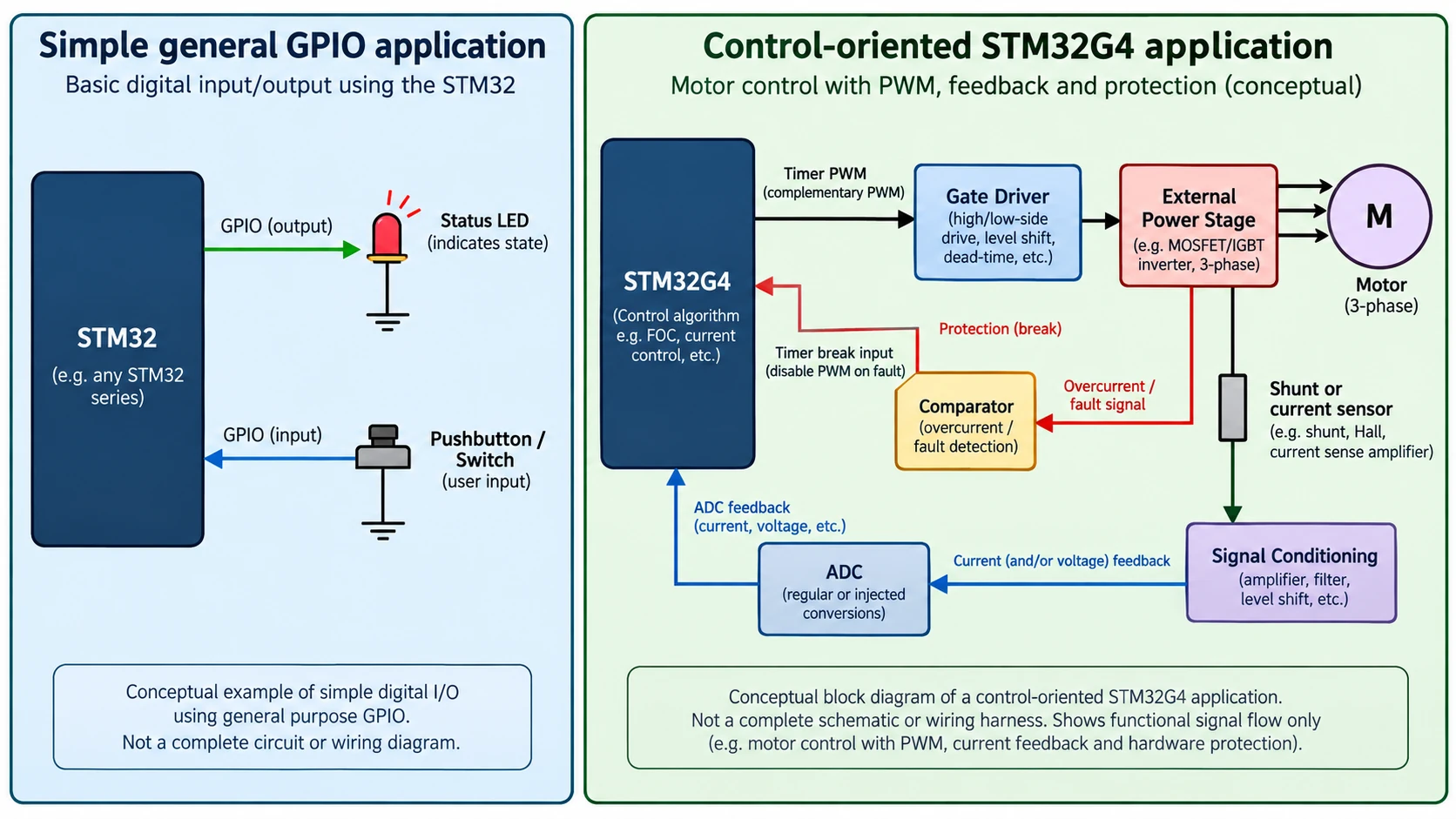
The NUCLEO-G431RB is a much more targeted recommendation. STM32G4 devices are oriented toward mixed-signal and real-time control applications, with capable timers and analog subsystems useful in power conversion, motor-control feedback and fast control loops. The G431 family has a Cortex-M4 with DSP/floating-point support and a maximum CPU speed of 170 MHz on supported configurations.
For a PWM-driven motor controller, for example, you care about complementary PWM outputs, dead-time generation, synchronized ADC sampling, fault/break inputs and deterministic interrupt timing. Those details are usually more important than whether a core scores slightly higher in a generic benchmark. The G4 family is attractive precisely because these building blocks are designed to work together.
The board itself remains easy to program because it is an official Nucleo with integrated ST-LINK. But a Nucleo board is not a power stage. Driving an inverter or high-current DC motor still requires gate drivers, properly sized transistors, current sensing, isolation or protection where appropriate, and careful power-electronics design. Never connect motor or mains-level power directly to MCU pins.
Buy it if: your next project involves serious PWM timing, feedback control, motor-control experimentation or analog signal acquisition. If you simply want to blink LEDs and read a BME280, its specialist features may go unused.
6. NUCLEO-L476RG — best established low-power learning platform
The NUCLEO-L476RG provides an STM32L4-based route into low-power firmware. The attraction is not simply low current in a datasheet headline: it is the ability to experiment with different run/sleep states, clock sources, RTC wake-up, retained memory and peripheral behaviour while still having a full debugger available during development.
For a battery-powered data logger, average consumption is driven by much more than MCU sleep current. Sensor standby drain, voltage regulator quiescent current, pull-up resistors, SD-card or radio operation, LED status indicators and the time spent awake can dominate the result. A full Nucleo board also includes circuitry that makes it unsuitable as a direct measurement of a stripped-down production sensor node unless you isolate or account for those loads.
A useful first experiment is to measure active current, enter a low-power mode, wake periodically using an RTC or timer, sample a sensor and return to sleep. Keep a table of measured current and duty cycle, then decide whether lower clock speed, reduced wake frequency or powering down the external peripherals saves more energy. That is better engineering than selecting a chip solely because the family name contains ‘low-power’.
Buy it if: you want a well-documented low-power STM32 platform and realistic exercises in RTC, wake sources and power measurement. Consider U5 if newer security and power-management features are specifically important.
7. NUCLEO-U575ZI-Q — best modern low-power and security exploration
The NUCLEO-U575ZI-Q brings a modern STM32U5 device to a Nucleo-144 development format. The U5 line is designed around energy efficiency, modern Arm Cortex-M33 features and security-oriented capabilities. For readers moving beyond hobby prototypes into connected products, that can matter more than pin count or cost alone.
This is a strong platform for learning secure boot concepts, protected firmware update architectures, low-power operation, memory protection and larger application structure. However, those are not one-click features. Proper security requires key provisioning, threat modelling, lifecycle decisions and careful handling of debug access. Simply choosing a Cortex-M33 or a TrustZone-capable part does not make an application secure.
The large Nucleo-144 form factor offers accessible connectors during development. Its size is not necessarily representative of the final product, and its onboard debug/power circuits also influence whole-board current consumption. The ‘Q’ suffix is part of the precise development board name: do not assume all U575 Nucleo variants share the same power configuration.
Buy it if: you are deliberately exploring modern low-power firmware, security-aware design or U5-specific capabilities, not because you need a more expensive board to learn GPIO basics.
8. NUCLEO-H753ZI — best for intensive computation and interfaces
The NUCLEO-H753ZI is a better 2026 recommendation than the older NUCLEO-H743ZI, which ST now lists as obsolete. This Nucleo-144 class gives access to a powerful STM32H7 MCU and a much broader set of development possibilities: computationally intensive control, high-rate data acquisition, graphics-related processing, complex signal-processing pipelines and interfaces demanding substantial memory throughput.
The important warning is that high-end STM32 development involves more than running familiar HAL code at a higher clock rate. Memory regions can have different access properties. DMA buffers and Cortex-M7 data cache interactions require deliberate design; otherwise a program may appear correct with small tests and fail when a peripheral or network workload grows. Interrupt priorities and stack/heap placement become more important too.
For Ethernet experiments, check the exact board hardware, required PHY/connector arrangements and ST’s application examples instead of inferring full network capability from the MCU family alone. Nucleo-144 variants have different fitted interfaces. Similarly, the availability of a USB controller in silicon does not mean every speed and role is available without the correct connector and external circuitry.
Buy it if: you already understand basic STM32 debugging and have a clear workload demanding H7-class performance. For a beginner, it often produces more configuration questions than learning value.
9. NUCLEO-WBA55CG — best for STM32 wireless protocols
Most ordinary STM32F/G/L Nucleo boards do not contain a Wi-Fi or Bluetooth radio. If wireless is a core requirement, choosing a proper radio-equipped STM32 board is more direct than assuming a common F4 Nucleo behaves like an ESP32. The NUCLEO-WBA55CG carries an STM32WBA wireless MCU and is suited to Bluetooth Low Energy and relevant IEEE 802.15.4 protocol work, depending on the approved software stack and firmware support.
The WBA platform introduces RF-specific design and software concepts: antenna behaviour, wireless coexistence, protocol stacks, radio qualification, boot/update considerations and power measurement across transmit/receive/sleep cycles. This is significantly more involved than toggling a GPIO. The official Nucleo board and software package make a sensible evaluation environment.
For a straightforward Wi-Fi sensor linked to Home Assistant, an ESP32 may remain easier because Wi-Fi is built into many variants and the ESPHome ecosystem is extensive. For BLE/Thread/Matter-oriented firmware development specifically on STM32, a WBA Nucleo is the relevant choice. Note also that NUCLEO-WBA52CG is marked NRND by ST, with WBA55CG identified as its replacement; check purchasing listings carefully.
Buy it if: your project requires STM32 wireless development and you are prepared to work within the chosen ST radio stack. Do not confuse Bluetooth/Thread capability with native Wi-Fi.
Nucleo-64 vs Nucleo-144 vs Discovery: which board format?
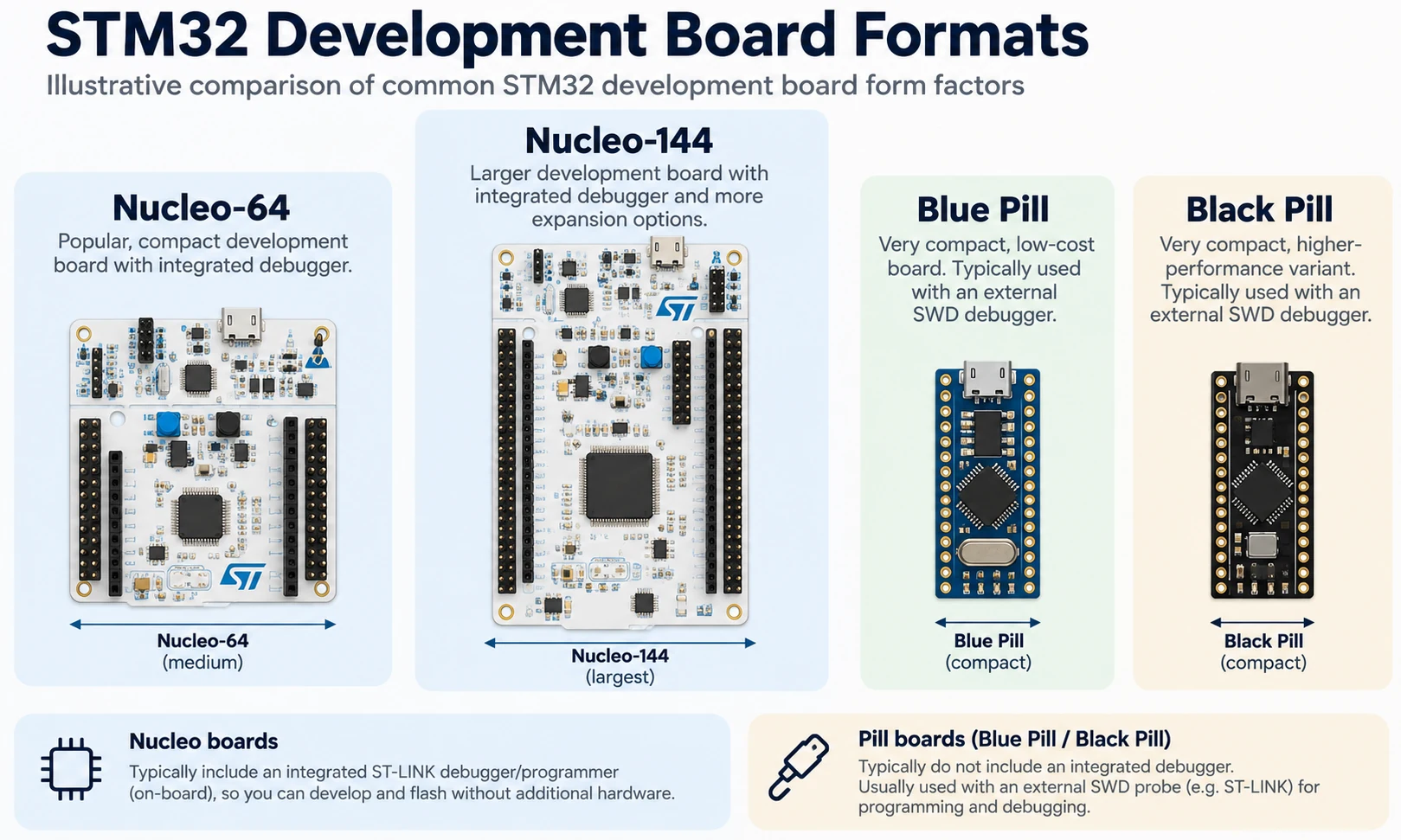
The Nucleo-64 layout is usually the best balance for introductory work. Many boards include Arduino Uno V3-style connectors, ST morpho headers and on-board ST-LINK. They sit comfortably on a desk, expose a useful number of pins and support practical sensor/shield experiments. ’64’ broadly refers to the MCU package/connectivity class; it does not mean that every board exposes 64 completely free GPIO pins.
Nucleo-144 boards are larger and often chosen to evaluate chips with more pins and interfaces. They may include additional Zio/morpho headers and make routing peripheral buses easier. This is helpful for a complex design but can be overkill for an LED, I2C sensor or UART tutorial. Check what is populated on the specific model, not on a generic Nucleo-144 photograph.
Discovery/evaluation kits are a different category. They frequently include displays, audio codecs, external memories, sensors or other target-application peripherals already connected on the PCB. They can make a display/audio/AI demonstration much easier, but may tie up pins and cost more than a plain Nucleo. Prefer a Discovery kit when those onboard features are precisely what you intend to use.
Pill boards invert the trade-off: very compact, simple to embed and widely sold, but typically with less on-board debugging and less assurance about clone component choices. A Blue Pill or Black Pill can be excellent hardware for a project; they are not automatically the easiest development environment.
Features that matter more than maximum clock speed
1. Debug access and programming
If you are learning embedded C, an integrated ST-LINK is an enormous convenience. You can set breakpoints, single-step, watch variables, examine memory and recover from a wrong configuration. External SWD is equally capable when correctly connected, but it adds a cable and probe to keep track of. Confirm supported ST-LINK variants and USB connector type on the exact board revision, not from an unrelated seller photo.
SWD pin signals are SWDIO, SWCLK, GND, and usually target voltage reference (VTref). Reset (NRST) can improve recovery. A VTref pin may be an input used for voltage detection and is not automatically a 3.3 V supply output. Never connect 5 V to a 3.3 V rail because the header was labelled ambiguously.
2. The peripheral checklist: CAN, USB, timers, ADC and Ethernet
Decide what the board must do before looking at its processor generation. CAN is a prime example: the STM32F103C8 has a classic CAN controller, whereas the STM32F401 and STM32F411 do not. Even with internal CAN/FDCAN, you normally need a physical transceiver and correct bus wiring. USB requires checking the exact USB peripheral, on-board wiring, connector and firmware; a connector may exist only for the debugger. ADC usefulness depends on resolution, sampling behaviour, source impedance and reference design as well as channel count. Timers should be checked for encoder mode, capture/compare, complementary outputs and break features.
Ethernet claims are especially easy to overstate. An MCU may have an Ethernet MAC while a board lacks the PHY or RJ45 port needed for an immediate network connection. A product family page that lists an interface under ‘features specific to some boards’ is not a promise that it is fitted on yours.
3. Memory, package and usable pins
For a new product, confirm flash and RAM from the device datasheet and memory map—not from the title of a third-party listing. Be wary of Blue Pill advertisements that assume extra flash beyond official capacity, and Black Pill listings that blur F401/F411 suffixes. Also distinguish a package’s nominal pin count from GPIO actually available after power, crystal, debug, boot and USB assignments. CubeMX is a good first check for pin conflicts, while the reference manual and schematic are final authorities.
4. Power consumption in the real circuit
A Nucleo’s on-board debugger, power LEDs and regulators make it an intentionally convenient development tool, not a minimised coin-cell design. To compare sleep current, configure an appropriate measurement path, isolate relevant board loads when supported and measure the complete active/sleep cycle. A 10 µA MCU claim is meaningless if a sensor board and regulator consume milliamps continuously.
5. Real cost and supply-chain reliability
When comparing purchase options, add the cost of an ST-LINK debugger, a good USB data cable, any required pin headers, a breadboard, a reliable 3.3 V supply and the transceivers/sensors required by the project. Check seller authenticity, chip marking, pin-header installation and USB connector type. For professional work, dependable documentation and an available production supply chain usually matter more than saving a little on the prototype PCB.
Choose a board for your exact project
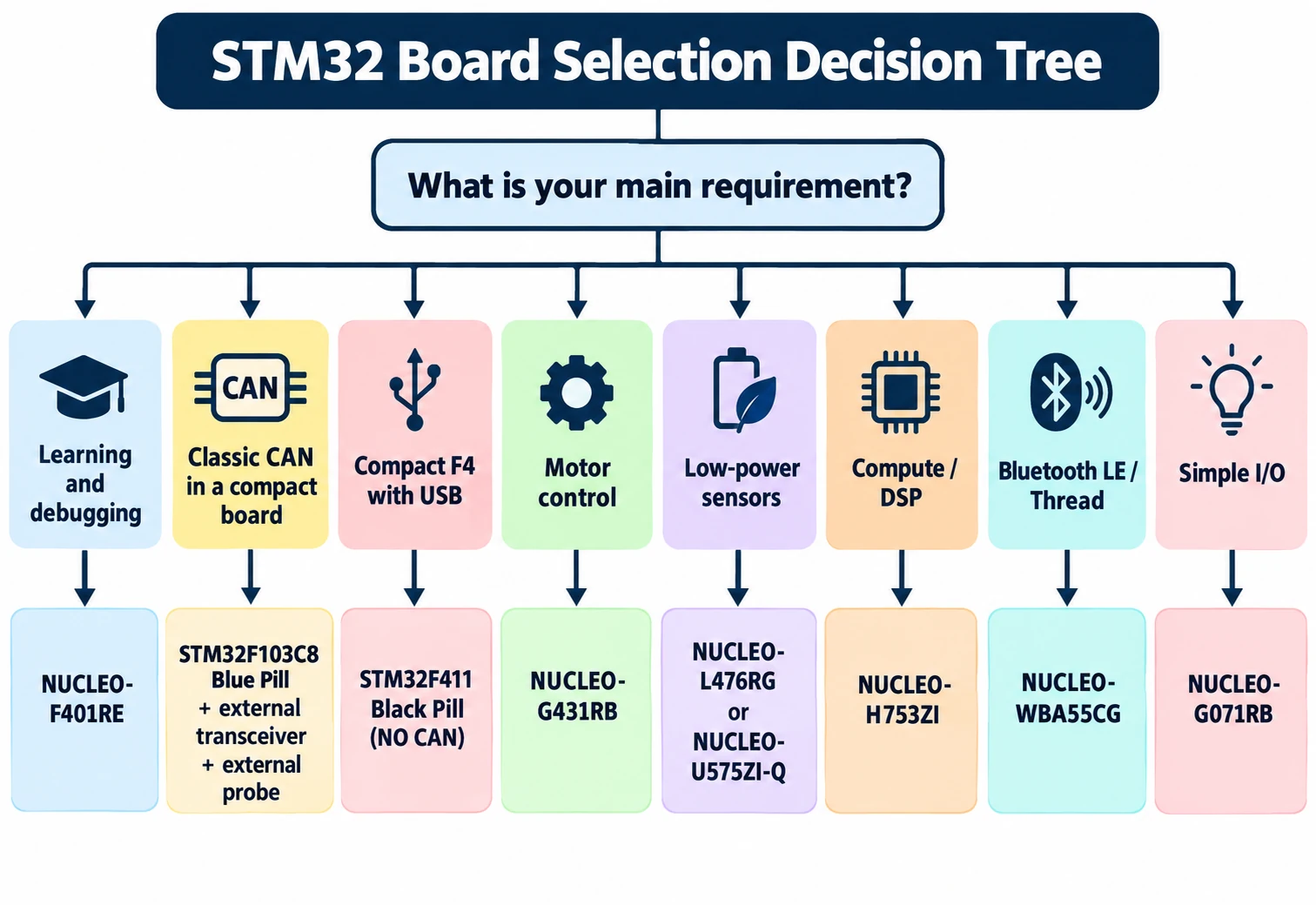
Here is the decision procedure we would actually use for nine common ideas rather than giving everyone the same shopping advice.
| Planned project | Recommended starting platform | Reason |
|---|---|---|
| Learn HAL, interrupts and debugger | NUCLEO-F401RE | Integrated ST-LINK and straightforward F4 ecosystem |
| Cheapest compact classic-CAN experiment | Verified F103 Blue Pill + SWD probe + CAN transceiver | MCU has classic CAN peripheral; validate board and bus design |
| Small generic controller with native USB capability | Verified F411 Black Pill | Compact F4, but check actual USB wiring and boot mode |
| Low-complexity industrial I/O prototype | NUCLEO-G071RB | G0 platform and official development convenience |
| High-frequency PWM and current control | NUCLEO-G431RB | G4 control-oriented peripherals |
| Battery sensor with RTC periodic wake | NUCLEO-L476RG | Good low-power experimentation and examples |
| Modern secure, energy-efficient controller | NUCLEO-U575ZI-Q | U5 low-power/security-oriented architecture |
| High-throughput computation or intensive DSP | NUCLEO-H753ZI | H7-class performance, provided you manage memory/cache correctly |
| Bluetooth LE or Thread experiments | NUCLEO-WBA55CG | Radio-equipped STM32 platform and ST protocol tooling |
The 2026 software workflow: do not follow the wrong CubeIDE tutorial
Many older YouTube videos open the STM32CubeMX configuration editor inside STM32CubeIDE. That is not the default workflow for STM32CubeIDE 2.x. ST separated CubeMX into a standalone application in the 2.0 release. For typical generated HAL projects, you select the correct board/MCU and configure pins and clocks in STM32CubeMX, generate an STM32CubeIDE-targeted project, then open it in STM32CubeIDE for editing, compiling and debugging. STM32CubeProgrammer is a separate tool for programming, reading and inspecting compatible targets.
For a Nucleo, the board selector can save substantial configuration time. For a Blue Pill or Black Pill, select the actual MCU rather than a superficially similar board. Keep generated code inside its designated user-code sections, and keep a versioned copy of the .ioc configuration where applicable. If a project created with an older integrated CubeIDE is being migrated, check tool and firmware package compatibility before regenerating everything.
A good first test for any purchase is: power the board correctly, connect the debugger, read the target device ID, build an LED example, place a breakpoint and inspect a variable. If those five steps work, you have a usable learning platform. If they do not, solve the power/debug problem before adding displays, radios or motor drivers.
Common buying mistakes and how to avoid them
Mistake: ‘All STM32F4 boards have CAN.’ They do not. Check the specific MCU. Our Blue Pill vs Black Pill comparison explains why the older F103 can be better for a CAN-centred project than some faster F4 chips.
Mistake: ‘There is a USB connector, so I can just upload a sketch over USB.’ That connector might connect to ST-LINK, the target USB peripheral, or a USB-to-UART device. Firmware bootloaders differ and are not guaranteed to be installed. Check the schematic and system-memory bootloader documentation for your particular part.
Mistake: ‘A Black Pill is a single standard PCB.’ Different manufacturers and revisions use different regulators, oscillators and pin arrangements. Verify the part marking and measure power rails before trusting an unlabelled diagram.
Mistake: ‘The higher the MHz, the better for everything.’ Clock speed is one attribute. For motor control, you need PWM/ADC synchronisation; for a battery sensor, a low standby drain; for BLE, a qualified radio stack; for CAN, a controller and transceiver. The fastest MCU may also be hardest to configure.
Mistake: ‘The Nucleo’s USB power proves a standalone circuit is safe.’ It does not. A final design needs regulator margin, reverse-current protection as relevant, bypass capacitors, grounding and input protection. Always check the board power jumpers and supply modes before applying external power.
Mistake: ‘Arduino shield compatibility means electrical compatibility.’ A shared connector arrangement does not guarantee the same logic voltage, drive strength or pin function. Most STM32 GPIO is designed around 3.3 V logic; only designated pins and conditions tolerate higher input voltages. Do not assume every pin is 5 V tolerant, and never infer voltage tolerance from the shape of an Arduino-compatible header.
What to buy alongside your STM32 board
For an official Nucleo, start with a known-good USB data cable of the right connector type. A breadboard, jumper wires and basic resistor/LED parts are enough for the first projects. An external ST-LINK is generally unnecessary for onboard development, though it can be useful later for another target.
For a Blue Pill or Black Pill, add a reliable SWD probe and suitable leads. You may also need soldered pin headers, a stable 3.3 V power source and a separate USB-UART adapter depending on your test method. If the project is CAN, add an appropriate transceiver and bus termination. If it is an I2C or SPI display, confirm the board’s voltage and level-shifting requirements. Our affiliate product pills should appear only next to the parts a reader actually needs, not as a generic shopping block with unrelated items.
For measurements, a basic multimeter is useful from day one. For low-power work, a current monitor with suitable dynamic range matters more than an additional development board. For fast communication and PWM/debug timing problems, a logic analyser and eventually an oscilloscope are often worth more than moving to a slightly faster MCU.
FAQ: best STM32 development boards
Is Blue Pill still worth buying in 2026?
Yes, particularly for inexpensive prototypes and projects that specifically use STM32F103 peripherals. But weigh clone uncertainty and external debugging costs. It is not automatically the best first board for a complete beginner.
Is Black Pill better than Blue Pill?
For processing power and many modern F4 tasks, an F411 Black Pill can be better. For an inexpensive controller with built-in classic CAN, an STM32F103 Blue Pill has a significant advantage. The correct answer depends on the actual MCU and project requirements, not PCB colour.
Which STM32 board is best for Arduino IDE?
Both many Blue Pill and Black Pill variants have community support through the STM32duino Arduino core. Support depends on MCU variant, board definition and upload method. A Nucleo board can also be supported, while STM32CubeMX and CubeIDE generally give more control over ST’s peripheral configuration and debugging workflow. See our CubeIDE vs Arduino Core guide.
Does every Nucleo board include an ST-LINK?
ST’s mainstream Nucleo-64 and Nucleo-144 development platforms normally include an on-board ST-LINK. Check the exact product page and revision, especially for special evaluation kits or refurbished boards. Having ST-LINK does not mean every optional peripheral is fitted on the PCB.
Which STM32 is best for CAN bus?
Select by the required CAN protocol and available controller instance. For classic CAN on a very small board, the STM32F103 Blue Pill is useful. For CAN FD, choose an STM32 part with FDCAN support and verify the specific board’s pin routing. Both generally require an external CAN transceiver; CAN FD additionally needs a suitable transceiver and bus design.
Which STM32 board has Wi-Fi?
Do not assume ordinary F4, G4 or L4 Nucleo boards contain a Wi-Fi radio. STM32 wireless families often target Bluetooth LE and IEEE 802.15.4 rather than Wi-Fi. If Wi-Fi is the main feature and there is no other STM32 constraint, compare the ESP32 and STM32 design trade-offs first.
Should I buy an H7 as my first STM32?
Usually not. It will work, but it introduces extra memory, clock, cache and peripheral complexity that a first GPIO/UART/I2C project does not need. Build confidence on an F4 or G0 Nucleo, then move to H7 when your workload justifies it.
Final recommendation
If you want a single board for learning real STM32 development, our pick is NUCLEO-F401RE. Its integrated debugger and mature documentation make it more productive than a superficially cheaper board with unreliable wiring or undocumented silicon. If your requirements are clearly different, choose deliberately: F103 Blue Pill for compact classic-CAN experiments, F411 Black Pill for compact F4 work, G431RB for PWM and analog control, L476RG/U575ZI-Q for low-power exploration, H753ZI for high-end processing, and WBA55CG for integrated wireless protocols.
Before paying, verify three things on the exact item: manufacturer/board revision, target MCU part number, and the peripheral that your project cannot do without. That simple check avoids most disappointing development-board purchases.