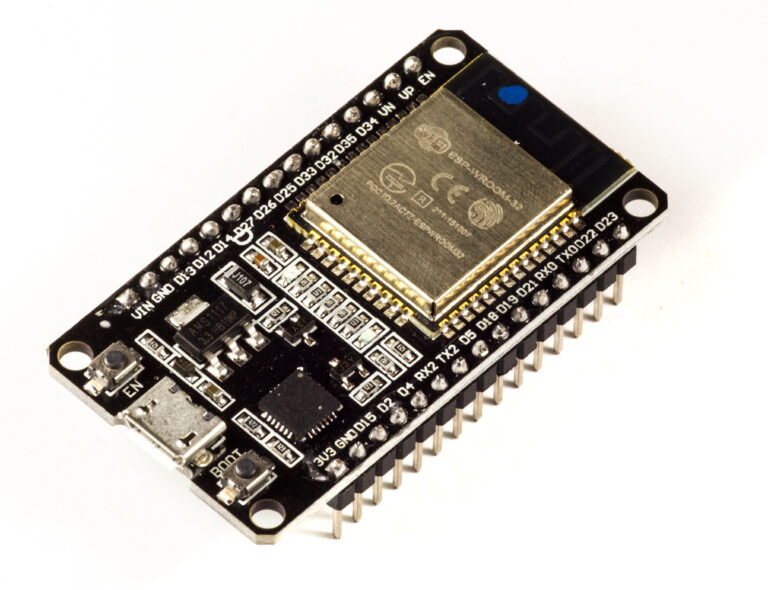
An ESP32AliExpress price with W5500AliExpress price Ethernet makes an excellent Home Assistant Bluetooth Proxy because Bluetooth no longer has to share the ESP32AliExpress price radio with Wi-Fi. The ESP32 listens for nearby Bluetooth Low Energy devices, while the W5500 carries the proxy traffic back to Home Assistant over wired Ethernet.
This is especially useful for SwitchBot devices, Bluetooth locks, thermostats, Xiaomi/Govee sensors, BTHome sensors and other BLE devices that need a reliable proxy in a fixed location. Ethernet does not increase Bluetooth transmit power or magically extend BLE range, but it removes Wi-Fi/Bluetooth coexistence from the ESP32 itself and gives the proxy a stable network path.
Current ESPHome documentation explicitly recommends Ethernet-connected proxies when Bluetooth performance matters. Ethernet-based ESP32 proxies can generally handle four active GATT connection slots reliably, compared with the normal ESP32 Bluetooth Proxy default of three.
What You Are Building
Bluetooth LE devices
       │
       │ BLE advertisements / GATT
       ▼
ESP32 Bluetooth radio
       │
       │ ESPHome Bluetooth Proxy
       ▼
ESP32
       │
       │ SPI
       ▼
W5500 Ethernet controller
       │
       │ 10/100 Ethernet
       ▼
Home Assistant network
       │
       ▼
Home Assistant Bluetooth integration
The W5500 does not process Bluetooth traffic itself. Its job is purely network connectivity. The ESP32 still performs the BLE scan and any active BLE connections, then forwards that information through the ESPHome native API to Home Assistant.
Home Assistant combines advertisements from all available scanners: local USB Bluetooth, ESPHome proxies and other supported remote adapters. Multiple Ethernet proxies can therefore be placed around a property to improve coverage.
Why Ethernet Is Better for a Dedicated Bluetooth Proxy
Classic ESP32 hardware uses one 2.4 GHz radio subsystem for Wi-Fi and Bluetooth. A Wi-Fi-connected Bluetooth Proxy therefore has to time-share radio resources between scanning for BLE packets and moving data across the Wi-Fi network.
With W5500 Ethernet, the network path moves to SPI and copper. The ESP32 radio can concentrate on BLE. This does not guarantee that every device suddenly has more range, but it removes one source of contention and is particularly useful for proxies that make active BLE connections.
| Feature | Wi-Fi Bluetooth Proxy | W5500 Ethernet Proxy |
|---|---|---|
| Network link | 2.4 GHz Wi-Fi | Wired Ethernet |
| BLE/Wi-Fi radio sharing | Yes | No Wi-Fi traffic required |
| Network stability | Depends on Wi-Fi coverage | Depends on cable/switch |
| Default active connection slots | 3 | 3, with 4 generally reliable |
| Placement freedom | Needs Wi-Fi + power | Needs Ethernet + power/PoE |
| Best use | Cheap distributed coverage | High-reliability fixed proxy |
For many houses, several inexpensive Wi-Fi proxies are still the best value. Ethernet is most attractive where cabling already exists, where a proxy is serving several actively connected BLE devices, or where Wi-Fi is congested.
What the W5500 Does
The WIZnet W5500 is a 10/100 Ethernet controller with an integrated MAC, PHY and hardwired TCP/IP engine. It connects to the ESP32 over SPI and supports an SPI clock up to 80 MHz at chip level.
ESPHome supports the W5500 directly on ESP32. You provide the SPI clock, MOSI, MISO and chip-select pins plus, normally, the interrupt and reset pins. ESPHome then uses the W5500 as the device’s network interface.
The chip itself is a 3.3 V device. Complete W5500 modules vary: some include a regulator and accept 5 V input, while others expect 3.3 V. Check the exact module before connecting power. Do not assume every blue W5500 breakout has the same power circuitry.
Recommended ESP32
For a dedicated W5500 Bluetooth Proxy, a classic dual-core ESP32-WROOM board remains an excellent choice. It has mature ESPHome Bluetooth support, enough RAM for the proxy stack and well-understood SPI pin assignments.
An ESP32-S3 can also work and may be preferable on a custom Ethernet board, but it is not automatically a better Bluetooth receiver. Antenna design and placement matter more than CPU speed.
Single-core devices such as ESP32-C3 are less attractive for a busy proxy. ESPHome documents that single-core C3 hardware can experience Wi-Fi/BLE scheduling issues. Ethernet removes Wi-Fi coexistence, but a classic dual-core ESP32 is still the safer, more proven starting point for this project.
For a wider board comparison, see our Best ESP32 for Bluetooth Proxy: C3 vs C6 vs S3 vs ESP32.
Example W5500 Wiring
The following pin assignment is a clean example for a generic classic ESP32 DevKit. It uses the normal VSPI pins for SCK/MISO/MOSI and avoids using a boot-strapping pin for chip select.
| W5500 signal | ESP32 GPIO | Purpose |
|---|---|---|
| SCK | GPIO18 | SPI clock |
| MISO | GPIO19 | W5500 → ESP32 data |
| MOSI | GPIO23 | ESP32 → W5500 data |
| CS / SCS | GPIO27 | SPI chip select |
| INT | GPIO26 | Ethernet interrupt |
| RST | GPIO25 | W5500 reset |
| GND | GND | Common ground |
| VCC | Module dependent | Check whether your board expects 3.3 V or 5 V |
These pins are only an example. ESPHome lets you choose other suitable GPIOs. If you are using a manufactured ESP32+W5500 board, always use that board’s published pin map instead of copying the generic wiring above.
Avoid Long Dupont Wires
SPI Ethernet is much less forgiving than a slow I²C temperature sensor. ESPHome specifically warns that connecting an Ethernet controller with long flying leads or Dupont wires can fail because of the high-frequency SPI clock.
For bench testing, keep wires very short and route ground cleanly. For a permanent proxy, use a PCB, a purpose-built ESP32/W5500 board or at least a compact soldered assembly. If you see CRC-like packet loss, random disconnects or link instability, do not immediately blame Home Assistant—check the physical SPI connection first.
Complete ESPHome W5500 Bluetooth Proxy YAML
This is a clean starting configuration for the wiring above:
substitutions:
  name: ethernet-bluetooth-proxy

esphome:
  name: ${name}
  name_add_mac_suffix: true
  friendly_name: Ethernet Bluetooth Proxy

esp32:
  board: esp32dev
  framework:
    type: esp-idf

logger:

api:
  encryption:
    key: !secret api_encryption_key

ota:
  - platform: esphome

ethernet:
  type: W5500
  clk_pin: GPIO18
  mosi_pin: GPIO23
  miso_pin: GPIO19
  cs_pin: GPIO27
  interrupt_pin: GPIO26
  reset_pin: GPIO25

esp32_ble_tracker:

bluetooth_proxy:
  active: true
  connection_slots: 4
No wifi: section is required for a dedicated Ethernet proxy. The W5500 becomes the network interface used by the ESPHome API, logging and OTA updates.
ESPHome’s current Bluetooth Proxy documentation recommends the default BLE scan parameters. Older proxy guides often suggest forcing long 100% scan windows. Current ESPHome guidance is to leave the defaults unless you are troubleshooting a specific problem.
Why connection_slots: 4 Makes Sense on Ethernet
The connection_slots setting controls how many simultaneous active BLE GATT connections Home Assistant can route through the proxy.
ESP32 defaults to three slots. ESPHome’s current documentation says Ethernet-based proxies can generally handle four reliably because Bluetooth no longer competes with Wi-Fi traffic. Each slot uses additional RAM, so increasing the number simply because the option exists is not useful.
Advertisement-only devices do not consume these slots. A BTHome thermometer that simply broadcasts data can be heard by the proxy without occupying an active connection. Devices such as some locks, thermostats and SwitchBot products may consume a slot while Home Assistant is actively connected.
If you do not need active connections at all, use:
bluetooth_proxy:
  active: false
This still forwards BLE advertisements but prevents Home Assistant from using the proxy for active GATT sessions.
Bluetooth Scanning Mode: Use Home Assistant Auto
Home Assistant now controls Bluetooth proxy scanning mode after the proxy is paired. The recommended setting for most installations is Auto.
- Auto: normally listens passively and briefly switches to active scanning when extra information is needed.
- Active: continuously sends scan requests, giving maximum discovery detail but using more battery on nearby BLE devices.
- Passive: only listens to advertisements and uses the least battery on the BLE devices.
For recent ESPHome proxies, changing scan_parameters.active in YAML is not the normal way to control day-to-day scanning once Home Assistant has taken ownership of the setting. Change the proxy’s scanning mode from the Home Assistant device configuration instead.
Do Not Confuse Active Scanning with Active Connections
These are two different concepts:
| Term | Meaning |
|---|---|
| Active scanning | The scanner sends BLE scan requests to obtain extra advertisement information. |
| Active connection | Home Assistant opens a two-way GATT session through the proxy. |
You can run passive scanning while still allowing active GATT connections when an integration needs them. Likewise, active scanning does not mean that every discovered device is consuming a proxy connection slot.
W5500 SPI Clock Speed
The W5500 chip supports SPI clocks up to 80 MHz, but there is no reason to push a Bluetooth Proxy to that limit. ESPHome currently defaults SPI Ethernet to approximately 26.67 MHz.
If your wiring or board has problems, reducing the clock can improve margin:
ethernet:
  type: W5500
  clk_pin: GPIO18
  mosi_pin: GPIO23
  miso_pin: GPIO19
  cs_pin: GPIO27
  interrupt_pin: GPIO26
  reset_pin: GPIO25
  clock_speed: 20MHz
A Bluetooth Proxy sends relatively little network traffic, so a lower SPI clock has no meaningful performance penalty. If 20 MHz makes an unstable bench-wired W5500 reliable, keep the lower speed or improve the physical layout.
Do You Need the W5500 Interrupt Pin?
Using the interrupt pin is the cleanest option and works across ESPHome/framework combinations. Recent ESP-IDF versions also support polling SPI Ethernet without INT, but the interrupt-driven configuration is simple and avoids periodic polling.
If you deliberately omit INT on a supported current framework, ESPHome can use a polling interval instead. For a new design, there is usually little benefit in saving one ESP32 GPIO at the expense of additional polling.
Static IP or DHCP?
DHCP is perfectly adequate for most proxies because Home Assistant and ESPHome can find the device by hostname. A static IP can still be useful for network management, firewall rules and predictable troubleshooting.
If you prefer a fixed address:
ethernet:
  type: W5500
  clk_pin: GPIO18
  mosi_pin: GPIO23
  miso_pin: GPIO19
  cs_pin: GPIO27
  interrupt_pin: GPIO26
  reset_pin: GPIO25

  manual_ip:
    static_ip: 192.168.1.60
    gateway: 192.168.1.1
    subnet: 255.255.255.0
Reserve the address in the router or document it properly. A duplicate static IP can make the proxy appear randomly unavailable even though the Ethernet link itself is fine.
Power over Ethernet: the Cleanest Installation
A PoE installation is ideal for a fixed Bluetooth Proxy because one cable supplies both network and power. However, a bare W5500 does not provide Power over Ethernet by itself.
You need either:
- A purpose-built ESP32 PoE board.
- A PoE splitter supplying the voltage required by your ESP32/W5500 assembly.
- A proper IEEE 802.3af/at powered-device module in a custom design.
Do not connect PoE cable pairs directly to a generic W5500 module. Standard PoE involves much higher voltage and negotiation/power circuitry that a normal SPI Ethernet breakout does not contain.
Home Assistant’s Bluetooth documentation currently highlights the Olimex ESP32-POE-ISO-EA family as a reference Ethernet proxy platform, specifically noting that the external-antenna -EA version has significantly better RF performance than the standard antenna version.
Ethernet Does Not Fix Bad Bluetooth Placement
This is the most important practical point. Ethernet improves the network side of the proxy. Bluetooth range still depends on the ESP32 antenna, the target device, walls, metalwork and local RF interference.
Do not install the proxy inside the network rack simply because the Ethernet switch is there. ESPHome recommends keeping Bluetooth proxies away from routers, switches and other noisy network equipment. A metal cabinet is even worse.
Use the Ethernet cable to move the proxy away from the rack and toward the BLE devices. That is one of the biggest advantages of a wired proxy: the network cable can be long while the Bluetooth path remains short.
For a full placement strategy, see our Home Assistant Bluetooth Proxy placement and range guide.
External Antenna vs PCB Antenna
If the ESP32 module has an external-antenna connector, it can make placement easier and improve reception when the proxy is inside an enclosure. The important point is not simply “bigger antenna = more range”; the antenna needs to be suitable for 2.4 GHz and mounted correctly.
A poorly routed coax cable or an antenna mounted against metal can perform worse than a good PCB antenna in open air. If you use an ESP32 module with an antenna selector resistor/jumper, make sure the hardware is actually configured for the external connector.
How Many Ethernet Bluetooth Proxies Do You Need?
One strong Ethernet proxy is not automatically better than several well-placed proxies. Bluetooth remains short-range and strongly affected by walls and metal.
A sensible strategy is:
- Use Ethernet/PoE proxies at fixed strategic locations where cabling exists.
- Use inexpensive Wi-Fi proxies to fill smaller dead zones.
- Place proxies near devices that need active connections, such as locks or SwitchBots.
- Avoid stacking multiple proxies next to each other; spread them through the building.
Home Assistant automatically aggregates multiple remote adapters. You do not need to assign a particular sensor permanently to one proxy.
Advertisement-Only Devices vs Active Devices
Understanding this distinction helps you size the proxy network.
| BLE device behaviour | Proxy requirement | Examples |
|---|---|---|
| Broadcasts advertisements only | No active connection slot | BTHome sensors, many thermometers/beacons |
| Requires occasional GATT connection | Uses a slot only while connected | Some sensors and controls |
| Maintains long-lived connection | Occupies one slot continuously | Some locks and thermostats |
You can therefore have dozens of broadcasting sensors near a proxy without needing dozens of connection slots. Slot pressure matters mainly when several devices require simultaneous two-way BLE sessions.
Home Assistant Setup
After flashing the ESP32 and connecting Ethernet:
- Wait for the W5500 link LEDs and ESPHome logs to show an IP address.
- In Home Assistant, open Settings → Devices & services.
- Add or accept the discovered ESPHome device.
- Open the Home Assistant Bluetooth integration and confirm the new remote scanner appears.
- Leave the scanning mode on Auto unless a specific integration requires otherwise.
The proxy itself normally does not create entities for every Bluetooth device it hears. Home Assistant’s individual Bluetooth integrations consume the proxy data and create the appropriate devices and entities.
Troubleshooting W5500 Ethernet
| Symptom | First checks |
|---|---|
| No Ethernet link LEDs | Check module power, RJ45 cable, switch port and reset wiring. |
| ESPHome cannot initialize W5500 | Check SCK/MOSI/MISO/CS mapping and confirm the module really uses W5500. |
| Random disconnects | Shorten SPI wiring, improve grounding and try 20 MHz SPI. |
| Link works but no IP | Check DHCP/VLAN/firewall configuration or static IP settings. |
| OTA cannot find device after changing network | Use the current IP directly or configure use_address during migration. |
| Ethernet works but Bluetooth is poor | Move the proxy away from switches, routers, metal cabinets and USB 3 equipment. |
Troubleshooting Bluetooth Proxy Behaviour
| Symptom | Likely cause / check |
|---|---|
| BLE advertisements appear but a lock will not connect | Check active connections are enabled and a slot is available. |
| Some devices appear only during setup | They may require active scanning; use Home Assistant Auto or Active mode temporarily. |
| Sensor batteries drain faster | Continuous active scanning can increase peripheral battery use; prefer Auto. |
| Proxy becomes unstable after adding many components | BLE stack consumes significant RAM; keep dedicated proxies simple. |
| Bluetooth range is worse than Wi-Fi proxy elsewhere | Compare antenna and placement; Ethernet itself does not improve RF gain. |
| Active devices randomly disconnect | Reduce connection-slot pressure, improve placement and inspect logs for bluetooth_connection. |
Should You Add Sensors and Relays to the Proxy?
You can. An ESP32-WROOM with W5500 still has spare GPIOs. A temperature sensor, PIR or relay can turn the proxy into a useful room node.
However, a dedicated high-reliability Bluetooth Proxy is one of the cases where keeping the firmware simple has value. BLE consumes significant RAM, and every additional component adds code, memory use and failure modes.
If the added sensor is simple and useful, there is nothing wrong with combining functions. For a reference design, see our Bluetooth Proxy + Motion + Temperature room node.
W5500 vs LAN8720 for a Bluetooth Proxy
| Feature | W5500 | LAN8720 / RMII |
|---|---|---|
| Connection to ESP32 | SPI | RMII parallel interface |
| GPIO requirement | About 6 pins with INT/RST | More pins |
| External clock complexity | No RMII clock routing | Requires correct RMII clock mode |
| Easy breakout modules | Yes | Less convenient for loose wiring |
| ESPHome support | Yes | Yes |
| Bluetooth Proxy performance | Excellent | Excellent |
For a DIY add-on to an existing ESP32 DevKit, W5500 is easier because SPI requires fewer signals. For a purpose-built PoE board such as the Olimex ESP32-POE family, RMII Ethernet is equally valid and avoids the separate W5500 module.
Is W5500 Worth It for Home Assistant Bluetooth?
Yes—when the proxy is important enough to justify wired networking. Ethernet removes Wi-Fi signal quality and Wi-Fi/BLE coexistence from the proxy itself, which makes the architecture cleaner and more predictable.
It is particularly worthwhile for:
- Bluetooth locks and thermostats that need active connections.
- Garages, plant rooms and utility areas with existing Ethernet.
- PoE installations where one cable can power the proxy.
- Busy 2.4 GHz environments.
- Permanent proxies where network reliability matters more than minimum cost.
For a few passive BLE thermometers in a normal house, a cheap Wi-Fi ESP32 proxy may be completely adequate. Do not install Ethernet simply because it is theoretically better. Use it where the wired network path solves a real placement, reliability or active-connection problem.
Recommended Configuration
For a generic DIY proxy, the practical baseline is:
- Classic ESP32-WROOM dual-core board.
- W5500 on short, clean SPI wiring.
- ESP-IDF framework in ESPHome.
- W5500 interrupt and reset lines connected.
- Default BLE tracker scan parameters.
bluetooth_proxy.active: true.connection_slots: 4if you actually need active connections.- Home Assistant scanning mode set to Auto.
- Proxy placed near BLE devices, not beside the Ethernet switch.
That setup gives Home Assistant a stable wired remote Bluetooth adapter without wasting the ESP32’s radio time on Wi-Fi.
Related ESP32 and Home Assistant Guides
- ESP32 Bluetooth Proxy for Home Assistant — complete basic setup, scanning and Home Assistant integration.
- Best ESP32 for Bluetooth Proxy: C3 vs C6 vs S3 vs ESP32 — board selection and Ethernet advantages.
- Home Assistant Bluetooth Proxy Placement and Range Guide — fixing coverage and dropouts.
- Advanced ESPHome Bluetooth Proxy Tips — active scanning, battery use and connection stability.
- Bluetooth Proxy + Motion + Temperature Room Node — adding useful local sensors.
Datasheets & External Resources
- ESPHome Bluetooth Proxy documentation — connection slots, Ethernet recommendations and scanning guidance.
- ESPHome Ethernet component — W5500 wiring, SPI options, clock speed and polling/interrupt support.
- ESPHome ESP32 BLE Tracker — scan parameters and Bluetooth behaviour.
- Home Assistant Bluetooth integration — remote adapters and proxy scanning modes.
- WIZnet W5500 documentation — 10/100 Ethernet controller and SPI specifications.