
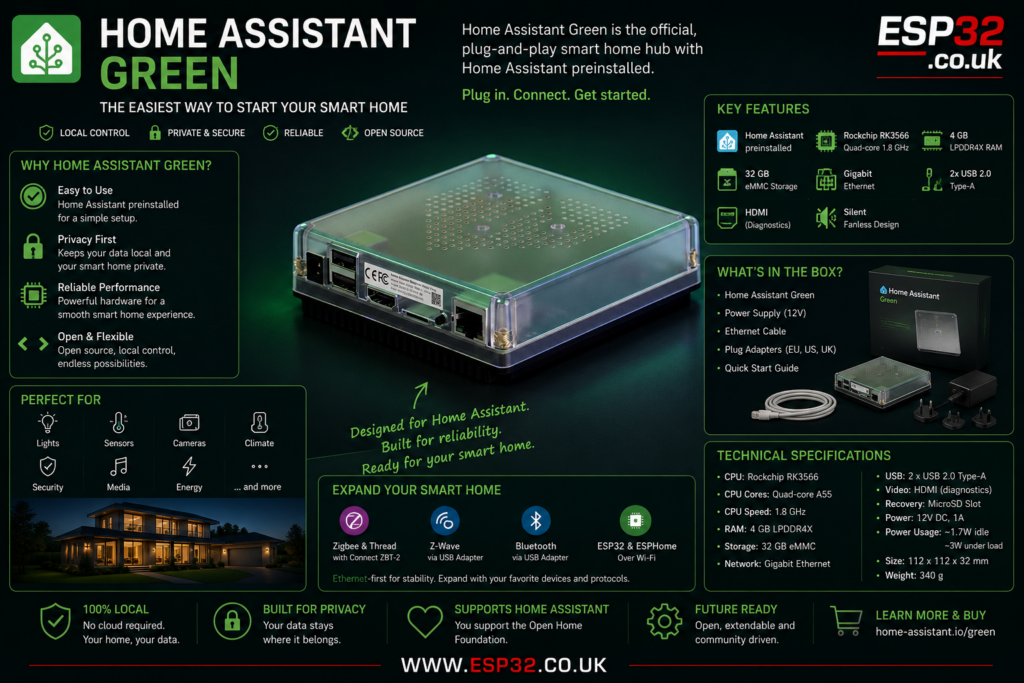
Home Assistant Green is the official plug-and-play smart home hub for Home Assistant. It is designed for people who want to run Home Assistant at home without building a Raspberry Pi setup, installing an operating system, choosing storage, flashing images or troubleshooting random hardware issues.
In simple terms, Home Assistant Green is the easy button for Home Assistant.
You connect power, plug it into your router with Ethernet, open the Home Assistant app or web interface, and start setting up your smart home. The device comes with Home Assistant Operating System already installed, so there is no complicated first installation process.
What is Home Assistant Green?
Home Assistant Green is a small dedicated computer built specifically to run Home Assistant. It is not a Zigbee hub, Z-Wave hub, Wi-Fi router or smart speaker by itself. Its main job is to run the Home Assistant server that controls your smart home.
That server is the brain of the system.
It can connect to lights, switches, sensors, cameras, heating controls, energy meters, smart plugs, alarms, media players and many other devices through Home Assistant integrations. Home Assistant says it supports more than 1,000 built-in integrations covering hundreds of thousands of smart devices and online services.
For beginners, this is the cleanest way to start. For experienced users, it is a neat, low-power, official box that avoids the mess of SD cards, random power supplies and unsupported hardware.
Why Home Assistant Green exists
Home Assistant is powerful, but starting with it used to feel more technical than it needed to.
A lot of users began with a Raspberry Pi. That works, but it also means choosing the right Pi, storage, power supply, case, cooling and installation method. If something goes wrong, you are troubleshooting the whole stack yourself.
Home Assistant Green removes most of that pain. It is sold as ready-to-use hardware with Home Assistant already installed. The official product page describes it as the easiest way to start using Home Assistant, with a simple plug-and-play setup.
That makes it ideal for people who want smart home control, not another weekend computer project.
Key features
Home Assistant Green includes:
- Official Home Assistant hardware
- Home Assistant Operating System preinstalled
- Rockchip RK3566 processor
- Quad-core Arm Cortex-A55 CPU
- 1.8 GHz CPU frequency
- 4 GB LPDDR4X RAM
- 32 GB eMMC storage
- Gigabit Ethernet
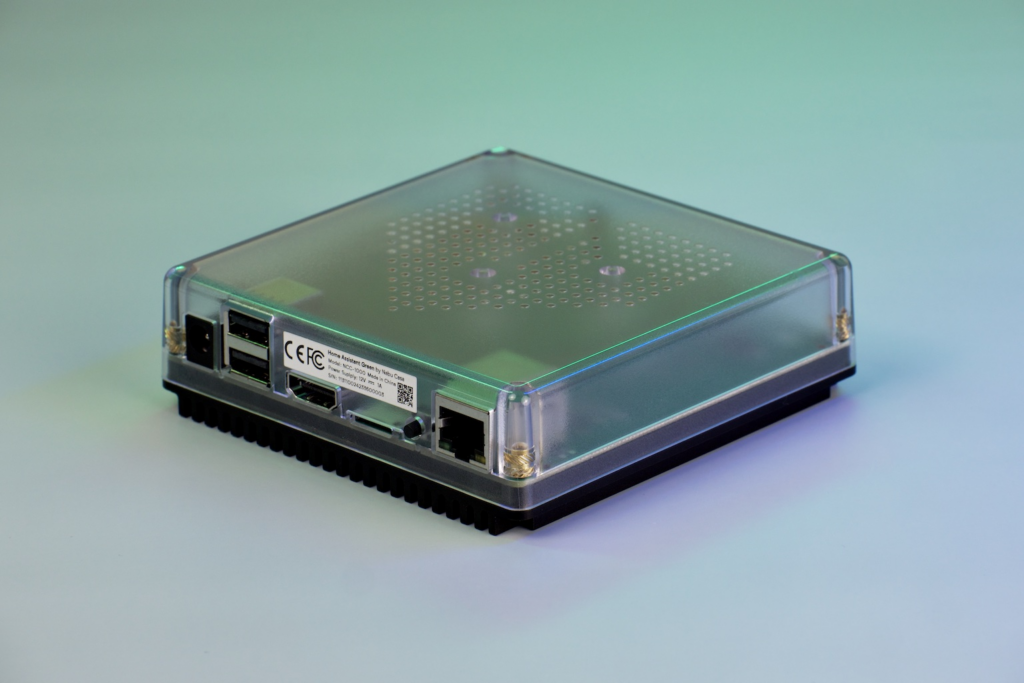
- Two USB 2.0 Type-A ports
- HDMI port for diagnostics
- MicroSD slot for recovery
- Silent fanless cooling
- Large aluminium heatsink
- Semi-transparent polycarbonate case
- Low power consumption
- Universal 12 V power supply included
- Ethernet cable included
The official specifications list a Rockchip RK3566 SoC, 4 GB RAM, 32 GB eMMC storage, two USB 2.0 ports and Gigabit Ethernet. Power use is listed at around 1.7 W idle and around 3 W under load.
Home Assistant Green hardware specifications
| Feature | Specification |
|---|---|
| SoC | Rockchip RK3566 |
| CPU | Quad-core Arm Cortex-A55 |
| CPU speed | 1.8 GHz |
| RAM | 4 GB LPDDR4X |
| Storage | 32 GB eMMC |
| Network | Gigabit Ethernet |
| USB | 2 × USB 2.0 Type-A |
| Display | HDMI, diagnostic use only |
| Recovery | MicroSD slot |
| Power | 12 V DC, 1 A |
| Cooling | Passive aluminium heatsink |
| Size | 112 × 112 × 32 mm |
| Weight | 340 g |
The important part is the storage. Home Assistant Green uses built-in eMMC storage, not a normal microSD card for daily operation. That is better for reliability than the classic Raspberry Pi setup where cheap SD cards can eventually fail.
What is in the box?
The box includes:
- Home Assistant Green smart home hub
- Gigabit Ethernet cable
- Universal power supply
- EU, US and UK plug adapters
- Quick start guide
- Warranty and safety information
The included power supply is rated at 12 V DC, 1 A.
That is good because it removes another common beginner mistake: using a random weak power supply and then blaming Home Assistant when the system behaves strangely.
Does Home Assistant Green have Zigbee, Thread, Wi-Fi or Bluetooth?
This is the main thing beginners must understand.
Home Assistant Green does not include built-in Zigbee, Thread, Z-Wave, Wi-Fi or Bluetooth radios. It is mainly an Ethernet-connected Home Assistant server.
That is not necessarily a bad thing. Ethernet is more reliable for the main smart home controller than Wi-Fi. But if you want to connect Zigbee, Thread, Z-Wave or Bluetooth devices directly, you need extra hardware.
For Zigbee and Thread, Home Assistant recommends adding Home Assistant Connect ZBT-2. For Z-Wave, you can use a compatible Z-Wave USB adapter. For Bluetooth, you can use a USB Bluetooth adapter or ESP32 Bluetooth proxies. The official Green page specifically says compatibility can be expanded with Connect ZBT-2 and third-party USB accessories for standards such as Z-Wave or Bluetooth.
Home Assistant Green and ESP32 devices
Home Assistant Green is not an ESP32 board, but it works very well with ESP32 projects.
This is where it becomes especially useful for readers of esp32.co.uk.
You can use Home Assistant Green as the main controller and then add ESP32 devices around the house using ESPHome or MQTT. For example:
- ESP32 temperature sensors
- ESP32 air quality monitors
- ESP32 Bluetooth proxy nodes
- ESP32 energy monitors
- ESP32 garage door controllers
- ESP32 water meter pulse counters
- ESP32 presence detection devices
- ESP32 relay boards
- ESP32 display dashboards
The Green runs Home Assistant. The ESP32 boards collect data, control hardware or extend wireless coverage.
That is a very strong combination. Home Assistant Green gives you the stable central hub, while ESP32 boards give you cheap, flexible, custom devices for every room.
Setup process
The setup is simple:
- Connect the Ethernet cable from Home Assistant Green to your router or network switch.
- Connect the power supply.
- Wait for the system to start.
- Open the Home Assistant mobile app or go to the Home Assistant local web address from a browser.
- Create your Home Assistant account.
- Start adding integrations and devices.
The official setup description is basically power plus network cable, then the app or web interface guides you through the rest.
For best results, connect it directly to your router or a stable network switch. Do not hide it behind a weak Wi-Fi bridge or powerline adapter unless you have no other option.
What can you control with Home Assistant Green?
Home Assistant Green can control anything that Home Assistant supports. That can include:
- Smart lights
- Smart plugs
- Thermostats
- Door and window sensors
- Motion sensors
- Leak sensors
- Cameras
- Energy meters
- Solar inverters
- EV chargers
- Media players
- Alarm systems
- Zigbee devices with an adapter
- Z-Wave devices with an adapter
- Matter devices with the right setup
- ESPHome devices
- MQTT devices
Home Assistant can also work alongside existing ecosystems such as Apple HomeKit, Google Home, Samsung SmartThings and Amazon Alexa, depending on the integration and whether cloud services are required.
The main advantage is that you can bring many different brands into one dashboard and one automation system.
Why local control matters
The biggest reason to use Home Assistant is local control.
Many smart home systems depend heavily on cloud services. That can be convenient, but it also means your lights, sensors or automations may depend on internet access and external company servers.
Home Assistant is different. It is designed to keep your smart home under your control. The official Green page states that Home Assistant keeps your data locally, helping protect privacy and allowing access to your smart home even when the internet is down.
That does not mean every single device will work offline. Some cloud-only products still depend on their manufacturer’s servers. But Home Assistant gives you the option to build a much more local and private smart home, especially when using ESPHome, Zigbee, Z-Wave and local network integrations.
Home Assistant Green vs Raspberry Pi
A Raspberry Pi can still run Home Assistant very well. It is flexible, popular and widely documented.
But Home Assistant Green is easier.
The main differences are:
| Feature | Home Assistant Green | Raspberry Pi |
|---|---|---|
| Setup | Home Assistant preinstalled | Manual installation needed |
| Storage | Built-in eMMC | Usually microSD or external SSD |
| Case | Included | Usually separate |
| Power supply | Included | Separate |
| Cooling | Passive heatsink built in | Depends on case |
| Support | Official Home Assistant hardware | Generic hardware |
| Flexibility | Less flexible | More flexible |
| Beginner friendly | Very high | Medium |
For beginners, Green is the better choice. For tinkerers who enjoy building and modifying hardware, Raspberry Pi still makes sense.
Home Assistant Green vs Home Assistant Yellow
Home Assistant Yellow is more expandable and more technical. Home Assistant Green is simpler and more plug-and-play.
The official Home Assistant page explains that Green is designed to be used as-is, while Yellow is designed to be extended with more storage or hardware. It also notes that Yellow includes support for Zigbee 3.0 and Matter-over-Thread, while Green can use those protocols by adding Connect ZBT-2.
Choose Green if you want the easiest official Home Assistant hub.
Choose Yellow if you want a more expandable system and you are comfortable with a more hands-on setup.
Should you add Home Assistant Connect ZBT-2?
For many users, yes.
Home Assistant Green becomes much more useful when paired with a Zigbee and Thread adapter. Without one, you can still use Wi-Fi devices, cloud integrations, Ethernet devices, ESPHome devices and many existing hubs. But you will not have direct Zigbee or Thread control.
Home Assistant says Connect ZBT-2 allows Zigbee or Thread devices to connect directly to Home Assistant Green, although Thread support is described as under development.
For a serious smart home setup, Green plus Connect ZBT-2 is the obvious official combination.
Is Home Assistant Green powerful enough?
For a normal smart home, yes.
The 1.8 GHz quad-core CPU, 4 GB RAM and 32 GB eMMC storage are enough for typical Home Assistant use. That includes dashboards, automations, integrations, ESPHome devices, Zigbee networks, energy monitoring and normal add-ons.
It is not meant to be a large home server. Do not buy it expecting to run heavy AI workloads, video recording for many cameras, big databases or several demanding services at once.
For a normal home, it is sensible. For a huge installation with many cameras and heavy add-ons, a mini PC may be better.
Who should buy Home Assistant Green?
Home Assistant Green is a good choice if:
- You are new to Home Assistant.
- You want official, supported hardware.
- You do not want to build a Raspberry Pi setup.
- You want a quiet, low-power smart home hub.
- You want Home Assistant preinstalled.
- You want local control and better privacy.
- You plan to use ESP32 and ESPHome devices.
- You want a clean central controller for automations.
It is probably not the best choice if:
- You want built-in Zigbee without buying an adapter.
- You need built-in Wi-Fi.
- You want maximum expandability.
- You want to run heavy camera recording or AI workloads.
- You already have a powerful mini PC or server running Home Assistant perfectly.
Final thoughts
Home Assistant Green is the simplest official way to start with Home Assistant.
It is not the most powerful Home Assistant machine, and it is not the most expandable. But that is not the point. The point is that it is simple, quiet, efficient and ready to use.
For most beginners, that is exactly what is needed.
Add a Connect ZBT-2 for Zigbee and Thread, add ESP32 devices with ESPHome, and you have a very capable local smart home platform without depending fully on Google, Amazon, Apple or random cloud apps.
For anyone starting a Home Assistant setup in 2026, Home Assistant Green is one of the safest and easiest places to begin.