ESP32 DevKitC V4 and ESP-WROOM-32 Overview
The ESP32 DevKitC V4AliExpress price pinout breaks most usable ESP32AliExpress price signals out to two 19-pin headers. For dependable projects, start with GPIO4, GPIO13, GPIO14, GPIO18, GPIO19, GPIO21, GPIO22, GPIO23, GPIO25, GPIO26, GPIO27, GPIO32 and GPIO33. GPIO34, GPIO35, GPIO36 and GPIO39 are input-only; GPIO0, GPIO2, GPIO5, GPIO12 and GPIO15 are strapping pins; and GPIO6–11 are reserved for flash. GPIO16 and GPIO17 are reserved on WROVER boards but available with ESP32AliExpress price-WROOM-32.
Key ideas before touching any pin:
- Logic level is 3.3 V only – higher voltages (like 5 V) can damage the chip.
- Some pins are input-only.
- Some pins are strapping/boot pins – their level at reset decides boot mode.
- Some pins are permanently used for on-board SPI flash and should be avoided.
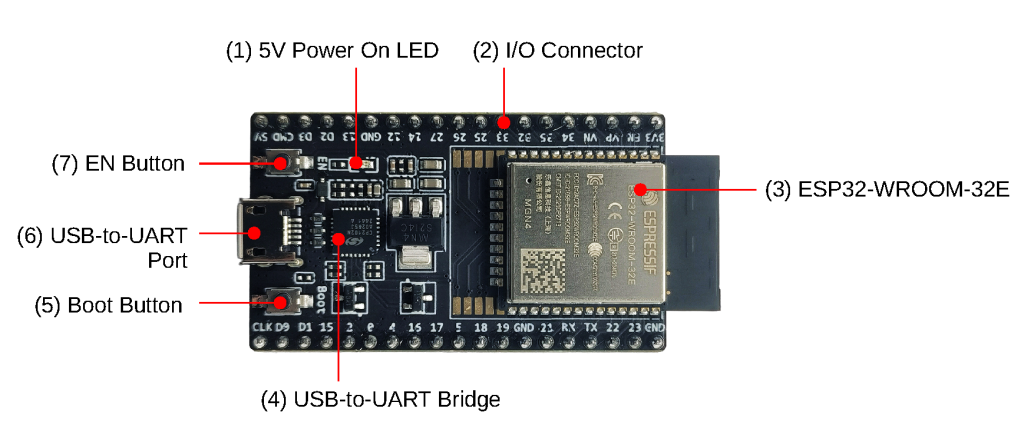
ESP32 DevKitC V4 Safe GPIO Cheat Sheet
For a typical ESP32AliExpress price DevKit v1 / WROOM-32 board, the following is a good mental model:
| GPIO Pin | Function | Status | Note |
| 34, 35, 36, 39 | Input Only | ✅ Safe | No pull-ups; Input only |
| 32, 33 | Analog/Digital | ✅ Safe | Great for ADC (Wi-Fi safe) |
| 25, 26, 27 | Digital I/O | ✅ Safe | Good for Relays/LEDs |
| 16, 17, 18, 19 | SPI / UART | ✅ Safe | GPIO16/17 unavailable on WROVER variants |
| 21, 22 | I2C | ✅ Safe | Default SDA/SCL |
| 1, 3 | TX / RX | ⚠️ Risky | Connected to USB/Serial |
| 0, 2, 5, 12, 15 | Strapping | ⚠️ Risky | Affects Boot Mode (High/Low) |
| 6, 7, 8, 9, 10, 11 | SPI Flash | ❌ Unsafe | Do not use (Crash) |
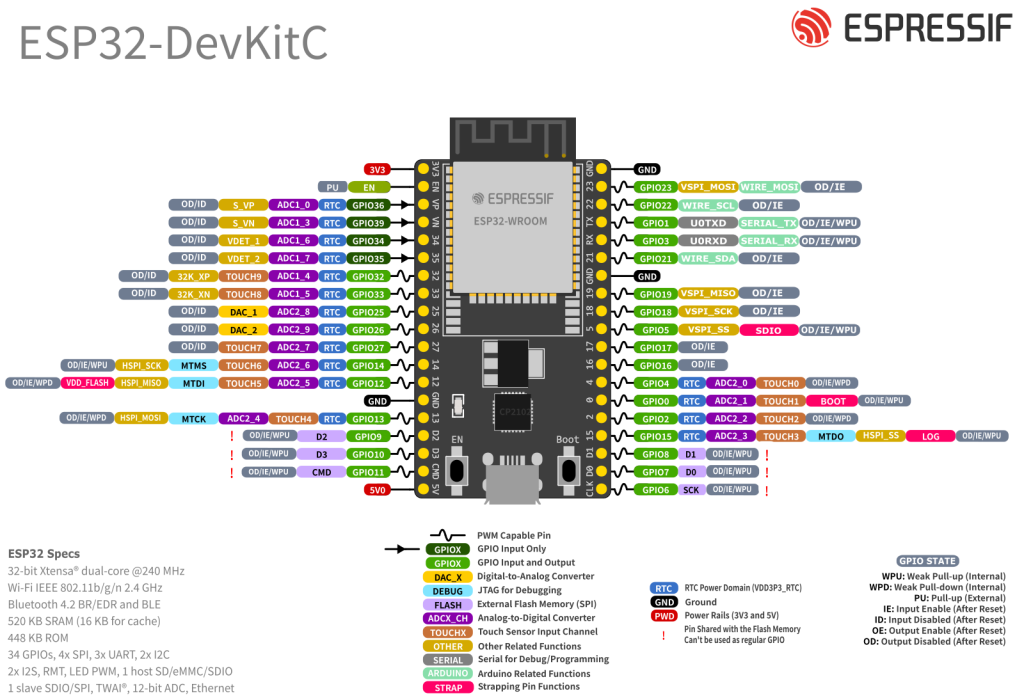
Best General-Purpose GPIOs
These are usually trouble-free and recommended for most projects:
- GPIO4, GPIO13, GPIO14, GPIO16, GPIO17, GPIO18, GPIO19, GPIO21, GPIO22, GPIO23, GPIO25, GPIO26, GPIO27, GPIO32 and GPIO33
They support digital I/O, PWM and many peripheral functions and don’t normally interfere with boot or flash. On DevKitC V4 boards fitted with ESP32AliExpress price-WROVER modules, GPIO16 and GPIO17 are reserved internally, so confirm the module before using them.
GPIOs to Use with Care
These work, but have special roles:
- Strapping / boot pins: GPIO0, GPIO2, GPIO5, GPIO12 and GPIO15. Their levels at reset configure boot behaviour, flash voltage and ROM messages.
- USB-Serial / programming pins: GPIO1 (TX0), GPIO3 (RX0)
Used by the onboard USB-UART for flashing and Serial Monitor.
Using these for buttons, relays, pull-downs, etc. is possible, but bad wiring can:
- Prevent boot
- Lock the chip in flashing mode
- Hide boot messages
Pins to Avoid on ESP32 DevKitC V4
- GPIO6, 7, 8, 9, 10, 11 – connected internally to the SPI flash. Don’t use them.
Input-Only GPIOs
The ESP32 has a group of pins that are input-only and lack internal pull-ups/pull-downs:
- GPIO34, GPIO35, GPIO36 (VP), GPIO39 (VN)
Characteristics:
- Can be used as digital inputs or ADC inputs (ADC1)
- Cannot drive outputs (no output driver)
- No internal pull-ups/pull-downs → use external resistors if needed
These are excellent for:
- Buttons (with external pull-up/down)
- Analog sensors (e.g. voltage dividers, potentiometers)
- “Input only” logic signals from other boards
Strapping and Boot Pins
Strapping pins are read at reset to choose boot mode, flash voltage, etc.
- GPIO0 – must be HIGH to boot normally, LOW to enter flashing mode
- GPIO2 – used in boot mode selection, default pull-down
- GPIO5 – influences SDIO timing
- GPIO12 (MTDI) – affects flash voltage; pulling it HIGH at boot can prevent start-up
- GPIO15 (MTDO) – controls ROM boot-message output; pulling it LOW suppresses boot logs
Practical rule:
If these pins are used in a project, avoid hard pull-downs or heavy loads that may force them LOW/HIGH at reset.
Power Pins and EN
Typical DevKit power pins:
- 3V3 – regulated 3.3 V output from the on-board regulator (or input, for bare modules).
- VIN / 5V – USB 5 V input (and often available as a pin to power small external circuits).
- GND – ground.
- EN – chip enable; HIGH = run, LOW = reset/disable.
On most DevKits you feed 5 V to VIN or via USB, and use the onboard 3.3 V for sensors. For external loads, keep current reasonable – the tiny regulator is not a bench supply.
ADC Pins
The ESP32 has two ADC blocks: ADC1 and ADC2, with up to 18 analog channels and up to 12-bit resolution.
ADC1 vs ADC2
On ESP-WROOM-32:
- ADC1 channels (safe with Wi-Fi) – on GPIO 32, 33, 34, 35, 36, 39
- ADC2 channels – GPIO0, GPIO2, GPIO4, GPIO12, GPIO13, GPIO14, GPIO15, GPIO25, GPIO26 and GPIO27; shared with Wi-Fi. GPIO0 is not recommended for ADC on DevKitC because auto-flash uses it.
Critical limitation:
ADC2 is shared with Wi-Fi, so reads can fail or time out while the radio is active. For Wi-Fi, MQTT and Home Assistant projects, use ADC1 whenever possible.
So for typical Wi-Fi projects (MQTT, web servers, Home Assistant, etc.):
- Prefer ADC inputs on GPIO32, 33, 34, 35, 36, 39.
ADC Measurement Basics
- Measurable range depends on the configured attenuation; use ADC calibration instead of assuming a linear 0–3.3 V range, and never exceed the GPIO voltage limit.
- Resolution: up to 12 bits → 4096 steps (~0.8 mV per step at 3.3 V).
Capacitive Touch Pins
ESP32 includes 10 capacitive touch GPIOs (TOUCH0–TOUCH9) that detect finger proximity and can even wake the ESP32 from deep sleep.
On ESP-WROOM-32 these map roughly to:
- TOUCH0 → GPIO4
- TOUCH1 → GPIO0
- TOUCH2 → GPIO2
- TOUCH3 → GPIO15
- TOUCH4 → GPIO13
- TOUCH5 → GPIO12
- TOUCH6 → GPIO14
- TOUCH7 → GPIO27
- TOUCH8 → GPIO33
- TOUCH9 → GPIO32
Usage notes:
- Read via
touchRead(GPIO)in Arduino IDE. - Can be configured as wake-up sources from deep sleep.
- Many touch pins overlap with strapping pins → design carefully.
I²C Pins: SDA and SCL
The ESP32 has flexible I²C routing – any GPIO can be used as SDA/SCL. However, most examples and libraries assume the default pair:
- GPIO21 → SDA
- GPIO22 → SCL
This convention is worth following unless there is a very good reason not to, especially for compatibility with libraries and tutorials.
Example Arduino setup:
Wire.begin(21, 22); // SDA, SCL
SPI Pins
The ESP32 exposes three SPI controllers: SPI, HSPI, VSPI. One is used internally for the SPI flash (on GPIO6–11), the other two are free for user devices.
Like I²C, SPI pins are configurable, but typical DevKit defaults for VSPI are:
- GPIO18 → SCK
- GPIO19 → MISO
- GPIO23 → MOSI
- GPIO5 → CS (chip select)
These are safe, high-speed pins and work well for:
- Displays (SPI TFT, OLED)
- External ADC/DAC
- SD cards (if not using an ESP32-CAM style module)
Avoid GPIO6–11 – they are connected to the on-board flash.
UART and Serial Pins
The ESP32 has three UARTs: UART0, UART1, UART2.
Typical mapping on DevKit:
- UART0 – main serial / flashing
- TX0 → GPIO1, RX0 → GPIO3
- UART2 – common extra serial port
- Often mapped to GPIO17 (TX2) and GPIO16 (RX2)
UART1 is internally tied to flash pins on many WROOM modules, so it’s usually ignored or remapped.
For projects needing hardware Serial for another device (GPS, RS-485, etc.), UART2 on GPIO16/17 is usually the cleanest choice.
Practical ESP32 DevKitC V4 Pin Recipes
Simple Sensor and Relay Node
A safe, re-usable pattern for a classic “sensor + relay” node:
| Function | Recommended GPIOs | Notes |
|---|---|---|
| I²C SDA | GPIO21 | BME280, OLED, etc. |
| I²C SCL | GPIO22 | |
| Relay / digital out | GPIO25 / GPIO26 / GPIO27 | Avoid boot pins if relay pulls heavy current at reset |
| Extra digital input | GPIO32 / GPIO33 | Can also be ADC1 |
| Analog sensor input | GPIO34 / 35 / 36 / 39 | Input-only ADC1 (Wi-Fi-safe) |
Touch Button That Wakes the ESP32
| Function | Recommended GPIOs | Notes |
|---|---|---|
| Touch button | GPIO33 or GPIO32 | TOUCH8 / TOUCH9, not strapping pins |
| Wake from sleep | same pin | Configure as touch wake source |
ESP32 DevKitC V4 Safe-Pin Rules
For classic ESP32 DevKit / ESP-WROOM-32 boards:
- Digital I/O / PWM
- → Start with GPIO4, GPIO13, GPIO14, GPIO18, GPIO19, GPIO21, GPIO22, GPIO23, GPIO25, GPIO26, GPIO27, GPIO32 and GPIO33. GPIO16/17 are WROOM-only choices.
- Analog inputs with Wi-Fi enabled
→ Use ADC1: 32, 33, 34, 35, 36, 39. - I²C bus
→ Use 21 (SDA) and 22 (SCL) unless there’s a strong reason not to. - SPI devices
→ Use 18 (SCK), 19 (MISO), 23 (MOSI), 5 (CS). - Avoid
- → GPIO6–11 (flash), and heavy loads on GPIO0, GPIO2, GPIO5, GPIO12 and GPIO15 at boot.
- Remember
- → GPIO34, GPIO35, GPIO36 and GPIO39 are input-only on the DevKitC headers and have no internal pull-ups/pull-downs.