
An ESP32AliExpress price Bluetooth proxy extends Home Assistant’s Bluetooth Low Energy coverage through your home network. Place an ESP32AliExpress price near distant BLE sensors, flash it with ESPHome, and Home Assistant can receive advertisements or make supported active connections through that proxy. You do not need to move the Home Assistant server or run a long USB cable.
The short version is: use a classic ESP32AliExpress price or ESP32-S3AliExpress price board, keep ESPHome’s default BLE scan parameters, enable esp32_ble_tracker and bluetooth_proxy, then use Home Assistant’s recommended Auto scanning mode. The complete setup and the important limitations are below.
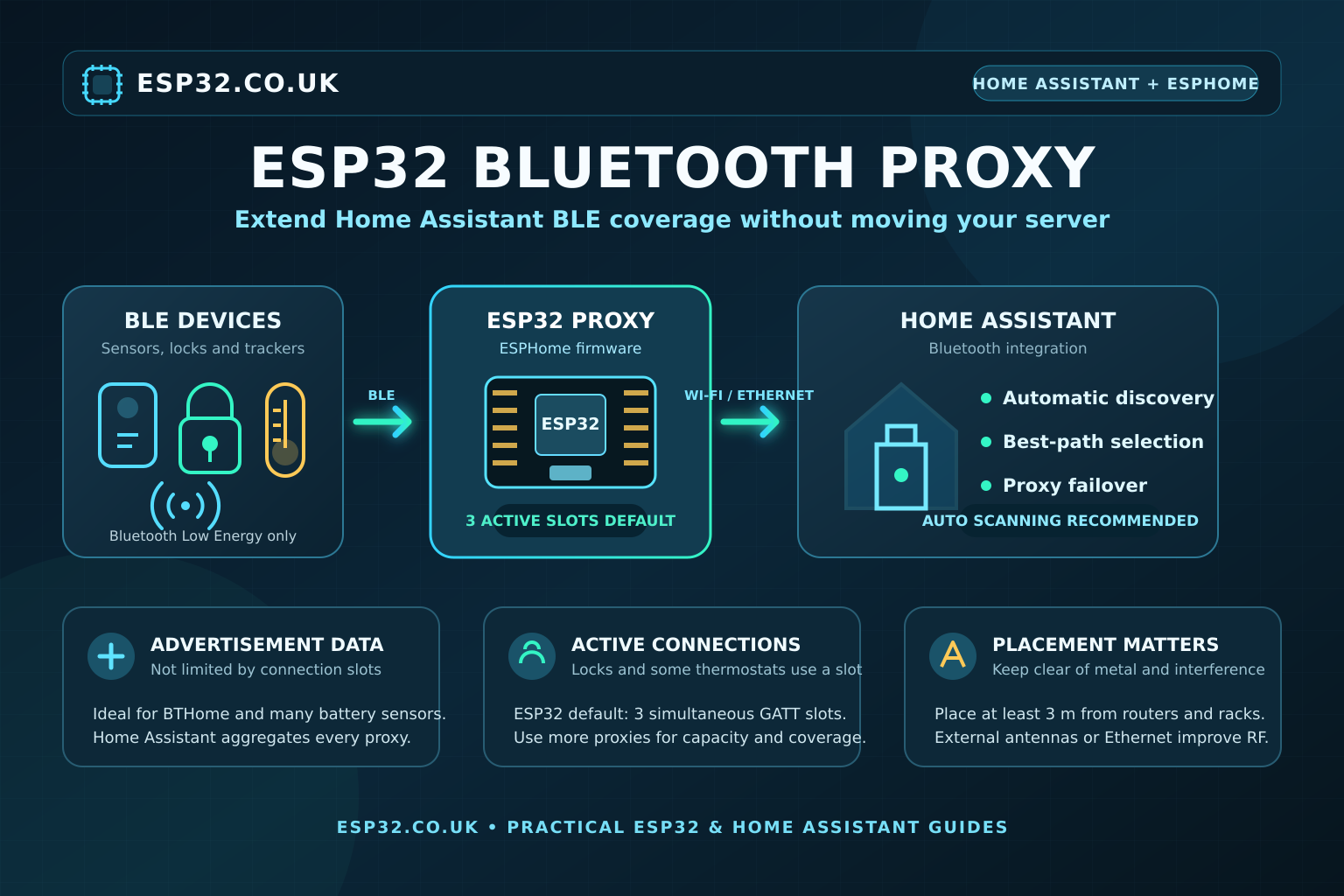
What an ESP32 Bluetooth proxy actually does
A proxy is a remote Bluetooth adapter for Home Assistant. The ESP32AliExpress price listens for nearby BLE traffic and sends it over Wi-Fi or Ethernet to Home Assistant’s Bluetooth integration. Home Assistant combines the proxy data with any local USB Bluetooth adapters and other proxies, then selects the best available path.
| Bluetooth traffic | What the proxy does | Typical devices |
|---|---|---|
| Advertisements | Listens for broadcast data and forwards it to Home Assistant | BTHome sensors, thermometers, plant sensors and beacons |
| Active GATT connections | Home Assistant connects through the proxy to read, write or control a supported device | Some locks, SwitchBot devices and thermostats |
The name can be confusing: this is not a universal Bluetooth repeater. It supports Bluetooth Low Energy devices that have a compatible Home Assistant integration. It does not extend Bluetooth Classic audio for headphones, speakers or game controllers.
Best ESP32 board for a Bluetooth proxy
For a simple Wi-Fi proxy, an ordinary dual-core ESP32-WROOM development board remains the safest low-cost choice. Board layout and antenna placement matter more than a fashionable chip name, so an ESP32-S3 does not automatically have better range than every classic ESP32.
| Board type | Recommendation | Reason |
|---|---|---|
| Classic ESP32 / ESP32-WROOM-32 | Best inexpensive default | Dual-core, mature ESPHome support and full proxy features |
| ESP32-S3 | Good choice | Dual-core and full BLE proxy support; choose a proven board or external-antenna version |
| ESP32-C3 or ESP32-C6 | Works, but not my first choice for a busy proxy | Single-core designs make BLE scanning and Wi-Fi share more processing time |
| ESP32 with Ethernet and external antenna | Best for difficult installations | Ethernet removes Wi-Fi traffic from the shared radio and an external antenna can improve reception |
| ESP8266 | Not compatible | It has no Bluetooth radio |
Current ESPHome also supports full proxy operation on RP2040/RP2350 boards with Bluetooth, including Raspberry Pi Pico W-family boards, but this guide uses ESP32 configuration. Advertisement-only proxy support exists on some other platforms with fewer capabilities.
Which BLE devices are supported?
The ESP32 does not decode every product itself. It forwards Bluetooth data and Home Assistant’s device integration interprets it. Common examples include BTHome sensors and supported Xiaomi, Govee, Inkbird, SwitchBot, Shelly BLU, Mopeka and plant-sensor integrations.
Support is therefore product-specific. A device being visible in a phone’s Bluetooth menu does not guarantee that Home Assistant can use it. Check the Home Assistant integrations list for the exact model, especially for encrypted devices, locks and products that require an active connection.
Fastest setup: use an ESPHome ready-made project
If your board is listed in ESPHome’s official Bluetooth proxy projects, the web installer is the quickest route:
- Connect the exact supported board to a computer by USB.
- Open the official project page in a compatible Chromium browser and select the matching board.
- Install the firmware and enter the 2.4 GHz Wi-Fi details when prompted.
- In Home Assistant, accept the discovered ESPHome device or add it from Settings → Devices & services → ESPHome.
- Open Settings → Connectivity → Bluetooth → Adapters and confirm that the proxy is present.
The installer list is for specific ready-made boards. Do not select a visually similar board and hope its pin mapping is identical. For a generic development board, create an ESPHome device and use the manual configuration below.
Manual ESPHome Bluetooth proxy YAML
This is a clean starting configuration for a generic classic ESP32 DevKit. Replace the board identifier if you use different hardware and keep credentials in ESPHome secrets.
substitutions:
  name: esp32-bluetooth-proxy

esphome:
  name: ${name}
  name_add_mac_suffix: true
  friendly_name: ESP32 Bluetooth Proxy

esp32:
  board: esp32dev
  framework:
    type: esp-idf

logger:

api:
  encryption:
    key: !secret api_encryption_key

ota:
  - platform: esphome

wifi:
  ssid: !secret wifi_ssid
  password: !secret wifi_password

  ap:
    ssid: "ESP32 Bluetooth Proxy Fallback"
    password: !secret fallback_password

captive_portal:

esp32_ble_tracker:

bluetooth_proxy:
  active: true
esp32_ble_tracker creates the BLE scanner used by the proxy. bluetooth_proxy.active: true allows Home Assistant to make GATT connections through it as well as receive advertisements. Active connections now default to enabled on ESP32, but keeping the setting visible makes the intention clear.
Existing old ESPHome device? When BLE support is added for the first time, the firmware may need a larger application partition. If compilation or OTA installation fails, make one USB update before trying OTA again.
Active connections and active scanning are different
Two settings use the word “active,” but they control different things:
| Setting | Meaning | Recommended starting point |
|---|---|---|
bluetooth_proxy.active | Allows Home Assistant to open GATT connections through the proxy | true |
| Home Assistant scanning mode | Controls whether the adapter only listens or requests extra scan-response data | Auto |
Home Assistant recommends Auto for most installations. It listens passively most of the time and briefly requests extra information when an integration needs it. Compared with continuous Active scanning, Home Assistant states that Auto can reduce scan-related battery drain on nearby BLE devices by roughly 95–96% while retaining quick discovery.
Change the mode from Settings → Connectivity → Bluetooth → Adapters. Use continuous Active only when a device or integration genuinely needs it; Passive uses the least battery but may omit information required by some integrations.
Bluetooth proxy connection slots explained
An ESP32 proxy provides three active connection slots by default. A lock or thermostat that stays connected may occupy a slot continuously, while a sensor that connects briefly releases the slot after exchanging data. Ordinary broadcast advertisements are handled separately and are not limited by this slot count.
ESPHome allows up to nine slots on ESP32, but recommends no more than five because every slot consumes memory and excessive settings can reduce stability. Ethernet-based proxies can generally handle four reliably. In a normal home, adding another well-positioned proxy is usually a better solution than forcing one Wi-Fi board to handle the maximum.
Placement for better Bluetooth range
- Place the proxy close to the BLE devices it must hear, not beside the Home Assistant server.
- Keep it out of metal cabinets and away from reinforced concrete, appliances and large power supplies.
- Keep it at least three metres from Wi-Fi routers, switches, racks and other network equipment where possible; ESPHome warns that nearby EMI can reduce Bluetooth reception.
- Do not hide the PCB antenna against a wall or metal surface. A vertical, open position normally performs better.
- Use several separated proxies for floors or distant rooms. Home Assistant can select the best path and fail over if a proxy becomes unavailable.
- For a difficult site, use Ethernet and a board with a genuine external-antenna connector rather than aggressive scan timing.
There is no universal “one proxy every ten metres” rule. Walls, floor slabs, metal and the transmitter power of each sensor matter more than the nominal chip specification. Add a proxy where Home Assistant shows weak or intermittent reception.
Add and monitor BLE devices in Home Assistant
Once the proxy is online, open Settings → Connectivity → Bluetooth. The Adapters view should show the ESPHome proxy, while the Advertisement monitor shows nearby devices that are broadcasting. Supported devices usually appear as discovered integrations; select the correct integration and complete its setup.
The Connection monitor is useful for locks and other products that maintain active links. Home Assistant considers signal quality and available slots when selecting a connection path. If you have multiple proxies, normal overlap is useful rather than a problem.
ESP32 proxy versus a USB Bluetooth adapter
| Method | Best use | Main limitation |
|---|---|---|
| USB Bluetooth adapter | Simple coverage near the Home Assistant host | Physical range is tied to the server; usually needs a USB extension cable |
| Wi-Fi ESP32 proxy | Cheap coverage in distant rooms | Wi-Fi and Bluetooth share the 2.4 GHz radio |
| Ethernet ESP32 proxy | High-reliability fixed installation | Higher cost and requires Ethernet cabling or PoE |
You do not have to choose only one method. Home Assistant can aggregate local adapters and remote proxies, which provides wider coverage and failover.
Troubleshooting an ESPHome Bluetooth proxy
The proxy does not appear in Home Assistant
- Confirm the ESP32 has joined the correct Wi-Fi network and has an IP address.
- Check ESPHome logs for Wi-Fi, API or repeated reboot errors.
- Add the ESPHome device manually by IP if mDNS discovery is blocked between VLANs.
- Allow the required ESPHome API traffic through any firewall between the proxy and Home Assistant.
A BLE sensor is not discovered
- Confirm it is a supported BLE device, not a Bluetooth Classic product.
- Check the sensor battery and use the Bluetooth Advertisement monitor to see whether it broadcasts.
- Move the proxy closer temporarily and leave the Home Assistant scanning mode on Auto.
- Install or configure the Home Assistant integration for that exact device family.
Advertisements work but control fails
- Verify that
bluetooth_proxy.activeis enabled. - Check the Bluetooth Connection monitor for occupied connection slots.
- Update Home Assistant and the proxy firmware, then retry with the closest proxy.
- Add another proxy if several devices maintain permanent connections.
Wi-Fi drops, reboots or overheating
Return esp32_ble_tracker to its default scan parameters. ESPHome states that aggressive interval and window values usually bring no useful gain and can increase CPU use, network traffic, heat and Wi-Fi instability. Prefer the ESP-IDF framework, remove memory-heavy extras such as a web server, and avoid combining a proxy with voice-assistant or audio workloads.
Single-core ESP32-C3 and similar boards can be more sensitive because Wi-Fi and BLE tracking run on the same core. If a minimal configuration remains unreliable, test a dual-core classic ESP32 or ESP32-S3 before tuning obscure BLE parameters.
Frequently asked questions
Can an ESP8266 be a Bluetooth proxy?
No. ESP8266 has Wi-Fi but no Bluetooth radio. Use an ESP32-family board or another platform explicitly supported by ESPHome’s Bluetooth proxy component.
Is an ESP32-S3 better than a normal ESP32?
Not automatically. Both can provide full proxy features. Antenna design, enclosure, placement and interference usually have a larger effect on usable range. Choose an external-antenna board when range matters.
How many Bluetooth proxies do I need?
Start with one in the weak-coverage area. Add more only for separate floors, shielded rooms, unreliable signal paths or additional active-connection capacity. There is no fixed number based only on floor area.
Should I change BLE scan interval and window?
Usually no. Current ESPHome documentation recommends the default scan parameters for most users. Fix placement, interference, board choice and firmware configuration before changing scan timing.
Next steps
A well-placed ESP32 proxy is one of the cheapest ways to make Home Assistant Bluetooth reliable beyond the server room. Start with the minimal configuration, use Auto scanning, confirm devices in the Advertisement and Connection monitors, then add another proxy only where the evidence shows a coverage or slot problem.
For optimisation after the basic proxy is working, see our advanced ESPHome Bluetooth proxy tips for SwitchBot, battery life and stability. The component details and current defaults are also maintained in the official ESPHome Bluetooth Proxy documentation and Home Assistant Bluetooth documentation.