
Quick Summary (TL;DR):
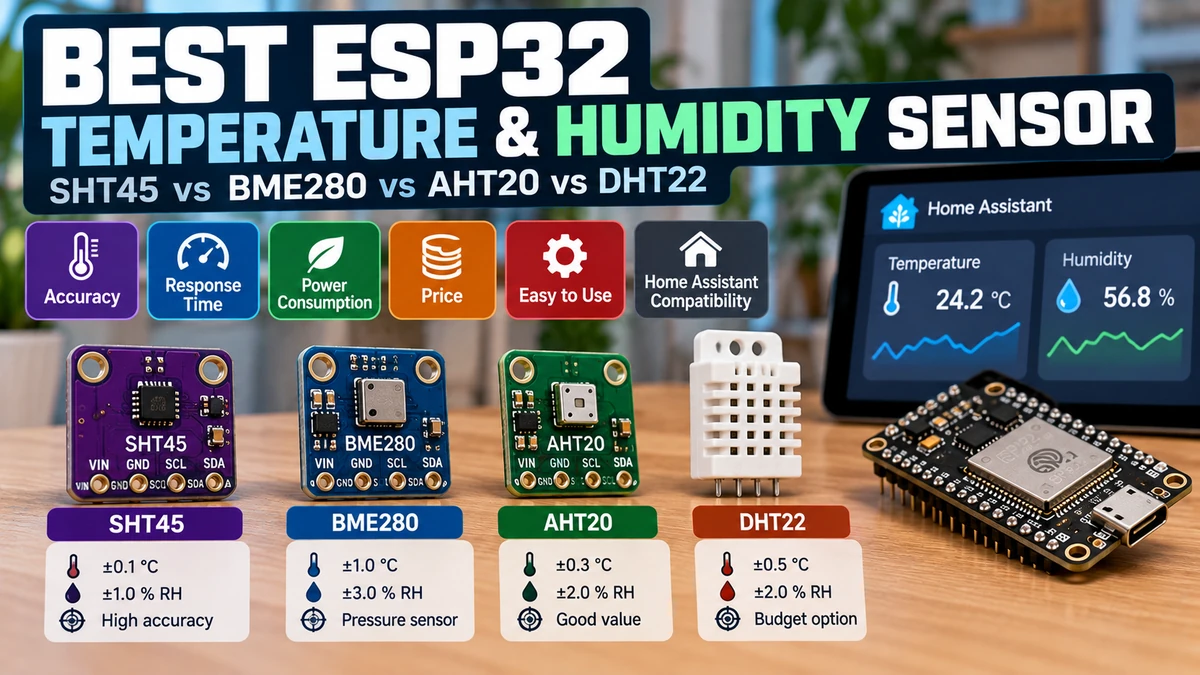
If the project is specifically about measuring temperature and relative humidity as accurately as possible, the SHT45AliExpress price is the clear winner: Sensirion specifies approximately ±1.0% RH and ±0.1°C typical accuracy, very low long-term drift, a fast digital I²C interface and an integrated heater for condensation recovery. The BME280AliExpress price is the best all-round environmental sensor when barometric pressure matters; it adds a real pressure sensorAliExpress price, but humidity accuracy is around ±3% RH and Bosch explicitly notes that its internal temperature reading can sit above true ambient temperature because of PCB/sensor self-heating. The AHT20 is the best budget modern choice: roughly ±2% RH and ±0.3°C typical accuracy, standard I²C and very low cost. The DHT22/AM2302 still works, but its custom single-wire timing, slow physical response, minimum two-second read interval and ageing design make it the least attractive choice for a new ESP32/Home Assistant build. For most readers: SHT45AliExpress price for best measurements, BME280AliExpress price for weather/pressure, AHT20 for best value, DHT22 only when you already own one or need to maintain an existing project.
Materials You’ll Need
| Item | Why you need it |
|---|---|
| ESP32 development board | Any ESP32 with suitable GPIO/I²C support |
| SHT45 breakout | High-accuracy temperature + humidity option |
| BME280 breakout | Temperature + humidity + barometric pressure |
| AHT20 breakout | Low-cost modern I²C temperature/humidity sensor |
| DHT22 / AM2302 | Legacy single-wire comparison / existing projects |
| Dupont wires | Sensor connections |
| Breadboard | Quick prototyping |
| 4.7 kΩ resistor | Useful pull-up for bare DHT22 DATA line |
| Ventilated enclosure | Reduces thermal and airflow measurement errors |
| Home Assistant + ESPHome | Local logging, dashboards and automations |
For a new build you do not need to buy all four sensors. The table is mainly there to make the comparison concrete. If accuracy is the priority, start with an SHT45. If pressure is required, buy a genuine BME280. If cost is the priority, AHT20 is usually a more sensible modern purchase than DHT22.
The Four Sensors at a Glance
| Feature | SHT45 | BME280 | AHT20 | DHT22 / AM2302 |
|---|---|---|---|---|
| Temperature | Yes | Yes | Yes | Yes |
| Humidity | Yes | Yes | Yes | Yes |
| Pressure | No | Yes | No | No |
| Typical temperature accuracy | ±0.1°C | ±0.5°C (0–65°C) | ±0.3°C | ±0.5°C |
| Typical humidity accuracy | ±1.0% RH | ±3% RH | ±2% RH | ±2% RH typical; worse at extremes |
| Humidity response τ63% | ~4 s | ~1 s | ~8 s | ~10 s class |
| Interface | I²C | I²C / SPI | I²C | Custom single-wire |
| Typical I²C address | 0x44 | 0x76 or 0x77 | 0x38 | N/A |
| Integrated heater | Yes | No | No | No |
| ESPHome support | Excellent | Excellent | Excellent | Excellent |
| Best use | Accurate room/HVAC sensor | Weather + pressure | Budget modern sensor | Legacy/very cheap projects |
Which One Should You Buy?
| Project | Best choice | Why |
|---|---|---|
| Best possible room temperature/humidity | SHT45 | Best published RH and temperature accuracy of these four |
| Home Assistant room sensor | SHT45 | Stable, accurate, easy ESPHome integration |
| Weather station | BME280 | Adds barometric pressure |
| Outdoor weather station where humidity quality matters most | SHT45 + separate pressure sensor | Better RH/T accuracy while retaining pressure via separate sensor |
| Budget indoor sensor | AHT20 | Modern I²C and strong accuracy for little money |
| Bathroom / condensation-prone location | SHT45 | Integrated heater can assist recovery from condensation |
| Battery environmental node | SHT45 or BME280 | Both sensors themselves are extremely low power |
| Existing old project | DHT22 | No reason to redesign if it already works |
| New project choosing between AHT20 and DHT22 | AHT20 | Better interface and generally better overall design |
SHT45: The Accuracy Winner
The SHT45 is the highest-accuracy member of Sensirion’s standard SHT4x family. It measures only two things — temperature and relative humidity — but it does both very well.
| SHT45 specification | Value |
|---|---|
| Typical humidity accuracy | ±1.0% RH |
| Typical temperature accuracy | ±0.1°C |
| Humidity range | 0–100% RH |
| Temperature range | -40 to +125°C |
| Humidity response τ63% | ~4 s |
| Temperature response τ63% | ~2 s |
| Typical RH long-term drift | <0.2% RH/year |
| Interface | I²C |
| Default address | 0x44 |
| Supply | 1.08–3.6 V at chip level |
| Heater | Integrated |
For normal indoor conditions, the difference between ±1% RH and ±3% RH is meaningful if you care about comparing rooms, controlling HVAC, logging environmental conditions or setting relatively tight humidity thresholds.
It is also a very clean sensor for Home Assistant because there is little ambiguity about what it is for. There is no gas algorithm, no barometric compensation and no analogue calibration. The ESP32 sends an I²C command and receives factory-calibrated digital temperature and humidity.
Why SHT45 Is Better Than SHT40/SHT41 When Accuracy Matters
The broader SHT4x family is excellent, but the SHT45 is the genuinely higher-accuracy part. SHT40/SHT41 are around ±1.8% RH and ±0.2°C typical; SHT45 tightens that to approximately ±1.0% RH and ±0.1°C.
For a bathroom fan that switches at 70% RH, an SHT40 is already good enough. For a high-quality climate logger or a reference sensor used to compare other nodes, the SHT45 upgrade makes more sense.
The SHT45 Heater Is Not a Room Heater
SHT4x devices contain a small on-chip heater. Its purpose is mainly condensation removal, decontamination and recovery. It should not be left on continuously while pretending to measure ambient humidity, because heating the sensing element changes the local temperature and therefore the relative-humidity reading.
ESPHome exposes heater power, duration and maximum duty-cycle controls. A sensible installation normally leaves the heater off and uses it only where condensation recovery is genuinely needed.
Best SHT45 Uses
- Home Assistant room climate sensors
- HVAC control and monitoring
- Bathrooms and high-humidity rooms
- Greenhouses
- Indoor environmental logging
- Calibration/reference comparisons between hobby sensors
- Battery temperature/humidity nodes
- Higher-quality outdoor stations when correctly shielded
BME280: The Best All-Round Weather Sensor
The BME280 remains one of the most useful ESP32 environmental sensors because it measures temperature, humidity and barometric pressure in one tiny device.
| BME280 specification | Value |
|---|---|
| Temperature accuracy | ±0.5°C from 0–65°C |
| Humidity accuracy | ±3% RH at 25°C / 20–80% RH |
| Humidity response τ63% | ~1 s |
| Pressure range | 300–1100 hPa full-accuracy range |
| Pressure absolute accuracy | About ±1 hPa from 0–65°C |
| Pressure relative accuracy | About ±0.12 hPa under specified conditions |
| Interface | I²C or SPI |
| I²C addresses | 0x76 or 0x77 |
| Sleep current | ~0.1 µA |
| T+H+P average current at 1 Hz | ~3.6 µA |
The pressure channel is the reason to buy it. Neither SHT45, AHT20 nor DHT22 can tell Home Assistant that atmospheric pressure is 1008 hPa and falling.
BME280 Temperature Is Not a Perfect Ambient Thermometer
Bosch explicitly describes the BME280 temperature sensor as part of the compensation system for pressure and humidity. The datasheet notes that its measured temperature depends on PCB temperature and sensor self-heating and is typically above true ambient temperature.
This is not a defect. It is a reminder that a BME280 soldered close to an ESP32 regulator, USB chip or warm enclosure wall may report a temperature that is slightly too high — and because relative humidity depends strongly on temperature, that thermal bias can also make the RH reading look lower than expected.
BME280 vs BMP280: Check What You Actually Bought
One of the most common marketplace problems is a board advertised as “BME280” that is actually populated with a BMP280. The BMP280 measures pressure and temperature but does not contain a humidity sensor.
BME280 = Temperature + Humidity + Pressure
BMP280 = Temperature + Pressure only
If ESPHome detects a BMP280 or humidity is missing, the problem may be the hardware rather than the configuration. Buying from a reputable supplier matters more for BME280 than the tiny price difference between anonymous modules.
When BME280 Beats SHT45
If the application needs pressure, the BME280 wins by default because SHT45 does not measure it.
For a weather station, pressure is often just as useful as humidity. A BME280 gives a complete three-variable environmental package with one I²C device.
When SHT45 Beats BME280
If the application is primarily a room climate sensor, SHT45 is the better measuring instrument: about ±1% RH vs ±3% RH and ±0.1°C vs ±0.5°C typical temperature accuracy.
The high-end solution is not necessarily choosing one sensor. It can be:
SHT45 → accurate temperature + humidity
separate pressure sensor → barometric pressure
That costs more and uses another I²C address, but it avoids compromising temperature/humidity quality just because pressure is also required.
AHT20: The Best Budget Modern Option
AHT20 is easy to underestimate because it is inexpensive. Its typical specifications are strong enough for most Home Assistant rooms: ±2% RH and ±0.3°C.
| AHT20 specification | Value |
|---|---|
| Humidity accuracy | ±2% RH typical |
| Temperature accuracy | ±0.3°C typical |
| Humidity response τ63% | ~8 s |
| Temperature response | ~5–30 s depending on conditions |
| Humidity range | 0–100% RH |
| Temperature range | -40 to +85°C |
| Interface | I²C |
| I²C address | 0x38 fixed |
| Typical role | Low-cost indoor temperature/humidity sensor |
That puts AHT20 in an interesting position. It is less accurate than SHT45 but generally more attractive than DHT22 for a new design because it uses a normal I²C bus and offers better typical temperature accuracy.
AHT20’s Biggest Limitation: Fixed I²C Address
AHT20 normally uses the fixed I²C address 0x38. That means you cannot place several AHT20 sensors on one I²C bus simply by changing addresses.
If you need multiple AHT20s on the same ESP32, use separate I²C buses where supported or an I²C multiplexer such as TCA9548A.
SHT45 has a similar one-address limitation in ordinary modules (0x44), while BME280 is slightly more flexible because it can normally be selected as 0x76 or 0x77.
Why AHT20 Is Better Than DHT22 for Most New Builds
- Standard I²C interface
- Better typical temperature accuracy
- No timing-critical custom single-wire protocol
- Easy ESPHome configuration
- Low module cost
- Compact breakout boards
If the only reason to choose DHT22 is “it is cheap,” check AHT20 pricing first. The difference is often too small to justify building a new project around the older DHT protocol.
DHT22 / AM2302: Still Usable, but Now a Legacy Choice
DHT22 was a major upgrade over DHT11 and helped make DIY environmental sensing popular. It still works perfectly well for basic comfort monitoring, but its design shows its age.
| DHT22 specification | Typical value |
|---|---|
| Humidity range | 0–100% RH |
| Humidity accuracy | ~±2% RH at room conditions; maximum error can be larger |
| Temperature range | -40 to +80°C |
| Temperature accuracy | ~±0.5°C |
| Resolution | 0.1% RH / 0.1°C |
| Minimum sampling interval | 2 seconds |
| Interface | Custom single-wire digital protocol |
| Pull-up | ~4.7–5.1 kΩ typical for bare sensor |
| Physical RH response | Slow compared with modern I²C sensors |
The key detail is that sampling interval and physical response time are not the same thing. The DHT22 may allow a new digital read every two seconds, but the humidity sensing element itself can take much longer to settle after a real environmental change.
Why DHT22 Can Be More Frustrating on ESP32
Its protocol uses precise pulse timing on one GPIO. ESPHome handles that complexity for you, but wiring quality, pull-up value, long cables, board timing and sensor clones can still produce invalid readings.
ESPHome’s current DHT documentation recommends a roughly 4.7 kΩ pull-up when needed and defaults to a 60-second update interval. That is perfectly adequate for room climate monitoring; reading every two seconds adds little value to Home Assistant.
When DHT22 Still Makes Sense
- You already own several and they work
- You are maintaining an existing design
- A tutorial or PCB is already built around DHT22
- Absolute lowest purchase cost matters more than interface elegance
For a brand-new 2026 project, I would normally choose AHT20 instead at the budget end, or SHT45 when measurement quality matters.
Accuracy: What the Numbers Really Mean
A sensor specified at ±1% RH does not mean every reading will always differ from a ±3% sensor by exactly two percentage points. Accuracy specifications describe an error envelope under stated conditions.
True room humidity: 50% RH

SHT45 typical tolerance: roughly 49–51% RH
BME280 published tolerance: roughly 47–53% RH
AHT20 typical tolerance: roughly 48–52% RH
Individual sensors can perform better than their limit. The value of the tighter specification is that you have a stronger reason to trust the number without hand-calibrating every unit.
Typical Accuracy vs Maximum Accuracy
Do not compare one manufacturer’s “typical” figure with another manufacturer’s worst-case limit as if they were identical concepts. SHT45, for example, has detailed accuracy maps across temperature and humidity; DHT22 clone listings often quote only a headline room-temperature figure.
For hobby/Home Assistant use, the practical ranking remains robust: SHT45 first, AHT20 second, BME280 third for pure RH accuracy, DHT22 last overall — but BME280 becomes the winner whenever pressure is a requirement.
Response Time: BME280 Is Surprisingly Fast
| Sensor | Humidity τ63% / practical response | Important note |
|---|---|---|
| SHT45 | ~4 s | Fast enough for HVAC and bathroom trends |
| BME280 | ~1 s | Very fast humidity element when exposed to airflow |
| AHT20 | ~8 s | Still easily fast enough for room monitoring |
| DHT22 | ~10 s class | Digital read interval can be 2 s, but physical sensor response is slower |
A fast sensor does not help if it is sealed inside a badly ventilated box. Enclosure airflow often dominates the real system response.
Sensor Placement Matters More Than Most Buyers Expect
A high-quality humidity sensor measures the air at the sensor. If that air is warmed by the ESP32, regulator or display, the reading can be perfectly correct locally and still wrong for the room.
- Keep the sensor away from the ESP32 module and voltage regulator.
- Do not place it directly above a warm PCB section.
- Provide ventilation slots near the sensor.
- Avoid direct sunlight.
- Avoid mounting directly against a cold/hot external wall.
- Keep it away from humid breath paths or air-conditioner outlets unless that is what you intend to measure.
- For outdoors, use a proper radiation shield and rain protection.
Relative humidity is temperature dependent. Even a small local heating error can cause a visible RH error, which is why sensor placement can erase the apparent advantage of buying a more accurate part.
ESP32 Self-Heating
An ESP32 can dissipate noticeably more heat while Wi-Fi is transmitting than while sleeping. A small sealed enclosure lets that heat accumulate around the sensor.
Bad layout:
[ESP32][regulator][SHT45]
inside sealed tiny box

Better layout:
[ESP32 + regulator] ---- PCB edge ---- [sensor near vent]
For precision projects, the environmental sensor is often placed on a small daughterboard or at the edge of the PCB to thermally isolate it from the main electronics.
Best Sensor for Home Assistant
Winner: SHT45.
A typical Home Assistant climate node needs stable room temperature and humidity rather than pressure. SHT45 gives the strongest measurement quality of these four while remaining simple to configure in ESPHome.
If the Home Assistant card should also show barometric pressure, choose BME280 or combine SHT45 with a dedicated pressure sensor.
Best Sensor for a Weather Station
Best single-chip choice: BME280.
Weather monitoring naturally benefits from atmospheric pressure. BME280 supplies all three standard weather variables in one device.
For a higher-end station where humidity accuracy is more important, use an SHT45 for temperature/RH and a separate pressure sensor. Whichever sensor you choose, a radiation shield matters far more than the difference between ±0.3°C and ±0.1°C if the sensor is exposed to sunlight.
Best Sensor for a Bathroom
SHT45.
Bathrooms combine fast humidity changes with occasional near-condensing conditions. The SHT45’s accuracy, reasonable response and integrated heater make it particularly well suited.
Do not continuously heat the sensor. Use the heater as a recovery tool after condensation or in a controlled low-duty-cycle strategy.
Best Sensor for a Greenhouse
SHT45 for measurement quality; AHT20 for a low-cost multi-node build.
Greenhouses can spend long periods at high RH. Sensor protection, contamination and condensation become important. For a serious design, consider a membrane-protected SHT4x variant rather than relying only on the bare breakout board.
Best Sensor for Battery Power
SHT45 and BME280 are both excellent.
The sensor itself is rarely the dominant battery load in an ESP32 deep-sleep node. The ESP32 board regulator, status LEDs and radio transmission usually matter far more.
BME280 draws only a few microamps at a 1 Hz T/H/P rate and around 0.1 µA in sleep; SHT45 is also designed for extremely low-power sensing. Do not choose DHT22 simply because its protocol looks simpler — the MCU/platform power budget is much more important.
Best Sensor for Multiple Devices on One I²C Bus
| Sensor | Address situation |
|---|---|
| SHT45 | Normally fixed 0x44 → one per bus unless multiplexed |
| BME280 | 0x76 or 0x77 → two can share one bus |
| AHT20 | Fixed 0x38 → one per bus unless multiplexed |
| DHT22 | Not I²C; each sensor normally gets its own GPIO |
If the project needs eight temperature/humidity sensors, a TCA9548A I²C multiplexer can be cleaner than choosing a worse sensor purely because of address collisions.
ESPHome Configuration: SHT45
i2c:
  sda: GPIO21
  scl: GPIO22

sensor:
  - platform: sht4x
    temperature:
      name: "SHT45 Temperature"
      id: sht45_temperature
    humidity:
      name: "SHT45 Humidity"
      id: sht45_humidity
    precision: High
    update_interval: 30s
ESPHome uses the common sht4x platform for SHT40/SHT41/SHT45. You do not select “SHT45” separately in YAML; the accuracy difference is in the hardware.
ESPHome Configuration: BME280
i2c:
  sda: GPIO21
  scl: GPIO22

sensor:
  - platform: bme280_i2c
    address: 0x76
    temperature:
      name: "BME280 Temperature"
    humidity:
      name: "BME280 Humidity"
    pressure:
      name: "BME280 Pressure"
    update_interval: 30s
If nothing appears at 0x76, scan the I²C bus; many boards use 0x77. ESPHome operates BME280 in forced mode for normal sensor reads, then the sensor returns to sleep.
ESPHome Configuration: AHT20
i2c:
  sda: GPIO21
  scl: GPIO22

sensor:
  - platform: aht10
    variant: AHT20
    temperature:
      name: "AHT20 Temperature"
    humidity:
      name: "AHT20 Humidity"
    update_interval: 30s
The ESPHome platform name is aht10, but the variant: AHT20 setting selects AHT20/AHT30 behaviour. AHT20 uses I²C address 0x38.
ESPHome notes that AHT20 humidity measurements may trigger a verbose-mode warning about the component blocking for roughly tens of milliseconds. That is a characteristic of the sensor measurement timing and is not normally a fault.
ESPHome Configuration: DHT22
sensor:
  - platform: dht
    pin: GPIO4
    model: DHT22
    temperature:
      name: "DHT22 Temperature"
      accuracy_decimals: 1
    humidity:
      name: "DHT22 Humidity"
      accuracy_decimals: 1
    update_interval: 60s
A bare DHT22 usually needs a pull-up resistor between DATA and 3.3 V. Many three-pin breakout modules already include it.
Do You Need 1-Second Updates?
Usually no. Room temperature and humidity change slowly compared with CPU or power sensors. A 30–60 second ESPHome interval is typically ideal for Home Assistant.
Faster polling creates more logs and Wi-Fi traffic, can increase self-heating, and rarely improves an automation such as a bathroom fan or dehumidifier.
Filtering Readings in ESPHome
If a sensor occasionally jumps by a fraction of a degree or percentage point, do not immediately add a huge moving average that delays real changes.
For room climate sensors, a modest median or sliding-window filter can make dashboards look cleaner while retaining responsiveness.
filters:
  - median:
      window_size: 5
      send_every: 3
      send_first_at: 1
Calibration and Offsets
ESPHome can apply an offset, but calibration should be based on a trustworthy reference and stable conditions.
filters:
  - offset: -0.4
Do not calibrate an SHT45 against a random DHT22 and assume the DHT22 is correct. If several sensors disagree, first check placement, airflow and self-heating. Those causes are often larger than the sensors’ factory calibration errors.
Why Two Sensors Side by Side Can Still Disagree
- They are not exactly at the same temperature.
- One breakout has an LED or regulator heating it.
- One sensor has slower physical response.
- Air reaches one sensor more easily.
- The sensors have different calibration tolerances.
- One sensor is affected by PCB heat.
- One humidity element has aged or been contaminated.
A comparison is most meaningful after both sensors have been placed together in free-moving air for enough time to stabilise.
Humidity Sensors and Contamination
Humidity sensing films can be affected by solvents, adhesives, cleaning chemicals, conformal coatings and prolonged extreme conditions. This matters when building your own PCB or enclosure.
Do not spray conformal coating over the sensor opening. Avoid exposing the sensing element to flux residue, silicone vapours or strong VOC sources during assembly. For dusty/wet applications, use a sensor variant or mechanical membrane designed for protection.
Common Problem: Temperature Reads Too High
First suspect local heating, especially if the sensor is inside a small enclosure with an active ESP32.
- Move the sensor away from ESP32 and regulator.
- Add vents.
- Increase distance from display/backlight.
- Reduce unnecessary Wi-Fi activity.
- Compare with the enclosure open.
With BME280, remember Bosch explicitly warns that the internal temperature can be above ambient because it is influenced by PCB temperature and self-heating.
Common Problem: Humidity Reads Too Low
A local temperature reading that is too high often makes relative humidity look too low. So a “humidity calibration problem” can actually be a thermal-layout problem.
Common Problem: BME280 Has No Humidity Entity
Check whether the physical chip is really a BME280 rather than BMP280. Cheap marketplace listings frequently confuse the two parts.
Common Problem: AHT20 Does Not Appear on I²C
Check for address 0x38, verify SDA/SCL and power, and confirm the module is actually AHT20. If another AHT20 is already on the same bus, the fixed address causes a collision.
Common Problem: DHT22 Shows NaN / Invalid Readings
- Check the DATA pull-up resistor.
- Explicitly set
model: DHT22or AM2302. - Keep the update interval comfortably above two seconds.
- Shorten poor-quality wiring.
- Verify 3.3 V/GND connections.
- Try another sensor — low-cost DHT clones vary considerably.
SHT45 vs BME280
Need best T/RH accuracy? → SHT45
Need pressure too?        → BME280
Need both at high quality?→ SHT45 + separate pressure sensor
SHT45 vs AHT20
SHT45 wins on measurement quality and long-term specification. AHT20 wins on cost. For ordinary bedrooms and basic automations, AHT20 can be perfectly adequate; for a higher-quality sensor node, choose SHT45.
AHT20 vs DHT22
AHT20 is my default winner for a new project. It provides a normal I²C interface, approximately ±0.3°C temperature accuracy and ±2% RH typical humidity accuracy. DHT22 mainly retains value through ubiquity and existing designs.
BME280 vs AHT20
Choose BME280 if pressure is useful. Choose AHT20 when only temperature/humidity are required and price matters. AHT20’s typical humidity and temperature accuracy is actually stronger on paper than BME280’s climate channels, but it lacks the barometer.
My 2026 Ranking
| Category | Winner | Reason |
|---|---|---|
| Best overall T/RH sensor | SHT45 | ±1% RH / ±0.1°C typical, heater, strong stability |
| Best weather/environment sensor | BME280 | Adds useful barometric pressure |
| Best budget modern sensor | AHT20 | Strong accuracy + I²C at low cost |
| Best legacy compatibility | DHT22 | Huge tutorial/library ecosystem |
| Best bathroom/high humidity | SHT45 | Accuracy + controlled heater |
| Best one-chip outdoor weather node | BME280 | T/H/P in one package |
| Best reference for comparing cheap nodes | SHT45 | Tightest specification of the group |
Decision Flow
Need barometric pressure?
 └─ YES → BME280
 └─ NO
     Is best temperature/humidity accuracy important?
      └─ YES → SHT45
      └─ NO
          Is low price the main goal?
           └─ YES → AHT20
           └─ NO → SHT45

Already own a DHT22?
 └─ Use it if it works; don't buy another just because it's familiar.
Final Recommendation
For a new ESP32/Home Assistant temperature and humidity project in 2026, I would buy the SHT45 when measurement quality matters and the AHT20 when budget matters.
I would choose the BME280 when pressure is part of the requirement, not because it is the most accurate humidity sensor. Its real strength is delivering temperature, humidity and excellent barometric data from one mature, ultra-low-power device.
I would not choose DHT22 for a completely new design unless price/availability or legacy compatibility forced the decision. It still measures room climate adequately, but AHT20 gives a cleaner modern interface and SHT45 gives a large step up in measurement quality.
SHT45 → best temperature + humidity
BME280 → best temperature + humidity + pressure package
AHT20 → best budget modern option
DHT22 → legacy / existing projects
And whichever sensor you buy, spend just as much thought on placement, ventilation and thermal isolation from the ESP32. A badly mounted SHT45 can easily produce less representative room readings than a cheaper sensor mounted correctly.
Related ESP32 Guides
- SHT40 vs SHT41 vs SHT45: Which Sensor Is Best?
- ESP32 + SHT45 with Home Assistant
- BME280 vs BME680 vs BME688: Which Is Best?
- ESP32 + BME280 with Home Assistant
- ESP32 DHT22 ESPHome Home Assistant Guide
Datasheets & External Resources
All manufacturer/framework references are collected here so the main article keeps readers inside esp32.co.uk.
- Sensirion SHT45 Product Page — current ±1% RH / ±0.1°C specifications, response time, supply range and SHT4x documentation.
- Sensirion SHT4x Datasheet — detailed SHT45 accuracy maps, long-term drift and heater behaviour.
- Bosch BME280 Datasheet — official humidity, pressure, temperature, power and interface specifications.
- ESPHome SHT4x Component — SHT40/SHT41/SHT45 configuration and heater options.
- ESPHome BME280 Component — I²C/SPI configuration, addresses and oversampling.
- ESPHome AHT10/AHT20 Component — AHT20 variant selection and I²C setup.
- ESPHome DHT Component — DHT22/AM2302 configuration, pull-up and timing guidance.
- Adafruit AHT20 Overview — current AHT20 breakout guidance and typical ±2% RH / ±0.3°C performance.