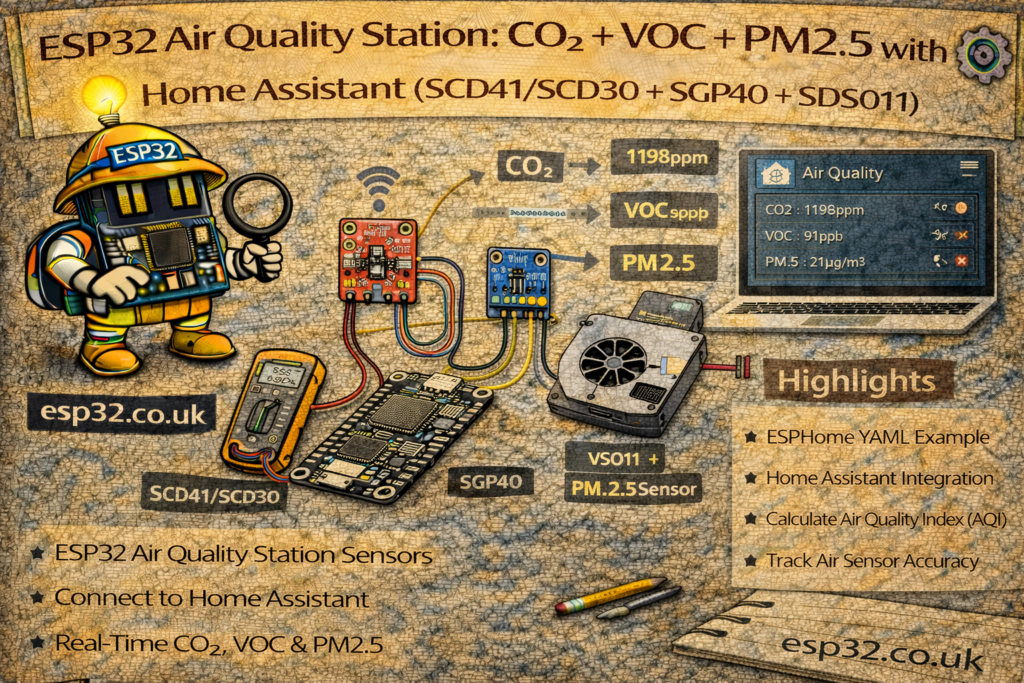
If you want one “single source of truth” for indoor air quality, the most useful combo is:
- CO₂ (ventilation / human presence proxy) → SCD41 or SCD30
- VOC index (chemicals, cooking, cleaners, off-gassing) → SGP40
- PM2.5 / particulate (smoke, dust, outdoor pollution) → SDS011 or similar PM sensor
With an ESP32 you can build a compact air quality station that reports to Home Assistant and gives you:
- A clear indoor air quality dashboard
- Automations: fan boost / ventilation alerts / window reminders
- Long-term trends and “what caused that spike?” insights
This guide shows wiring and configuration using ESPHome (recommended) plus an MQTT-style alternative approach.
1. Sensor Selection (Quick)
CO₂: SCD41 vs SCD30
- SCD41: smaller, typically lower power, great modern choice
- SCD30: older but excellent accuracy and stability
Both provide:
- CO₂ (ppm)
- Temperature (°C)
- Humidity (%)
VOC: SGP40
- Outputs VOC Index (not ppm)
- Best interpreted as a trend/scale:
- Lower is better, spikes indicate pollution events
PM2.5: SDS011 (UART)
- Measures PM2.5 and PM10 (µg/m³)
- Needs airflow and decent placement
- Draws more current than the I²C sensors
2. Hardware Required
- ESP32 DevKit
- SCD41 or SCD30 (I²C)
- SGP40 (I²C)
- SDS011 particulate sensor (UART)
- 5 V power supply (SDS011 typically needs 5 V)
- Enclosure with airflow (don’t seal it airtight)
Optional but recommended:
- Small 5 V fan for airflow (quiet, slow) for more stable PM readings
- Display (OLED) if you want local readout (optional)
3. Wiring Overview
3.1 I²C Bus (SCD41/SCD30 + SGP40)
I²C is shared:
ESP32        SCD41/SCD30     SGP40
3.3V  -----> VCC             VCC
GND   -----> GND             GND
GPIO21 ----> SDA             SDA
GPIO22 ----> SCL             SCL
Note: Many breakouts already include pull-up resistors. If your setup behaves oddly (I²C instability), reduce cable length and avoid “too many pull-ups” on the same bus.
3.2 SDS011 (UART)
SDS011 typically uses 5 V power and UART TTL.
ESP32        SDS011
5V    -----> 5V
GND   -----> GND
GPIO16 (RX) <----- TX
GPIO17 (TX) -----> RX
(ESP32 TX/RX pins can be swapped; just match them in config.)
METHOD 1 — ESPHome Air Quality Station (Recommended)
ESPHome makes multi-sensor nodes clean and maintainable.
4. ESPHome Base Configuration
esphome:
  name: esp32-air-quality
  platform: ESP32
  board: esp32dev

wifi:
  ssid: "YOUR_WIFI"
  password: "YOUR_PASSWORD"

logger:
api:
ota:
5. I²C Configuration
i2c:
  sda: 21
  scl: 22
  scan: true
6. CO₂ Sensor (Choose One)
Option A: SCD41 (scd4x)
sensor:
  - platform: scd4x
    co2:
      name: "Air CO2"
      id: co2_ppm
    temperature:
      name: "Air Temperature"
      id: air_temp
    humidity:
      name: "Air Humidity"
      id: air_hum
    update_interval: 30s
Option B: SCD30
sensor:
  - platform: scd30
    co2:
      name: "Air CO2"
      id: co2_ppm
    temperature:
      name: "Air Temperature"
      id: air_temp
    humidity:
      name: "Air Humidity"
      id: air_hum
    update_interval: 30s
Use one, not both.
7. VOC Sensor (SGP40)
ESPHome commonly uses the sgp4x platform (VOC index output).
sensor:
  - platform: sgp4x
    voc:
      name: "VOC Index"
      id: voc_index
    update_interval: 30s
Better VOC accuracy: SGP sensors often benefit from temperature/humidity compensation. If your ESPHome setup supports it, feed temp/humidity into the VOC algorithm.
8. PM Sensor (SDS011)
SDS011 uses UART:
uart:
  rx_pin: 16
  tx_pin: 17
  baud_rate: 9600
Now define the sensor:
sensor:
  - platform: sds011
    pm_2_5:
      name: "PM2.5"
      id: pm25
    pm_10_0:
      name: "PM10"
      id: pm10
    update_interval: 60s
9. Optional: Derived “Air Quality Score” Sensors
Once you have the raw values, you can create a simple combined score to show as a single gauge.
Example: “poor if any is bad” logic as a text sensor:
text_sensor:
  - platform: template
    name: "Air Quality Status"
    lambda: |-
      if (id(co2_ppm).state > 1200 || id(pm25).state > 35 || id(voc_index).state > 200) {
        return {"Poor"};
      } else if (id(co2_ppm).state > 900 || id(pm25).state > 15 || id(voc_index).state > 120) {
        return {"OK"};
      } else {
        return {"Good"};
      }
This is deliberately simple and practical: it gives you a single “Good/OK/Poor” status that tracks what you actually care about.
10. Home Assistant Dashboard (Indoor Air Quality)
Once the ESPHome node is added, Home Assistant will have entities like:
sensor.air_co2sensor.pm2_5sensor.voc_indexsensor.air_temperaturesensor.air_humiditytext_sensor.air_quality_status(if added)
10.1 Dashboard Card Example
type: vertical-stack
cards:
  - type: gauge
    entity: sensor.air_co2
    name: CO₂ (ppm)
    min: 400
    max: 2000

  - type: gauge
    entity: sensor.pm2_5
    name: PM2.5 (µg/m³)
    min: 0
    max: 150

  - type: gauge
    entity: sensor.voc_index
    name: VOC Index
    min: 0
    max: 500

  - type: entities
    entities:
      - sensor.air_temperature
      - sensor.air_humidity
      - text_sensor.air_quality_status
11. Useful Home Assistant Automations
11.1 Ventilation Reminder (CO₂)
automation:
  - alias: "Air Quality – CO2 High"
    trigger:
      - platform: numeric_state
        entity_id: sensor.air_co2
        above: 1000
        for: "00:10:00"
    action:
      - service: notify.mobile_app
        data:
          title: "Air Quality"
          message: "CO₂ is high (>1000 ppm). Consider opening a window."
11.2 PM2.5 Alert (Smoke / Dust)
  - alias: "Air Quality – PM2.5 Spike"
    trigger:
      - platform: numeric_state
        entity_id: sensor.pm2_5
        above: 35
        for: "00:05:00"
    action:
      - service: notify.mobile_app
        data:
          title: "Air Quality"
          message: "PM2.5 is elevated. Check for smoke/cooking or outdoor pollution."
11.3 VOC Spike (Cooking / Cleaning)
  - alias: "Air Quality – VOC Spike"
    trigger:
      - platform: numeric_state
        entity_id: sensor.voc_index
        above: 200
        for: "00:05:00"
    action:
      - service: notify.mobile_app
        data:
          title: "Air Quality"
          message: "VOC index is high. Ventilation recommended."
METHOD 2 — MQTT Approach (If You Prefer Your MQTT Style)
ESP32 publishes one JSON payload:
Topic: home/air/quality
Payload:
{"co2": 842, "pm25": 6.2, "pm10": 11.4, "voc": 92, "t": 22.1, "h": 45.3}
Home Assistant:
mqtt:
  sensor:
    - name: "Air CO2"
      state_topic: "home/air/quality"
      value_template: "{{ value_json.co2 }}"
      unit_of_measurement: "ppm"

    - name: "PM2.5"
      state_topic: "home/air/quality"
      value_template: "{{ value_json.pm25 }}"
      unit_of_measurement: "µg/m³"

    - name: "PM10"
      state_topic: "home/air/quality"
      value_template: "{{ value_json.pm10 }}"
      unit_of_measurement: "µg/m³"

    - name: "VOC Index"
      state_topic: "home/air/quality"
      value_template: "{{ value_json.voc }}"

    - name: "Air Temperature"
      state_topic: "home/air/quality"
      value_template: "{{ value_json.t }}"
      unit_of_measurement: "°C"

    - name: "Air Humidity"
      state_topic: "home/air/quality"
      value_template: "{{ value_json.h }}"
      unit_of_measurement: "%"
This matches the working MQTT syntax you shared earlier.
12. Placement & Accuracy Tips (Matters More Than People Think)
- Don’t place it directly next to a window or AC vent
- Keep it away from kitchen hob if you want “whole room” readings
- PM sensors need airflow:
- Don’t suffocate the inlet/outlet
- Consider a slow fan for stability
- CO₂ sensors want stable air mixing:
- Avoid corners and enclosed shelves
- Give CO₂ sensors time to warm up and settle after power-up
Summary
A combined ESP32 air quality station is one of the most useful “always-on” Home Assistant nodes:
- CO₂ tells you when ventilation is needed
- VOC catches chemicals, cooking, cleaners and off-gassing
- PM2.5 catches smoke, dust and outdoor pollution events
- Everything appears as normal HA sensors with a clean dashboard and automations
Once installed, you’ll quickly learn the patterns of your home: what cooking does, what cleaning sprays do, and how quickly CO₂ rises overnight—then you can automate ventilation in a smart, targeted way.