Snippet summary:
This example shows how to turn an ESP32 into a BLE beacon that broadcasts Eddystone URL frames. It periodically advertises a compressed URL, rotates between multiple URLs across wake cycles, and uses deep sleep to achieve ultra-low power operation.
Introduction
- This example demonstrates BLE beacon broadcasting, not client/server communication
- The ESP32 advertises a URL over BLE using the Eddystone protocol
- No connections are required — devices simply scan and read the broadcast
- Designed for low-power IoT and proximity-based applications
👉 Think of it as a wireless URL broadcaster
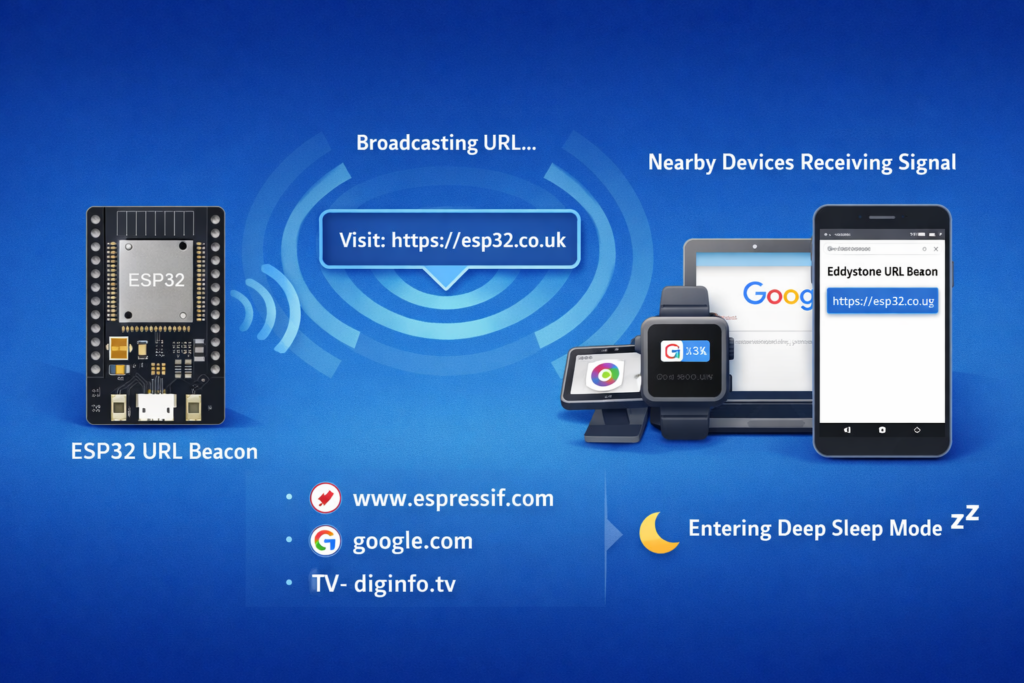
What is Eddystone URL
- A BLE beacon format defined by Google
- Broadcasts compressed URLs inside BLE advertisements
- Designed for:
👉 Instead of pairing, devices just scan and decode the URL
What this example does
- Cycles through a list of predefined URLs
- Encodes each into Eddystone format
- Broadcasts it for 10 seconds
- Enters deep sleep
- Wakes up and broadcasts the next URL
👉 Each wake cycle = different URL
URL list and rotation
String URL[] = { ... }
- Contains multiple URLs
- Examples include:
Selection logic:
URL[bootcount % (sizeof(URL) / sizeof(URL[0]))]
- Uses boot count to rotate URLs
- Every wake cycle → next URL
👉 Simple but effective state machine
Smart URL encoding
EddystoneURL.setSmartURL(...)
- Automatically compresses URLs
- Uses predefined prefixes:
- Uses suffix compression where possible
👉 This reduces BLE payload size
URL limitations
- Max length ≈ 17 bytes after encoding
- Invalid cases:
// setSmartURL() returns 0 = error
👉 Always validate URLs before use
Advertising structure
oAdvertisementData.addData(data);
oScanResponseData.setName("ESP32 URLBeacon");
- Advertisement → contains encoded URL
- Scan response → contains device name
👉 Standard BLE split:
- data → primary packet
- name → scan response
BLE setup
BLEDevice::init("URLBeacon");
BLEDevice::setPower(BEACON_POWER);
- Initializes BLE stack
- Sets transmit power
#define BEACON_POWER ESP_PWR_LVL_N12
👉 Low power mode for energy efficiency
No BLE server required
// BLEServer *pServer = BLEDevice::createServer(); // not needed
- This is important
- Beacon mode does NOT require a server
👉 Saves:
- RAM
- flash
- power
Advertising cycle
pAdvertising->start();
delay(10000);
pAdvertising->stop();
- Advertises for 10 seconds
- Then stops
👉 Short bursts → better battery life
Deep sleep operation
esp_deep_sleep(1000000LL * GPIO_DEEP_SLEEP_DURATION);
- ESP32 shuts down almost completely
- Only RTC memory remains
#define GPIO_DEEP_SLEEP_DURATION 10
👉 Sleeps for 10 seconds between broadcasts
RTC memory usage
RTC_DATA_ATTR static time_t last;
RTC_DATA_ATTR static uint32_t bootcount;
- Values persist across deep sleep
- Used for:
👉 Essential for low-power state tracking
Boot diagnostics
Serial.printf("Start ESP32 %lu\n", bootcount++);
- Shows how many wake cycles occurred
Serial.printf("Deep sleep (%llds since last reset...)\n");
- Helps debug timing behavior
Runtime flow
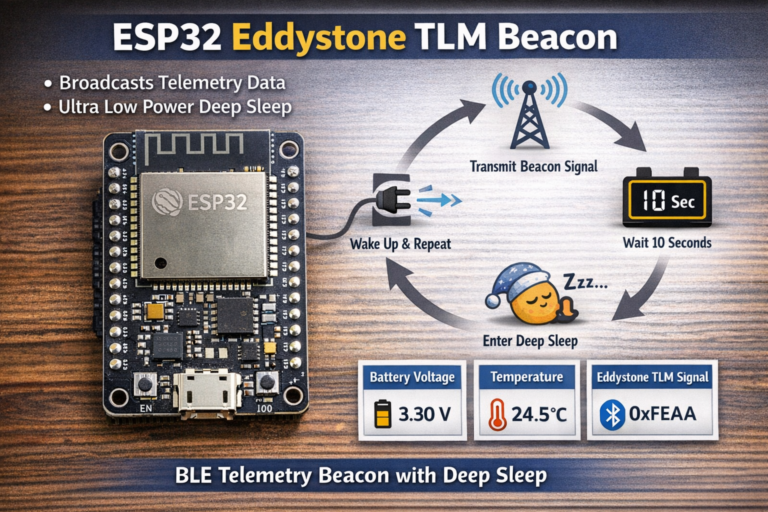
- ESP32 wakes up
- Selects next URL
- Encodes URL
- Starts BLE advertising
- Broadcasts for 10 seconds
- Stops advertising
- Goes to deep sleep
- Repeats
👉 Fully autonomous beacon
How to scan the beacon
Use:
- ESP32 BLE scanner example
- nRF Connect (Android/iOS)
- any BLE scanner with Eddystone support
Look for:
- Service UUID:
0xFEAA - Frame type: URL
Real-world applications
- proximity-based web links
- asset tracking tags
- smart posters / exhibits
- retail promotions
- IoT device discovery
👉 “tapless” interaction via BLE scanning
Limitations
- no connection support
- no data feedback
- limited payload size
- depends on scanner support
👉 Pure broadcast model
Improvements for production
- use dynamic URLs (e.g. sensor data endpoints)
- adjust sleep duration for battery optimization
- increase TX power for longer range
- add real sensor integration
- implement configuration via OTA or BLE setup mode
Honest take
This example is:
- simple but powerful
- extremely efficient
- underused in real projects
Big takeaway:
👉 BLE can replace QR codes in many cases
But:
- requires user to have BLE scanner
- not as universally accessible as NFC/QR
Conclusion
This example shows how to build a:
👉 low-power BLE URL broadcaster
Using:
- Eddystone URL format
- compressed advertising payload
- deep sleep cycles
It’s ideal for:
- battery-powered IoT
- proximity-based interactions
- lightweight wireless communication
|
1 2 3 4 5 6 7 8 9 10 11 12 13 14 15 16 17 18 19 20 21 22 23 24 25 26 27 28 29 30 31 32 33 34 35 36 37 38 39 40 41 42 43 44 45 46 47 48 49 50 51 52 53 54 55 56 57 58 59 60 61 62 63 64 65 66 67 68 69 70 71 72 73 74 75 76 77 78 79 80 81 82 83 84 85 86 87 88 89 90 91 92 93 94 95 96 97 98 99 100 101 102 103 104 105 106 107 |
/* EddystoneURL beacon by BeeGee EddystoneURL frame specification https://github.com/google/eddystone/blob/master/eddystone-url/README.md Upgraded on: Feb 20, 2023 By: Tomas Pilny */ /* Create a BLE server that will send periodic Eddystone URL frames. The design of creating the BLE server is: 1. Create a BLE Server 2. Create advertising data 3. Start advertising. 4. wait 5. Stop advertising. 6. deep sleep */ #include "sys/time.h" #include <Arduino.h> #include "BLEDevice.h" #include "BLEUtils.h" #include "BLEBeacon.h" #include "BLEAdvertising.h" #include "BLEEddystoneURL.h" #include "esp_sleep.h" char unprintable[] = {0x01, 0xFF, 0xDE, 0xAD}; String URL[] = { "http://www.espressif.com/", // prefix 0x00, suffix 0x00 "https://www.texas.gov", // prefix 0x01, suffix 0x0D "http://en.mapy.cz", // prefix 0x02, no valid suffix "https://arduino.cc", // prefix 0x03, no valid suffix "google.com", // URL without specified prefix - the function will assume default prefix "http://www." = 0x00 "diginfo.tv", // URL without specified prefix - the function will assume default prefix "http://www." = 0x00 // "http://www.URLsAbove17BytesAreNotAllowed.com", // Too long URL - setSmartURL() will return 0 = ERR // "", // Empty string - setSmartURL() will return 0 = ERR // String(unprintable), // Unprintable characters / corrupted String - setSmartURL() will return 0 = ERR }; #define GPIO_DEEP_SLEEP_DURATION 10 // sleep x seconds and then wake up #define BEACON_POWER ESP_PWR_LVL_N12 RTC_DATA_ATTR static time_t last; // remember last boot in RTC Memory RTC_DATA_ATTR static uint32_t bootcount; // remember number of boots in RTC Memory // See the following for generating UUIDs: // https://www.uuidgenerator.net/ BLEAdvertising *pAdvertising; struct timeval now; int setBeacon() { BLEAdvertisementData oAdvertisementData = BLEAdvertisementData(); BLEAdvertisementData oScanResponseData = BLEAdvertisementData(); BLEEddystoneURL EddystoneURL; EddystoneURL.setPower(BEACON_POWER); // This is only information about the power. The actual power is set by `BLEDevice::setPower(BEACON_POWER)` if (EddystoneURL.setSmartURL(URL[bootcount % (sizeof(URL) / sizeof(URL[0]))])) { String frame = EddystoneURL.getFrame(); String data(EddystoneURL.getFrame().c_str(), frame.length()); oAdvertisementData.addData(data); oScanResponseData.setName("ESP32 URLBeacon"); pAdvertising->setAdvertisementData(oAdvertisementData); pAdvertising->setScanResponseData(oScanResponseData); Serial.printf("Advertise URL \"%s\"\n", URL[bootcount % (sizeof(URL) / sizeof(URL[0]))].c_str()); return 1; // OK } else { Serial.println("Smart URL set ERR"); return 0; // ERR } } void setup() { Serial.begin(115200); gettimeofday(&now, NULL); Serial.printf("Start ESP32 %lu\n", bootcount++); Serial.printf("Deep sleep (%llds since last reset, %llds since last boot)\n", now.tv_sec, now.tv_sec - last); last = now.tv_sec; // Create the BLE Device BLEDevice::init("URLBeacon"); BLEDevice::setPower(BEACON_POWER); // Create the BLE Server // BLEServer *pServer = BLEDevice::createServer(); // <-- no longer required to instantiate BLEServer, less flash and ram usage pAdvertising = BLEDevice::getAdvertising(); if (setBeacon()) { // Start advertising pAdvertising->start(); Serial.println("Advertising started..."); delay(10000); pAdvertising->stop(); } Serial.println("Enter deep sleep"); bootcount++; esp_deep_sleep(1000000LL * GPIO_DEEP_SLEEP_DURATION); } void loop() {} |