This example demonstrates how to build a secure ESP32 BLE client using a static passkey. It scans for a BLE server, connects securely using MITM protection, reads both insecure and secure characteristics, subscribes to notifications, and writes data to both — showcasing full encrypted BLE communication.
1. Introduction
This example builds on the standard ESP32 BLE client, but adds something critical:
👉 security
Instead of a simple connection, this client performs:
- secure pairing
- MITM-protected authentication
- encrypted communication
It uses a static passkey (123456) shared between client and server.
This is exactly how many real-world BLE devices work:
- medical devices
- smart locks
- industrial sensors
- authenticated IoT nodes
2. What this example does
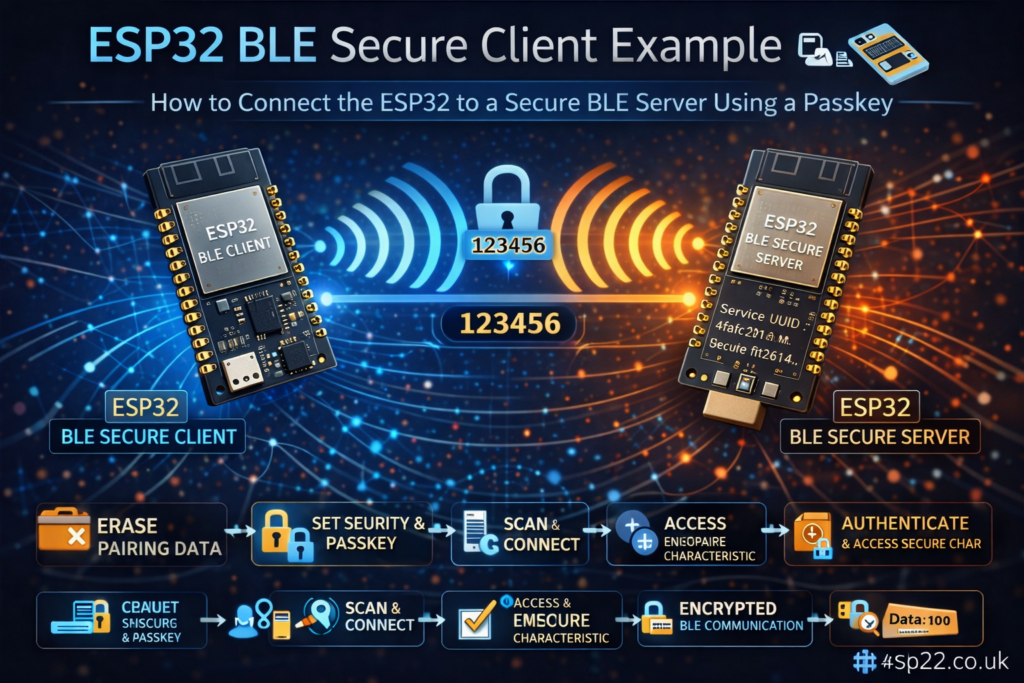
The workflow is:
- Clears previous pairing data
- Configures BLE security (passkey + MITM)
- Scans for a device advertising a specific service
- Connects as a secure BLE client
- Reads:
- Subscribes to notifications
- Writes data to both characteristics periodically
3. Key concept: Secure vs Insecure characteristics
This example uses two characteristics:
static BLEUUID insecureCharUUID(...)
static BLEUUID secureCharUUID(...)
Insecure characteristic
- No authentication required
- Can be read immediately
Secure characteristic
- Requires encryption + MITM
- Triggers pairing process
👉 This is the core demonstration of BLE security behavior
4. Static passkey setup
#define CLIENT_PIN 123456
And later:
pSecurity->setPassKey(true, CLIENT_PIN);
This means:
- The passkey is fixed (not random)
- No user input required
- Client automatically authenticates
⚠️ Must match the server passkey exactly
5. Clearing pairing data (important)
nvs_flash_erase();
nvs_flash_init();
This clears stored bonding keys.
Why this matters:
- ESP32 stores pairing info in flash
- Without clearing, it may skip authentication
- This ensures fresh pairing every run
👉 This is critical for testing security behavior
6. BLE security configuration
6.1 Authentication mode
pSecurity->setAuthenticationMode(false, true, true);
This enables:
- Secure connection
- MITM protection
- Encryption
Without MITM:
👉 BLE would fall back to Just Works pairing (less secure)
6.2 IO capability
pSecurity->setCapability(ESP_IO_CAP_IN);
This tells BLE:
- device behaves like keyboard input
Even though the passkey is static, this is required to:
👉 enable proper MITM authentication flow
7. Bluedroid vs NimBLE behavior
The example highlights an important difference:
Bluedroid (ESP32 default)
- Security starts on connect
- You cannot access secure data without pairing
NimBLE (C3/S3 default)
- Security starts on demand
- You can read insecure data before authentication
👉 This explains why the code behaves slightly differently across chips
8. Connection process
Create client
BLEClient *pClient = BLEDevice::createClient();
Connect to server
pClient->connect(myDevice);
Set MTU
pClient->setMTU(517);
This improves:
- throughput
- efficiency
9. Service and characteristic discovery
pClient->getService(serviceUUID);
Then:
getCharacteristic(insecureCharUUID);
getCharacteristic(secureCharUUID);
If either fails → disconnect
👉 Good defensive design
10. Reading characteristics
Insecure read
pRemoteInsecureCharacteristic->readValue();
Works immediately.
Secure read
pRemoteSecureCharacteristic->setAuth(ESP_GATT_AUTH_REQ_MITM);
pRemoteSecureCharacteristic->readValue();
This triggers:
👉 authentication + pairing process
11. Notifications
registerForNotify(notifyCallback);
Both characteristics can send updates.
Callback prints:
- UUID
- data length
- raw payload
12. Writing data
Inside loop:
Insecure write
pRemoteInsecureCharacteristic->writeValue(...)
Secure write
pRemoteSecureCharacteristic->writeValue(...)
The difference:
- insecure → always works
- secure → requires encryption
13. Scanning and device detection
advertisedDevice.isAdvertisingService(serviceUUID)
Once found:
doConnect = true;
14. Main loop logic
Connect when ready
if (doConnect)
When connected
- write to both characteristics
- demonstrate secure communication
When disconnected
BLEDevice::getScan()->start(0);
Restart scanning
15. Full runtime flow
- Clear pairing data
- Start scan
- Find server
- Connect
- Read insecure data
- Trigger authentication
- Read secure data
- Receive notifications
- Write to both characteristics
- Repeat
16. Important requirements
You need matching server
This example is designed to work with:
👉 Server_secure_static_passkey
Without it:
- no connection
- no authentication
- nothing happens
17. Common pitfalls
1. Passkey mismatch
→ connection fails silently or disconnects
2. MITM disabled
→ no real security (Just Works used)
3. Not clearing NVS
→ pairing skipped unexpectedly
4. Wrong IO capability
→ authentication method may fail
18. Real-world use cases
This pattern is used in:
- secure IoT sensors
- industrial BLE devices
- smart home authentication
- medical devices
- encrypted telemetry
19. Improvements for production
1. Replace static passkey
Use dynamic or user-entered key
2. Add bonding
Store keys for faster reconnection
3. Handle reconnect logic better
Add retry/backoff strategy
4. Parse data properly
Instead of raw Serial output
5. Add device filtering
By address or RSSI
Honest take
This example is:
- very powerful
- rarely understood properly
- poorly explained in official docs
Biggest hidden concept:
👉 BLE security is triggered by access to protected attributes — not just connection
Once you understand that, everything clicks.
Conclusion
This example demonstrates one of the most important BLE concepts:
👉 secure communication using pairing + encryption
It shows:
- how BLE security actually works
- how authentication is triggered
- how secure vs insecure data behaves
If you understand this example, you’re already ahead of most ESP32 BLE developers.
|
1 2 3 4 5 6 7 8 9 10 11 12 13 14 15 16 17 18 19 20 21 22 23 24 25 26 27 28 29 30 31 32 33 34 35 36 37 38 39 40 41 42 43 44 45 46 47 48 49 50 51 52 53 54 55 56 57 58 59 60 61 62 63 64 65 66 67 68 69 70 71 72 73 74 75 76 77 78 79 80 81 82 83 84 85 86 87 88 89 90 91 92 93 94 95 96 97 98 99 100 101 102 103 104 105 106 107 108 109 110 111 112 113 114 115 116 117 118 119 120 121 122 123 124 125 126 127 128 129 130 131 132 133 134 135 136 137 138 139 140 141 142 143 144 145 146 147 148 149 150 151 152 153 154 155 156 157 158 159 160 161 162 163 164 165 166 167 168 169 170 171 172 173 174 175 176 177 178 179 180 181 182 183 184 185 186 187 188 189 190 191 192 193 194 195 196 197 198 199 200 201 202 203 204 205 206 207 208 209 210 211 212 213 214 215 216 217 218 219 220 221 222 223 224 225 226 227 228 229 230 231 232 233 234 235 236 237 238 239 240 241 242 243 244 245 246 247 248 249 250 |
/* Secure client with static passkey This example demonstrates how to create a secure BLE client that connects to a secure BLE server using a static passkey without prompting the user. The client will automatically use the same passkey (123456) as the server. This client is designed to work with the Server_secure_static_passkey example. Note that ESP32 uses Bluedroid by default and the other SoCs use NimBLE. Bluedroid initiates security on-connect, while NimBLE initiates security on-demand. This means that in NimBLE you can read the insecure characteristic without entering the passkey. This is not possible in Bluedroid. IMPORTANT: MITM (Man-In-The-Middle protection) must be enabled for password prompts to work. Without MITM, the BLE stack assumes no user interaction is needed and will use "Just Works" pairing method (with encryption if secure connection is enabled). Based on examples from Neil Kolban and h2zero. Created by lucasssvaz. */ #include "BLEDevice.h" #include "BLESecurity.h" #include "nvs_flash.h" // The remote service we wish to connect to. static BLEUUID serviceUUID("4fafc201-1fb5-459e-8fcc-c5c9c331914b"); // The characteristics of the remote service we are interested in. static BLEUUID insecureCharUUID("beb5483e-36e1-4688-b7f5-ea07361b26a8"); static BLEUUID secureCharUUID("ff1d2614-e2d6-4c87-9154-6625d39ca7f8"); // This must match the server's passkey #define CLIENT_PIN 123456 static boolean doConnect = false; static boolean connected = false; static boolean doScan = false; static BLERemoteCharacteristic *pRemoteInsecureCharacteristic; static BLERemoteCharacteristic *pRemoteSecureCharacteristic; static BLEAdvertisedDevice *myDevice; // Callback function to handle notifications static void notifyCallback(BLERemoteCharacteristic *pBLERemoteCharacteristic, uint8_t *pData, size_t length, bool isNotify) { Serial.print("Notify callback for characteristic "); Serial.print(pBLERemoteCharacteristic->getUUID().toString().c_str()); Serial.print(" of data length "); Serial.println(length); Serial.print("data: "); Serial.write(pData, length); Serial.println(); } class MyClientCallback : public BLEClientCallbacks { void onConnect(BLEClient *pclient) { Serial.println("Connected to secure server"); } void onDisconnect(BLEClient *pclient) { connected = false; Serial.println("Disconnected from server"); } }; bool connectToServer() { Serial.print("Forming a secure connection to "); Serial.println(myDevice->getAddress().toString().c_str()); BLEClient *pClient = BLEDevice::createClient(); Serial.println(" - Created client"); pClient->setClientCallbacks(new MyClientCallback()); // Connect to the remote BLE Server. pClient->connect(myDevice); Serial.println(" - Connected to server"); // Set MTU to maximum for better performance pClient->setMTU(517); // Obtain a reference to the service we are after in the remote BLE server. BLERemoteService *pRemoteService = pClient->getService(serviceUUID); if (pRemoteService == nullptr) { Serial.print("Failed to find our service UUID: "); Serial.println(serviceUUID.toString().c_str()); pClient->disconnect(); return false; } Serial.println(" - Found our service"); // Obtain a reference to the insecure characteristic pRemoteInsecureCharacteristic = pRemoteService->getCharacteristic(insecureCharUUID); if (pRemoteInsecureCharacteristic == nullptr) { Serial.print("Failed to find insecure characteristic UUID: "); Serial.println(insecureCharUUID.toString().c_str()); pClient->disconnect(); return false; } Serial.println(" - Found insecure characteristic"); // Obtain a reference to the secure characteristic pRemoteSecureCharacteristic = pRemoteService->getCharacteristic(secureCharUUID); if (pRemoteSecureCharacteristic == nullptr) { Serial.print("Failed to find secure characteristic UUID: "); Serial.println(secureCharUUID.toString().c_str()); pClient->disconnect(); return false; } Serial.println(" - Found secure characteristic"); // Read the value of the insecure characteristic (should work without authentication) if (pRemoteInsecureCharacteristic->canRead()) { String value = pRemoteInsecureCharacteristic->readValue(); Serial.print("Insecure characteristic value: "); Serial.println(value.c_str()); } // For Bluedroid, we need to set the authentication request type for the secure characteristic // This is not needed for NimBLE and will be ignored. pRemoteSecureCharacteristic->setAuth(ESP_GATT_AUTH_REQ_MITM); // Try to read the secure characteristic (this will trigger security negotiation in NimBLE) if (pRemoteSecureCharacteristic->canRead()) { Serial.println("Attempting to read secure characteristic..."); String value = pRemoteSecureCharacteristic->readValue(); Serial.print("Secure characteristic value: "); Serial.println(value.c_str()); } // Register for notifications on both characteristics if they support it if (pRemoteInsecureCharacteristic->canNotify()) { pRemoteInsecureCharacteristic->registerForNotify(notifyCallback); Serial.println(" - Registered for insecure characteristic notifications"); } if (pRemoteSecureCharacteristic->canNotify()) { pRemoteSecureCharacteristic->registerForNotify(notifyCallback); Serial.println(" - Registered for secure characteristic notifications"); } connected = true; return true; } /** * Scan for BLE servers and find the first one that advertises the service we are looking for. */ class MyAdvertisedDeviceCallbacks : public BLEAdvertisedDeviceCallbacks { /** * Called for each advertising BLE server. */ void onResult(BLEAdvertisedDevice advertisedDevice) { Serial.print("BLE Advertised Device found: "); Serial.println(advertisedDevice.toString().c_str()); // We have found a device, let us now see if it contains the service we are looking for. if (advertisedDevice.haveServiceUUID() && advertisedDevice.isAdvertisingService(serviceUUID)) { Serial.println("Found our secure server!"); BLEDevice::getScan()->stop(); myDevice = new BLEAdvertisedDevice(advertisedDevice); doConnect = true; doScan = true; } } }; void setup() { Serial.begin(115200); Serial.println("Starting Secure BLE Client application..."); // Clear NVS to remove any cached pairing information // This ensures fresh authentication for testing Serial.println("Clearing NVS pairing data..."); nvs_flash_erase(); nvs_flash_init(); BLEDevice::init("Secure BLE Client"); // Set up security with the same passkey as the server BLESecurity *pSecurity = new BLESecurity(); // Set security parameters // Default parameters: // - IO capability is set to NONE // - Initiator and responder key distribution flags are set to both encryption and identity keys. // - Passkey is set to BLE_SM_DEFAULT_PASSKEY (123456). It will warn if you don't change it. // - Key size is set to 16 bytes // Set the same static passkey as the server // The first argument defines if the passkey is static or random. // The second argument is the passkey (ignored when using a random passkey). pSecurity->setPassKey(true, CLIENT_PIN); // Set authentication mode to match server requirements // Enable secure connection and MITM (for password prompts) for this example pSecurity->setAuthenticationMode(false, true, true); // Set IO capability to KeyboardOnly // We need the proper IO capability for MITM authentication even // if the passkey is static and won't be entered by the user // See https://www.bluetooth.com/blog/bluetooth-pairing-part-2-key-generation-methods/ pSecurity->setCapability(ESP_IO_CAP_IN); // Retrieve a Scanner and set the callback we want to use to be informed when we // have detected a new device. Specify that we want active scanning and start the // scan to run for 5 seconds. BLEScan *pBLEScan = BLEDevice::getScan(); pBLEScan->setAdvertisedDeviceCallbacks(new MyAdvertisedDeviceCallbacks()); pBLEScan->setInterval(1349); pBLEScan->setWindow(449); pBLEScan->setActiveScan(true); pBLEScan->start(5, false); } void loop() { // If the flag "doConnect" is true then we have scanned for and found the desired // BLE Server with which we wish to connect. Now we connect to it. if (doConnect == true) { if (connectToServer()) { Serial.println("We are now connected to the secure BLE Server."); } else { Serial.println("We have failed to connect to the server; there is nothing more we will do."); } doConnect = false; } // If we are connected to a peer BLE Server, demonstrate secure communication if (connected) { // Write to the insecure characteristic String insecureValue = "Client time: " + String(millis() / 1000); if (pRemoteInsecureCharacteristic->canWrite()) { pRemoteInsecureCharacteristic->writeValue(insecureValue.c_str(), insecureValue.length()); Serial.println("Wrote to insecure characteristic: " + insecureValue); } // Write to the secure characteristic String secureValue = "Secure client time: " + String(millis() / 1000); if (pRemoteSecureCharacteristic->canWrite()) { pRemoteSecureCharacteristic->writeValue(secureValue.c_str(), secureValue.length()); Serial.println("Wrote to secure characteristic: " + secureValue); } } else if (doScan) { // Restart scanning if we're disconnected BLEDevice::getScan()->start(0); } delay(2000); // Delay 2 seconds between loops } |