Summary : Discover how to implement BLE 5.0 Periodic Advertising on the ESP32-C3 and ESP32-S3. This guide explains how to use the Bluedroid stack to create deterministic, power-efficient data broadcasting trains that multiple synced receivers can follow without establishing a connection.
Mastering BLE 5.0 Periodic Advertising on ESP32-C3 & ESP32-S3
Bluetooth 5.0 introduced several massive upgrades over legacy Bluetooth Low Energy, but one of the most powerful for low-power IoT networks is Periodic Advertising (PA).
In legacy BLE, a scanner has to leave its radio turned on (consuming significant battery) and “listen” continuously, hoping to catch a peripheral’s advertising packet as it passes by.
Periodic Advertising solves this by creating a highly deterministic “data train.” The broadcaster transmits data at an exact, negotiated interval. A scanner can listen once, find the schedule (sync), and then go to sleep, waking up exactly when the next packet is due. This allows a single ESP32-C3 or S3 to broadcast rich telemetry to dozens of battery-powered receivers simultaneously, with zero active connections.
Let’s break down chegewara’s C++ example using the Arduino IDE and the ESP-IDF Bluedroid stack to see how this is configured.
1. The Strict Prerequisite: Non-Connectable
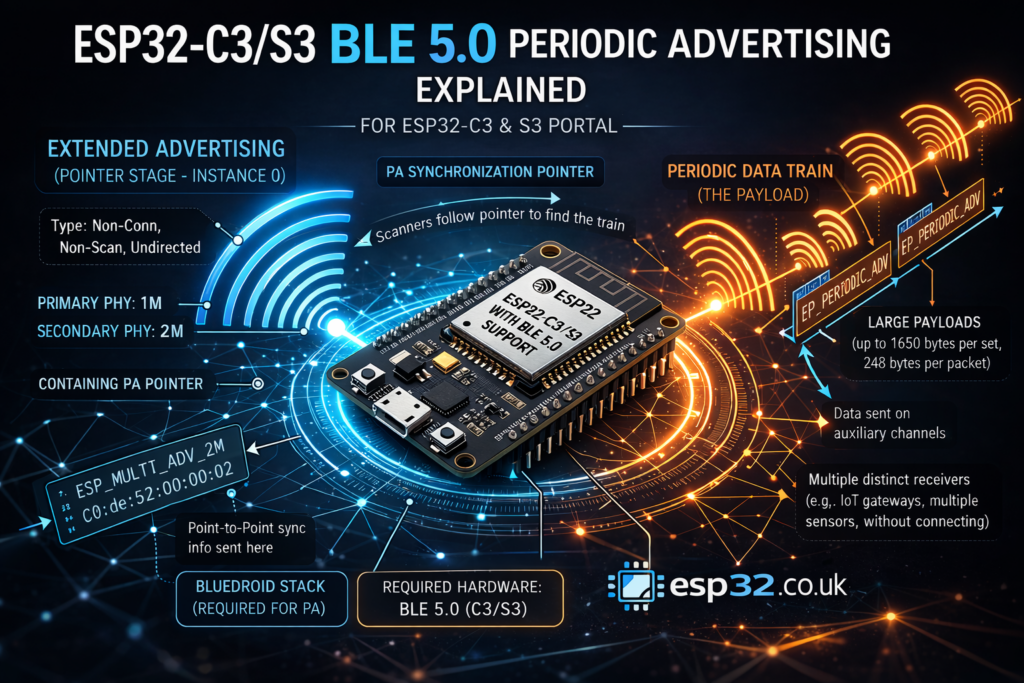
To use Periodic Advertising, you must first set up a standard Extended Advertising set to act as the “pointer.” This pointer tells scanners where and when the periodic data train will arrive.
However, the Bluetooth specification and the Bluedroid stack enforce a strict rule: The underlying extended advertisement must be non-connectable and non-scannable.
C++
esp_ble_gap_ext_adv_params_t ext_adv_params_2M = {
  // This specific type is MANDATORY for Periodic Advertising
  .type = ESP_BLE_GAP_SET_EXT_ADV_PROP_NONCONN_NONSCANNABLE_UNDIRECTED,
  .interval_min = 0x40,
  .interval_max = 0x40,
  // ...
  .primary_phy = ESP_BLE_GAP_PHY_1M,
  .secondary_phy = ESP_BLE_GAP_PHY_2M,
  .sid = 1,
};
If you try to make this pointer connectable (e.g., ESP_BLE_GAP_SET_EXT_ADV_PROP_CONNECTABLE), the Bluedroid stack will throw an error (cmd err=0xc) and refuse to start the periodic train.
2. Defining the Periodic Parameters
Next, we define the parameters for the actual periodic data train. This is distinct from the extended advertising parameters.
C++
static esp_ble_gap_periodic_adv_params_t periodic_adv_params = {
  .interval_min = 0x320,  // 1000 ms interval (0x320 * 1.25ms = 1000ms)
  .interval_max = 0x640,  // 2000 ms max interval
  .properties = 0,        // Do not include TX power in the payload
};
The interval values here dictate how often the actual payload is broadcast on the secondary data channels. Because the receiver will sync to this exact timing, you can push much larger payloads (up to the controller’s limits) very efficiently.
3. Orchestrating the Startup Sequence
The order of operations in the setup() loop is critical. You cannot start periodic advertising without the extended advertising pointer running first.
C++
void setup() {
  Serial.begin(115200);
  BLEDevice::init("");

  // 1. Configure the Extended Adv (The Pointer)
  advert.setAdvertisingParams(0, &ext_adv_params_2M);
  advert.setAdvertisingData(0, sizeof(raw_scan_rsp_data_2m), &raw_scan_rsp_data_2m[0]);
  advert.setInstanceAddress(0, addr_2m);
  advert.setDuration(0, 0, 0);

  delay(100);

  // 2. Start the Extended Adv FIRST
  advert.start();

  // 3. Configure the Periodic Adv (The Train)
  advert.setPeriodicAdvertisingParams(0, &periodic_adv_params);
  advert.setPeriodicAdvertisingData(0, sizeof(periodic_adv_raw_data), &periodic_adv_raw_data[0]);

  // 4. Start the Periodic Adv
  advert.startPeriodicAdvertising(0);
}
Once startPeriodicAdvertising(0) is called, your ESP32-C3/S3 is actively maintaining the synchronization pointer on the primary channels and dumping the periodic_adv_raw_data payload on the secondary high-speed 2M channels exactly every 1 to 2 seconds.
|
1 2 3 4 5 6 7 8 9 10 11 12 13 14 15 16 17 18 19 20 21 22 23 24 25 26 27 28 29 30 31 32 33 34 35 36 37 38 39 40 41 42 43 44 45 46 47 48 49 50 51 52 53 54 55 56 57 58 59 60 61 62 63 64 65 66 67 68 69 70 71 72 |
/* Simple BLE5 periodic advertising example on esp32 C3/S3 only ESP_BLE_GAP_SET_EXT_ADV_PROP_NONCONN_NONSCANNABLE_UNDIRECTED can be used for periodic advertising author: chegewara */ #ifndef CONFIG_BLUEDROID_ENABLED #error "NimBLE does not support periodic advertising yet. Try using Bluedroid." #elif !defined(CONFIG_BT_BLE_50_FEATURES_SUPPORTED) #error "This SoC does not support BLE5. Try using ESP32-C3, or ESP32-S3" #else #include <BLEDevice.h> #include <BLEAdvertising.h> esp_ble_gap_ext_adv_params_t ext_adv_params_2M = { .type = ESP_BLE_GAP_SET_EXT_ADV_PROP_NONCONN_NONSCANNABLE_UNDIRECTED, .interval_min = 0x40, .interval_max = 0x40, .channel_map = ADV_CHNL_ALL, .own_addr_type = BLE_ADDR_TYPE_RANDOM, .peer_addr_type = BLE_ADDR_TYPE_RANDOM, .peer_addr = {0, 0, 0, 0, 0, 0}, .filter_policy = ADV_FILTER_ALLOW_SCAN_ANY_CON_ANY, .tx_power = EXT_ADV_TX_PWR_NO_PREFERENCE, .primary_phy = ESP_BLE_GAP_PHY_1M, .max_skip = 0, .secondary_phy = ESP_BLE_GAP_PHY_2M, .sid = 1, .scan_req_notif = false, }; static uint8_t raw_scan_rsp_data_2m[] = {0x02, 0x01, 0x06, 0x02, 0x0a, 0xeb, 0x12, 0x09, 'E', 'S', 'P', '_', 'M', 'U', 'L', 'T', 'I', '_', 'A', 'D', 'V', '_', '2', 'M', 0X0}; static esp_ble_gap_periodic_adv_params_t periodic_adv_params = { .interval_min = 0x320, // 1000 ms interval .interval_max = 0x640, .properties = 0, // Do not include TX power }; static uint8_t periodic_adv_raw_data[] = {0x02, 0x01, 0x06, 0x02, 0x0a, 0xeb, 0x03, 0x03, 0xab, 0xcd, 0x11, 0x09, 'E', 'S', 'P', '_', 'P', 'E', 'R', 'I', 'O', 'D', 'I', 'C', '_', 'A', 'D', 'V'}; uint8_t addr_2m[6] = {0xc0, 0xde, 0x52, 0x00, 0x00, 0x02}; BLEMultiAdvertising advert(1); // max number of advertisement data void setup() { Serial.begin(115200); Serial.println("Multi-Advertising..."); BLEDevice::init(""); advert.setAdvertisingParams(0, &ext_adv_params_2M); advert.setAdvertisingData(0, sizeof(raw_scan_rsp_data_2m), &raw_scan_rsp_data_2m[0]); advert.setInstanceAddress(0, addr_2m); advert.setDuration(0, 0, 0); delay(100); advert.start(); advert.setPeriodicAdvertisingParams(0, &periodic_adv_params); advert.setPeriodicAdvertisingData(0, sizeof(periodic_adv_raw_data), &periodic_adv_raw_data[0]); advert.startPeriodicAdvertising(0); } void loop() { delay(2000); } #endif |